Pure HTML + Bootstrap static pages, editable without build tools
HTMLAdmin dashboard
Discord-Bot-Website — HTML Admin dashboard Template
By Abhay557
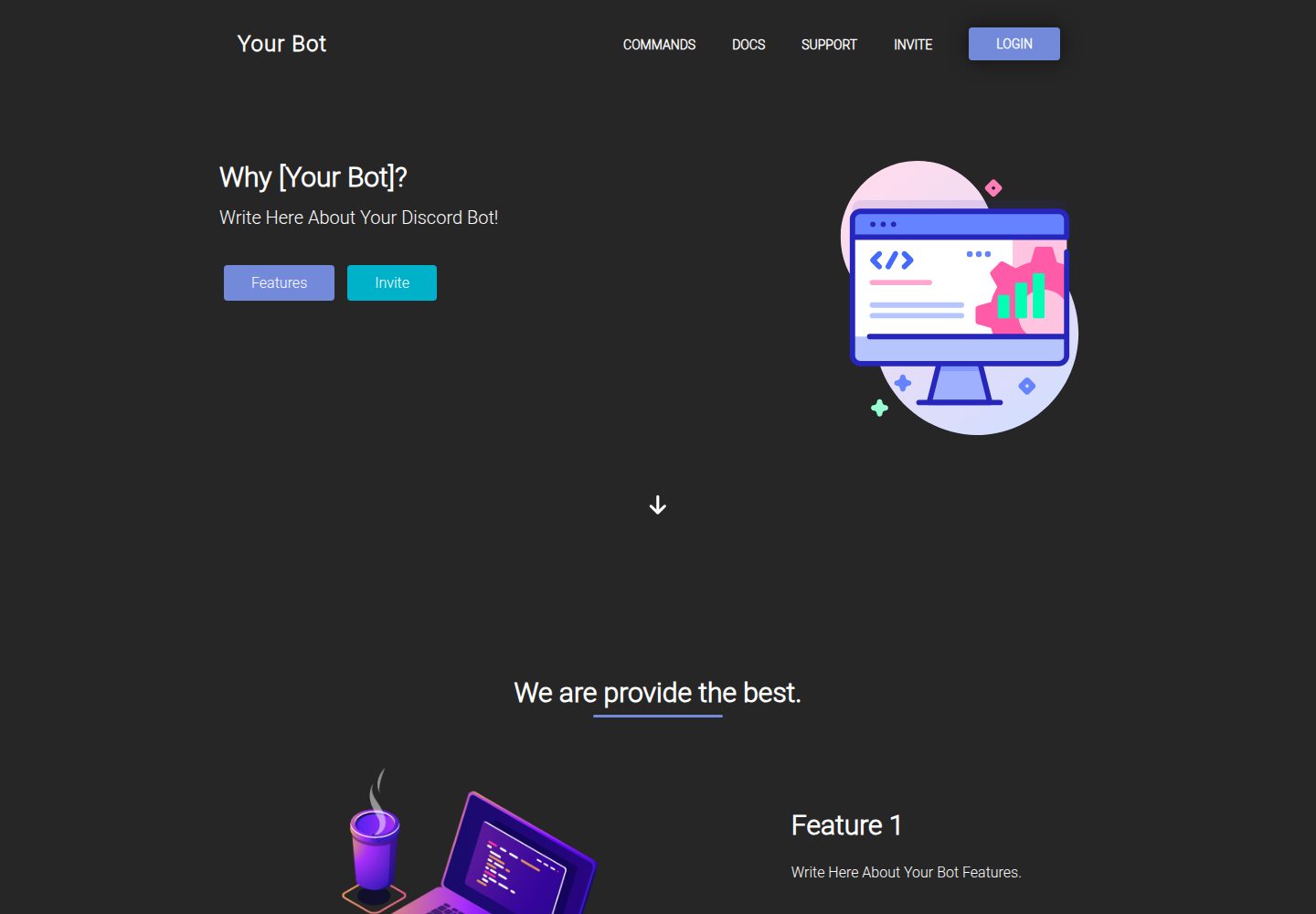
A static HTML website template for Discord bots, built on Bootstrap, with ready-to-edit pages such as a homepage and a commands page.
Explore the design
Compare the page layouts and mobile experience. Open any screenshot for a closer look.
Desktop homepage1 / 2
Desktop captureTop of page
Actual screenshot captured by the server browser.
All pages & views 2
Screenshots show visual appearance; interactive behavior may differ.
Recorded 2026-10-02View source
What stands out
A quick read of the recorded project description.
Includes ready-made homepage and commands pages, with the commands page responsive
Provides visual details such as a custom cursor, fonts, and favicon
README lists three adjustable areas: background, color scheme, and text styles
MIT licensed, allowing modification, commercial use, and distribution
Template Details
This is a Discord bot official website template built with HTML and Bootstrap, created by Abhay557 and released under the MIT license. The template provides ready-made page structures; the homepage and commands page screenshots shown in the README indicate that it includes two types of pages: a homepage and a command list, with the commands page being responsive.
The template emphasizes customizability: the background (color, texture, or image), color scheme, and text styles (paragraph headings, menus, page titles) can all be adjusted in the source code. It also includes a custom cursor, fonts, and favicon, as well as a "view source" easter egg. The repository does not provide a backend, data API, or deployment configuration; it is purely a static frontend, and the page content must be replaced by the user with information for their own bot.
Regarding licensing, the code is licensed under MIT, allowing free use, modification, commercial use, and distribution, provided the copyright and license notice are retained. Third-party assets such as demo images, fonts, and icons require separate license verification, and external services such as domains and hosting may incur costs.
HTMLBackend
Is it right for your project?
Use Cases
- Build a static introduction site for a Discord bot to showcase features and commands
- Use as practice material for learning Bootstrap page structure and responsive layout
- Quickly place bot official website pages on existing static hosting and replace the copy yourself
Suitable For
- Discord bot developers who need ready-made HTML page structures and are willing to edit code manually
- Personal projects that want to introduce bot commands and features using static pages
- Those familiar with Bootstrap basics who want a quick start on an official website frontend
Getting started & customization
Use these recorded setup notes alongside the repository instructions for your chosen version.
- 1
The template is static HTML and can be opened directly in a browser or deployed to any static hosting
- 2
Page copy, images, and command content must be replaced with information for the corresponding bot
- 3
The code is used under the MIT license; retain the original author's copyright and license notice when distributing
- 4
Third-party assets such as demo images, fonts, and icons require separate license verification
- 5
External services such as domains and hosting may incur additional costs
License & source material
Usage conditions & limitations
Free to use · keep license noticeThis entry covers the free version in the public repository under the MIT license; the free scope applies to that version's code and does not imply that external services or third-party assets are free.
Must comply with when using
- Free use, modification, commercial use, and distribution of this version's code are permitted.
- When distributing copies or substantial portions of the code, retain the original author's copyright notice and the full MIT license notice.
- The code is provided as is; warranties and limitations of liability are governed by the original license and applicable law.
Additional costs & items to verify
- The README provides a Discord server invite link for support or discussion; joining that server is not required to use the template, but it is an external community channel provided by the author.
- The README directs users to contact the author via their GitHub profile, which is an optional support channel and does not constitute a usage restriction.
- The GitHub repository link given in the README points to Html5-Game rather than this template repository; users following that link to find the source code may not locate this template, so note the inconsistency between the link and the project.
- Demo images, fonts, icons, and other third-party assets must be checked against their respective licenses and cannot be judged solely by the code's MIT license.
- External services such as domains, hosting, databases, payments, or AI may incur separate charges.
View Original Text Basis
Permission is hereby granted, free of charge
Original License Text
* [Join a discord server](https://discord.gg/CUgHj4X7uB)
Original README
* [Contact the author](https://github.com/Abhay557)
Original README
https://github.com/Abhay557/Discord-Bot-Website/blob/main/LICENSE.mdhttps://github.com/Abhay557/Discord-Bot-Website/blob/main/README.md* [Github repo](https://github.com/Abhay557/Html5-Game)
Original README
Compiled by DeepSeek based on repository license and README ·2026-10-02. Results only cover the materials read; dependencies, images, fonts, and subsequent term changes are subject to their respective original texts.
Project checks & description sources
Template Information
- Source platforms
- GitHub
- Documentation and maintenance reference score
- More documented · 81 / 100
- Technologies
- HTML
- Website type
- Admin dashboard
How this score is calculated
Our heuristic uses license records (up to 30), a demo link (12), a preview (10), stars (15), recorded maintenance (15), description completeness (8), feature records (5) and classification data (5). It is not a code, security or performance test, or a Google score. A link does not establish tested functionality.
What to verify for this project
- Repository update recorded
- 2024-10-15
- Screenshot last checked
- 2026-10-02
A demo link is listed. Check it with your own content and viewport sizes; its presence does not confirm that forms, authentication or payments work.
The catalog identifies HTML as the primary stack. Check the actual dependency manifest and lockfile for versions and hosting requirements. These notes use recorded metadata, not a code audit or a deployment test.
Use a selection guide →How this description was prepared
AI-assisted description based on catalog records and repository material. Repository authors are not automatically the reviewers of this description.
Automatically checked against source and license rules; no manual editorial review.
Inspect the recorded source material
SHA-256: 70fbeb693564b3adbc718fb6aa62510c7f1d9bf816efa500a3c375ed8ccfac07
2026-10-02T19:54:34.530Z
Source file / repository# Advanced Discord Bot Website <h4>Stunning website with good UI design for the new Discord bots, built with Bootstrap and has many ready-made pages to edit by your own.</h4> ## Preview ### Main Page <img src="/readme/gallery/3.jpg" style="height: 500px;"> ### Commands Page <img src="/readme/gallery/com.png" style="height: 500px;"> ## New features 1. **Easy to customize** 2. **Custom cursor** 3. **New fonts & favicon image** 4. **Responsive command page** ## customization It's your website, and you control the source code. So you can customize. Added “view source” easter egg, Cursor & everything, If you like. But we've provided a handful of quick customizations for you to consider As you get your website off the ground. At this point, you should have a clear idea of why you’re creating a personal website. Now that you’ve chosen a template to get you started, it’s time to consider the how. <p>when it comes to design there are 3 key areas:</p> 1. **background**. Change the color, texture, Or image for the background of your site to fit your brand Or your bot features. 2. **colors**. Choose a palette that works well with your Template or create or replicate one that matches your brand color scheme. 3. **text style**. There are sizes, colors, and styles of text for different sections within your website template. You can modify things such as paragraph titles, menus, and page titles. ## one last step! With your website template customized and the content for your pages added, All that’s left to do is run your website. Congratulations on getting your website online. * [Join a discord server](https://discord.gg/CUgHj4X7uB) * [Contact the author](https://github.com/Abhay557) * [Github repo](https://github.com/Abhay557/Html5-Game)
Explore similar templates
Compare previews and descriptions within the same stack and category.

gentelella
Gentelella v4 is a free, open-source admin dashboard template maintained by Colorlib, built with vanilla JavaScript, SCSS, and Vite 8 without Bootstrap or jQuery.
HTML · Admin dashboard

coreui-free-bootstrap-admin-template
A free Bootstrap admin template maintained by CoreUI, built on CoreUI's own UI component library. It provides compiled HTML pages and Pug template source code, covering dashboards, authentication, forms, components, icons, and error pages.
HTML · Admin dashboard

dashboards
A collection of responsive dashboard HTML templates open-sourced by Keen IO, built on CSS Grid, offering multiple prebuilt admin data interface layouts.
HTML · Admin dashboard

SB Admin 2
SB Admin 2 is a classic Bootstrap admin template from Start Bootstrap, offering dashboards, charts, tables, and common management pages.
HTML · Admin dashboard

Adminator-admin-dashboard
Adminator 4 is a vanilla HTML, CSS and JavaScript admin dashboard template with a CSS-variable token design system, built-in light and dark themes, no jQuery or Bootstrap dependency, and 18 pages covering dashboards, mail, calendar, charts, forms, tables and error pages.
HTML · Admin dashboard

SB Admin
SB Admin is a lightweight, open-source Bootstrap admin template from Start Bootstrap. It offers a sidebar-and-top-bar layout with data tables, forms, and stat cards, plus responsive design.
HTML · Admin dashboard