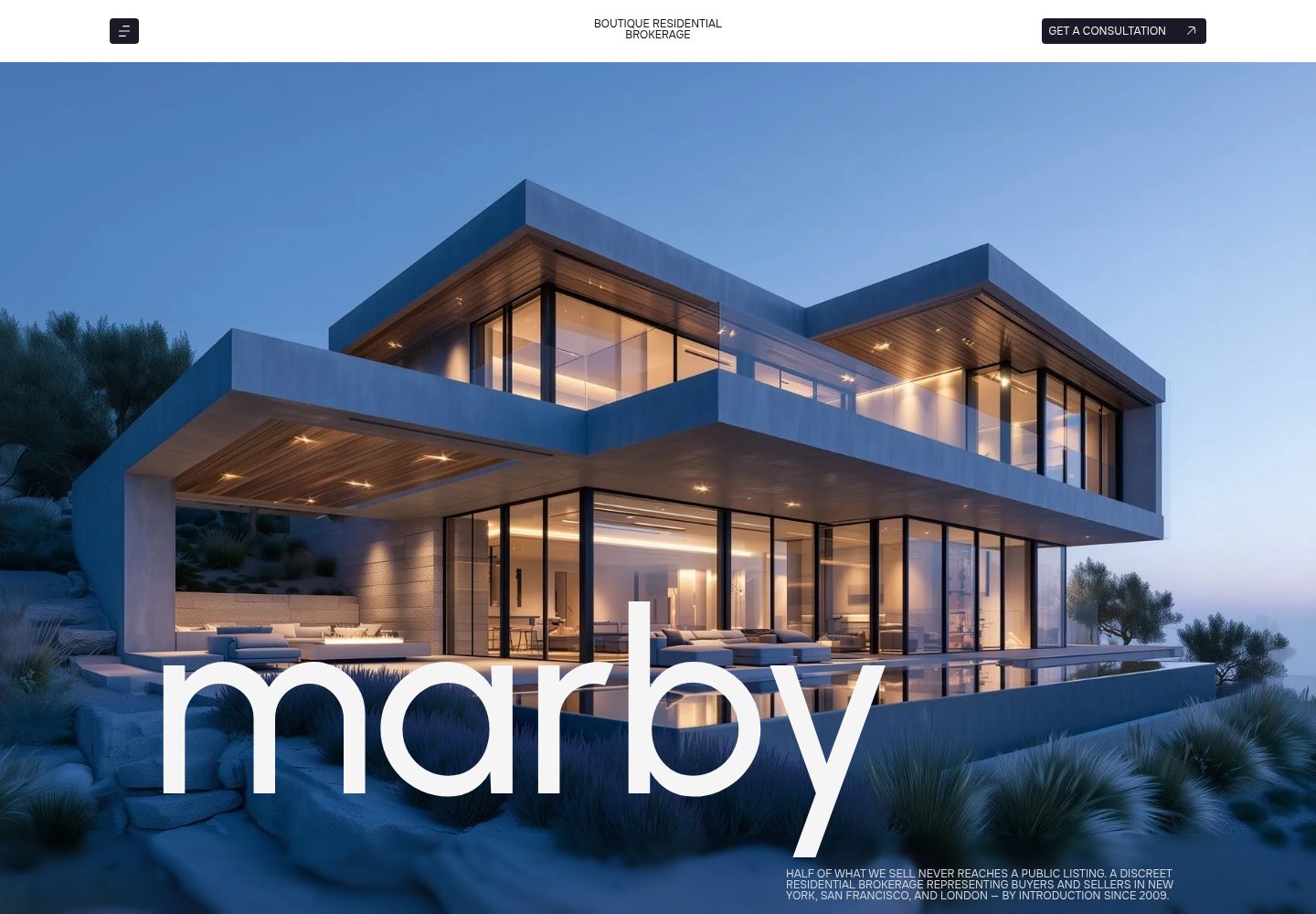
Property listings include category tabs and live search; property detail pages are generated from Markdown and include specifications, highlights, a map, nearby places, advisor cards, and a gallery grouped by room with a lightbox
AstroBlogCorporate Website
marby-astro — Astro Blog Template
By agnilem
Marby is an Astro editorial-style theme for boutique real estate agencies and brokerages, featuring property listings with filtering, property detail pages, a blog, team and office pages, and static site output.
Explore the design
Compare the page layouts and mobile experience. Open any screenshot for a closer look.
Desktop homepage1 / 3
Desktop captureTop of page
Actual screenshot captured by the server browser.
All pages & views 3
Screenshots show visual appearance; interactive behavior may differ.
Recorded 2026-09-30View source
What stands out
A quick read of the recorded project description.
The blog supports category filtering and related articles, with posts also coming from Markdown files
Content and copy are separated: properties and blog use Markdown, while other copy is centralized in site.json, and content collection schemas validate fields at build time
Interactions are implemented by native TypeScript modules without introducing a UI framework; includes smooth scrolling and scroll-triggered reveals, and respects prefers-reduced-motion
The Urbanist and Onest fonts are self-hosted via Fontsource, and colors, font sizes, and easing are defined as CSS custom properties in tokens.css
Template Details
Marby is a real estate website theme built with Astro, positioned as "quiet, editorial style" and aimed at boutique real estate agencies and brokerages. It provides a complete page structure: the homepage includes a video hero, about, services, featured listings, testimonials, features, team, and FAQ; there are also About Us, property listings, property detail, blog, blog detail, contact, terms, and 404 pages.
Property and blog content is managed through Markdown. Each property has one file, with frontmatter storing specifications, highlights, nearby places, and gallery images, while the body is the description and the filename is the URL; blog posts are likewise one file per post, with fields for ordering, title, date, category, and image. The schemas for both content collections are defined in src/content.config.ts, and misspelled fields will cause build errors. Other copy is centralized in src/content/site.json, covering navigation, footer, social, homepage sections, team, testimonials, FAQ, offices, the about page, terms, and tags.
Interactions do not depend on a UI framework; each behavior is a separate native TypeScript module, all wired together in entry.ts. The theme includes Lenis smooth scrolling and scroll-triggered element reveals, and respects prefers-reduced-motion: when reduced motion is enabled, smooth scrolling, marquees, and reveal animations are turned off while the layout remains intact. The Urbanist and Onest fonts are self-hosted via Fontsource.
The build outputs pure static files under dist/, deployable to any static host; on Vercel or Netlify, import the repository and keep the default build command and output directory. The contact form by default only shows loading and success states; it will only actually submit after setting PUBLIC_FORM_ENDPOINT to an endpoint for a service such as Formspree or Basin.
AstroBlogCorporate website
Is it right for your project?
Use Cases
- Build a showcase website for a boutique real estate agency or brokerage, including property listings and details
- Maintain property and blog content with Markdown, letting non-developers update the site by editing files
- Deploy to Vercel, Netlify, or another static host, outputting pure static files
- Need a contact form but can first display it in demo state, then later connect to a form service such as Formspree or Basin
Suitable For
- Showcase websites for boutique real estate agencies, brokerages, or independent real estate advisors
- Teams that accept managing content with Markdown and JSON files
- Projects that prefer static output and do not introduce a front-end UI framework
- Real estate sites that need property filtering, property detail galleries, and a blog
Getting started & customization
Use these recorded setup notes alongside the repository instructions for your chosen version.
- 1
Run npm install to install dependencies, npm run dev to start local development (default http://localhost:4321), npm run build to output to dist/, and npm run preview to preview the build result
- 2
Set site in astro.config.mjs to your own domain to ensure canonical and Open Graph links are correct
- 3
The contact form by default only shows status; it will only actually submit after setting PUBLIC_FORM_ENDPOINT to an endpoint for a service such as Formspree or Basin; PUBLIC_VERCEL_ANALYTICS and PUBLIC_STORE_BADGE are optional switches, off by default
- 4
Replace the images and hero video in public/assets/, and replace placeholder content such as names, addresses, and photos in the demo
- 5
When deploying to Vercel or Netlify, import the repository and keep the default build command npm run build and output directory dist
License & source material
Usage conditions & limitations
Free to use · keep license noticeThis entry covers the free version under the MIT license in the public repository; the free scope is the code of this version and does not mean external services or third-party assets are free.
Must comply with when using
- Free use, modification, commercial use, and distribution of this version's code are permitted.
- When distributing copies or substantial portions of the code, retain the original author's copyright notice and the complete MIT license notice.
- The code is provided as is; warranties and limitations of liability are governed by the original license and applicable law.
Additional costs & items to verify
- The map on property detail pages is implemented by embedding Google Maps, which is an external service; it may fail to load in some regions or network environments, and you should confirm Google Maps' terms of use and quota requirements before commercial use.
- The contact form does not actually submit by default and only shows loading and success states; to actually receive submissions, you need to configure PUBLIC_FORM_ENDPOINT to point to a third-party form service such as Formspree or Basin, which may involve account registration, API keys, or paid quotas.
- Enabling PUBLIC_VERCEL_ANALYTICS loads Vercel Web Analytics and Speed Insights, which are external analytics services and may create account dependencies or costs.
- Names, addresses, and photos in the demo are placeholder content and need to be replaced with your own assets; the licensing status of these demo assets is not explained in the README, so you should confirm or replace them before commercial use.
- The README mentions the Formspree form service; actual submission requires configuring a service endpoint, and its usage quotas and fees need to be checked separately.
- Demo images, fonts, icons, and other third-party assets need to be checked against their respective licenses and cannot be judged solely by the code's MIT license.
- External services such as domains, hosting, databases, payments, or AI may incur additional charges.
View Original Text Basis
Permission is hereby granted, free of charge
Original License Text
The property map embeds Google Maps.
Original README
URL the contact form posts to (Formspree, Basin, ...). Unset, the form only shows its states.
Original README
`true` loads Vercel Web Analytics and Speed Insights
Original README
https://github.com/agnilem/marby-astro/blob/main/LICENSEhttps://github.com/agnilem/marby-astro/blob/main/README.mdNames, addresses and photos in the demo are placeholders; replace them with your own.
Original README
Compiled by DeepSeek based on repository license and README ·2026-10-01. Results only cover the materials read; dependencies, images, fonts, and subsequent term changes are subject to their respective original texts.
Project checks & description sources
Template Information
- Source platforms
- GitHub
- Documentation and maintenance reference score
- More documented · 85 / 100
- Technologies
- Astro
- Website type
- Blog · Corporate Website
How this score is calculated
Our heuristic uses license records (up to 30), a demo link (12), a preview (10), stars (15), recorded maintenance (15), description completeness (8), feature records (5) and classification data (5). It is not a code, security or performance test, or a Google score. A link does not establish tested functionality.
What to verify for this project
- Repository update recorded
- 2026-09-28
- Screenshot last checked
- 2026-10-01
A demo link is listed. Check it with your own content and viewport sizes; its presence does not confirm that forms, authentication or payments work.
The catalog identifies Astro as the primary stack. Check the actual dependency manifest and lockfile for versions and hosting requirements. These notes use recorded metadata, not a code audit or a deployment test.
Use a selection guide →How this description was prepared
AI-assisted description based on catalog records and repository material. Repository authors are not automatically the reviewers of this description.
Automatically checked against source and license rules; no manual editorial review.
Inspect the recorded source material
SHA-256: d94e5167437c199ba6c92ee4f9d2a7e2a771d7cd239724786c1e2e40e97ad28e
2026-10-01T14:12:57.490Z
Source file / repository# Marby, an Astro real estate theme
A quiet, editorial theme for boutique real estate agencies and brokerages: property listings with filters, detail pages with photo galleries, a blog, team and office pages. Static output, no UI framework: every interaction is a small vanilla TypeScript module.
Live demo: [marby-astro.vercel.app](https://marby-astro.vercel.app)
## Features
- Full-bleed video hero with the brand wordmark
- Services as stacking sticky cards, offices as a sticky stack on the contact page
- Property listing with category tabs and live search
- Property pages generated from Markdown: specs, highlights, map, nearby places, lead advisor card and a photo gallery grouped by room with a lightbox
- Blog with category filters, related articles and Markdown posts
- Testimonial slider, glass feature cards, a team ticker that reveals portraits on hover
- FAQ accordions (one open at a time), contact form with loading and success states
- Overlay menu; the nav caption flips colour over dark sections
- Lenis smooth scrolling and scroll-triggered reveals
- Honours `prefers-reduced-motion`: smooth scrolling, the ticker and reveals switch off, the layout stays intact
- Urbanist and Onest, self-hosted through Fontsource
## Getting started
```sh
npm install
npm run dev # http://localhost:4321
npm run build # outputs to dist/
npm run preview # serves dist/
```
## Pages
| Route | What it is |
| --- | --- |
| `/` | hero, about, services, featured listings, testimonials, features, team, FAQ |
| `/about-us` | vision and mission, milestones, beliefs, FAQ, team |
| `/property` | listing grid with tabs and search, FAQ tiles |
| `/property/[slug]` | one page per file in `src/content/properties/` |
| `/blog` | article grid with category filters |
| `/blog/[slug]` | one page per file in `src/content/blog/` |
| `/contact` | office cards, FAQ |
| `/terms-conditions` | terms |
| `/404` | not found |
The contact form and footer appear on every page except the 404.
## Editing content
- `src/content/site.json` holds all other copy: navigation, footer, socials, home sections, team, testimonials, FAQs, offices, about page, terms and labels.
- `src/content/properties/*.md`: one file per property. The frontmatter holds the specs, highlights, nearby places and gallery images; the Markdown body is the description. The filename is the URL.
- `src/content/blog/*.md`: one file per article (`order`, `title`, `date`, `category`, `image`). The filename is the URL.
- Schemas for both collections are in `src/content.config.ts`, so a typo in a field fails the build instead of breaking a page.
- Images and the hero video live in `public/assets/`.
- Colours, the type scale and easings are custom properties in `src/styles/tokens.css`; shared styles are in `src/styles/global.css`. Each component keeps its own styles.
## Project structure
```
src/
components/ Nav, Footer, Btn, Icon, StoreBadge
sections/ one component per page section
ui/ cards and FAQ rows
content/ site.json, properties/, blog/
icons/ SVG icons
layouts/Base.astro head, nav, footer, scripts
pages/ routes
scripts/ one module per behaviour, wired in entry.ts
styles/ tokens.css, global.css
```
## Environment variables
All optional and off by default.
| Variable | Effect |
| --- | --- |
| `PUBLIC_FORM_ENDPOINT` | URL the contact form posts to (Formspree, Basin, ...). Unset, the form only shows its states. |
| `PUBLIC_VERCEL_ANALYTICS` | `true` loads Vercel Web Analytics and Speed Insights |
| `PUBLIC_STORE_BADGE` | `true` shows the fixed store badge in the corner |
## Deploy
The build is plain static files in `dist/`, so it runs on any static host. On Vercel or Netlify, import the repo and keep the defaults (build command `npm run build`, output `dist`). Set `site` in `astro.config.mjs` to your domain so canonical and Open Graph URLs are correct.
## License and credits
MIT, see `LICENSE`. Fonts: Urbanist (The Urbanist Project Authors) and Onest (The Onest Project Authors), both under the SIL Open Font License 1.1. Names, addresses and photos in the demo are placeholders; replace them with your own. The property map embeds Google Maps.
Explore similar templates
Compare previews and descriptions within the same stack and category.

astrowind
AstroWind is a free, open-source Astro starter theme using Astro and Tailwind CSS, released under the MIT license.
Astro · Blog

astro-paper
AstroPaper is a minimal, responsive, accessible, and SEO-friendly Astro blog theme. Articles are stored as Markdown/MDX in src/content/posts/, with subdirectories affecting URLs.
Astro · Blog

fuwari
Fuwari is a static blog template built with Astro and Tailwind CSS for personal blogs. It manages posts as Markdown files in src/content/posts/, with frontmatter for title, date, description, cover, tags, categories, draft status, and language.
Astro · Blog

Firefly
Firefly is a clean personal blog theme forked from Astro and Fuwari, offering four background modes, single/double sidebar and list/grid layouts, Pagefind client-side full-text search, and a six-language UI.
Astro · Blog

astro-theme-cactus
Astro Cactus is an Astro-based blog and portfolio theme that uses Markdown/MDX content collections to manage posts, notes, and tags, with frontmatter type-checked by a schema.
Astro · Portfolio

astrofy
Astrofy is a free and open-source personal portfolio website template built with Astro and TailwindCSS, with built-in blog, CV timeline, project showcase, store, and RSS feed modules.
Astro · Portfolio