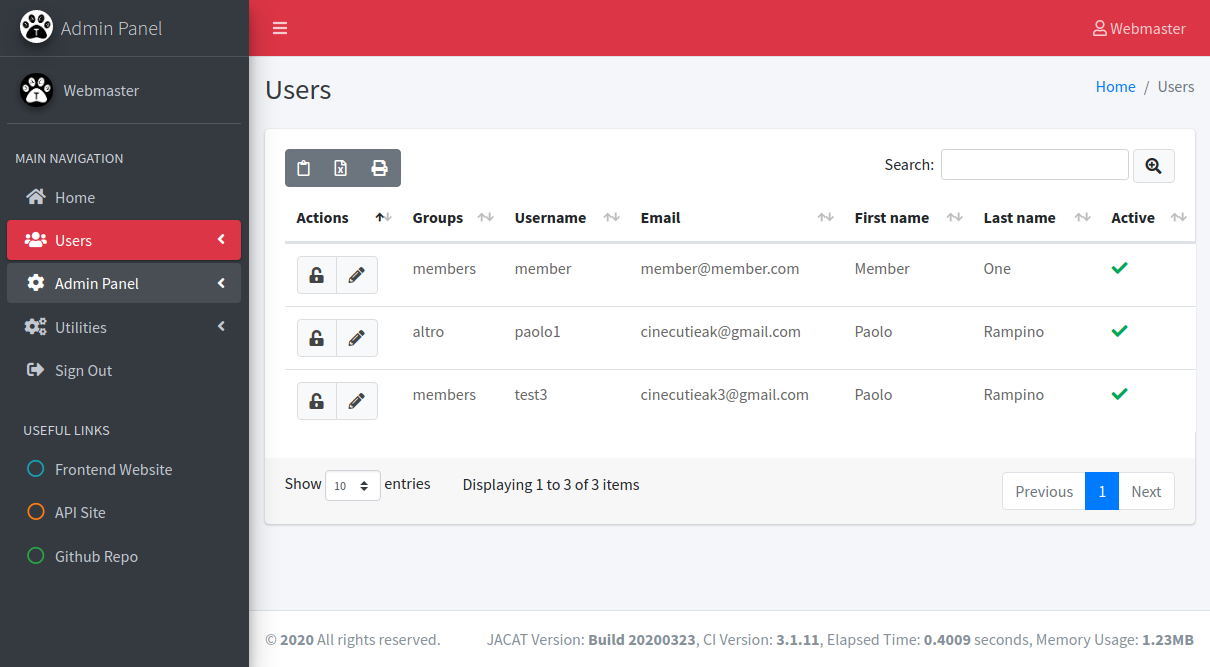
Provides three site entry points within a single application: frontend website, AdminLTE v3 admin panel, and RESTful API
HTMLAdmin dashboard
JACAT — HTML Admin dashboard Template
By Akir4d
JACAT is a multi-site admin template based on CodeIgniter and AdminLTE3, providing frontend, admin panel, and API entry points within a single application, and integrating tools such as Grocery CRUD, Ion Auth, and Swagger.
Explore the design
Compare the page layouts and mobile experience. Open any screenshot for a closer look.
Author preview
Author-provided preview
Preview provided in the project README.
One original preview is available. Open the full image to inspect the design.
Screenshots show visual appearance; interactive behavior may differ.
Recorded 2026-10-03View source
What stands out
A quick read of the recorded project description.
Uses CodeIgniter HMVC modular structure; modules such as admin, adminlte, and api can independently organize controllers, models, and views
Integrates Ion Auth authentication, Grocery CRUD, and Image CRUD; the admin panel can directly generate data tables and image management interfaces
The API module includes Swagger UI and generates interface documentation via swagger-php annotations
Provides gulp asset pipeline tasks covering image compression, CSS/JS concatenation and minification, and file watching
Presets foundational capabilities such as blog pagination, cover image carousel, form builder, breadcrumbs, pagination, multi-language support, and email configuration
Template Details
JACAT (Just Another CodeIgniter/AdminLTE template) is a starter template intended to host a frontend website, an admin panel, and an API site within a single CodeIgniter application. It is a fork of the discontinued CodeIgniter 3 Bootstrap project, uses an HMVC modular structure, and applies the AdminLTE v3 theme to the admin panel. The README states that the project is still under development and the author welcomes issues, but no online demo is provided (the Demo Project is marked as Coming Soon).
Built-in features include: two sets of user authentication for the frontend and admin panel (registration, login, password recovery, password change, etc.), CRUD tables based on Grocery CRUD, image management with Image CRUD, API documentation via Swagger UI, preset data structures for blogs and cover images (carousel), a form builder library, breadcrumbs and pagination, multi-language support, email configuration, and command-line callable functions (such as scheduled tasks and database backups). Asset building is handled through gulp tasks, including image compression and CSS/JS concatenation and minification.
There are clear usage constraints: the server environment recommends PHP 7.0+, Apache 2.2+ with the rewrite module enabled, and MySQL 5.5+; the README notes that it has not been tested on MariaDB. Installation requires manually creating a database, copying and modifying the database configuration, then visiting /upgrade to initialize tables and default data. The admin panel comes with four preset accounts: webmaster, admin, manager, and staff; the default username and password are the same, and should be changed before production use. The project's last build date is 2020-03-28, and repository updates stopped in early 2022.
HTMLAdmin panel
Is it right for your project?
Use Cases
- Starter development for small to medium-sized sites that need to maintain frontend, admin panel, and API within one CodeIgniter project
- Quickly building an admin panel with CRUD tables and image management using the AdminLTE v3 theme
- Projects that need to add a Swagger documentation page for existing RESTful interfaces
- PHP developers who want to reference HMVC module division, Ion Auth permission groups, or gulp asset build approaches
Suitable For
- Developers familiar with PHP and the CodeIgniter framework who can read and modify source code themselves
- Site projects that need multiple sites (frontend/admin/API) sharing one codebase and database
- Teams that accept secondary development on a starter template rather than an out-of-the-box finished system
Getting started & customization
Use these recorded setup notes alongside the repository instructions for your chosen version.
- 1
Server environment recommends PHP 7.0+, Apache 2.2+ with the rewrite module enabled, and MySQL 5.5+; the README notes it has not been fully tested on MariaDB
- 2
After cloning the repository, create a database, copy application/config/database.model.php to database.php, and fill in connection information
- 3
Visit the site path /upgrade to initialize data tables and default configuration data; upgrading from older versions also uses this entry point
- 4
The admin panel comes with four preset accounts: webmaster, admin, manager, and staff; the default username and password are the same, and should be changed immediately after deployment
- 5
The upload directory assets/uploads needs write permissions; assets/dist is generated by gulp tasks and should not be edited manually
License & source material
Usage conditions & limitations
Free to use · keep license noticeThis entry covers the free version under the MIT license in the public repository; the free scope applies to that version's code and does not imply that external services or third-party assets are free.
Must comply with when using
- Permits free use, modification, commercial use, and distribution of that version's code.
- When distributing copies or substantial portions of the code, retain the original author's copyright notice and the full MIT license notice.
- The code is provided as is; warranties and limitations of liability are governed by the original license and applicable law.
Additional costs & items to verify
- The server environment requires PHP 7.0 or higher; PHP environments below that version cannot run it.
- Apache 2.2+ with the rewrite module enabled is recommended; other web server environments have not been fully tested.
- The database requires MySQL 5.5+; the README explicitly states it has not been tested on MariaDB, and using MariaDB may cause issues.
- Installation requires visiting the /upgrade path to initialize data tables and default data; this entry point should be handled properly after deployment.
- The admin panel comes with four preset accounts: webmaster, admin, manager, and staff; the default username and password are the same, and must be changed before production use.
- Email configuration uses the external Mailgun service by default; actual sending requires configuring a Mailgun account and API key.
- The project is still under development; the README does not promise production readiness, and stability should be evaluated before use.
- The README's Demo Project is marked as Coming Soon, and no online demo environment is provided.
- Demo images, fonts, icons, and other third-party assets must be checked against their respective licenses; the code's MIT license alone cannot be used to judge them.
- External services such as domains, hosting, databases, payments, or AI may incur additional charges.
View Original Text Basis
Permission is hereby granted, free of charge
Original License Text
**PHP 7.0+**
Original README
**Apache 2.2+** with rewrite mod enabled
Original README
**MySQL 5.5+** (not tested on MariaDB)
Original README
go to your-new-site/upgrade to install database with new tables and default configuration datas.
Original README
Webmaster (default username & password are both "webmaster", belongs to the webmaster group)
Original README
email.php --- Created to centralize email configuration (default: using Mailgun)
Original README
**Note: This project is still in progress, but welcome for any issues encountered**
Original README
https://github.com/Akir4d/JACAT/blob/master/LICENSEhttps://github.com/Akir4d/JACAT/blob/master/README.md* Coming Soon...
Original README
Compiled by DeepSeek based on repository license and README ·2026-10-03. Results only cover the materials read; dependencies, images, fonts, and subsequent term changes are subject to their respective original texts.
Project checks & description sources
Template Information
- Source platforms
- GitHub
- Documentation and maintenance reference score
- Partly documented · 60 / 100
- Technologies
- HTML
- Website type
- Admin dashboard
How this score is calculated
Our heuristic uses license records (up to 30), a demo link (12), a preview (10), stars (15), recorded maintenance (15), description completeness (8), feature records (5) and classification data (5). It is not a code, security or performance test, or a Google score. A link does not establish tested functionality.
What to verify for this project
- Repository update recorded
- 2022-01-18
- Screenshot last checked
- 2026-10-03
No demo link is recorded. Use the repository instructions to evaluate the project locally; the screenshot alone cannot establish interactive behavior.
The catalog identifies HTML as the primary stack. Check the actual dependency manifest and lockfile for versions and hosting requirements. These notes use recorded metadata, not a code audit or a deployment test.
Use a selection guide →How this description was prepared
AI-assisted description based on catalog records and repository material. Repository authors are not automatically the reviewers of this description.
Automatically checked against source and license rules; no manual editorial review.
Inspect the recorded source material
SHA-256: f84476ecd8583870e8d2bcb42faa09124dedb44e1064b7da11770326ba0ddc64
2026-10-03T00:02:25.833Z
Source file / repository## JACAT (Just Another CodeIgniter/AdminLTE template)
**Latest Build: 2020-03-28**
**Note: This project is still in progress, but welcome for any issues encountered**
A starter template that supports multi-tenant (Frontend / Admin Panel / API) website in a single application. This is a fork of abandoned [CodeIgniter 3 Bootstrap](https://github.com/waifung0207/ci_bootstrap_3).
If you plan to upgrade form original you have to use [sql/upgrade_from_old_codeigniter_3_bootstrap.sql](sql/upgrade_from_old_codeigniter_3_bootstrap.sql) and also check the changes inside [application/modules/admin/config/ion_auth.php](application/modules/admin/config/ion_auth.php)
This repository is developed upon the following tools:
* [CodeIgniter](http://www.codeigniter.com/) (3.1.11) - PHP framework
* [CodeIgniter HMVC Extensions](https://bitbucket.org/wiredesignz/codeigniter-modular-extensions-hmvc) - modular structure by [wiredesignz](http://wiredesignz.co.nz/)
* [codeigniter-base-model](https://github.com/jamierumbelow/codeigniter-base-model) - more advanced CRUD functions for models by [jamierumbelow](https://github.com/jamierumbelow)
* [codeigniter-restserver](https://github.com/chriskacerguis/codeigniter-restserver) - base setup for API module
* [Ion Auth](http://benedmunds.com/ion_auth) - (3.0) authentication library for CodeIgniter by [Ben Edmunds](http://benedmunds.com/)
* [Bootstrap](http://getbootstrap.com/) (4.4.1) - popular frontend framework
* [Grocery CRUD](http://www.grocerycrud.com/) (custom based on v1.6.3) - feature-rich library to build CRUD tables
* [Image CRUD](http://www.grocerycrud.com/image-crud) (v0.8) - CRUD library for image management
* [AdminLTE](https://github.com/almasaeed2010/AdminLTE) (3.0.2) - bootstrap theme for Admin Panel
### Features
This repository contains setup for rapid development:
* Multi-tenant (e.g. Frontend Website, Admin Panel, API) website in single application
* Modular design by CodeIgniter HMVC extension
* Custom config files (sites.php, locale.php) for easy configuration of website behavior
* Admin Panel with AdminLTE v3 theme, and Grocery CRUD integration
* Admin Panel includes usage of [Sortable](http://rubaxa.github.io/Sortable/) library
* API Site with [Swagger](http://swagger.io/) UI integrated, via annotations supported by [swagger-php](https://github.com/zircote/swagger-php) library
* API Site to handle RESTful endpoints, with shortcut functions to grab parameters and display results
* User authentication for Frontend Website (Sign Up, Login, Forgot Password, etc.)
* User authentication for Admin Panel (Login, Change Password, etc.)
* Preset layouts and templates
* Preset asset pipeline (e.g. minify scripts, image optimization) via gulp (reference from [gulp-starter](https://github.com/greypants/gulp-starter))
* Preset data structure for Blogging (with pagination) and Cover Photos (carousel), which can be managed from Admin Panel
* Form Builder library to help with form rendering with Bootstrap theme, form validation, etc.
* Breadcrumb and Pagination handling fit with Bootstrap theme
* Custom 404 pages for Frontend Website and Admin Panel
* Multilingual support
* Email config setup
* Functions to be called from CLI (e.g. daily cron job, database backup)
* ... more coming!
### Demo Project
* Coming Soon...
### Server Environment
Below configuration are preferred; other environments are not well-tested, but still feel free to report and issues.
* **PHP 7.0+**
* **Apache 2.2+** with rewrite mod enabled
* **MySQL 5.5+** (not tested on MariaDB)
### Setup Guide
1. git clone this repo
2. Create a database (e.g. named "jacat"), into MySQL server
3. Inside /application/config/ copy "database.model.php" as "database.php" and make sure that database config is set correctly
4. go to your-new-site/upgrade to install database with new tables and default configuration datas.
5. You should be able to access Frontend Website, Admin Panel and API Site (with Swagger Doc) respectively
6. Visit the Demo Controllers (exist in both Frontend / Admin Panel / API) for sample usage
### Upgrade database from prevoius version
1. go to your-new-site/upgrade to upgrade database tables
### Admin Users (and default login accounts)
There are 4 preset users for Admin Panel:
* Webmaster (default username & password are both "webmaster", belongs to the webmaster group)
* Admin (default username & password are both "admin", belongs to the admin group)
* Manager (default username & password are both "manager", belongs to the manager group)
* Staff (default username & password are both "staff", belongs to the staff group)
### Folder Structure
Explanation on the folder structure which supports HMVC (only showing the highlighted folders and files).
```
application/ --- Main CodeIgniter source files
config/
production/ --- Configuration when ENVIRONMENT is set as "production"
autoload.php --- By default, some files are loaded for this repo
jacat.php --- Core configuration file for all sites
database.php --- Need to verify to ensure connection with MySQL database
email.php --- Created to centralize email configuration (default: using Mailgun)
form_validation.php --- Created to centralize validation forms for all forms, include ReCAPTCHA settings
routes.php --- Changed default controller from Welcome to Home
controllers/ --- Controllers for Frontend Website; extends from MY_Controller (except Cli)
Cli.php --- Utility function that can only be called from command line
Home.php --- Default controller for Frontend Website
core/ --- Extending CodeIgniter core classes; can also be used within modules
MY_Controller.php --- Important class which contains shared logic of all controllers
MY_Loader.php --- Required for HMVC extension
MY_Model.php --- Contains shared function for model classes
MY_Router.php --- Required for HMVC extension
helpers/ --- Contains custom helper functions being used throughout this repo
language/ --- Preset language files
libraries/ --- Custom libraries (e.g. Form Builder, System Message)
MY_Email.php --- Enhanced email library, includes work with Mailgun API
models/ --- Sample model extending from MY_Model
modules/ --- Each module can be accessed by http://{base_url}/{module_name}/{module_controller}/, etc.
admin/ --- Module for Admin Panel
config/ --- Configuration for Admin Panel (overriding application/config/)
controllers/ --- Controllers for Admin Panel; also extends from MY_Controller
libraries/ --- Libraries specific for Admin Panel
models/ --- Models only being used in Admin Panel
views/ --- Views for Admin Panel; can reuse Frontend views, or override by using same path/filename
adminlte/ --- Module with AdminLTE widgets
api/ --- Another module specific for API endpoints
third_party/ --- 3rd party files (HMVC extension, Grocery CRUD, Rest Server, etc.)
views/ --- Views for Frontend Website, can also be used by modules unless overrided
assets/ --- Folder for public files
api/ --- Swagger UI assets
dist/ --- Post-processed scripts and images via gulp tasks (don't manually edit files here!)
grocery_crud/ --- Asset files from Grocery CRUD library
image_crud/ --- Asset files from Image CRUD library
uploads/ --- Default folder for upload files, where permission should set as writable
gulpfile.js/ --- Task runner following gulp-starter practice
tasks/ --- Gulp tasks
config.js --- Configuration for Gulp tasks
screenshots/ --- Screenshot images for preview
sql/ --- MySQL files
backup/ --- Files which will be created when backup database from CLI
core/ --- Files contains core data (e.g. Ion Auth)
latest.sql --- Latest version of all preset data
src/ --- Folder for non-public source files
css/ --- Custom CSS files append to each site
images/ --- Source image files before optimization
js/ --- Custom CSS files append to each site
sass/ --- SASS files for styling
theme/ --- Default folder for additional theme files
system/ --- CodeIgniter core files (unchanged as clean CI3 installation)
.htaccess --- URL rewrite for Apache web server (require mod enabled)
```
### Preset Gulp Tasks
The gulpfile.js folder is prepared with following tasks available:
* **default**: run **build** task first, then **watch** for file change
* **build**: run **imagemin**, **cssmin** and **uglify** tasks in parallel
* **rebuild**: run **clean** task first, then **copy**, **imagemin**, **cssmin** and **uglify** tasks in parallel
* **clean**: remove all files inside the dist folder (default: /assets/dist)
* **copy**: copy required files to dist folder
* **cssmin**: concat and minify CSS files
* **imagemin**: optimize images (jpg, png, gif, svg) and output to dist folder (default: /assets/dist/images)
* **uglify**: concat and minify (uglify) JS files
* **watch**: monitor JS / CSS / image files and execute specific tasks upon changes
### Screenshots
Admin Panel - Home:


Frontend - Home:

More screenshots can be viewed from the [screenshots folder](https://github.com/Akir4d/JACAT/blob/master/screenshots/) under this repository.
Explore similar templates
Compare previews and descriptions within the same stack and category.

gentelella
Gentelella v4 is a free, open-source admin dashboard template maintained by Colorlib, built with vanilla JavaScript, SCSS, and Vite 8 without Bootstrap or jQuery.
HTML · Admin dashboard

coreui-free-bootstrap-admin-template
A free Bootstrap admin template maintained by CoreUI, built on CoreUI's own UI component library. It provides compiled HTML pages and Pug template source code, covering dashboards, authentication, forms, components, icons, and error pages.
HTML · Admin dashboard

dashboards
A collection of responsive dashboard HTML templates open-sourced by Keen IO, built on CSS Grid, offering multiple prebuilt admin data interface layouts.
HTML · Admin dashboard

SB Admin 2
SB Admin 2 is a classic Bootstrap admin template from Start Bootstrap, offering dashboards, charts, tables, and common management pages.
HTML · Admin dashboard

Adminator-admin-dashboard
Adminator 4 is a vanilla HTML, CSS and JavaScript admin dashboard template with a CSS-variable token design system, built-in light and dark themes, no jQuery or Bootstrap dependency, and 18 pages covering dashboards, mail, calendar, charts, forms, tables and error pages.
HTML · Admin dashboard

SB Admin
SB Admin is a lightweight, open-source Bootstrap admin template from Start Bootstrap. It offers a sidebar-and-top-bar layout with data tables, forms, and stat cards, plus responsive design.
HTML · Admin dashboard