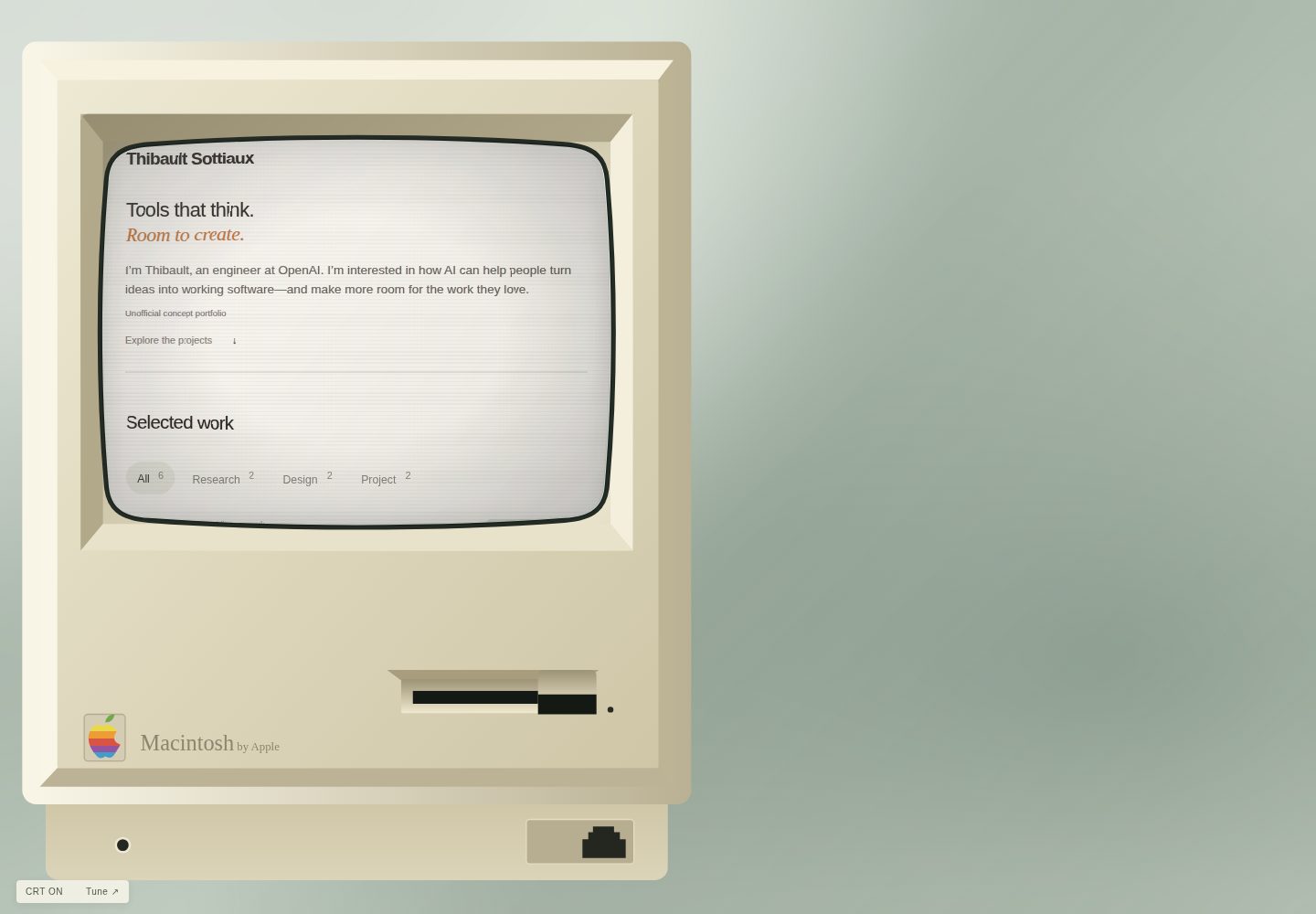
Curved CRT display design with independently scrollable screen content
HTMLPortfolio
retro-portfolio — HTML Portfolio Template
By alanli28
A retro-computer portfolio template built with plain HTML, CSS, and JavaScript, featuring a curved CRT display and draggable, rotatable project notes, with no build step.
Explore the design
Compare the page layouts and mobile experience. Open any screenshot for a closer look.
Desktop homepage1 / 2
Desktop captureTop of page
Actual screenshot captured by the server browser.
All pages & views 2
Screenshots show visual appearance; interactive behavior may differ.
Recorded 2026-10-10View source
What stands out
A quick read of the recorded project description.
Project notes support dragging, rotation, and collection
Plain HTML, CSS, and JavaScript, with no package manager or build step
Centralized configuration of name, introduction, contact information, and projects via config.js
CRT ON/OFF and Tune controls for adjusting display, layout, and background
Opening animation respects the system's reduced-motion preference
Template Details
retro-portfolio is a portfolio template with a retro-computer visual theme. The main page is a mini computer with a curved CRT display; the screen content scrolls independently, and project notes float on the desktop and can be dragged, rotated, and collected. The template is written in plain HTML, CSS, and JavaScript, with no package manager or build step, and demo images are bundled locally.
Content is configured centrally in config.js, including name, page title, introduction, contact information, footer, and project list. Each project can set title, tag (research, design, or project), context, image, summary, text, and optional links and noteImage. Project images go in the assets/projects/ directory, and the optional video field accepts a relative URL or an HTTPS URL. Colors and layout are adjusted in style.css, and display-related settings are in crt.js.
The template's default demo content is fictional and is not a real person's website; it is not affiliated with any individual or institution mentioned in the examples. The README explicitly states that the first-person introduction and project displays in the examples are for demonstration purposes and does not claim that the example person wrote the listed papers or designed the related interfaces. Before deployment, public contact information, name, and example works must be replaced.
For browser compatibility, the CRT distortion effect uses SVG filters, which may render differently across browsers; turning off CRT removes the effect. The opening animation respects the system's reduced-motion preference. The template does not include analytics, cookies, remote fonts, personal documents, or external storage.
HTMLPortfolio
Is it right for your project?
Use Cases
- Building a retro-computer-style showcase page for a personal portfolio
- Deploying a static HTML portfolio with no build step on static hosting
- Using as a reference template for learning plain HTML, CSS, and JavaScript interactions
- Showcasing research, design, or project works with external links
Suitable For
- Developers or designers who want to deploy a portfolio using plain static files
- Personal websites that prefer a retro-computer visual style
- Pages that need draggable note-style project displays
- Users willing to replace the example content themselves and verify third-party asset licenses
Getting started & customization
Use these recorded setup notes alongside the repository instructions for your chosen version.
- 1
For local preview, run python3 -m http.server 4173, then visit http://localhost:4173
- 2
Edit config.js to replace the name, page title, introduction, contact information, and project content
- 3
Place project images in assets/projects/ and set image to the filename in config.js
- 4
When deploying to GitHub Pages, in the repository Settings → Pages, select the main branch and / (root)
- 5
When deploying to Vercel or Netlify, choose a static/Other project, leave the build command empty, and publish the repository root
License & source material
Usage conditions & limitations
Free to use · keep license noticeThis listing covers the free version under the MIT license in the public repository; the free scope is the code of that version and does not mean external services or third-party assets are free.
Must comply with when using
- You may use, modify, commercialize, and distribute the code of this version for free.
- When distributing copies or substantial portions of the code, retain the original author's copyright notice and the full MIT license notice.
- The code is provided as is; warranties and limitations of liability are governed by the original license and applicable law.
Additional costs & items to verify
- Demo images, fonts, icons, and other third-party assets must be checked against their respective licenses and cannot be judged solely by the code's MIT license.
- External services such as domains, hosting, databases, payments, or AI may incur separate fees.
- Third-party product artwork and paper preview images retain their original rights and are not covered by the MIT license; before use, check ATTRIBUTION.md and verify these assets' licenses yourself.
- The retro-computer illustration is inspired by classic Macintosh hardware; product names and brand logos belong to their respective owners, and the software license does not grant rights to these trademarks.
- Using this template does not imply any affiliation with or endorsement by the individuals or institutions mentioned in the examples.
- The template is an unofficial speculative demo, is not the website of the example person, and is not affiliated with or endorsed by the example person or OpenAI.
- Before deploying your own portfolio, you must replace the public contact information, name, and example work content.
- After replacing the demo content with your own, you should remove the caseNotice statement.
- The first-person introduction and project displays are fictional demo content and must not be used as real statements.
View Original Text Basis
Permission is hereby granted, free of charge
Original License Text
Third-party product artwork and paper previews retain their original rights and are excluded from the MIT grant; see [ATTRIBUTION.md](ATTRIBUTION.md).
Original README
The retro computer illustration is inspired by classic Macintosh hardware; product names and brand marks belong to their respective owners and are not granted by the software license.
Original README
No affiliation or endorsement is implied.
Original README
This is an unofficial, speculative template demonstration. It is not Tibo’s website and is not affiliated with or endorsed by Tibo or OpenAI.
Original README
Replace the public contact, name, and sample work before deploying your own portfolio.
Original README
Remove `caseNotice` when you have replaced the demo with your own content.
Original README
https://github.com/alanli28/retro-portfolio/blob/main/LICENSEhttps://github.com/alanli28/retro-portfolio/blob/main/README.mdThe first-person biography and project presentation are imagined for demonstration.
Original README
Compiled by DeepSeek based on repository license and README ·2026-10-10. Results only cover the materials read; dependencies, images, fonts, and subsequent term changes are subject to their respective original texts.
Project checks & description sources
Template Information
- Source platforms
- GitHub
- Documentation and maintenance reference score
- More documented · 80 / 100
- Technologies
- HTML
- Website type
- Portfolio
How this score is calculated
Our heuristic uses license records (up to 30), a demo link (12), a preview (10), stars (15), recorded maintenance (15), description completeness (8), feature records (5) and classification data (5). It is not a code, security or performance test, or a Google score. A link does not establish tested functionality.
What to verify for this project
- Repository update recorded
- 2026-10-10
- Screenshot last checked
- 2026-10-10
A demo link is listed. Check it with your own content and viewport sizes; its presence does not confirm that forms, authentication or payments work.
The catalog identifies HTML as the primary stack. Check the actual dependency manifest and lockfile for versions and hosting requirements. These notes use recorded metadata, not a code audit or a deployment test.
Use a selection guide →How this description was prepared
AI-assisted description based on catalog records and repository material. Repository authors are not automatically the reviewers of this description.
Review declaration: [email protected] · 2026-10-10
Inspect the recorded source material
SHA-256: 6a2b669ddbc5eeea82ada330258ab4858aef65bb52ac2813fb6bffca8418f408
2026-10-10T08:58:52.504Z
Source file / repository# Retro Portfolio A free, retro-computer portfolio template with a curved CRT display and project notes you can drag, rotate, and collect. Built with plain HTML, CSS, and JavaScript. No packages or build step. Demo images are bundled locally.  [Live demo](https://alanli28.github.io/retro-portfolio/) · [Use this template](https://github.com/alanli28/retro-portfolio/generate) ## Try it locally ```sh python3 -m http.server 4173 ``` Open http://localhost:4173. Scroll inside the computer, open a project, then drag the top edge of its note or use the rotation handle. Use **CRT ON/OFF** and **Tune** to adjust the display, layout, and background. ## Make it yours Edit **config.js**: name, page title, headline, biography, contact link (or email), footer, and projects. The default demo imagines a portfolio for Thibault “Tibo” Sottiaux at OpenAI. Biography prose is invented sample copy, not a quotation. Project cards reference public team work and a public appearance. Research cards link to real related papers and code; Design cards study public interfaces. These are editorial examples, not claims of personal authorship. Selected-work covers are original, simple SVG icons. Sticky notes omit decorative covers; an optional `noteImage` is used only for explanatory imagery, such as the CLI interface. See [image credits](ATTRIBUTION.md). Each project has `title`, `tag` (`research`, `design`, or `project`), `context`, `image`, `summary`, `text`, and optional `links` and `noteImage`. Put images in `assets/projects/` and set `image` to the filename. Optional `video` accepts a relative URL or an HTTPS URL. Add links as `["Visit project", "https://example.com"]` pairs. Keep content as plain text. Customize colors and layout in `style.css`; display settings live in `crt.js`. ## Deploy - **GitHub Pages:** repository Settings → Pages → Deploy from a branch → `main` → `/ (root)`. - **Vercel / Netlify:** import the repository, choose a static/Other project, leave the build command empty, and publish the repository root. - **Any static host:** upload the HTML, JS, CSS, favicon, and `assets/` directory together. ## Design and browser notes The screen scrolls independently from the surrounding scene. Project notes float over the desktop and have their own scrolling. The layout adapts to smaller screens; this is intentionally a miniature-computer presentation. The opening animation respects reduced-motion preferences. CRT distortion uses SVG filters, whose appearance varies by browser; CRT OFF removes the effect. No analytics, cookies, remote fonts, personal documents, or external storage are included. The default contact points to Tibo’s public X profile; no private email or personal documents are included. Replace the public contact, name, and sample work before deploying your own portfolio. ## About the example This is an unofficial, speculative template demonstration. It is not Tibo’s website and is not affiliated with or endorsed by Tibo or OpenAI. It does not claim that Tibo authored the listed papers or personally designed the featured interfaces. The public identity and Codex connection are based on this [OpenAI Forum speaker introduction](https://forum.openai.com/public/events/codex-is-for-everyone-why-codex-matters-beyond-code-fa40puy7wi). The first-person biography and project presentation are imagined for demonstration. To use a neutral identity, change `name`, `title`, `bio`, `contactLabel`, `contactUrl`, `footer`, and `projects` in `config.js`. Remove `caseNotice` when you have replaced the demo with your own content. You can use `email` instead of `contactUrl` / `contactLabel`. ## Contributing Useful contributions include browser fixes, mobile usability improvements, and new visual themes. Please describe the change and include before/after screenshots for visual updates. ## License Template code and original SVG sample illustrations are provided under the MIT license. Third-party product artwork and paper previews retain their original rights and are excluded from the MIT grant; see [ATTRIBUTION.md](ATTRIBUTION.md). The retro computer illustration is inspired by classic Macintosh hardware; product names and brand marks belong to their respective owners and are not granted by the software license. No affiliation or endorsement is implied.
Explore similar templates
Compare previews and descriptions within the same stack and category.

simplefolio
Simplefolio is a minimal single-page portfolio template for developers, built with HTML, Bootstrap, SCSS, and Parcel under the MIT license. It includes Hero, About, Projects, Contact, and Footer sections, with content edited in /src/index.html and theme colors controlled by two SCSS variables.
HTML · Portfolio

Freelancer
A bright, single-page Bootstrap portfolio template for freelancers, designers, and small studios. It includes a responsive portfolio grid with modal detail windows and an SB Forms contact form that requires an API token.
HTML · Portfolio

Resume
A single-page resume and CV template from Start Bootstrap, built on Bootstrap with a fixed sidebar and content sections.
HTML · Portfolio

Creative
A single-page marketing template by Start Bootstrap for creative agencies and product services, built on Bootstrap with SCSS, featuring a portfolio grid and call-to-action sections. It includes pre-set SB Forms markers for form integration and npm build scripts for source customization.
HTML · Corporate Website

Grayscale
A dark single-page Bootstrap template from Start Bootstrap for photography, events and brand storytelling, with a large hero and clearly separated sections.
HTML · Corporate Website

startbootstrap-stylish-portfolio
A one-page Bootstrap portfolio theme from Start Bootstrap with multiple content sections and an off-canvas navigation menu. Basic use means editing HTML/CSS under dist and opening index.html; advanced use relies on npm with Pug and SCSS build scripts.
HTML · Portfolio