A static blog theme customized on top of Astro and Fuwari
AstroBlog
fuwafuwa — Astro Blog Template
By AllsVoid
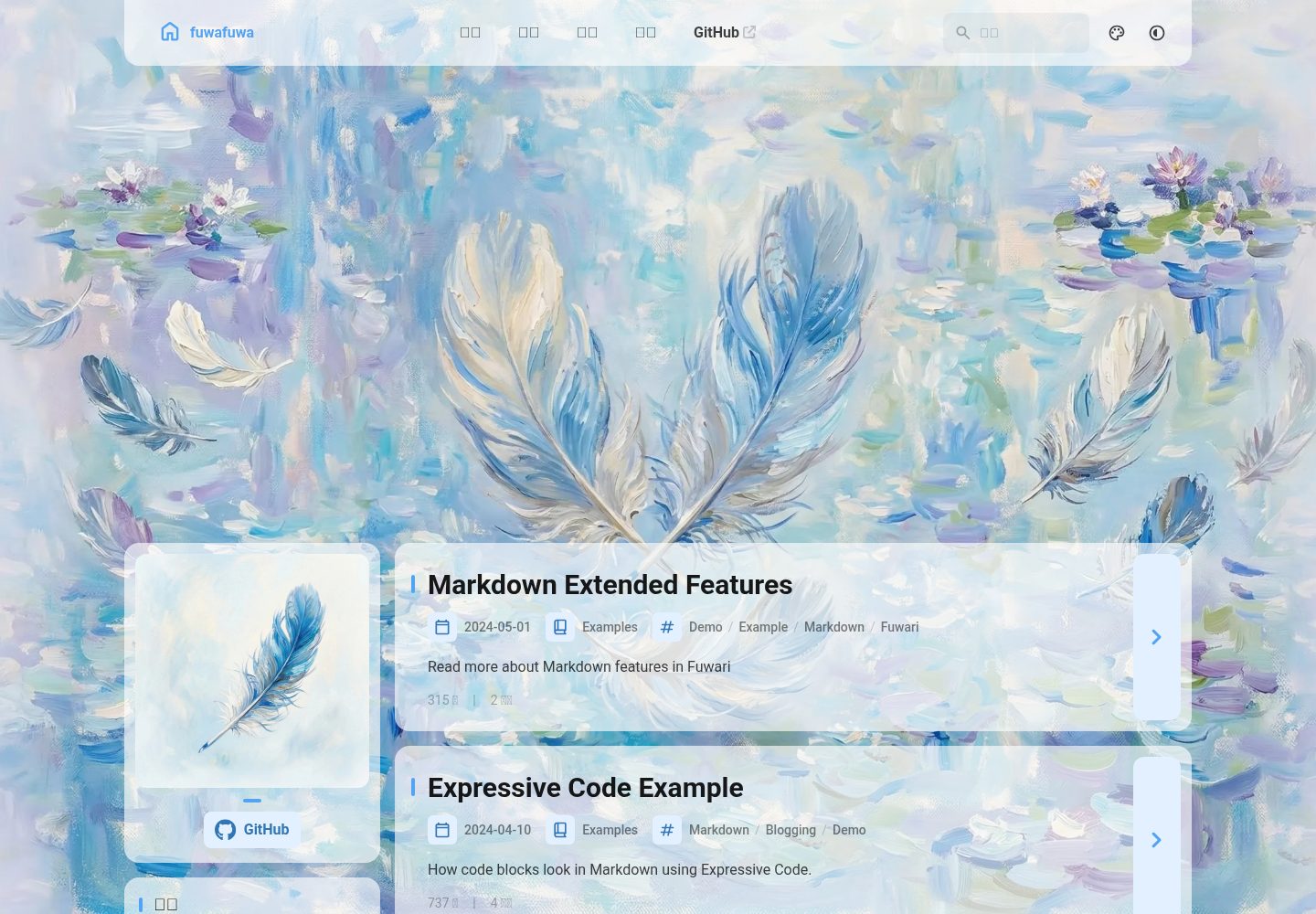
A static blog theme customized on top of Astro and Fuwari, adding global acrylic intensity, a fixed Banner background mode, Live Photo, and custom image directives.
Explore the design
Compare the page layouts and mobile experience. Open any screenshot for a closer look.
Desktop homepage1 / 3
Desktop captureTop of page
Actual screenshot captured by the server browser.
All pages & views 3
Screenshots show visual appearance; interactive behavior may differ.
Recorded 2026-10-12View source
What stands out
A quick read of the recorded project description.
Controls the acrylic effect intensity for cards and floating panels via siteConfig.acrylic, with values from 0 to 1
Switches the Banner between scrolling with the page or being fixed as a viewport background via siteConfig.fixedBanner
ImageWrapper.astro uniformly handles public and src/assets image paths, combined with astro:assets optimization
Markdown supports the :::img directive to control image dimensions and supports Live Photo pairing of still images with video
Licensed under MIT, permitting free use, modification, commercial use, and distribution of this version's code
Template Details
fuwafuwa is a static blog theme built with Astro, customized by AllsVoid on top of Fuwari, and released under the MIT license. It retains Fuwari's blog structure and focuses its changes on site configuration, image handling, and visual styling.
At the configuration level, site information, theme colors, and the Banner are managed centrally through src/config.ts, with type definitions in src/types/config.ts. The added siteConfig.acrylic controls the acrylic effect intensity for cards and floating panels, with values from 0 to 1; siteConfig.fixedBanner switches the Banner's scrolling behavior, and when set to false the Banner remains behind the viewport as a fixed background image.
For image handling, the project uses ImageWrapper.astro to distinguish between public static assets and src/assets resources, with the latter optimized via import.meta.glob and the Image component from astro:assets. In Markdown, the :::img directive can control image dimensions, and Live Photo (pairing a still image with a video) is supported. The relevant logic is located in rehype-component-img-directive.mjs and the rehypeComponents configuration in astro.config.mjs.
Run and build commands follow Fuwari's approach, using pnpm install, pnpm dev, pnpm build, and pnpm preview. The README mainly documents this repository's changes relative to upstream Fuwari, to aid upgrades, migrations, or troubleshooting. Third-party assets such as demo images, fonts, and icons must be checked against their respective licenses; the code's MIT license does not cover these assets.
AstroBlog
Is it right for your project?
Use Cases
- Building a personal static blog focused on articles
- Making visual and image-capability customizations on top of Fuwari
- Blog sites that need acrylic card effects or a fixed background Banner
- Content pages that control image dimensions in Markdown or display Live Photos
Suitable For
- Developers familiar with Astro and Markdown content organization
- Blog authors who want to personalize Fuwari
- Users who need a static blog and handle image assets themselves
Getting started & customization
Use these recorded setup notes alongside the repository instructions for your chosen version.
- 1
Use pnpm install to install dependencies, pnpm dev to start development, pnpm build to build, and pnpm preview to preview
- 2
Site information, theme colors, Banner, and settings such as acrylic and fixedBanner are modified in src/config.ts, with type definitions in src/types/config.ts
- 3
The Banner image path points to src/assets, for example assets/images/demo-banner.png
- 4
Images are uniformly handled through src/components/misc/ImageWrapper.astro; public assets start with /, while src/assets resources use relative paths
- 5
Live Photo and :::img directive logic is located in src/plugins/rehype-component-img-directive.mjs and the rehypeComponents configuration in astro.config.mjs
License & source material
Usage conditions & limitations
Free to use · keep license noticeThis entry covers the free version in the public repository under the MIT license; the free scope is this version's code and does not mean external services or third-party assets are free.
Must comply with when using
- Permits free use, modification, commercial use, and distribution of this version's code.
- When distributing copies or substantial portions of the code, retain the original author's copyright notice and the full MIT license notice.
- The code is provided as is; warranties and limitations of liability are governed by the original license and applicable law.
Additional costs & items to verify
- Demo images, fonts, icons, and other third-party assets must be checked against their respective licenses and cannot be judged solely by the code's MIT license.
- External services such as domains, hosting, databases, payments, or AI may incur separate charges.
View Original Text Basis
https://github.com/AllsVoid/fuwafuwa/blob/master/LICENSEhttps://github.com/AllsVoid/fuwafuwa/blob/master/README.mdPermission is hereby granted, free of charge
Original License Text
Compiled by DeepSeek based on repository license and README ·2026-10-12. Results only cover the materials read; dependencies, images, fonts, and subsequent term changes are subject to their respective original texts.
Project checks & description sources
Template Information
- Source platforms
- GitHub
- Documentation and maintenance reference score
- More documented · 80 / 100
- Technologies
- Astro
- Website type
- Blog
How this score is calculated
Our heuristic uses license records (up to 30), a demo link (12), a preview (10), stars (15), recorded maintenance (15), description completeness (8), feature records (5) and classification data (5). It is not a code, security or performance test, or a Google score. A link does not establish tested functionality.
What to verify for this project
- Repository update recorded
- 2026-03-17
- Screenshot last checked
- 2026-10-12
A demo link is listed. Check it with your own content and viewport sizes; its presence does not confirm that forms, authentication or payments work.
The catalog identifies Astro as the primary stack. Check the actual dependency manifest and lockfile for versions and hosting requirements. These notes use recorded metadata, not a code audit or a deployment test.
Use a selection guide →How this description was prepared
AI-assisted description based on catalog records and repository material. Repository authors are not automatically the reviewers of this description.
Review declaration: [email protected] · 2026-10-13
Inspect the recorded source material
SHA-256: e151ad7c5108edb698fd246caba59abeaeaac76693dc6b97041a9d2001c95cef
2026-10-12T22:24:23.631Z
Source file / repository## 项目说明
这是基于 [Fuwari](https://github.com/saicaca/fuwari) 二次定制的个人博客
本 README 仅说明在原 Fuwari 基础上本仓库做的**主要修改和新增功能**,方便以后升级、迁移或排查问题时参考。
---
## 站点配置(`src/config.ts`)
站点的基础信息和主题行为通过 `src/config.ts` 进行配置,类型定义位于 `src/types/config.ts`。
### `siteConfig`
重要字段说明:
- **基本信息**
- `title`: 站点标题
- `subtitle`: 副标题
- `lang`: 站点语言(例如 `"zh_CN"`)
- **Live Photo**
- `livephoto?: boolean`
- 控制是否启用 LivePhotosKit 相关逻辑,配合自定义的 `::img` / Live Photo 支持使用。
- **主题色**
- `themeColor.hue: number`
- `themeColor.fixed: boolean`
### 新增:全局亚克力强度 `acrylic`
- 位置:`siteConfig.acrylic?: number`
- 含义:控制卡片与浮动面板的“亚克力”效果强度,取值范围 **0 ~ 1**:
- `0`:不启用(与原始 Fuwari 接近,无模糊,纯色卡片)
- `1`:最高强度的亚克力效果
- 推荐使用 `0.xx` 做细调,例如:
```ts
export const siteConfig: SiteConfig = {
// ...
acrylic: 0.8,
};
```
实现方式(简述):
- 在 `Layout.astro` 中将 `acrylic` 注入为全局 CSS 变量 `--acrylic-strength`。
- 在 `src/styles/main.css` 中对以下类增加了 `backdrop-filter` 与透明度混合:
- `.card-base`:文章卡片、侧边栏卡片等
- `.float-panel`:顶部设置面板、搜索面板等
> 如需完全关闭亚克力效果,将 `acrylic` 设为 `0` 即可。
### 新增:Banner 滚动行为 `fixedBanner`
- 位置:`siteConfig.fixedBanner?: boolean`
- 语义:
- `true`(默认):**当前行为**,Banner 是页面顶部的一块区域,随页面滚动,很快会被内容“顶出视口”。
- `false`:**背景模式**,Banner 作为一张**固定在视口后面的背景图**,页面滚动时背景图一直在后面显示。
示例:
```ts
export const siteConfig: SiteConfig = {
// ...
fixedBanner: false, // 背景图固定在后面
};
```
实现方式(简述):
- 在 `Layout.astro` 中根据 `fixedBanner` 给 `<body>` 添加 `banner-bg` 类。
- 在同文件底部的全局样式中,对 `.banner-bg #banner-wrapper` / `.banner-bg #banner` 施加:
- `position: fixed; inset: 0; height: 100vh;` 等,使 Banner 成为始终在后面的全屏背景。
### Banner 配置
- `siteConfig.banner.enable`: 是否启用 Banner。
- `siteConfig.banner.src`: Banner 图片相对路径,指向 `src/assets`,例如:
```ts
banner: {
enable: true,
src: "assets/images/demo-banner.png", // 对应 src/assets/images/demo-banner.png
videoSrc: "",
position: "center",
credit: {
enable: false,
text: "",
url: "",
},
},
```
---
## 图片使用约定与 `ImageWrapper`
项目中统一通过 `src/components/misc/ImageWrapper.astro` 来处理图片:
- 自动区分以下几类路径:
- **public 下的静态资源**:以 `/` 开头,例如 `/assets/avatar.png`
- **`src/assets` 下的资源**:相对路径,例如 `assets/images/demo-avatar.png`
- 对于 `src/assets` 下的资源,使用 `import.meta.glob` 进行动态导入,并结合 `astro:assets` 的 `Image` 组件进行优化。
---
## Live Photo 与自定义图片指令
项目扩展了 Fuwari 的图片能力,用于:
- 在 Markdown 中通过指令控制图片尺寸。
- 支持 Live Photo(静态图 + 视频)。
### Markdown 指令示例(见 `src/content/posts/img-rehype-test.md`)
```markdown
:::img{src="/src/assets/images/demo-banner.png" alt="有 size 的 M 图" size="M"}
:::img{src="/src/assets/images/demo-banner.png" alt="无 size,退化为普通 img"}
:::img{src="/livephoto/IMG_8723.JPEG" alt="实况测试" video="/livephoto/IMG_8723.MOV"}
```
实现相关逻辑主要在:
- `src/plugins/rehype-component-img-directive.mjs`
- `astro.config.mjs` 中的 `rehypeComponents` 配置。
---
## 运行与构建
基础命令与原 Fuwari 一致,例如:
```bash
pnpm install
pnpm dev # 开发
pnpm build # 构建
pnpm preview
```
如需升级上游 Fuwari 或调整这些自定义功能,建议先阅读:
- `src/config.ts`
- `src/types/config.ts`
- `src/layouts/Layout.astro`
- `src/styles/main.css`
- `src/components/misc/ImageWrapper.astro`
Explore similar templates
Compare previews and descriptions within the same stack and category.

astrowind
AstroWind is a free, open-source Astro starter theme using Astro and Tailwind CSS, released under the MIT license.
Astro · Blog

astro-paper
AstroPaper is a minimal, responsive, accessible, and SEO-friendly Astro blog theme. Articles are stored as Markdown/MDX in src/content/posts/, with subdirectories affecting URLs.
Astro · Blog

fuwari
Fuwari is a static blog template built with Astro and Tailwind CSS for personal blogs. It manages posts as Markdown files in src/content/posts/, with frontmatter for title, date, description, cover, tags, categories, draft status, and language.
Astro · Blog

Firefly
Firefly is a clean personal blog theme forked from Astro and Fuwari, offering four background modes, single/double sidebar and list/grid layouts, Pagefind client-side full-text search, and a six-language UI.
Astro · Blog

astro-theme-cactus
Astro Cactus is an Astro-based blog and portfolio theme that uses Markdown/MDX content collections to manage posts, notes, and tags, with frontmatter type-checked by a schema.
Astro · Portfolio

astrofy
Astrofy is a free and open-source personal portfolio website template built with Astro and TailwindCSS, with built-in blog, CV timeline, project showcase, store, and RSS feed modules.
Astro · Portfolio