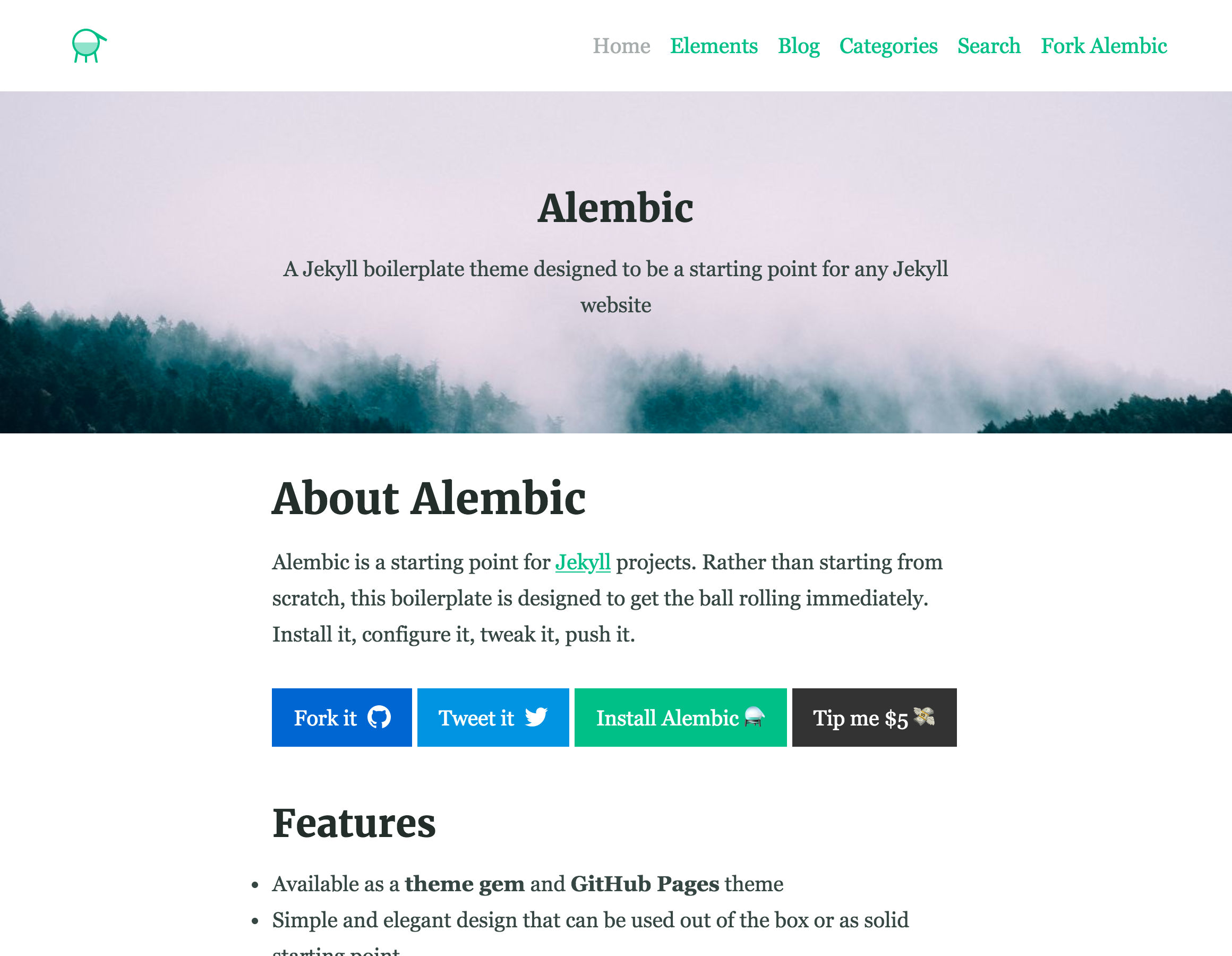
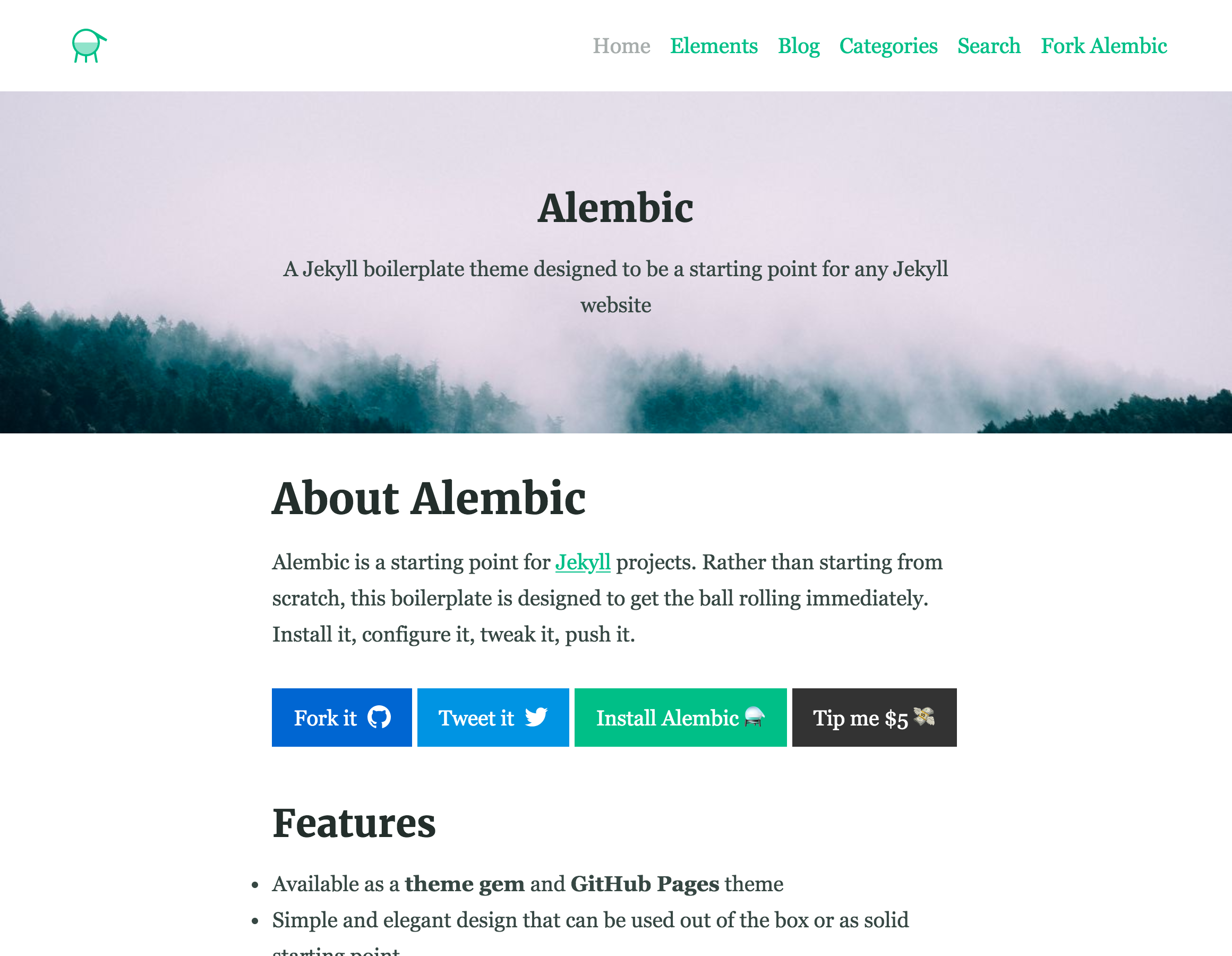
Can be installed as a Jekyll theme gem or GitHub Pages remote theme
HTMLStarter
website_theme — HTML Starter Template
By amandagloor
Alembic is a Jekyll-based website theme that serves as a starter template for Jekyll projects, providing configurable navigation, colors, fonts, contact forms, and share buttons as basic structure.
Explore the design
Compare the page layouts and mobile experience. Open any screenshot for a closer look.
Author preview
Author-provided previewTop of page
Preview provided in the project README.
One original preview is available. Open the full image to inspect the design.
Screenshots show visual appearance; interactive behavior may differ.
Recorded 2026-10-03View source
What stands out
A quick read of the recorded project description.
Configure colors, fonts, and navigation via a single settings file
Built-in Service Worker for offline and slow connections
Built-in JavaScript-based live search
Provides Formspree or Netlify Forms contact form integration
Includes a post index page grouped by category and 9 social share buttons
Template Details
Alembic is a Jekyll theme positioned as a starter template for any Jekyll website. It can be installed as a theme gem, used as a GitHub Pages remote theme, or forked as a boilerplate (a method marked as deprecated). The theme offers a clean default design and allows customization of styles and settings through file overrides.
Functionally, Alembic includes configurable navigation (header, footer, social links, share links), color and font adjustments via a single settings file, a built-in Service Worker for offline and slow connections, JavaScript-based live search, contact forms using Formspree or Netlify Forms, a post index page grouped by category, and share buttons for 9 social networks. The theme also provides documentation and a demo site.
There are several usage limitations: actual contact form submissions require configuring third-party service endpoints, whose quotas and fees must be checked separately; demo images, fonts, icons, and other third-party assets must be checked under their respective licenses, as the code's MIT license does not cover these assets; external services such as domains and hosting may incur additional charges. Additionally, forking as a boilerplate is marked as deprecated and not recommended by the author.
HTMLLauncher
Is it right for your project?
Use Cases
- Quickly set up a new Jekyll website
- Add a configurable theme to a GitHub Pages site
- Static sites requiring offline access
- Blogs or project pages needing contact forms and social share buttons
Suitable For
- Developers building static sites with Jekyll
- Users wanting to quickly apply a theme on GitHub Pages
- Projects needing configurable navigation, colors, and fonts
- Sites requiring offline support and live search
Getting started & customization
Use these recorded setup notes alongside the repository instructions for your chosen version.
- 1
When used as a theme gem, add gem "alembic-jekyll-theme" to the Gemfile, run bundle install, and set theme: alembic-jekyll-theme in _config.yml.
- 2
When used as a GitHub Pages remote theme, add gem "jekyll-remote-theme", include jekyll-remote-theme in the plugins section of _config.yml, and set remote_theme: daviddarnes/alembic@main.
- 3
Contact forms use Formspree or Netlify Forms; actual submissions require configuring the corresponding service endpoint.
- 4
Custom styles can be overridden by copying assets/styles.scss and overriding at the same path; color and font variables must be declared before @import "alembic";.
- 5
Demo images, fonts, icons, and other third-party assets must be checked under their respective licenses; they cannot be judged solely by the code's MIT license.
License & source material
Usage conditions & limitations
Free to use · keep license noticeThis entry covers the free version under the MIT license in the public repository; the free scope applies to that version's code and does not imply that external services or third-party assets are free.
Must comply with when using
- Free use, modification, commercial use, and distribution of this version's code are permitted.
- When distributing copies or substantial portions of the code, retain the original author's copyright notice and the full MIT license notice.
- The code is provided as-is; warranties and liability limitations are governed by the original license and applicable law.
Additional costs & items to verify
- The README mentions the Formspree form service; actual submissions require configuring a service endpoint, and its usage quotas and fees must be checked separately.
- Demo images, fonts, icons, and other third-party assets must be checked under their respective licenses; they cannot be judged solely by the code's MIT license.
- External services such as domains, hosting, databases, payments, or AI may incur additional charges.
- Contact forms rely on third-party services Formspree or Netlify Forms; before actual submission, you must register and configure the corresponding service endpoint, and its quotas and fees must be checked separately.
- The default font is loaded from Google Fonts, which is an external service dependency and may involve network requests and third-party terms.
- The optional Google Analytics integration requires you to provide a tracking ID; it is an external service and may involve additional terms and fees.
- Using a forked repository as a boilerplate is marked as deprecated and not recommended by the author.
- The comment feature relies on the third-party service Disqus and requires configuring a project username; it is an external service dependency.
View Original Text Basis
Permission is hereby granted, free of charge
Original License Text
**Contact form** built in using [Formspree](https://formspree.io/) or [Netlify Forms](https://www.netlify.com/features/#forms)
Original README
Alembic comes with custom fonts served from Google fonts.
Original README
Google Analytics can be enabled via the site configuration too.
Original README
_(deprecated, not recommended)_
Original README
https://github.com/amandagloor/website_theme/blob/main/LICENSEhttps://github.com/amandagloor/website_theme/blob/main/README.mdThe `disqus` value can be changed to your project username on [Disqus](https://disqus.com), remove this from the `/_config.yml` file if you don't want comments enabled.
Original README
Compiled by DeepSeek based on repository license and README ·2026-10-04. Results only cover the materials read; dependencies, images, fonts, and subsequent term changes are subject to their respective original texts.
Project checks & description sources
Template Information
- Source platforms
- GitHub
- Documentation and maintenance reference score
- Less documented · 45 / 100
- Technologies
- HTML
- Website type
- Starter
How this score is calculated
Our heuristic uses license records (up to 30), a demo link (12), a preview (10), stars (15), recorded maintenance (15), description completeness (8), feature records (5) and classification data (5). It is not a code, security or performance test, or a Google score. A link does not establish tested functionality.
What to verify for this project
- Repository update recorded
- 2023-06-28
- Screenshot last checked
- 2026-10-04
No demo link is recorded. Use the repository instructions to evaluate the project locally; the screenshot alone cannot establish interactive behavior.
The catalog identifies HTML as the primary stack. Check the actual dependency manifest and lockfile for versions and hosting requirements. These notes use recorded metadata, not a code audit or a deployment test.
Use a selection guide →How this description was prepared
AI-assisted description based on catalog records and repository material. Repository authors are not automatically the reviewers of this description.
Review declaration: [email protected] · 2026-10-04
Inspect the recorded source material
SHA-256: 8ff30d497a43e99f80403fb7c6082078dec454c4417864c80e38f4cb25a1d161
2026-10-04T13:45:24.613Z
Source file / repository# [Alembic](https://alembic.darn.es/)
[](https://badge.fury.io/rb/alembic-jekyll-theme)
⚗ A Jekyll boilerplate theme designed to be a starting point for any Jekyll website.
[<img src="https://cdn.buymeacoffee.com/buttons/default-yellow.png" width="217"/>](https://buymeacoffee.com/daviddarnes#support)
## Contents
- [About](#about)
- [Features](#features)
- [Examples](#examples)
- [Installation](#installation)
- [Customising](#customising)
- [Configuration](#configuration)
- [Gem dependency settings](#gem-dependency-settings)
- [Site settings](#site-settings)
- [Site performance settings](#site-performance-settings)
- [Site navigation](#site-navigation)
- [Custom fonts](#custom-fonts)
- [Using includes](#using-includes)
- [Page layouts](#page-layouts)
- [Page and Post options](#page-and-post-options)
- [Credits](#credits)
## About
**Alembic is a starting point for [Jekyll](https://jekyllrb.com/) projects. Rather than starting from scratch, this boilerplate theme is designed to get rolling immediately. Install it, configure it, tweak it, push it.**
## Features
- Available as a **theme gem** and **GitHub Pages** theme
- Clear and elegant design that can be used out of the box or as solid starting point
- Tested in all major browsers, including **IE and Edge**
- Built in **Service Worker** so it can work offline and on slow connections
- **Configurable colours** and typography in a single settings file
- Extensive set of **shortcodes** to include various elements; such as buttons, icons, figure images and more
- Solid **typographic framework** from [Sassline](https://sassline.com/)
- Configurable navigation via a single file
- Modular Jekyll components
- Post category support in the form of a single post index page grouped by category
- Built in live search using JavaScript
- **Contact form** built in using [Formspree](https://formspree.io/) or [Netlify Forms](https://www.netlify.com/features/#forms)
- Designed with **[Siteleaf](http://www.siteleaf.com/)** in mind
- Has 9 of the most popular networks as performant sharing buttons
- Has documentation
## Examples
Here are a few examples of Alembic out in the wild being used in a variety of ways:
- [billmei.net](https://billmei.net/)
- [bawejakunal.github.io](https://bawejakunal.github.io/)
- [case2111.github.io](https://case2111.github.io/)
- [karateca.org](https://www.karateca.org/)
## Installation
### Quick setup
To give you a running start I've put together some starter kits that you can download, fork or even deploy immediately:
- Vanilla Jekyll starter kit:
[](https://app.netlify.com/start/deploy?repository=https://github.com/daviddarnes/alembic-kit)
- Forestry starter kit:
[](https://app.forestry.io/quick-start?repo=daviddarnes/alembic-forestry-kit&engine=jekyll)
[](https://app.netlify.com/start/deploy?repository=https://github.com/daviddarnes/alembic-forestry-kit)
- Netlify CMS starter kit:
[](https://app.netlify.com/start/deploy?repository=https://github.com/daviddarnes/alembic-netlifycms-kit&stack=cms)
- GitHub Pages with remote theme kit - **[Download kit](https://github.com/daviddarnes/alembic-kit/archive/remote-theme.zip)**
- Stackbit starter kit:
[](https://app.stackbit.com/create?theme=https://github.com/daviddarnes/alembic-stackbit-kit)
### As a Jekyll theme
1. Add `gem "alembic-jekyll-theme"` to your `Gemfile` to add the theme as a dependancy
2. Run the command `bundle install` in the root of project to install the theme and its dependancies
3. Add `theme: alembic-jekyll-theme` to your `_config.yml` file to set the site theme
4. Run `bundle exec jekyll serve` to build and serve your site
5. Done! Use the [configuration](#configuration) documentation and the example [`_config.yml`](https://github.com/daviddarnes/alembic/blob/master/_config.yml) file to set things like the navigation, contact form and social sharing buttons
### As a GitHub Pages remote theme
1. Add `gem "jekyll-remote-theme"` to your `Gemfile` to add the theme as a dependancy
2. Run the command `bundle install` in the root of project to install the jekyll remote theme gem as a dependancy
3. Add `jekyll-remote-theme` to the list of `plugins` in your `_config.yml` file
4. Add `remote_theme: daviddarnes/alembic@main` to your `_config.yml` file to set the site theme
5. Run `bundle exec jekyll serve` to build and serve your site
6. Done! Use the [configuration](#configuration) documentation and the example [`_config.yml`](https://github.com/daviddarnes/alembic/blob/master/_config.yml) file to set things like the navigation, contact form and social sharing buttons
### As a Boilerplate / Fork
_(deprecated, not recommended)_
1. [Fork the repo](https://github.com/daviddarnes/alembic#fork-destination-box)
2. Replace the `Gemfile` with one stating all the gems used in your project
3. Delete the following unnecessary files/folders: `.github`, `LICENSE`, `screenshot.png`, `CNAME` and `alembic-jekyll-theme.gemspec`
4. Run the command `bundle install` in the root of project to install the jekyll remote theme gem as a dependancy
5. Run `bundle exec jekyll serve` to build and serve your site
6. Done! Use the [configuration](#configuration) documentation and the example [`_config.yml`](https://github.com/daviddarnes/alembic/blob/master/_config.yml) file to set things like the navigation, contact form and social sharing buttons
## Customising
When using Alembic as a theme means you can take advantage of the file overriding method. This allows you to overwrite any file in this theme with your own custom file, by matching the file name and path. The most common example of this would be if you want to add your own styles or change the core style settings.
To add your own styles copy the [`styles.scss`](https://github.com/daviddarnes/alembic/blob/master/assets/styles.scss) into your own project with the same file path (`assets/styles.scss`). From there you can add your own styles, you can even optionally ignore the theme styles by removing the `@import "alembic";` line.
If you're looking to set your own colours and fonts you can overwrite them by matching the variable names from the [`_settings.scss`](https://github.com/daviddarnes/alembic/blob/master/_sass/_settings.scss) file in your own `styles.scss`, make sure to state them before the `@import "alembic";` line so they take effect. The settings are a mixture of custom variables and settings from [Sassline](https://medium.com/@jakegiltsoff/sassline-v2-0-e424b2881e7e) - follow the link to find out how to configure the typographic settings.
## Configuration
There are a number of optional settings for you to configure. Use the example [`_config.yml`](https://github.com/daviddarnes/alembic/blob/master/_config.yml) file in the repo and use the documentation below to configure your site:
### Gem dependency settings
`twitter`, `author` and `social` values will need to be changed to the projects' social information or removed. Look for the `Gem settings` comment within the `/_config.yml` file. These values are for the [jekyll-seo-tag](https://github.com/jekyll/jekyll-seo-tag) - follow the link to find out more.
### Site settings
You'll need to change the `description`, `title` and `url` to match with the project. You'll also need to replace the logos, default social and default offline images in the `/assets/` directory with your own graphics. Setting the site language can be done with `lang`, the theme will default to `en-US`. The `email` needs to be changed to the email you want to receive contact form enquires with. The `disqus` value can be changed to your project username on [Disqus](https://disqus.com), remove this from the `/_config.yml` file if you don't want comments enabled. Look for the `Site settings` comment within the `/_config.yml` file. The `repo` setting is optional, for now, and can be removed entirely, if you wish.
Google Analytics can be enabled via the site configuration too. Add your tracking ID to the `/_config.yml` file in the following method: `google_analytics: 'UA-XXXXXXXX-1'`. By default all IPs of site visitors are anonymous to maintain a level of privacy for the audience. If you wish to turn this off set the `google_analytics_anonymize_ip` key to `false`.
Date format can be customised in the `/_config.yml` with the option `date_format` (please refer to Liquid date filters documentation for learning about formatting possibilities). Only placeholder formatting is supported, do not try to use ordinal dates introduced in Jekyll 3.8.
The `short_name` option within `/_config.yml` is to add a custom name to the site's web application counterpart. When the website is added to a device this name will appear alonside the app icon. The short name will default to the site title if this isn't set.
### Site performance settings
Alembic comes with a couple of options to enhance the speed and overall performance of the site you build upon it.
By default the built in Service Worker is enabled, and will work on a 'network first' method. Meaning if there's no internet connection the content the Service Worker has cached will be used until the connection comes back. It will always look for a live version of the code first. To disable the Service Worker add an option called `service_worker` with a value of `false` in the `/_config.yml` file.
Another option to speed up Alembic is to enable inline CSS, which is off by default. You can enable this by setting `css_inline: true` inside your `/_config.yml` file. By switching to inline styles you bypass the use `/assets/styles.scss`, any custom styles will need to be added in `/_includes/site-styles.html` or in a new custom file.
Please note that these options aren't a "silver bullet" for making your site faster, make sure to audit and debug your site to get the best performance for your situation.
### Site navigation
There are a total of 4 different navigation types:
- `navigation_header`: The links shown in the header (it is also used on the 404 page)
- `navigation_footer`: The links shown in the footer
- `social_links`: The social icon links that are shown in the sidebar
- `sharing_links`: The social sharing buttons that are shown at the bottom of blog posts
All navigations can be edited using the `_config.yml` file. To see example usage either look for the `Site navigation` comment within the `/_config.yml` file or see [the nav-share.html include](#nav-sharehtml).
If there are no items for the `navigation_header` or `navigation_footer`, they will fallback to a list of pages within the site. The `social_navigation` properties should either be one that is already in the list (so `Twitter` or `Facebook`) or a regular `link`, this is so an icon can be set for the link.
### Custom fonts
Alembic comes with custom fonts served from Google fonts. By default it requests Merriweather but this can be any font from any provider assuming it supports requesting fonts in the same manner and does not require javascript.
This can be configured under the `custom_fonts` key.
- `urls`: The urls supplied to you from your font provider (eg https://fonts.googleapis.com/css2?family=Merriweather). For best performance try to use as few urls as possible
- `preconnect`: (optional) If your font provider serves the font files from another domain it can be useful to make a connection to that domain in advance. For example google load the font files from fonts.gstatic.com. This can be omitted if not required
If you want to customise this further you can find the include for custom fonts in `_includes/site-custom-fonts.html`.
## Using includes
There are 2 main types of includes: ones designed for the site and ones that are designed as shortcodes. Here are a list of the shortcode includes:
### `button.html`
A button that can link to a page of any kind.
Example usage: `{% include button.html text="I'm a button" link="https://david.darn.es" %}`
Available options:
- `text`: The text of the button _required_
- `link`: The link that the button goes to _required_
- `icon`: The icon that is added to the end of the button text
- `color`: The colour of the button
### `figure.html`
An image with optional caption.
Example usage: `{% include figure.html image="/uploads/feature-image.jpg" caption="Check out my photo" %}`
Available options:
- `image`: The image shown _required_
- `caption`: A caption to explain the image
- `position`: The position of the image; `left`, `right` or `center`
- `width` & `height`: Optional width and height attributes of the containing image
### `icon.html`
An icon.
Example usage: `{% include icon.html id="twitter" %}`
Available options:
- `id`: The reference for the icon _required_
- `title`: The accessible label for the icon
- `color`: The desired colour of the icon
- `width` & `height`: Width and height attributes for the icon, default is `16`
### `nav-share.html`
A set of buttons that share the current page to various social networks, which is controlled within the `_config.yml` file under the `sharing_links` keyword.
Example usage: `{% include nav-share.html %}`
Available options:
``` yml
Twitter: "#1DA1F2"
facebook: "#3B5998"
Pinterest: "#BD081C"
LinkedIn: "#0077B5"
tumblr: "#36465D"
Reddit: "#FF4500"
HackerNews: "#ff6600"
DesignerNews: "#2D72D9"
Email: true
```
_The first item is the name of the network (must be one of the ones stated above) and the second is the colour of the button. To remove a button remove the line of the same name._
### `video.html`
A YouTube video.
Example usage: `{% include video.html id="zrkcGL5H3MU" %}`
Available options:
- `id`: The YouTube ID for the video _required_
### `map.html`
A Google map. _See Google [My Maps](https://www.google.com/mymaps)_
Example usage: `{% include map.html id="1UT-2Z-Vg_MG_TrS5X2p8SthsJhc" %}`
Available options:
- `id`: The map ID for the video _required_
### `site-form.html`
Adds a contact form to the page. This can be used with [Formspree](https://formspree.io/) or [Netlify Forms](https://www.netlify.com/docs/form-handling/) depending on your setup.
Example usage: `{% include site-form.html %}`
Available options:
- `netlify_form=true`: Set whether you would like to use Netlify Forms, otherwise the form will default to Formspree
- `name`: Give the form a name, by default the form is called "Contact". The name will be reflected when form submissions come through in Netlify or in your email client. The name is also used in the label and input elements for accessibility
Use the `email` option in the `/_config.yml` to change to the desired email.
### `site-search.html`
Adds a search form to the page.
Example usage: `{% include site-search.html %}`
This include has no options. This include will add a block of javascript to the page and javascript reference in order for the search field to work correctly.
### `site-before-start.html` & `site-before-end.html`
Optional html includes for adding scripts, css, js or any embed code you wish to add to every page without the need to overwrite the entire `default.html` template.
**Example usage:** These are different to other includes as they are designed to be overwritten. If you create a `site-before-start.html` file in the `_includes/` the contents of the file will be included immediately before the closing `</head>` tag. If you create a `site-before-end.html` file the contents of the file will be included immediately before the closing `</body>` tag.
## Page layouts
As well as `page`, `post`, `blog`, there are a few alternative layouts that can be used on pages:
- `categories`: Shows all posts grouped by category, with an index of categories in a left hand sidebar
- `search`: Adds a search field to the page as well as a simplified version of the sidebar to allow more focus on the search results
## Page and Post options
There are some more specific options you can apply when creating a page or a post:
- `aside: true`: Adds a sidebar to the page or post, this is false by default and will not appear
- `comments: false`: Turns off comments for that post
- `feature_image: "/uploads/feature-image.jpg"`: Adds a full width feature image at the top of the page
- `feature_text: "Example text"`: Adds text to the top of the page as a full width feature with solid colour; supports markdown. This can be used in conjunction with the `feature_image` option to create a feature image with text over it
- `indexing: false`: Adds a `noindex` meta element to the `<head>` to stop crawler bots from indexing the page, used on the 404 page
> **Note:** The Post List Page options are actually in the collection data within the `_config.yml` file.
## Credits
- Thanks to [Simple Icons](https://simpleicons.org/) for providing the brand icons, by [Dan Leech](https://twitter.com/bathtype)
- Thanks to [Sassline](https://sassline.com/) for the typographic basis, by [Jake Giltsoff](https://twitter.com/jakegiltsoff)
- Thanks to [Flexbox mixin](https://github.com/mastastealth/sass-flex-mixin) by [Brian Franco](https://twitter.com/brianfranco)
- Thanks to [Normalize](https://necolas.github.io/normalize.css/) by [Nicolas Gallagher](https://twitter.com/necolas) and [Jonathan Neal](https://twitter.com/jon_neal).
- Thanks to [pygments-css](http://richleland.github.io/pygments-css/) for the autumn syntax highlighting, by [Rich Leland](https://twitter.com/richleland)
Explore similar templates
Compare previews and descriptions within the same stack and category.

startbootstrap-simple-sidebar
A Bootstrap off-canvas sidebar navigation HTML starter template from Start Bootstrap. It provides directly editable HTML and CSS in the dist directory, while the source uses Pug, SCSS, and JavaScript with npm build scripts for live preview and compilation.
HTML · Starter

adminkit
AdminKit is a free, MIT-licensed HTML admin and dashboard template built on Bootstrap 5. The free version includes 15 demo pages, 1 plugin, and 1 color scheme, with hundreds of UI components, forms, tables, charts, and icons.
HTML · Admin dashboard

Landing-Page
A general-purpose landing page HTML template maintained by Tailwind Toolbox, written in pure HTML and loading the complete Tailwind CSS via CDN.
HTML · Corporate Website

light-bootstrap-dashboard
Light Bootstrap Dashboard is a free, MIT-licensed admin dashboard template from Creative Tim, built on Bootstrap with a responsive static HTML structure.
HTML · Admin dashboard

sing-app
Sing App Lite is a free, open-source admin dashboard template from Flatlogic, built with Bootstrap 4.5 and SCSS. It provides a responsive layout, dashboard examples, typography, tables, notifications, basic charts, icons, maps, and a hover sidebar, along with styled Bootstrap components.
HTML · Admin dashboard

startbootstrap-modern-business
Modern Business is a multipurpose Bootstrap full-site HTML template from Start Bootstrap with 17 standalone pages covering home, about, services, portfolio, pricing, blog, FAQ, and contact.
HTML · Starter