Generates a static site with Hugo and builds pages using HTML
HugoHTMLBlogTool Site
Corporio — Hugo Blog Template
By AminZibayi
Corporio is a Hugo-based corporate website template that includes a company landing page, product pages, and a built-in blog, with integrated TinaCMS visual editing, under the MIT license.
Explore the design
Compare the page layouts and mobile experience. Open any screenshot for a closer look.
Desktop homepage1 / 3
Desktop captureTop of page
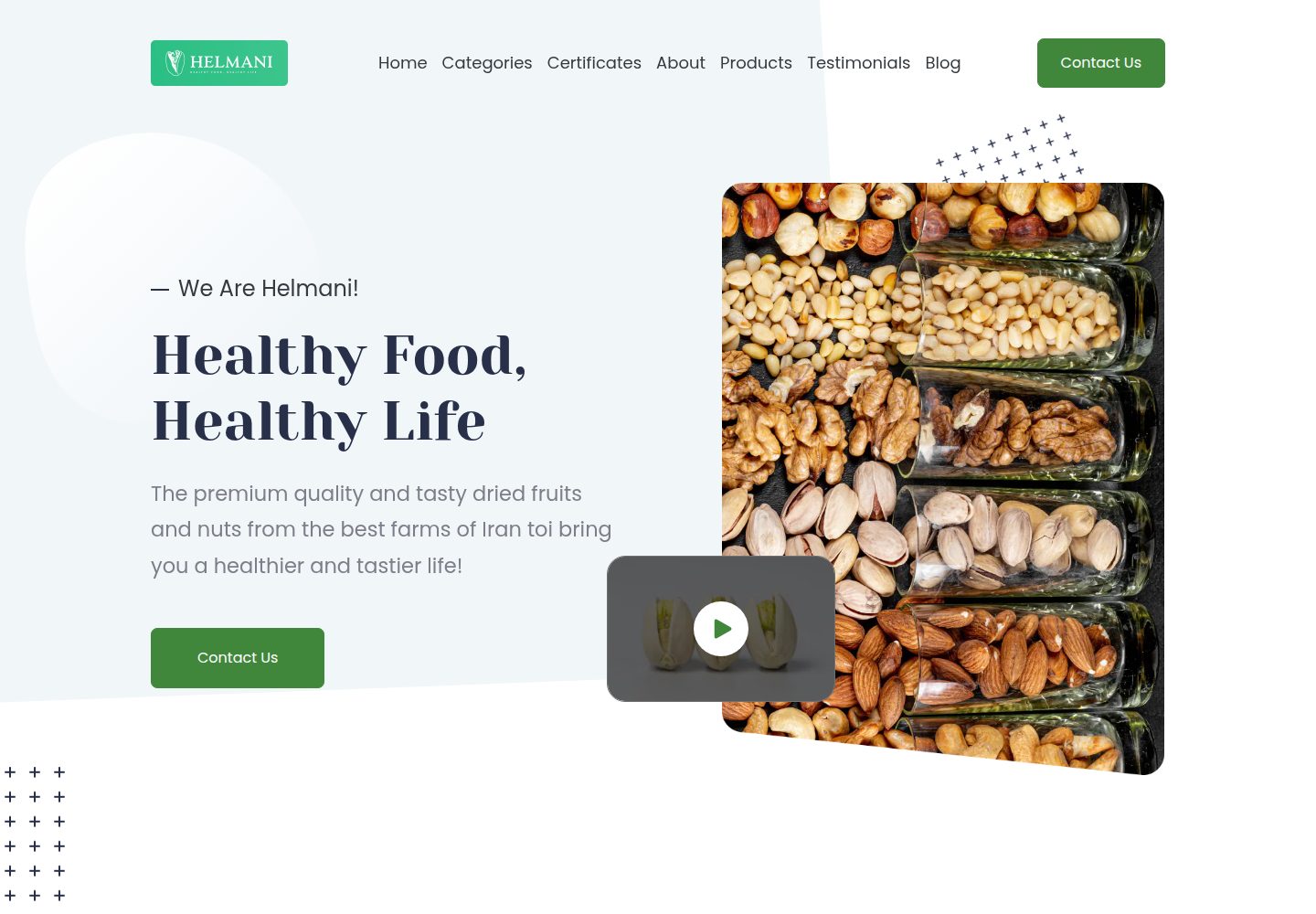
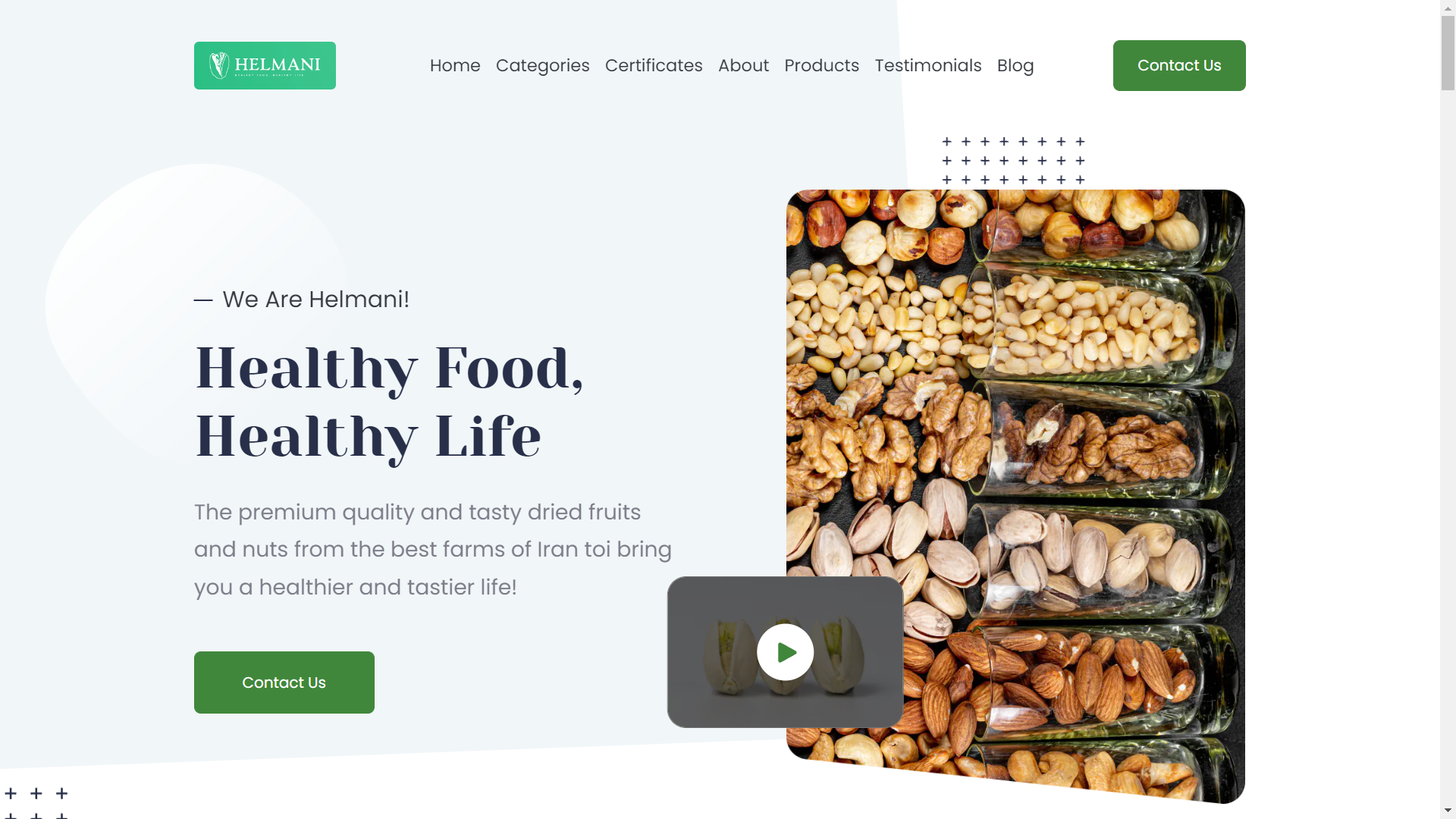
Actual screenshot captured by the server browser.
All pages & views 3
Screenshots show visual appearance; interactive behavior may differ.
Recorded 2026-10-02View source
What stands out
A quick read of the recorded project description.
Includes a company landing page, product pages, and a complete blog module
Integrates TinaCMS for graphical editing of Markdown and YAML content in the browser, with commits back to the GitHub repository
Can be used as a standalone site by cloning, or introduced as a Hugo theme via Git submodule
Provides pnpm scripts for development, build, preview, clean, lint, format, and end-to-end testing
Released under the MIT license, permitting free use, modification, commercial use, and distribution of this version of the code
Template Details
Corporio is a Hugo-based corporate website template maintained by AminZibayi and released under the MIT license. It targets corporate website use cases, providing a company landing page, product/service pages, and a complete built-in blog, making it suitable for corporate sites that need to present brand, products, and content together.
Technically, Corporio generates a static site with Hugo, builds pages using HTML and styling scripts, and integrates TinaCMS, an open-source headless content management system. TinaCMS provides a graphical editing interface that can connect to a GitHub repository, allowing editors to modify Markdown and YAML content in the browser and commit changes back to the repository; the template also supports skipping the Tina step and building directly. The project provides pnpm scripts for development, build, preview, clean, lint, format, and end-to-end testing, along with a separate documentation directory.
There are two usage approaches: clone the repository directly as a standalone site, or add it as a Git submodule to use as a theme in an existing Hugo site. The README recommends PNPM, while noting that NPM or Yarn also work but compatibility is not guaranteed. The runtime requires the latest LTS version of Node.js.
Limitations to note: third-party assets such as demo images, fonts, and icons require separate license verification and cannot be judged solely by the code's MIT license; external services such as domains and hosting may incur costs. The README's descriptions of security scores, speed, and SEO are project self-statements and were not independently verified in this material.
HugoHTMLBlogUtility site
Is it right for your project?
Use Cases
- Building a corporate website that presents company information, products/services, and blog content together
- Providing a TinaCMS graphical interface for editors unfamiliar with code to maintain site content
- Integrating the template as a Hugo theme into an existing Hugo site
- Deploying a static site on platforms such as Netlify or Render
Suitable For
- Teams that need a corporate website with a built-in blog
- Developers using Hugo who want to introduce visual content editing
- Individuals or organizations that want to use and modify the template for free under the MIT license
Getting started & customization
Use these recorded setup notes alongside the repository instructions for your chosen version.
- 1
Requires the latest LTS version of Node.js; the README recommends PNPM, while NPM or Yarn are usable but compatibility is not guaranteed.
- 2
Standalone site approach: clone the repository, run npm install or pnpm install, then run npm run start or pnpm start.
- 3
Theme approach: add as a Git submodule to themes/corporio, install dependencies in the theme directory, and add theme: "corporio" to the site configuration.
- 4
Using TinaCMS in production mode requires registering a Tina account, connecting a GitHub repository, and filling in clientId and token in tina/config.js; if not needed, use pnpm build to skip the Tina build.
- 5
Third-party assets such as demo images, fonts, and icons must be checked against their respective licenses; external services such as domains and hosting may incur additional charges.
License & source material
Usage conditions & limitations
Free to use · keep license noticeThis entry covers the free version in the public repository under the MIT license; the free scope applies to this version of the code and does not imply that external services or third-party assets are free.
Must comply with when using
- Permits free use, modification, commercial use, and distribution of this version of the code.
- When distributing copies or substantial portions of the code, retain the original author's copyright notice and the full MIT license notice.
- The code is provided as-is; warranties and limitations of liability are governed by the original license and applicable law.
Additional costs & items to verify
- Using TinaCMS in production mode requires registering a Tina account, connecting a GitHub repository, and filling in clientId and token in tina/config.js; if visual editing is not needed, use pnpm build to skip the Tina build step.
- The README recommends PNPM for installing dependencies; NPM or Yarn are usable but compatibility is not guaranteed and may cause installation or build issues.
- The runtime requires the latest LTS version of Node.js; older versions may cause build failures.
- Demo images, fonts, icons, and other third-party assets must be checked against their respective licenses and cannot be judged solely by the code's MIT license.
- External services such as domains, hosting, databases, payments, or AI may incur additional charges.
View Original Text Basis
Permission is hereby granted, free of charge
Original License Text
Sign up for a free Tina account at https://tina.io/
Original README
it is recommended to use PNPM however you may also use NPM or Yarn, but they are not guaranteed to work
Original README
https://github.com/AminZibayi/Corporio/blob/master/LICENSEhttps://github.com/AminZibayi/Corporio/blob/master/README.md- [Node.js](https://nodejs.org/) — latest LTS version
Original README
Compiled by DeepSeek based on repository license and README ·2026-10-02. Results only cover the materials read; dependencies, images, fonts, and subsequent term changes are subject to their respective original texts.
Project checks & description sources
Template Information
- Source platforms
- GitHub
- Documentation and maintenance reference score
- More documented · 92 / 100
- Technologies
- Hugo · HTML
- Website type
- Blog · Tool Site
How this score is calculated
Our heuristic uses license records (up to 30), a demo link (12), a preview (10), stars (15), recorded maintenance (15), description completeness (8), feature records (5) and classification data (5). It is not a code, security or performance test, or a Google score. A link does not establish tested functionality.
What to verify for this project
- Repository update recorded
- 2026-04-13
- Screenshot last checked
- 2026-10-02
A demo link is listed. Check it with your own content and viewport sizes; its presence does not confirm that forms, authentication or payments work.
The catalog identifies Hugo as the primary stack. Check the actual dependency manifest and lockfile for versions and hosting requirements. These notes use recorded metadata, not a code audit or a deployment test.
Use a selection guide →How this description was prepared
AI-assisted description based on catalog records and repository material. Repository authors are not automatically the reviewers of this description.
Automatically checked against source and license rules; no manual editorial review.
Inspect the recorded source material
SHA-256: af692ea794d85bca9fadf50d054def2a3410a0b29d6ac4b9092243e2a1d66103
2026-10-02T17:07:52.173Z
Source file / repository<h1 align="center">
Corporio
</h1>
<h3 align="center">
Corporation Website Template
</h3>
<p align="center">
Corporio is an enterprise level corporation website template leveraging latest technologies making it secure, fast, and SEO-ready — by default
</p>
<!-- <p align="center">
<a href="https://github.com/AminZibayi/Corporio/blob/master/LICENSE">
<img src="https://img.shields.io/github/license/AminZibayi/Corporio?style=flat-square" alt="GitHub">
</a>
<a href="https://github.com/AminZibayi/Corporio/releases">
<img src="https://img.shields.io/github/v/release/AminZibayi/Corporio?include_prereleases&style=flat-square"alt="GitHub release (latest SemVer including pre-releases)">
</a>
<a href="https://www.npmjs.com/package/@hyas/core">
<img src="https://img.shields.io/npm/v/@hyas/core?style=flat-square" alt="npm (scoped)">
</a>
<a href="https://github.com/AminZibayi/Corporio/actions?query=workflow%3A%22Hyas+CI%22">
<img src="https://img.shields.io/github/workflow/status/AminZibayi/Corporio/Hyas%20CI/master?style=flat-square" alt="GitHub Workflow Status (branch)">
</a>
<a href="https://app.netlify.com/sites/hyas/deploys">
<img src="https://img.shields.io/netlify/895a161c-86be-48a2-8c57-a8c5d68cd1a4?style=flat-square" alt="Netlify">
</a>
</p> -->
- [Demo](#demo)
- [Why Corporio?](#why-corporio)
- [Requirements](#requirements)
- [Get Started](#get-started)
- [Standalone Website](#standalone-website)
- [1. Create a new site](#1-create-a-new-site)
- [2. Install dependencies](#2-install-dependencies)
- [3. Start development server](#3-start-development-server)
- [As a Theme](#as-a-theme)
- [1. Create a new site](#1-create-a-new-site-1)
- [2. Install dependencies](#2-install-dependencies-1)
- [3. Configure website](#3-configure-website)
- [Tina CMS](#tina-cms)
- [Using TinaCMS development mode](#using-tinacms-development-mode)
- [Using TinaCMS with Corporio in production](#using-tinacms-with-corporio-in-production)
- [Building without TinaCMS](#building-without-tinacms)
- [Benefits of using TinaCMS](#benefits-of-using-tinacms)
- [Other commands](#other-commands)
- [Documentation](#documentation)
- [Contributing](#contributing)
- [Communities](#communities)
- [License](#license)
## Demo
- [corporio.onrender.com](https://corporio.onrender.com/)
## Why Corporio?
Eight reasons why you should use Corporio:
1. **Security aware**. Get A+ scores on [Mozilla Observatory](https://observatory.mozilla.org/analyze/corporio.onrender.com) out of the box. Easily change the default Security Headers to suit your needs.
2. **Fast by default**. Leveraging the fastest static site generator, delivering optimized and minified static assets on the fastest CDNs on Render and Netlify.
3. **SEO-ready**. Use sensible defaults for structured data, open graph, and Twitter cards. Or easily change the SEO settings to your liking.
4. **Tina Integrated**. Do you prefer a graphical user interface over a text editor? or do you want to deliver the website to your non-technical customer? If so, Corporio is already integrated with tina, a feature-rich headless CMS.
5. **Development tools**. Code with confidence. Check styles, scripts, and markdown for errors and fix automatically or manually.
6. **Responsive**. Build robust, flexible, and intuitive websites with that looks best on any device.
7. **Integrated Blog**. Beside the modern and well-designed company landing page, Corporio ships with a built-in and ready full-featured blog.
8. **Products Page**. Introduce your products and services perfectly and impress your customers with our stunning product pages.
9. **Deploy-ready**. Deploy to Netlify or Render with sensible defaults. Easily use Netlify Functions, Render Redirects, and Headers.
## Requirements
- [Node.js](https://nodejs.org/) — latest LTS version
## Get Started
Start a new Corporio themed site in two ways either as a theme or as a standalone website
Please note that it is recommended to use PNPM however you may also use NPM or Yarn, but they are not guaranteed to work.
### Standalone Website
#### 1. Create a new site
```bash
git clone https://github.com/AminZibayi/Corporio.git my-corporio-site && cd my-corporio-site
```
#### 2. Install dependencies
```bash
npm install
# OR
pnpm install
```
#### 3. Start development server
```bash
npm run start
# OR
pnpm start
```
### As a Theme
#### 1. Create a new site
```bash
git submodule add https://github.com/AminZibayi/Corporio.git themes/corporio
```
#### 2. Install dependencies
```bash
cd /themes/corporio && pnpm install
```
#### 3. Configure website
Add `theme: "corporio"` to your website config file.
## Tina CMS
The Corporio template includes integration with TinaCMS, an open-source headless content management system. TinaCMS allows you to edit and manage content directly within GitHub repositories using a graphical editing interface.
### Using TinaCMS development mode
The `tina:dev` script starts TinaCMS in dev mode along with the Hugo development
server. This allows editing content in TinaCMS and seeing changes live.
Head to http://localhost:1313/admin to see Tina admin panel.
### Using TinaCMS with Corporio in production
The `tina:build` script builds TinaCMS alongside generating a static site output with Hugo.
- Sign up for a free Tina account at https://tina.io/
- Create a new project and connect your GitHub repository that contains the Corporio codebase
- Enter your own tina clientId and token in `tina/config.js`
- Tina will automatically detect the configuration for collections and fields in tina/config.js
- You can then edit content in Tina's sidebar interface or modal popups
- Saved changes will commit back to your connected repo
### Building without TinaCMS
If you don’t need Tina integration, you can use the command `pnpm build`. This command will skip the Tina build step.
### Benefits of using TinaCMS
- Edit content visually without needing to edit code
- Integrated workflow using your existing Git repo
- Collaborate with other editors and content creators
- Work with both markdown and YAML content
- Flexible fields and media management
## Other commands
Here are some other useful commands for development and maintenance:
- `pnpm create <path/to/content>`: Create a new content file (e.g., `pnpm create blog/my-new-post.md`).
- `pnpm start:lan`: Start the development server accessible from other devices on your local network.
- `pnpm forestry`: Start the Hugo development server with settings optimized for Forestry CMS.
- `pnpm tina:dev`: Start TinaCMS in development mode alongside the Hugo development server.
- `pnpm tina:build`: Build the site for production with TinaCMS.
- `pnpm build:lan`: Build the site for production using a LAN-specific base URL.
- `pnpm build:preview`: Build a preview version of the site (including drafts and future content).
- `pnpm clean`: Removes the `public` and `resources` directories.
- `pnpm clean:install`: Removes `pnpm-lock.yaml` and `node_modules` for a clean reinstallation.
- `pnpm lint`: Runs all linting checks (scripts, styles, markdown).
- `pnpm lint:markdown-fix`: Automatically fixes markdown linting issues.
- `pnpm format`: Formats all code according to project standards.
- `pnpm test:e2e`: Runs end-to-end tests using Playwright.
- `pnpm check`: Displays the installed Hugo version.
- `pnpm version`: Generates a changelog and updates the project version.
## Documentation
For comprehensive documentation on configuration, content management, theming, and deployment, please refer to the [full documentation](./docs/README.md).
## Contributing
You can contribute to this project by using it to create your own website, sharing it with your friends, sharing your ideas or reporting a bug through opening an issue and informing us if you have crafted your website using Corporio.
Contribution to the source code and documentation are highly welcome, there are many comments in the source code containing the keyword `TODO:` which could be a good staring point for you, feel free to ask a question by opening an issue.
## Communities
_TODO_
## License
[The MIT License](https://github.com/AminZibayi/Corporio/blob/master/LICENSE)
Explore similar templates
Compare previews and descriptions within the same stack and category.

hugo-PaperMod
A fast, clean, responsive Hugo theme for blogs and lightweight portfolios, with three layout modes (Regular, Home-Info, Profile), automatic and manual light/dark themes, Fuse.js client-side search, multilingual support, and built-in Open Graph, Twitter Cards, and Schema.org data.
Hugo · Portfolio

LoveIt
LoveIt is a clean, elegant, and feature-rich Hugo blog theme derived from LeaveIt and KeepIt, MIT-licensed. It offers light/dark modes, responsive layout, multilingual support, and search via Lunr.js or Algolia.
Hugo · Blog

hugo-coder
hugo-coder is a minimalist Hugo blog theme maintained by luizdepra under the MIT license. It provides a clean, text-focused blog appearance, configuration documentation in the docs directory, and a complete exampleSite with hugo.toml.
Hugo · Blog

blowfish
Blowfish is a Hugo personal website and blog theme built with Tailwind CSS 4, focused on lightness, simplicity, and content-first presentation.
Hugo · Blog

hugo-paper
hugo-paper is a simple, clean, and customizable Hugo blog theme configured through config.toml or hugo.toml.
Hugo · Blog

hextra
Hextra is a Hugo theme for documentation and blog sites, built on Hugo and Tailwind CSS with design referencing Nextra.
Hugo · Documentation