Built with Astro, with styling organized using Tailwind CSS and DaisyUI
AstroCorporate Website
ProCleaning — Astro Business Template
By anastasiiaxfr
ProCleaning is an Astro-based landing page template for cleaning service company websites, including home, services, team, blog, and contact pages, with Markdown/MDX content management and built-in SEO, sitemap, and PWA support.
Explore the design
Compare the page layouts and mobile experience. Open any screenshot for a closer look.
Desktop homepage1 / 3
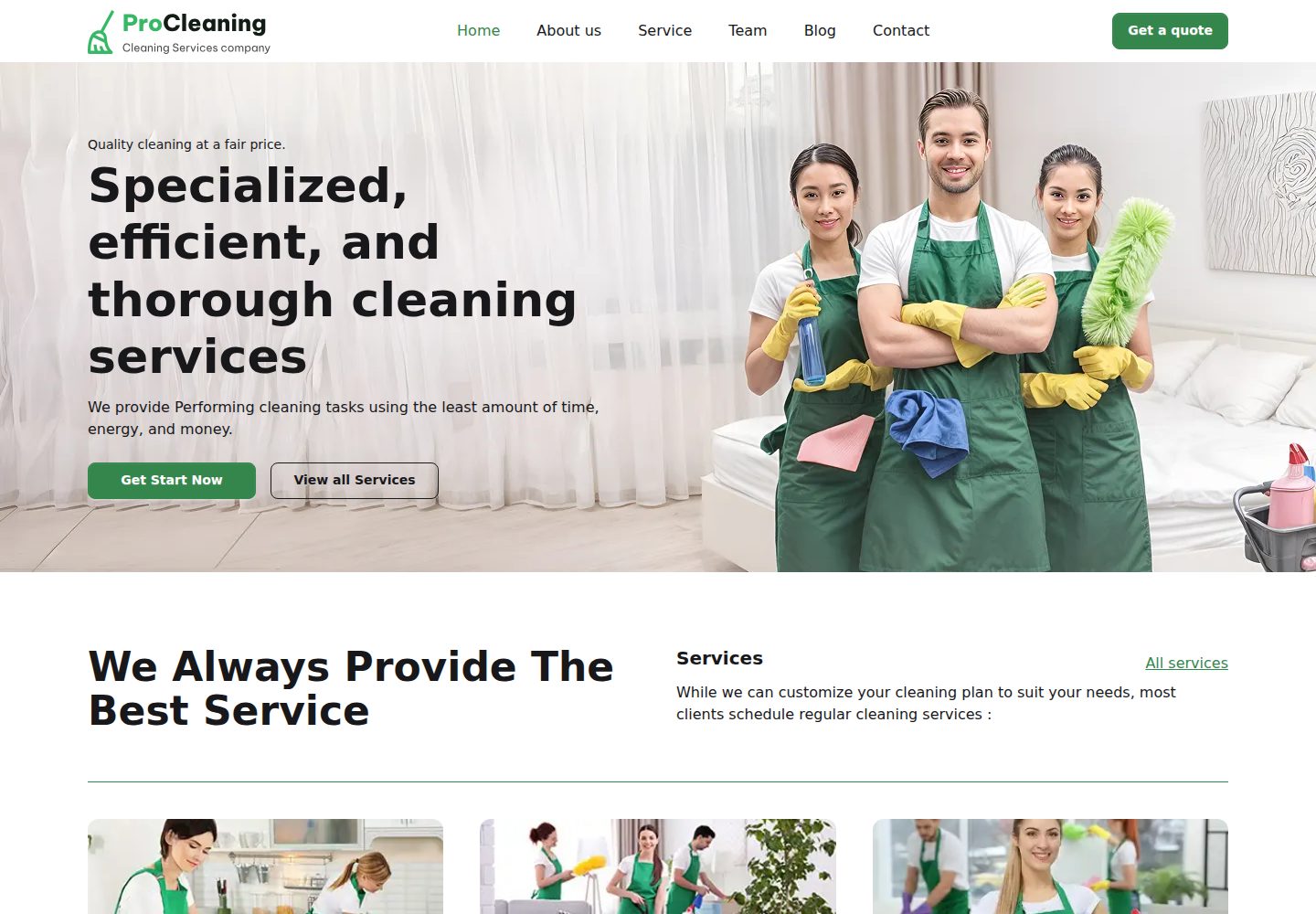
Desktop captureTop of page
Actual screenshot captured by the server browser.
All pages & views 3
Screenshots show visual appearance; interactive behavior may differ.
Recorded 2026-10-02View source
What stands out
A quick read of the recorded project description.
Pages cover home, services, team, blog, contact, and error pages, including list and detail levels
Content is written in Markdown and MDX, making it easy to maintain services, team, and blog posts
Built-in canonical links, meta tags, Open Graph, and JSON-LD structured data
Provides sitemap, robots.txt, and RSS output, with PWA support
The repository uses the MIT license, permitting use, modification, commercial use, and distribution of this version of the code
Template Details
ProCleaning is a landing page template for cleaning service companies, maintained by anastasiiaxfr in the repository and licensed under MIT. The template is built with Astro, styled with Tailwind CSS and DaisyUI, and organizes content with Markdown and MDX. It is suitable for building a marketing website that presents services, team information, customer testimonials, and contact details.
The page structure covers the home page, contact page, team list and team detail pages, service list and service detail pages, blog list and blog detail pages, as well as 404 and 500 error pages, broadly covering the common sections a cleaning service company needs for public-facing presentation. The template includes built-in SEO-related configuration, including canonical links, meta tags, Open Graph data, and JSON-LD structured data, and also provides sitemap, robots.txt, and RSS output, with PWA support.
The project structure is clear, with source code concentrated under src in the assets, components, content, layouts, and pages directories, and static assets placed in public. The development workflow uses npm scripts, the local development server runs on port 4321 by default, and the build output goes to the dist directory, deployable to static hosting platforms such as Vercel, Netlify, or Cloudflare Pages. The Lighthouse scores and specific Astro and Tailwind version numbers mentioned in the README are project self-descriptions and have not been verified item by item against the dependency list, so they are not repeated here.
Regarding usage limitations, the template's MIT license covers only the code in the repository; third-party assets such as demo images, fonts, and icons must be confirmed separately under their respective licenses. External services such as domains, hosting, databases, and payments may incur additional costs. The template is positioned as a landing page and does not include business system implementations such as an admin backend, online booking, or payments.
AstroCorporate website
Is it right for your project?
Use Cases
- Cleaning service companies building a marketing website to present services and team information
- Cleaning or home service brands using the blog section to publish cleaning knowledge and industry content
- Static sites that need basic SEO configuration such as sitemap, RSS, and structured data
- Teams that want to manage page content with Markdown/MDX and deploy to static hosting platforms
Suitable For
- Website building for cleaning, janitorial, home service, and similar service businesses
- Developers and small teams familiar with Astro or willing to maintain content using Markdown
- Projects that need to quickly launch a landing page and replace brand assets and copy themselves
- Static sites planned for deployment to Vercel, Netlify, or Cloudflare Pages
Getting started & customization
Use these recorded setup notes alongside the repository instructions for your chosen version.
- 1
Use npm install to install dependencies, and npm run dev to start the local development server (default localhost:4321)
- 2
npm run build generates the production site into the dist directory, and npm run preview allows local preview before deployment
- 3
Pages and content are located under src in directories such as components, content, layouts, and pages, with static assets placed in public
- 4
Third-party assets such as demo images, fonts, and icons must be checked under their respective licenses before use in a formal project
- 5
Domains, hosting, and external services may incur costs and should be evaluated independently
License & source material
Usage conditions & limitations
Free to use · keep license noticeThis entry covers the free version under the MIT license in the public repository; the free scope is the code of this version and does not mean that external services or third-party assets are free.
Must comply with when using
- Permits free use, modification, commercial use, and distribution of this version of the code.
- When distributing copies or substantial portions of the code, retain the original author's copyright notice and the complete MIT license notice.
- The code is provided as is; warranties and limitations of liability are governed by the original license and applicable law.
Additional costs & items to verify
- The template's design is inspired by the free ProCleaning Theme in the Figma community. If you need to use or modify that Figma design file, you should comply with its respective license terms; the MIT license covers only the code in this repository.
- The MIT license requires retaining the original copyright notice and license notice in all copies or substantial portions, with attribution to Anastasiia Berest / anastasiiaxfr.
- Demo images, fonts, icons, and other third-party assets must be checked under their respective licenses and cannot be judged solely by the code's MIT license.
- External services such as domains, hosting, databases, payments, or AI may incur separate charges.
View Original Text Basis
Permission is hereby granted, free of charge
Original License Text
ProCleaning is inspired by the free [ProCleaning Theme](https://www.figma.com/community/file/1382254995439883455/cleaning-services-website-landing-page)
Original README
https://github.com/anastasiiaxfr/ProCleaning/blob/main/LICENSEhttps://github.com/anastasiiaxfr/ProCleaning/blob/main/README.mdMade with ❤️ by [anastasiiaxfr](https://github.com/anastasiiaxfr/ProCleaning)
Original README
Compiled by DeepSeek based on repository license and README ·2026-10-02. Results only cover the materials read; dependencies, images, fonts, and subsequent term changes are subject to their respective original texts.
Project checks & description sources
Template Information
- Source platforms
- Astro Themes
- Documentation and maintenance reference score
- More documented · 87 / 100
- Technologies
- Astro
- Website type
- Corporate Website
How this score is calculated
Our heuristic uses license records (up to 30), a demo link (12), a preview (10), stars (15), recorded maintenance (15), description completeness (8), feature records (5) and classification data (5). It is not a code, security or performance test, or a Google score. A link does not establish tested functionality.
What to verify for this project
- Repository update recorded
- 2026-06-09
- Screenshot last checked
- 2026-10-02
A demo link is listed. Check it with your own content and viewport sizes; its presence does not confirm that forms, authentication or payments work.
The catalog identifies Astro as the primary stack. Check the actual dependency manifest and lockfile for versions and hosting requirements. These notes use recorded metadata, not a code audit or a deployment test.
Use a selection guide →How this description was prepared
AI-assisted description based on catalog records and repository material. Repository authors are not automatically the reviewers of this description.
Automatically checked against source and license rules; no manual editorial review.
Inspect the recorded source material
SHA-256: 39de5c9dc1795a7330d9aed7e0b2588f22da58f42a046dd8c23f4e1c8059366e
2026-10-02T23:41:02.725Z
Source file / repository> ⭐️ Love this theme? Star it to support our work! # ProCleaning: Cleaning services website landing page A modern, responsive landing page template for cleaning service businesses. Built with Astro and Tailwind CSS, ProCleaning helps cleaning companies showcase their services, team, testimonials, and contact information with a fast, professional, and conversion-focused design. > ⚡ Built with Astro 6, Tailwind CSS 4 & DaisyUI, and Markdown — optimized for performance, SEO, and simplicity.  ## Demo - ✨ [Live Demo](https://pro-cleaning-eta.vercel.app/) - 💨 [PageSpeed Insights Report](https://pagespeed.web.dev/analysis/https-pro-cleaning-eta-vercel-app/i1cp4fvfla?form_factor=mobile) - [Sitemap.xml](https://pro-cleaning-eta.vercel.app//sitemap-index.xml) - [Robots.txt](https://pro-cleaning-eta.vercel.app//robots.txt) - [Schema.org validator](https://search.google.com/test/rich-results/result?id=Xz43gQTsgKUxMJzb-N78WQ) - [RSS](https://pro-cleaning-eta.vercel.app/rss.xml) Features: - ✅ Minimal styling (make it your own!) - ✅ 99+/100 Lighthouse performance - ✅ SEO-friendly with canonical URLs and meta tags, Open Graph data, JSON-LD schema and PWA - ✅ Sitemap, robots.txt support - ✅ Markdown & MDX support - ✅ Fully responsive and accessible - ✅ Easily deploy to Vercel, Netlify, or Cloudflare Pages Pages: - home - contacts - team - team detail - service - service detail - blog - blog detail - 404 / 500 ## PWA support  ## Google pages speed   ## Open Graph Card   Main color changed to Luminance color: [Luminance color](https://app.contrast-finder.org/result.html?foreground=%23FFF&background=%2336B864&ratio=4.5&isBackgroundTested=true&algo=Rgb&lang=uk) ## 🚀 Project Structure Inside of your Astro project, you'll see the following folders and files: ```text ├── public/ ├── src/ │ ├── assets/ │ ├── components/ │ ├── content/ │ ├── layouts/ │ └── pages/ ├── astro.config.mjs ├── README.md ├── package.json └── tsconfig.json ``` ## 🧞 Commands All commands are run from the root of the project, from a terminal: | Command | Action | | :------------------------ | :----------------------------------------------- | | `npm install` | Installs dependencies | | `npm run dev` | Starts local dev server at `localhost:4321` | | `npm run build` | Build your production site to `./dist/` | | `npm run preview` | Preview your build locally, before deploying | | `npm run astro ...` | Run CLI commands like `astro add`, `astro check` | | `npm run astro -- --help` | Get help using the Astro CLI | ## 👀 Want to learn more? Check out [our documentation](https://docs.astro.build) or jump into our [Discord server](https://astro.build/chat). ## 🛠 Credits Made with ❤️ by [anastasiiaxfr](https://github.com/anastasiiaxfr/ProCleaning) ProCleaning is inspired by the free [ProCleaning Theme](https://www.figma.com/community/file/1382254995439883455/cleaning-services-website-landing-page)
Explore similar templates
Compare previews and descriptions within the same stack and category.

astrowind
AstroWind is a free, open-source Astro starter theme using Astro and Tailwind CSS, released under the MIT license.
Astro · Blog

astro-landing-page
An Astro + Tailwind CSS landing page example template with theme variables, dark mode, responsive layout, and Open Graph tags, under the MIT license, suitable as a starting point for single-page product, event, or corporate homepage sites.
Astro · Corporate Website

Tailcast
Tailcast is a dark-themed corporate website template built with Astro and Tailwind CSS for a fictional startup.
Astro · Corporate Website

Positivus
Positivus is an Astro and Tailwind CSS landing page theme for digital marketing agencies, maintained by manulthanura with a demo on Vercel.
Astro · Corporate Website

qwind
Qwind is a free and open-source website template built on Qwik and Tailwind CSS, featuring directory-based routing via QwikCity, a Markdown blog, dark mode, and static deployment configuration.
Astro · Tool Site

agency-landing-page-Astrojs
A single-page digital agency landing page template built with Astro and Tailwind CSS, featuring light and dark themes and a modular component directory. Suitable for static showcase pages, with MIT-licensed code and third-party assets requiring separate license verification.
Astro · Corporate Website