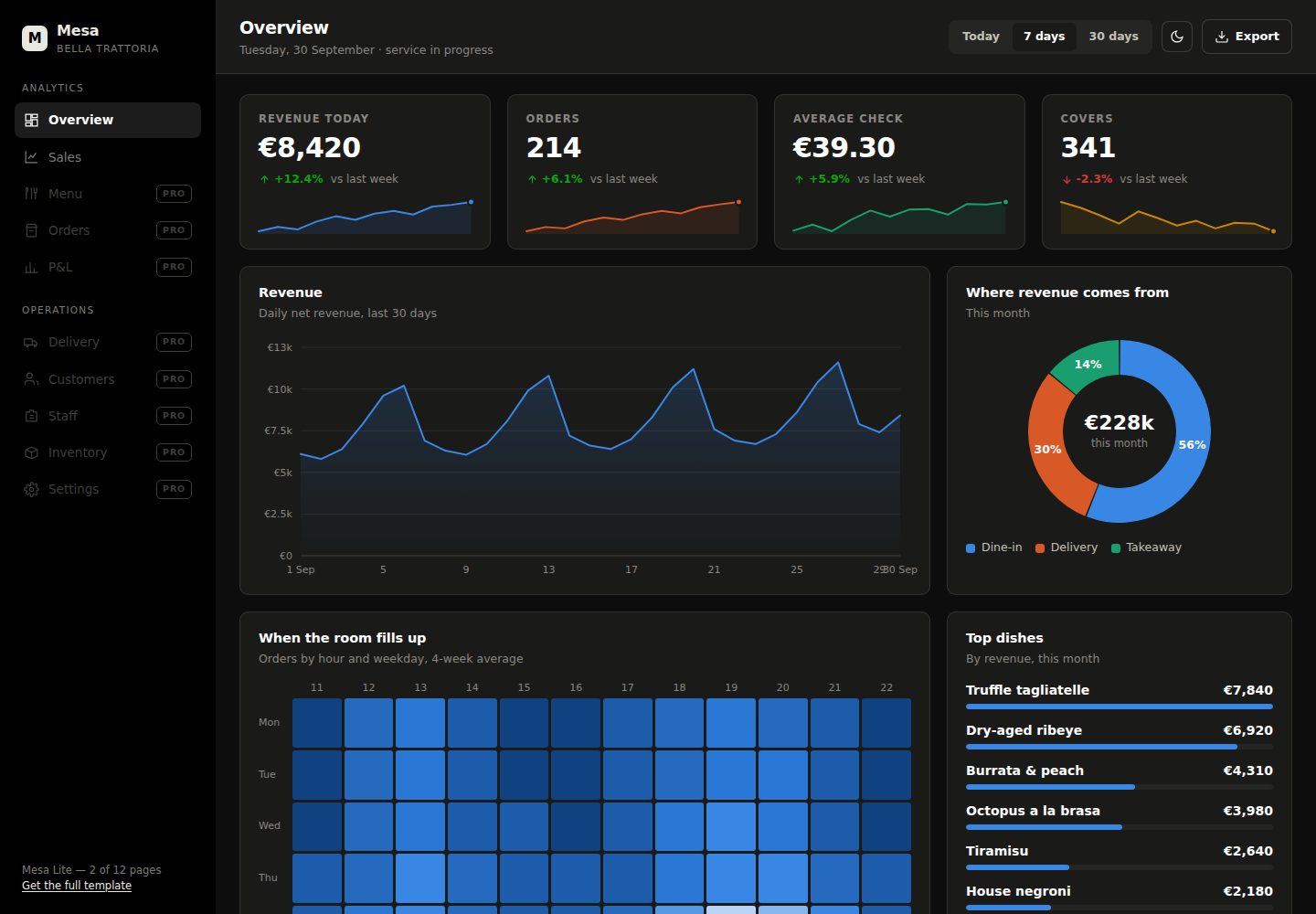
Zero dependencies: no npm install, bundler or CDN — open index.html and it runs
HTMLAdmin dashboardCorporate Website
mesa-lite — HTML Admin dashboard Template
By Anatolii198
Mesa Lite is a zero-dependency restaurant data dashboard template with overview and sales pages, charts hand-written in native SVG, and data centralized in js/data.js.
Explore the design
Compare the page layouts and mobile experience. Open any screenshot for a closer look.
Desktop homepage1 / 2
Desktop captureTop of page
Actual screenshot captured by the server browser.
All pages & views 2
Screenshots show visual appearance; interactive behavior may differ.
Recorded 2026-10-18View source
What stands out
A quick read of the recorded project description.
Two complete pages, overview and sales, plus login and 404 pages
Eight hand-written SVG chart types: line/area, vertical bars (grouped and stacked), horizontal stacked bars, donut, sparkline, ranked bar list, trend row, weekday × hour heatmap
All charts support hover tooltips and redraw on window resize and theme switch
Data centralized in a single DATA object in js/data.js; replace values to update the pages
Dark and light themes, with the choice saved in localStorage
Template Details
Mesa Lite is a dashboard template for restaurants, cafes and bars; the repository offers a free version. It includes two complete pages — index.html (overview: KPI cards, revenue, weekday × hour heatmap, top dishes, channel breakdown, average order value, live order feed) and sales.html (sales: revenue, payment mix, gross profit, category margins, channel × payment, period-over-period) — plus login.html and 404.html. All charts are hand-written SVG in eight types, with hover tooltips, redraw on window resize and redraw on theme switch.
Usage is simple: clone the repository and open index.html directly in a browser, or serve it over HTTP with python -m http.server 8000. All data is centralized in the DATA object in js/data.js; replace the values while keeping the structure to update both pages. Charts are drawn through APIs such as Mesa.line, Mesa.bars and Mesa.donut, colors use CSS custom properties (--s1 to --s4), and theme tokens sit at the top of css/style.css. Dark and light modes are supported, and the choice is saved in localStorage.
The README states explicitly that the date-range buttons and the login form are placeholders that need to be connected to a backend. The commercial version offers more pages and chart types. Browsers supported are current Chrome, Edge, Firefox and Safari, with responsiveness from 360px. The README does not provide information on performance, production readiness or specific framework versions.
HTMLAdmin panelCorporate website
Is it right for your project?
Use Cases
- Quickly prototyping a data overview dashboard for a restaurant, cafe or bar
- Static dashboard projects that must run offline without external dependencies
- A reference template for learning how hand-written SVG charts and theme switching are implemented
- Evaluating whether to upgrade from the free version to the commercial version with more pages and chart types
Suitable For
- Restaurant, cafe or bar operators who need a zero-dependency static dashboard template
- Front-end developers who want to edit data.js directly to show their own demo data
- Learners looking for examples of hand-written SVG chart implementations
Getting started & customization
Use these recorded setup notes alongside the repository instructions for your chosen version.
- 1
Clone the repository and open index.html directly in a browser; no dependencies to install
- 2
If the browser blocks local files, run python -m http.server 8000 in the project directory and access it over HTTP
- 3
Replace the values in the DATA object in js/data.js while keeping the structure, and both pages update together
- 4
The date-range buttons and the login form are placeholders that need to be connected to a backend
- 5
Theme tokens sit at the top of css/style.css; chart colors use the CSS custom properties --s1 to --s4
License & source material
Usage conditions & limitations
Free to use · keep license noticeThis listing covers the free version in the public repository, which is under the MIT license; the free scope is that version's code and does not mean external services or third-party assets are free.
Must comply with when using
- The code of this version may be used, modified, used commercially and distributed free of charge.
- When distributing copies or substantial portions of the code, the original author's copyright notice and the full MIT license notice must be retained.
- The code is provided as is; warranties and limitations of liability are governed by the original license and applicable law.
Additional costs & items to verify
- Demo images, fonts, icons and other third-party assets must be checked against their own licenses; the code's MIT license alone does not settle this.
- External services such as domains, hosting, databases, payments or AI may incur separate charges.
- The repository is a free, reduced version; the commercial Mesa version offers an additional 10 pages and 3 chart types and must be purchased separately.
- The full Mesa version costs 29 USD; the free version does not include all of its pages and charts.
- Data import, POS/spreadsheet conversion or integration with API-based systems are paid services quoted per job and are not part of the free code.
- The numbers on the pages are demo data for a fictional restaurant and contain no real business data.
- The date-range buttons and the login form are deliberate placeholders and only work once connected to a backend.
View Original Text Basis
Permission is hereby granted, free of charge
Original License Text
This repository is the free cut. The commercial version adds ten more pages and three more chart types:
Original README
**[Get Mesa — $29](https://payhip.com/b/C8O71)** · [full demo, all 12 pages](https://mesa-dashboard-demo.netlify.app)
Original README
Need it filled with your own numbers? Swapping `data.js` is straightforward, but a one-off load of your data, a converter from your POS or spreadsheet exports, or a live connection to a system with an API is a paid service, quoted per job — ask through the store.
Original README
The figures here are realistic demo data for a fictional restaurant; no real business numbers are included. The date-range buttons and the sign-in form are deliberate placeholders — point them at your own backend and the rest of the page already works.
Original README
https://github.com/Anatolii198/mesa-lite/blob/main/LICENSEhttps://github.com/Anatolii198/mesa-lite/blob/main/README.mdThe figures here are realistic demo data for a fictional restaurant; no real business numbers are included. The date-range buttons and the sign-in form are deliberate placeholders — point them at your own backend and the rest of the page already works.
Original README
Compiled by DeepSeek based on repository license and README ·2026-10-18. Results only cover the materials read; dependencies, images, fonts, and subsequent term changes are subject to their respective original texts.
Project checks & description sources
Template Information
- Source platforms
- GitHub
- Documentation and maintenance reference score
- More documented · 85 / 100
- Technologies
- HTML
- Website type
- Admin dashboard · Corporate Website
How this score is calculated
Our heuristic uses license records (up to 30), a demo link (12), a preview (10), stars (15), recorded maintenance (15), description completeness (8), feature records (5) and classification data (5). It is not a code, security or performance test, or a Google score. A link does not establish tested functionality.
What to verify for this project
- Repository update recorded
- 2026-10-18
- Screenshot last checked
- 2026-10-18
A demo link is listed. Check it with your own content and viewport sizes; its presence does not confirm that forms, authentication or payments work.
The catalog identifies HTML as the primary stack. Check the actual dependency manifest and lockfile for versions and hosting requirements. These notes use recorded metadata, not a code audit or a deployment test.
Use a selection guide →How this description was prepared
AI-assisted description based on catalog records and repository material. Repository authors are not automatically the reviewers of this description.
Review declaration: codex-user-requested-batch-review-20261021 · 2026-10-21
Inspect the recorded source material
SHA-256: d9620f614fe034fab39279cde4a4b67184b3caa0daeb54493f61a026e0f8bc62
2026-10-18T17:43:24.609Z
Source file / repository# Mesa Lite — restaurant analytics dashboard, zero dependencies
A dashboard template for restaurants, cafés and bars. Open `index.html` and it runs — no npm install, no bundler, no CDN, nothing that phones home.
The charts are not Chart.js. They are plain SVG, written from scratch, in one 25 KB file.

**[Live demo](https://Anatolii198.github.io/mesa-lite/)** · dark and light · works offline
---
## What's in here
Two full pages plus the two small ones that usually get skipped:
| Page | What it shows |
|---|---|
| `index.html` | Overview — KPI tiles, revenue, weekday × hour heatmap, top dishes, channel split, average check, live order feed |
| `sales.html` | Sales — revenue, payment mix, gross profit, margin by category, channel × payment, month-on-month |
| `login.html` | Sign-in |
| `404.html` | Not found |
Eight chart types, all hand-written:
`line / area` · `vertical bars (grouped and stacked)` · `horizontal stacked bars` · `donut with share labels` · `sparklines` · `ranked bar list` · `trend rows` · `weekday × hour heatmap`
Every chart has a hover tooltip and redraws on resize and on theme switch.

---
## Quick start
```bash
git clone https://github.com/Anatolii198/mesa-lite.git
cd mesa-lite
```
Then open `index.html` in a browser. That's the whole setup.
If your browser blocks local files, serve the folder over HTTP:
```bash
python -m http.server 8000
```
---
## Your own numbers
Every figure lives in `js/data.js` inside a single `DATA` object. Replace the values, keep the shape, and both pages update. Nothing is hard-coded in the markup.
```js
const DATA = {
currency: '€',
kpi: {
revenue: { value: 8420, delta: 12.4, spark: [6100, 6480, /* … */] },
// …
},
revenue30: { labels: ['1 Sep', '2 Sep', /* … */], values: [6800, 7250, /* … */] },
// …
};
```
## Drawing a chart
Every chart takes a CSS selector and a config object:
```js
Mesa.line('#chart-revenue', {
labels: DATA.revenue30.labels,
series: [{ name: 'Revenue', color: '--s1', values: DATA.revenue30.values }],
currency: '€',
height: 268
});
Mesa.bars('#chart-channels', {
labels: DATA.channels.labels,
series: DATA.channels.series,
stacked: true,
currency: '€'
});
Mesa.donut('#chart-split', { items: DATA.channelSplit, currency: '€' });
```
`color` takes a CSS custom property name (`--s1` … `--s4`), so series colours come from the stylesheet and both themes stay correct. The palette is checked for deuteranopia, protanopia and tritanopia — adjacent categorical colours stay distinguishable, and status colours always ship with a label rather than colour alone.
## Theming
Design tokens sit at the top of `css/style.css`. The pages ship dark with no flash of white; the toggle switches to light and remembers the choice in `localStorage`. Charts re-read their colours on switch — it is not a CSS filter inversion.
---
## The full template
This repository is the free cut. The commercial version adds ten more pages and three more chart types:
| | Mesa Lite | Mesa |
|---|---|---|
| Pages | 2 + sign-in + 404 | 12 + sign-in + 404 |
| Chart types | 8 | 11 |
| Menu, Orders, P&L, Delivery, Customers, Staff, Inventory, Settings | — | ✓ |
| P&L waterfall, service timeline, menu-engineering scatter | — | ✓ |
| CSV export of any page | — | ✓ |
| README with the full chart API | — | ✓ |
**[Get Mesa — $29](https://payhip.com/b/C8O71)** · [full demo, all 12 pages](https://mesa-dashboard-demo.netlify.app)
Need it filled with your own numbers? Swapping `data.js` is straightforward, but a one-off load of your data, a converter from your POS or spreadsheet exports, or a live connection to a system with an API is a paid service, quoted per job — ask through the store.
---
## Notes
The figures here are realistic demo data for a fictional restaurant; no real business numbers are included. The date-range buttons and the sign-in form are deliberate placeholders — point them at your own backend and the rest of the page already works.
Browser support: current Chrome, Edge, Firefox and Safari, desktop and mobile. Responsive from 360 px up.
## License
MIT — see [LICENSE](LICENSE). Use it in personal and commercial projects.
Explore similar templates
Compare previews and descriptions within the same stack and category.

AdminLTE
An HTML admin dashboard built with Bootstrap 5 and vanilla JavaScript. Astro builds the documentation; React, Vue and Angular editions live in separate repositories.
HTML · Admin dashboard

gentelella
Gentelella v4 is a free, open-source admin dashboard template maintained by Colorlib, built with vanilla JavaScript, SCSS, and Vite 8 without Bootstrap or jQuery.
HTML · Admin dashboard

coreui-free-bootstrap-admin-template
A free Bootstrap admin template maintained by CoreUI, built on CoreUI's own UI component library. It provides compiled HTML pages and Pug template source code, covering dashboards, authentication, forms, components, icons, and error pages.
HTML · Admin dashboard

dashboards
A collection of responsive dashboard HTML templates open-sourced by Keen IO, built on CSS Grid, offering multiple prebuilt admin data interface layouts.
HTML · Admin dashboard

SB Admin 2
SB Admin 2 is a classic Bootstrap admin template from Start Bootstrap, offering dashboards, charts, tables, and common management pages.
HTML · Admin dashboard

Adminator-admin-dashboard
Adminator 4 is a vanilla HTML, CSS and JavaScript admin dashboard template with a CSS-variable token design system, built-in light and dark themes, no jQuery or Bootstrap dependency, and 18 pages covering dashboards, mail, calendar, charts, forms, tables and error pages.
HTML · Admin dashboard