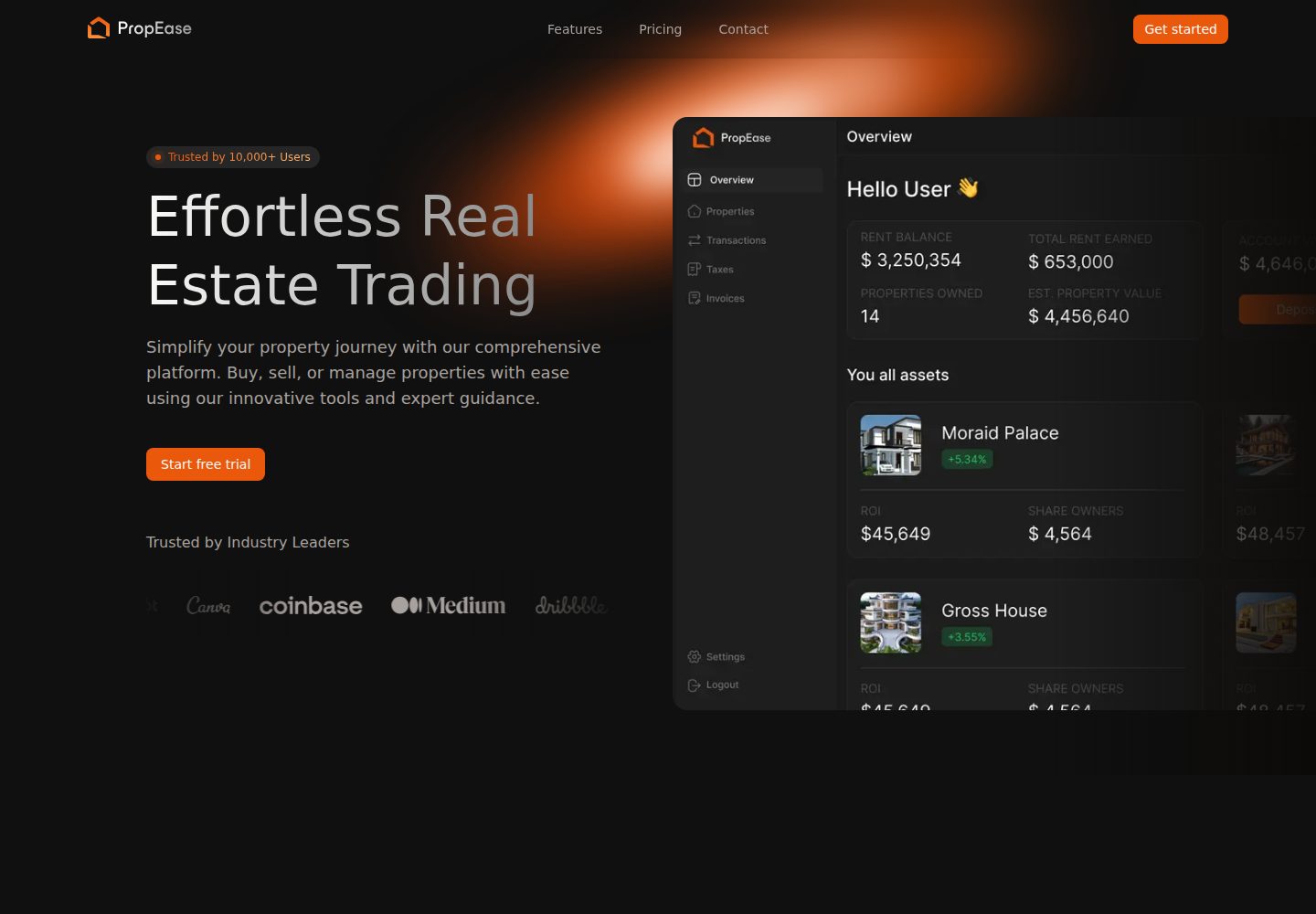
The README positions it as a real estate management landing page that showcases property listings, agent profiles, and real estate services
Next.jsReactCorporate Website
propease-nextjs-frontend-app — Next.js Business Template
By aphelion31
PropEase is a Next.js-based real estate management landing page template that showcases property listings, agent profiles, and real estate services. The README lists a tech stack including Next.js, TailwindCSS, Shadcn UI, Framer Motion, React Hook Form, Clerk, TypeScript, and Number Flow.
Explore the design
Compare the page layouts and mobile experience. Open any screenshot for a closer look.
Desktop homepage1 / 2
Desktop captureTop of page
Actual screenshot captured by the server browser.
All pages & views 2
Screenshots show visual appearance; interactive behavior may differ.
Recorded 2026-10-14View source
What stands out
A quick read of the recorded project description.
The tech stack includes Next.js, TailwindCSS, Shadcn UI, Framer Motion, React Hook Form, Clerk, TypeScript, and Number Flow
Uses Clerk for authentication, and the environment variable example includes sign-in and sign-up related configuration
Provides two ways to install dependencies and start the development server: pnpm and yarn
Deployment instructions point to the Vercel platform and the official Next.js deployment documentation
Licensed under MIT
Template Details
PropEase's README positions it as a modern real estate management landing page for showcasing property listings, agent profiles, and real estate services, and emphasizes an elegant and responsive design. On the tech stack side, the README explicitly lists Next.js, TailwindCSS, Shadcn UI, Framer Motion, React Hook Form, Clerk, TypeScript, and Number Flow. Installation steps include cloning the repository, installing dependencies with pnpm or yarn, running the development server, and renaming .env.example to .env before configuring the app name and Clerk-related environment variables. The deployment section only points to the Vercel platform and the Next.js deployment documentation, without providing more specific deployment configuration details. The README does not state the number of pages, the specific routing structure, data sources, backend APIs, or production environment considerations; these need to be confirmed by reviewing the source code or actually running it.
Next.jsCorporate Website
Is it right for your project?
Use Cases
- As a starting point for a landing page for a real estate management or agency business, to showcase property listings and service information
- For demonstrating a page implementation using Next.js with TailwindCSS, Shadcn UI, and Framer Motion
- As a reference in frontend projects that need Clerk sign-in and sign-up flows
- For learning how to integrate React Hook Form and Number Flow into a page
Suitable For
- Frontend developers who need a real estate landing page template
- Developers who want a reference for integrating Next.js with Clerk
- Projects building interfaces with TailwindCSS and Shadcn UI
- Teams that need a modifiable frontend template under the MIT license
Getting started & customization
Use these recorded setup notes alongside the repository instructions for your chosen version.
- 1
After cloning the repository, install dependencies with pnpm install or yarn install
- 2
Start the development server with pnpm run dev or yarn dev; by default it is accessible at http://localhost:3000
- 3
Rename .env.example to .env, and fill in NEXT_PUBLIC_APP_NAME as well as Clerk's publishable key, secret key, and sign-in/sign-up related URLs
- 4
The README recommends deploying via the Vercel platform and referring to the Next.js deployment documentation; no other deployment configuration details are provided
License & source material
Usage conditions & limitations
Free to use · keep license noticeThis entry covers the free version under the MIT license in a public repository; the free scope is the code of this version and does not mean that external services or third-party assets are free.
Must comply with when using
- You are allowed to use, modify, commercialize, and distribute the code of this version for free.
- When distributing copies or substantial portions of the code, retain the original author's copyright notice and the complete MIT license notice.
- The code is provided as is; warranties and limitations of liability are governed by the original license and applicable law.
Additional costs & items to verify
- Demo images, fonts, icons, and other third-party assets must be checked against their respective licenses; they cannot be judged solely by the code's MIT license.
- External services such as domains, hosting, databases, payments, or AI may incur separate charges.
- Using Clerk for authentication requires registering a Clerk account and configuring environment variables such as the publishable key and secret key, which is an external service dependency.
- The Clerk publishable key environment variable must be filled in, otherwise the authentication functionality will not work properly.
- The Clerk secret key environment variable must be filled in, which is an external service credential requirement.
View Original Text Basis
Permission is hereby granted, free of charge
Original License Text
- **Clerk** – Authentication
Original README
NEXT_PUBLIC_CLERK_PUBLISHABLE_KEY=
Original README
https://github.com/aphelion31/propease-nextjs-frontend-app/blob/master/LICENSEhttps://github.com/aphelion31/propease-nextjs-frontend-app/blob/master/README.mdCLERK_SECRET_KEY=
Original README
Compiled by DeepSeek based on repository license and README ·2026-10-14. Results only cover the materials read; dependencies, images, fonts, and subsequent term changes are subject to their respective original texts.
Project checks & description sources
Template Information
- Source platforms
- GitHub
- Documentation and maintenance reference score
- Partly documented · 66 / 100
- Technologies
- Next.js · React
- Website type
- Corporate Website
How this score is calculated
Our heuristic uses license records (up to 30), a demo link (12), a preview (10), stars (15), recorded maintenance (15), description completeness (8), feature records (5) and classification data (5). It is not a code, security or performance test, or a Google score. A link does not establish tested functionality.
What to verify for this project
- Repository update recorded
- 2025-07-22
- Screenshot last checked
- 2026-10-14
A demo link is listed. Check it with your own content and viewport sizes; its presence does not confirm that forms, authentication or payments work.
The catalog identifies Next.js as the primary stack. Check the actual dependency manifest and lockfile for versions and hosting requirements. These notes use recorded metadata, not a code audit or a deployment test.
Use a selection guide →How this description was prepared
AI-assisted description based on catalog records and repository material. Repository authors are not automatically the reviewers of this description.
Review declaration: codex-user-requested-batch-review-20261015 · 2026-10-15
Inspect the recorded source material
SHA-256: 0c7ad2cac61aa29ecf94ed4eb58c197778d245640750214e7be09899dffc8959
2026-10-14T10:36:19.953Z
Source file / repository
# PropEase - Real Estate Management Landing Page


<img src="https://github.com/user-attachments/assets/c5463a31-b063-4064-bc4b-0e7e3b4aa73e" alt="Propease Thumbnail">

## 🔥 Introduction

PropEase is a modern real estate management landing page that showcases property listings, agent profiles, and real estate services with an elegant and responsive design.

## 💻 Tech Stack

- **Next.js 15** – React framework for production
- **TailwindCSS** – Utility-first CSS framework
- **Shadcn UI** – Reusable components
- **Framer Motion** – Smooth animations
- **React Hook Form** – Form validations
- **Clerk** – Authentication
- **TypeScript** – Type-safe code
- **Number Flow** – Smooth number animations

## 🛠️ Installation

1. Clone the repository:
    ```bash
    git clone https://github.com/bforbilly24/propease-nextjs-frontend-app.git
    ```

2. Install dependencies:
    ```bash
    pnpm install
    # or
    yarn install
    ```

3. Run the development server:
    ```bash
    pnpm run dev
    # or
    yarn dev
    ```
4. Environment Variables
Rename `.env.example` to `.env`:

```env
    NEXT_PUBLIC_APP_NAME=PropEase

    NEXT_PUBLIC_CLERK_PUBLISHABLE_KEY=
    CLERK_SECRET_KEY=
    NEXT_PUBLIC_CLERK_SIGN_IN_URL=/signin
    NEXT_PUBLIC_CLERK_SIGN_UP_URL=/signup
    NEXT_PUBLIC_CLERK_SIGN_IN_FALLBACK_URL=/
    NEXT_PUBLIC_CLERK_SIGN_UP_FALLBACK_URL=/
```

5. Open [http://localhost:3000](http://localhost:3000) in your browser


## 🚀 Deploy on Vercel

The easiest way to deploy your Next.js app is to use the [Vercel Platform](https://vercel.com/new) from the creators of Next.js.

Check out the [Next.js deployment documentation](https://nextjs.org/docs/deployment) for more details.


## 📜 License

This project is licensed under the MIT License - see the [LICENSE](LICENSE) file for details.Explore similar templates
Compare previews and descriptions within the same stack and category.

SaaS-Boilerplate
SaaS-Boilerplate is an open-source SaaS starter template built with Next.js App Router, React 19, TypeScript, Tailwind CSS, and Shadcn UI.
Next.js · SaaS

Next-JS-Landing-Page-Starter-Template
A free Next.js landing page starter template written in Tailwind CSS and TypeScript, featuring built-in navbar, hero, features, CTA banner, and footer sections.
Next.js · Corporate Website

next-saas-starter
A free Next.js SaaS marketing landing page template from Blazity, using static generation and styled-components with no extra UI library.
Next.js · SaaS

startup-nextjs
Startup is a free, MIT-licensed Next.js template from NextJSTemplates for SaaS startups and corporate landing pages.
Next.js · SaaS

shadcn-landing-page
A Next.js landing page template built with Shadcn, TypeScript, and Tailwind, converted from a Shadcn-Vue version. It includes sections such as Navbar, mobile Sidebar, Hero, Pricing, FAQ, and Footer, and highlights responsive design, navigation, and dark mode.
Next.js · Corporate Website

shadcn-dashboard-landing-template
An open-source admin dashboard and marketing landing page template built on shadcn/ui and Tailwind CSS, with both Vite + React and Next.js versions in one repository.
Next.js · Admin dashboard