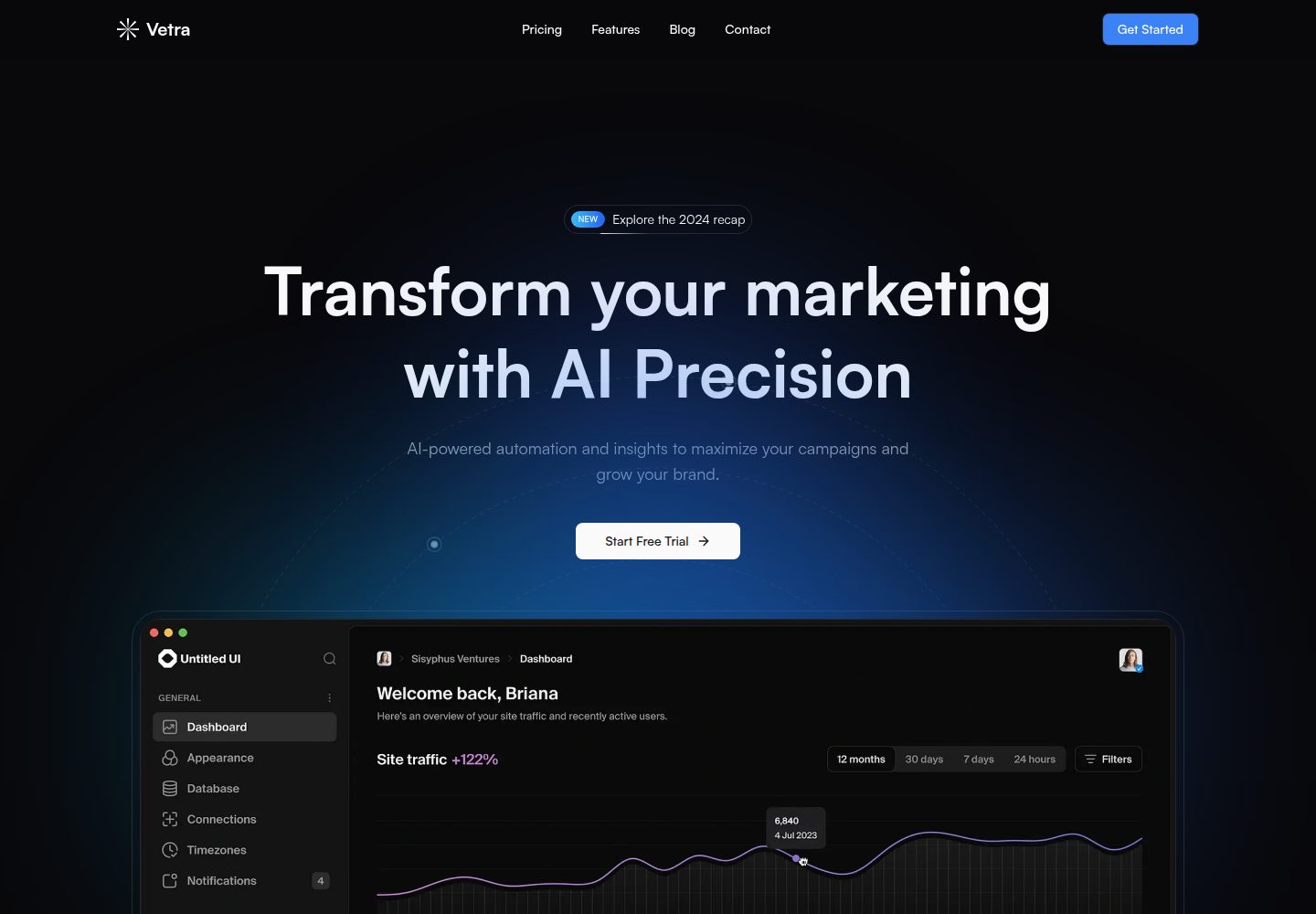
The README states the template is for an AI marketing automation platform and includes interfaces for campaign management, content generation, and performance analysis
Next.jsReactCorporate Website
vetra-nextjs-frontend-app — Next.js Business Template
By aphelion31
Vetra is a Next.js-based front-end template for an AI marketing automation platform; the README states it provides interfaces for campaign management, content generation, and performance analysis.
Explore the design
Compare the page layouts and mobile experience. Open any screenshot for a closer look.
Desktop homepage1 / 2
Desktop captureTop of page
Actual screenshot captured by the server browser.
All pages & views 2
Screenshots show visual appearance; interactive behavior may differ.
Recorded 2026-10-14View source
What stands out
A quick read of the recorded project description.
The tech stack includes Next.js 15, TailwindCSS, Shadcn UI, Framer Motion, TypeScript, and Number Flow
Provides two ways to install dependencies and start the development server: pnpm and yarn
Requires configuring the NEXT_PUBLIC_APP_URL environment variable via a .env file
The deployment section points to the Vercel platform and the Next.js deployment documentation
Uses the MIT license; the README welcomes Pull Requests
Template Details
Vetra is a front-end project for an AI marketing automation platform, positioned by the README as an interface for managing marketing campaigns, generating content, and viewing performance analysis. For the tech stack, the README lists Next.js 15, TailwindCSS, Shadcn UI, Framer Motion, TypeScript, and Number Flow. Installation steps are to clone the repository, install dependencies with pnpm or yarn, run pnpm run dev or yarn dev, and open http://localhost:3000 in a browser. For environment variables, the README requires creating a .env file in the root directory and setting NEXT_PUBLIC_APP_URL. For deployment, the README only points to the Vercel platform and the Next.js deployment documentation, without more specific deployment configuration. The README does not describe backend APIs, data sources, authentication methods, AI model integration, or production environment considerations; these need to be confirmed independently.
Next.jsCorporate Website
Is it right for your project?
Use Cases
- Building a front-end interface prototype for a marketing automation platform
- Using it as a project starting point for a Next.js and Shadcn UI combination
- Running it locally and viewing campaign management and analytics pages
- Doing secondary development based on the existing code and submitting Pull Requests
Suitable For
- Developers who need a front-end template for an AI marketing automation platform
- Teams using the Next.js, TailwindCSS, and TypeScript tech stack
- Individuals or organizations that want to reuse the code under the MIT license and do secondary development
Getting started & customization
Use these recorded setup notes alongside the repository instructions for your chosen version.
- 1
Clone the repository: git clone https://github.com/bforbilly24/vetra-nextjs-frontend-app.git
- 2
Install dependencies: pnpm install or yarn install
- 3
Start the development server: pnpm run dev or yarn dev
- 4
Open http://localhost:3000 in a browser
- 5
Create a .env file in the root directory and set NEXT_PUBLIC_APP_URL
License & source material
Usage conditions & limitations
Free to use · keep license noticeThis entry covers the free version in a public repository under the MIT license; the free scope is the code of that version and does not mean external services or third-party assets are free.
Must comply with when using
- Allows free use, modification, commercial use, and distribution of that version's code.
- When distributing copies or substantial portions of the code, retain the original author's copyright notice and the complete MIT license notice.
- The code is provided as is; warranties and limitations of liability are governed by the original license and applicable law.
Additional costs & items to verify
- Demo images, fonts, icons, and other third-party assets must be checked against their respective licenses and cannot be judged solely by the code's MIT license.
- External services such as domains, hosting, databases, payments, or AI may incur separate charges.
View Original Text Basis
https://github.com/aphelion31/vetra-nextjs-frontend-app/blob/master/LICENSEhttps://github.com/aphelion31/vetra-nextjs-frontend-app/blob/master/README.mdPermission is hereby granted, free of charge
Original License Text
Compiled by DeepSeek based on repository license and README ·2026-10-14. Results only cover the materials read; dependencies, images, fonts, and subsequent term changes are subject to their respective original texts.
Project checks & description sources
Template Information
- Source platforms
- GitHub
- Documentation and maintenance reference score
- Partly documented · 69 / 100
- Technologies
- Next.js · React
- Website type
- Corporate Website
How this score is calculated
Our heuristic uses license records (up to 30), a demo link (12), a preview (10), stars (15), recorded maintenance (15), description completeness (8), feature records (5) and classification data (5). It is not a code, security or performance test, or a Google score. A link does not establish tested functionality.
What to verify for this project
- Repository update recorded
- 2025-07-21
- Screenshot last checked
- 2026-10-14
A demo link is listed. Check it with your own content and viewport sizes; its presence does not confirm that forms, authentication or payments work.
The catalog identifies Next.js as the primary stack. Check the actual dependency manifest and lockfile for versions and hosting requirements. These notes use recorded metadata, not a code audit or a deployment test.
Use a selection guide →How this description was prepared
AI-assisted description based on catalog records and repository material. Repository authors are not automatically the reviewers of this description.
Review declaration: codex-user-requested-batch-review-20261015 · 2026-10-15
Inspect the recorded source material
SHA-256: f0e63f021d7b78123c18aeec5bde43f926d4a5b546724a8f39443c4dea1423fa
2026-10-14T10:03:19.487Z
Source file / repository<img src="https://github.com/user-attachments/assets/9594d359-0988-4fec-b588-0dcee51168e3" alt="Vetra Logo" width="50" height="50">
# 🚀 Vetra - AI Marketing Automation Platform
<img src="https://github.com/user-attachments/assets/df541304-ea1c-4ebe-b6fd-2e093680314f" alt="Vetra Thumbnail">
## 🌟 Introduction
Vetra is an AI-powered marketing automation platform that transforms your marketing workflow in seconds. Built with modern technologies, it offers a sleek interface for managing marketing campaigns, content generation, and performance analytics.
## 💻 Tech Stack
- **Next.js 15** – React framework for production
- **TailwindCSS** – Utility-first CSS framework
- **Shadcn UI** – Reusable component system
- **Framer Motion** – Smooth animations
- **TypeScript** – Type-safe code
- **Number Flow** – Smooth number animations
## 🛠️ Installation
1. Clone the repository:
```bash
git clone https://github.com/bforbilly24/vetra-nextjs-frontend-app.git
```
2. Install dependencies:
```bash
pnpm install
# or
yarn install
```
3. Run the development server:
```bash
pnpm run dev
# or
yarn dev
```
4. Open [http://localhost:3000](http://localhost:3000) in your browser
## 🔧 Environment Variables
Create a `.env` file in the root directory:
```env
NEXT_PUBLIC_APP_URL=your_app_url
```
## 🚀 Deploy on Vercel
The easiest way to deploy your Next.js app is to use the [Vercel Platform](https://vercel.com/new) from the creators of Next.js.
Check out the [Next.js deployment documentation](https://nextjs.org/docs/deployment) for more details.
## 🤝 Contributing
Contributions are welcome! Please feel free to submit a Pull Request.
1. Fork the project
2. Create your feature branch (`git checkout -b feature/AmazingFeature`)
3. Commit your changes (`git commit -m 'Add some AmazingFeature'`)
4. Push to the branch (`git push origin feature/AmazingFeature`)
5. Open a Pull Request
## 📜 License
This project is licensed under the MIT License - see the [LICENSE](LICENSE) file for details.Explore similar templates
Compare previews and descriptions within the same stack and category.

SaaS-Boilerplate
SaaS-Boilerplate is an open-source SaaS starter template built with Next.js App Router, React 19, TypeScript, Tailwind CSS, and Shadcn UI.
Next.js · SaaS

Next-JS-Landing-Page-Starter-Template
A free Next.js landing page starter template written in Tailwind CSS and TypeScript, featuring built-in navbar, hero, features, CTA banner, and footer sections.
Next.js · Corporate Website

next-saas-starter
A free Next.js SaaS marketing landing page template from Blazity, using static generation and styled-components with no extra UI library.
Next.js · SaaS

startup-nextjs
Startup is a free, MIT-licensed Next.js template from NextJSTemplates for SaaS startups and corporate landing pages.
Next.js · SaaS

shadcn-landing-page
A Next.js landing page template built with Shadcn, TypeScript, and Tailwind, converted from a Shadcn-Vue version. It includes sections such as Navbar, mobile Sidebar, Hero, Pricing, FAQ, and Footer, and highlights responsive design, navigation, and dark mode.
Next.js · Corporate Website

shadcn-dashboard-landing-template
An open-source admin dashboard and marketing landing page template built on shadcn/ui and Tailwind CSS, with both Vite + React and Next.js versions in one repository.
Next.js · Admin dashboard