Laravel backend and React frontend connected via Inertia, without building a separate API
LaravelReactStarter
mylarainreact — Laravel Starter Template
By ary21
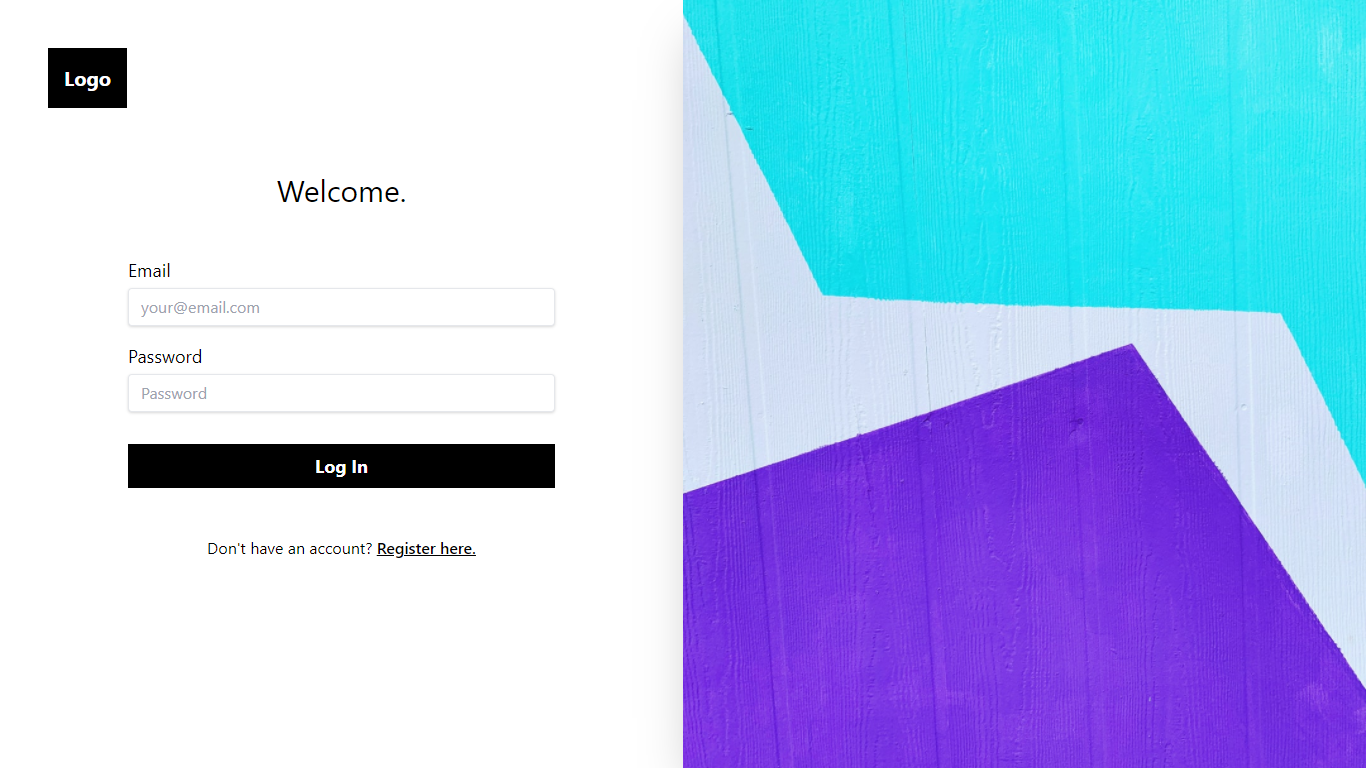
A starter template based on Laravel, Inertia, React, and Tailwind, with built-in Laravel Fortify authentication, providing example login, home, profile, and menu pages.
Explore the design
Compare the page layouts and mobile experience. Open any screenshot for a closer look.
Author preview
Author-provided preview
Preview provided in the project README.
One original preview is available. Open the full image to inspect the design.
Screenshots show visual appearance; interactive behavior may differ.
Recorded 2026-10-13View source
What stands out
A quick read of the recorded project description.
Built-in Laravel Fortify authentication, with authentication controllers published into the application for customization
Uses Tailwind CSS for styling
Includes Laravel Sail local development environment configuration
Integrates Ziggy to access Laravel routes in JavaScript
Provides example login, home, profile, and menu pages
Template Details
mylarainreact is a Laravel starter project that uses React on the front end, connects to the back end via Inertia, and uses Tailwind CSS for styling. The project improves upon kachidk/React-Inertia-Laravel-Tailwind-starter-kit, aiming to provide a minimal starting point for Laravel applications that need authentication.
The template includes built-in Laravel Fortify authentication, and the authentication controllers are published into the application for easy modification according to business needs. The README shows screenshots of the login page, home page, profile page, and menu page, indicating that these pages are included in the initial structure.
The project also includes Laravel Sail for a local development environment and configures Ziggy to access Laravel routes in JavaScript. The README mentions setting up a global alias '@' for resources/js via webpack to facilitate absolute path imports.
Regarding usage limitations, the README's installation steps include deleting the docs directory and README.md, indicating that the documentation and preview images are template example content and should not be kept in the final project. The README's note about hard redirects addresses session refresh and 419 errors, which is a usage consideration rather than a general feature. The project was last updated in 2021, and dependency versions are based on the list in the README; no subsequent maintenance or compatibility information is provided.
LaravelReactStarter
Is it right for your project?
Use Cases
- Rapidly building a Laravel + React project prototype with authentication
- Laravel applications that want to use Inertia instead of a separate frontend/backend API
- Projects that need to customize the authentication flow based on Laravel Fortify
- Those who want to reference how Tailwind and React pages are organized in Laravel
Suitable For
- Developers familiar with Laravel and React who want to reduce initial configuration
- Projects that need an authentication starting point and plan to modify the authentication controllers themselves
- Those who accept Inertia as the frontend-backend connection approach
- Scenarios for learning or internal prototypes, rather than direct production use
Getting started & customization
Use these recorded setup notes alongside the repository instructions for your chosen version.
- 1
Run composer install, npm install, npm run dev in sequence
- 2
Copy .env.example to .env and run php artisan key:generate
- 3
Run php artisan storage:link to create the storage link
- 4
Delete the docs directory and README.md as needed to avoid example documentation entering the final project
- 5
The README reminds that on pages requiring session refresh, use Inertia::Location for a hard redirect to avoid 419 errors
License & source material
Usage conditions & limitations
Free to use · keep license noticeThis entry covers the free version under the MIT license in the public repository; the free scope is the code of that version and does not mean external services or third-party assets are free.
Must comply with when using
- Free use, modification, commercial use, and distribution of that version's code are permitted.
- When distributing copies or substantial portions of the code, retain the original author's copyright notice and the full MIT license notice.
- The code is provided as is; warranties and limitations of liability are governed by the original license and applicable law.
Additional costs & items to verify
- Demo images, fonts, icons, and other third-party assets must be checked against their respective licenses and cannot be judged solely by the code's MIT license.
- External services such as domains, hosting, databases, payments, or AI may incur additional charges.
- The installation steps require deleting the docs directory, indicating that documentation and preview images are template example content and should not be kept in the final project.
- The installation steps require deleting README.md, indicating that this documentation file is template example content and should not be kept in the final project.
- On pages requiring session refresh, use Inertia::Location for a hard redirect to avoid 419 page expired errors.
View Original Text Basis
Permission is hereby granted, free of charge
Original License Text
// To remove the documentation 7. rm -r docs // windows rm -r docs // linux
Original README
8. del readme.md // windows rm README.md // linux
Original README
https://github.com/ary21/mylarainreact/blob/main/LICENSEhttps://github.com/ary21/mylarainreact/blob/main/README.mdMake Hard Visits with ``` Inertia::Location(route('login')); ``` Good for those pages that require refresh of sessions, to avoid 419 error (Page Expired).
Original README
Compiled by DeepSeek based on repository license and README ·2026-10-13. Results only cover the materials read; dependencies, images, fonts, and subsequent term changes are subject to their respective original texts.
Project checks & description sources
Template Information
- Source platforms
- GitHub
- Documentation and maintenance reference score
- Partly documented · 58 / 100
- Technologies
- Laravel · React
- Website type
- Starter
How this score is calculated
Our heuristic uses license records (up to 30), a demo link (12), a preview (10), stars (15), recorded maintenance (15), description completeness (8), feature records (5) and classification data (5). It is not a code, security or performance test, or a Google score. A link does not establish tested functionality.
What to verify for this project
- Repository update recorded
- 2021-09-14
- Screenshot last checked
- 2026-10-13
No demo link is recorded. Use the repository instructions to evaluate the project locally; the screenshot alone cannot establish interactive behavior.
The catalog identifies Laravel as the primary stack. Check the actual dependency manifest and lockfile for versions and hosting requirements. These notes use recorded metadata, not a code audit or a deployment test.
Use a selection guide →How this description was prepared
AI-assisted description based on catalog records and repository material. Repository authors are not automatically the reviewers of this description.
Review declaration: [email protected] · 2026-10-13
Inspect the recorded source material
SHA-256: 9afe759b40eff3973cd15f0273fefeb926564da91e853a2a55ab7667d955687e
2026-10-13T00:45:58.233Z
Source file / repository
# mylarainreact
Starter Kit Project with Laravel Inertia React JS
# Laravel React Inertia Tailwind starter kit
Improve from : https://github.com/kachidk/React-Inertia-Laravel-Tailwind-starter-kit
## Includes Laravel Fortify for authentication
## Introduction
This starter kit provides a minimal and simple starting point for building a Laravel application with authentication. Styled with Tailwind. It also includes [Laravel Fortify](https://laravel.com/docs/8.x/fortify) which publishes authentication controllers to your application that can be easily customized based on your own application's needs.
This starter is powered by React, Inertia, Tailwind and Laravel.
### Includes
* Laravel v8.40
* Laravel fortify v1.7
* Laravel sail v1.0.1
* React v17.0.2
* React prop-types v15.7.2
* Inertia v0.8.7
* Inertia-react v0.5.12
* Inertia-laravel v0.4.2
* Inertia-progress v0.2.4
* Tailwindcss v2.1.2
* Ziggy v1.2
## Notable Packages
- [Laravel](https://laravel.com) - Backend 🎰
- [ReactJs](https://reactjs.com) - Frontend 💻
- [InertiaJs](https://inertiajs.com) - Mediator(Helps discard API) 🧑🦯
- [Tailwindcss](https://tailwindcss.com) - Styling 💅
## How do I set this up
* Click Use as Template up there.
* Follow the self explanatory Steps.
* Clone your generated Repo Locally ``` git clone repo-name new-folder-name ```
* In the Root of your local Repository;
```bash
1. composer install
2. npm install
3. npm run dev
4. cp .env.example .env
5. php artisan key:generate
6. php artisan storage:link
// To remove the documentation
7. rm -r docs // windows
rm -r docs // linux
8. del readme.md // windows
rm README.md // linux
```
## Just Reminders 😅
* Make Hard Visits with
```
Inertia::Location(route('login'));
```
Good for those pages that require refresh of sessions, to avoid 419 error (Page Expired).
* Global alias
```bash
const path = require('path');
.webpackConfig({
resolve: {
alias: {
//making a global alias
'@': path.resolve('resources/js')
},
},
});
```
I made a global alias '@' for absolute path imports.
## How it looks
<img src='docs/login-page.png' />
<img src='docs/home-page.png' />
<img src ='docs/profile-page.png' />
<img src='docs/menu-page.png' />
Explore similar templates
Compare previews and descriptions within the same stack and category.

sage
Sage is a WordPress starter theme maintained by Roots, using Laravel Blade components and templates, Vite builds, Tailwind CSS, and built-in block editor support.
Laravel · Starter

wave
Wave is an open-source SaaS starter kit built on Laravel and released under the MIT license.
Laravel · SaaS

filament-starter
A Laravel TALL stack starter template maintained by Log1x, with a preconfigured Filament admin panel and plugins including Curator, Gravatar, Exceptions, Jobs Monitor, Breezy, Peek, and Logger.
Laravel · Starter

electrik
Electrik is a Laravel SaaS starter kit installed as a Composer package, with authentication, teams, Stripe subscription billing, and the Slate 3 interface under the Electrik\ namespace rather than copied into App\.
Laravel · SaaS

php-saas
php-saas is a Laravel-based SaaS starter positioned as an everything-included kit. It generates new projects via a global Composer command and includes authentication with two-factor, API tokens, Stripe and Paddle billing, and project, team, and organization management.
Laravel · SaaS

filament-jetstream
A Laravel starter kit that implements Jetstream-like authentication and account features using Filament's native panels and components. It includes login, registration, two-factor authentication, session management, user profiles, and optional teams and API tokens.
Laravel · Starter