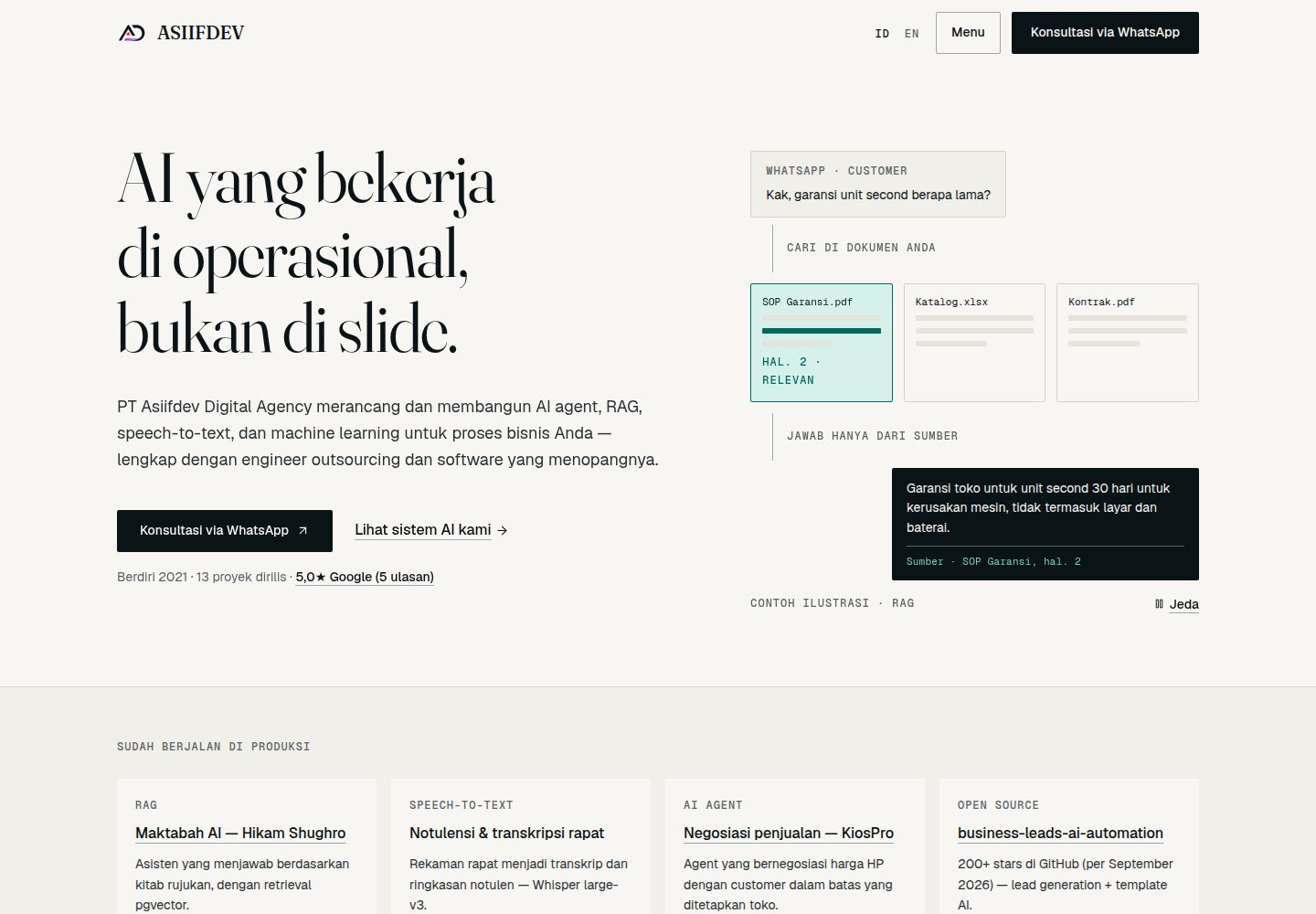
Scrapes Google Maps for sales leads and scores them with AI
HTMLCorporate Website
business-leads-ai-automation — HTML Business Template
By asiifdev
Prospex is a self-hosted, MIT-licensed open-source sales lead automation platform that scrapes Google Maps for leads, uses AI to generate outreach content for email, WhatsApp, and more, and provides a CRM pipeline and analytics dashboard.
Explore the design
Compare the page layouts and mobile experience. Open any screenshot for a closer look.
Desktop homepage1 / 3
Desktop captureTop of page
Actual screenshot captured by the server browser.
All pages & views 3
Screenshots show visual appearance; interactive behavior may differ.
Recorded 2026-10-01View source
What stands out
A quick read of the recorded project description.
Generates personalized emails, WhatsApp messages, Instagram DMs, LinkedIn messages, and cold call scripts per lead
Built-in CRM pipeline covering the full lifecycle: New, Contacted, Replied, Won/Lost
Provides analytics dashboards for conversion funnel, industry distribution, and campaign ROI
Supports CSV, JSON, and vCard export, plus a REST API with Swagger documentation
Supports OpenAI-compatible AI services such as OpenRouter or local Ollama
Template Details
Prospex is a self-hosted, open-source sales lead automation platform that combines lead discovery, AI-generated outreach content, and CRM management in a single dashboard. The project is organized as a Turborepo + pnpm workspace, with a Next.js frontend, a NestJS REST API backend, PostgreSQL for data storage, BullMQ and Redis for asynchronous task queues, and AI capabilities integrated via the OpenAI SDK, supporting OpenAI-compatible services such as OpenRouter or local Ollama.
Core modules include: lead discovery (scraping Google Maps and AI scoring), an AI content engine (generating personalized emails, WhatsApp messages, Instagram DMs, LinkedIn messages, and cold call scripts per lead), a campaign manager (multi-query batch campaigns with real-time progress tracking), a CRM pipeline (full lifecycle from New → Contacted → Replied → Won/Lost), analytics (conversion funnel, industry distribution, campaign ROI), and CSV, JSON, and vCard export. The API provides Swagger documentation and API key management.
Usage constraints: the project requires Node.js, pnpm, and Docker; local development starts PostgreSQL and Redis via Docker Compose; production deployment uses a separate docker-compose.prod.yml containing PostgreSQL, Redis, NestJS API, Next.js, and Nginx. AI features depend on external or local model services; mock AI can be used when OPENAI_API_KEY is not configured. Scraping Google Maps relies on an external data source, and its availability and compliance must be assessed independently. The code is MIT-licensed, but third-party assets such as demo images, fonts, and icons, as well as external services like domains, hosting, databases, and AI, may incur separate fees or require separate license verification.
HTMLCorporate Website
Is it right for your project?
Use Cases
- SMEs or agencies building a self-hosted lead acquisition and outreach workflow
- Sales teams batch-scraping and scoring Google Maps business leads by industry or region
- Automatically generating email, WhatsApp, or LinkedIn outreach copy for different leads
- Tracking lead status from first contact to closed-won or lost in a CRM pipeline
- Viewing campaign conversion funnels and industry distribution through analytics dashboards
Suitable For
- SMEs that want to self-host a sales lead automation system
- Agencies that need to batch-acquire local business leads and conduct outreach
- Development teams with Node.js, Docker, and PostgreSQL operations capabilities
- Sales operations staff who need AI outreach and CRM pipeline integrated in a single dashboard
Getting started & customization
Use these recorded setup notes alongside the repository instructions for your chosen version.
- 1
Requires Node.js 20+, pnpm 9+, and a Docker environment
- 2
Copy .env.example to apps/api/.env and packages/database/.env, and fill in DATABASE_URL and other configuration
- 3
Run docker compose up -d to start PostgreSQL and Redis, then push the database schema and run Prisma generate
- 4
Start the API (port 3001) and Dashboard (port 3000) development servers separately
- 5
Production deployment uses docker-compose.prod.yml and requires strong passwords and real API keys
License & source material
Usage conditions & limitations
Free to use · keep license noticeThis listing covers the free version in the public repository under the MIT license; the free scope is the code of this version and does not mean external services or third-party assets are free.
Must comply with when using
- Free use, modification, commercial use, and distribution of this version's code are permitted.
- When distributing copies or substantial portions of the code, retain the original author's copyright notice and the full MIT license notice.
- The code is provided as is; warranties and limitations of liability are governed by the original license and applicable law.
Additional costs & items to verify
- AI features require an OpenAI API key or a compatible service; without configuration, only mock AI is available and real generated content cannot be obtained.
- Using OpenRouter requires registering an account and obtaining an API key, which may incur third-party service fees.
- Using Ollama requires installing and running the Ollama service locally, consuming local compute.
- Lead scraping depends on the external Google Maps data source; its availability and compliance must be assessed independently and may be subject to third-party terms.
- Production deployment requires preparing a Docker environment, strong passwords, and real API keys, and bearing external costs such as servers and databases.
- Demo images, fonts, icons, and other third-party assets must be checked against their respective licenses and cannot be judged solely by the code's MIT license.
- External services such as domains, hosting, databases, payments, or AI may incur separate fees.
View Original Text Basis
Permission is hereby granted, free of charge
Original License Text
OPENAI_API_KEY=sk-your-key-here # or leave empty for mock AI
Original README
OPENAI_BASE_URL=https://openrouter.ai/api/v1
Original README
OPENAI_BASE_URL=http://localhost:11434/v1
Original README
Scrape Google Maps with AI-powered lead scoring
Original README
https://github.com/asiifdev/business-leads-ai-automation/blob/main/LICENSEhttps://github.com/asiifdev/business-leads-ai-automation/blob/main/README.mddocker compose -f docker-compose.prod.yml up -d
Original README
Compiled by DeepSeek based on repository license and README ·2026-10-01. Results only cover the materials read; dependencies, images, fonts, and subsequent term changes are subject to their respective original texts.
Project checks & description sources
Template Information
- Source platforms
- GitHub
- Documentation and maintenance reference score
- More documented · 91 / 100
- Technologies
- HTML
- Website type
- Corporate Website
How this score is calculated
Our heuristic uses license records (up to 30), a demo link (12), a preview (10), stars (15), recorded maintenance (15), description completeness (8), feature records (5) and classification data (5). It is not a code, security or performance test, or a Google score. A link does not establish tested functionality.
What to verify for this project
- Repository update recorded
- 2026-08-18
- Screenshot last checked
- 2026-10-01
A demo link is listed. Check it with your own content and viewport sizes; its presence does not confirm that forms, authentication or payments work.
The catalog identifies HTML as the primary stack. Check the actual dependency manifest and lockfile for versions and hosting requirements. These notes use recorded metadata, not a code audit or a deployment test.
Use a selection guide →How this description was prepared
AI-assisted description based on catalog records and repository material. Repository authors are not automatically the reviewers of this description.
Automatically checked against source and license rules; no manual editorial review.
Inspect the recorded source material
SHA-256: 01596281238ad095ff7ddc8a1e35bd901d9d343a16fa5fb3fec3d375f62252d5
2026-10-01T04:28:43.776Z
Source file / repository<div align="center"> <h1>Prospex</h1> <p><strong>Open-source AI-powered GTM automation platform</strong></p> <p>Find leads · Score them with AI · Generate personalized outreach · Close deals</p> [](https://opensource.org/licenses/MIT) [](https://www.typescriptlang.org/) [](https://nextjs.org/) [](https://nestjs.com/) [](https://www.postgresql.org/) [](https://docs.docker.com/compose/) </div> ## What is Prospex? Prospex is a **self-hosted, open-source** platform that combines lead discovery, AI-powered outreach generation, and CRM management in one dashboard. Think Apollo.io + Instantly.ai — but open-source, self-hosted, and free. ### Features | Module | Description | |--------|-------------| | **Lead Discovery** | Scrape Google Maps with AI-powered lead scoring | | **AI Content Engine** | Personalized Email, WhatsApp, Instagram DM, LinkedIn, Cold Call scripts per lead | | **Campaign Manager** | Multi-query batch campaigns with real-time progress tracking | | **CRM Pipeline** | Full lead lifecycle: New → Contacted → Replied → Won/Lost | | **Analytics** | Conversion funnel, industry breakdown, campaign ROI | | **Export** | Download leads as CSV, JSON, or vCard | | **API** | REST API with Swagger docs + API key management | ### Tech Stack | Layer | Technology | |-------|-----------| | **Frontend** | Next.js 16, App Router, shadcn/ui, Tailwind CSS, Recharts | | **Backend** | NestJS 10, Prisma ORM, REST API | | **Database** | PostgreSQL 16 | | **Queue** | BullMQ + Redis 7 | | **AI** | OpenAI SDK (supports OpenRouter & Ollama) | | **Monorepo** | Turborepo + pnpm workspaces | | **Deploy** | Docker Compose | --- ## Quickstart ### Prerequisites - [Node.js 20+](https://nodejs.org/) - [pnpm 9+](https://pnpm.io/) - [Docker](https://www.docker.com/) ### 1. Clone & install ```bash git clone https://github.com/asiifdev/business-leads-ai-automation.git cd business-leads-ai-automation pnpm install ``` ### 2. Configure environment ```bash cp .env.example apps/api/.env cp .env.example packages/database/.env ``` Edit `apps/api/.env` with your values: ```env DATABASE_URL="postgresql://prospex:yourpassword@localhost:5432/prospex" OPENAI_API_KEY=sk-your-key-here # or leave empty for mock AI OPENAI_MODEL=gpt-4o-mini # Optional: use OpenRouter or Ollama # OPENAI_BASE_URL=https://openrouter.ai/api/v1 ``` ### 3. Start infrastructure ```bash docker compose up -d # starts PostgreSQL + Redis pnpm --filter @prospex/database db:push # push schema pnpm --filter @prospex/database exec prisma generate ``` ### 4. Run development servers ```bash # Terminal 1 — API (port 3001) pnpm --filter @prospex/api dev # Terminal 2 — Dashboard (port 3000) pnpm --filter @prospex/web dev ``` Open [http://localhost:3000](http://localhost:3000) and you're in. Swagger API docs: [http://localhost:3001/api/docs](http://localhost:3001/api/docs) --- ## Project Structure ``` prospex/ ├── apps/ │ ├── web/ # Next.js 16 dashboard │ ├── api/ # NestJS REST API │ └── marketing/ # Landing page ├── packages/ │ ├── database/ # Prisma schema + migrations │ ├── types/ # Shared TypeScript types │ └── config/ # Shared eslint/tsconfig ├── docker-compose.yml # Local dev (PostgreSQL + Redis) ├── docker-compose.prod.yml # Production stack └── nginx.conf # Nginx reverse proxy config ``` --- ## API Endpoints | Method | Endpoint | Description | |--------|----------|-------------| | `GET` | `/api/health` | Health check | | `GET/POST` | `/api/campaigns` | List / create campaigns | | `GET/PATCH/DELETE` | `/api/campaigns/:id` | Campaign detail / update / delete | | `POST` | `/api/scraper/campaigns/:id/start` | Start scraping + AI pipeline | | `GET` | `/api/leads` | List leads (filter by `?campaignId=`) | | `PATCH` | `/api/leads/:id/crm` | Update CRM status | | `GET` | `/api/analytics` | Overview stats | | `GET` | `/api/analytics/industries` | Leads by industry | | `GET` | `/api/export/leads/csv` | Export leads as CSV | | `GET` | `/api/export/leads/json` | Export leads as JSON | | `GET` | `/api/export/leads/vcard` | Export leads as vCard | | `GET/POST/DELETE` | `/api/settings/api-keys` | API key management | | `GET/POST` | `/api/settings/integrations` | Integration config | Full interactive docs at `/api/docs` (Swagger). --- ## Using OpenRouter / Ollama Prospex supports any OpenAI-compatible AI provider: **OpenRouter** (access Claude, Gemini, Llama, etc.): ```env OPENAI_API_KEY=sk-or-your-openrouter-key OPENAI_BASE_URL=https://openrouter.ai/api/v1 OPENAI_MODEL=anthropic/claude-haiku-4-5 ``` **Ollama** (local, fully offline): ```env OPENAI_API_KEY=ollama OPENAI_BASE_URL=http://localhost:11434/v1 OPENAI_MODEL=llama3.2 ``` --- ## Production Deployment ```bash cp .env.example .env # Edit .env with production values (strong passwords, real API key) docker compose -f docker-compose.prod.yml up -d ``` This starts: PostgreSQL + Redis + NestJS API + Next.js + Nginx. --- ## Development ```bash pnpm install # install all dependencies pnpm dev # start all apps (requires turbo) pnpm build # build all apps pnpm --filter @prospex/database db:studio # Prisma Studio (DB browser) ``` --- ## Changelog ### 2026-07-29 - **Fix**: search queries now combine each campaign's search term with every area in its `location` field (split on commas) before scraping — previously `location` was stored but never sent to the scraper, so results could drift to the scraping server's IP-based region instead of the requested cities. - **Feature**: leads now capture `lat`/`lng` coordinates (parsed from the scraped Google Maps place URL) and store them on the `Lead` model. - **Feature**: campaign detail page has a new "Map" tab with a Leaflet-based lead map (custom priority-colored markers, auto-fit bounds, popups linking to lead detail) alongside the existing "List" view. - **Fix**: scraping progress no longer gets stuck at 0% — the scraper now reports incremental progress per search query/area combo while scraping runs (previously progress only updated before scraping started and after it fully finished, so long-running scrapes appeared frozen). - **Fix**: campaign and lead list polling (every 2s while a campaign is running) no longer flashes the whole page back to a loading skeleton on every refresh — only the initial fetch shows the skeleton, so live progress/lead updates render smoothly. - **Fix**: lead scoring/ordering no longer ranks by raw star rating alone (a 5.0★ lead with 1 review could previously outrank a 4.5★ lead with thousands of reviews). Review count is now scraped and stored, and rating contribution to the score uses a Bayesian average (weighted toward a neutral 4.0★ prior by review volume) so low-review, high-star leads no longer unfairly beat well-reviewed ones. --- ## License MIT — see [LICENSE](LICENSE). --- <div align="center"> <sub>Built with ❤️ by <a href="https://github.com/asiifdev">asiifdev</a></sub> </div>
Explore similar templates
Compare previews and descriptions within the same stack and category.

mazer
Mazer is a free and open-source Bootstrap 5 admin dashboard and landing page template that does not depend on jQuery. It provides prebuilt releases, source builds, and CDN inclusion, and includes dark mode, perfect-scrollbar, and ApexCharts examples.
HTML · Admin dashboard

Freelancer
A bright, single-page Bootstrap portfolio template for freelancers, designers, and small studios. It includes a responsive portfolio grid with modal detail windows and an SB Forms contact form that requires an API token.
HTML · Portfolio

Creative
A single-page marketing template by Start Bootstrap for creative agencies and product services, built on Bootstrap with SCSS, featuring a portfolio grid and call-to-action sections. It includes pre-set SB Forms markers for form integration and npm build scripts for source customization.
HTML · Corporate Website

startbootstrap-agency
Agency is a one-page Bootstrap portfolio theme from Start Bootstrap, MIT licensed. It includes a responsive portfolio grid with modal details and a preconfigured SB Forms contact form that requires an API token.
HTML · Corporate Website

startbootstrap-landing-page
A general-purpose Bootstrap landing page template from Start Bootstrap, MIT licensed, with a Pug/SCSS/npm build pipeline.
HTML · Corporate Website

Landing-Page
A general-purpose landing page HTML template maintained by Tailwind Toolbox, written in pure HTML and loading the complete Tailwind CSS via CDN.
HTML · Corporate Website