Laravel REST API backend separated from a React + Vite frontend, without using Blade templates
LaravelViteReactStarter
LaraBaseX — Laravel Starter Template
By ayush-sleeping
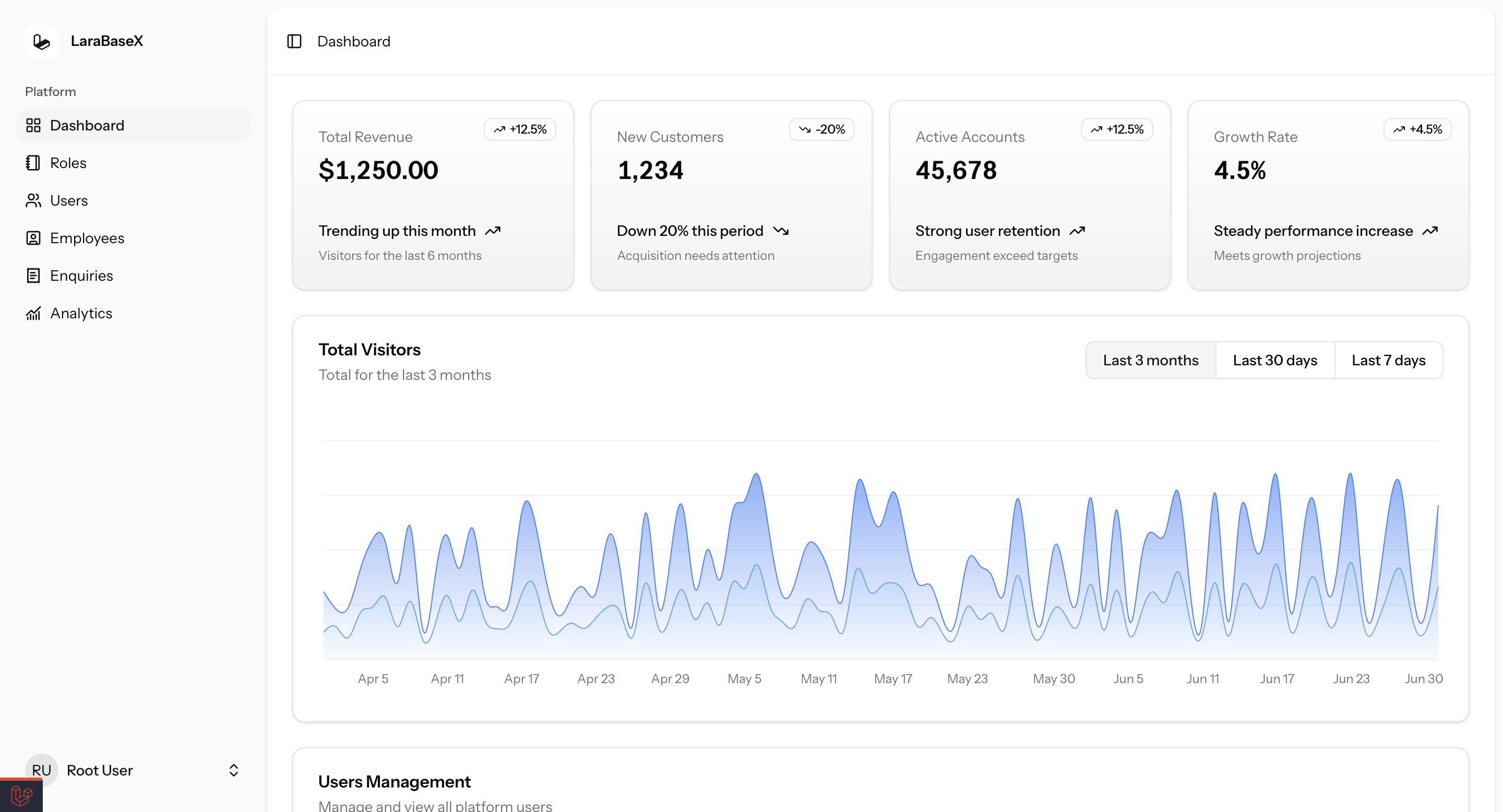
LaraBaseX is a full-stack starter built on Laravel and React, providing a REST API backend, a React frontend, and basic CRUD modules for users, roles and permissions, employees, and inquiries.
Explore the design
Compare the page layouts and mobile experience. Open any screenshot for a closer look.
Author preview
Author-provided preview
Preview provided in the project README.
One original preview is available. Open the full image to inspect the design.
Screenshots show visual appearance; interactive behavior may differ.
Recorded 2026-10-03View source
What stands out
A quick read of the recorded project description.
Integrates Laravel Sanctum authentication and Spatie roles and permissions, with permission-based frontend UI control
Built-in complete CRUD modules for users, employees, and inquiries, plus a dashboard interface
Provides configuration for development and testing tools such as PHPStan, Pest, Pint, ESLint, and Postman/Newman
Includes Docker development configuration and states support for VPS or shared hosting deployment
Template Details
LaraBaseX is a full-stack starter template for developers, with a backend that uses Laravel to build a REST API and a frontend that uses React (built with Vite) and integrates Shadcn UI, without relying on Blade templates. The project is positioned to skip repetitive initialization work and go straight into feature development.
The template includes authentication and authorization foundations: Laravel Sanctum handles the login and registration flow, the Spatie permission package provides role and permission management, and it supports permission-based frontend UI control. On the business module side, it provides three complete CRUDs for users, employees, and inquiries, plus a usable dashboard interface.
Development and quality tools include PHPStan static analysis, Pest testing, Pint code style, ESLint frontend checks, and Postman/Newman API test scripts. For deployment, it states support for Docker, VPS, or shared hosting, and provides Laravel's standard configuration items for queues, caching, email, and more.
Note that statements in the README such as "production-ready" and "scalable to enterprise level" are the author's own claims; the template itself does not include performance or security audit evidence. Before actual use, you should verify dependency versions, environment configuration, and third-party asset licenses yourself.
LaravelViteReactStarter
Is it right for your project?
Use Cases
- Quickly building a prototype of an admin management system with authentication and permission management
- Starting a new project with a Laravel API + React frontend-backend separation approach
- Needing basic CRUD for users, employees, and inquiries as a business starting point
- Standardizing code style, static analysis, and API testing processes within a team
Suitable For
- Full-stack developers familiar with Laravel and React
- Teams that need to skip repetitive initialization and go straight to business feature development
- Developers who accept a frontend-backend separation architecture and maintain dependencies and deployment themselves
Getting started & customization
Use these recorded setup notes alongside the repository instructions for your chosen version.
- 1
Run composer install and npm install in sequence, copy .env.example to .env, and configure environment variables such as the database
- 2
Run php artisan key:generate and php artisan migrate --seed to initialize the database
- 3
Build the frontend with npm run build; during development, start Vite with npm run dev
- 4
The backend can be started with php artisan serve or docker-compose up; the frontend runs on port 5173 by default
- 5
Before use, verify dependency versions, third-party asset licenses, and external service costs
License & source material
Usage conditions & limitations
Free to use · keep license noticeThis entry covers the free version under the MIT license in the public repository; the free scope is the code of that version and does not mean external services or third-party assets are free.
Must comply with when using
- You are allowed to use, modify, commercialize, and distribute the code of this version for free.
- When distributing copies or substantial portions of the code, retain the original author's copyright notice and the complete MIT license notice.
- The code is provided as is; warranties and limitations of liability are governed by the original license and applicable law.
Additional costs & items to verify
- Before use, you must configure the database connection information yourself (MySQL is recommended, SQLite is also supported) and set environment variables such as email and cache, otherwise the application will not run properly.
- External services such as email and cache require you to configure environment variables yourself and may involve third-party service accounts or fees.
- Docker is only an optional method for local development; production deployment requires you to prepare the server environment yourself.
- Deployment requires your own runtime environment such as Docker, shared hosting, or a VPS; the template itself does not provide hosting services.
- Demo images, fonts, icons, and other third-party assets must be checked against their respective licenses; you cannot judge based solely on the code's MIT license.
- External services such as domains, hosting, databases, payments, or AI may incur additional charges.
View Original Text Basis
Permission is hereby granted, free of charge
Original License Text
Update `.env` with your database credentials (MySQL recommended, SQLite supported).
Original README
Set up mail, cache, and other environment variables as needed.
Original README
- Or use Docker for local development:
Original README
https://github.com/ayush-sleeping/LaraBaseX/blob/main/LICENSEhttps://github.com/ayush-sleeping/LaraBaseX/blob/main/README.md- **Deployment Ready**: Docker / Shared Hosting / VPS
Original README
Compiled by DeepSeek based on repository license and README ·2026-10-03. Results only cover the materials read; dependencies, images, fonts, and subsequent term changes are subject to their respective original texts.
Project checks & description sources
Template Information
- Source platforms
- GitHub
- Documentation and maintenance reference score
- Partly documented · 70 / 100
- Technologies
- Laravel · Vite · React
- Website type
- Starter
How this score is calculated
Our heuristic uses license records (up to 30), a demo link (12), a preview (10), stars (15), recorded maintenance (15), description completeness (8), feature records (5) and classification data (5). It is not a code, security or performance test, or a Google score. A link does not establish tested functionality.
What to verify for this project
- Repository update recorded
- 2025-10-13
- Screenshot last checked
- 2026-10-03
No demo link is recorded. Use the repository instructions to evaluate the project locally; the screenshot alone cannot establish interactive behavior.
The catalog identifies Laravel as the primary stack. Check the actual dependency manifest and lockfile for versions and hosting requirements. These notes use recorded metadata, not a code audit or a deployment test.
Use a selection guide →How this description was prepared
AI-assisted description based on catalog records and repository material. Repository authors are not automatically the reviewers of this description.
Automatically checked against source and license rules; no manual editorial review.
Inspect the recorded source material
SHA-256: 916c76c7096b2043172e2c2d0d6f73967cd019bb7436403924eb10087a57a352
2026-10-03T07:40:13.648Z
Source file / repository## 🚀 LaraBaseX
> A Laravel 12 + ReactJS Full Stack Starter Boilerplate.
This is a secure, modular, production-ready base project using Laravel 12 with ReactJS frontend, ideal for building scalable web applications without Blade.
[](https://example.com)
[](https://example.com)
## Overview
What LaraBaseX Is
A starter kit for developers who want to skip repetitive setup work and start building features right away.
- Laravel 12 backend → clean REST API architecture, ready for production.
- ReactJS frontend → Vite-based, integrated with API, UI ready with Shadcn.
- Security baked in → CSRF, CORS, Rate limiting, Sanitization.
- Roles & Permissions → Spatie permissions + UI protection.
- Full CRUDs ready → Users, Employees, Enquiries.
- Deployment ready → Works with Docker, VPS, or shared hosting.
Why It’s Useful
- Saves weeks of setup time by giving you authentication, authorization, logging, validation, helper functions, and database structure out of the box.
- Gives a modern dev experience — API response helpers, centralized error handling, custom commands, and frontend integration.
- Provides flexibility — you can scale it from small apps to enterprise-level solutions.
Included Major Features
- Backend → Laravel 12 API, Sanctum Auth, MySQL, Redis queues, Spatie permissions, custom helpers.
- Frontend → React + Shadcn UI, API integration, role-based UI.
- Dev Tools → PHPStan, Pest tests, ESLint, Pint, Postman tests, Docker dev setup.
- Security → HTTPS enforcement, CORS setup, CSRF tokens, rate limits.
- Production Ready → Queue workers, caching, mailers, exception logging, activity logs.
<p align="right"><a href="#top"><img src="https://img.shields.io/badge/-Back%20to%20Top-blueviolet?style=for-the-badge" /></a></p>
<br>
<br>
<div id="top"></div>
##
### Table of content:
| No. | Topics |
| ------- | --------------------------------------------------------------------------------------- |
| 0. | [Tech Stack](#tech-stack) |
| 1 | [Features and Integrations](#features-and-integrations) |
| 2 | [Getting Started](#getting-started) |
| 3 | [Documentations](#documentations) |
| 4 | [Folder Structure](#folder-structure) |
<br>
<br>
#
## Tech Stack
> A modern tech stack for building scalable web applications.
- **Backend**: Laravel 12 (REST API)
- **Frontend**: ReactJS (Vite + Axios) + Shadcn UI
- **Database**: MySQL
- **Authentication**: Laravel Sanctum
- **Deployment Ready**: Docker / Shared Hosting / VPS
<p align="right"><a href="#top"><img src="https://img.shields.io/badge/-Back%20to%20Top-blueviolet?style=for-the-badge" /></a></p>
<br>
<br>
#
## Features and Integrations
| Category | Integrations & Features |
|------------------|---------------------------------------------------------------------------------------|
| RDBMS | MySQL, SQLite (default) |
| Storage | Local, Unix File System |
| Message Queues | Redis, Database (queue driver), Supervisor (production) |
| Mailers | SMTP, Mailgun (via Laravel config) |
| Caching | Redis, File |
| Logging | Monolog, custom exception handler, Spatie Activity Log |
| Validations | FormRequest, custom validation rules |
| Transformers | API response helpers |
| Helpers | Centralized helpers for API, formatting, utilities |
| Internationalisation | Laravel's built-in i18n, language files |
| Console Commands | Custom Artisan commands, scheduler |
| Security | HTTPS, CORS, CSRF, Rate Limiting, Authorization, Input Sanitization |
| Frontend | ReactJS (Vite), Shadcn UI, Inertia.js SPA routing |
| Deployment | Docker, Shared Hosting, VPS |
| Authentication | Full login & registration flow with database-backed users |
| Dashboard | Working dashboard UI and backend |
| Roles & Permissions | Create/manage roles, assign permissions, protect routes and UI |
| User Management | Full users CRUD (create, read, update, delete) and assign Roles & Permissions |
| Employee Management | Employee CRUD (create, read, update, delete) and assign Roles & Permissions |
| Enquiry | Enquiry section for user/customer queries |
<p align="right"><a href="#top"><img src="https://img.shields.io/badge/-Back%20to%20Top-blueviolet?style=for-the-badge" /></a></p>
<br>
<br>
#
## Getting Started
1. **Clone the repo:**
```sh
git clone https://github.com/ayush-sleeping/LaraBaseX.git
cd LaraBaseX
```
2. **Install backend dependencies:**
```sh
composer install
```
3. **Install frontend dependencies:**
```sh
npm install
```
4. **Copy and configure environment files:**
```sh
cp .env.example .env
```
- Update `.env` with your database credentials (MySQL recommended, SQLite supported).
- Set up mail, cache, and other environment variables as needed.
5. **Generate application key:**
```sh
php artisan key:generate
```
6. **Run database migrations and seeders:**
```sh
php artisan migrate --seed
```
7. **Build frontend assets:**
```sh
npm run build
```
8. **Start the Laravel backend server:**
```sh
php artisan serve
```
- Or use Docker for local development:
```sh
docker-compose up
```
9. **Start the React frontend (Vite):**
```sh
npm run dev
```
10. **Access the app:**
- Backend API: [http://localhost:8000](http://localhost:8000)
- Frontend: [http://localhost:5173](http://localhost:5173)
11. **Run tests and code quality checks:**
- PHPStan (static analysis):
```sh
./vendor/bin/phpstan analyse
```
- Pest (unit/feature tests):
```sh
./vendor/bin/pest
```
- Pint (code style):
```sh
./vendor/bin/pint
```
- ESLint (frontend lint):
```sh
npm run lint
```
- Postman/Newman (API tests):
```sh
bash postman/test.sh
```
- Health check:
```sh
php test_health.php
```
<p align="right"><a href="#top"><img src="https://img.shields.io/badge/-Back%20to%20Top-blueviolet?style=for-the-badge" /></a></p>
<br>
<br>
#
## Documentations
> Comprehensive guides and references for the codebase.
| No. | Topics | Includes |
| --- | ------- | -------- |
| 1 | [Security Essentials Documentation](documentation/1.%20Security%20Essentials/) | HTTPS Enforced, CORS Configured Properly, CSRF Protection and Others ... |
| 2 | [Architecture & Structure Essentials](documentation/2.%20Architecture%20&%20Structure%20Essentials/) | Helpers, Services, Job Queues, and Others ... |
| 3 | [Packages to Include Documentation](documentation/3.%20Packages%20to%20Include/) | Spatie Laravel Permission, Laravel Sanctum, and Others ... |
| 4 | [Developer Experience Documentation](documentation/4.%20Developer%20Experience%20(DX)/) | Global Exception Handler, Standard API Response, Seeder & Factory and Others ... |
| 5 | [Frontend Integration Documentation](documentation/5.%20Frontend%20Integration%20(ReactJS)/) | Serve React with Vite, Proxy Setup, React Router and Others ... |
| 6 | [User Management Essentials](documentation/6.%20User%20Management%20Essentials/) | Auth APIs, Password Management, Roles & Permissions and Others ... |
| 7 | [Helper Functions Documentation](documentation/7.%20Helper%20Functions/) | Helper Functions |
| 8 | [MySQL Best Practices Documentation](documentation/8.%20MySQL%20Best%20Practices/) | MySQL Best Practices |
| 9 | [Deployment & Production Readiness](documentation/9.%20Deployment%20&%20Production%20Readiness/) | Deployment on server |
| 10 | [Authentication Flow Documentation](documentation/10.%20Authentication%20Flow%20Documentation/Authentication%20Flow%20Documentation%20docx.md) | Authentication Flow |
| 11 | [Authorization Flow Documentation](documentation/11.%20Authorization%20Flow%20Documentation/Authorization%20Flow%20Documentation%20docx.md) | Authorization Flow |
| 12 | [Setting Profile Information Update](documentation/12.%20Setting%20Profile%20Information%20Update/) | Profile Information Update |
| 13 | [Setting Password Update](documentation/13.%20Setting%20Password%20Update/) | Password Update |
| 14 | [Permission Based UI Implementation](documentation/14.%20Permission%20Based%20UI%20Implementation/) | Permission Based UI Implementation |
| 15 | [LaraBaseX Postman Collection](postman/README.md) | Postman Collection |
| 16 | [Testing](documentation/16.%20Testing/) | Testing Documentation |
<p align="right"><a href="#top"><img src="https://img.shields.io/badge/-Back%20to%20Top-blueviolet?style=for-the-badge" /></a></p>
<br>
<br>
#
## Folder Structure
```
LaraBaseX/
├── app/
│ ├── Http/
│ │ ├── Controllers/
│ │ │ ├── Api/
│ │ │ │ ├── AuthController.php
│ │ │ │ ├── BaseApiController.php
│ │ │ │ └── HomeController.php
│ │ │ ├── Auth/
│ │ │ │ ├── AuthenticatedSessionController.php
│ │ │ │ ├── ConfirmablePasswordController.php
│ │ │ │ ├── EmailVerificationNotificationController.php
│ │ │ │ ├── EmailVerificationPromptController.php
│ │ │ │ ├── NewPasswordController.php
│ │ │ │ ├── PasswordController.php
│ │ │ │ ├── PasswordResetLinkController.php
│ │ │ │ ├── RegisteredUserController.php
│ │ │ │ └── VerifyEmailController.php
│ │ │ ├── Backend/
│ │ │ │ ├── DashboardController.php
│ │ │ │ ├── EmployeeController.php
│ │ │ │ ├── EnquiryController.php
│ │ │ │ ├── RoleController.php
│ │ │ │ └── UserController.php
│ │ │ ├── Frontend/
│ │ │ │ └── (empty)
│ │ │ ├── Settings/
│ │ │ │ ├── PasswordController.php
│ │ │ │ └── ProfileController.php
│ │ │ ├── Controller.php
│ │ │ └── HealthController.php
│ │ ├── Kernel.php
│ │ ├── Middleware/
│ │ │ ├── AdminAccess.php
│ │ │ ├── Authenticate.php
│ │ │ ├── BasicAuth.php
│ │ │ ├── EncryptCookies.php
│ │ │ ├── ForceHttps.php
│ │ │ ├── HandleAppearance.php
│ │ │ ├── HandleInertiaRequests.php
│ │ │ ├── PreventBackHistory.php
│ │ │ ├── PreventRequestsDuringMaintenance.php
│ │ │ ├── RedirectIfAuthenticated.php
│ │ │ ├── Token.php
│ │ │ ├── TrimStrings.php
│ │ │ ├── TrustHosts.php
│ │ │ ├── TrustProxies.php
│ │ │ ├── ValidateSignature.php
│ │ │ └── VerifyCsrfToken.php
│ │ └── Requests/
│ │ ├── Auth/
│ │ │ └── LoginRequest.php
│ │ ├── Settings/
│ │ │ └── ProfileUpdateRequest.php
│ │ └── (empty)
│ ├── Repositories/
│ │ └── Contracts/ (empty)
│ ├── Scopes/
│ │ └── HierarchyScope.php
│ ├── Services/
│ │ ├── BackupMonitoringService.php
│ │ ├── CacheWarmupService.php
│ │ └── QueryCacheService.php
│ ├── Traits/
│ │ ├── Cacheable.php
│ │ └── Hashidable.php
│ └── helpers.php
├── bootstrap/
│ ├── cache/
│ │ ├── .gitignore
│ │ ├── config.php
│ │ ├── packages.php
│ │ ├── routes-v7.php
│ │ └── services.php
│ ├── app.php
│ └── providers.php
├── config/
│ ├── app.php
│ ├── auth.php
│ ├── backup.php
│ ├── broadcasting.php
│ ├── cache.php
│ ├── cors.php
│ ├── database.php
│ ├── debugbar.php
│ ├── filesystems.php
│ ├── hashids.php
│ ├── hashing.php
│ ├── inertia.php
│ ├── l5-swagger.php
│ ├── logging.php
│ ├── mail.php
│ ├── permission.php
│ ├── proxy.php
│ ├── queue.php
│ ├── sanctum.php
│ ├── services.php
│ ├── session.php
│ ├── telescope.php
│ ├── trusted.php
│ ├── view.php
├── database/
│ ├── .gitignore
│ ├── database.sqlite
│ ├── factories/
│ │ └── UserFactory.php
│ ├── migrations/
│ │ ├── 0001_01_01_000000_create_users_table.php
│ │ ├── 0001_01_01_000001_create_cache_table.php
│ │ ├── 0001_01_01_000002_create_jobs_table.php
│ │ ├── 2025_08_01_000000_create_permissiongroups_table.php
│ │ ├── 2025_08_01_000001_create_permissions_table.php
│ │ ├── 2025_08_01_000002_create_roles_table.php
│ │ ├── 2025_08_01_000003_create_model_has_permissions_table.php
│ │ ├── 2025_08_01_000004_create_model_has_roles_table.php
│ │ ├── 2025_08_01_000005_create_role_has_permissions_table.php
│ │ ├── 2025_08_01_134338_create_personal_access_tokens_table.php
│ │ ├── 2025_08_04_000001_create_employees_table.php
│ │ ├── 2025_08_04_000002_create_enquiries_table.php
│ │ ├── 2025_08_04_075755_add_avatar_column_to_users_table.php
│ │ ├── 2025_08_08_063250_create_telescope_entries_table.php
│ │ ├── 2025_08_08_063402_create_activity_log_table.php
│ │ ├── 2025_08_08_063403_add_event_column_to_activity_log_table.php
│ │ └── 2025_08_08_063404_add_batch_uuid_column_to_activity_log_table.php
│ └── seeders/
│ ├── DatabaseSeeder.php
│ └── PermissionSeeder.php
├── documentation/
│ ├── 1. Security Essentials/
│ ├── 2. Architecture & Structure Essentials/
│ ├── 3. Packages to Include/
│ ├── 4. Developer Experience (DX)/
│ ├── 5. Frontend Integration (ReactJS)/
│ ├── 6. User Management Essentials/
│ ├── 7. Helper Functions/
│ ├── 8. MySQL Best Practices/
│ ├── 9. Deployment & Production Readiness/
│ ├── 10. Authentication Flow Documentation/
│ ├── 11. Authorization Flow Documentation/
│ ├── 12. Setting Profile Information Update/
│ ├── 13. Setting Password Update/
│ ├── 14. Permission Based UI Implementation/
│ └── 15. Testing/
├── lang/
│ ├── en/
│ └── vendor/
├── node_modules/
│ ├──
├── postman/
│ ├──
├── public/
│ ├── .htaccess
│ ├── apple-touch-icon.png
│ ├── build/
│ ├── favicon.ico
│ ├── favicon.svg
│ ├── index.php
│ ├── logo.svg
│ └── robots.txt
├── resources/
│ ├── css/
│ │ └── app.css
│ ├── js/
│ │ ├── app.tsx
│ │ ├── ssr.tsx
│ │ ├── ziggy.js
│ │ ├── components/
│ │ ├── hooks/
│ │ ├── layouts/
│ │ ├── lib/
│ │ ├── pages/
│ │ │ ├── auth/
│ │ │ ├── backend/
│ │ │ ├── frontend/
│ │ │ ├── settings/
│ │ │ ├── dashboard.tsx
│ │ │ ├── error.tsx
│ │ │ └── welcome.tsx
│ │ └── types/
│ └── views/
│ ├── app.blade.php
│ └── vendor/
│ └── l5-swagger/
├── routes/
│ ├── api.php
│ ├── auth.php
│ ├── backend.php
│ ├── channels.php
│ ├── console.php
│ ├── frontend.php
│ ├── settings.php
│ └── web.php
├── scripts/
│ └── phpstan.sh
├── storage/
│ ├── api-docs/
│ ├── app/
│ ├── debugbar/
│ ├── framework/
│ ├── logs/
│ └── pail/
├── stubs/
│ └──
├── tests/
│ ├── Feature/
│ ├── Pest.php
│ ├── TestCase.php
│ └── Unit/
├── vendor/
│ └── ... (all composer dependencies)
├── .editorconfig
├── .env
├── .env.example
├── .gitattributes
├── .github/
├── .gitignore
├── .prettierignore
├── .prettierrc
├── LICENSE
├── README.md
├── artisan
├── components.json
├── composer.json
├── composer.lock
├── eslint.config.js
├── package-lock.json
├── package.json
├── phpstan-baseline.neon
├── phpstan.neon
├── phpunit.xml
├── postman/
├── test_health.php
├── tsconfig.json
├── vite.config.ts
```
<p align="right"><a href="#top"><img src="https://img.shields.io/badge/-Back%20to%20Top-blueviolet?style=for-the-badge" /></a></p>
Explore similar templates
Compare previews and descriptions within the same stack and category.

sage
Sage is a WordPress starter theme maintained by Roots, using Laravel Blade components and templates, Vite builds, Tailwind CSS, and built-in block editor support.
Laravel · Starter

wave
Wave is an open-source SaaS starter kit built on Laravel and released under the MIT license.
Laravel · SaaS

filament-starter
A Laravel TALL stack starter template maintained by Log1x, with a preconfigured Filament admin panel and plugins including Curator, Gravatar, Exceptions, Jobs Monitor, Breezy, Peek, and Logger.
Laravel · Starter

electrik
Electrik is a Laravel SaaS starter kit installed as a Composer package, with authentication, teams, Stripe subscription billing, and the Slate 3 interface under the Electrik\ namespace rather than copied into App\.
Laravel · SaaS

php-saas
php-saas is a Laravel-based SaaS starter positioned as an everything-included kit. It generates new projects via a global Composer command and includes authentication with two-factor, API tokens, Stripe and Paddle billing, and project, team, and organization management.
Laravel · SaaS

filament-jetstream
A Laravel starter kit that implements Jetstream-like authentication and account features using Filament's native panels and components. It includes login, registration, two-factor authentication, session management, user profiles, and optional teams and API tokens.
Laravel · Starter