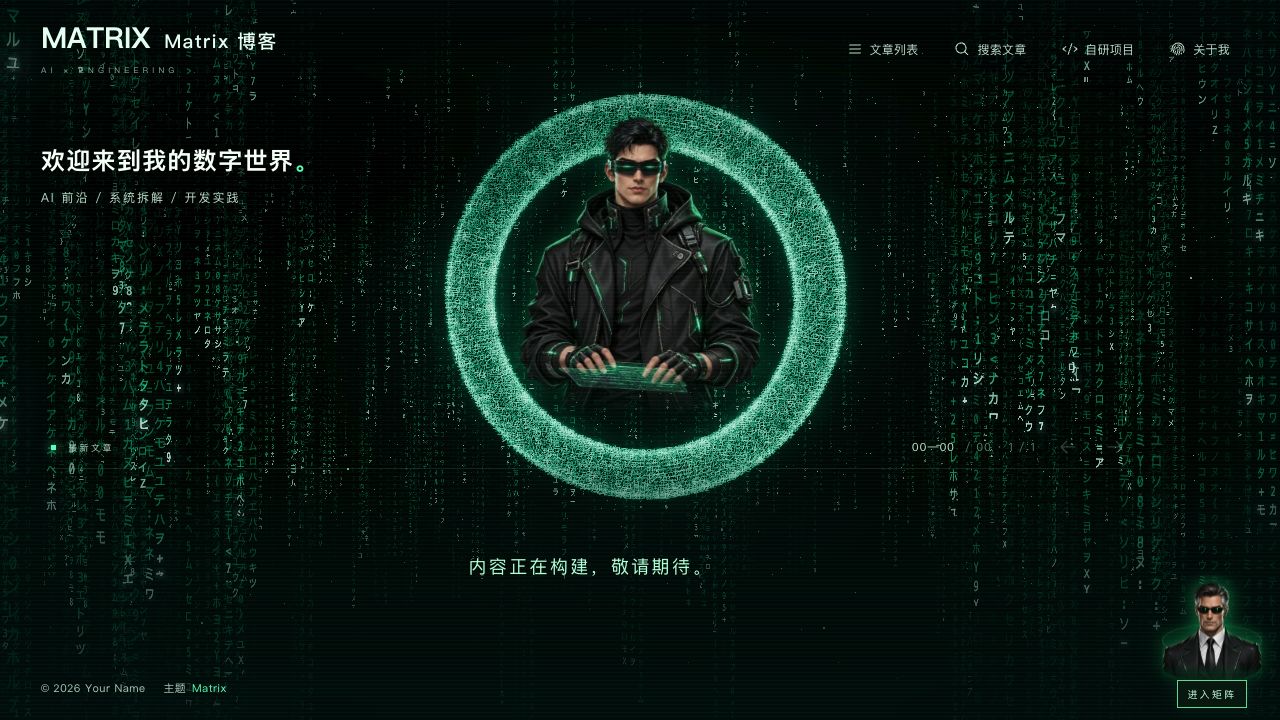
The homepage uses Three.js to procedurally generate digital rain and a text ring, with local mouse compression, figure parallax and a laser decoding transition
AstroReactBlog
matrix — Astro Blog Template
By baiduxc
An immersive blog theme built on Astro and React, with a homepage that uses Three.js to generate digital rain and a text ring, article pages that return to black text on white, and optional AI streaming chat.
Explore the design
Compare the page layouts and mobile experience. Open any screenshot for a closer look.
Author preview
Author-provided preview
Preview provided in the project README.
One original preview is available. Open the full image to inspect the design.
Screenshots show visual appearance; interactive behavior may differ.
Recorded 2026-10-10View source
What stands out
A quick read of the recorded project description.
Article reading pages use a white layout about 1200px wide and support code highlighting and copying, mathematical formulas and Mermaid diagrams
Provides a responsive cover carousel, article list pagination and a draggable 3D tag cloud, with the tag cloud hidden on mobile
Outputs RSS, Sitemap, Canonical, article structured data and static HTML for crawlers and scriptless browsers
Optional AI streaming chat with a shared backend compatible with EdgeOne Pages, Cloudflare Pages and Vercel; the blog remains usable when it is not configured
Sound effects are generated by Web Audio, animations stop when the page is hidden or when leaving the homepage, and the system reduce-motion preference is supported
Template Details
Matrix is a blog theme that uses a digital matrix as its visual language, and the repository contains the complete Astro project source. The homepage builds a space from procedurally generated digital rain, a text ring and a transparent figure illustration, combined with local mouse compression, figure parallax and a laser decoding transition; article reading pages switch to a white layout about 1200px wide, emphasizing readability.
On the content side, the theme provides a responsive cover carousel (supporting text-only cards without covers), article list pagination and a draggable 3D tag cloud (the tag cloud is hidden on mobile). Articles are in Markdown format and support code highlighting and copying, mathematical formulas, Mermaid diagrams, article copyright and original URL cards, and output RSS, Sitemap, Canonical, article structured data, and static HTML for crawlers and scriptless browsers. There is also a standalone world map about page and a mechanical city project page background.
AI chat is optional; by default, the blog builds and works normally without any keys configured, and when not configured, clicking the figure in the bottom right shows a prompt that the assistant is not yet connected. Once enabled, it uses SSE streaming output, supports stopping generation and code copying, and the backend shares a single chat core with function entry points for EdgeOne Pages, Cloudflare Pages and Vercel. Sound effects are generated by Web Audio, the corresponding animations stop when the page is hidden or when leaving the homepage, and the system reduce-motion preference is supported.
Limitations to note: the repository does not include the author's articles, albums, ICP filing number or API keys, so the first run shows an empty article state; the project uses root-path deployment and does not support being mounted directly under a subpath such as /blog/; article format is currently .md; when only static files are deployed there is no /api/chat backend, so chat requires separately deploying the function corresponding to server/chat/ and proxying the same-origin interface. The theme code is MIT licensed, but third-party assets such as demo images, fonts and icons must be checked against their respective licenses, and external services such as domains, hosting, databases, payments or AI may incur separate charges.
AstroReactBlog
Is it right for your project?
Use Cases
- Building a personal technical blog with a distinctive visual atmosphere, with digital matrix effects on the homepage
- Publishing Markdown technical articles with code, mathematical formulas or Mermaid diagrams
- Adding an optional AI chat entry to a blog and deploying it to EdgeOne Pages, Cloudflare Pages or Vercel
- Using a standalone world map about page and a mechanical city project page to present personal information and a project list
Suitable For
- Developers who want strong visual effects on the blog homepage while keeping article pages simple and readable
- Users who use Astro and React and are willing to adjust site information through configuration files
- Content sites that need basic SEO output such as RSS, Sitemap and structured data
- Static blogs planned for deployment to EdgeOne Pages, Cloudflare Pages or Vercel
Getting started & customization
Use these recorded setup notes alongside the repository instructions for your chosen version.
- 1
Requires Node.js 22.11+ and pnpm 9.14.4; the install command is pnpm install --frozen-lockfile, and pnpm-lock.yaml should be kept during deployment
- 2
Site settings are centralized in src/matrix/config/site.js, where url defaults to an example domain and must be changed to your own address before going live
- 3
The project uses root-path deployment and does not support being mounted directly under a subpath such as /blog/; article format is currently .md
- 4
To enable AI chat, configure CHAT_PROVIDER, CHAT_API_KEY, CHAT_MODEL, etc. in a local .env.local or in the platform's server-side environment variables, then redeploy; do not upload .env.local
- 5
The repository does not include the author's articles, albums, ICP filing number or API keys, so the first run shows an empty article state; you can use pnpm new-post to create your first article
License & source material
Usage conditions & limitations
Free to use · keep license noticeThis entry covers the free version under the MIT license in the public repository; the free scope is the code of this version and does not mean that external services or third-party assets are free.
Must comply with when using
- You may use, modify, commercialize and distribute the code of this version for free.
- When distributing copies or substantial portions of the code, retain the original author's copyright notice and the complete MIT license notice.
- The code is provided as is; warranties and limitations of liability are governed by the original license and applicable law.
Additional costs & items to verify
- Demo images, fonts, icons and other third-party assets must be checked against their respective licenses and cannot be judged solely by the code's MIT license.
- External services such as domains, hosting, databases, payments or AI may incur separate charges.
- Deployment limitation: the site must be deployed at the root path and cannot be mounted directly under a subpath such as /blog/.
- Content format limitation: articles currently support only .md format.
- When only static files are deployed there is no chat backend; if AI chat is needed, the server/chat/ function must be deployed separately and the same-origin interface proxied.
- Enabling AI chat requires configuring server-side environment variables such as CHAT_API_KEY, CHAT_PROVIDER and CHAT_MODEL.
- AI chat depends on an external service provider account; model permissions and available regions are determined by that account.
- Public high-traffic sites need to add server-side authentication or rate limiting themselves; browser-side counting can be cleared and bypassed.
- Keys must not be placed in site.js, frontmatter or any PUBLIC_ variable.
- The repository does not contain the author's articles, albums, ICP filing number or API keys, so the first run shows an empty article state.
- The online demo instance contains the author's personal content and is not distributed with the theme.
- The project does not include film or TV stills and does not represent any official association with any film or television work.
View Original Text Basis
Permission is hereby granted, free of charge
Original License Text
项目使用根路径部署,不支持直接挂在 `/blog/` 等子路径下。
Original README
目前文章格式为 `.md`。
Original README
只部署静态文件时没有 `/api/chat` 后端;需要聊天时,应另外部署 `server/chat/` 对应的函数并代理同源 `/api/chat` 和 `/api/chat/status`。
Original README
如启用聊天,在项目环境变量中添加 `CHAT_API_KEY`、`CHAT_PROVIDER`、`CHAT_MODEL` 等聊天配置
Original README
模型权限和地域取决于服务商账号。
Original README
如果用于公开大流量站点,请按实际需要增加服务端鉴权或限流。
Original README
不要将 Key 放到 `site.js`、frontmatter 或任何 `PUBLIC_` 变量中。
Original README
仓库不包含作者的文章、相册、备案号或 API Key。
Original README
在线实例包含作者的个人内容,不随主题分发。
Original README
https://github.com/baiduxc/matrix/blob/main/LICENSEhttps://github.com/baiduxc/matrix/blob/main/README.md项目不附带影视剧照,也不代表与任何影视作品存在官方关联。
Original README
Compiled by DeepSeek based on repository license and README ·2026-10-10. Results only cover the materials read; dependencies, images, fonts, and subsequent term changes are subject to their respective original texts.
Project checks & description sources
Template Information
- Source platforms
- GitHub
- Documentation and maintenance reference score
- More documented · 85 / 100
- Technologies
- Astro · React
- Website type
- Blog
How this score is calculated
Our heuristic uses license records (up to 30), a demo link (12), a preview (10), stars (15), recorded maintenance (15), description completeness (8), feature records (5) and classification data (5). It is not a code, security or performance test, or a Google score. A link does not establish tested functionality.
What to verify for this project
- Repository update recorded
- 2026-10-10
- Screenshot last checked
- 2026-10-10
A demo link is listed. Check it with your own content and viewport sizes; its presence does not confirm that forms, authentication or payments work.
The catalog identifies Astro as the primary stack. Check the actual dependency manifest and lockfile for versions and hosting requirements. These notes use recorded metadata, not a code audit or a deployment test.
Use a selection guide →How this description was prepared
AI-assisted description based on catalog records and repository material. Repository authors are not automatically the reviewers of this description.
Review declaration: [email protected] · 2026-10-11
Inspect the recorded source material
SHA-256: 80fa69040c74744318c795873413cdde578b27cfe7ba6e620801d611dba1ab2e
2026-10-10T19:05:08.438Z
Source file / repository# Matrix · Astro Theme 一个以数字矩阵为视觉语言的沉浸式博客主题,完整包含 Astro 项目源码。首页以程序生成的数字雨、文字圆环和透明人物插画构建空间,文章阅读回归白底黑字。 [](./LICENSE) [](https://astro.build/) [](https://vercel.com/new/clone?repository-url=https%3A%2F%2Fgithub.com%2Fbaiduxc%2Fmatrix&project-name=matrix-blog&repository-name=matrix-blog) [](https://edgeone.ai/pages/new?repository-url=https%3A%2F%2Fgithub.com%2Fbaiduxc%2Fmatrix&project-name=matrix-blog&build-command=pnpm%20build&install-command=pnpm%20install%20--frozen-lockfile&output-directory=dist) [演示地址](https://www.oferry.com/) **[Cloudflare Pages 部署说明 ↓](#cloudflare-pages)** · [问题反馈](https://github.com/baiduxc/matrix/issues) > 仓库不包含作者的文章、相册、备案号或 API Key。首次运行显示空文章状态;按下面的步骤发布自己的第一篇文章即可。在线实例包含作者的个人内容,不随主题分发。  ## 特性 - Three.js 程序生成数字雨与文字圆环;鼠标局部挤压、人物视差、镭射解码转场。 - 响应式封面轨道,支持无封面文字卡片;文章列表分页和可拖动的三维标签云,手机隐藏标签云。 - 约 1200px 的白色阅读页面,代码高亮与复制、数学公式、Mermaid 图表、文章版权与原文地址卡片。 - 搜索按需展示结果,RSS、Sitemap、Canonical、文章结构化数据以及供爬虫和无脚本浏览器读取的静态 HTML。 - 独立的世界地图关于页、机械城项目页背景。 - 可选 AI 流式聊天、Markdown / 代码复制、输入打字音效;共用后端兼容 EdgeOne、Cloudflare Pages、Vercel。 - 音效由 Web Audio 生成;页面隐藏或离开首页时停止对应动画,支持系统减少动态效果偏好。 ## 快速开始 准备 **Node.js 22.11+** 和 **pnpm 9.14.4**。建议使用 Node 22 LTS。仓库锁定 pnpm 版本,部署时保留 `pnpm-lock.yaml`。 ```bash git clone https://github.com/baiduxc/matrix.git my-blog cd my-blog corepack enable corepack prepare [email protected] --activate pnpm install --frozen-lockfile pnpm dev ``` 打开终端输出的本地地址,默认 `http://localhost:4321`。也可以先 Fork 仓库,再克隆自己的仓库,以便后续发布内容。 ```bash pnpm check # Astro / TypeScript 检查 pnpm build # 静态站点输出到 dist/ pnpm test # 功能及构建产物检查,先执行 build pnpm preview # 预览静态产物;不启动聊天后端 ``` 本地测试 AI 聊天使用 `pnpm dev`;部署平台运行各自的函数入口。 可选 GitHub Actions:仓库提供 [`docs/workflows/build.yml`](./docs/workflows/build.yml),复制到 `.github/workflows/build.yml` 并提交,即可在推送和 Pull Request 时自动运行安装、检查、构建与测试。 ## 配置你的网站 所有公开站点设置集中在 **[`src/matrix/config/site.js`](./src/matrix/config/site.js)**。修改后重新构建部署。 | 字段 | 用途 | | --- | --- | | `title` / `owner` | 站点标题、作者与版权署名 | | `brand` / `tagline` | 导航 Logo、启动画面文字与副标题 | | `soundEnabled` | 音效总开关;`true` 开启,`false` 关闭点击、打字与镭射声音 | | `url` | 正式域名,例如 `https://blog.example.com`;用于 Canonical、RSS、Sitemap、文章地址 | | `description` | SEO 简介 | | `heroTitle` / `heroSubtitle` | 首页主标题与介绍 | | `filingNumber` / `filingUrl` | 备案号和跳转地址;留空隐藏,仅首页显示 | | `github` | 关于页 GitHub 链接 | | `about` | 关于页介绍、宣言和签名 | | `projectPage` / `projects` | 项目页介绍及项目卡片 | | `favicon` | `public/` 下的站点图标路径 | | `articleLicense` | 默认文章许可;可由文章 frontmatter 覆盖 | | `themeName` / `themeRepository` | 页脚主题名称和开源链接 | `url` 默认是示例域名,请在正式上线前改成自己的地址。项目使用根路径部署,不支持直接挂在 `/blog/` 等子路径下。 项目卡片示例,添加到配置中的 `projects` 数组: ```js { name: "My Project", kind: "OPEN SOURCE", url: "https://github.com/your-username/your-project", description: "用一两句话介绍这个项目。", tag: "BUILD / 01", } ``` 更深入的视觉调整: - `src/matrix/config/characters.js`:人物帧与视线锚点。 - `src/matrix/config/audio.js`:点击、打字、镭射音效的音量、频率和时长;总开关在 `site.js` 的 `soundEnabled`。 - `src/matrix/config/syntax-highlighting.js`:代码语言别名和高亮颜色映射。 - `src/matrix/styles.css`:布局与样式。 - `public/assets/matrix/`:透明人物 WebP、地图和机械城背景。 ## 写文章 ```bash pnpm new-post hello-matrix "我的第一篇文章" ``` 编辑生成的 `src/content/posts/hello-matrix.md`。也可以直接创建 Markdown 文件: ```yaml --- title: 我的第一篇文章 published: 2026-10-11 updated: 2026-10-12 description: 一段简短的文章简介。 image: /images/hello.webp tags: [Astro, AI] category: 技术开发 draft: false pinned: false --- ``` 在 frontmatter 下方写正文。`title`、`published` 必填;日期使用上面的未加引号格式。`draft: true` 不发布;`pinned: true` 排在列表前面。文件名决定 `/posts/hello-matrix/` 地址,修改已发布文件名也会改变地址。目前文章格式为 `.md`。 封面可使用 HTTPS 图片 URL,或将图片放在 `public/images/`,填写 `/images/文件名.webp`。留空时首页显示文字封面,列表和阅读页不占用封面空间。正文图片同样可使用 `public/` 路径。建议使用压缩后的 WebP / AVIF 图片。 支持使用 `author`、`sourceLink`、`licenseName`、`licenseUrl` 单独设置文章署名、原文地址和许可。主题代码的 MIT 许可与文章的内容许可独立;请根据自己文章的授权方式配置 `articleLicense`。 代码围栏添加语言标记,例如 `javascript`、`python`、`bash`、`json`。`mermaid` 围栏绘制图表,`$...$` / `$$...$$` 支持数学公式。 ## 部署 这是静态 Astro 站点,博客页面部署到 CDN;只有启用 AI 聊天时才需要函数。无需安装 Astro 服务端适配器。 | 平台 | 构建命令 | 输出目录 | 聊天函数入口 | | --- | --- | --- | --- | | EdgeOne Pages | `pnpm build` | `dist` | `edge-functions/api/chat/` | | Cloudflare Pages | `pnpm build` | `dist` | `functions/api/chat/` | | Vercel | `pnpm build` | `dist` | `api/chat.js`、`api/chat/status.js` | 各平台使用 **Node 22.11+**,安装命令为 `pnpm install --frozen-lockfile`。第一次部署后修改 `site.js` 中的域名,再部署一次。 ### EdgeOne Pages 点击上方部署按钮,或在 [EdgeOne Pages](https://edgeone.ai/products/pages) 创建项目并导入自己的 GitHub / Gitee 仓库。根目录使用仓库根目录,配置由 `edgeone.json` 提供。确认输出目录为 `dist`,部署成功后绑定自己的域名。 如启用聊天,在项目环境变量中添加 `CHAT_API_KEY`、`CHAT_PROVIDER`、`CHAT_MODEL` 等聊天配置,选择需要生效的生产 / 预览环境,**保存后重新部署**。这里需要的是函数运行时可读取的环境变量。后续推送到关联分支会自动构建部署。 [官方部署按钮说明](https://edgeone.ai/document/173005746529800192) ### Cloudflare Pages 1. Fork 本仓库。进入 Cloudflare 控制台的 **Workers & Pages**,创建 **Pages** 项目并连接 GitHub 仓库。 2. 框架选择 Astro,生产分支选择 `main`,构建命令 `pnpm build`,构建输出目录 `dist`,根目录留空。 3. 构建环境设置 `NODE_VERSION=22.11.0`、`PNPM_VERSION=9.14.4`,保存并部署。仓库同时提供 `.node-version` 和 Pages 用的 `wrangler.toml`。 4. 需要聊天时,在项目 Settings 的 Variables and Secrets 中添加 `CHAT_API_KEY` **Secret**,以及 `CHAT_PROVIDER`、`CHAT_MODEL` 等聊天变量,分别配置生产 / 预览环境,然后重新部署。 5. 在 Custom domains 中绑定自己的域名,并更新 `site.js` 中的 `url`。 Pages 会自动编译仓库根目录下的 `functions/`。`public/_routes.json` 将函数调用范围限制为 `/api/*`,文章与静态资源继续由 CDN 提供。使用 Git 集成部署,避免仅上传 `dist` 而漏掉函数源码。 [官方 Astro 部署说明](https://developers.cloudflare.com/pages/framework-guides/deploy-an-astro-site/) · [Pages Functions](https://developers.cloudflare.com/pages/functions/get-started/) ### Vercel 点击上方 **Deploy with Vercel**,或在 [Vercel](https://vercel.com/new) 导入自己的仓库。框架选择 Astro;`vercel.json` 已配置构建、输出和聊天函数时长。项目 Node.js 版本选择 **22.x**。 如启用聊天,在项目 Settings → Environment Variables 添加 `CHAT_API_KEY`、`CHAT_PROVIDER`、`CHAT_MODEL` 等聊天配置,选择 Production / Preview 环境,然后重新部署。无需 `PUBLIC_` 前缀。`api/` 中的函数使用 Node.js Web 标准入口并返回 SSE 流。 [官方部署按钮说明](https://vercel.com/docs/deploy-button) · [函数运行时说明](https://vercel.com/docs/functions/runtimes/node-js) ### 自己的服务器 / 其他静态托管 将 `pnpm build` 产生的 `dist/` 发布到 Web 根目录,支持目录形式的 HTML 路由即可。不要将所有路径强制改写到首页,否则文章和 JSON 内容接口会失效。只部署静态文件时没有 `/api/chat` 后端;需要聊天时,应另外部署 `server/chat/` 对应的函数并代理同源 `/api/chat` 和 `/api/chat/status`。 ## 可选:启用 AI 聊天 默认不需要任何密钥即可构建和使用博客。点击右下角人物打开聊天框,未配置时会提示助手暂未连接。 本地开发: ```bash cp .env.example .env.local ``` 在 `.env.local` 选择服务商并填写该账号可用的模型: ```dotenv CHAT_PROVIDER=bailian CHAT_API_KEY=你的服务商密钥 CHAT_MODEL=你的模型ID # 自定义网关或其他地域地址时填写;使用预设地址则留空。 CHAT_BASE_URL= ``` 重启 `pnpm dev`。生产部署在平台控制台配置同名的**服务端环境变量 / Secret**,保存后重新部署。不要上传 `.env.local`。 | `CHAT_PROVIDER` | 服务商 | 内置 Base URL | 模型设置 | | --- | --- | --- | --- | | `bailian` | 阿里云百炼标准模型 API(北京) | `https://dashscope.aliyuncs.com/compatible-mode/v1` | `CHAT_MODEL` 填账号已开通的模型 ID | | `volcengine` | 火山方舟 | `https://ark.cn-beijing.volces.com/api/v3` | 填模型 ID 或推理接入点 ID | | `deepseek` | DeepSeek 官方 | `https://api.deepseek.com` | 默认 `deepseek-flash`,可用 `CHAT_MODEL` 覆盖 | | `openai` | OpenAI 官方 | `https://api.openai.com/v1` | 填支持 Chat Completions 的模型 ID | | `gemini` | Google Gemini 的 OpenAI 兼容接口 | `https://generativelanguage.googleapis.com/v1beta/openai` | 填兼容接口支持的 Gemini 模型 ID | | `custom` | 自定义 OpenAI 兼容网关 | 必填 `CHAT_BASE_URL` | 必填 `CHAT_MODEL` | 模型权限和地域取决于服务商账号。除 DeepSeek 的默认模型外,各预设需显式填写 `CHAT_MODEL`。密钥、模型或地址不完整时,聊天保持未连接状态;博客页面可正常使用。 `CHAT_BASE_URL` 可以覆盖任意预设地址,支持 Base URL 或完整的 `/chat/completions` 地址,不会重复拼接后缀。地址须为 HTTPS,不能包含用户名、密码、查询参数或片段。接口需支持 OpenAI Chat Completions 格式及 SSE 流;OpenAI Responses API、Gemini 原生 `generateContent` 地址不适用于这里。 自定义网关示例: ```dotenv CHAT_PROVIDER=custom CHAT_API_KEY=你的网关密钥 CHAT_MODEL=你的网关模型ID CHAT_BASE_URL=https://gateway.example.com/v1 ``` 可选高级参数:`CHAT_MAX_TOKENS` 为输出 token 预算,默认 `1500`,范围 `128–8192`;`CHAT_TOKEN_PARAMETER` 可选 `max_tokens` 或 `max_completion_tokens`。OpenAI 预设默认使用后者,其余预设默认使用前者;如果自定义网关要求另一种参数,可手动覆盖。不同服务商的专用参数不会互相发送。 旧版 `BAILIAN_API_KEY`、`BAILIAN_CHAT_MODEL`、`BAILIAN_CHAT_BASE_URL` 继续兼容:未设置新服务商且仅使用旧密钥时,沿用原 Token Plan 地址和默认模型。显式选择新的服务商后不会复用旧百炼密钥。新部署建议使用上表中面向服务端的标准模型 API;百炼官方将 Token Plan / Coding Plan 的适用范围限定为 AI 工具交互,参见 [官方 Base URL 说明](https://help.aliyun.com/zh/model-studio/base-url)。 接口参考:[百炼](https://help.aliyun.com/zh/model-studio/base-url) · [火山方舟](https://docs.volcengine.com/docs/ark/base-url-and-authentication?lang=zh) · [DeepSeek](https://api-docs.deepseek.com/) · [OpenAI](https://developers.openai.com/api/reference/resources/chat/subresources/completions/methods/create) · [Gemini](https://ai.google.dev/gemini-api/docs/openai)。 聊天使用 SSE 流式输出,保留最近部分上下文,支持停止生成和代码复制。每个浏览器本地保存 50 轮使用计数;聊天框刷新按钮只清除对话,不重置计数。**这是浏览器端使用限制,不是每 IP 硬限额**,清除浏览器存储可绕过。如果用于公开大流量站点,请按实际需要增加服务端鉴权或限流。 排查连接时访问 `/api/chat/status`:正常应返回 JSON,密钥、模型和地址均已配置且格式有效时 `configured` 为 `true`;如果返回 HTML / 404,检查是否部署了平台函数。如果为 `false`,检查服务商、模型、地址和运行时密钥并重新部署。不要将 Key 放到 `site.js`、frontmatter 或任何 `PUBLIC_` 变量中。 ## 项目结构 ```text src/ content/posts/ 你的 Markdown 文章(初始为空) matrix/config/ 站点、人物、音效与高亮配置 matrix/ React / Three.js 主题界面 layouts/ Astro 页面壳与 SEO pages/ 静态页面、文章、RSS、JSON 接口 plugins/ Markdown 增强 public/assets/matrix/ 主题图片素材 server/chat/ 共用聊天核心与 Web API 处理器 edge-functions/ EdgeOne Pages 函数 functions/ Cloudflare Pages 函数 api/ Vercel 函数 ``` ## 许可与致谢 主题代码使用 [MIT License](./LICENSE)。本项目由已有 Astro 博客演进而来,保留所继承代码的上游版权声明;感谢 [Astro](https://astro.build/)、[React](https://react.dev/)、[Three.js](https://threejs.org/) 及相关开源依赖。 随仓库提供的人物、地图和机械城 WebP 是用于主题的 AI 生成插画,不包含作者文章的封面和相册。可以替换为自己的素材。项目不附带影视剧照,也不代表与任何影视作品存在官方关联。 欢迎通过 [Issues](https://github.com/baiduxc/matrix/issues) 和 Pull Requests 改进主题。
Explore similar templates
Compare previews and descriptions within the same stack and category.

astrowind
AstroWind is a free, open-source Astro starter theme using Astro and Tailwind CSS, released under the MIT license.
Astro · Blog

astro-paper
AstroPaper is a minimal, responsive, accessible, and SEO-friendly Astro blog theme. Articles are stored as Markdown/MDX in src/content/posts/, with subdirectories affecting URLs.
Astro · Blog

fuwari
Fuwari is a static blog template built with Astro and Tailwind CSS for personal blogs. It manages posts as Markdown files in src/content/posts/, with frontmatter for title, date, description, cover, tags, categories, draft status, and language.
Astro · Blog

Firefly
Firefly is a clean personal blog theme forked from Astro and Fuwari, offering four background modes, single/double sidebar and list/grid layouts, Pagefind client-side full-text search, and a six-language UI.
Astro · Blog

astro-theme-cactus
Astro Cactus is an Astro-based blog and portfolio theme that uses Markdown/MDX content collections to manage posts, notes, and tags, with frontmatter type-checked by a schema.
Astro · Portfolio

astrofy
Astrofy is a free and open-source personal portfolio website template built with Astro and TailwindCSS, with built-in blog, CV timeline, project showcase, store, and RSS feed modules.
Astro · Portfolio