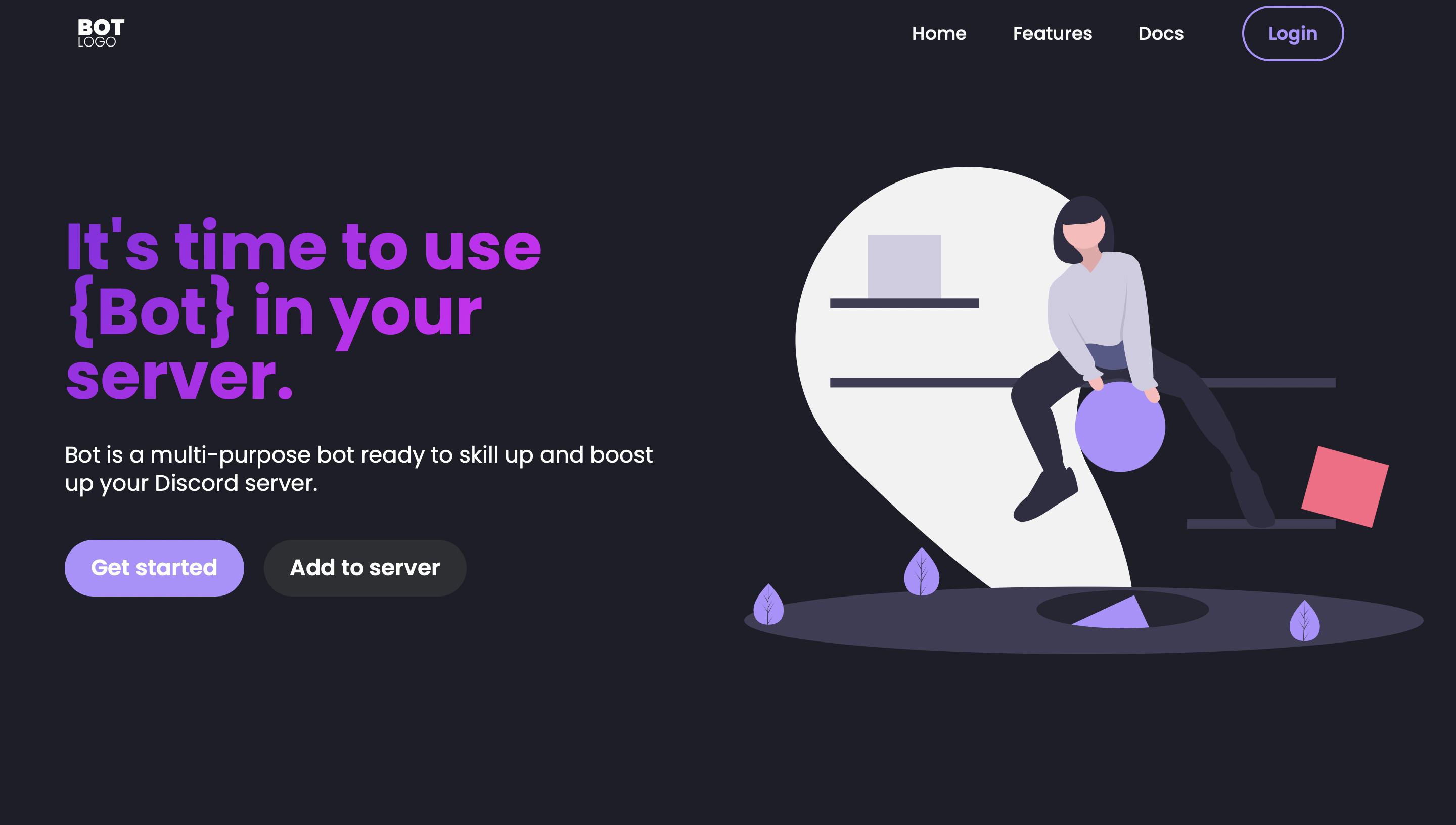
Responsive landing page template for promoting Discord bots
HTMLStarter
Discord-Bot-Website-Template — HTML Starter Template
By BardothWeb
A Bootstrap-based landing page template for promoting Discord bots, built with HTML, CSS, and JavaScript, currently containing only the home page.
Explore the design
Compare the page layouts and mobile experience. Open any screenshot for a closer look.
Author preview
Author-provided preview
Preview provided in the project README.
One original preview is available. Open the full image to inspect the design.
Screenshots show visual appearance; interactive behavior may differ.
Recorded 2026-10-03View source
What stands out
A quick read of the recorded project description.
Built on Bootstrap, along with HTML, CSS, and JavaScript
Constructed using Mobirise as the base draft
Currently contains only one page: the landing page
MIT license, allowing free use, modification, commercial use, and distribution
Can be deployed to static hosting platforms such as GitHub Pages or Netlify
Template Details
This is a responsive website template for showcasing and promoting Discord bots. The repository description explicitly states that it currently provides only a landing page and no other pages. The page is built on Bootstrap, along with HTML, CSS, and JavaScript; the author mentions using Mobirise as the base draft.
Usage is straightforward: clone or fork the repository, open index.html directly in a browser to view it, then replace the bot information and adjust the design as needed, and deploy to a static hosting platform such as GitHub Pages or Netlify. The template is under the MIT license, allowing free use, modification, commercial use, and distribution; when distributing, the copyright and license notice must be retained, and the author also requests that attribution be kept when using it.
Limitations to note: some images in the template come from external platforms such as Freepik and undraw, and their licenses must be checked separately; they cannot be judged solely by the code's MIT license. The repository provides no feature descriptions beyond the landing page, and there is no description of backend, data, or interaction logic.
HTMLLauncher
Is it right for your project?
Use Cases
- Building an introduction and promotion home page for a new Discord bot
- Quickly replacing copy and images to create a showcase page for a bot project
- Deploying as a static site to GitHub Pages or Netlify
- Performing secondary design and structural adjustments on an existing Bootstrap page
Suitable For
- Developers who need a promotional landing page for a Discord bot
- Static page projects that want a quick start based on Bootstrap
- Users who accept having only a landing page and will extend pages themselves later
- Teams or individuals who can independently verify the licenses of third-party image assets
Getting started & customization
Use these recorded setup notes alongside the repository instructions for your chosen version.
- 1
Clone or fork the repository: git clone https://github.com/BardothWeb/Discord-Bot-Website-Template.git
- 2
Open index.html directly in a browser to preview
- 3
Replace the bot information and adjust the design as needed, then deploy to a static hosting platform
- 4
Retain the original author's copyright notice and the full MIT license notice when distributing the code
- 5
Before use, independently verify the license terms of images from sources such as Freepik and undraw
License & source material
Usage conditions & limitations
Free to use · keep license noticeThis entry covers the free version under the MIT license in the public repository; the free scope is the code of this version and does not mean that external services or third-party assets are free.
Must comply with when using
- Free use, modification, commercial use, and distribution of this version's code are permitted.
- When distributing copies or substantial portions of the code, retain the original author's copyright notice and the full MIT license notice.
- The code is provided as is; warranties and limitations of liability are governed by the original license and applicable law.
Additional costs & items to verify
- The author requests that attribution be kept when using the template. This is the author's attribution request; the MIT license itself does not require attribution, but it is recommended to comply to respect the author's wishes.
- Some images in the template come from external platforms such as Freepik and undraw; these images are not covered by this project's MIT license and must be used only after independently verifying and complying with the respective platform's license terms.
- Demo images, fonts, icons, and other third-party assets must be checked against their respective licenses; they cannot be judged solely by the code's MIT license.
- External services such as domains, hosting, databases, payments, or AI may incur additional charges.
View Original Text Basis
Permission is hereby granted, free of charge
Original License Text
Please leave a credit when using this template.
Original README
https://github.com/BardothWeb/Discord-Bot-Website-Template/blob/main/LICENSEhttps://github.com/BardothWeb/Discord-Bot-Website-Template/blob/main/README.mdSome of the images used in this template are sourced from external platforms such as Freepik and undraw. Please ensure that you review and respect the licenses associated with these images:
Original README
Compiled by DeepSeek based on repository license and README ·2026-10-03. Results only cover the materials read; dependencies, images, fonts, and subsequent term changes are subject to their respective original texts.
Project checks & description sources
Template Information
- Source platforms
- GitHub
- Documentation and maintenance reference score
- Partly documented · 56 / 100
- Technologies
- HTML
- Website type
- Starter
How this score is calculated
Our heuristic uses license records (up to 30), a demo link (12), a preview (10), stars (15), recorded maintenance (15), description completeness (8), feature records (5) and classification data (5). It is not a code, security or performance test, or a Google score. A link does not establish tested functionality.
What to verify for this project
- Repository update recorded
- 2024-02-21
- Screenshot last checked
- 2026-10-03
No demo link is recorded. Use the repository instructions to evaluate the project locally; the screenshot alone cannot establish interactive behavior.
The catalog identifies HTML as the primary stack. Check the actual dependency manifest and lockfile for versions and hosting requirements. These notes use recorded metadata, not a code audit or a deployment test.
Use a selection guide →How this description was prepared
AI-assisted description based on catalog records and repository material. Repository authors are not automatically the reviewers of this description.
Review declaration: [email protected] · 2026-10-04
Inspect the recorded source material
SHA-256: fc86e4381f7c55f0c46d341f5f231be9fecdf93d2209918c8befe43d3b5742ae
2026-10-03T08:44:57.166Z
Source file / repository# 🚀 Discord Bot Website Template ## 🖼️ Screenshots  ## 📝 About the Project Today, I'm excited to share with you a Discord Bot Website Template (at the moment landing page only), available for free! As a developer myself, I know the struggle of finding visually appealing and responsive templates for showcasing projects. So, I decided to create this template to make it easier for bot creators like you to present your creations to the world. Whether you're a seasoned developer or just starting out, this template is designed to help you make a strong first impression with your Discord bots. ## 🛠️ Technologies Used List of the technologies/frameworks/libraries used: - Bootstrap - HTML - CSS - JavaScript - Mobirise (basic base) ## ⚙️ Installation Steps to install: 1. Fork the repository or clone it: git clone `https://github.com/BardothWeb/Discord-Bot-Website-Template.git` 2. Open the index.html file in your browser. ## 🖥️ Usage To use this template, simply clone or fork the repository and customize it according to your needs. Add your bot's information, tweak the design, and make it your own! Once customized, you can host it on platforms like GitHub Pages or Netlify to showcase your Discord bot to the world. ## 🤝 Contributing If you'd like to contribute to this project, please follow these steps: 1. Fork the repository 2. Create a new branch (`git checkout -b feature`) 3. Make your changes 4. Commit your changes (`git commit -am 'Add new feature'`) 5. Push to the branch (`git push origin feature`) 6. Create a new Pull Request ## 📄 License This project is licensed under the [MIT License](https://opensource.org/licenses/MIT) - see the [LICENSE](LICENSE) file for details. Please leave a credit when using this template. ## 🖼️ Image Credits and Licensing Some of the images used in this template are sourced from external platforms such as Freepik and undraw. Please ensure that you review and respect the licenses associated with these images: - [Freepik License Agreement](https://www.freepikcompany.com/legal#nav-freepik) - [undraw License Agreement](https://undraw.co/license) ## 📧 Contact If you have any questions or feedback, feel free to contact me: Discord: .bardoth 
Explore similar templates
Compare previews and descriptions within the same stack and category.

startbootstrap-simple-sidebar
A Bootstrap off-canvas sidebar navigation HTML starter template from Start Bootstrap. It provides directly editable HTML and CSS in the dist directory, while the source uses Pug, SCSS, and JavaScript with npm build scripts for live preview and compilation.
HTML · Starter

adminkit
AdminKit is a free, MIT-licensed HTML admin and dashboard template built on Bootstrap 5. The free version includes 15 demo pages, 1 plugin, and 1 color scheme, with hundreds of UI components, forms, tables, charts, and icons.
HTML · Admin dashboard

Landing-Page
A general-purpose landing page HTML template maintained by Tailwind Toolbox, written in pure HTML and loading the complete Tailwind CSS via CDN.
HTML · Corporate Website

light-bootstrap-dashboard
Light Bootstrap Dashboard is a free, MIT-licensed admin dashboard template from Creative Tim, built on Bootstrap with a responsive static HTML structure.
HTML · Admin dashboard

sing-app
Sing App Lite is a free, open-source admin dashboard template from Flatlogic, built with Bootstrap 4.5 and SCSS. It provides a responsive layout, dashboard examples, typography, tables, notifications, basic charts, icons, maps, and a hover sidebar, along with styled Bootstrap components.
HTML · Admin dashboard

startbootstrap-modern-business
Modern Business is a multipurpose Bootstrap full-site HTML template from Start Bootstrap with 17 standalone pages covering home, about, services, portfolio, pricing, blog, FAQ, and contact.
HTML · Starter