Jekyll-based blog theme with MIT-licensed code
JekyllBlog
centrarium — Jekyll Blog Template
By bencentra
Centrarium is a Jekyll-based blog and website theme, MIT-licensed, supporting cover images, pagination, category and tag archives, code highlighting, Disqus comments, and social sharing.
Explore the design
Compare the page layouts and mobile experience. Open any screenshot for a closer look.
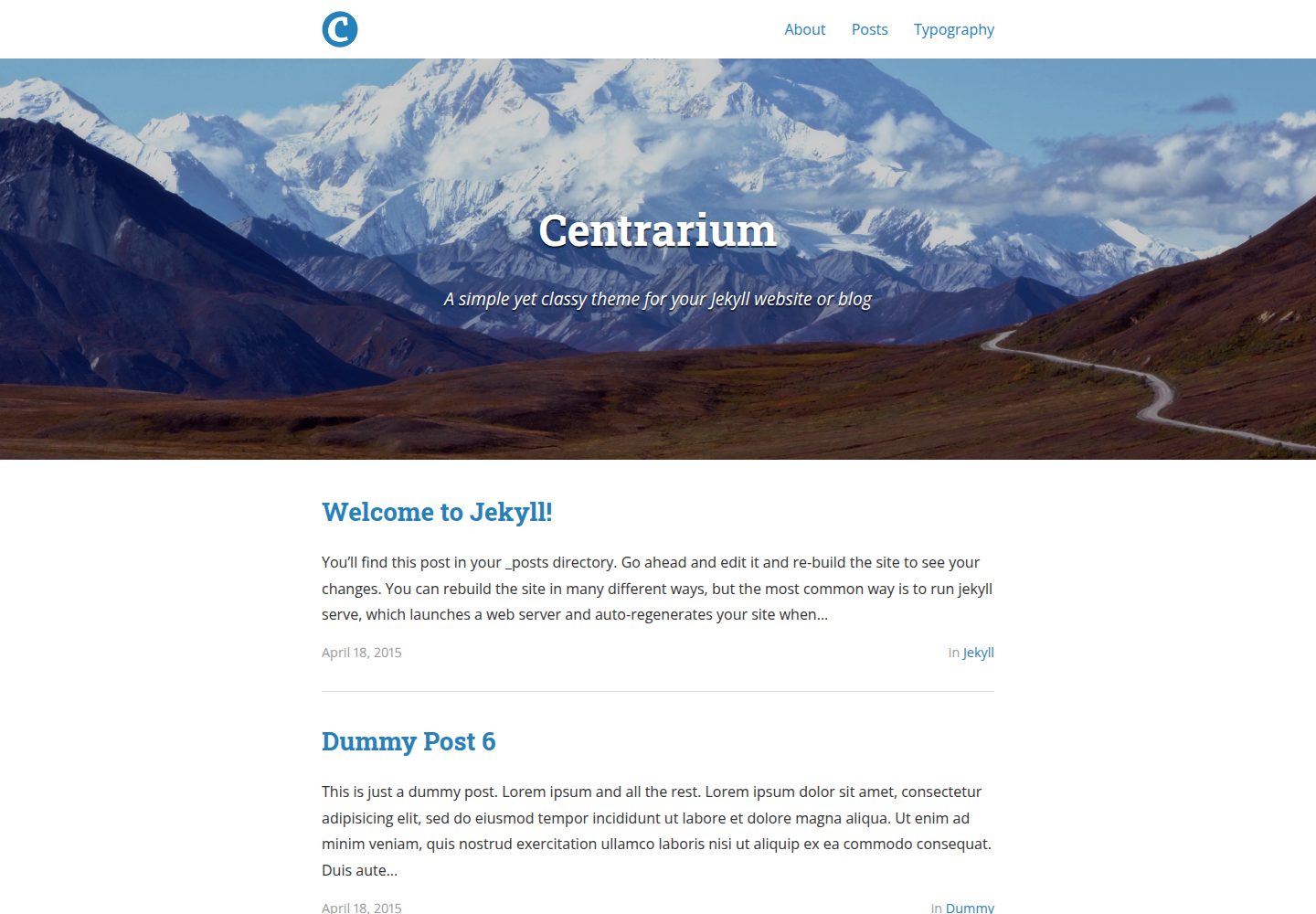
Desktop homepage1 / 3
Desktop captureTop of page
Actual screenshot captured by the server browser.
All pages & views 3
Screenshots show visual appearance; interactive behavior may differ.
Recorded 2026-09-30View source
What stands out
A quick read of the recorded project description.
Adjust fonts, font sizes, and colors via _sass/base/_variables.scss
Homepage and posts support cover images, and images can be viewed full-screen with Lightbox
Pagination is enabled by default, and archive pages can be generated by category and tag
Integrates HighlightJS code highlighting, Disqus comments, and Google Analytics
Navigation and footer links are generated automatically from page front matter
Template Details
Centrarium is a theme developed by Ben Centra for Jekyll websites or blogs. The repository is MIT-licensed and may be used, modified, and distributed for free. The theme's styles are built on Sass tool libraries including Bourbon, Neat, Bitters, and Refills; icons use Font Awesome, code highlighting uses HighlightJS, and image viewing uses Lightbox.
In terms of features, the theme provides customizable fonts and colors, cover images for the homepage and posts, pagination enabled by default, archiving of posts by category and tag, syntax highlighting for code snippets, Disqus comments, an image lightbox, Google Analytics with custom page name tracking, and integration with social networks such as Twitter, Facebook, LinkedIn, and GitHub. Navigation and footer links are generated automatically from front matter: pages marked with category: page, having a title, and with main_nav: true set will appear in the navigation.
There are two ways to use it: use the repository as a starting point for a new site, placing posts in the posts/ directory and creating pages with Jekyll front matter; or, in an existing Jekyll site, replace the _includes, _layouts, and _sass directories, replace index.html, and copy posts.html and _config.yml. Dependencies are installed via Bundler.
Limitations to note: category and tag archives depend on jekyll-archives, which is not included in GitHub Pages. If deploying to GitHub Pages, you must disable the archive feature or switch to building locally and pushing the generated output. Disqus, Google Analytics, and similar services are external and require you to configure your own accounts. Third-party assets such as the demo cover images in the theme must have their licenses checked separately.
JekyllBlog
Is it right for your project?
Use Cases
- Building a personal blog and publishing posts with code snippets
- Changing the theme style and layout of an existing Jekyll site
- Content sites that need to browse post archives by category or tag
- Importing via Stackbit and connecting headless CMSs such as NetlifyCMS and Contentful
Suitable For
- Individual developers building static blogs with Jekyll
- Users who want to customize the color scheme by directly modifying Sass variables
- Bloggers who need post comments, code highlighting, and social sharing
- Users planning to deploy to Netlify or self-host a static site
Getting started & customization
Use these recorded setup notes alongside the repository instructions for your chosen version.
- 1
Install Bundler first, then run bundle install to install dependencies such as Jekyll, jekyll-archives, jekyll-sitemap, and jekyll-paginate
- 2
New sites can use the repository files directly; existing sites need to replace the _includes, _layouts, and _sass directories and merge _config.yml
- 3
When deploying to GitHub Pages, disable jekyll-archives because that plugin is not supported by GitHub Pages
- 4
Disqus comments require setting disqus_shortname in _config.yml, and Google Analytics requires setting ga_tracking_id
- 5
Third-party assets such as cover images, fonts, and icons should have their licenses checked separately; do not judge based solely on the code's MIT license
License & source material
Usage conditions & limitations
Free to use · keep license noticeThis entry covers the free version in the public repository under the MIT license; the free scope is the code of that version and does not mean external services or third-party assets are free.
Must comply with when using
- You may use, modify, commercially use, and distribute the code of this version for free.
- When distributing copies or substantial portions of the code, retain the original author's copyright notice and the full MIT license notice.
- The code is provided as is; warranties and limitations of liability are governed by the original license and applicable law.
Additional costs & items to verify
- Category and tag archives depend on the jekyll-archives plugin, which is not supported by GitHub Pages; if deploying to GitHub Pages, you must disable the archive feature or switch to building locally and pushing the generated output.
- Disqus comments are an optional external service; you must register a Disqus account and set disqus_shortname in _config.yml to enable them.
- Google Analytics is an optional external service; you must have a Google Analytics account and enter ga_tracking_id to enable tracking.
- The demo cover images in the theme come from a third party (Chris M. Morris / Flickr); their license is unrelated to the code's MIT license, and you must check the asset authorization separately before use.
- Demo images, fonts, icons, and other third-party assets must be checked under their respective licenses; do not judge based solely on the code's MIT license.
- External services such as domains, hosting, databases, payments, or AI may incur additional charges.
View Original Text Basis
Permission is hereby granted, free of charge
Original License Text
the Jekyll Archive gem is NOT included with GitHub pages! Disable the archive feature if you intend to deploy your site to GitHub pages.
Original README
You can enable [Disqus][disqus] comments for you site by including one config option
Original README
You can enable basic [Google Analytics][ga] pageview tracking by including your site's tracking ID
Original README
https://github.com/bencentra/centrarium/blob/master/LICENSE.mdhttps://github.com/bencentra/centrarium/blob/master/README.mdCover image by Chris M. Morris ([flickr][cover]).
Original README
Compiled by DeepSeek based on repository license and README ·2026-10-01. Results only cover the materials read; dependencies, images, fonts, and subsequent term changes are subject to their respective original texts.
Project checks & description sources
Template Information
- Source platforms
- GitHub
- Documentation and maintenance reference score
- More documented · 76 / 100
- Technologies
- Jekyll
- Website type
- Blog
How this score is calculated
Our heuristic uses license records (up to 30), a demo link (12), a preview (10), stars (15), recorded maintenance (15), description completeness (8), feature records (5) and classification data (5). It is not a code, security or performance test, or a Google score. A link does not establish tested functionality.
What to verify for this project
- Repository update recorded
- 2024-08-15
- Screenshot last checked
- 2026-10-01
A demo link is listed. Check it with your own content and viewport sizes; its presence does not confirm that forms, authentication or payments work.
The catalog identifies Jekyll as the primary stack. Check the actual dependency manifest and lockfile for versions and hosting requirements. These notes use recorded metadata, not a code audit or a deployment test.
Use a selection guide →How this description was prepared
AI-assisted description based on catalog records and repository material. Repository authors are not automatically the reviewers of this description.
Automatically checked against source and license rules; no manual editorial review.
Inspect the recorded source material
SHA-256: 1b0304078ec4f25fa66022fb17f6b0473db24a8f1ceecda7bd2be18d5a43c101
2026-10-01T13:34:47.189Z
Source file / repository# Centrarium [](https://circleci.com/gh/bencentra/centrarium/tree/master)
A simple yet classy theme for your Jekyll website or blog. Customizable to fit your style or brand.
Built with these awesome libraries:
* [Bourbon][bourbon]
* [Neat][neat]
* [Bitters][bitters]
* [Refills][refills]
* [Font Awesome][fontawesome]
* [HighlightJS][highlightjs]
* [Lightbox][lightbox]
Here's a [demo](http://bencentra.com/centrarium). It also works on [GitHub Pages](http://bencentra.github.io/centrarium/). I also use it for [my own website][bencentra].
Inspired by dirkfabisch's [Mediator](https://github.com/dirkfabisch/mediator) theme, which I previously used for my own blog, as well as [Type Theme](http://rohanchandra.github.io/type-theme/).
Cover image by Chris M. Morris ([flickr][cover]).
## Features
This theme comes with a number of features, including:
* Easily customizable fonts and colors
* Cover images for your homepage and blog posts
* Pagination enabled by default
* Archiving of posts by categories and tags
* Syntax highlighting for code snippets
* Disqus integration for post comments
* Lightbox for viewing full-screen photos and albums
* Google Analytics with custom page name tracking
* Social media integration (Twitter, Facebook, LinkedIn, GitHub, and more)
## Installation
If you're just getting started with Jekyll, you can use this repository as a starting point for your own site. Just [download this project](https://github.com/bencentra/centrarium/archive/master.zip) and add all the files to your project. Add your blog posts to the `posts/` directory, and create your pages with the proper Jekyll front matter (see `posts.html` for an example).
If your site already uses Jekyll, follow these steps:
1. Replace the files in the `_includes`, `_layouts`, and `_sass` directories with those from this project.
2. Replace your `index.html` with the one from this project, and copy over the `posts.html` file as well.
3. Copy the contents of the `_config.yml` from this project in to yours, and update the necessary information.
Don't forget to install Jekyll and other dependencies:
```bash
# cd into project directory
cd centrarium
# install Bundler if you don't have it already
gem install bundler
# install jekyll, jekyll-archives, jekyll-sitemap, and jekyll-paginate
bundle install
```
## Stackbit Deploy
This theme is ready to import into Stackbit. This theme can be deployed to Netlify and you can connect any headless CMS including Forestry, NetlifyCMS, DatoCMS or Contentful.
[](https://app.stackbit.com/create?theme=https://github.com/bencentra/centrarium)
## Updating Header and Footer Links
Links in the header and footer are auto-generated. Links will be made for all files marked `category: page`, that have a title, and have the custom `main_nav` front-matter variable set to `true`. You can modify the rules for link generation in `_layouts/nav_links.html`.
## Updating Styles
If you want change the CSS of the theme, you'll probably want to check out these files in the `_sass/` directory:
* `base/_variables.scss`: Common values found throughout the project, including base font size, font families, colors, and more.
* `base/_typography.scss`: Base typography values for the site (see `typography.html` for a demonstration)
* `_layout.scss`: The primary styles for the layout and design of the theme.
### Important Variables
Here are the important variables from `base/_variables.scss` you can tweak to customize the theme to your liking:
* `$base-font-family`: The font-family of the body text. Make sure to `@import` any new fonts!
* `$heading-font-family`: The font-family of the headers. Make sure to `@import` any new fonts!
* `$base-font-size`: The base font-size. Defaults to $em-base from Bourbon (`bourbon/settings/_px-to-em.scss`).
* `$base-font-color`: The color for the body text.
* `$action-color`: The color for links in the body text.
* `$highlight-color`: The color for the footer and page headers (when no cover image provided).
## Configuration
All configuration options can be found in `_config.yml`.
### Site Settings
* __title:__ The title for your site. Displayed in the navigation menu, the `index.html` header, and the footer.
* __subtitle:__ The subtitle of your site. Displayed in the `index.html` header.
* __email:__ Your email address, displayed with the Contact info in the footer.
* __name:__ Your name. _Currently unused._
* __description:__ The description of your site. Used for search engine results and displayed in the footer.
* __baseurl:__ The subpath of your site (e.g. /blog/).
* __url:__ The base hostname and protocol for your site.
* __cover:__ The relative path to your site's cover image.
* __logo:__ The relative path to your site's logo. Used in the navigation menu instead of the title if provided.
### Build Settings
* __markdown:__ Markdown parsing engine. Default is kramdown.
* __inter_post_navigation:__ Whether to render links to the next and previous post on each post.
### Pagination settings
See the documentation for [jekyll-paginate-v2](https://github.com/sverrirs/jekyll-paginate-v2/blob/master/README-GENERATOR.md#site-configuration) for more details.
### Archive Settings
Although this theme comes with a combined, categorized archive (see `posts.html`), you can enable further archive creation thanks to [jekyll-archives][archives]. Support for category and tag archive pages is included, but you can also add your own archive pages for years, months, and days.
To change archive settings, see the __jekyll-archives__ section of `_config.yml`:
```yml
jekyll-archives:
enabled:
- categories
- tags
layout: 'archive'
permalinks:
category: '/category/:name/'
tag: '/tag/:name/'
```
To fully disable the archive, remove the __jekyll-archives__ section AND remove it from the __gems__ list.
__NOTE:__ the Jekyll Archive gem is NOT included with GitHub pages! Disable the archive feature if you intend to deploy your site to GitHub pages. [Here is a guide](http://ixti.net/software/2013/01/28/using-jekyll-plugins-on-github-pages.html) on how you can use the `jekyll archive` gem with GitHub pages. The general gist: compile the Jekyll site locally and then push that compiled site to GitHub.
A sitemap is also generated using [jekyll-sitemap][sitemap].
### Syntax Highlighting Settings
Inside of a post, you can enable syntax highlighting with the `{% highlight <language> %}` Liquid tag. For example:
```
{% highlight javascript %}
function demo(string, times) {
for (var i = 0; i < times; i++) {
console.log(string);
}
}
demo("hello, world!", 10);
{% endhighlight %}
```
You can change the [HighlightJS theme][highlightjs_theme] in `_config.yml`:
```yml
highlightjs_theme: "monokai_sublime"
```
### Disqus Settings
You can enable [Disqus][disqus] comments for you site by including one config option:
* __disqus_shortname:__ Your Disqus username. If the property is set, Disqus comments will be included with your blog posts.
If you want to disable Disqus for only a specific page, add __disqus_disabled: true__ to the page's front matter.
### Google Analytics Settings
You can enable basic [Google Analytics][ga] pageview tracking by including your site's tracking ID:
* __ga_tracking_id__: The Tracking ID for your website. You can find it on your Google Analytics dashboard. If the property is set, Google Analytics will be added to the footer of each page.
### Social Settings
Your personal social network settings are combined with the social sharing options. In the __social__ section of `_config.yml`, include an entry for each network you want to include. For example:
```yml
social:
- name: Twitter # Name of the service
icon: twitter # Font Awesome icon to use (minus fa- prefix)
username: TheBenCentra # (User) Name to display in the footer link
url: https://twitter.com/TheBenCentra # URL of your profile (leave blank to not display in footer)
desc: Follow me on Twitter # Description to display as link title, etc
share: true # Include in the "Share" section of posts
```
### Social Protocols
Using the Open Graph Protocol or Twitter Card metadata, you can automatically set the images and text used when people share your site on Twitter or Facebook. These take a bit of setup, but are well worth it. The relevant fields are at the end of the `_config.yml` file.
Also there is another protocol, the Open Source protocol, for saying where your site is hosted if the source is open. This helps develops more easily see your code if they are interested, or if they have issues. For more, see http://osprotocol.com.
### Category Descriptions
You can enhance the `posts.html` archive page with descriptions of your post categories. See the __descriptions__ section of `_config.yml`:
```yml
# Category descriptions (for archive pages)
descriptions:
- cat: jekyll
desc: "Posts describing Jekyll setup techniques."
```
### Custom Page-Specific Javascript
You can add page-specific javascript files by adding them to the top-level `/js` directory and including the filename in the __custom_js__ page's configuration file:
```yml
# Custom js (for individual pages)
---
layout: post
title: "Dummy Post"
date: 2015-04-18 08:43:59
author: Ben Centra
categories: Dummy
custom_js:
- Popmotion
- Vue
---
```
The `/js/` directory would contain the corresponding files:
```bash
$ ls js/
Popmotion.js Vue.js
```
## Contributing
Want to help make this theme even better? Contributions from the community are welcome!
Please follow these steps:
1. Fork/clone this repository.
2. Develop (and test!) your changes.
3. Open a pull request on GitHub. A description and/or screenshot of changes would be appreciated!
4. I ([Ben Centra](https://github.com/bencentra)) will review and merge the pull request.
## License
MIT. See [LICENSE.MD](https://github.com/bencentra/centrarium/blob/master/LICENSE.md).
[bencentra]: http://bencentra.com
[bourbon]: http://bourbon.io/
[neat]: http://neat.bourbon.io/
[bitters]: http://bitters.bourbon.io/
[refills]: http://refills.bourbon.io/
[fontawesome]: http://fortawesome.github.io/Font-Awesome/
[highlightjs]: https://highlightjs.org/
[highlightjs_theme]: https://highlightjs.org/static/demo/
[lightbox]: http://lokeshdhakar.com/projects/lightbox2/
[cover]: https://www.flickr.com/photos/79666107@N00/3796678503/in/photolist-6MuYfc-61Rtft-8XzPmY-a6Cozm-54eSMs-6oMJmk-aepZQq-9YkPHp-fiAEGE-dVP4Z5-oxPyJP-atKUFJ-9YHWA5-9YF2f2-9YF2gR-9YHVGN-9YHVvs-qZYYQ6-4JqP2i-a2peGy-9YHVUm-9YHVF7-9YHVCL-9YF3NK-cYteMo-aiPmb9-69dtAi-9YF21x-4aWpmn-7SLiUL-77pqVX-8vXbYv-4HGDSH-a2h5P1-8LsZrQ-9aj1ez-auPZ7q-9YHVMd-9YF2bi-9YF23D-8LpWpn-9an6KL-9YHVZL-dqZ3Cz-2GuvnX-9YHWUo-9YHVWd-p5Roh5-i1zTbv-6sYrUT
[disqus]: https://disqus.com/
[ga]: http://www.google.com/analytics/
[archives]: https://github.com/jekyll/jekyll-archives
[sitemap]: https://github.com/jekyll/jekyll-sitemap
Explore similar templates
Compare previews and descriptions within the same stack and category.

al-folio
A Jekyll academic homepage theme for scholars and researchers, with a clean responsive design and out-of-the-box support for publication lists, project showcases, CVs, and blogs.
Jekyll · Portfolio

minimal-mistakes
Minimal Mistakes is a two-column Jekyll theme for personal sites, blogs, project documentation, or portfolios.
Jekyll · Portfolio

Beautiful Jekyll
Beautiful Jekyll is a mature, easy-to-use Jekyll blog theme maintained by Dean Attali since 2015, with over 50,000 users.
Jekyll · Blog

jekyll-TeXt-theme
A customizable Jekyll theme for personal sites, team sites, blogs, projects, and documentation.
Jekyll · Blog

startbootstrap-clean-blog-jekyll
The official Jekyll version of Start Bootstrap's Clean Blog theme, offering a blog home page, about page, contact page, and sample post pages, with a Formspree-powered contact form.
Jekyll · Blog

So Simple
A minimal reading-oriented Jekyll theme by Michael Rose for personal blogs, portfolios, and long-form reading. It offers multiple layouts, microformat markup, Disqus comments, Google Analytics, Jekyll SEO Tag, three skins, and aggregation by year, category, and tag with a grid view.
Jekyll · Blog