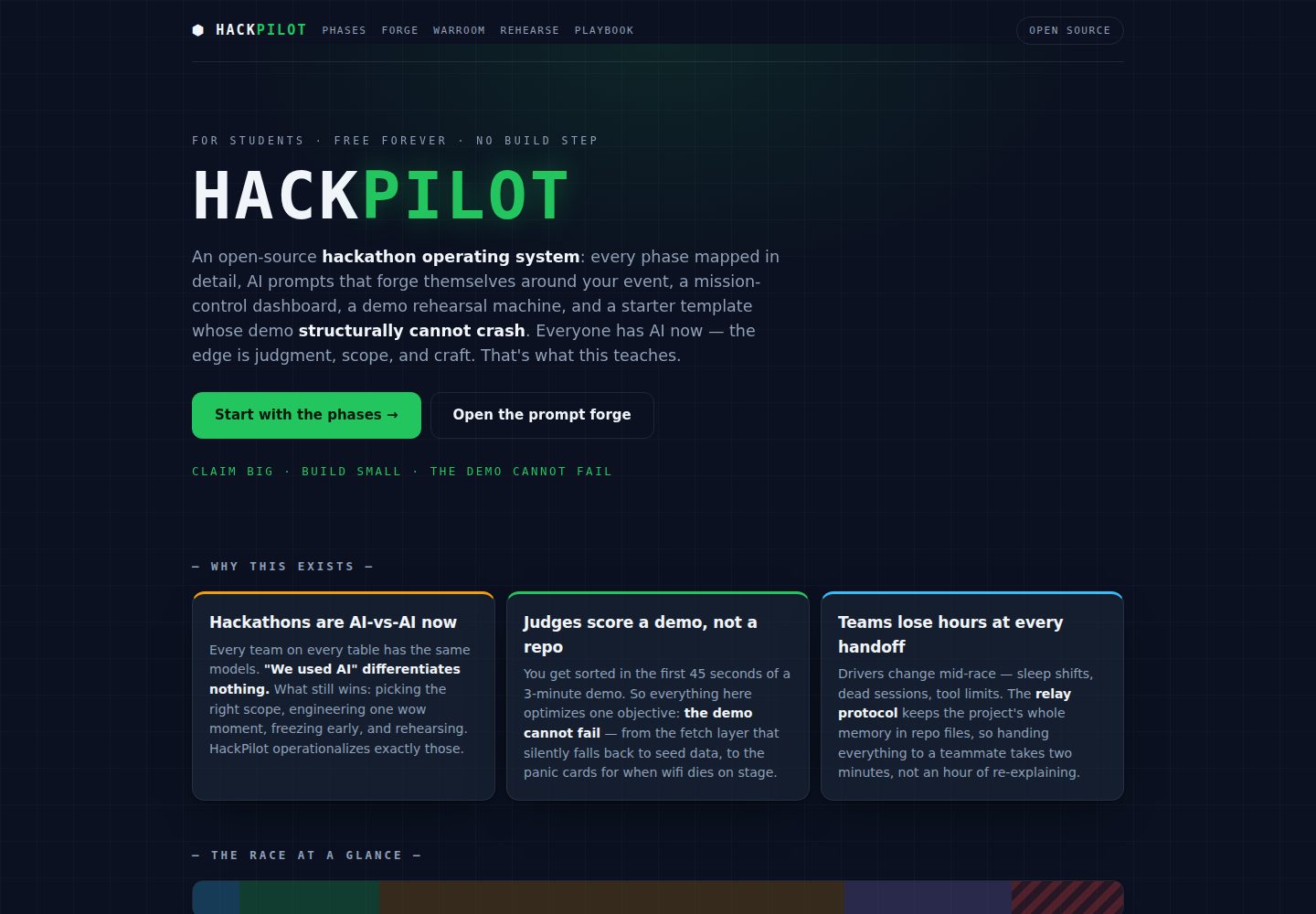
Multiple self-contained HTML pages covering phase guides, prompt generation, war room, demo rehearsal, and playbook
HTMLAdmin dashboardStarter
HackPilot — HTML Admin dashboard Template
By bharath-0814
HackPilot is an open-source hackathon toolkit for students, delivered as pure static HTML pages that provide phase guides, prompt generation, a war room checklist, a demo teleprompter, and a playbook, with no build step or dependencies.
Explore the design
Compare the page layouts and mobile experience. Open any screenshot for a closer look.
Desktop homepage1 / 2
Desktop captureTop of page
Actual screenshot captured by the server browser.
All pages & views 2
Screenshots show visual appearance; interactive behavior may differ.
Recorded 2026-10-15View source
What stands out
A quick read of the recorded project description.
forge.html can generate 11 pre-filled AI prompts, including director, each phase, builder and auditor pairs, and team relay
warroom.html provides a live countdown with phase instructions, interactive checklists, a judge self-scoring card, and on-stage emergency protocols
template/ includes demosafe.js, where every fetch goes through timeout → seed fallback, and supports Ctrl+Shift+P emergency mode
No build step, no dependencies, no account; all tool state is stored in the browser's localStorage
Each page is self-contained, storage access goes through a try/catch shim, and prefers-reduced-motion is respected
Template Details
HackPilot is an open-source toolkit for student hackathons; the README positions it as an operating system "from theme release to the podium." It consists of multiple self-contained HTML pages: index.html is the landing page and concept map; phases.html is the core, listing goals, concrete actions, prompts to trigger, common pitfalls, and completion checklists phase by phase; forge.html is the prompt forge, where after filling in event information once it generates 11 pre-filled AI prompts (director, each phase, builder and auditor pairs, team relay); warroom.html is the mission control console, offering a live countdown with phase instructions, interactive checklists, a judge self-scoring card, and on-stage emergency protocols; rehearse.html is the demo teleprompter, letting a script run against a pacing clock; playbook.html collects sponsor prize arbitrage, an amazing-moments catalog, stage techniques, Q&A jujitsu, and ten rules; template/ is a crash-proof starter app containing a dark glass-style native UI and demosafe.js (every fetch goes through timeout → seed fallback, and supports a silent Ctrl+Shift+P emergency mode). The README states that all tool state is stored in the browser's localStorage; in environments that block storage, the tools still run but do not persist. Usage is to open index.html directly in a browser, with no build step, dependencies, or account, and it works offline. Deployment options include GitHub Pages, Netlify drag-and-drop, and the Vercel command. Design principles require each page to be self-contained, never introduce a build step, route all storage access through a try/catch shim, and respect prefers-reduced-motion. The README does not provide specific interaction details for each page, browser compatibility ranges, or performance data.
HTMLBackendLauncher
Is it right for your project?
Use Cases
- Student teams checking goals, actions, prompts, and completion checklists phase by phase during a hackathon
- Generating pre-filled AI prompts after filling in event information once, to guide each phase and team collaboration
- Managing competition progress on the war room page using the countdown, checklists, and self-scoring card
- Rehearsing a demo script against a pacing clock with the demo teleprompter
- Opening pages directly in a browser with no installation or internet connection
Suitable For
- Student teams participating in hackathons
- Users who want to customize the toolkit for a campus club or college
- Beginners who need to modify pages in an environment without a build step
- Users working on restricted devices or in offline environments
Getting started & customization
Use these recorded setup notes alongside the repository instructions for your chosen version.
- 1
Open index.html directly in a browser; no build step, dependencies, or account required
- 2
All tool state is stored in the browser's localStorage; in environments that block storage, the tools still run but do not persist
- 3
Deploy to GitHub Pages: push the folder, then in Settings → Pages select deploy from a branch
- 4
Deploy to Netlify: drag the folder to netlify.com/drop
- 5
Deploy to Vercel: run the vercel command in that folder
License & source material
Usage conditions & limitations
Free to use · keep license noticeThis entry covers the free version under the MIT license in the public repository; the free scope is that version's code and does not mean external services or third-party assets are free.
Must comply with when using
- Free use, modification, commercial use, and distribution of that version's code are permitted.
- When distributing copies or substantial portions of the code, retain the original author's copyright notice and the full MIT license notice.
- The code is provided as is; warranties and limitations of liability are governed by the original license and applicable law.
Additional costs & items to verify
- Demo images, fonts, icons, and other third-party assets must be checked against their respective licenses; the code's MIT license alone cannot determine this.
- External services such as domains, hosting, databases, payments, or AI may incur separate charges.
View Original Text Basis
https://github.com/bharath-0814/HackPilot/blob/main/LICENSEhttps://github.com/bharath-0814/HackPilot/blob/main/README.mdPermission is hereby granted, free of charge
Original License Text
Compiled by DeepSeek based on repository license and README ·2026-10-15. Results only cover the materials read; dependencies, images, fonts, and subsequent term changes are subject to their respective original texts.
Project checks & description sources
Template Information
- Source platforms
- GitHub
- Documentation and maintenance reference score
- More documented · 85 / 100
- Technologies
- HTML
- Website type
- Admin dashboard · Starter
How this score is calculated
Our heuristic uses license records (up to 30), a demo link (12), a preview (10), stars (15), recorded maintenance (15), description completeness (8), feature records (5) and classification data (5). It is not a code, security or performance test, or a Google score. A link does not establish tested functionality.
What to verify for this project
- Repository update recorded
- 2026-07-07
- Screenshot last checked
- 2026-10-15
A demo link is listed. Check it with your own content and viewport sizes; its presence does not confirm that forms, authentication or payments work.
The catalog identifies HTML as the primary stack. Check the actual dependency manifest and lockfile for versions and hosting requirements. These notes use recorded metadata, not a code audit or a deployment test.
Use a selection guide →How this description was prepared
AI-assisted description based on catalog records and repository material. Repository authors are not automatically the reviewers of this description.
Review declaration: codex-user-requested-batch-review-20261017 · 2026-10-16
Inspect the recorded source material
SHA-256: 9919ae373e91204f8679ad0f804611473a6f4be38f812a2c6946a763a199d4fe
2026-10-15T10:40:58.943Z
Source file / repository# ⬢ HackPilot **An open-source hackathon operating system for students — from theme drop to podium.** [](https://bharath-0814.github.io/HackPilot/) [](LICENSE) [](CONTRIBUTING.md) [](CONTRIBUTING.md) **🔴 Live: [bharath-0814.github.io/HackPilot](https://bharath-0814.github.io/HackPilot/)** — no clone, no install, works on your phone right now. Every team has AI now; "we used AI" differentiates nothing. What still wins hackathons is judgment: picking the right scope, engineering one wow moment, freezing early, rehearsing, and never letting a judge see a surprise. HackPilot turns that judgment into running tools. > **Claim big. Build small. The demo cannot fail.** ## What's inside | Page | What it does | |---|---| | [`index.html`](index.html) | Landing — the doctrine and the map | | [`phases.html`](phases.html) | **The core:** every phase in working detail — goals, exact moves, the prompt to fire, pitfalls, done-checklists | | [`forge.html`](forge.html) | Prompt forge — fill your event once, 11 battle-tested AI prompts generate pre-filled (director, every phase, builder+auditor pair, team baton-pass) | | [`warroom.html`](warroom.html) | Mission control — live countdown with phase orders, interactive checklists, a judge self-scorecard, on-stage panic protocols | | [`rehearse.html`](rehearse.html) | Demo teleprompter — your script against a pace clock; three clean runs = stage-ready | | [`playbook.html`](playbook.html) | Techniques — sponsor-prize arbitrage, the wow-moment catalog, stagecraft, Q&A judo, the Ten Laws | | [`template/`](template/) | Crash-proof starter app — dark-glass vanilla UI + `demosafe.js` (every fetch: timeout → seed fallback; silent `Ctrl+Shift+P` panic mode) | ## Use it (10 seconds) Open `index.html` in any browser. That's it — **no build step, no dependencies, no accounts, works offline.** All tool state lives in your browser's localStorage (and the tools still run in hosts that block storage — they just don't persist there). ## Deploy your own copy (60 seconds) - **GitHub Pages:** push this folder → Settings → Pages → deploy from branch. Done. - **Netlify:** drag the folder onto [netlify.com/drop](https://app.netlify.com/drop). - **Vercel:** `vercel` in this folder. Fork it for your campus club, put your college's name on it, add your own prompts. ## The design principles (also the contribution rules) 1. **Every page is self-contained.** One HTML file = markup + styles + logic. No shared bundles, no imports, no CDN. A first-year with Notepad can modify any page. 2. **No build step, ever.** If a change requires npm, it's the wrong change. 3. **Storage is optional.** Every `localStorage` access goes through a try/catch shim — the tools must run in sandboxed webviews and locked-down school machines. 4. **The demo cannot fail** applies to this site too: designed empty states, no dead buttons, `prefers-reduced-motion` respected. ## Honest colophon Built by a student who ships by directing AI coding agents, using exactly the process this site teaches — the AI wrote the lines, the decisions (scope, cuts, design, what got deleted) were human. The prompt trail that built it is the same kind of log the site tells you to keep for judges. ## License [MIT](LICENSE). Take it, fork it, win with it. If it helped you place — tell someone else about it; that's the whole point.
Explore similar templates
Compare previews and descriptions within the same stack and category.

AdminLTE
An HTML admin dashboard built with Bootstrap 5 and vanilla JavaScript. Astro builds the documentation; React, Vue and Angular editions live in separate repositories.
HTML · Admin dashboard

gentelella
Gentelella v4 is a free, open-source admin dashboard template maintained by Colorlib, built with vanilla JavaScript, SCSS, and Vite 8 without Bootstrap or jQuery.
HTML · Admin dashboard

coreui-free-bootstrap-admin-template
A free Bootstrap admin template maintained by CoreUI, built on CoreUI's own UI component library. It provides compiled HTML pages and Pug template source code, covering dashboards, authentication, forms, components, icons, and error pages.
HTML · Admin dashboard

dashboards
A collection of responsive dashboard HTML templates open-sourced by Keen IO, built on CSS Grid, offering multiple prebuilt admin data interface layouts.
HTML · Admin dashboard

SB Admin 2
SB Admin 2 is a classic Bootstrap admin template from Start Bootstrap, offering dashboards, charts, tables, and common management pages.
HTML · Admin dashboard

Adminator-admin-dashboard
Adminator 4 is a vanilla HTML, CSS and JavaScript admin dashboard template with a CSS-variable token design system, built-in light and dark themes, no jQuery or Bootstrap dependency, and 18 pages covering dashboards, mail, calendar, charts, forms, tables and error pages.
HTML · Admin dashboard