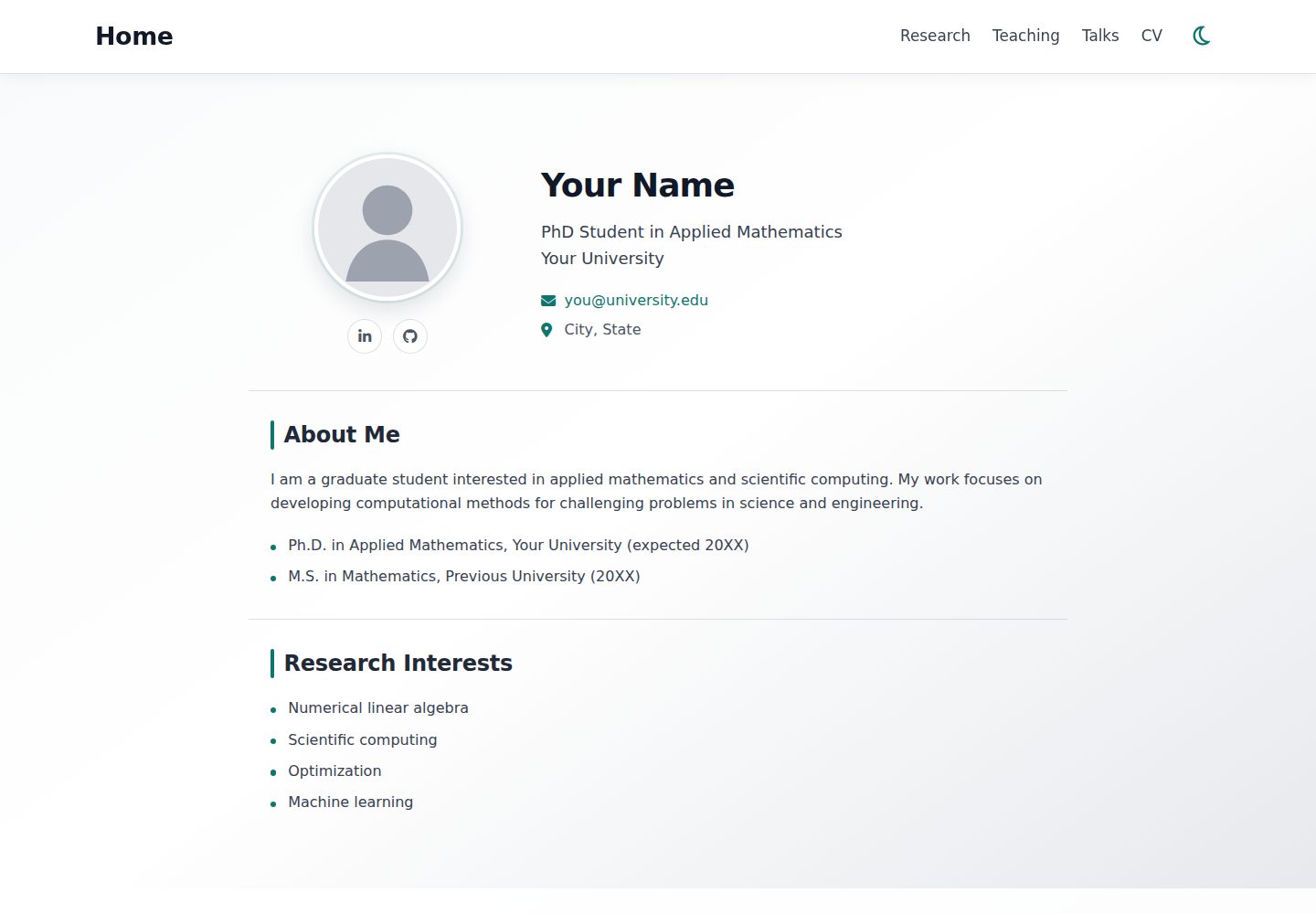
Site-wide information is configured centrally in data/profile.toml, covering name, title, affiliation, contact details, bio, education history, research interests, avatar, CV, and links to social and academic platforms
HTMLPortfolioStarter
academic-starter — HTML Portfolio Template
By BhattHarshit
A Hugo-based academic personal website template that centralizes personal information in data/profile.toml and deploys to GitHub Pages via GitHub Actions.
Explore the design
Compare the page layouts and mobile experience. Open any screenshot for a closer look.
Desktop homepage1 / 2
Desktop captureTop of page
Actual screenshot captured by the server browser.
All pages & views 2
Screenshots show visual appearance; interactive behavior may differ.
Recorded 2026-10-15View source
What stands out
A quick read of the recorded project description.
The navigation bar is generated automatically from content pages; adding a new content/<name>/_index.md with menu: true and a weight creates a tab, with lower weight appearing earlier
Includes three sample content pages: research, teaching, and talks, which can be replaced directly with personal content
The CV tab opens a PDF directly; the file is located at static/files/cv.pdf by default, and the path can be changed in profile.toml
Automatically builds and publishes to GitHub Pages via GitHub Actions; the README includes troubleshooting notes for setting the Pages Source and rerunning workflows
Template Details
This is a Hugo template for creating and maintaining an academic personal website. Most of the site's global information is configured centrally in data/profile.toml, including name and academic title, affiliation and contact details, personal bio and education history, research interests, avatar, CV, and links to LinkedIn, Google Scholar, ORCID, and GitHub. The template includes three content pages: research, teaching, and talks. The navigation bar is generated automatically from the front matter of content pages; order can be controlled with weight, or menu: false can keep a page present without showing it in the navigation. The CV tab opens a PDF directly. For deployment, the README's process is to click Use this template on GitHub to create a repository named your_Github_username.github.io, set Source to GitHub Actions under Settings → Pages, after which GitHub Actions automatically builds and publishes the site; the Deploy Hugo site to GitHub Pages workflow can also be run manually from Actions. Running locally requires installing Hugo first, then executing hugo server. The README does not specify the template's browser compatibility range, accessibility support, specific Hugo version requirements, or deployment methods other than GitHub Pages.
HTMLPortfolioStarter
Is it right for your project?
Use Cases
- Building a personal academic homepage to present bio, education history, research interests, and contact details
- Publishing categorized content pages such as research, teaching, and academic talks
- Providing a directly openable CV PDF download entry on the website
- Hosting and automatically updating a personal site for free via GitHub Pages
Suitable For
- University faculty, researchers, or students who need to maintain an academic personal homepage
- Users who are familiar with or willing to use GitHub and Hugo
- Users who want to manage personal information centrally via a configuration file rather than editing page by page
Getting started & customization
Use these recorded setup notes alongside the repository instructions for your chosen version.
- 1
Click Use this template to create a new repository; the repository name must be your_Github_username.github.io
- 2
Under Settings → Pages, set Source to GitHub Actions in Build and deployment
- 3
Edit data/profile.toml to update personal information, and replace the avatar under static/images/ and static/files/cv.pdf
- 4
Local preview requires installing Hugo first (on macOS, brew install hugo can be used), then run hugo server
- 5
If Actions reports Get Pages site failed, check whether the Pages Source is set to GitHub Actions, then rerun the failed workflow from the Actions tab
License & source material
Usage conditions & limitations
Free to use · keep license noticeThis entry covers the free version under the MIT license in the public repository; the free scope is the code of this version and does not mean that external services or third-party assets are free.
Must comply with when using
- Free use, modification, commercial use, and distribution of this version's code are permitted.
- When distributing copies or substantial portions of the code, retain the original author's copyright notice and the full MIT license notice.
- The code is provided as is; warranties and limitations of liability are governed by the original license and applicable law.
Additional costs & items to verify
- Demo images, fonts, icons, and other third-party assets must be checked against their respective licenses and cannot be judged solely by the code's MIT license.
- External services such as domains, hosting, databases, payments, or AI may incur separate charges.
- Using this template requires registering and logging in to a GitHub account first.
- The repository must be named your_Github_username.github.io to deploy as described.
- You need to set the Build and deployment Source to GitHub Actions under Settings → Pages in the GitHub repository.
- Running locally requires installing Hugo first.
View Original Text Basis
Permission is hereby granted, free of charge
Original License Text
1. Create a GitHub account if you don't have one and log in with it.
Original README
3. Create a **new repository** and name it: `your_Github_username.github.io`.
Original README
4. Open **Settings → Pages** and under **Build and deployment**, set **Source** to **GitHub Actions**.
Original README
https://github.com/BhattHarshit/academic-starter/blob/main/LICENSEhttps://github.com/BhattHarshit/academic-starter/blob/main/.github/README.mdInstall [Hugo](https://gohugo.io/), then run:
Original README
Compiled by DeepSeek based on repository license and README ·2026-10-15. Results only cover the materials read; dependencies, images, fonts, and subsequent term changes are subject to their respective original texts.
Project checks & description sources
Template Information
- Source platforms
- GitHub
- Documentation and maintenance reference score
- More documented · 85 / 100
- Technologies
- HTML
- Website type
- Portfolio · Starter
How this score is calculated
Our heuristic uses license records (up to 30), a demo link (12), a preview (10), stars (15), recorded maintenance (15), description completeness (8), feature records (5) and classification data (5). It is not a code, security or performance test, or a Google score. A link does not establish tested functionality.
What to verify for this project
- Repository update recorded
- 2026-10-14
- Screenshot last checked
- 2026-10-15
A demo link is listed. Check it with your own content and viewport sizes; its presence does not confirm that forms, authentication or payments work.
The catalog identifies HTML as the primary stack. Check the actual dependency manifest and lockfile for versions and hosting requirements. These notes use recorded metadata, not a code audit or a deployment test.
Use a selection guide →How this description was prepared
AI-assisted description based on catalog records and repository material. Repository authors are not automatically the reviewers of this description.
Review declaration: codex-user-requested-batch-review-20261015 · 2026-10-15
Inspect the recorded source material
SHA-256: 22d899b2789621cf9a0f78761ce18facfd70e33747c618300e406793f3e92442
2026-10-15T01:41:43.860Z
Source file / repository# Academic Starter
A simple Hugo template for creating and maintaining a professional academic website.
<p align="center">
<a href="https://bhattharshit.github.io/academic-starter/">
<img src="../static/images/demo.gif"
alt="Academic Website Template Demo"
width="900">
</a>
</p>
<p align="center">
<a href="https://bhattharshit.github.io/academic-starter/">
<strong>View Live Demo →</strong>
</a>
</p>
## Quick start
1. Create a GitHub account if you don't have one and log in with it.
2. Click **Use this template** in the top right corner.
3. Create a **new repository** and name it: `your_Github_username.github.io`.
4. Open **Settings → Pages** and under **Build and deployment**, set **Source** to **GitHub Actions**.
5. Edit `data/profile.toml` slightly and commit changes. (OR, open **Actions → Deploy Hugo site to GitHub Pages → Run workflow**.)
4. Your website will be available at: `https://your_Github_username.github.io/`
5. Edit `data/profile.toml` to update your information and replace `static/images/avatar.svg` and `static/files/cv.pdf` with your files.
GitHub Actions will automatically build and publish the site.
## Site Information
Most site-wide information is controlled from:
```text
data/profile.toml
```
This includes your:
- name and academic title
- institution and contact information
- biography and education
- research interests
- profile image
- CV
- LinkedIn, Google Scholar, ORCID, and GitHub links
## Profile Image
Place your image in:
```text
static/images/
```
and update its path in `data/profile.toml`, for example:
```toml
avatar = "images/profile.jpg"
```
## CV
Replace:
```text
static/files/cv.pdf
```
with your own CV.
If you use a different filename, update its path in `data/profile.toml`:
```toml
cv = "files/my-cv.pdf"
```
The **CV** tab opens the PDF directly.
## Edit Existing Pages
The starter includes:
```text
content/research/_index.md
content/teaching/_index.md
content/talks/_index.md
```
Replace the example content with your own.
## Add a Navigation Tab
Navigation is generated automatically.
For example, to add a **Projects** page, create:
```text
content/projects/_index.md
```
with:
```yaml
---
title: "Projects"
draft: false
menu: true
weight: 25
---
Add your project information here.
```
Lower `weight` values appear earlier in the navigation bar.
The default order is:
```text
Research 10
Teaching 15
Talks 20
```
Set `menu: false` if you want the page to exist without appearing in the navigation bar.
## Run Locally (optional)
Install [Hugo](https://gohugo.io/), then run:
```bash
hugo server
```
On macOS, Hugo can be installed with:
```bash
brew install hugo
```
Open the local address shown in the terminal.
## Repository Structure
```text
data/profile.toml # Personal and site-wide information
content/
├── research/ # Research page
├── teaching/ # Teaching page
└── talks/ # Talks page
static/
├── images/ # Profile image and other images
├── files/cv.pdf # CV
└── css/ # Site styling
layouts/ # Hugo templates
.github/workflows/ # GitHub Pages deployment
hugo.toml # Hugo configuration
```
For normal use, you generally only need to edit `data/profile.toml`, files under `content/`, and your image/CV files.
## Troubleshooting
If GitHub Actions reports:
```text
Get Pages site failed
```
go to:
**Settings → Pages → Build and deployment → Source → GitHub Actions**
Then re-run the failed workflow from the **Actions** tab.
## Acknowledgment
This template is built with [Hugo](https://gohugo.io/) by [Harshit Bhatt](https://bhattharshit.github.io/).
Explore similar templates
Compare previews and descriptions within the same stack and category.

simplefolio
Simplefolio is a minimal single-page portfolio template for developers, built with HTML, Bootstrap, SCSS, and Parcel under the MIT license. It includes Hero, About, Projects, Contact, and Footer sections, with content edited in /src/index.html and theme colors controlled by two SCSS variables.
HTML · Portfolio

Freelancer
A bright, single-page Bootstrap portfolio template for freelancers, designers, and small studios. It includes a responsive portfolio grid with modal detail windows and an SB Forms contact form that requires an API token.
HTML · Portfolio

Resume
A single-page resume and CV template from Start Bootstrap, built on Bootstrap with a fixed sidebar and content sections.
HTML · Portfolio

Creative
A single-page marketing template by Start Bootstrap for creative agencies and product services, built on Bootstrap with SCSS, featuring a portfolio grid and call-to-action sections. It includes pre-set SB Forms markers for form integration and npm build scripts for source customization.
HTML · Corporate Website

startbootstrap-simple-sidebar
A Bootstrap off-canvas sidebar navigation HTML starter template from Start Bootstrap. It provides directly editable HTML and CSS in the dist directory, while the source uses Pug, SCSS, and JavaScript with npm build scripts for live preview and compilation.
HTML · Starter

adminkit
AdminKit is a free, MIT-licensed HTML admin and dashboard template built on Bootstrap 5. The free version includes 15 demo pages, 1 plugin, and 1 color scheme, with hundreds of UI components, forms, tables, charts, and icons.
HTML · Admin dashboard