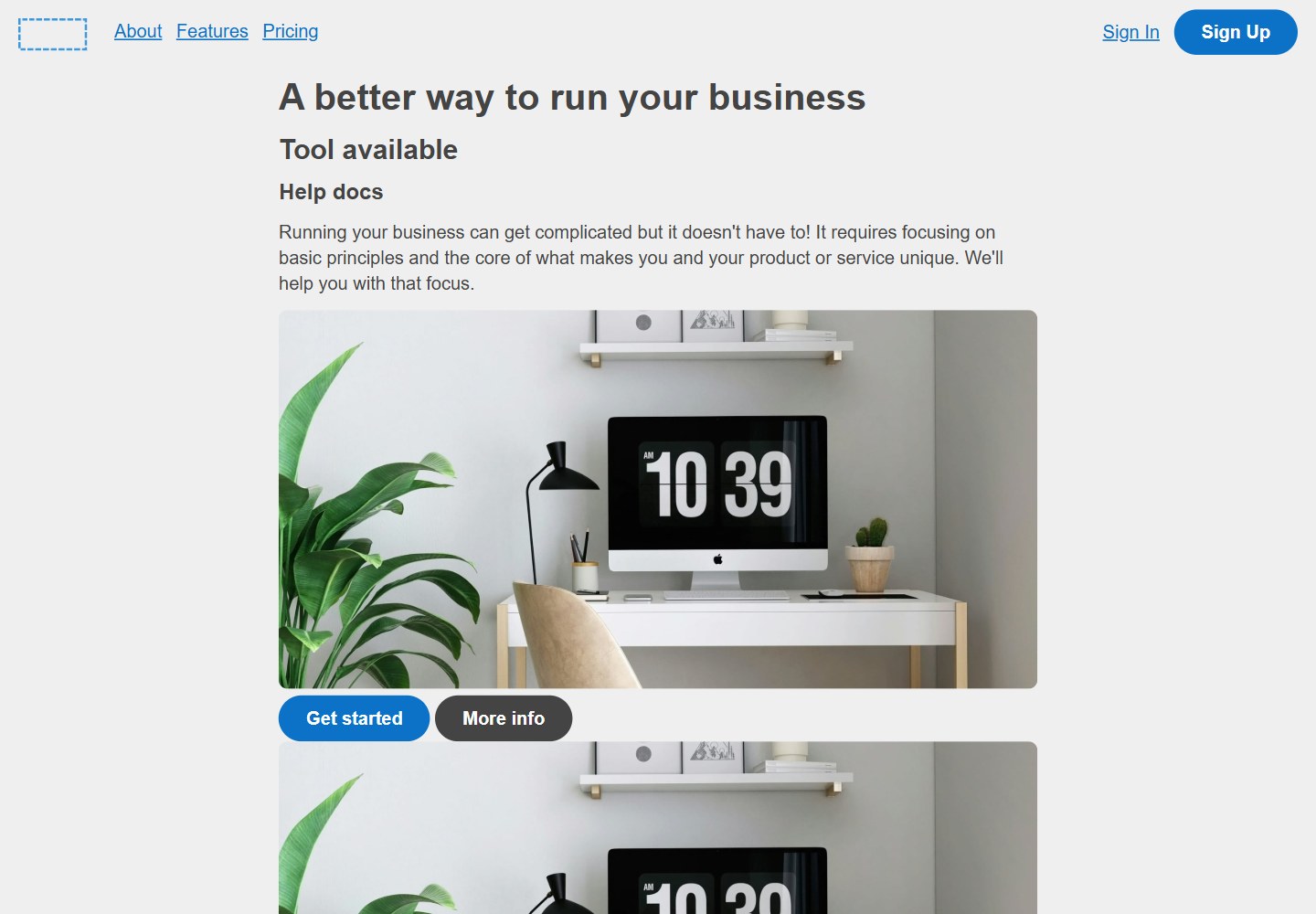
Provides four categories of common components: content sections, content lists, article content, and form fields
HTMLBlogCorporate WebsiteStarter
starter-website-components — HTML Blog Template
By blocksedit
An HTML design system built on common patterns from real websites, providing standard web content components for brochure sites, landing pages, content articles, and digital forms.
Explore the design
Compare the page layouts and mobile experience. Open any screenshot for a closer look.
Desktop homepage1 / 2
Desktop captureTop of page
Actual screenshot rendered from the verified source checkout.
All pages & views 2
Screenshots show visual appearance; interactive behavior may differ.
Recorded 2026-10-21View source
What stands out
A quick read of the recorded project description.
Components can be mixed and matched for brochure sites, landing pages, content articles, and digital forms
Responsive design adapting to different screen sizes
Dark mode compatible
Semantic code, accessibility-oriented
Set up for Blocks Edit, supporting drag-and-drop editing
Template Details
This template is an HTML design system containing standard web content components, organized from patterns across hundreds of real-world websites. It targets scenarios such as brochure sites, landing pages, content articles, and digital forms, offering common patterns that can be mixed and matched to fit different types of web pages. The README lists four categories of common components: content sections (browsable blocks for homepages and landing pages), content lists (displaying related entries such as articles, products, and events), article content (typographic treatment of content elements within an article), and form fields (for collecting information in contact forms, surveys, and similar). The template has responsive layouts, dark mode compatibility, semantic code, and accessibility-oriented optimization, and is set up for drag-and-drop editing in Blocks Edit. The README does not provide the specific tech stack, dependency versions, or installation or deployment steps.
HTMLBlogCorporate websiteStarter
Is it right for your project?
Use Cases
- Building a brochure site or landing page: use content sections and content lists to assemble page structure quickly
- Producing content articles: use article content components to standardize typography
- Creating contact forms or surveys: use form field components to collect information
- Web projects that need dark mode or responsive layouts
- Teams that want to visually edit HTML templates through Blocks Edit
Suitable For
- Brochure site or landing page projects that need standard web content components
- Typography and structure building for content articles or blog-style pages
- Web pages that include digital forms (such as contact forms and surveys)
- Teams that want to use Blocks Edit for visual editing
Getting started & customization
Use these recorded setup notes alongside the repository instructions for your chosen version.
- 1
The README does not provide specific installation or deployment steps; refer to other files in the repository or Blocks Edit documentation
- 2
The template is set up for Blocks Edit and can be edited by drag and drop in its visual editor
- 3
Before use, confirm the project's specific requirements for responsiveness, dark mode, and accessibility
License & source material
Usage conditions & limitations
Free to use · keep license noticeThis entry covers the free version under the MIT license in the public repository; the free scope is the code of that version and does not mean external services or third-party assets are free.
Must comply with when using
- The code of this version may be used, modified, used commercially, and distributed free of charge.
- When distributing copies or substantial portions of the code, the original author's copyright notice and the full MIT license notice must be retained.
- The code is provided as is; warranties and limitations of liability are governed by the original license and applicable law.
Additional costs & items to verify
- Demo images, fonts, icons, and other third-party assets must be checked against their respective licenses; the code's MIT license alone is not sufficient to judge them.
- External services such as domains, hosting, databases, payments, or AI may incur separate charges.
- The template is set up for drag-and-drop editing in Blocks Edit; Blocks Edit is an external visual editing service, and using its editing features may require an account or paid plan with that service, and the README does not document its free scope.
- This theme is made by the Blocks Edit team; the README mentions that Blocks Edit can turn any HTML template into a visually editable one; this is an external service, and its usage conditions and fees must be confirmed separately.
View Original Text Basis
Permission is hereby granted, free of charge
Original License Text
- Blocks Edit ready for drag and drop editing
Original README
https://github.com/blocksedit/starter-website-components/blob/main/LICENSEhttps://github.com/blocksedit/starter-website-components/blob/main/README.mdThis theme has been put together by the Blocks Edit team. [Blocks Edit](https://blocksedit.com) makes any HTML template editable in a visual editor. So you can setup your own design for your team to build and edit web pages on their own.
Original README
Compiled by DeepSeek based on repository license and README ·2026-10-20. Results only cover the materials read; dependencies, images, fonts, and subsequent term changes are subject to their respective original texts.
Project checks & description sources
Template Information
- Source platforms
- GitHub
- Documentation and maintenance reference score
- Partly documented · 73 / 100
- Technologies
- HTML
- Website type
- Blog · Corporate Website · Starter
How this score is calculated
Our heuristic uses license records (up to 30), a demo link (12), a preview (10), stars (15), recorded maintenance (15), description completeness (8), feature records (5) and classification data (5). It is not a code, security or performance test, or a Google score. A link does not establish tested functionality.
What to verify for this project
- Repository update recorded
- 2026-05-27
- Screenshot last checked
- 2026-10-21
No demo link is recorded. Use the repository instructions to evaluate the project locally; the screenshot alone cannot establish interactive behavior.
The catalog identifies HTML as the primary stack. Check the actual dependency manifest and lockfile for versions and hosting requirements. These notes use recorded metadata, not a code audit or a deployment test.
Use a selection guide →How this description was prepared
AI-assisted description based on catalog records and repository material. Repository authors are not automatically the reviewers of this description.
Review declaration: codex-user-requested-batch-review-20261021 · 2026-10-21
Inspect the recorded source material
SHA-256: 8d2a655e3f276160b39fa3b1e2451ea2cd891de33250d992849775e22adfa42e
2026-10-20T22:42:43.441Z
Source file / repository# Starter Website Components ### HTML design system of standard web content components based on hundreds of real-world websites Made for building brochure sites, landing pages, content articles, and digital forms. With common patterns that can be mixed and matched for any type of web page. ### Features ### - Responsive across screen sizes - Dark mode compatibility - Semantic code, optimized for accessibility - Blocks Edit ready for drag and drop editing ## Commonly used components ## ### Content sections ### Skimmable sections for a homepage and landing pages. <img src="starter-pages-components-sections-2.png"> ### Content listings ### A series of related items like articles, products, and events. <img src="starter-pages-components-sections-4.png"> ### Article content ### Ways to format content elements in an article. <img src="starter-pages-components-sections-3.png"> ### Form fields ### Fields to collect information, for contact forms, surveys, etc. <img src="starter-pages-components-sections.png"> This theme has been put together by the Blocks Edit team. [Blocks Edit](https://blocksedit.com) makes any HTML template editable in a visual editor. So you can setup your own design for your team to build and edit web pages on their own.
Explore similar templates
Compare previews and descriptions within the same stack and category.

mazer
Mazer is a free and open-source Bootstrap 5 admin dashboard and landing page template that does not depend on jQuery. It provides prebuilt releases, source builds, and CDN inclusion, and includes dark mode, perfect-scrollbar, and ApexCharts examples.
HTML · Admin dashboard

Freelancer
A bright, single-page Bootstrap portfolio template for freelancers, designers, and small studios. It includes a responsive portfolio grid with modal detail windows and an SB Forms contact form that requires an API token.
HTML · Portfolio

Casper
Casper is Ghost's official classic blog theme, long used as the default and still maintained.
HTML · Magazine

Creative
A single-page marketing template by Start Bootstrap for creative agencies and product services, built on Bootstrap with SCSS, featuring a portfolio grid and call-to-action sections. It includes pre-set SB Forms markers for form integration and npm build scripts for source customization.
HTML · Corporate Website

startbootstrap-agency
Agency is a one-page Bootstrap portfolio theme from Start Bootstrap, MIT licensed. It includes a responsive portfolio grid with modal details and a preconfigured SB Forms contact form that requires an API token.
HTML · Corporate Website

startbootstrap-simple-sidebar
A Bootstrap off-canvas sidebar navigation HTML starter template from Start Bootstrap. It provides directly editable HTML and CSS in the dist directory, while the source uses Pug, SCSS, and JavaScript with npm build scripts for live preview and compilation.
HTML · Starter