Derived from Astro Starlight with theme optimizations
AstroPortfolioBlog
astroplex — Astro Portfolio Template
By bluephoeniiix
Astroplex is a documentation theme modification project based on Astro Starlight, replacing fonts with IBM Plex, adjusting theme colors, and adding KaTeX math support, suitable for portfolio and blog sites.
Explore the design
Compare the page layouts and mobile experience. Open any screenshot for a closer look.
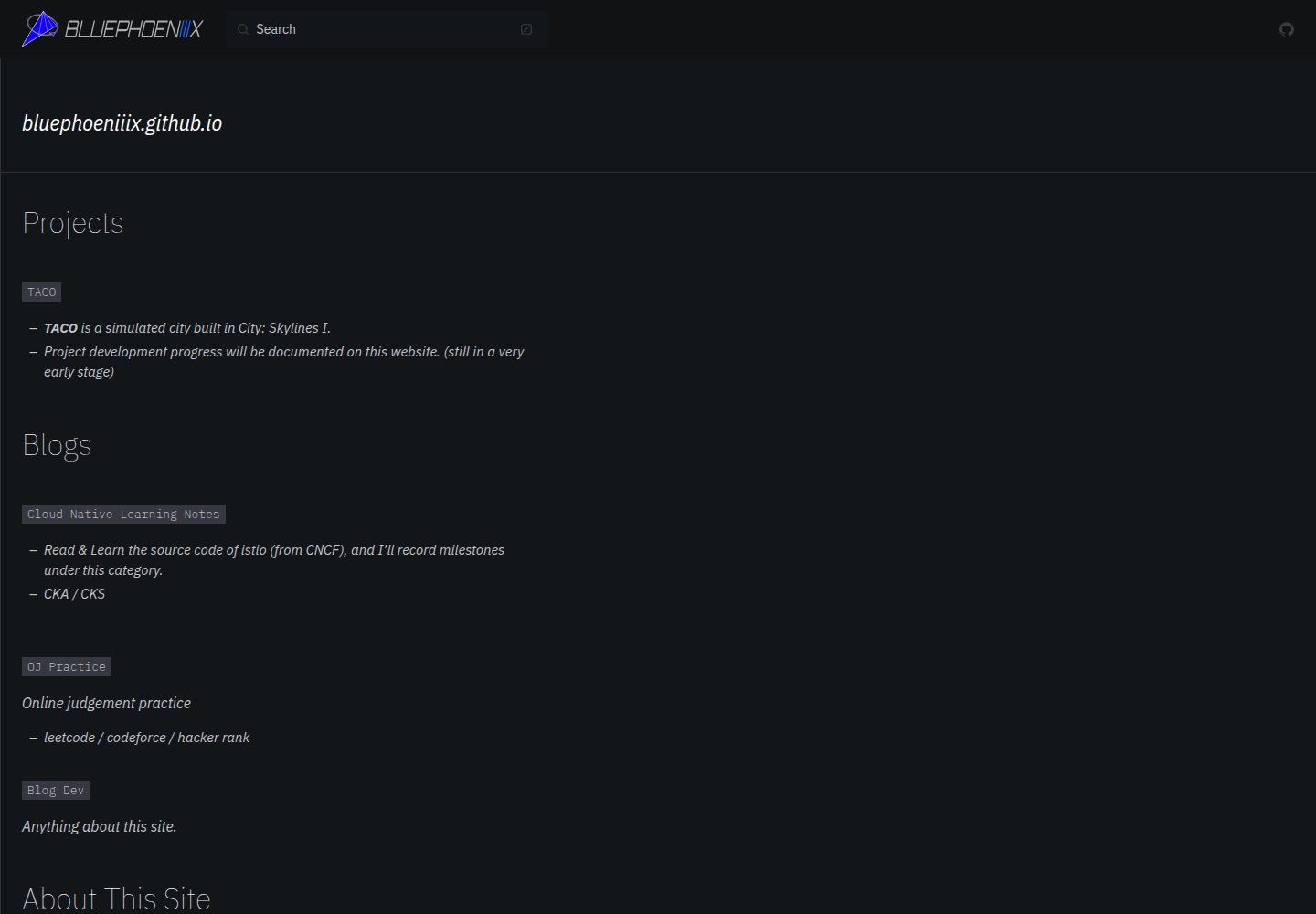
Desktop homepage1 / 2
Desktop captureTop of page
Actual screenshot captured by the server browser.
All pages & views 2
Screenshots show visual appearance; interactive behavior may differ.
Recorded 2026-10-03View source
What stands out
A quick read of the recorded project description.
Font replaced from Roboto to the IBM Plex font family
Theme colors reference IBM Carbon Design's light/dark schemes
Added KaTeX math support missing from Starlight
Provides Docker and install.sh installation script workflow
MIT licensed, free to use, modify, and distribute
Template Details
Astroplex is a theme derived from Astro Starlight and optimized, with the repository self-described as "An Optimized Theme From Astro Starlight". The changes focus on three areas: replacing the Roboto font with the IBM Plex font family, with some adjustments for small viewports; modifying theme styles with reference to IBM Carbon Design's light/dark schemes; and adding the KaTeX math support that Starlight originally lacked. The README lists diagram support as a to-do and notes that more features are under development, so that capability is not currently available.
For usage, the repository provides Docker build and run scripts under the install-scripts directory, installing nvm and pnpm via install.sh, then running pnpm install in the astroplex directory. For development, enter the docs/ directory and run npm run dev; the README recommends using VS Code's Remote Dev and Docker extensions for port forwarding; you can also modify the dev command in package.json as described to disable the Astro development toolbar. When deploying to GitHub Pages, a .nojekyll file must be added to the pages repository.
The repository uses the MIT license, allowing free use, modification, commercial use, and distribution of this version of the code, provided the copyright and license notice are retained when distributing. Third-party assets such as demo images, fonts, and icons require separate license verification, and external services such as domains and hosting may incur additional charges.
AstroPortfolioBlog
Is it right for your project?
Use Cases
- Building documentation or blog sites with math formulas
- Creating personal portfolio pages
- Customizing fonts and color themes on top of Starlight
- Local development of Astro projects using a Docker environment
Suitable For
- Documentation sites needing KaTeX math rendering
- Developers wanting to customize themes based on Starlight
- Front-end developers using Docker and VS Code remote development
- Personal projects preparing to deploy to GitHub Pages
Getting started & customization
Use these recorded setup notes alongside the repository instructions for your chosen version.
- 1
Run docker build -t your-image-name . in the install-scripts directory to build the image
- 2
Run docker run -i -t your-image-name /bin/bash then execute bash install.sh to set up the environment
- 3
Enter the astroplex directory and run pnpm install to install dependencies
- 4
Enter the docs/ directory and run npm run dev to start development mode
- 5
When deploying to GitHub Pages, add a .nojekyll file to the pages repository
License & source material
Usage conditions & limitations
Free to use · keep license noticeThis entry covers the free version under the MIT license in a public repository; the free scope applies to this version's code, not to external services or third-party assets.
Must comply with when using
- Free use, modification, commercial use, and distribution of this version's code are permitted.
- When distributing copies or substantial portions of the code, retain the original author's copyright notice and the full MIT license notice.
- The code is provided as-is; warranties and liability limitations are governed by the original license and applicable law.
Additional costs & items to verify
- The development workflow depends on Docker and VS Code remote connection extensions; if not using VS Code, you must configure Docker port forwarding yourself, which is an additional environment dependency.
- When deploying to GitHub Pages, a .nojekyll file must be added to the pages repository; otherwise, asset directories starting with an underscore may not publish correctly.
- Demo images, fonts, icons, and other third-party assets require license verification per their respective terms; they cannot be judged solely by the code's MIT license.
- External services such as domains, hosting, databases, payments, or AI may incur additional charges.
View Original Text Basis
Permission is hereby granted, free of charge
Original License Text
You probably need Visual Studio Code for Docker Remote Connect. If not, please modify Docker's port forwarding.
Original README
https://github.com/bluephoeniiix/astroplex/blob/main/LICENSEhttps://github.com/bluephoeniiix/astroplex/blob/main/README.mdRemember to add `.nojekyll` file into your page repo.
Original README
Compiled by DeepSeek based on repository license and README ·2026-10-03. Results only cover the materials read; dependencies, images, fonts, and subsequent term changes are subject to their respective original texts.
Project checks & description sources
Template Information
- Source platforms
- GitHub
- Documentation and maintenance reference score
- Partly documented · 73 / 100
- Technologies
- Astro
- Website type
- Portfolio · Blog
How this score is calculated
Our heuristic uses license records (up to 30), a demo link (12), a preview (10), stars (15), recorded maintenance (15), description completeness (8), feature records (5) and classification data (5). It is not a code, security or performance test, or a Google score. A link does not establish tested functionality.
What to verify for this project
- Repository update recorded
- 2024-07-15
- Screenshot last checked
- 2026-10-03
A demo link is listed. Check it with your own content and viewport sizes; its presence does not confirm that forms, authentication or payments work.
The catalog identifies Astro as the primary stack. Check the actual dependency manifest and lockfile for versions and hosting requirements. These notes use recorded metadata, not a code audit or a deployment test.
Use a selection guide →How this description was prepared
AI-assisted description based on catalog records and repository material. Repository authors are not automatically the reviewers of this description.
Automatically checked against source and license rules; no manual editorial review.
Inspect the recorded source material
SHA-256: ec56a68fb4a49adc74ea867e06ebd2deef708eb93ec47cb697bf926798cc7da6
2026-10-03T00:47:07.434Z
Source file / repository# Astroplex An optimized theme from Astro Starlight ## Features ### Optimized Typography - Replaced Roboto fonts with IBM Plex font families - Minor viewports' adjustments ### Optimized Theme - Theme modifications inspired by IBM Carbon Design Light/Dark Theme ### Katex Support - Implemented missing math formula support from Starlight ### Diagram support (to do) - Plan to implement missing diagram support from Starlight More functionalities are under development ## Showcases [Visit this link](https://bluephoeniiix.github.io) ## How to use ### Installations && Dev Inside `install-scripts` folder, enter: ```bash docker build -t your-image-name . ``` Then: ```bash docker run -i -t your-image-name /bin/bash ``` Then: ```bash bash install.sh ``` Then activate nvm env: ```bash bash ``` After this, you can check whether nvm and pnpm are installed or not. `cd` into `astroplex` folder, type: ```bash pnpm install ``` #### Port Forwarding You probably need Visual Studio Code for Docker Remote Connect. If not, please modify Docker's port forwarding. Open Visual Studio Code, search for the Remote Dev and Docker plugin, click on the instance, and attach to Visual Studio Code. Then `cd` into the `docs/` folder, type: ```bash npm run dev ``` The webpage will be rendered under the dev mode. ### Disable Astro Dev Bar In the `docs/` folder, find `packages.json`, and replace `dev` option's content with: ```bash npm cache clean --force && astro preferences disable devToolbar && astro dev ``` ## Github Pages Remember to add `.nojekyll` file into your page repo.
Explore similar templates
Compare previews and descriptions within the same stack and category.

astrowind
AstroWind is a free, open-source Astro starter theme using Astro and Tailwind CSS, released under the MIT license.
Astro · Blog

astro-paper
AstroPaper is a minimal, responsive, accessible, and SEO-friendly Astro blog theme. Articles are stored as Markdown/MDX in src/content/posts/, with subdirectories affecting URLs.
Astro · Blog

fuwari
Fuwari is a static blog template built with Astro and Tailwind CSS for personal blogs. It manages posts as Markdown files in src/content/posts/, with frontmatter for title, date, description, cover, tags, categories, draft status, and language.
Astro · Blog

Firefly
Firefly is a clean personal blog theme forked from Astro and Fuwari, offering four background modes, single/double sidebar and list/grid layouts, Pagefind client-side full-text search, and a six-language UI.
Astro · Blog

astro-theme-cactus
Astro Cactus is an Astro-based blog and portfolio theme that uses Markdown/MDX content collections to manage posts, notes, and tags, with frontmatter type-checked by a schema.
Astro · Portfolio

astrofy
Astrofy is a free and open-source personal portfolio website template built with Astro and TailwindCSS, with built-in blog, CV timeline, project showcase, store, and RSS feed modules.
Astro · Portfolio