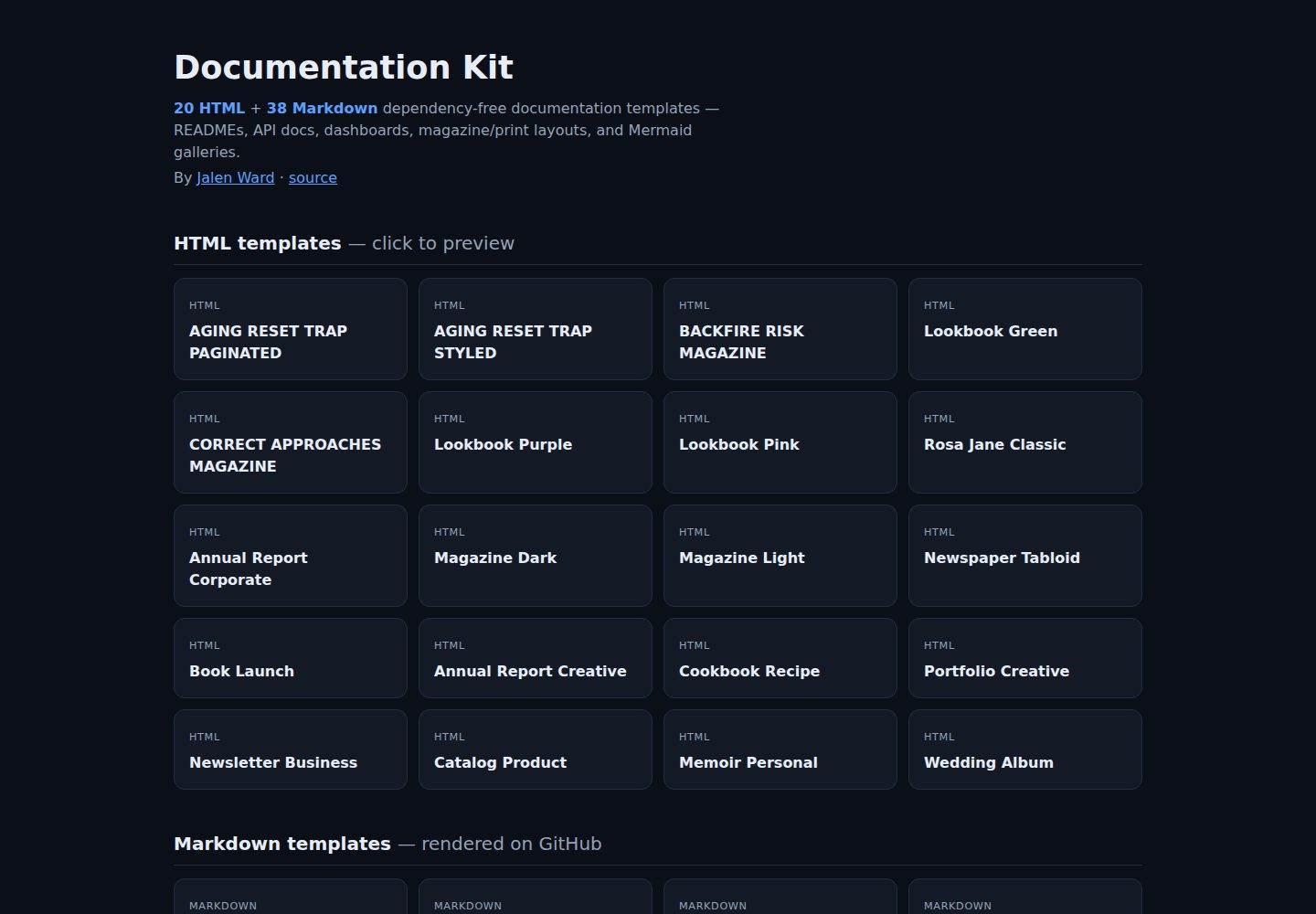
58 template files: 20 HTML page layouts and 38 Markdown documentation templates
HTMLAdmin dashboardDocumentation
documentation-kit — HTML Admin dashboard Template
By builtbyai
Documentation Kit is a collection of 58 dependency-free HTML and Markdown templates for READMEs, API docs, dashboards, architecture docs, and magazine and print layouts.
Explore the design
Compare the page layouts and mobile experience. Open any screenshot for a closer look.
Desktop homepage1 / 2
Desktop captureTop of page
Actual screenshot captured by the server browser.
All pages & views 2
Screenshots show visual appearance; interactive behavior may differ.
Recorded 2026-10-15View source
What stands out
A quick read of the recorded project description.
Zero dependencies and no build step; Markdown renders on GitHub, Obsidian, and most static site generators
HTML templates are single-file self-contained pages using inline CSS and web font links, and can be opened directly in a browser
README templates provide 6 color theme variants, and HTML layouts use CSS custom properties for easy color changes
Includes copyable components such as cards, grids, callouts, metric tiles, and styled tables
All sample names, emails, and phone numbers are fictional placeholder data
Template Details
Documentation Kit is a template collection maintained by builtbyai, with 58 files in total, divided into 20 HTML layout templates and 38 Markdown documentation templates. The README states that its goal is to address whether documentation "looks credible, is easy to scan, and is complete," providing starting points where content can be copied and replaced directly.
The Markdown templates cover READMEs (including 6 theme variants), API references, CHANGELOGs, CONTRIBUTING, system architecture docs, Mermaid diagrams, dashboards and CRM boards, card and grid components, Obsidian callouts, and GitHub Markdown guides. The HTML templates are single-file self-contained pages, including magazine, lookbook, annual report, product catalog, portfolio, newsletter, wedding album, and other layouts, using inline CSS and web font links, and can be opened directly in a browser and exported to PDF via the print dialog.
The README explicitly states that all templates are zero-dependency with no build step, Markdown can render on GitHub, Obsidian, and most static site generators, and HTML uses CSS custom properties for easy color changes. The sample data is all fictional placeholder content (example.com, 555-0100, etc.). The README does not provide browser compatibility ranges, accessibility support status, or production-environment suitability for each template.
HTMLAdminDocumentation
Is it right for your project?
Use Cases
- Writing a README for a new project with badges, quick start, and environment variable sections
- Writing API endpoint reference documentation with request/response examples
- Building a metrics dashboard or CRM board with Markdown tables and cards
- Creating annual report, magazine, or product catalog pages that can be printed to PDF
- Embedding Mermaid flowcharts, sequence diagrams, Gantt charts, or class diagrams in documentation
Suitable For
- Individual developers who need ready-made documentation or layout starting points and do not want to introduce build tools
- Maintainers writing READMEs, CHANGELOGs, and CONTRIBUTING for open-source projects
- Design and content staff who need to produce print or PDF layouts (reports, catalogs, portfolios)
- Teams organizing technical documentation in GitHub or Obsidian
Getting started & customization
Use these recorded setup notes alongside the repository instructions for your chosen version.
- 1
Markdown templates: choose a file from the Markdown/ directory, copy it into your project and rename it, replace placeholders such as [Project Name] and example.com, then commit and it will render
- 2
HTML templates: choose a file from the HTML/ directory, preview it in a browser, edit the content directly, and adjust the CSS variables in :root to change colors
- 3
To export PDF, use the browser print dialog's "Save as PDF"; the README states that HTML layouts are already adjusted for printing
- 4
To browse locally, run git clone https://github.com/builtbyai/documentation-kit.git, then open index.html or an individual template file
License & source material
Usage conditions & limitations
Free to use · keep license noticeThis entry covers the free version under the MIT license in the public repository; the free scope is the code of that version and does not mean external services or third-party assets are free.
Must comply with when using
- Free use, modification, commercial use, and distribution of that version's code are permitted.
- When distributing copies or substantial portions of the code, retain the original author's copyright notice and the complete MIT license notice.
- The code is provided as is; warranties and limitations of liability are governed by the original license and applicable law.
Additional costs & items to verify
- Demo images, fonts, icons, and other third-party assets must be checked against their respective licenses and cannot be judged solely by the code's MIT license.
- External services such as domains, hosting, databases, payments, or AI may incur separate charges.
View Original Text Basis
https://github.com/builtbyai/documentation-kit/blob/main/LICENSEhttps://github.com/builtbyai/documentation-kit/blob/main/README.mdPermission is hereby granted, free of charge
Original License Text
Compiled by DeepSeek based on repository license and README ·2026-10-15. Results only cover the materials read; dependencies, images, fonts, and subsequent term changes are subject to their respective original texts.
Project checks & description sources
Template Information
- Source platforms
- GitHub
- Documentation and maintenance reference score
- More documented · 85 / 100
- Technologies
- HTML
- Website type
- Admin dashboard · Documentation
How this score is calculated
Our heuristic uses license records (up to 30), a demo link (12), a preview (10), stars (15), recorded maintenance (15), description completeness (8), feature records (5) and classification data (5). It is not a code, security or performance test, or a Google score. A link does not establish tested functionality.
What to verify for this project
- Repository update recorded
- 2026-07-16
- Screenshot last checked
- 2026-10-15
A demo link is listed. Check it with your own content and viewport sizes; its presence does not confirm that forms, authentication or payments work.
The catalog identifies HTML as the primary stack. Check the actual dependency manifest and lockfile for versions and hosting requirements. These notes use recorded metadata, not a code audit or a deployment test.
Use a selection guide →How this description was prepared
AI-assisted description based on catalog records and repository material. Repository authors are not automatically the reviewers of this description.
Review declaration: codex-user-requested-batch-review-20261017 · 2026-10-16
Inspect the recorded source material
SHA-256: 4270d867dd279edf8582e7d53b08f405ea3081bbaa914d3f4b58b90b32ff308b
2026-10-15T10:26:35.533Z
Source file / repository<div align="center"> # 📄 Documentation Kit **58 dependency-free HTML & Markdown templates for documentation that looks as credible as it reads.** READMEs · API references · dashboards · architecture docs · magazine & print layouts · Mermaid galleries [](https://builtbyai.github.io/documentation-kit/)       </div> --- > **▶ Browse the whole library in your browser:** **[builtbyai.github.io/documentation-kit](https://builtbyai.github.io/documentation-kit/)** > Every HTML layout previews live; every Markdown template renders on GitHub. No install, no build. Great documentation is a design problem as much as a writing one. This is a set of drop-in starting points I built while writing READMEs, API references, dashboards, and long-form documents — everything from a GitHub-flavored README to a print-ready magazine layout. **Copy a file, swap in your content, ship.** ## Why this exists Most documentation stalls at a blank page. You know *what* to say but not how to make it look credible, scannable, and finished. These templates solve the "how it looks" half so you can focus on the words: - **Markdown templates** render cleanly on GitHub, in Obsidian, and in most static-site generators — no build step, no dependencies. - **HTML templates** are single-file, self-contained pages (inline CSS, web-font links) that open straight in a browser and print to PDF without a toolchain. - Everything uses **fictional sample data only** (`example.com`, `555-0100`, placeholder names) — nothing to scrub before you reuse it. ## What's inside | Category | Count | Format | Highlights | | --- | ---: | --- | --- | | HTML layout templates | 20 | `.html` | Magazines, lookbooks, annual reports, catalogs, portfolios, wedding album | | Markdown documentation templates | 38 | `.md` | README, API docs, CHANGELOG, CONTRIBUTING, architecture docs | | README theme variants | 6 | `.md` | Ocean Blue, Sunset Warm, Forest Nature, Monochrome, Enhanced, base | | Dashboard / CRM templates | 4 | `.md` | Metrics dashboards, colorful CRM boards | | **Total template files** | **58** | | | ``` documentation-kit/ ├── index.html # generated gallery — links every template (served via GitHub Pages) ├── HTML/ # 20 self-contained, print-ready HTML page layouts └── Markdown/ # 38 Markdown documentation & component templates ``` ## Gallery ### HTML page layouts (`HTML/`) Each file is a complete, standalone page — open it in any browser or export to PDF. **[Preview them all live →](https://builtbyai.github.io/documentation-kit/)** | File | Layout | Best for | | --- | --- | --- | | [`06_annual_report_corporate.html`](HTML/06_annual_report_corporate.html) | Corporate annual report | Investor updates, yearly summaries | | [`12_annual_report_creative.html`](HTML/12_annual_report_creative.html) | Creative annual report | Agency / studio year-in-review | | [`07_magazine_dark.html`](HTML/07_magazine_dark.html) · [`08_magazine_light.html`](HTML/08_magazine_light.html) | Editorial magazine | Long-form articles, thought pieces | | [`02_lookbook_green.html`](HTML/02_lookbook_green.html) · [`03_lookbook_purple.html`](HTML/03_lookbook_purple.html) · [`04_lookbook_pink.html`](HTML/04_lookbook_pink.html) | Product lookbook | Collections, brand catalogs | | [`09_newspaper_tabloid.html`](HTML/09_newspaper_tabloid.html) | Newspaper / tabloid | Newsletters, press pages | | [`10_book_launch.html`](HTML/10_book_launch.html) · [`05_rosa_jane_classic.html`](HTML/05_rosa_jane_classic.html) · [`18_memoir_personal.html`](HTML/18_memoir_personal.html) | Book / eBook | Novel previews, memoirs | | [`13_cookbook_recipe.html`](HTML/13_cookbook_recipe.html) | Cookbook | Recipe collections | | [`15_portfolio_creative.html`](HTML/15_portfolio_creative.html) | Portfolio | Designer / creative showcases | | [`16_newsletter_business.html`](HTML/16_newsletter_business.html) | Business newsletter | Quarterly reports | | [`17_catalog_product.html`](HTML/17_catalog_product.html) | Product catalog | Ecommerce, home goods | | [`20_wedding_album.html`](HTML/20_wedding_album.html) | Wedding album | Events, keepsakes | ### Markdown templates (`Markdown/`) | File | Purpose | | --- | --- | | [`README_TEMPLATE.md`](Markdown/README_TEMPLATE.md) + 5 theme variants | Project READMEs with badges, quick-start, and env-var sections | | [`API_DOCUMENTATION_TEMPLATE.md`](Markdown/API_DOCUMENTATION_TEMPLATE.md) | Endpoint reference with request/response examples in JS, Python, Ruby | | [`SYSTEM_ARCHITECTURE_DOC_TEMPLATE.md`](Markdown/SYSTEM_ARCHITECTURE_DOC_TEMPLATE.md) | Architecture decision records and system diagrams | | [`CHANGELOG_TEMPLATE.md`](Markdown/CHANGELOG_TEMPLATE.md) · [`CONTRIBUTING_TEMPLATE.md`](Markdown/CONTRIBUTING_TEMPLATE.md) | Keep-a-Changelog and contributor onboarding | | [`MERMAID_GALLERY_TEMPLATE.md`](Markdown/MERMAID_GALLERY_TEMPLATE.md) · [`02_Mermaid_Diagrams.md`](Markdown/02_Mermaid_Diagrams.md) | Flowcharts, sequence, Gantt, and class diagrams | | [`Enhanced_CRM_Dashboard.md`](Markdown/Enhanced_CRM_Dashboard.md) · [`04_Dashboard_Metrics.md`](Markdown/04_Dashboard_Metrics.md) | Metrics dashboards built from styled tables and cards | | [`HTML_CARDS_LIBRARY.md`](Markdown/HTML_CARDS_LIBRARY.md) · [`ULTIMATE_GRID_MASTERY.md`](Markdown/ULTIMATE_GRID_MASTERY.md) | Reusable card and grid components that render in GitHub Markdown | | [`03_Obsidian_Callouts.md`](Markdown/03_Obsidian_Callouts.md) | Obsidian callout / admonition patterns | | [`GITHUB_MARKDOWN_GUIDE.md`](Markdown/GITHUB_MARKDOWN_GUIDE.md) · [`ADVANCED_FORMATTING_TECHNIQUES.md`](Markdown/ADVANCED_FORMATTING_TECHNIQUES.md) | Reference guides to advanced GFM features | | [`INDEX.md`](Markdown/INDEX.md) | Full index of the Markdown collection | > Browse [`Markdown/INDEX.md`](Markdown/INDEX.md) for the complete, categorized list. ## Features - **Zero dependencies.** No npm install, no build step. Markdown renders anywhere; HTML files are single-file and self-contained. - **Copy-paste components.** Cards, grids, callouts, metric tiles, and styled tables you can lift into your own docs. - **GitHub-native.** The Markdown templates use only formatting that renders on GitHub — inline HTML, tables, task lists, and Mermaid. - **Print-ready.** HTML layouts are tuned for A4/Letter and export cleanly to PDF from the browser's print dialog. - **Theming.** README templates ship in six color themes; HTML layouts use CSS custom properties, so a palette swap is a few variables. - **Safe sample data.** Every name, email, and phone number is fictional placeholder data. ## Tech Stack - **Markdown** — GitHub Flavored Markdown (GFM), Obsidian callout syntax, Mermaid.js diagrams - **HTML5 + CSS3** — semantic markup, CSS custom properties, Flexbox & Grid, inline styles for portability - **Web fonts** — Google Fonts via `<link>`; degrade gracefully to system fonts - **No JavaScript, no framework, no bundler** — by design ## How to use **Markdown template** 1. Pick a file from `Markdown/` (start with [`README_TEMPLATE.md`](Markdown/README_TEMPLATE.md) or [`API_DOCUMENTATION_TEMPLATE.md`](Markdown/API_DOCUMENTATION_TEMPLATE.md)). 2. Copy it into your project and rename it (e.g. `README.md`). 3. Find-and-replace the placeholders — `[Project Name]`, `example.com`, sample metrics — with your own. 4. Commit. It renders immediately on GitHub or in your docs site. **HTML template** 1. Pick a file from `HTML/` and open it in a browser to preview (or use the [live gallery](https://builtbyai.github.io/documentation-kit/)). 2. Edit the content inline; adjust the CSS variables in `:root` to rebrand. 3. To produce a PDF, use the browser's **Print → Save as PDF** (layouts are print-tuned). ```bash # Clone and browse locally git clone https://github.com/builtbyai/documentation-kit.git cd documentation-kit # Open the gallery, or any single template open index.html # macOS (Linux: xdg-open, Windows: start) open HTML/08_magazine_light.html ``` ## What this demonstrates Beyond being reusable, this repo is a portfolio piece in **information design and documentation craft**: consistent visual systems across 58 artifacts, print-tuned CSS, a component vocabulary (cards/grids/callouts/metric tiles) that survives GitHub's Markdown sandbox, and a generated gallery that makes the whole set browsable in one click. Good docs are a product surface — this is what caring about that surface looks like. ## License Released under the [MIT License](LICENSE). Use the templates freely in personal and commercial projects.
Explore similar templates
Compare previews and descriptions within the same stack and category.

AdminLTE
An HTML admin dashboard built with Bootstrap 5 and vanilla JavaScript. Astro builds the documentation; React, Vue and Angular editions live in separate repositories.
HTML · Admin dashboard

gentelella
Gentelella v4 is a free, open-source admin dashboard template maintained by Colorlib, built with vanilla JavaScript, SCSS, and Vite 8 without Bootstrap or jQuery.
HTML · Admin dashboard

coreui-free-bootstrap-admin-template
A free Bootstrap admin template maintained by CoreUI, built on CoreUI's own UI component library. It provides compiled HTML pages and Pug template source code, covering dashboards, authentication, forms, components, icons, and error pages.
HTML · Admin dashboard

dashboards
A collection of responsive dashboard HTML templates open-sourced by Keen IO, built on CSS Grid, offering multiple prebuilt admin data interface layouts.
HTML · Admin dashboard

SB Admin 2
SB Admin 2 is a classic Bootstrap admin template from Start Bootstrap, offering dashboards, charts, tables, and common management pages.
HTML · Admin dashboard

Adminator-admin-dashboard
Adminator 4 is a vanilla HTML, CSS and JavaScript admin dashboard template with a CSS-variable token design system, built-in light and dark themes, no jQuery or Bootstrap dependency, and 18 pages covering dashboards, mail, calendar, charts, forms, tables and error pages.
HTML · Admin dashboard