Implemented in plain HTML/CSS/JS with no frameworks, dependencies, or build steps; open index.html to preview
HTMLPortfolio
developer-portfolio — HTML Portfolio Template
By byte-way
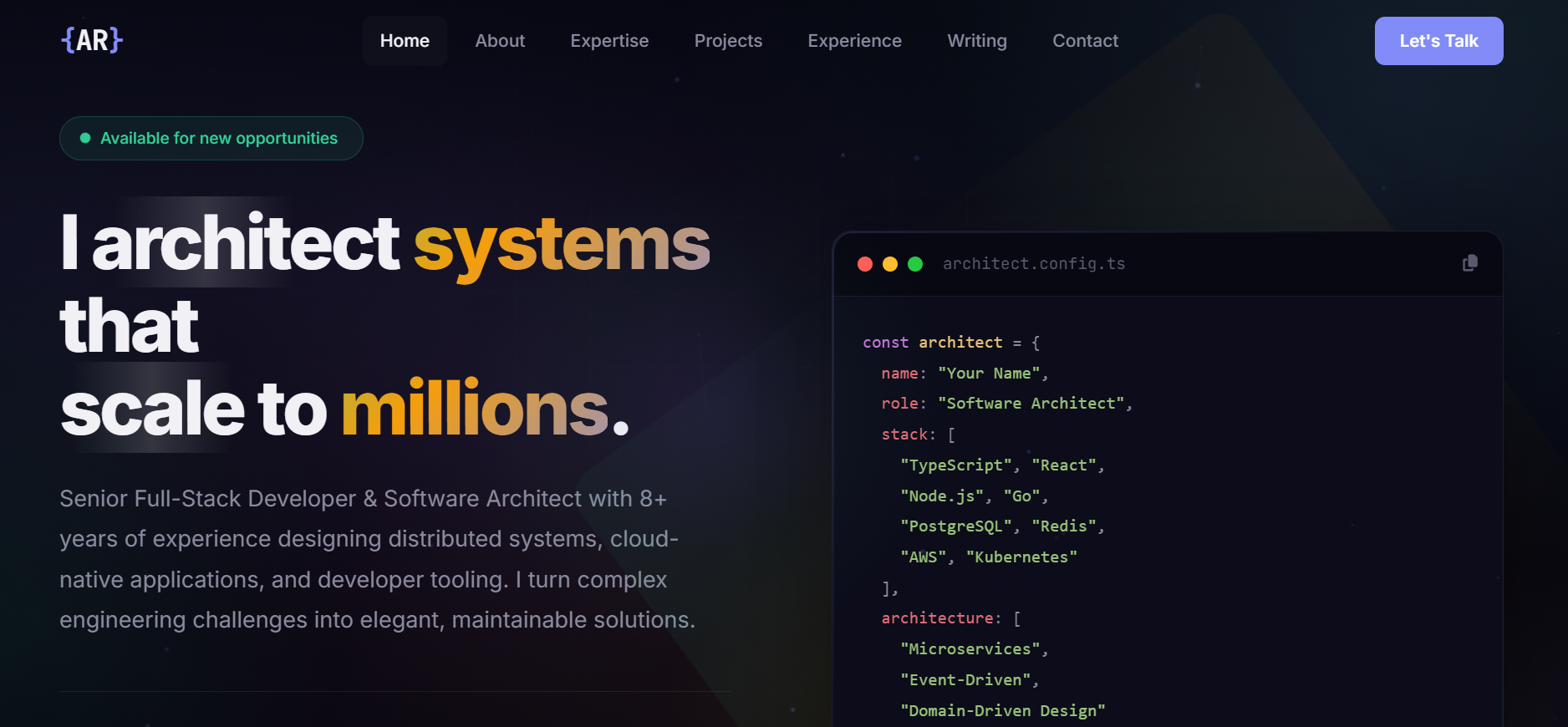
A developer portfolio template written in plain HTML/CSS/JS with no frameworks, dependencies, or build steps, featuring Hero, Projects, Experience, Writing, and Contact sections.
Explore the design
Compare the page layouts and mobile experience. Open any screenshot for a closer look.
Author preview
Author-provided preview
Preview provided in the project README.
One original preview is available. Open the full image to inspect the design.
Screenshots show visual appearance; interactive behavior may differ.
Recorded 2026-10-08View source
What stands out
A quick read of the recorded project description.
Includes eight sections: Hero, About, Expertise, Projects, Experience, Writing, Testimonials, and Contact
Centralized management of primary, secondary, and warm colors via CSS custom properties for easy theme changes
Scroll-triggered reveal using IntersectionObserver, with animations executed in a single requestAnimationFrame loop
Responsive layout covering 320px to 4K, with a collapsible mobile navigation and interactions that avoid relying on hover
Released under the MIT license, permitting free use, modification, commercial use, and distribution of this version of the code
Template Details
This is a static portfolio template for individual developers, built entirely with plain HTML, CSS, and JavaScript, without relying on any framework or build tool. The page is organized into sections, including a Hero with a typewriter introduction and animated code window, an About section with glassmorphism cards, a tech stack grid grouped by domain, skeleton-style project showcases, an interactive experience timeline, article cards, peer testimonials, and a contact form.
The template manages colors centrally through CSS custom properties, uses the Inter and JetBrains Mono fonts from Google Fonts, and structures each section as an independent <section> block that can be removed, reordered, or duplicated as needed. Project cards, personal information, and social links must be manually replaced in index.html.
Regarding usage limitations: the template itself has no backend, and the contact form requires integration with a working form service. Third-party assets such as demo images, fonts, and icons need separate license verification. The Lighthouse scores and performance optimization claims mentioned in the README are the author's own statements and were not independently verified in this material.
HTMLPortfolio
Is it right for your project?
Use Cases
- Developers building a personal online resume or portfolio page to showcase their tech stack, projects, and work experience
- Deploying as a static site to GitHub Pages, Netlify, Vercel, or any web server
- Using as a front-end learning reference to see how CSS animations and interactions are implemented without a framework
- Replacing copy and color schemes on the existing HTML to quickly produce a publishable personal homepage
Suitable For
- Developers who want to showcase personal projects and experience using a purely static page
- Users who need to edit HTML/CSS directly without introducing a build process
- Individuals planning to host their portfolio on free static hosting platforms such as GitHub Pages
- Users who accept manually replacing placeholder content and integrating their own form service
Getting started & customization
Use these recorded setup notes alongside the repository instructions for your chosen version.
- 1
After cloning the repository or downloading the ZIP, open index.html directly in a browser to view the result; no dependency installation or build command is required.
- 2
Replace placeholder information such as name, email, LinkedIn, and GitHub in index.html, and add or remove <section> blocks as needed.
- 3
Adjust colors in the :root custom properties in css/style.css, and change fonts via the Google Fonts <link> tag in index.html.
- 4
The contact form is a front-end structure only; you must integrate a working form submission service to actually receive messages.
- 5
When deploying to GitHub Pages, select the main branch root directory in the repository Settings → Pages; Netlify or Vercel can connect directly to the repository without a build command.
License & source material
Usage conditions & limitations
Free to use · keep license noticeThis entry covers the free version of the public repository under the MIT license; the free scope applies to this version of the code and does not imply that external services or third-party assets are free.
Must comply with when using
- Free use, modification, commercial use, and distribution of this version of the code are permitted.
- When distributing copies or substantial portions of the code, retain the original author's copyright notice and the full MIT license notice.
- The code is provided as-is; warranties and limitations of liability are governed by the original license and applicable law.
Additional costs & items to verify
- Demo images, fonts, icons, and other third-party assets must be checked against their respective licenses; the code's MIT license alone is not sufficient to determine this.
- External services such as domains, hosting, databases, payments, or AI may incur additional fees.
- The template relies on the Inter and JetBrains Mono fonts provided by Google Fonts, loaded via the Google Fonts <link> tag in index.html; this is an external font service, and its license and availability must be verified independently.
- The README only marks GitHub Pages as a free deployment method; platforms such as Netlify/Vercel are not marked as free, and actual costs must be verified independently.
- Deploying to Netlify or Vercel requires connecting the repository and depends on these third-party platforms, which constitutes an external service requirement.
- The README claims the contact form works, but the template is purely static front-end; actually receiving messages requires integrating a form service, and the README does not provide a backend implementation.
View Original Text Basis
Permission is hereby granted, free of charge
Original License Text
The template uses [Inter](https://fonts.google.com/specimen/Inter) for body text and [JetBrains Mono](https://fonts.google.com/specimen/JetBrains+Mono) for code.
Original README
### GitHub Pages (free)
Original README
Connect your repo — zero config needed. No build command required.
Original README
https://github.com/byte-way/developer-portfolio/blob/main/LICENSEhttps://github.com/byte-way/developer-portfolio/blob/main/README.md| **Contact** | Working contact form + social links |
Original README
Compiled by DeepSeek based on repository license and README ·2026-10-08. Results only cover the materials read; dependencies, images, fonts, and subsequent term changes are subject to their respective original texts.
Project checks & description sources
Template Information
- Source platforms
- GitHub
- Documentation and maintenance reference score
- Partly documented · 71 / 100
- Technologies
- HTML
- Website type
- Portfolio
How this score is calculated
Our heuristic uses license records (up to 30), a demo link (12), a preview (10), stars (15), recorded maintenance (15), description completeness (8), feature records (5) and classification data (5). It is not a code, security or performance test, or a Google score. A link does not establish tested functionality.
What to verify for this project
- Repository update recorded
- 2026-04-12
- Screenshot last checked
- 2026-10-08
No demo link is recorded. Use the repository instructions to evaluate the project locally; the screenshot alone cannot establish interactive behavior.
The catalog identifies HTML as the primary stack. Check the actual dependency manifest and lockfile for versions and hosting requirements. These notes use recorded metadata, not a code audit or a deployment test.
Use a selection guide →How this description was prepared
AI-assisted description based on catalog records and repository material. Repository authors are not automatically the reviewers of this description.
Review declaration: [email protected] · 2026-10-09
Inspect the recorded source material
SHA-256: f9ca087adb88bf6dd42b8c76dc39ea1fa4aee99709a7a30ec2d55aa7fd040d04
2026-10-08T22:11:31.206Z
Source file / repository<p align="center">
<img src="favicon.svg" width="80" alt="Logo">
</p>
<h1 align="center">Developer Portfolio</h1>
<p align="center">
<strong>A stunning, performance-optimized developer portfolio template</strong><br>
Pure HTML, CSS & JavaScript — no frameworks, no dependencies, no build tools.
</p>
<p align="center">
<a href="#-features">Features</a> •
<a href="#-quick-start">Quick Start</a> •
<a href="#-customization">Customization</a> •
<a href="#-performance">Performance</a> •
<a href="#-license">License</a>
</p>
<p align="center">
<a href="https://byte-way.github.io/developer-portfolio/"><img src="https://img.shields.io/badge/%20%20%E2%96%B6%20%20LIVE%20DEMO%20%E2%80%94%20Visit%20Site%20%20-818cf8?style=for-the-badge&labelColor=4f46e5&logo=googlechrome&logoColor=white&scale=1.5" height="50" alt="Live Demo"></a>
</p>
<p align="center">
<img src="https://img.shields.io/badge/HTML5-E34F26?style=flat-square&logo=html5&logoColor=white" alt="HTML5">
<img src="https://img.shields.io/badge/CSS3-1572B6?style=flat-square&logo=css3&logoColor=white" alt="CSS3">
<img src="https://img.shields.io/badge/JavaScript-F7DF1E?style=flat-square&logo=javascript&logoColor=black" alt="JS">
<img src="https://img.shields.io/badge/Responsive-Yes-34d399?style=flat-square" alt="Responsive">
<img src="https://img.shields.io/badge/License-MIT-818cf8?style=flat-square" alt="MIT License">
</p>
---
## Preview
<p align="center">
<img src="screenshots/hero.png" width="100%" alt="Hero Section — Typewriter intro with animated code window">
</p>
<p align="center">
<img src="screenshots/experience.png" width="100%" alt="Experience Section — Career timeline">
</p>
<p align="center">
<img src="screenshots/contact.png" width="100%" alt="Contact Section">
</p>
### Sections
| Section | Description |
|---------|-------------|
| **Hero** | Typewriter intro, animated code window, live stats |
| **About** | Bio cards with glass morphism effect |
| **Expertise** | Tech stack grid organized by domain |
| **Projects** | Skeleton-style project showcases with hover effects |
| **Experience** | Interactive timeline with role details |
| **Writing** | Blog/article cards |
| **Testimonials** | Peer review quotes |
| **Contact** | Working contact form + social links |
---
## ✨ Features
### Visual Effects
- Aurora gradient background with constellation canvas
- Morphing gradient orbs with smooth float animations
- Scroll-triggered reveal animations
- Holographic cards with animated borders
- Magnetic buttons with tilt effect
- Typewriter text animation
- Wave section dividers
### Performance
- **Zero dependencies** — pure vanilla HTML/CSS/JS
- **Single rAF loop** — all animations unified into one render cycle
- GPU-accelerated `translate3d` transforms throughout
- CSS `contain: strict` isolation on all fixed layers
- `content-visibility: auto` for off-screen sections
- Background animations pause during scroll
- Firefox-specific optimizations (auto-detected)
- Constellation canvas renders at 30fps with spatial culling
- **~760 lines of HTML** · **~2400 lines of CSS** · **~460 lines of JS**
### Responsive Design
- Fluid layouts from 320px to 4K
- Touch-optimized for mobile (no hover-dependent features)
- Collapsible mobile navigation
- Adaptive typography and spacing
### Developer Experience
- Clean, well-commented code
- CSS custom properties for easy theming
- Semantic HTML with proper ARIA labels
- No build step — edit and deploy
---
## 🚀 Quick Start
### Option 1: Clone & Open
```bash
git clone https://github.com/byte-way/developer-portfolio.git
cd developer-portfolio
```
Open `index.html` in your browser. That's it.
### Option 2: Use as Template
Click the **"Use this template"** button at the top of this repo to create your own copy.
### Option 3: Download
Download the ZIP from the green **Code** button and extract it.
---
## 🎨 Customization
### 1. Personal Info
Edit `index.html` and replace the placeholder content:
```
Your Name → your actual name
your.email@... → your email
linkedin/example → your LinkedIn URL
github/example → your GitHub URL
```
### 2. Colors
All colors are defined as CSS custom properties in `css/style.css`:
```css
:root {
--bg-primary: #060610; /* Main background */
--accent: #818cf8; /* Primary accent (indigo) */
--accent-secondary: #34d399; /* Secondary accent (green) */
--accent-warm: #f59e0b; /* Warm accent (amber) */
}
```
### 3. Fonts
The template uses [Inter](https://fonts.google.com/specimen/Inter) for body text and [JetBrains Mono](https://fonts.google.com/specimen/JetBrains+Mono) for code. Change them in the Google Fonts `<link>` tag in `index.html`.
### 4. Sections
Each section is a self-contained `<section>` block. Remove, reorder, or duplicate as needed:
```
#home → Hero with intro
#about → About cards
#expertise → Tech stack
#projects → Project showcases
#experience → Career timeline
#writing → Blog articles
#contact → Contact form
```
### 5. Projects
Project cards use a skeleton style. Edit the project blocks in `index.html`:
```html
<article class="project-showcase reveal">
<div class="project-showcase-visual">
<div class="project-showcase-skeleton">
<i class="fas fa-your-icon"></i>
</div>
</div>
<div class="project-showcase-content">
<h3 class="project-showcase-title">Your Project</h3>
<p class="project-showcase-description">Description here.</p>
</div>
</article>
```
---
## ⚡ Performance
Lighthouse scores on a clean deployment:
| Metric | Score |
|--------|-------|
| Performance | 95+ |
| Accessibility | 90+ |
| Best Practices | 95+ |
| SEO | 90+ |
Key optimizations:
- No render-blocking JS (script at bottom of `<body>`)
- Single event listener for mousemove, single listener for scroll
- All CSS animations use compositor-only properties (`transform`, `opacity`)
- `IntersectionObserver` for lazy reveals (no scroll position polling)
- Firefox detected at runtime → heavy effects disabled automatically
---
## 📁 Project Structure
```
developer-portfolio/
├── index.html # Main page (all sections)
├── css/
│ └── style.css # Complete design system (~2400 lines)
├── js/
│ └── script.js # Interactions & animations (~460 lines)
├── screenshots/ # README preview images
│ ├── hero.png
│ ├── experience.png
│ └── contact.png
├── favicon.svg # Browser tab icon {AR}
├── .gitignore # Git ignore rules
├── LICENSE # MIT License
└── README.md # This file
```
---
## 🌐 Deployment
### GitHub Pages (free)
1. Push this repo to GitHub
2. Go to **Settings → Pages**
3. Set source to **main branch** / root
4. Your site is live at `https://byte-way.github.io/developer-portfolio/`
### Netlify / Vercel
Connect your repo — zero config needed. No build command required.
### Any Static Host
Upload `index.html`, `css/`, `js/`, and `favicon.svg` to any web server.
---
## 🤝 Contributing
Contributions are welcome! Feel free to:
1. Fork the repo
2. Create a feature branch (`git checkout -b feature/amazing-feature`)
3. Commit your changes (`git commit -m 'Add amazing feature'`)
4. Push to the branch (`git push origin feature/amazing-feature`)
5. Open a Pull Request
---
## 📄 License
This project is licensed under the **MIT License** — see the [LICENSE](LICENSE) file for details.
Free for personal and commercial use. Attribution appreciated but not required.
---
<p align="center">
If this template helped you, consider giving it a ⭐
</p>
Explore similar templates
Compare previews and descriptions within the same stack and category.

simplefolio
Simplefolio is a minimal single-page portfolio template for developers, built with HTML, Bootstrap, SCSS, and Parcel under the MIT license. It includes Hero, About, Projects, Contact, and Footer sections, with content edited in /src/index.html and theme colors controlled by two SCSS variables.
HTML · Portfolio

Freelancer
A bright, single-page Bootstrap portfolio template for freelancers, designers, and small studios. It includes a responsive portfolio grid with modal detail windows and an SB Forms contact form that requires an API token.
HTML · Portfolio

Resume
A single-page resume and CV template from Start Bootstrap, built on Bootstrap with a fixed sidebar and content sections.
HTML · Portfolio

Creative
A single-page marketing template by Start Bootstrap for creative agencies and product services, built on Bootstrap with SCSS, featuring a portfolio grid and call-to-action sections. It includes pre-set SB Forms markers for form integration and npm build scripts for source customization.
HTML · Corporate Website

Grayscale
A dark single-page Bootstrap template from Start Bootstrap for photography, events and brand storytelling, with a large hero and clearly separated sections.
HTML · Corporate Website

startbootstrap-stylish-portfolio
A one-page Bootstrap portfolio theme from Start Bootstrap with multiple content sections and an off-canvas navigation menu. Basic use means editing HTML/CSS under dist and opening index.html; advanced use relies on npm with Pug and SCSS build scripts.
HTML · Portfolio