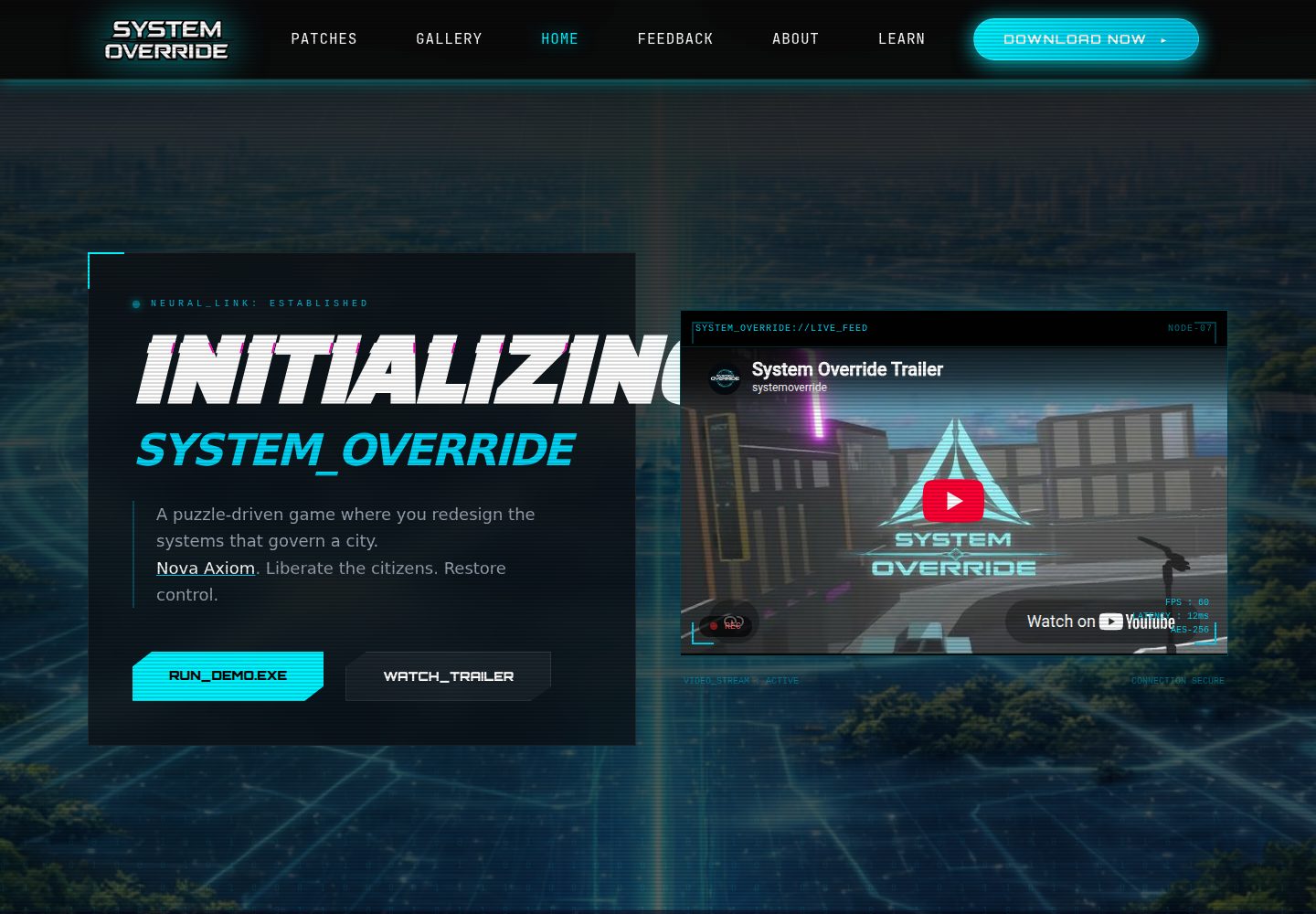
Includes public pages for home, about, learn, patches, gallery, and feedback
HTMLAdmin dashboard
System-Override-Website — HTML Admin dashboard Template
By cafyrei
A cyberpunk-style game community website built on CodeIgniter 4, with public pages for patches, screenshots, and feedback, plus a content management backend.
Explore the design
Compare the page layouts and mobile experience. Open any screenshot for a closer look.
Desktop homepage1 / 3
Desktop captureTop of page
Actual screenshot captured by the server browser.
All pages & views 3
Screenshots show visual appearance; interactive behavior may differ.
Recorded 2026-10-13View source
What stands out
A quick read of the recorded project description.
Patch list supports uploading and downloading patch assets
Screenshot gallery for displaying game visuals
Player feedback form with validation for submitting suggestions or bug reports
Admin dashboard for managing patches and gallery entries and for viewing or deleting feedback
Responsive styling and interface animations using Tailwind CSS and custom CSS/JavaScript
Template Details
System Override is a cyberpunk-themed game community platform built for the Capstone project System Override. It gives players a game introduction, update patches, screenshots, and a feedback entry point, while providing administrators with a session-protected backend for managing patches and gallery entries and for viewing and deleting player feedback.
The stack is PHP 8.1+ with CodeIgniter 4, using MySQL/MariaDB via the MySQLi driver, with frontend styling from Tailwind CSS 4 and project-specific CSS/JavaScript. The project has no migration files; you must manually create the game_patches, gallery, and user_feedback tables. Patches and gallery assets uploaded by administrators are stored under public/uploads/, so the web server must have write permission to that directory.
Public routes include the home page, about, learn about the game, patches, gallery, and feedback form; admin routes are /admin-login and /admin. The README explicitly notes that administrator authentication is currently written directly in the Admin controller using hardcoded credentials, and should be replaced with secure hashing or a proper user authentication system before deployment. The project is under the MIT license, and third-party assets such as demo images, fonts, and icons must be checked separately for their own licensing.
HTMLAdmin backend
Is it right for your project?
Use Cases
- A game team publishing update notes and patch downloads to the community
- Players browsing the game introduction and screenshots and submitting suggestions or bug reports
- Administrators centrally reviewing feedback, publishing patches, and updating the gallery in the backend
- Presenting the frontend and backend structure of a game community site as a course or graduation project
Suitable For
- Teams that need to build a community announcement and feedback site for a small game project
- Learners who want to reference a CodeIgniter 4 admin implementation
- Developers who accept manual table creation and configuring the server and database themselves
Getting started & customization
Use these recorded setup notes alongside the repository instructions for your chosen version.
- 1
Requires PHP 8.1+ with the intl, mbstring, json, mysqlnd, and curl extensions enabled, plus Composer, MySQL/MariaDB, and a web server configured to point to the public/ directory
- 2
Copy env to .env and set CI_ENVIRONMENT, app.baseURL, and database.default.* connection information
- 3
The project has no migration files; manually create the database and the game_patches, gallery, and user_feedback tables using the SQL provided in the README
- 4
Ensure PHP can write to writable/ and the web server can write to public/uploads/gallery/ and public/uploads/patches/
- 5
Replace the hardcoded admin credentials in the Admin controller before deployment, and use HTTPS and a least-privilege database account
License & source material
Usage conditions & limitations
Free to use · keep license noticeThis entry covers the free version under the MIT license in the public repository; the free scope is the code of this version and does not mean external services or third-party assets are free.
Must comply with when using
- You may use, modify, commercialize, and distribute the code of this version for free.
- When distributing copies or substantial portions of the code, retain the original author's copyright notice and the full MIT license notice.
- The code is provided as is; warranties and limitations of liability are governed by the original license and applicable law.
Additional costs & items to verify
- Demo images, fonts, icons, and other third-party assets must be checked under their respective licenses and cannot be judged solely by the code's MIT license.
- External services such as domains, hosting, databases, payments, or AI may incur separate charges.
- The project does not include database migration files; you must create the table structure manually with a database tool, and tables cannot be created automatically via migration commands.
- You must ensure PHP has write permission to the writable/ directory and the web server has write permission to public/uploads/gallery/ and public/uploads/patches/; otherwise the admin upload feature will not work.
- Administrator authentication uses hardcoded credentials in the Admin controller and must be replaced with secure hashing or a proper authentication system before deployment, otherwise there is a security risk.
- Production deployment requires HTTPS and a least-privilege database account with only the permissions the application needs.
- Node.js and npm are only needed if you rebuild the CSS; a pure deployment run can skip installing them.
View Original Text Basis
Permission is hereby granted, free of charge
Original License Text
This project currently has no application migrations, so create the schema with your database tool:
Original README
Make sure PHP can write to `writable/` and that the web server can write to `public/uploads/gallery/` and `public/uploads/patches/` when administrators upload content.
Original README
The current administrator authentication is implemented directly in `app/Controllers/Admin/Admin.php`. Before deploying, replace the hard-coded credentials with securely hashed, environment-based credentials or a proper user/authentication system.
Original README
Use HTTPS and a production database account with only the permissions the application needs.
Original README
https://github.com/cafyrei/System-Override-Website/blob/main/LICENSEhttps://github.com/cafyrei/System-Override-Website/blob/main/README.mdNode.js and npm (only needed when rebuilding CSS)
Original README
Compiled by DeepSeek based on repository license and README ·2026-10-13. Results only cover the materials read; dependencies, images, fonts, and subsequent term changes are subject to their respective original texts.
Project checks & description sources
Template Information
- Source platforms
- GitHub
- Documentation and maintenance reference score
- More documented · 80 / 100
- Technologies
- HTML
- Website type
- Admin dashboard
How this score is calculated
Our heuristic uses license records (up to 30), a demo link (12), a preview (10), stars (15), recorded maintenance (15), description completeness (8), feature records (5) and classification data (5). It is not a code, security or performance test, or a Google score. A link does not establish tested functionality.
What to verify for this project
- Repository update recorded
- 2026-09-06
- Screenshot last checked
- 2026-10-13
A demo link is listed. Check it with your own content and viewport sizes; its presence does not confirm that forms, authentication or payments work.
The catalog identifies HTML as the primary stack. Check the actual dependency manifest and lockfile for versions and hosting requirements. These notes use recorded metadata, not a code audit or a deployment test.
Use a selection guide →How this description was prepared
AI-assisted description based on catalog records and repository material. Repository authors are not automatically the reviewers of this description.
Review declaration: [email protected] · 2026-10-13
Inspect the recorded source material
SHA-256: d388cb63ce8a1f577b671a8220d70860fa4fa0a81e668f66cb0be1fda98ced3a
2026-10-13T09:00:01.395Z
Source file / repository# System Override
System Override is a cyberpunk-themed game community website built with CodeIgniter 4. It provides public pages for game information, patch notes, screenshots, and player feedback, plus a session-protected dashboard for managing patches, gallery items, and feedback.
## What it is for
This project gives a game team one place to communicate with its community. Players can learn about the game, see released updates and screenshots, and submit suggestions or bug reports. Administrators can then review player feedback and publish or update the patch and gallery content without editing the site files directly.
## Features
- Public home, About, Learn, Patches, Gallery, and Feedback pages
- Patch-note listing with downloadable/uploaded patch assets
- Screenshot gallery
- Validated player feedback form for suggestions and bug reports
- Admin dashboard to manage patches and gallery entries, and review or delete feedback
- Responsive styling built with Tailwind CSS and project-specific CSS/JavaScript
- Background audio and interface animations
## Stack
- PHP 8.1+
- CodeIgniter 4
- MySQL/MariaDB via MySQLi
- Tailwind CSS 4
- PHPUnit 10
## Requirements
- PHP 8.1 or later with `intl`, `mbstring`, `json`, `mysqlnd`, and `curl` enabled
- Composer
- Node.js and npm (only needed when rebuilding CSS)
- MySQL or MariaDB
- A web server configured to serve the `public/` directory
## Getting started
1. Install PHP dependencies:
```bash
composer install
```
2. Install frontend dependencies:
```bash
npm install
```
3. Create your local environment file from the example:
```bash
copy env .env
```
On macOS/Linux, use `cp env .env` instead.
4. Set `CI_ENVIRONMENT`, `app.baseURL`, and the `database.default.*` values in `.env`. For example:
```ini
CI_ENVIRONMENT = development
app.baseURL = 'http://localhost/system-override/public/'
database.default.hostname = localhost
database.default.database = system-override
database.default.username = root
database.default.password =
database.default.DBDriver = MySQLi
```
5. Create the database and its tables. This project currently has no application migrations, so create the schema with your database tool:
```sql
CREATE DATABASE `system-override` CHARACTER SET utf8mb4 COLLATE utf8mb4_general_ci;
USE `system-override`;
CREATE TABLE `game_patches` (
`patch_id` INT UNSIGNED NOT NULL AUTO_INCREMENT,
`patch_path` VARCHAR(255) NOT NULL,
`patch_title` VARCHAR(255) NOT NULL,
`patch_description` TEXT NOT NULL,
`patch_version` VARCHAR(100) NOT NULL,
`patch_type` VARCHAR(100) NOT NULL,
`patch_release` DATE NOT NULL,
PRIMARY KEY (`patch_id`)
);
CREATE TABLE `gallery` (
`gallery_id` INT UNSIGNED NOT NULL AUTO_INCREMENT,
`image_path` VARCHAR(255) NOT NULL,
`gallery_title` VARCHAR(255) NOT NULL,
`gallery_description` TEXT NOT NULL,
PRIMARY KEY (`gallery_id`)
);
CREATE TABLE `user_feedback` (
`feedback_id` INT UNSIGNED NOT NULL AUTO_INCREMENT,
`username` VARCHAR(50) NOT NULL,
`feedback_type` ENUM('suggestion', 'bug_report') NOT NULL,
`comment` TEXT NOT NULL,
`email` VARCHAR(255) NOT NULL,
`status` VARCHAR(50) NOT NULL DEFAULT 'unread',
`created_at` DATETIME NOT NULL DEFAULT CURRENT_TIMESTAMP,
PRIMARY KEY (`feedback_id`)
);
```
6. Make sure PHP can write to `writable/` and that the web server can write to `public/uploads/gallery/` and `public/uploads/patches/` when administrators upload content.
7. Run the local server:
```bash
php spark serve
```
Open the URL printed by CodeIgniter (normally `http://localhost:8080`). If using Apache/XAMPP, configure the document root to this repository's `public/` directory.
## Frontend development
Rebuild Tailwind CSS while editing view templates:
```bash
npm run dev
```
The command watches `public/input.css` and writes the generated stylesheet to `public/css/output.css`.
## Routes
| Path | Purpose |
| --- | --- |
| `/` | Home page and recent unread feedback |
| `/about` | Team/about page |
| `/learn` | Game learning page |
| `/patches` | Published patches |
| `/gallery` | Screenshot gallery |
| `/feedback` | Feedback form |
| `/admin-login` | Administrator sign-in |
| `/admin` | Dashboard for feedback, gallery, and patches |
## Tests
Run the PHPUnit suite with:
```bash
composer test
```
## Project layout
```text
app/ Controllers, models, views, and CodeIgniter configuration
public/ Web root, compiled CSS, JavaScript, images, audio, and uploads
public/uploads/ Admin-managed gallery and patch assets
writable/ Logs, sessions, cache, and other runtime files
tests/ PHPUnit tests
```
## Security notes
- Keep `.env` private; it is intentionally ignored by Git.
- The current administrator authentication is implemented directly in `app/Controllers/Admin/Admin.php`. Before deploying, replace the hard-coded credentials with securely hashed, environment-based credentials or a proper user/authentication system.
- Use HTTPS and a production database account with only the permissions the application needs.
## License
This project is distributed under the [MIT License](LICENSE).
Explore similar templates
Compare previews and descriptions within the same stack and category.

gentelella
Gentelella v4 is a free, open-source admin dashboard template maintained by Colorlib, built with vanilla JavaScript, SCSS, and Vite 8 without Bootstrap or jQuery.
HTML · Admin dashboard

coreui-free-bootstrap-admin-template
A free Bootstrap admin template maintained by CoreUI, built on CoreUI's own UI component library. It provides compiled HTML pages and Pug template source code, covering dashboards, authentication, forms, components, icons, and error pages.
HTML · Admin dashboard

dashboards
A collection of responsive dashboard HTML templates open-sourced by Keen IO, built on CSS Grid, offering multiple prebuilt admin data interface layouts.
HTML · Admin dashboard

SB Admin 2
SB Admin 2 is a classic Bootstrap admin template from Start Bootstrap, offering dashboards, charts, tables, and common management pages.
HTML · Admin dashboard

Adminator-admin-dashboard
Adminator 4 is a vanilla HTML, CSS and JavaScript admin dashboard template with a CSS-variable token design system, built-in light and dark themes, no jQuery or Bootstrap dependency, and 18 pages covering dashboards, mail, calendar, charts, forms, tables and error pages.
HTML · Admin dashboard

SB Admin
SB Admin is a lightweight, open-source Bootstrap admin template from Start Bootstrap. It offers a sidebar-and-top-bar layout with data tables, forms, and stat cards, plus responsive design.
HTML · Admin dashboard