Jekyll port of Ghost's default theme Casper v2
JekyllBlog
blog (CaptMD-11) — Jekyll Blog Template
By CaptMD-11
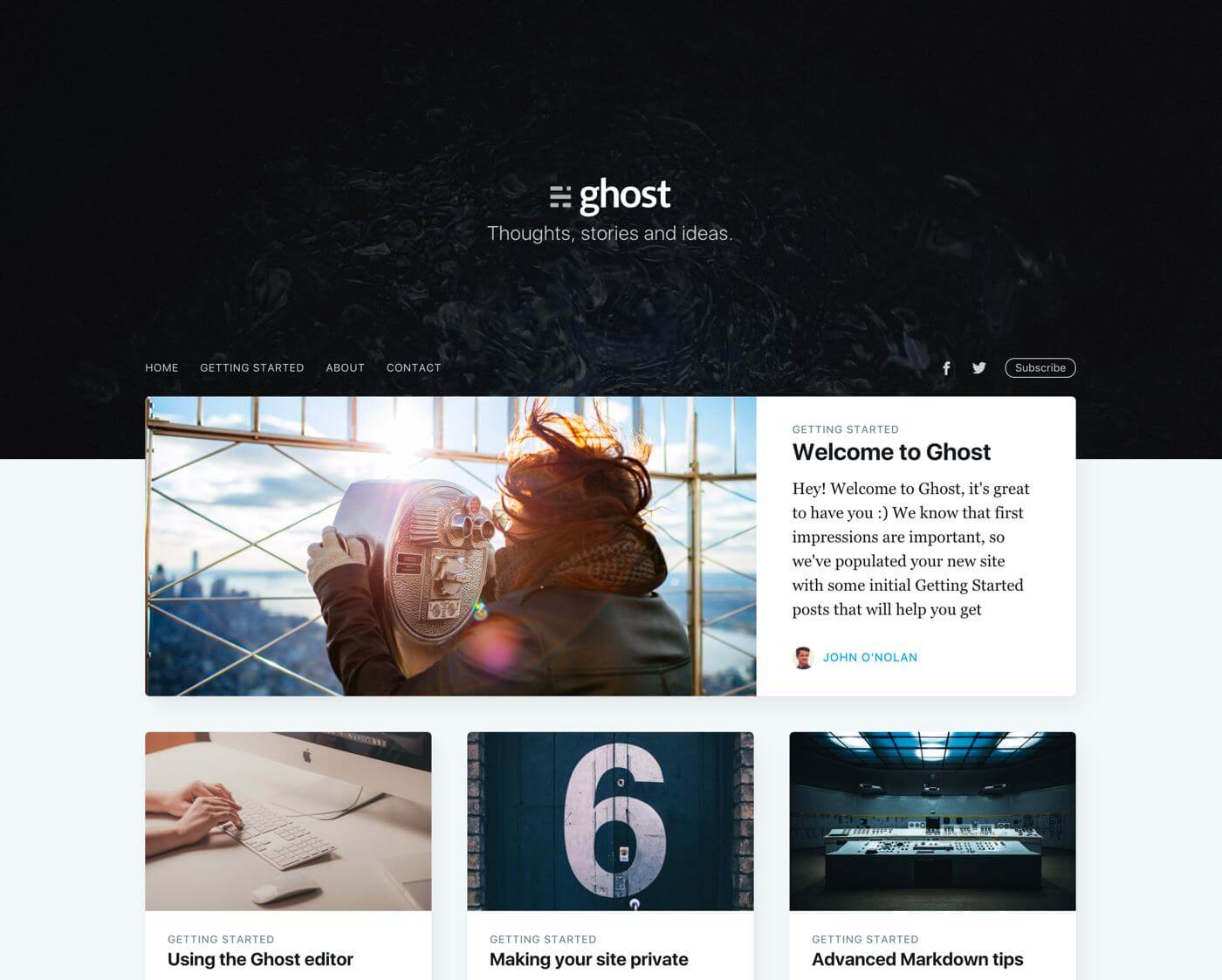
Jasper2 is a Jekyll port of Ghost's default theme Casper v2, aimed at static hosting such as GitHub Pages, with support for multiple authors, tag pages, and pagination.
Explore the design
Compare the page layouts and mobile experience. Open any screenshot for a closer look.
Author preview
Author-provided previewTop of page
Preview provided in the project README.
One original preview is available. Open the full image to inspect the design.
Screenshots show visual appearance; interactive behavior may differ.
Recorded 2026-10-02View source
What stands out
A quick read of the recorded project description.
Multiple authors supported via _data/authors.yml, including avatars, bios, and social links
Tag descriptions and custom cover images configured via _data/tags.yml
Includes Ghost's default pages such as author pages, tag pages, an about page, and a 404 page
Supports infinite scroll or standard pagination, with an Atom feed generated by jekyll-feed
Code highlighting with highlight.js, with optional Google Analytics and Disqus integrations
Template Details
Jasper2 fully ports Ghost's default theme Casper v2 to Jekyll and can be deployed on GitHub Pages or other Jekyll-compatible static hosts. The theme manages multiple authors via _data/authors.yml (avatar, bio, website, Twitter, Facebook, etc.), configures tag descriptions and cover images via _data/tags.yml, and includes Ghost's default pages such as author pages, tag pages, an about page, and a 404 page, with a related-posts view at the bottom of each post.
For content organization, it supports either infinite scroll or standard pagination; jekyll-feed generates an Atom feed; code highlighting uses highlight.js; Google Analytics and Disqus comments are optional integrations; and the subscribe button requires an external service. Styling follows Casper's build approach, using Gulp/PostCSS to process /assets/css/ and output to /assets/built/, requiring Node and Gulp installed locally.
Deployment options include building with GitHub Actions and pushing to the gh-pages branch, generating _site locally with bundle exec jekyll serve and uploading it, automated builds with Travis CI, or handing it to a Jekyll-compatible host such as Netlify. The README states that the theme builds correctly with Ruby 2.6.3 and Jekyll 3.9.0. When using author pages, the author field in each post's front matter must be changed to match the username in authors.yml.
JekyllBlog
Is it right for your project?
Use Cases
- Building a personal or team blog with multiple authors using Jekyll
- Publishing a static blog on GitHub Pages while keeping the Casper style
- Content sites that need author pages, tag pages, and a related-posts view
- Front-end developers who want to customize Casper styles with Gulp/PostCSS
Suitable For
- Bloggers using Jekyll or GitHub Pages
- Site maintainers who need multiple authors and tag categorization
- Projects that want to keep the visual style of Ghost's Casper
- Developers who can accept local Node/Gulp compilation for styles
Getting started & customization
Use these recorded setup notes alongside the repository instructions for your chosen version.
- 1
For author pages, change the author field in each post's front matter to match the username in _data/authors.yml
- 2
Style changes are made in /assets/css/; run npm install first, then gulp to compile to /assets/built/
- 3
For local preview, run bundle exec jekyll serve; generated content is placed in _site/
- 4
The subscribe button depends on an external service; Google Analytics and Disqus are optional configurations
- 5
The README states that the theme builds correctly with Ruby 2.6.3 and Jekyll 3.9.0
License & source material
Usage conditions & limitations
Free to use · keep license noticeThis entry covers the free version in the public repository under the MIT license; the free scope is the code of this version and does not mean that external services or third-party assets are free.
Must comply with when using
- You may use, modify, commercialize, and distribute the code of this version for free.
- When distributing copies or substantial portions of the code, retain the original author's copyright notice and the full MIT license notice.
- The code is provided as is; warranties and limitations of liability are governed by the original license and applicable law.
Additional costs & items to verify
- The subscribe button is optional; once enabled, it depends on an external service (such as an email subscription service) to work, and the feature is unavailable without an external service.
- Google Analytics tracking is optional; once enabled, you must provide your own Google Analytics account and tracking ID, and it is subject to Google's terms of service.
- Disqus comments are optional; once enabled, you must register a Disqus account and configure the site shortname, and comment data is hosted by third-party Disqus.
- Modifying styles requires Node and Gulp installed globally locally, and running npm install and gulp to compile; without them, CSS cannot be customized.
- The README states that the theme builds correctly with Ruby 2.6.3 and Jekyll 3.9.0; using other versions may encounter compatibility issues.
- When using author pages, the author field in each post's front matter must be changed to match the username of the corresponding author in _data/authors.yml; otherwise, author pages will not be generated correctly.
- Demo images, fonts, icons, and other third-party assets must be checked against their respective licenses and cannot be judged solely by the code's MIT license.
- External services such as domains, hosting, databases, payments, or AI may incur additional charges.
View Original Text Basis
Permission is hereby granted, free of charge
Original License Text
Toggleable subscribe button (requires an external service)
Original README
Support for Google Analytics tracking
Original README
Support for Disqus comments (not Ghost standard)
Original README
You'll need Node and Gulp installed globally.
Original README
This install builds well with Ruby v2.6.3 and Jekyll v3.9.0.
Original README
https://github.com/CaptMD-11/blog/blob/master/LICENSEhttps://github.com/CaptMD-11/blog/blob/master/README.mdyou need to rename the field *author* in the front matter of every post to match that of your each author's *username* as defined in the *[\_data/authors.yml](_data/authors.yml)* file.
Original README
Compiled by DeepSeek based on repository license and README ·2026-10-02. Results only cover the materials read; dependencies, images, fonts, and subsequent term changes are subject to their respective original texts.
Project checks & description sources
Template Information
- Source platforms
- GitHub
- Documentation and maintenance reference score
- Partly documented · 68 / 100
- Technologies
- Jekyll
- Website type
- Blog
How this score is calculated
Our heuristic uses license records (up to 30), a demo link (12), a preview (10), stars (15), recorded maintenance (15), description completeness (8), feature records (5) and classification data (5). It is not a code, security or performance test, or a Google score. A link does not establish tested functionality.
What to verify for this project
- Repository update recorded
- 2024-05-14
- Screenshot last checked
- 2026-10-02
A demo link is listed. Check it with your own content and viewport sizes; its presence does not confirm that forms, authentication or payments work.
The catalog identifies Jekyll as the primary stack. Check the actual dependency manifest and lockfile for versions and hosting requirements. These notes use recorded metadata, not a code audit or a deployment test.
Use a selection guide →How this description was prepared
AI-assisted description based on catalog records and repository material. Repository authors are not automatically the reviewers of this description.
Automatically checked against source and license rules; no manual editorial review.
Inspect the recorded source material
SHA-256: cc081a5793ff4a7fcd3d329c7b3ffb25ad54de4fd6a8c0a07f4c8a0b30d2ba74
2026-10-02T17:39:30.711Z
Source file / repository## Jasper2 [](https://github.com/jekyllt/jasper2/actions/workflows/jekyll_build.yml) [](http://travis-ci.org/jekyllt/jasper2) [](http://travis-ci.org/jekyllt/jasper2) This is a full-featured port of Ghost's default theme [Casper](https://github.com/tryghost/casper) [v2.1.9](https://github.com/TryGhost/Casper/releases/tag/2.1.9) for [Jekyll](https://jekyllrb.com/) / [GitHub Pages](https://pages.github.com/). ## Live Demo [Ghost's Casper](https://demo.ghost.io) // [Jasper2](https://jekyllt.github.io/jasper2) 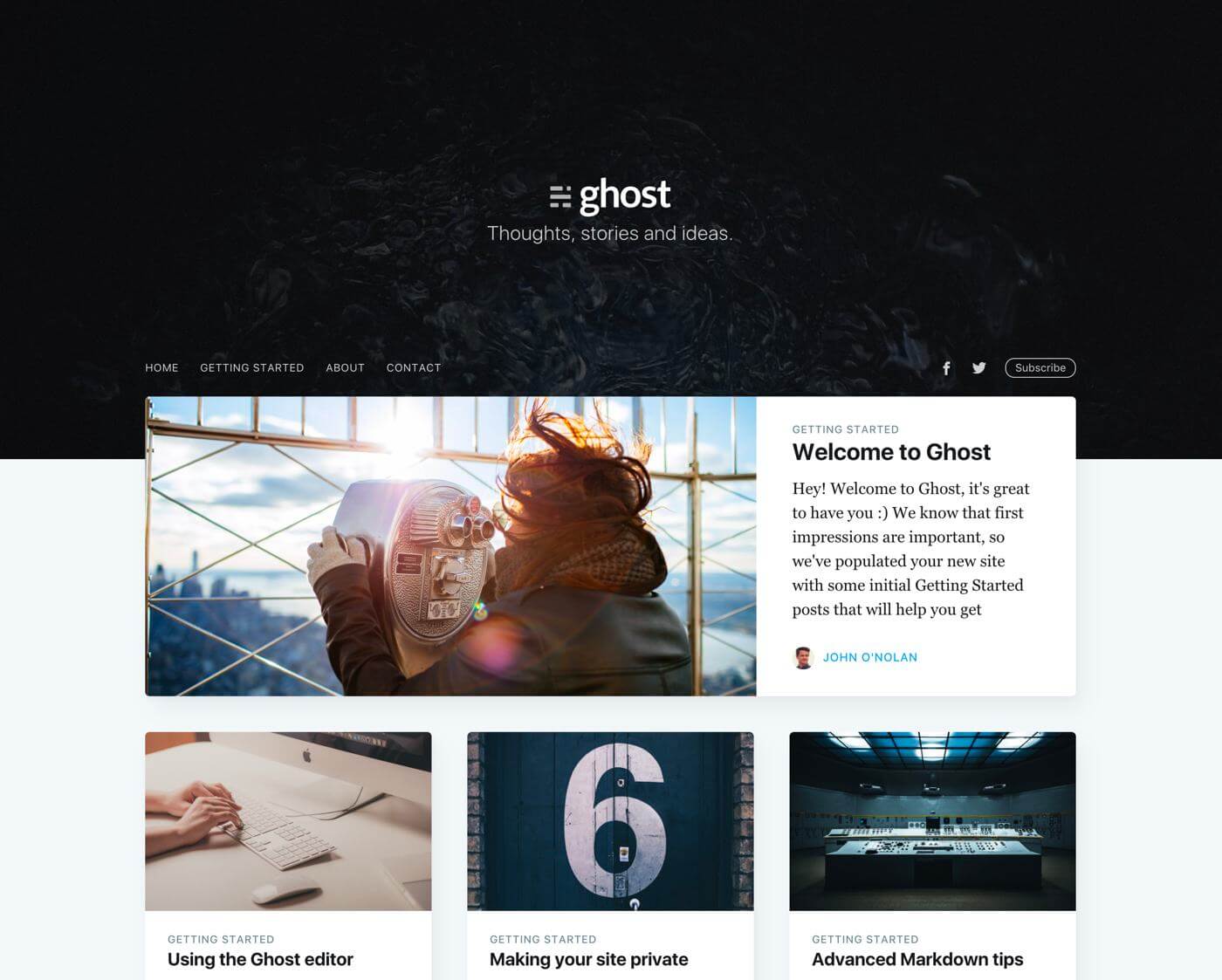 ## Features * Out of the box support for multiple authors (via `_data/authors.yml`) * Full author information including: picture, bio, website, twitter, facebook, etc. * Tag description(s) and personalised covers (via `_data/tags.yml`) * Related posts view at the bottom of each post * All Ghost default pages: Author page(s), Tag page(s), About page(s), 404, etc. * Pagination (infinite scrolling or standard pagination, i.e. posts across multiple pages) * Atom Feeds by [Jekyll-feed](https://github.com/jekyll/jekyll-feed) * Toggleable subscribe button (requires an external service) * Code Syntax Highlight with [highlight.js](https://highlightjs.org/) * Support for Google Analytics tracking * Support for Disqus comments (not Ghost standard) ## Getting Started ### Deployment There are several alternatives to building and deploying the site: 1. build the site with [GitHub Actions](https://github.com/features/actions) which pushes the resulting files (the contents of `_site/` or `../jasper2-pages/`) to the *gh-pages* branch. This is the approach that is currently used. See [jekyll_build.yml](.github/workflows/jekyll_build.yml) for more details. 2. generate the site locally (more details below) and push the resulting HTML to a Github repository, that GitHub Pages then host; 3. build the site with [travis-ci](https://travis-ci.org/) (with goodies from [jekyll-travis](https://github.com/mfenner/jekyll-travis)) automatically pushing the generated HTML files to a *gh-pages* branch. 4. deploy the static website with Jekyll-compatible hosters, such as https://www.netlify.com/, that allow for deployment from the Github repo and publish the website using CDNs. Netlify has a free starter offer. For option **2)** simply clone this repository (*master branch*), and then run `bundle exec jekyll serve` inside the directory. Upload the resulting `_site/` (or `../jasper2-pages/`) contents to your repository (*master branch* if uploading as your personal page (e.g. username.github.io) or *gh-pages branch* if uploading as a project page (as for the [demo](https://github.com/jekyllt/jasper2/tree/gh-pages)). For option **3)** you will need to set up travis-ci for your personal fork. Briefly all you need then is to change your details in *[\_config.yml](_config.yml)* so that you can push to your github repo. You will also need to generate a secure key to add to your *[.travis.yml](.travis.yml)* (you can find more info on how to do it in that file). Also make sure you read the documentation from [jekyll-travis](https://github.com/mfenner/jekyll-travis). This approach has clear advantages in that you simply push your file changes to GitHub and all the HTML files are generated for you and pushed to *gh-pages*. Also you get to know if everything is still fine with your site builds. Don't hesitate to contact me if you still have any issues (see below about issue tracking). ### Author Pages In order to properly generate author pages you need to rename the field *author* in the front matter of every post to match that of your each author's *username* as defined in the *[\_data/authors.yml](_data/authors.yml)* file. With the latest update, multiple author blogs are now supported out of the box. ### Compiling Styles Following on the way Casper styles are compiled as [described here](https://github.com/tryghost/casper#development): Jasper2 styles are compiled using Gulp/PostCSS to polyfill future CSS spec. You'll need Node and Gulp installed globally. After that, from the theme's root directory: ```bash $ npm install $ gulp ``` Now you can edit `/assets/css/` files, which will be compiled to `/assets/built/` automatically. ## Issues and Contributing This install builds well with Ruby v2.6.3 and Jekyll v3.9.0. If you run into any problems please log them on the [issue tracker](https://github.com/jekyllt/jasper2/issues). Feel free pull-request your patches and fixes. ## Thanks Many thanks to the Ghost team for all the design work. Also many thanks to all contributors, that help keeping the project alive and updated :smile: ## Copyright & License Same licence as the one provided by Ghost's team. See Casper's theme [license](GHOST.txt). Copyright (C) 2015-2021 - Released under the MIT License. Permission is hereby granted, free of charge, to any person obtaining a copy of this software and associated documentation files (the "Software"), to deal in the Software without restriction, including without limitation the rights to use, copy, modify, merge, publish, distribute, sublicense, and/or sell copies of the Software, and to permit persons to whom the Software is furnished to do so, subject to the following conditions: The above copyright notice and this permission notice shall be included in all copies or substantial portions of the Software. THE SOFTWARE IS PROVIDED "AS IS", WITHOUT WARRANTY OF ANY KIND, EXPRESS OR IMPLIED, INCLUDING BUT NOT LIMITED TO THE WARRANTIES OF MERCHANTABILITY, FITNESS FOR A PARTICULAR PURPOSE AND NONINFRINGEMENT. IN NO EVENT SHALL THE AUTHORS OR COPYRIGHT HOLDERS BE LIABLE FOR ANY CLAIM, DAMAGES OR OTHER LIABILITY, WHETHER IN AN ACTION OF CONTRACT, TORT OR OTHERWISE, ARISING FROM, OUT OF OR IN CONNECTION WITH THE SOFTWARE OR THE USE OR OTHER DEALINGS IN THE SOFTWARE.
Explore similar templates
Compare previews and descriptions within the same stack and category.

al-folio
A Jekyll academic homepage theme for scholars and researchers, with a clean responsive design and out-of-the-box support for publication lists, project showcases, CVs, and blogs.
Jekyll · Portfolio

minimal-mistakes
Minimal Mistakes is a two-column Jekyll theme for personal sites, blogs, project documentation, or portfolios.
Jekyll · Portfolio

Beautiful Jekyll
Beautiful Jekyll is a mature, easy-to-use Jekyll blog theme maintained by Dean Attali since 2015, with over 50,000 users.
Jekyll · Blog

jekyll-TeXt-theme
A customizable Jekyll theme for personal sites, team sites, blogs, projects, and documentation.
Jekyll · Blog

startbootstrap-clean-blog-jekyll
The official Jekyll version of Start Bootstrap's Clean Blog theme, offering a blog home page, about page, contact page, and sample post pages, with a Formspree-powered contact form.
Jekyll · Blog

So Simple
A minimal reading-oriented Jekyll theme by Michael Rose for personal blogs, portfolios, and long-form reading. It offers multiple layouts, microformat markup, Disqus comments, Google Analytics, Jekyll SEO Tag, three skins, and aggregation by year, category, and tag with a grid view.
Jekyll · Blog