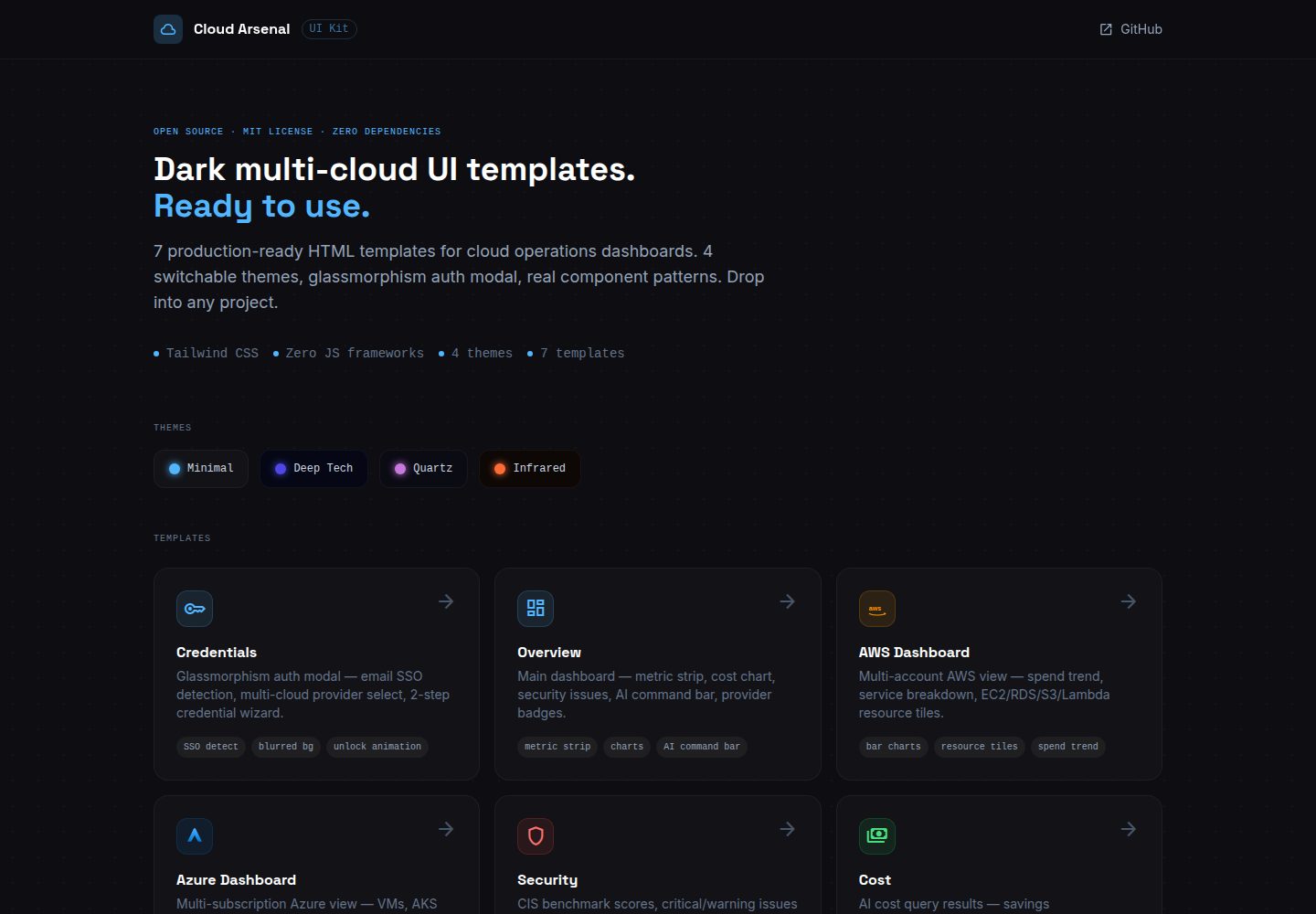
Seven standalone HTML templates covering credentials, overview, AWS, Azure, security, cost, and settings scenarios
HTMLAdmin dashboard
ui-kit — HTML Admin dashboard Template
By CloudArsenal
Cloud Arsenal UI Kit is a set of dark-themed HTML templates for cloud operations dashboards, covering seven pages: credentials, overview, AWS, Azure, security, cost, and settings. Zero dependencies, and can be opened directly in a browser.
Explore the design
Compare the page layouts and mobile experience. Open any screenshot for a closer look.
Desktop homepage1 / 2
Desktop captureTop of page
Actual screenshot captured by the server browser.
All pages & views 2
Screenshots show visual appearance; interactive behavior may differ.
Recorded 2026-10-15View source
What stands out
A quick read of the recorded project description.
Zero dependencies, no build step or npm install required; after cloning, open directly in a browser
Uses Tailwind CSS, Google Fonts, and Material Symbols icons via CDN
Four CSS variable-based themes, switched via the data-theme attribute
MIT licensed, usable for personal and commercial projects
Template Details
Cloud Arsenal UI Kit provides seven standalone HTML templates for cloud operations dashboard interfaces: Credentials (glassmorphism authentication modal with email SSO detection, multi-cloud provider selection, two-step wizard), Overview (main dashboard with metric bars, charts, AI command bar, provider badges), AWS (multi-account AWS spend trends, service breakdown, resource tiles), Azure (multi-subscription Azure VM, AKS, SQL, and cost breakdown), Security (CIS benchmarks, critical issues list, compliance progress bars), Cost (AI cost query results, savings recommendations, idle detection), Settings (MCP server registry, SSO configuration, AI provider switching).
Each template is a standalone HTML file that loads Tailwind CSS, Google Fonts (Space Grotesk, Inter, JetBrains Mono), and Material Symbols icons via CDN. No build step or npm install is required; after cloning, open it directly in a browser. The theme is based on CSS variables and offers four color schemes: minimal, deeptech, quartz, and infrared, switched by changing the data-theme attribute.
This UI Kit is the design foundation for the Cloud Arsenal multi-cloud operations platform and is MIT licensed, usable for personal and commercial projects. The README does not specify the templates' browser compatibility range, accessibility support, component reuse approach, or integration details with the main application.
HTMLAdmin panel
Is it right for your project?
Use Cases
- Quickly building interface prototypes for cloud operations dashboards
- Preparing dark-themed page templates for a multi-cloud management platform
- Previewing and adjusting page styles directly in an environment without build tools
Suitable For
- Developers or designers who need cloud operations dashboard interface prototypes
- Projects that want to start with pure HTML plus CDN without introducing a build process
- Teams that need multiple dark color schemes for interface comparison
Getting started & customization
Use these recorded setup notes alongside the repository instructions for your chosen version.
- 1
Clone the repository: git clone https://github.com/CloudArsenal/ui-kit
- 2
Open index.html or any template in the templates directory directly in a browser
- 3
To switch themes, change the data-theme attribute on the page to minimal, deeptech, quartz, or infrared
License & source material
Usage conditions & limitations
Free to use · keep license noticeThis entry covers the free version in the public repository under the MIT license; the free scope is the code of this version and does not mean external services or third-party assets are free.
Must comply with when using
- Free use, modification, commercial use, and distribution of this version's code are permitted.
- When distributing copies or substantial portions of the code, retain the original author's copyright notice and the full MIT license notice.
- The code is provided as is; warranties and limitations of liability are governed by the original license and applicable law.
Additional costs & items to verify
- Demo images, fonts, icons, and other third-party assets must be checked against their respective licenses and cannot be judged solely by the code's MIT license.
- External services such as domains, hosting, databases, payments, or AI may incur separate charges.
- The templates load Tailwind CSS via CDN, so use depends on the availability of that external CDN service.
- The templates load Space Grotesk, Inter, and JetBrains Mono fonts via Google Fonts, depending on Google's font service.
- Icons use Google's Material Symbols font service and require an internet connection to load.
View Original Text Basis
Permission is hereby granted, free of charge
Original License Text
- [Tailwind CSS](https://tailwindcss.com) via CDN
Original README
- [Google Fonts](https://fonts.google.com) — Space Grotesk, Inter, JetBrains Mono
Original README
https://github.com/CloudArsenal/ui-kit/blob/main/LICENSEhttps://github.com/CloudArsenal/ui-kit/blob/main/README.md- [Material Symbols](https://fonts.google.com/icons) for icons
Original README
Compiled by DeepSeek based on repository license and README ·2026-10-15. Results only cover the materials read; dependencies, images, fonts, and subsequent term changes are subject to their respective original texts.
Project checks & description sources
Template Information
- Source platforms
- GitHub
- Documentation and maintenance reference score
- More documented · 80 / 100
- Technologies
- HTML
- Website type
- Admin dashboard
How this score is calculated
Our heuristic uses license records (up to 30), a demo link (12), a preview (10), stars (15), recorded maintenance (15), description completeness (8), feature records (5) and classification data (5). It is not a code, security or performance test, or a Google score. A link does not establish tested functionality.
What to verify for this project
- Repository update recorded
- 2026-03-31
- Screenshot last checked
- 2026-10-15
A demo link is listed. Check it with your own content and viewport sizes; its presence does not confirm that forms, authentication or payments work.
The catalog identifies HTML as the primary stack. Check the actual dependency manifest and lockfile for versions and hosting requirements. These notes use recorded metadata, not a code audit or a deployment test.
Use a selection guide →How this description was prepared
AI-assisted description based on catalog records and repository material. Repository authors are not automatically the reviewers of this description.
Review declaration: codex-user-requested-batch-review-20261017 · 2026-10-16
Inspect the recorded source material
SHA-256: e79389e8f5f3f86263b467574463f2166079300c48943bc5f126fd030868458a
2026-10-15T06:04:03.543Z
Source file / repository# Cloud Arsenal UI Kit Dark-themed UI templates for cloud operations dashboards. Zero dependencies. Drop into any project. **[Live Preview →](https://cloudArsenal.github.io/ui-kit)** --- ## Templates | Template | Description | |---|---| | [Credentials](templates/credentials.html) | Glassmorphism auth modal — email SSO detection, multi-cloud provider select, 2-step wizard | | [Overview](templates/overview.html) | Main dashboard — metric strip, charts, AI command bar, provider badges | | [AWS](templates/aws.html) | Multi-account AWS — spend trend, service breakdown, resource tiles | | [Azure](templates/azure.html) | Multi-subscription Azure — VMs, AKS, SQL, cost breakdown | | [Security](templates/security.html) | CIS benchmarks, critical issues list, compliance progress bars | | [Cost](templates/cost.html) | AI cost query results, savings recommendations, idle detection | | [Settings](templates/settings.html) | MCP server registry, SSO config, AI provider switcher | --- ## Usage Clone and open any template directly in a browser — no build step, no npm install. ```bash git clone https://github.com/CloudArsenal/ui-kit open ui-kit/index.html ``` Each template is a standalone HTML file using: - [Tailwind CSS](https://tailwindcss.com) via CDN - [Google Fonts](https://fonts.google.com) — Space Grotesk, Inter, JetBrains Mono - [Material Symbols](https://fonts.google.com/icons) for icons --- ## Themes 4 CSS variable-based themes — switch by changing the `data-theme` attribute: | Theme | Background | Accent | |---|---|---| | `minimal` | `#0E0E12` | `#52B6FF` ice blue | | `deeptech` | `#050814` | `#4F46E5` + `#22D3EE` neon | | `quartz` | `#0B0B14` | `#C678DD` violet | | `infrared` | `#0D0806` | `#FF6B35` warm orange | --- ## Part of Cloud Arsenal This UI kit is the design foundation for [Cloud Arsenal](https://cloud-arsenal.com) — an open-source AI-driven multi-cloud operations platform. - Main app: [cloud-arsenal/app](https://github.com/CloudArsenal/app) - AWS MCP server: [cloud-arsenal/aws-server](https://github.com/CloudArsenal/aws-server) - Azure MCP server: [cloud-arsenal/azure-server](https://github.com/CloudArsenal/azure-server) --- ## License MIT — use freely in personal and commercial projects.
Explore similar templates
Compare previews and descriptions within the same stack and category.

AdminLTE
An HTML admin dashboard built with Bootstrap 5 and vanilla JavaScript. Astro builds the documentation; React, Vue and Angular editions live in separate repositories.
HTML · Admin dashboard

gentelella
Gentelella v4 is a free, open-source admin dashboard template maintained by Colorlib, built with vanilla JavaScript, SCSS, and Vite 8 without Bootstrap or jQuery.
HTML · Admin dashboard

coreui-free-bootstrap-admin-template
A free Bootstrap admin template maintained by CoreUI, built on CoreUI's own UI component library. It provides compiled HTML pages and Pug template source code, covering dashboards, authentication, forms, components, icons, and error pages.
HTML · Admin dashboard

dashboards
A collection of responsive dashboard HTML templates open-sourced by Keen IO, built on CSS Grid, offering multiple prebuilt admin data interface layouts.
HTML · Admin dashboard

SB Admin 2
SB Admin 2 is a classic Bootstrap admin template from Start Bootstrap, offering dashboards, charts, tables, and common management pages.
HTML · Admin dashboard

Adminator-admin-dashboard
Adminator 4 is a vanilla HTML, CSS and JavaScript admin dashboard template with a CSS-variable token design system, built-in light and dark themes, no jQuery or Bootstrap dependency, and 18 pages covering dashboards, mail, calendar, charts, forms, tables and error pages.
HTML · Admin dashboard