Framework and content are separated: the public repository holds only components, styles and build scripts, while personal configuration, articles and images live in a private content bundle outside the repository
AstroBlog
coisini-blog-framework — Astro Blog Template
By coisini233333333
An Astro-based static blog framework that keeps reusable components, styles and build scripts in a public repository, while personal articles and configuration live in a private content bundle outside the repository; the build reads the bundle and publishes only static web pages.
Explore the design
Compare the page layouts and mobile experience. Open any screenshot for a closer look.
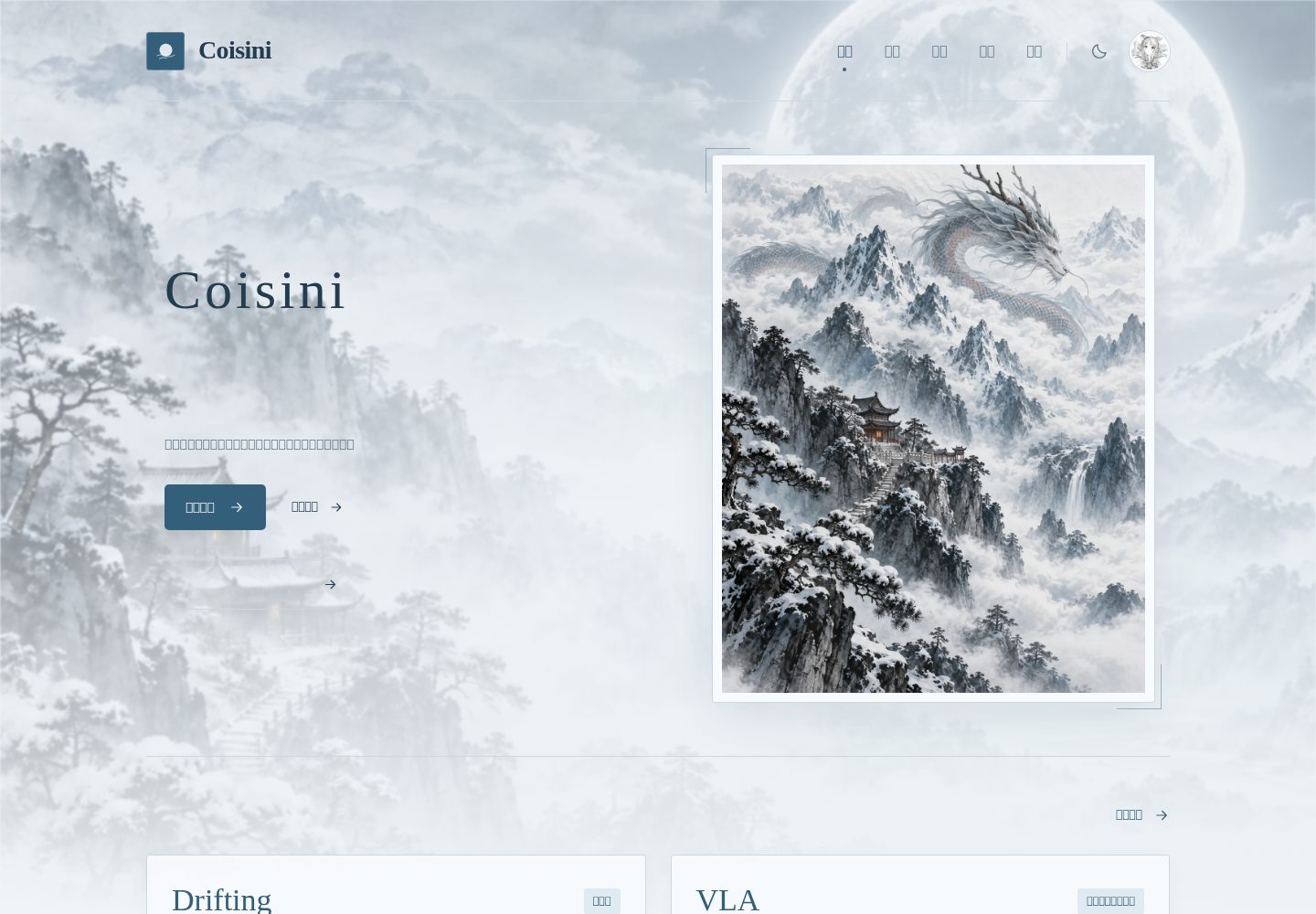
Desktop homepage1 / 3
Desktop captureTop of page
Actual screenshot captured by the server browser.
All pages & views 3
Screenshots show visual appearance; interactive behavior may differ.
Recorded 2026-10-13View source
What stands out
A quick read of the recorded project description.
The build reads the content bundle, and publishing uploads only static web pages; no database, backend service or browser API keys are required
Supports two content types—technical notes and essays—plus article tables of contents, search filtering, archives, RSS and sitemap
Provides light/dark theme switching, with colors, fonts, corner radius and spacing adjusted centrally in global.css
The publish script only copies dist/ to a temporary publishing repository; it does not push the private content repository, modify main, or force-push history
Includes built-in build, internal link, privacy and format validation scripts; the privacy check rejects publishing Markdown, TypeScript, JSON configuration, hidden files and source maps
Template Details
This is an Astro static blog framework for personal writing. The repository itself contains only components, styles, build scripts and fictional examples. Site configuration, project data, Markdown articles and images are placed in a separate content bundle directory, which the framework reads at build time; publishing uploads only the generated static web pages. The content bundle sits outside the framework repository and must be backed up to a private repository or other private storage.
The framework provides routes for the home page, sections, articles and projects. It supports two content categories—technical notes and essays—along with article tables of contents, search filtering, archives, RSS and sitemap, and light/dark theme switching. Articles use Markdown and frontmatter to describe title, date, tags, category, draft status and cover image; projects use JSON. Styles are centralized in global.css, where colors, fonts, spacing and responsive layout can be adjusted.
The publishing workflow targets GitHub Pages and separates the framework from the site using main and gh-pages branches: CI on main only validates examples and does not automatically overwrite a personal site; publishing runs locally and reads the local private content bundle. Published articles remain public on the site, and the generated HTML can be read, copied and indexed by search engines. The private content bundle protects Markdown source, drafts and edit history—not article access control. Any file placed in the content bundle's public/ directory will be published.
AstroBlog
Is it right for your project?
Use Cases
- Personal technical blog: write technical notes in Markdown, organize content by category and tag, and generate RSS and sitemap
- Essay writing: essays have a separate entry point and are presented separately from technical notes on the home page
- Project showcase: maintain a project list and details with projects.json, and link to published articles
- Static sites where the original writing and drafts are kept in private storage and only the generated web pages are made public
- Deploy to GitHub Pages and make it accessible via a custom domain
Suitable For
- Writers who accept maintaining content with Markdown and JSON
- Developers who want the framework code public while keeping personal articles and drafts out of the public repository
- Blogs that need static publishing without relying on a database or backend API
- Users willing to back up the content bundle themselves and handle GitHub Pages and domain configuration on their own
Getting started & customization
Use these recorded setup notes alongside the repository instructions for your chosen version.
- 1
Requires Node.js 24 and npm; after cloning the repository, run npm ci and npm run dev, which by default reads only the public examples in examples/site/
- 2
Initialize the content bundle with npm run content:init -- ../my-private-content; this command refuses to overwrite an existing directory and requires the target to be outside the framework repository
- 3
Copy .env.example to .env and set SITE_CONTENT_DIR, SITE_URL, BASE_PATH and PAGES_REPOSITORY; restart the development server after changing JSON configuration or the content bundle path
- 4
Run npm run deploy before publishing; after the first push creates the gh-pages branch, select gh-pages / (root) in the GitHub repository under Settings → Pages
- 5
The content bundle must be backed up to a private repository or other private storage; Git ignore is not a substitute for backup and cannot remove already committed files or their history
License & source material
Usage conditions & limitations
Free to use · keep license noticeThis entry covers the free version in the public repository under the MIT license; the free scope is that version's code and does not mean external services or third-party assets are free.
Must comply with when using
- You may use, modify, commercialize and distribute this version's code for free.
- When distributing copies or substantial portions of the code, retain the original author's copyright notice and the full MIT license notice.
- The code is provided as is; warranties and limitations of liability are governed by the original license and applicable law.
Additional costs & items to verify
- Demo images, fonts, icons and other third-party assets must be checked against their respective licenses; the code's MIT license alone is not sufficient to judge them.
- External services such as domains, hosting, databases, payments or AI may incur separate charges.
- The content bundle must be backed up to a private repository or other private storage; Git ignore is not a substitute for backup and cannot remove already committed files or their history.
- Published articles remain public and indexable; the private content bundle protects only Markdown source, drafts and edit history—not access control; any file placed in the content bundle's public/ directory will be published.
- A successful deploy push does not mean the Pages deployment is complete; check GitHub Actions/Pages status. Initial repository setup is managed by GitHub; the script does not purchase plans or modify DNS.
- When migrating from an old repository containing personal content, deleting articles in the current commit is not enough; create a new framework repository without the old history and keep the old repository private. Do not make public an old repository containing article history.
- The privacy check rejects publishing Markdown, TypeScript, JSON configuration, hidden files and source maps, and checks common private key/token formats, but it cannot guarantee detection of all sensitive information.
- If an API requiring keys is needed in the future, a separate server-side proxy must be used; sensitive values must not be placed in PUBLIC_*, page scripts, Markdown or public/.
- Content is treated as trusted author input and supports Markdown/HTML; do not place untrusted third-party content directly into the build.
- When publishing from a branch, write the domain as a single line in the content bundle's public/CNAME to avoid the publish overwriting the domain setting, and update SITE_URL and BASE_PATH=/ before republishing.
View Original Text Basis
Permission is hereby granted, free of charge
Original License Text
**内容包需要自行备份到私有仓库或其他私有存储**,Git ignore 不能替代备份,也不能清除已经提交过的文件及其历史。
Original README
已发表文章在网站上仍然公开,生成的 HTML 也可读取、复制和被搜索引擎索引。私有内容包保护 Markdown 原文、草稿与编辑历史,不是文章访问控制。任何放进内容包 `public/` 的文件都会发布。
Original README
`npm run deploy` 推送成功不等于 Pages 已完成部署,请检查 GitHub Actions/Pages 的状态。首次仓库设置由 GitHub 管理,脚本不会自行购买套餐或修改 DNS。
Original README
从包含个人内容的旧仓库迁移时,**仅在当前提交删除文章还不够**。请像本项目一样新建无旧历史的框架仓库,旧仓库保持私有;不要直接公开含文章历史的旧仓库。
Original README
隐私校验拒绝发布 Markdown、TypeScript、JSON 配置、隐藏文件和 source map,并检查常见私钥/令牌格式。它是额外检查,**不能保证识别所有形式的敏感信息**。
Original README
未来需要带密钥的接口时,使用独立服务端代理,敏感值不得放入 `PUBLIC_*`、页面脚本、Markdown 或 `public/`。
Original README
内容是可信作者输入,支持 Markdown/HTML;不要把不可信第三方内容直接放入构建。
Original README
https://github.com/coisini233333333/coisini-blog-framework/blob/main/LICENSEhttps://github.com/coisini233333333/coisini-blog-framework/blob/main/README.md使用分支发布时,在内容包 `public/CNAME` 中放入你的域名一行,避免后续发布覆盖域名设置;同时更新 `SITE_URL` 与 `BASE_PATH=/` 并重新发布。
Original README
Compiled by DeepSeek based on repository license and README ·2026-10-13. Results only cover the materials read; dependencies, images, fonts, and subsequent term changes are subject to their respective original texts.
Project checks & description sources
Template Information
- Source platforms
- GitHub
- Documentation and maintenance reference score
- More documented · 80 / 100
- Technologies
- Astro
- Website type
- Blog
How this score is calculated
Our heuristic uses license records (up to 30), a demo link (12), a preview (10), stars (15), recorded maintenance (15), description completeness (8), feature records (5) and classification data (5). It is not a code, security or performance test, or a Google score. A link does not establish tested functionality.
What to verify for this project
- Repository update recorded
- 2026-09-23
- Screenshot last checked
- 2026-10-13
A demo link is listed. Check it with your own content and viewport sizes; its presence does not confirm that forms, authentication or payments work.
The catalog identifies Astro as the primary stack. Check the actual dependency manifest and lockfile for versions and hosting requirements. These notes use recorded metadata, not a code audit or a deployment test.
Use a selection guide →How this description was prepared
AI-assisted description based on catalog records and repository material. Repository authors are not automatically the reviewers of this description.
Review declaration: [email protected] · 2026-10-13
Inspect the recorded source material
SHA-256: a3e510d48c11519901e08717fbae438cc191d400c3b3b59365f46f5893454d96
2026-10-13T00:58:10.174Z
Source file / repository# 一隅 · Coisini Blog Framework 一个可复用的 Astro 静态博客框架:浅米白与灰绿配色、深浅主题切换、随笔、技术笔记、项目展示、文章目录、搜索筛选、归档、RSS 与 sitemap。使用 **Astro 7 + TypeScript + 原生 CSS + Markdown**,不需要数据库、后台服务或浏览器 API 密钥。 [实际站点:Coisini 博客](https://coisini2333.com/) · [框架构建状态](https://github.com/coisini233333333/coisini-blog-framework/actions/workflows/ci.yml) **公开框架,私有写作。** 框架仓库只包含组件、样式、构建脚本和虚构示例。你自己的站点配置、项目资料、文章和图片放在独立内容包,构建时读取,发布时只上传静态网页。 > 已发表文章在网站上仍然公开,生成的 HTML 也可读取、复制和被搜索引擎索引。私有内容包保护 Markdown 原文、草稿与编辑历史,不是文章访问控制。任何放进内容包 `public/` 的文件都会发布。 ## 快速体验 需要 Node.js 24、npm。点击 GitHub 的 **Use this template** 创建自己的框架仓库,或克隆此仓库: ```bash git clone https://github.com/coisini233333333/coisini-blog-framework.git cd coisini-blog-framework npm ci npm run dev ``` 打开 `http://localhost:4321/`。默认只读取 `examples/site/` 中的公开示例。 ## 创建自己的博客 ```bash npm run content:init -- ../my-private-content ``` 初始化拒绝覆盖已有目录,并要求目标在框架仓库外。把 `.env.example` 复制为 `.env`,写入: ```dotenv SITE_CONTENT_DIR=../my-private-content SITE_URL=https://YOUR_NAME.github.io/YOUR_REPOSITORY BASE_PATH=/YOUR_REPOSITORY PAGES_REPOSITORY=YOUR_NAME/YOUR_REPOSITORY ``` 本地体验时可先省略后三项。使用自定义域名时设 `SITE_URL=https://your-domain.com`、`BASE_PATH=/`。路径以框架根目录为基准,支持绝对路径;进程环境变量优先于 `.env`。修改 JSON 配置或内容包路径后重启开发服务器。 `.env` 已忽略;框架的格式化和 Git 提交不会包含外部内容目录。**内容包需要自行备份到私有仓库或其他私有存储**,Git ignore 不能替代备份,也不能清除已经提交过的文件及其历史。 ## 目录与职责 ```text coisini-blog-framework/ 公开、可以复用 ├── content/source.mjs 选择内容包与部署地址(仅构建端) ├── src/config/site.ts 站点 JSON 的类型与校验 ├── src/content.config.ts Markdown 集合与 frontmatter 校验 ├── src/data/projects/ 项目 JSON 校验 ├── src/pages/ 首页、栏目、文章、项目等路由 ├── src/components/ 导航、卡片、搜索与 SVG 插图 ├── src/layouts/ 共享页面外壳 ├── src/styles/global.css 配色、字体、间距、响应式布局 ├── examples/site/ 可运行的公开示例内容包 ├── scripts/ 初始化、校验和发布 └── .github/workflows/ci.yml 只验证示例,不读取私有内容 my-private-content/ 私有、在框架仓库之外 ├── site.json 作者、标题、首页图片和关于介绍 ├── projects.json 项目列表与详情 ├── blog/ Markdown 文章与草稿 └── public/ 会公开的图片、图标等静态资源 ``` 每次构建只选一个完整内容包,不会把个人文章与示例混合。框架升级通常只需更新框架代码;内容结构如有不兼容变化,JSON/Markdown 校验会明确报错。 ## 日常修改 | 需求 | 修改位置 | | -------------------------- | ---------------------------------------------------- | | 站名、介绍、头像、首页图片 | 内容包 `site.json` | | 替换图片 | 内容包 `public/images/`,配置使用 `/images/name.jpg` | | 写随笔、技术文章 | 内容包 `blog/*.md` | | 新增项目、状态、相关资料 | 内容包 `projects.json` | | 配色、字体、圆角、间距 | 框架 `src/styles/global.css` | | 调整布局、交互 | 框架 `src/pages/`、`src/components/` | 图片路径不带 `public`。头像设为空字符串时不显示右上角头像,关于页使用姓名首字。默认字体来自本机,不请求第三方字体。详见 [美术定制](docs/visual-assets.md)。 ### 文章格式 ```md --- title: 我的笔记 description: 简短介绍。 pubDate: 2026-09-12 tags: [研究, 实践] category: technical draft: false art: particles # updatedDate: 2026-09-13 # cover: /images/my-cover.jpg # coverAlt: 图片说明 --- ## 正文标题 正文从这里开始。 ``` - `category`:`technical`(默认)或 `essay`;首页放技术笔记,随笔有独立入口。 - `draft: true`:不生成文章页面,也不进入列表、搜索、归档、RSS、sitemap。草稿仍只应保存在私有内容包。 - `art`:默认 `landscape`,另有 `particles` 和 `interface` 两种 SVG 封面;设置 `cover` 时优先使用图片。 - `sample: true`:标记公开示例,不影响发布;真实文章通常不需要这个字段。 - 文件名作为文章地址,建议英文小写与连字符。项目的可选 `noteSlug` 对应该文件名;未找到已发表文章时不显示关联链接。 内容是可信作者输入,支持 Markdown/HTML;不要把不可信第三方内容直接放入构建。文章内链使用相对地址。单层文章互链可写 `../another-post/`,图片可写 `../../images/picture.jpg`。复杂路径请以 `npm run test:build` 的检查结果为准。 ### 项目格式 复制示例 `projects.json` 中的一项。必填字段为 `slug`、`title`、`subtitle`、`description`、`tags`、`status`、`overview`、`focus` 和 `references`。允许空数组;`noteSlug` 可省略。项目 `slug` 必须唯一,只允许小写英文、数字及中间连字符。 ## 发布到 GitHub Pages 采用两个分支分离框架与网站: | 位置 | 内容 | | ------------------- | ------------------------------- | | 公开仓库 `main` | 框架源码、文档和公开示例 | | 公开仓库 `gh-pages` | 生成的 HTML、CSS、JS 和公开资源 | | 外部私有内容包 | 个人配置、Markdown 原文与草稿 | `main` 的 CI 只检查示例,**不会自动覆盖你的个人网站**。发布个人博客在本机执行,读取本机私有内容,不要求把私有仓库访问令牌交给公开 Actions。 1. 准备公开框架仓库,安装 GitHub CLI 并运行 `gh auth login`。配置 Git 的 `user.name` 与 `user.email`;建议使用 GitHub 的 noreply 邮箱。 2. 设置本地 `.env` 的内容包路径和真实发布地址。 3. 执行: ```bash npm run deploy ``` 4. 首次推送生成 `gh-pages` 分支后,在 GitHub 仓库 **Settings → Pages → Deploy from a branch** 选择 **gh-pages / (root)**。 5. 等待 GitHub 的 Pages 构建成功,再访问网站。以后修改文章仍执行 `npm run deploy`。 发布脚本每次重新构建并校验,只复制 `dist/` 到临时发布仓库。它使用现有 Git/GitHub 登录权限,不创建或打印密钥,不更改仓库可见性,不推送私有内容仓库,不改 `main`,也不强推历史。`gh-pages` 的发布历史包含以前公开过的网页;删除文章不能保证互联网副本或旧提交被删除。 `npm run deploy` 推送成功不等于 Pages 已完成部署,请检查 GitHub Actions/Pages 的状态。首次仓库设置由 GitHub 管理,脚本不会自行购买套餐或修改 DNS。参考 [GitHub 发布源文档](https://docs.github.com/en/pages/getting-started-with-github-pages/configuring-a-publishing-source-for-your-github-pages-site)。 ### 自定义域名 先在 GitHub 账户 Settings → Pages 验证域名,再在仓库 Pages 配置 Custom domain,然后按 [GitHub DNS 文档](https://docs.github.com/en/pages/configuring-a-custom-domain-for-your-github-pages-site/managing-a-custom-domain-for-your-github-pages-site) 修改注册商 DNS。使用分支发布时,在内容包 `public/CNAME` 中放入你的域名一行,避免后续发布覆盖域名设置;同时更新 `SITE_URL` 与 `BASE_PATH=/` 并重新发布。DNS/证书就绪后开启 HTTPS。 ## 验证与安全边界 ```bash npm run build # Astro / TypeScript 检查与静态构建 npm run test:build # 内链、资源、目录锚点、草稿、RSS、sitemap、canonical npm run test:privacy # 输出白名单、草稿标记、疑似凭据、source map、符号链接 npm run format:check npm run preview # 查看最近一次构建 ``` CI 验证根路径与项目子路径。隐私校验拒绝发布 Markdown、TypeScript、JSON 配置、隐藏文件和 source map,并检查常见私钥/令牌格式。它是额外检查,**不能保证识别所有形式的敏感信息**。请只在内容包 `public/` 放明确准备公开的文件;不引用某张图片不会使它变成私有。 没有后端接口或 API 凭据;配置内容只在构建端读取,前端不包含私有磁盘路径。未来需要带密钥的接口时,使用独立服务端代理,敏感值不得放入 `PUBLIC_*`、页面脚本、Markdown 或 `public/`。公开 CI 只有读取权限,官方 Actions 固定提交 SHA,checkout 不保留凭据。 从包含个人内容的旧仓库迁移时,**仅在当前提交删除文章还不够**。请像本项目一样新建无旧历史的框架仓库,旧仓库保持私有;不要直接公开含文章历史的旧仓库。 ## 学习与复用 建议依次阅读:`src/pages/index.astro` 的页面结构 → `src/styles/global.css` 的样式变量 → `PostList.astro` 的浏览器交互 → 内容模型与构建脚本。先调整一个颜色或组件,再运行验证。 框架代码与内置示例采用 [MIT License](LICENSE)。个人博客的文章、头像和其他私有内容不属于框架授权范围;发布网页不自动授予他人转载许可。
Explore similar templates
Compare previews and descriptions within the same stack and category.

astrowind
AstroWind is a free, open-source Astro starter theme using Astro and Tailwind CSS, released under the MIT license.
Astro · Blog

astro-paper
AstroPaper is a minimal, responsive, accessible, and SEO-friendly Astro blog theme. Articles are stored as Markdown/MDX in src/content/posts/, with subdirectories affecting URLs.
Astro · Blog

fuwari
Fuwari is a static blog template built with Astro and Tailwind CSS for personal blogs. It manages posts as Markdown files in src/content/posts/, with frontmatter for title, date, description, cover, tags, categories, draft status, and language.
Astro · Blog

Firefly
Firefly is a clean personal blog theme forked from Astro and Fuwari, offering four background modes, single/double sidebar and list/grid layouts, Pagefind client-side full-text search, and a six-language UI.
Astro · Blog

astro-theme-cactus
Astro Cactus is an Astro-based blog and portfolio theme that uses Markdown/MDX content collections to manage posts, notes, and tags, with frontmatter type-checked by a schema.
Astro · Portfolio

astrofy
Astrofy is a free and open-source personal portfolio website template built with Astro and TailwindCSS, with built-in blog, CV timeline, project showcase, store, and RSS feed modules.
Astro · Portfolio