Provides motion detection security automation, supporting cameras, PIR, and Aqara human sensors
HTMLAdmin dashboard
home-assistant-templates — HTML Admin dashboard Template
By cpunella
A collection of dashboard and automation templates for Home Assistant, including YAML configurations for motion detection, battery monitoring, and temperature monitoring, which can be browsed, copied, and used after replacing entity IDs.
Explore the design
Compare the page layouts and mobile experience. Open any screenshot for a closer look.
Desktop homepage1 / 2
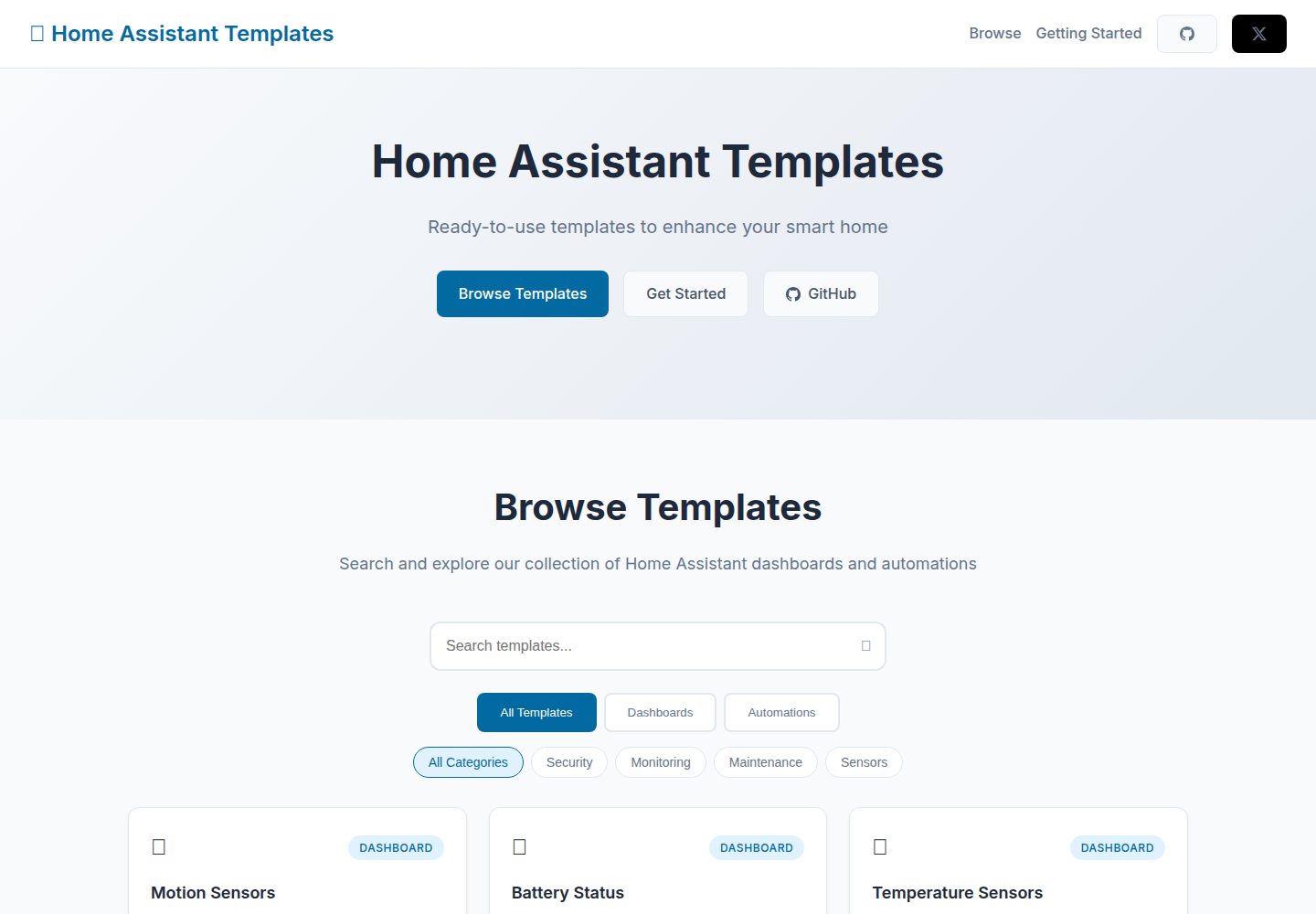
Desktop captureTop of page
Actual screenshot captured by the server browser.
All pages & views 2
Screenshots show visual appearance; interactive behavior may differ.
Recorded 2026-10-03View source
What stands out
A quick read of the recorded project description.
Provides battery monitoring automation, with configurable battery thresholds and device-level notifications
Includes three dashboard templates: motion sensor, battery status, and temperature sensor
All configurations are shown as YAML, ready to use after copying and replacing entity IDs
The demo site supports browsing templates by search and filtering
The repository uses the MIT license, allowing free use, modification, and distribution of the code
Template Details
This project is a template collection for Home Assistant, providing two types of configurations: dashboards and automations. The automation section includes a motion detection security system and a battery monitoring system. The former sends a notification when motion is detected in away mode, supports cameras, PIR, and Aqara human sensors, and can optionally trigger security lighting; the latter tracks device battery levels and reminds you to replace batteries when they fall below a threshold. The dashboard section includes a motion sensor dashboard, a battery status dashboard, and a temperature sensor dashboard, used respectively for real-time status and historical data, centralized battery levels and low-battery alerts, and temperature trends by room.
The usage flow is: browse templates on the demo site, find the desired template through search and filtering, view the YAML configuration, copy it and modify it according to your own entity IDs, then add it to Home Assistant and restart. The repository is released under the MIT license, but the README explicitly states that templates should be thoroughly tested in a real environment before production use, and recommends backing up your Home Assistant configuration before applying new automations.
HTMLBackend
Is it right for your project?
Use Cases
- Quickly set up motion detection notifications and security lighting linkage in away mode for Home Assistant
- Centrally monitor battery levels of all battery-powered devices in the home and receive alerts when batteries are low
- View temperature sensor data and trends by room
- Browse and copy ready-made YAML configurations from the demo site as a starting point for customization
Suitable For
- Users who are using Home Assistant and want to refer to ready-made YAML configurations
- Smart home users who need ideas for motion detection notifications or battery monitoring automation
- Builders who prefer to browse templates first and then modify entity IDs themselves
Getting started & customization
Use these recorded setup notes alongside the repository instructions for your chosen version.
- 1
Browse templates on the demo site and locate the desired configuration through search and filtering
- 2
Click to view the YAML, copy it, and modify it according to your own entity IDs
- 3
Add the configuration to Home Assistant and restart
- 4
The README states that templates should be thoroughly tested in a real environment before production use, and recommends backing up your Home Assistant configuration first
- 5
The code uses the MIT license; when distributing, retain the copyright and license notice; third-party assets such as demo images, fonts, and icons require separate license verification
License & source material
Usage conditions & limitations
Free to use · keep license noticeThis entry covers the free version under the MIT license from a public repository; the free scope applies to this version's code and does not imply that external services or third-party assets are free.
Must comply with when using
- Free use, modification, commercial use, and distribution of this version's code are permitted.
- When distributing copies or substantial portions of the code, retain the original author's copyright notice and the full MIT license notice.
- The code is provided as is; warranties and limitations of liability are governed by the original license and applicable law.
Additional costs & items to verify
- Demo images, fonts, icons, and other third-party assets must be checked under their respective licenses and cannot be judged solely by the code's MIT license.
- External services such as domains, hosting, databases, payments, or AI may incur additional fees.
- Usage restrictions: templates must be thoroughly tested in your own environment before production use; back up your Home Assistant configuration before implementing new automations.
View Original Text Basis
Permission is hereby granted, free of charge
Original License Text
https://github.com/cpunella/home-assistant-templates/blob/main/LICENSEhttps://github.com/cpunella/home-assistant-templates/blob/main/README.mdThese templates should be thoroughly tested in your environment before production use. Always backup your Home Assistant configuration before implementing new automations.
Original README
Compiled by DeepSeek based on repository license and README ·2026-10-04. Results only cover the materials read; dependencies, images, fonts, and subsequent term changes are subject to their respective original texts.
Project checks & description sources
Template Information
- Source platforms
- GitHub
- Documentation and maintenance reference score
- More documented · 77 / 100
- Technologies
- HTML
- Website type
- Admin dashboard
How this score is calculated
Our heuristic uses license records (up to 30), a demo link (12), a preview (10), stars (15), recorded maintenance (15), description completeness (8), feature records (5) and classification data (5). It is not a code, security or performance test, or a Google score. A link does not establish tested functionality.
What to verify for this project
- Repository update recorded
- 2025-09-08
- Screenshot last checked
- 2026-10-04
A demo link is listed. Check it with your own content and viewport sizes; its presence does not confirm that forms, authentication or payments work.
The catalog identifies HTML as the primary stack. Check the actual dependency manifest and lockfile for versions and hosting requirements. These notes use recorded metadata, not a code audit or a deployment test.
Use a selection guide →How this description was prepared
AI-assisted description based on catalog records and repository material. Repository authors are not automatically the reviewers of this description.
Review declaration: [email protected] · 2026-10-05
Inspect the recorded source material
SHA-256: fa9d98a7472794742dffb2065da9e31567b66618138e21382881802158db2729
2026-10-04T23:20:23.115Z
Source file / repository# Home Assistant Templates 🏠 A curated collection of ready-to-use Home Assistant templates including dashboards, automations, and configurations. Browse, copy, and customize templates for your smart home setup. 🌐 **Live Website:** [home-assistant-templates.vercel.app](https://home-assistant-templates.vercel.app) ## 🚀 Quick Start 1. **Browse templates** at [home-assistant-templates.vercel.app](https://home-assistant-templates.vercel.app) 2. **Find a template** you like using search and filters 3. **View YAML** configuration by clicking "View YAML" 4. **Copy configuration** and customize entity IDs for your setup 5. **Add to Home Assistant** and restart ## What's Included ### 🤖 Automations - **🔒 Motion Detection Security** - Smart notifications when motion detected during away mode - **🔋 Battery Monitoring** - Proactive low battery alerts for all devices ### 📊 Dashboards - **📊 Motion Sensors Dashboard** - Real-time motion detection monitoring and history - **🔋 Battery Status Dashboard** - Centralized battery level tracking and alerts - **🌡️ Temperature Sensors Dashboard** - Room temperature monitoring with trends ## 🤝 Contributing Any idea/feedback on what's next? Reach me on X (https://x.com/CPunella)! ## Automations ### 🔒 Motion Detection Security System **Location:** `automations/motion_sensors/` A comprehensive Home Assistant automation that sends notifications when motion is detected while your alarm system is set to "away" mode. **Features:** - ✅ Multi-sensor support (Camera, PIR, Aqara occupancy sensors) - ✅ Smart notifications with sensor location and timestamp - ✅ Optional security lighting activation - ✅ Parallel processing for multiple simultaneous detections - ✅ Comprehensive logging and high-priority alerts ### 🔋 Battery Monitoring System **Location:** `automations/battery/` Smart battery monitoring automation that tracks device battery levels and sends proactive notifications when batteries need replacement. **Features:** - ✅ Configurable battery level thresholds - ✅ Device-specific notifications with battery percentage - ✅ Smart filtering to avoid notification spam - ✅ Support for all battery-powered Home Assistant devices ## Dashboards ### 📊 Motion Sensors Dashboard **Location:** `dashboard/motion-sensors-dashboard/` Comprehensive dashboard for monitoring motion detection across your home with real-time status and historical data visualization. ### 🔋 Battery Status Dashboard **Location:** `dashboard/battery-status-dashboard/` Centralized battery monitoring dashboard showing current battery levels, low battery alerts, and maintenance schedules for all battery-powered devices. ### 🌡️ Temperature Sensors Dashboard **Location:** `dashboard/temperature-sensors-dashboard/` Temperature monitoring dashboard with trend visualization, room-by-room temperature tracking, and climate control insights. ## Features - **Security Automations**: Motion detection and alert systems for home security - **Battery Management**: Proactive battery monitoring and replacement notifications - **Custom Dashboard Scripts**: Enhanced UI components for comprehensive home monitoring - **Template-Ready**: All automations sanitized and ready for public use ## License This project is licensed under the MIT License - see the LICENSE file for details. ## Disclaimer These templates should be thoroughly tested in your environment before production use. Always backup your Home Assistant configuration before implementing new automations.
Explore similar templates
Compare previews and descriptions within the same stack and category.

gentelella
Gentelella v4 is a free, open-source admin dashboard template maintained by Colorlib, built with vanilla JavaScript, SCSS, and Vite 8 without Bootstrap or jQuery.
HTML · Admin dashboard

coreui-free-bootstrap-admin-template
A free Bootstrap admin template maintained by CoreUI, built on CoreUI's own UI component library. It provides compiled HTML pages and Pug template source code, covering dashboards, authentication, forms, components, icons, and error pages.
HTML · Admin dashboard

dashboards
A collection of responsive dashboard HTML templates open-sourced by Keen IO, built on CSS Grid, offering multiple prebuilt admin data interface layouts.
HTML · Admin dashboard

SB Admin 2
SB Admin 2 is a classic Bootstrap admin template from Start Bootstrap, offering dashboards, charts, tables, and common management pages.
HTML · Admin dashboard

Adminator-admin-dashboard
Adminator 4 is a vanilla HTML, CSS and JavaScript admin dashboard template with a CSS-variable token design system, built-in light and dark themes, no jQuery or Bootstrap dependency, and 18 pages covering dashboards, mail, calendar, charts, forms, tables and error pages.
HTML · Admin dashboard

SB Admin
SB Admin is a lightweight, open-source Bootstrap admin template from Start Bootstrap. It offers a sidebar-and-top-bar layout with data tables, forms, and stat cards, plus responsive design.
HTML · Admin dashboard