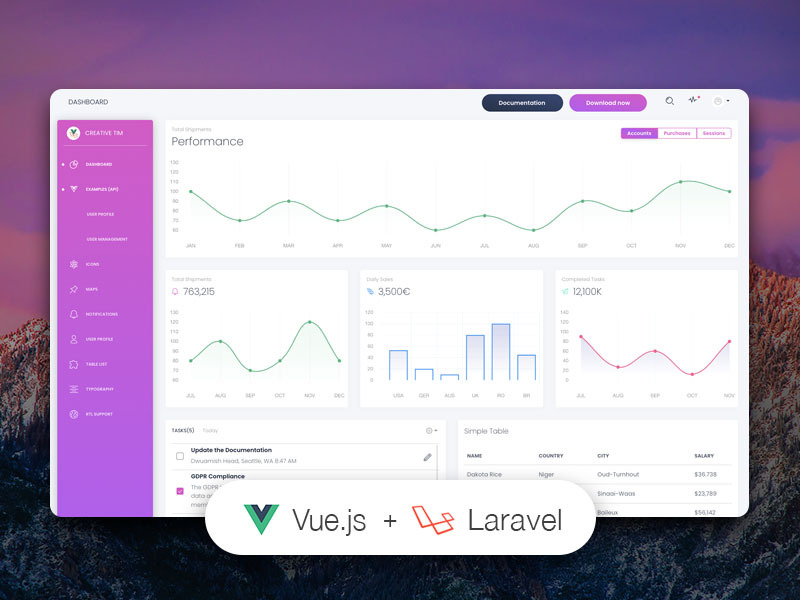
Vue single-page application paired with a Laravel JSON:API backend, with frontend and backend separated
VueLaravelAdmin dashboard
vue-white-dashboard-laravel — Vue Admin dashboard Template
By creativetimofficial
Vue White Dashboard Laravel is an admin dashboard template consisting of a Vue single-page application and a Laravel JSON:API backend, providing login, registration, dashboard, and profile editing pages.
Explore the design
Compare the page layouts and mobile experience. Open any screenshot for a closer look.
Author preview
Author-provided previewTop of page
Preview provided in the project README.
One original preview is available. Open the full image to inspect the design.
Screenshots show visual appearance; interactive behavior may differ.
Recorded 2026-10-03View source
What stands out
A quick read of the recorded project description.
Login, registration, dashboard, and edit profile pages already implemented
Uses the JSON:API standard to govern data requests and responses between client and server
Frontend based on Vue White Dashboard, backend uses Laravel with Passport authentication integrated
MIT-licensed free version, modifiable and usable commercially
Template Details
This template connects the Vue White Dashboard frontend to a working Laravel REST API backend, with the frontend and backend communicating via the JSON:API standard. The repository contains two separate project folders: a Laravel API project and a Vue frontend project. The frontend is built on Vue White Dashboard, while the backend uses Laravel and follows the JSON:API specification to demonstrate an API-driven admin interface.
Functionally, the template already implements login, registration, dashboard, and edit profile pages, with routing and authentication state management configured. Login uses the test account [email protected] / secret, and you can also register your own account. The backend requires PHP, Composer, MySQL, and a multi-threaded web server such as Apache/Nginx; the README explicitly advises against using php artisan serve because its single-threaded nature causes requests to stall. The frontend requires Node.js, npm, and Vue CLI.
Regarding licensing, this version uses the MIT license, allowing free use, modification, commercial use, and distribution of the code, but third-party assets such as demo images, fonts, and icons must be checked separately for their licenses. The template is positioned as a free version; for more features, the author offers a PRO version.
VueLaravelBackend
Is it right for your project?
Use Cases
- Starting an admin project that requires a Vue frontend working with a Laravel API backend
- Demonstrating or learning how the JSON:API standard is used in a frontend-backend separated architecture
- Quickly building a dashboard interface with login, registration, and profile editing features
- Serving as a reference implementation for API-driven development
Suitable For
- Developers familiar with Vue and Laravel
- Teams needing a frontend-backend separated admin template
- Developers wanting to understand JSON:API practices
- Individuals or organizations looking for an MIT-licensed free admin template
Getting started & customization
Use these recorded setup notes alongside the repository instructions for your chosen version.
- 1
The backend requires PHP, Composer, MySQL, and a multi-threaded web server such as Apache/Nginx; do not use php artisan serve
- 2
The frontend requires Node.js (8.9 or higher, 8.11.0+ recommended), npm, and Vue CLI
- 3
Backend installation steps include composer install, copying .env, configuring the database, running migrate --seed, generating a key, installing Passport and configuring CLIENT_ID/CLIENT_SECRET, and configuring mail credentials
- 4
Frontend installation steps include npm install, copying .env, setting VUE_APP_BASE_URL and VUE_APP_API_BASE_URL, then running npm run dev or npm run build
- 5
You can log in with [email protected] / secret for testing, or register your own user
License & source material
Usage conditions & limitations
Free to use · keep license noticeThis entry covers the free version under the MIT license in the public repository; the free scope applies to this version's code and does not mean external services or third-party assets are free.
Must comply with when using
- You may freely use, modify, commercially use, and distribute this version's code.
- When distributing copies or substantial portions of the code, retain the original author's copyright notice and the full MIT license notice.
- The code is provided as is; warranties and limitations of liability are governed by the original license and applicable law.
Additional costs & items to verify
- The free version has limited features; more features require purchasing the PRO version, and PRO features are not part of the free open-source scope.
- Backend email functionality depends on the third-party service mailtrap.io, requiring you to register an account and provide credentials, which may incur external service costs.
- Authentication relies on Laravel Passport, which must be installed and configured with CLIENT_ID and CLIENT_SECRET to run.
- Running the backend requires PHP, Composer, MySQL, and a multi-threaded web server environment such as Apache/Nginx.
- Using php artisan serve is prohibited because its single-threaded nature causes requests to stall; a multi-threaded server must be used.
- Demo images, fonts, icons, and other third-party assets must be checked under their respective licenses and cannot be judged solely by the code's MIT license.
- External services such as domain, hosting, database, payment, or AI may incur additional charges.
View Original Text Basis
Permission is hereby granted, free of charge
Original License Text
If you want to get more features, go PRO with [White Dashboard PRO Laravel](https://www.creative-tim.com/product/vue-white-dashboard-pro-laravel).
Original README
Add your own mailtrap.io credentials in MAIL_USERNAME and MAIL_PASSWORD in the .env file
Original README
Install Laravel Passport: `php artisan passport:install` and set in the .env file the CLIENT_ID and CLIENT_SECRET that you receive
Original README
The Laravel JSON:API backend project requires a proper multi-threaded web server such as Apache/Nginx environment with PHP, Composer and MySQL.
Original README
https://github.com/creativetimofficial/vue-white-dashboard-laravel/blob/master/LICENSE.mdhttps://github.com/creativetimofficial/vue-white-dashboard-laravel/blob/master/README.md**Do not use `php artisan serve` as it will result in stalled requests due to the single-threaded nature of the built-in PHP web server.**
Original README
Compiled by DeepSeek based on repository license and README ·2026-10-03. Results only cover the materials read; dependencies, images, fonts, and subsequent term changes are subject to their respective original texts.
Project checks & description sources
Template Information
- Source platforms
- GitHub
- Documentation and maintenance reference score
- Partly documented · 65 / 100
- Technologies
- Vue · Laravel
- Website type
- Admin dashboard
How this score is calculated
Our heuristic uses license records (up to 30), a demo link (12), a preview (10), stars (15), recorded maintenance (15), description completeness (8), feature records (5) and classification data (5). It is not a code, security or performance test, or a Google score. A link does not establish tested functionality.
What to verify for this project
- Repository update recorded
- 2024-05-27
- Screenshot last checked
- 2026-10-03
No demo link is recorded. Use the repository instructions to evaluate the project locally; the screenshot alone cannot establish interactive behavior.
The catalog identifies Vue as the primary stack. Check the actual dependency manifest and lockfile for versions and hosting requirements. These notes use recorded metadata, not a code audit or a deployment test.
Use a selection guide →How this description was prepared
AI-assisted description based on catalog records and repository material. Repository authors are not automatically the reviewers of this description.
Automatically checked against source and license rules; no manual editorial review.
Inspect the recorded source material
SHA-256: b31d938ae5faaa1791bee9720712d9e9110ca05a6009e0cc2d5152d2665ead30
2026-10-03T08:33:16.264Z
Source file / repository# [Vue White Dashboard Laravel](https://vue-white-dashboard-laravel.creative-tim.com/?ref=mdpl-readme)   [](https://github.com/creativetimofficial/vue-white-dashboard-laravel/issues?q=is%3Aopen+is%3Aissue) [](https://github.com/creativetimofficial/vue-white-dashboard-laravel/issues?q=is%3Aissue+is%3Aclosed) *Vue version*: Vue White Dashboard v1.0.1. More info at https://www.creative-tim.com/product/vue-white-dashboard  What if your frontend came not only with reusable components, but also with a reusable backend? API-driven development is more than just a buzzword and we partnered with [UPDIVISION](https://updivision.com) to prove it. Build awesome-looking apps with a flexible architecture across a variety of devices and operating systems with Vue White Dashboard Laravel. If you want to get more features, go PRO with [White Dashboard PRO Laravel](https://www.creative-tim.com/product/vue-white-dashboard-pro-laravel). # Download For the free version of the project you can either - download the .zip file from the Creative Tim site and extract it or - make a clone from the Github repository You will get two project folders: one for the Laravel API project and one for the Vue frontend. # Laravel API Setup ## Introduction JSON:API is a specification for how a client should request that resources be fetched or modified, and how a server should respond to those requests. It is designed to minimize both the number of requests and the amount of data transmitted between clients and servers. This efficiency is achieved without compromising readability, flexibility, or discoverability. [Click here to go to the JSON:API docs](https://explore.postman.com/api/6357/laravel-jsonapi) ## Prerequisites ### JSON:API backend The Laravel JSON:API backend project requires a proper multi-threaded web server such as Apache/Nginx environment with PHP, Composer and MySQL. **Do not use `php artisan serve` as it will result in stalled requests due to the single-threaded nature of the built-in PHP web server.** We strongly recommend using [Laradock](https://laradock.io/) for Linux and Mac or [Laragon](https://laragon.org/download/) for Windows if possible. Other options for your local environment: - Windows: [How to install WAMP on Windows](https://updivision.com/blog/post/beginner-s-guide-to-setting-up-your-local-development-environment-on-windows) - Linux & Mac: [How to install LAMP on Linux & Mac](https://updivision.com/blog/post/guide-what-is-lamp-and-how-to-install-it-on-ubuntu-and-macos) You will also need to install Composer 2: [https://getcomposer.org/doc/00-intro.md](https://getcomposer.org/doc/00-intro.md) ### Vue White frontend The Vue White frontend project requires a working local environment with NodeJS version 8.9 or above (8.11.0+ recommended), npm, VueCLI. Install Node: https://nodejs.org/ (version 8.11.0+ recommended) Install NPM: https://www.npmjs.com/get-npm Install VueCLI: https://cli.vuejs.org/guide/installation.html ## Laravel JSON:API Project Installation 1. Navigate in your Laravel API project folder: `cd your-laravel-json-api-project` 2. Install project dependencies: `composer install` 3. Create a new .env file: `cp .env.example .env` 3. Add your own database credentials in the .env file in DB_DATABASE, DB_USERNAME, DB_PASSWORD 5. Create users table: `php artisan migrate --seed` 6. Generate application key: `php artisan key:generate` 7. Install Laravel Passport: `php artisan passport:install` and set in the .env file the CLIENT_ID and CLIENT_SECRET that you receive 8. Add your own mailtrap.io credentials in MAIL_USERNAME and MAIL_PASSWORD in the .env file ## Vue White Dashboard Project Installation 1. Navigate to your Vue White Dashboard project folder: `cd your-white-dashbord-project` 2. Install project dependencies: `npm install` 3. Create a new .env file: `cp .env.example .env` 4. `VUE_APP_BASE_URL` should contain the URL of your Vue White Dashboard Project (eg. http://localhost:8080/) 5. `VUE_APP_API_BASE_URL` should contain the URL of your Laravel JSON:API Project. (eg. http://localhost:3000/api/v1) 6. Run `npm run dev` to start the application in a local development environment or `npm run build` to build release distributables. ## Usage Register a user or login using [email protected] and secret and start testing the theme. Besides the dashboard and the auth pages this theme also has an edit profile page. All the necessary files are installed out of the box and all the needed routes are added to `src\router\index.js`. Keep in mind that all the features can be viewed once you log in using the credentials provided above or by registering your own user. ### Dashboard You can access the dashboard either by using the "**Dashboards/Dashboard**" link in the left sidebar or by adding **/home** in the URL. ### Login The login functionality is fully implemented in our theme helping you to start your project in no time. To login into dashboard you just have to add **/login** in the URL and fill the login form with the credentials (user: **[email protected]** and password: **secret**). The `src\pages\Login.vue` is the Vue component which handles the login functinality. You can easily adapt it to your needs. It uses the auth store located in `src\store\modules\auth.js`. #### Login card ``` <div class="col-lg-4 col-md-6 ml-auto mr-auto"> <form @submit.prevent="handleSubmit()"> <card class="card-login card-white"> <template slot="header"> <img src="/img/card-primary.png" alt="" /> <h1 class="card-title">Log in</h1> </template> <div> <ValidationProvider name="email" rules="required|email" v-slot="{ passed, failed, errors }" > <base-input required v-model="email" type="email" placeholder="Email" addon-left-icon="tim-icons icon-email-85" :error="errors[0]" :class="[{ 'has-success': passed }, { 'has-danger': failed }]"> </base-input> <validation-error :errors="apiValidationErrors.email" /> </ValidationProvider> <ValidationProvider name="password" rules="required|min:5" v-slot="{ passed, failed, errors }" > <base-input required v-model="password" placeholder="Password" addon-left-icon="tim-icons icon-lock-circle" type="password" :error="errors[0]" :class="[{ 'has-success': passed }, { 'has-danger': failed }]"> </base-input> <validation-error :errors="apiValidationErrors.password" /> </ValidationProvider> </div> <div slot="footer"> <base-button native-type="submit" type="primary" class="mb-3" size="lg" block> Get Started </base-button> <div class="pull-left"> <h6> <router-link class="link footer-link" to="/register"> Create Account </router-link> </h6> </div> <div class="pull-right"> <h6><a href="#pablo" class="link footer-link">Need Help?</a></h6> </div> </div> </card> </form> <!-- </ValidationObserver> --> </div> ``` ### Register The register functionality is fully implemented in our theme helping you to start your project in no time. To register a new user you just have to add **/register** in the URL or click on register link from login page and fill the register form with user details. The `src\pages\Register.vue` is the Vue component which handles the login functinality. You can easily extend it to your needs. It uses the auth store located in `src\store\modules\auth.js`. #### Register card ``` <div class="col-md-7 mr-auto"> <form @submit.prevent="handleSubmit()"> <card class="card-register card-white"> <template slot="header"> <img class="card-img" src="/img/card-primary.png" alt="Card image"/> <h4 class="card-title">Register</h4> </template> <ValidationProvider name="name" rules="required" v-slot="{ passed, failed, errors }"> <base-input required v-model="name" placeholder="Full Name" addon-left-icon="tim-icons icon-single-02" type="text" :error="errors[0]" :class="[{ 'has-success': passed }, { 'has-danger': failed }]"> </base-input> </ValidationProvider> <ValidationProvider name="email" rules="required|email" v-slot="{ passed, failed, errors }"> <base-input required v-model="email" placeholder="Email" addon-left-icon="tim-icons icon-email-85" type="email" :error="errors[0]" :class="[{ 'has-success': passed }, { 'has-danger': failed }]"> </base-input> </ValidationProvider> <ValidationProvider name="password" rules="required" v-slot="{ passed, failed, errors }"> <base-input required v-model="password" placeholder="Password" addon-left-icon="tim-icons icon-lock-circle" type="password" :error="errors[0]" :class="[{ 'has-success': passed }, { 'has-danger': failed }]"> </base-input> </ValidationProvider> <ValidationProvider name="password" rules="required" v-slot="{ passed, failed, errors }"> <base-input required placeholder="Confirm Password" type="password" name="Password confirmation" v-model="password_confirmation" addon-left-icon="tim-icons icon-lock-circle" :error="errors[0]" :class="[{ 'has-success': passed }, { 'has-danger': failed }]"> </base-input> </ValidationProvider> <base-checkbox v-model="boolean" class="text-left"> I agree to the <a href="#something">terms and conditions</a>. </base-checkbox> <base-button native-type="submit" slot="footer" type="primary" round block size="lg"> Get Started </base-button> </card> </form> </div> ``` ### Profile edit You have the option to edit the current logged in user's profile information (name, email, profile picture) and password. To access this page, just click the "**Examples/Profile**" link in the left sidebar or add **/profile** in the URL. The `src\pages\Examples\UserProfile` is the folder with Vue components that handle the update of the user information and password. #### Edit profile component ``` <template> <card class="stacked-form" title="Stacked Form"> <h4 slot="header" class="card-title">Edit Profile</h4> <form @submit.prevent> <base-input v-model="user.email" label="Email" type="email" placeholder="Enter email"/> <validation-error :errors="apiValidationErrors.email" /> <base-input v-model="user.name" label="Name" placeholder="Name"/> <validation-error :errors="apiValidationErrors.name" /> <base-button @click="updateProfile()" class="mt-3" native-type="submit" type="primary">Submit</base-button> </form> </card> </template> <script> import ValidationError from "@/components/ValidationError.vue"; import formMixin from "@/mixins/form-mixin"; export default { mixins: [formMixin], components: { ValidationError }, props: { user: Object }, methods: { async updateProfile() { try { await this.$store.dispatch("profile/update", this.user) this.resetApiValidation(); this.$notify({ type: 'success', message: 'Profile updated successfully.', icon: 'tim-icons icon-bell-55', }) await this.$store.getters["profile/me"] } catch (e) { this.$notify({ type: 'danger', message: 'Oops, something went wrong!', icon: 'tim-icons icon-bell-55', }) this.setApiValidation(e.response.data.errors) } } } } </script> ``` #### Edit password component ``` <template> <card class="stacked-form" title="Change Password"> <h4 slot="header" class="card-title">Change Password</h4> <form ref="password_form" @submit.prevent> <div> <base-input v-model="password" label="Password" type="password" placeholder="Password"/> <validation-error :errors="apiValidationErrors.password"/> <base-input v-model="password_confirmation" label="Password Confirmation" type="password" placeholder="Password Confirmation"/> <validation-error :errors="apiValidationErrors.password_confirmation"/> <base-button class="mt-3" native-type="submit" type="primary" @click="changePassword()" >Submit</base-button > </div> </form> </card> </template> <script> import ValidationError from "@/components/ValidationError.vue"; import formMixin from "@/mixins/form-mixin"; export default { name: "edit-password-card", props: { user: Object }, components: {ValidationError}, mixins: [formMixin], data: () => ({ password: null, password_confirmation: null, }), methods: { async changePassword() { this.user.password = this.password; this.user.password_confirmation = this.password_confirmation; try { this.resetApiValidation(); await this.$store.dispatch("users/update", this.user) this.$notify({ type: 'success', message: 'Password changed successfully.', icon: 'tim-icons icon-bell-55', }) this.user = await this.$store.getters["profile/me"] this.$refs["password_form"].reset(); } catch (e) { this.$notify({ type: 'danger', message: 'Oops, something went wrong!', icon: 'tim-icons icon-bell-55', }) this.setApiValidation(e.response.data.errors) } } } }; </script> ``` ## Table of Contents * [Versions](#versions) * [Demo](#demo) * [Documentation](#documentation) * [File Structure](#file-structure) * [Browser Support](#browser-support) * [Resources](#resources) * [Reporting Issues](#reporting-issues) * [Licensing](#licensing) * [Useful Links](#useful-links) ## Versions [<img src="https://github.com/creativetimofficial/public-assets/blob/master/logos/html-logo.jpg" height="80" />](#) [<img src="https://github.com/creativetimofficial/public-assets/blob/master/logos/laravel_logo.png" height="80" />](#) [<img src="https://github.com/creativetimofficial/public-assets/blob/master/logos/vue.jpg" height="80" />](#) [<img src="https://github.com/creativetimofficial/public-assets/blob/master/logos/json-api.png" height="75" />](#) | LARAVEL | VUE | LARAVEL & VUE| | --- | --- | --- | | [](https://www.creative-tim.com/product/white-dashboard-laravel?ref=vwdl-readme) |[](https://www.creative-tim.com/product/vue-white-dashboard?ref=vwdl-readme) |[](https://www.creative-tim.com/product/vue-white-dashboard-laravel?ref=vwdl-readme) | ## Demo | Register | Login | Dashboard | | --- | --- | --- | | [](https://vue-white-dashboard-laravel.creative-tim.com/register?ref=vwdl-readme) | [](https://vue-white-dashboard-laravel.creative-tim.com/login?ref=vwdl-readme) | [](https://vue-white-dashboard-laravel.creative-tim.com/?ref=vwdl-readme) | | Profile Page | Users Page | Tables Page | | --- | --- | --- | | [](https://vue-white-dashboard-laravel.creative-tim.com/examples/user-profile?ref=vwdl-readme) | [](https://vue-white-dashboard-laravel.creative-tim.com/examples/user-management/list-users?ref=vwdl-readme) | [](https://vue-white-dashboard-laravel.creative-tim.com/table-list?ref=vwdl-readme) [View More](https://vue-white-dashboard-laravel.creative-tim.com/?ref=vwdl-readme) ## Documentation The documentation for the Vue White Dashboard Laravel is hosted at our [website](https://vue-white-dashboard-laravel.creative-tim.com/documentation?ref=vwdl-readme). ## File Structure ``` | .browserslistrc | .eslintrc.js | .gitignore | .jshintrc | babel.config.js | CHANGELOG.md | package-lock.json | package.json | postcss.config.js | README.md | yarn.lock | +---public | | .DS_Store | | favicon.png | | index.html | | | \---img | | apple-icon.png | | bg-pricing.jpg | | bg3.jpg | | default-avatar.png | | favicon.png | | image_placeholder.jpg | | laravel-vue.svg | | placeholder.jpg | | |---src | .DS_Store | App.vue | globalComponents.js | globalDirectives.js | main.js | |---assets | | .DS_Store | | | |---css | | demo.css | | | | | └── sass │ ├── dashboard │ └── vendor │ └── bootstrap-rtl.scss ├── components │ ├── BaseAlert.vue │ ├── BaseButton.vue │ ├── BaseCheckbox.vue │ ├── BaseDropdown.vue │ ├── BaseNav.vue │ ├── BaseRadio.vue │ ├── BaseTable.vue │ ├── Cards │ │ ├── Card.vue │ │ └── StatsCard.vue │ ├── Charts │ │ ├── BarChart.js │ │ ├── config.js │ │ ├── LineChart.js │ │ └── utils.js │ ├── CloseButton.vue │ ├── index.js │ ├── Inputs │ │ └── BaseInput.vue │ ├── Modal.vue │ ├── NavbarToggleButton.vue │ ├── NotificationPlugin │ │ ├── index.js │ │ ├── Notifications.vue │ │ └── Notification.vue │ ├── SidebarPlugin │ │ ├── index.js │ │ ├── SidebarLink.vue │ │ └── SideBar.vue │ └── ValidationError.vue ├── layout │ ├── dashboard │ │ ├── AuthLayout.vue │ │ ├── ContentFooter.vue │ │ ├── Content.vue │ │ ├── DashboardLayout.vue │ │ ├── MobileMenu.vue │ │ └── TopNavbar.vue │ └── starter │ ├── Content.vue │ ├── MobileMenu.vue │ ├── SampleFooter.vue │ ├── SampleLayout.vue │ ├── SampleNavbar.vue │ └── SamplePage.vue ├── main.js ├── middleware │ ├── auth.js │ └── guest.js ├── mixins │ └── form-mixin.js ├── pages │ ├── Dashboard │ │ ├── TaskList.vue │ │ └── UserTable.vue │ ├── Dashboard.vue │ ├── Examples │ │ ├── UserManagement │ │ │ └── ListUserPage.vue │ │ ├── UserProfile │ │ │ ├── EditPasswordCard.vue │ │ │ └── EditProfileCard.vue │ │ └── UserProfile.vue │ ├── Icons.vue │ ├── Login.vue │ ├── Maps.vue │ ├── NotFoundPage.vue │ ├── Notifications │ │ └── NotificationTemplate.vue │ ├── Notifications.vue │ ├── Password │ │ ├── Email.vue │ │ └── Reset.vue │ ├── Profile │ │ ├── EditProfileForm.vue │ │ └── UserCard.vue │ ├── Profile.vue │ ├── Register.vue │ ├── TableList.vue │ └── Typography.vue ├── plugins │ ├── whiteDashboard.js │ ├── globalComponents.js │ ├── globalDirectives.js │ ├── isDemo.js │ └── RTLPlugin.js ├── registerServiceWorker.js ├── router │ ├── index.js │ ├── routes.js │ └── starterRouter.js └── store ├── index.js ├── modules │ ├── alerts-module.js │ ├── auth.js │ ├── profile-module.js │ ├── reset.js │ └── users-module.js └── services ├── profile-service.js └── users-service.js ``` ## Browser Support At present, we officially aim to support the last two versions of the following browsers: <img src="https://github.com/creativetimofficial/public-assets/blob/master/logos/chrome-logo.png?raw=true" width="64" height="64"> <img src="https://raw.githubusercontent.com/creativetimofficial/public-assets/master/logos/firefox-logo.png" width="64" height="64"> <img src="https://raw.githubusercontent.com/creativetimofficial/public-assets/master/logos/edge-logo.png" width="64" height="64"> <img src="https://raw.githubusercontent.com/creativetimofficial/public-assets/master/logos/safari-logo.png" width="64" height="64"> <img src="https://raw.githubusercontent.com/creativetimofficial/public-assets/master/logos/opera-logo.png" width="64" height="64"> ## Resources - Demo: <https://vue-white-dashboard-laravel.creative-tim.com/?ref=vwdl-readme> - Download Page: <https://www.creative-tim.com/product/vue-white-dashboard-laravel?ref=vwdl-readme> - Documentation: <https://vue-white-dashboard-laravel.creative-tim.com/documentation?ref=vwdl-readme> - License Agreement: <https://www.creative-tim.com/license> - Support: <https://www.creative-tim.com/contact-us> - Issues: [Github Issues Page](https://github.com/creativetimofficial/vue-white-dashboard-laravel/issues) - **Dashboards:** | LARAVEL | VUE | LARAVEL & VUE| | --- | --- | --- | | [](https://www.creative-tim.com/product/white-dashboard-laravel?ref=vwdl-readme) |[](https://www.creative-tim.com/product/vue-white-dashboard?ref=vwdl-readme) |[](https://www.creative-tim.com/product/vue-white-dashboard-laravel?ref=vwdl-readme) | ## Change log Please see the [changelog](CHANGELOG.md) for more information on what has changed recently. ## Credits - [Creative Tim](https://creative-tim.com/?ref=vwdl-readme) - [UPDIVISION](https://updivision.com) ## Reporting Issues We use GitHub Issues as the official bug tracker for the white Dashboard Laravel. Here are some advices for our users that want to report an issue: 1. Make sure that you are using the latest version of the white Dashboard Laravel. Check the CHANGELOG from your dashboard on our [website](https://www.creative-tim.com/?ref=vwdl-readme). 2. Providing us reproducible steps for the issue will shorten the time it takes for it to be fixed. 3. Some issues may be browser specific, so specifying in what browser you encountered the issue might help. ## Licensing - Copyright Creative Tim (https://www.creative-tim.com/?ref=vwdl-readme) - Licensed under MIT (https://github.com/creativetimofficial/vue-white-dashboard-laravel/blob/master/LICENSE.md) ## Useful Links - [Tutorials](https://www.youtube.com/channel/UCVyTG4sCw-rOvB9oHkzZD1w) - [Affiliate Program](https://www.creative-tim.com/affiliates/new) (earn money) - [Blog Creative Tim](http://blog.creative-tim.com/) - [Free Products](https://www.creative-tim.com/bootstrap-themes/free) from Creative Tim - [Premium Products](https://www.creative-tim.com/bootstrap-themes/premium?ref=vwdl-readme) from Creative Tim - [React Products](https://www.creative-tim.com/bootstrap-themes/react-themes?ref=vwdl-readme) from Creative Tim - [Angular Products](https://www.creative-tim.com/bootstrap-themes/angular-themes?ref=vwdl-readme) from Creative Tim - [VueJS Products](https://www.creative-tim.com/bootstrap-themes/vuejs-themes?ref=vwdl-readme) from Creative Tim - [More products](https://www.creative-tim.com/bootstrap-themes?ref=vwdl-readme) from Creative Tim - Check our Bundles [here](https://www.creative-tim.com/bundles??ref=vwdl-readme) ## Social Media ### Creative Tim: Twitter: <https://twitter.com/CreativeTim?ref=vwdl-readme> Facebook: <https://www.facebook.com/CreativeTim?ref=vwdl-readme> Dribbble: <https://dribbble.com/creativetim?ref=vwdl-readme> Instagram: <https://www.instagram.com/CreativeTimOfficial?ref=vwdl-readme> ### Updivision: Twitter: <https://twitter.com/updivision?ref=vwdl-readme> Facebook: <https://www.facebook.com/updivision?ref=vwdl-readme> Linkedin: <https://www.linkedin.com/company/updivision?ref=vwdl-readme> Updivision Blog: <https://updivision.com/blog/?ref=vwdl-readme> ## Credits - [Creative Tim](https://creative-tim.com/?ref=mdpl-readme) - [UPDIVISION](https://updivision.com)
Explore similar templates
Compare previews and descriptions within the same stack and category.

vuestic-admin
Vuestic Admin is an open-source Vue 3 admin template maintained by Epicmax, built on Vuestic UI with Vite, Pinia, and Tailwind CSS. It provides a ready-to-run dashboard with a dark theme, global configuration, i18n internationalization, and responsive layout.
Vue · Admin dashboard

v3-admin-vite
v3-admin-vite is an AI-friendly Vue3 admin template built on Vue3, Vite, TypeScript, and Element Plus. It keeps a lean structure with detailed comments, supports backend-controlled dynamic route permissions, page-level and button-level permissions, multiple themes and layouts, and mobile compatibility.
Vue · Admin dashboard

vue-typescript-admin-template
A Vue 2.6 + TypeScript + Element UI admin template ported from vue-element-admin, offering type safety and enterprise features like permission authentication, internationalization, dynamic themes, editors, charts, Excel/PDF handling, and PWA support.
Vue · Admin dashboard

vue-antd-admin
Vue Antd Admin is the Vue implementation of Ant Design Pro, providing an out-of-the-box front-end and design solution for admin dashboards.
Vue · Admin dashboard

coreui-free-vue-admin-template
CoreUI's official free Vue admin template, MIT licensed, built on Vue 3 and the CoreUI component library with Vue Router, Pinia, and Vite.
Vue · Admin dashboard
nova-admin
Nova Admin is an admin template built on Vue3, Vite, TypeScript, and Naive UI, with Unocss for styling.
Vue · Admin dashboard