Complete Astro blog theme providing responsive layout, dark mode, and i18n multilingual support
AstroBlog
astro-theme-reimu — Astro Blog Template
By D-Sketon
A Hakurei Reimu style Astro blog theme ported from hexo-theme-reimu, supporting multiple languages, dark mode, and various comment systems.
Explore the design
Compare the page layouts and mobile experience. Open any screenshot for a closer look.
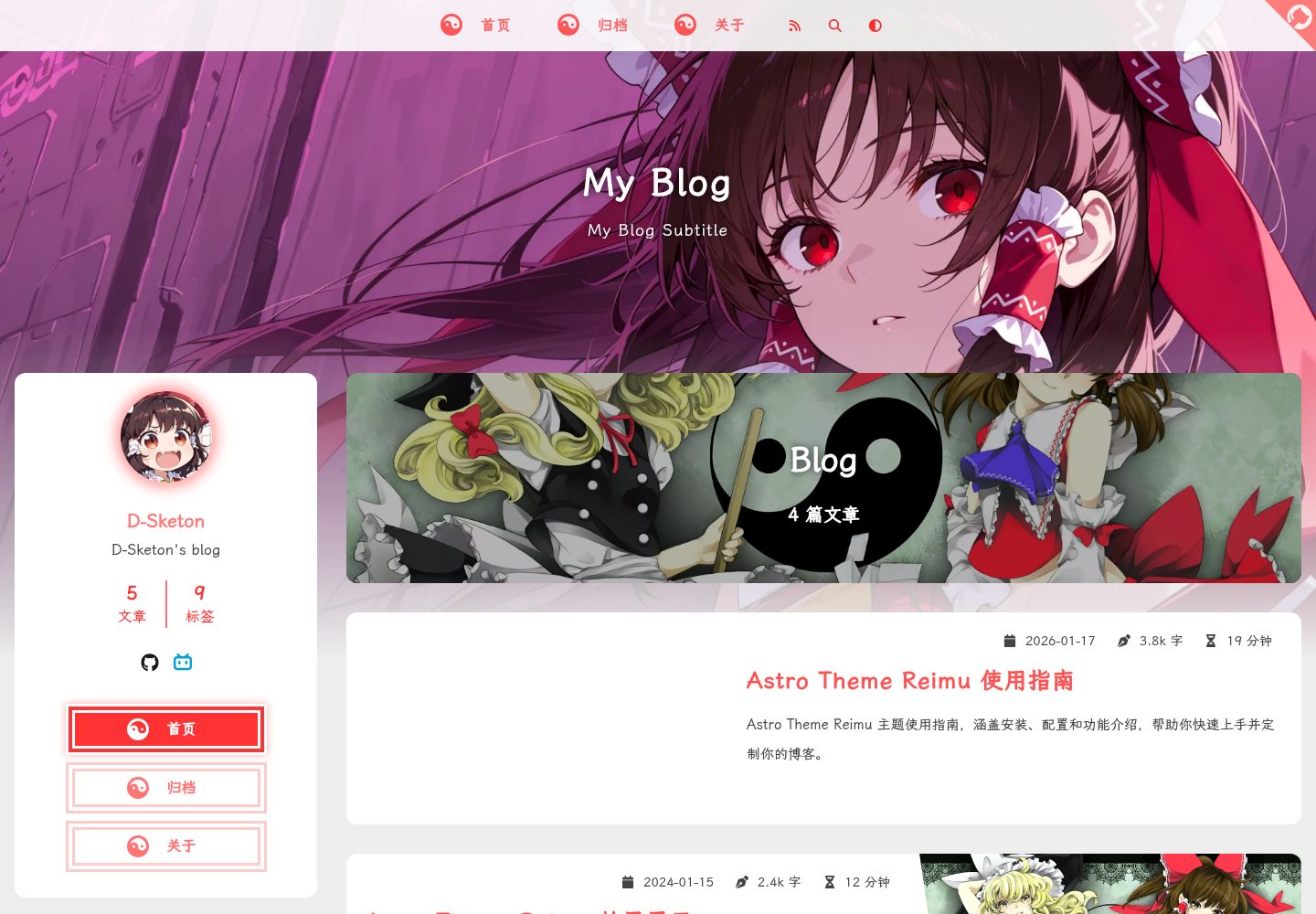
Desktop homepage1 / 3
Desktop captureTop of page
Actual screenshot captured by the server browser.
All pages & views 3
Screenshots show visual appearance; interactive behavior may differ.
Recorded 2026-09-30View source
What stands out
A quick read of the recorded project description.
Integrates Expressive Code syntax highlighting, KaTeX math formulas, and Mermaid flowcharts
Supports local search (Fuse.js), table of contents navigation, and RSS subscription
Optional comment systems including Valine, Waline, Twikoo, Gitalk, Giscus, Disqus, and Utterances
Built-in MDX components including internal links, external links, friend links, heatmap, tag roulette, tabs, and photo wall
Provides image lazy loading, image lightbox, loading animations, AOS scroll animations, and mouse effects
Template Details
astro-theme-reimu is an Astro port of hexo-theme-reimu, positioned as a Hakurei Reimu style blog theme, with the repository under the MIT license. The theme provides complete blog functionality, including responsive layout, dark mode, and i18n multilingual support, with language files covering en, zh-cn, zh-tw, and ja. For content, blog posts are stored in src/content/blog, the about page is located in src/pages, and static assets are placed in the public directory.
For content presentation, the theme integrates Expressive Code syntax highlighting, KaTeX math formulas, and Mermaid flowcharts, and supports local search (based on Fuse.js), table of contents navigation, and RSS subscription. Comment systems can be chosen from Valine, Waline, Twikoo, Gitalk, Giscus, Disqus, or Utterances; for statistics, it supports Busuanzi visitor statistics as well as Baidu Analytics, Google Analytics, and Clarity for website analytics. Media and interactions include image lazy loading, image lightbox, loading animations, AOS scroll animations, and mouse effects.
Theme configuration is centralized in src/config.ts, where you can set site information, sidebar position and widgets, menu navigation, header image and responsive srcset, footer filing information, social links, comment systems, analytics and statistics, copyright notice, loading animations, friend links, homepage category cards, and sharing channels. Cover images are configured as a random list in src/covers.ts; when an article's Front Matter specifies a cover, the specified cover is used first. Built-in MDX components cover internal links, external links, friend links, heatmap, tag roulette, tabs, and photo wall.
Regarding usage limitations, comments, statistics, and some interactive features depend on external services or account configuration. For example, Waline requires a server address, Valine requires LeanCloud application information, Gitalk/Giscus/Utterances require a GitHub repository or application credentials, Twikoo requires an environment ID, Disqus requires a shortname, and analytics and statistics require the corresponding site ID. The theme is based on Astro; installing dependencies is recommended with pnpm, and building and previewing are done via pnpm run build and pnpm run preview respectively.
AstroBlog
Is it right for your project?
Use Cases
- Building a static blog site with a Hakurei Reimu style theme
- Personal sites needing a multilingual (en, zh-cn, zh-tw, ja) blog interface
- Articles that want to display code highlighting, math formulas, and flowcharts in a blog
- Blogs that need to integrate third-party comment systems or website analytics tools
Suitable For
- Developers building static blogs with Astro
- Personal bloggers who prefer the Touhou Project Hakurei Reimu visual style
- Blog authors who need multilingual and dark mode support
- Users who want to centrally configure theme options via src/config.ts
Getting started & customization
Use these recorded setup notes alongside the repository instructions for your chosen version.
- 1
After cloning the repository, enter the directory and install dependencies with pnpm install (recommended)
- 2
Use pnpm run dev for the development server, pnpm run build for production builds, and pnpm run preview to preview the build result
- 3
Configure site information, sidebar, menu, header image, footer, social links, etc. in src/config.ts
- 4
Blog posts are stored in src/content/blog, the about page is located in src/pages, and static assets are placed in the public directory
- 5
Comment systems and analytics require credentials or IDs for the corresponding services, such as Waline server address, LeanCloud application information, GitHub application credentials, Twikoo environment ID, Disqus shortname, and Baidu Analytics/Google Analytics/Clarity site IDs
License & source material
Usage conditions & limitations
Free to use · keep license noticeThis entry covers the free version under the MIT license in the public repository; the free scope is the code of this version and does not mean external services or third-party assets are free.
Must comply with when using
- Free use, modification, commercial use, and distribution of this version's code are allowed.
- When distributing copies or substantial portions of the code, retain the original author's copyright notice and the full MIT license notice.
- The code is provided as is; warranties and limitations of liability are governed by the original license and applicable law.
Additional costs & items to verify
- The Waline comment system requires self-deployment or a server address, which is an external service dependency, not a built-in feature of the theme.
- Valine comments depend on a LeanCloud account and application credentials (App ID/App Key), requiring registration for an external service.
- Gitalk comments require creating a GitHub OAuth application and providing Client ID/Secret and a repository for storing comments.
- Giscus comments depend on a GitHub repository and Discussion configuration, requiring a repository ID and category ID.
- Twikoo comments require self-deploying the server and filling in an environment ID or deployment address.
- Disqus comments require registering a Disqus site and filling in a shortname, depending on a third-party service.
- Website analytics requires registering Baidu Analytics and filling in a site ID, which is an external service dependency.
- Google Analytics requires registering an account and providing a measurement ID, which is an external service dependency.
- Microsoft Clarity analytics requires registration and a project ID, which is an external service dependency.
- Busuanzi visitor statistics depend on a third-party public statistics service; once enabled, data is provided by an external service.
- Demo images, fonts, icons, and other third-party assets must be checked against their respective licenses and cannot be judged solely by the code's MIT license.
- External services such as domains, hosting, databases, payments, or AI may incur additional charges.
View Original Text Basis
Permission is hereby granted, free of charge
Original License Text
serverURL: "your-server-url", // Waline 服务器地址
Original README
appId: "your-app-id", // LeanCloud App ID
Original README
clientID: "your-client-id", // GitHub Application Client ID
Original README
repoId: "your-repo-id", // 仓库 ID
Original README
envId: "your-env-id", // 腾讯云环境填 envId;Vercel 环境填地址(https://xxx.vercel.app)
Original README
shortname: "your-shortname", // Disqus shortname
Original README
baidu_analytics: "your-baidu-id", // 百度统计 ID
Original README
google_analytics: "your-ga-id", // Google Analytics ID
Original README
clarity: "your-clarity-id", // Microsoft Clarity ID
Original README
https://github.com/D-Sketon/astro-theme-reimu/blob/main/LICENSEhttps://github.com/D-Sketon/astro-theme-reimu/blob/main/README.mdbusuanzi: true, // 是否启用不蒜子访客统计
Original README
Compiled by DeepSeek based on repository license and README ·2026-10-01. Results only cover the materials read; dependencies, images, fonts, and subsequent term changes are subject to their respective original texts.
Project checks & description sources
Template Information
- Source platforms
- GitHub
- Documentation and maintenance reference score
- More documented · 87 / 100
- Technologies
- Astro
- Website type
- Blog
How this score is calculated
Our heuristic uses license records (up to 30), a demo link (12), a preview (10), stars (15), recorded maintenance (15), description completeness (8), feature records (5) and classification data (5). It is not a code, security or performance test, or a Google score. A link does not establish tested functionality.
What to verify for this project
- Repository update recorded
- 2026-05-13
- Screenshot last checked
- 2026-10-01
A demo link is listed. Check it with your own content and viewport sizes; its presence does not confirm that forms, authentication or payments work.
The catalog identifies Astro as the primary stack. Check the actual dependency manifest and lockfile for versions and hosting requirements. These notes use recorded metadata, not a code audit or a deployment test.
Use a selection guide →How this description was prepared
AI-assisted description based on catalog records and repository material. Repository authors are not automatically the reviewers of this description.
Automatically checked against source and license rules; no manual editorial review.
Inspect the recorded source material
SHA-256: 19fe27fcead41d3ed3b17f60f482ce669683faa5178f4e7122fde4926d66fff3
2026-10-01T13:34:31.744Z
Source file / repository<div align="center">
<img src="https://fastly.jsdelivr.net/gh/D-Sketon/blog-img/icon.png"/>
<h1>astro-theme-reimu</h1>
<img alt="version" src="https://img.shields.io/badge/dynamic/json?url=https%3A%2F%2Fgithub.com%2FD-Sketon%2Fastro-theme-reimu%2Fraw%2Fmain%2Fpackage.json&query=%24.version&label=version">
<img alt="GitHub License" src="https://img.shields.io/github/license/D-Sketon/astro-theme-reimu">
<img alt="GitHub Repo stars" src="https://img.shields.io/github/stars/D-Sketon/astro-theme-reimu">
💘 博麗 霊夢 💘
[演示网站](https://d-sketon.github.io/astro-theme-reimu)
简体中文 | [English](https://github.com/D-Sketon/astro-theme-reimu/blob/main/README.en.md)
<img src="https://cdn.jsdelivr.net/gh/D-Sketon/astro-theme-reimu/screenshot.png"/>
</div>
---
本主题是 [hexo-theme-reimu](https://github.com/D-Sketon/hexo-theme-reimu) 的 Astro 移植版本,一款博丽灵梦风格的 Astro 主题。
| framework | repository | version | stars |
| ---------------------------- | ------------------------------------------------------------------ | ------------------------------------------------------------------------------------------------------------------------------------------------------------------------------------------- | -------------------------------------------------------------------------------------------------- |
| [Hexo](https://hexo.io/) | [hexo-theme-reimu](https://github.com/D-Sketon/hexo-theme-reimu) | <img alt="version" src="https://img.shields.io/badge/dynamic/json?url=https%3A%2F%2Fgithub.com%2FD-Sketon%2Fhexo-theme-reimu%2Fraw%2Fmain%2Fpackage.json&query=%24.version&label=version"> | <img alt="GitHub Repo stars" src="https://img.shields.io/github/stars/D-Sketon/hexo-theme-reimu"> |
| [Hugo](https://gohugo.io) | [hugo-theme-reimu](https://github.com/D-Sketon/hugo-theme-reimu) | <img alt="version" src="https://img.shields.io/badge/dynamic/json?url=https%3A%2F%2Fgithub.com%2FD-Sketon%2Fhugo-theme-reimu%2Fraw%2Fmain%2Fpackage.json&query=%24.version&label=version"> | <img alt="GitHub Repo stars" src="https://img.shields.io/github/stars/D-Sketon/hugo-theme-reimu"> |
| [Astro](https://astro.build) | [astro-theme-reimu](https://github.com/D-Sketon/astro-theme-reimu) | <img alt="version" src="https://img.shields.io/badge/dynamic/json?url=https%3A%2F%2Fgithub.com%2FD-Sketon%2Fastro-theme-reimu%2Fraw%2Fmain%2Fpackage.json&query=%24.version&label=version"> | <img alt="GitHub Repo stars" src="https://img.shields.io/github/stars/D-Sketon/astro-theme-reimu"> |
**欢迎提交 ISSUE 和 PR!**
## 特性
### 基础功能
- ✨ 完整的博客功能
- 📱 响应式布局
- 🌙 暗黑模式支持
- 🌍 多语言支持(i18n)
### 代码与数学
- 🖥️ 代码高亮(基于 Expressive Code)
- ➗ KaTeX 数学公式支持
- 📊 Mermaid 流程图支持
### 搜索与评论
- 🔍 本地搜索(基于 Fuse.js)
- 💬 多评论系统支持:
- Valine
- Waline
- Twikoo
- Gitalk
- Giscus
- Disqus
- Utterances
### 统计与分析
- 📊 文章阅读统计(Waline/Valine)
- 👥 访客统计(不蒜子)
- 📈 网站分析:
- 百度统计
- Google Analytics
- Clarity
### 媒体与交互功能
- 🖼️ 图片懒加载
- 🖼️ 图片灯箱
- ⚡ 加载动画
- 🎨 AOS 滚动动画
- 🎯 鼠标特效
### 导航与结构
- 📑 目录导航
- 📰 RSS 订阅
### 设计与自定义
- 🎨 图标支持(FontAwesome、Iconify)
- 🔗 内置 MDX 组件:
- 内部链接
- 外部链接
- 友情链接
- 热力图
- 标签轮盘
- 标签页
- 照片墙
- ©️ 文章版权声明
- 🌐 响应式头图(srcset)
- 🎨 分享卡片功能
## 安装与使用
### 快速开始
```bash
# 克隆仓库
git clone https://github.com/D-Sketon/astro-theme-reimu.git
cd astro-theme-reimu
# 安装依赖(推荐使用 pnpm)
pnpm install
# 启动开发服务器
pnpm run dev
# 构建生产版本
pnpm run build
# 预览构建结果
pnpm run preview
```
### 项目结构
```plain
/
├── public/ # 静态资源
│ ├── images/
│ │ ├── banner.webp
│ │ ├── banner-800w.webp
│ │ ├── banner-600w.webp
│ │ ├── favicon.ico
│ │ ├── reimu.png
│ │ └── taichi.png
│ └── robots.txt
├── src/
│ ├── components/ # Astro/React 组件
│ ├── content/ # 内容集合
│ │ └── blog/ # 博客文章
│ ├── content.config.ts# 内容集合配置
│ ├── hooks/ # React Hooks
│ ├── languages/ # i18n 语言文件
│ │ ├── en.ts
│ │ ├── zh-cn.ts
│ │ ├── zh-tw.ts
│ │ └── ja.ts
│ ├── layouts/ # 页面布局
│ ├── pages/ # 页面路由
│ │ ├── about.mdx # 关于页面
│ │ ├── archives/ # 归档页面
│ │ ├── blog/ # 博客页面
│ │ ├── categories/ # 分类页面
│ │ ├── tags/ # 标签页面
│ │ └── rss.xml.js # RSS 订阅
│ ├── plugins/ # Markdown 插件
│ ├── styles/ # 样式文件
│ ├── utils/ # 工具函数
│ ├── config.ts # 主题配置文件
│ ├── covers.ts # 封面图配置
│ └── env.d.ts
├── astro.config.mjs # Astro 配置
├── package.json
└── tsconfig.json
```
任何静态资产(如图像)都可以放置在 `public/` 目录中。
所有博客文章都存储在目录 `src/content/blog` 中,关于页面存储在目录 `src/pages` 中。
## 配置
编辑 `src/config.ts` 进行主题配置:
<details>
<summary>基本配置</summary>
##### 站点信息
```typescript
export default {
site: {
title: "My Blog", // 站点标题
subtitle: "My Blog Subtitle", // 站点副标题
description: "Your blog description", // 站点描述
keywords: "blog, astro, theme", // 关键词
author: "Your Name", // 作者名称
language: "zh-CN", // 站点语言 (en | zh-CN | zh-TW | ja)
},
};
```
##### 侧边栏
```typescript
export default {
sidebar: {
avatar: "/images/avatar.webp", // 头像路径(相对于 public 目录)
position: "right", // 侧边栏位置 (left | right)
},
};
```
##### 侧边栏小部件
```typescript
export default {
widgets: [
"category", // 分类
"tag", // 标签
"tagcloud", // 标签云
"archive", // 归档
"recent_posts", // 最近文章
],
};
```
##### 菜单导航
```typescript
export default {
menu: [
{ name: "home", url: "/" }, // 菜单项名称(对应 i18n 翻译)
{ name: "archives", url: "/archives" },
{ name: "about", url: "/about" },
],
};
```
##### 头图与封面
###### 头图配置
```typescript
export default {
banner: "/images/banner.webp", // 头图路径
// 响应式头图(可选)
banner_srcset: {
enable: true,
srcset: [
{ src: "/images/banner-600w.webp", media: "(max-width: 479px)" },
{ src: "/images/banner-800w.webp", media: "(max-width: 799px)" },
{ src: "/images/banner.webp", media: "(min-width: 800px)" },
],
},
};
```
###### 封面配置
在 `src/covers.ts` 中配置随机封面图列表:
```typescript
export default [
"https://example.com/cover1.webp",
"https://example.com/cover2.webp",
"https://example.com/cover3.webp",
];
```
文章封面显示逻辑:
1. 如果文章 Front Matter 中指定了 `cover`,则使用指定的封面
2. 否则从 `covers.ts` 中随机选择一张
3. 如果 `covers.ts` 为空,则使用头图作为封面
##### 页脚
```typescript
export default {
footer: {
since: 2020, // 起始年份(会显示为 2020 - 当前年份)
powered: true, // 是否显示 "Powered by Astro"
count: true, // 是否显示文章统计
busuanzi: true, // 是否启用不蒜子访客统计
icp: {
icpnumber: "", // ICP备案号
beian: "", // 网安备案号
recordcode: "", // 网安备案链接中的recordcode参数
},
moe_icp: {
icpnumber: "", // 萌国ICP备案号
},
},
};
```
##### 社交链接
```typescript
export default {
social: {
email: "mailto:[email protected]",
github: "https://github.com/yourname",
twitter: "https://twitter.com/yourname",
facebook: "https://www.facebook.com/yourname",
// 更多社交平台...
},
};
```
</details>
<details>
<summary>评论系统</summary>
##### Waline
[Waline](https://waline.js.org/) 是一个简洁、安全的评论系统。
```typescript
export default {
waline: {
enable: true,
serverURL: "your-server-url", // Waline 服务器地址
lang: "zh-CN", // 语言
locale: {}, // 自定义语言包
emoji: [
// 表情包
"https://unpkg.com/@waline/[email protected]/weibo",
"https://unpkg.com/@waline/[email protected]/bilibili",
],
meta: ["nick", "mail", "link"], // 评论者信息
requiredMeta: ["nick", "mail"], // 必填项
wordLimit: 0, // 评论字数限制(0 为不限制)
pageSize: 10, // 每页评论数
pageview: true, // 是否启用浏览量统计
},
};
```
##### Valine
[Valine](https://valine.js.org/) 是一个基于 LeanCloud 的快速、简洁且高效的无后端评论系统。
```typescript
export default {
valine: {
enable: true,
appId: "your-app-id", // LeanCloud App ID
appKey: "your-app-key", // LeanCloud App Key
pageSize: 10, // 评论列表分页
avatar: "mp", // Gravatar 头像风格
lang: "zh-cn", // 语言
placeholder: "Just go go", // 评论框占位文本
guest_info: "nick,mail,link", // 评论者信息字段
recordIP: true, // 是否记录评论者 IP
highlight: true, // 是否高亮代码块
visitor: false, // 是否显示访问量
serverURLs: "", // LeanCloud 服务器地址(可选)
},
};
```
##### Gitalk
[Gitalk](https://gitalk.github.io/) 是一个基于 GitHub Issue 和 Preact 的现代评论组件。
```typescript
export default {
gitalk: {
enable: true,
clientID: "your-client-id", // GitHub Application Client ID
clientSecret: "your-client-secret", // GitHub Application Client Secret
repo: "your-repo", // 存储评论的 GitHub 仓库
owner: "your-name", // 仓库所有者
admin: ["your-name"], // 仓库管理员(可以是数组)
},
};
```
##### Giscus
[Giscus](https://giscus.app/zh-CN) 是一个基于 GitHub Discussion 的评论系统。
```typescript
export default {
giscus: {
enable: true,
repo: "your-username/your-repo", // GitHub 仓库
repoId: "your-repo-id", // 仓库 ID
category: "your-category", // 分类名称
categoryId: "your-category-id", // 分类 ID
mapping: "pathname", // 评论映射方式
strict: 0, // 严格模式
reactionsEnabled: 1, // 启用反应
emitMetadata: 0, // 发出元数据
inputPosition: "bottom", // 输入框位置
},
};
```
##### Twikoo
[Twikoo](https://twikoo.js.org/) 支持多种部署方式的评论系统。
```typescript
export default {
twikoo: {
enable: true,
envId: "your-env-id", // 腾讯云环境填 envId;Vercel 环境填地址(https://xxx.vercel.app)
region: "", // 腾讯云区域(可选)
},
};
```
##### Utterances
[Utterances](https://utteranc.es/) 是一个基于 GitHub Issue 的轻量级评论组件。
```typescript
export default {
utterances: {
enable: true,
repo: "owner/repo", // GitHub 仓库
issue_term: "title", // Issue 映射方式
theme: "github-light", // 主题
},
};
```
##### Disqus
[Disqus](https://disqus.com/) 是一个全球性的评论系统。
```typescript
export default {
disqus: {
enable: true,
shortname: "your-shortname", // Disqus shortname
count: true, // 是否启用评论数量统计
},
};
```
</details>
<details>
<summary>分析与统计</summary>
##### 网站分析
```typescript
export default {
analytics: {
baidu_analytics: "your-baidu-id", // 百度统计 ID
google_analytics: "your-ga-id", // Google Analytics ID
clarity: "your-clarity-id", // Microsoft Clarity ID
},
};
```
</details>
<details>
<summary>其他功能</summary>
##### 版权声明
```typescript
export default {
copyright: {
enable: true, // 是否启用版权声明
content: {
author: true, // 显示作者
link: true, // 显示文章链接
title: true, // 显示文章标题
date: false, // 显示发布日期
updated: false, // 显示更新日期
license: true, // 显示许可协议
license_type: "by-nc-sa", // 许可协议类型
},
},
};
```
##### 加载动画
```typescript
export default {
preloader: {
enable: true, // 是否启用加载动画
text: "少女祈祷中...", // 加载文本
rotate: true, // 图标是否旋转
},
};
```
##### 友链
```typescript
export default {
friend: [
{
name: "Friend Name", // 友链名称
url: "https://friend.com", // 友链地址
desc: "Description", // 友链描述
avatar: "/avatar.webp", // 友链头像
},
],
};
```
##### 首页分类卡片
```typescript
export default {
home_categories: {
enable: true, // 是否启用首页分类卡片
content: [
{
categories: "Blog", // 分类名称
cover: "/images/category-cover.webp", // 分类封面(可选)
},
],
},
};
```
##### 分享功能
```typescript
export default {
share: [
"weibo", // 微博
"qq", // QQ
"weixin", // 微信
// "twitter", // Twitter
// "facebook", // Facebook
// "linkedin", // LinkedIn
// "reddit", // Reddit
],
};
```
##### 赞助功能
```typescript
export default {
sponsor: {
enable: false, // 是否启用赞助功能
qr: [
{ name: "支付宝", src: "/sponsor/alipay.jpg" },
{ name: "微信", src: "/sponsor/wechat.png" },
],
},
};
```
##### 文章过期提醒
```typescript
export default {
outdate: {
enable: false, // 是否启用文章过期提醒
daysAgo: 180, // 多少天前的文章算过期
},
};
```
##### 鼠标特效
```typescript
export default {
firework: {
enable: true, // 是否启用鼠标特效
disable_on_mobile: false, // 是否在移动端禁用
options: {
// 详细配置请参考 mouse-firework 文档
},
},
};
```
##### 三角徽标
```typescript
export default {
triangle_badge: {
enable: false,
type: "github", // 图标类型
link: "https://github.com/yourname",
},
};
```
</details>
## 写作
<details>
<summary>创建文章</summary>
在 `src/content/blog/` 目录下创建 `.md` 或 `.mdx` 文件:
```markdown
---
title: 你的文章标题
description: 文章描述
pubDate: 2024-01-01
updatedDate: 2024-01-02
cover: https://example.com/cover.jpg
tags:
- tag1
- tag2
categories:
- category1
---
你的文章内容...
```
</details>
<details>
<summary>Front Matter 字段</summary>
#### Front Matter 字段
| 字段 | 描述 | 类型 | 必填 | 默认值 |
| ----------- | ---------------------- | -------------------- | ---- | ------- |
| title | 文章标题 | `string` | 是 | - |
| description | 文章描述(用于 SEO) | `string` | 是 | - |
| keywords | 文章关键词(用于 SEO) | `string[] \| string` | 否 | `[]` |
| pubDate | 发布日期 | `Date` | 是 | - |
| updatedDate | 更新日期 | `Date` | 否 | - |
| cover | 封面图 URL | `string` | 否 | - |
| tags | 标签列表 | `string[]` | 否 | `[]` |
| categories | 分类列表 | `string[]` | 否 | `[]` |
| excerpt | 文章摘要 | `string` | 否 | - |
| comment | 是否启用评论系统 | `boolean` | 否 | `true` |
| author | 文章作者 | `string` | 否 | - |
| toc | 是否显示目录 | `boolean` | 否 | `true` |
| sponsor | 是否显示赞助信息 | `boolean` | 否 | - |
| copyright | 是否显示版权声明 | `boolean` | 否 | - |
| share | 是否显示分享按钮 | `boolean` | 否 | - |
| outdated | 文章是否过期 | `boolean` | 否 | `false` |
</details>
<details>
<summary>数学公式</summary>
主题内置了 KaTeX 支持,可以直接在 Markdown 中使用 LaTeX 语法:
#### 行内公式
```markdown
行内公式:$E = mc^2$
```
#### 块级公式
```markdown
块级公式:
$$
\frac{n!}{k!(n-k)!} = \binom{n}{k}
$$
```
</details>
<details>
<summary>Mermaid 流程图</summary>
主题内置了 Mermaid 支持:
````markdown
```mermaid
graph TD
A[开始] --> B[处理]
B --> C{判断}
C -->|是| D[结束]
C -->|否| B
```
````
</details>
<details>
<summary>代码块</summary>
代码块基于 [Expressive Code](https://expressive-code.com/) 实现,支持:
- 语法高亮
- 行号显示
- 代码折叠(使用 `collapse` 标记)
- 代码复制按钮
#### 基本代码块
````markdown
```javascript
function hello() {
console.log("Hello, World!");
}
```
````
#### 代码折叠
````markdown
```js collapse={1-5, 12-14}
// 这些行默认折叠
function example() {
console.log("Hello");
}
// 这些行默认展开
const result = example();
```
````
</details>
<details>
<summary>内置组件</summary>
主题提供了丰富的内置 MDX 组件:
#### 链接组件
##### 内部链接
用于在文章中创建指向其他文章的精美链接卡片,支持显示封面图和摘要。适合在文章中推荐相关内容或创建内容导航。
```markdown
<Link slug="post-slug" title="文章标题" cover="封面URL" />
```
**Props:**
- `slug` (`string`, 可选): 文章 slug
- `url` (`string`, 可选): 外部链接 URL
- `title` (`string`, 可选): 链接标题
- `cover` (`string | "auto"`, 可选): 封面图片
##### 外部链接
用于创建指向外部网站的精美链接卡片,自动识别为外部链接。适合在文章中分享外部资源或推荐其他网站。
```markdown
<Link url="https://github.com" title="GitHub" cover="auto" />
```
#### 内容组件
##### 友情链接卡片
展示友情链接列表,每个链接包含头像、名称和描述。适合在关于页面或专门的友链页面展示合作伙伴网站。
友情链接卡片使用全局配置中的友链列表:
```markdown
<FriendCard />
```
**Props:** 无
##### 热力图卡片
基于访问量数据生成热力图可视化,展示内容活跃度。适合在个人主页或数据统计页面展示访问数据。
```markdown
<HeatMapCard levelStandard="1000,5000,10000" />
```
**Props:**
- `levelStandard` (`string`, 可选): 等级标准,默认 "1000,5000,10000"
##### 标签轮盘
以轮盘形式展示标签列表,用户可以点击随机选择标签。适合在标签页面或侧边栏增加趣味性交互。
```markdown
<TagRoulette tags="标签1,标签2,标签3" icon="🎯" />
```
**Props:**
- `tags` (`string`, 可选): 标签列表,用逗号分隔,默认预设标签
- `icon` (`string`, 可选): 按钮图标,默认 "🕹️"
#### 布局组件
##### 标签页
创建多标签页界面,可以在同一区域展示不同内容。适合展示相关内容的多个方面或选项卡式导航。
```markdown
<Tabs active={1} center={false}>
<TabItem title="Tab 1">内容1</TabItem>
<TabItem title="Tab 2">内容2</TabItem>
</Tabs>
```
**Tabs Props:**
- `active` (`number`, 可选): 默认激活的标签页,默认 1
- `center` (`boolean`, 可选): 是否居中,默认 false
**TabItem Props:**
- `title` (`string`, 必需): 标签页标题
##### 折叠详情
创建可展开/折叠的内容区域,可以隐藏次要信息。适合展示详细说明、代码示例或长文本内容。
```markdown
<Details summary="点击展开">
这里是折叠的内容
</Details>
```
**Props:**
- `summary` (`string`, 必需): 折叠标题
##### 网格布局
创建响应式网格布局,可以灵活排列内容。适合展示卡片列表、图片网格或等宽内容块。
```markdown
<Grid col={3}>
<GridCell>单元格1</GridCell>
<GridCell>单元格2</GridCell>
<GridCell>单元格3</GridCell>
</Grid>
```
**Grid Props:**
- `width` (`number`, 可选): 最小宽度,默认 240
- `col` (`number`, 可选): 列数,优先于 width
**GridCell Props:** 无
##### 照片墙
创建精美的图片展示墙,支持灯箱效果。适合在文章中展示多张图片或创建图片集页面。
```markdown
<Gallery>


</Gallery>
```
**Props:** 无
##### 警告块
创建不同类型的提示信息框,支持多种样式。适合突出重要信息、警告或提示用户注意。
```markdown
<AlertBlockquote type="info" title="提示">
这是一个信息提示
</AlertBlockquote>
<AlertBlockquote type="warning">
这是一个警告提示
</AlertBlockquote>
<AlertBlockquote type="danger">
这是一个危险提示
</AlertBlockquote>
```
**Props:**
- `type` (`"info" | "warning" | "danger" | "tip" | "important"`, 可选): 警告类型,默认 "info"
- `title` (`string`, 可选): 自定义标题,默认使用 type 大写
</details>
## 部署
### 配置站点信息
编辑 `astro.config.mjs`:
```javascript
export default defineConfig({
site: "https://yourusername.github.io", // 你的站点 URL
base: "/your-repo-name", // 子路径(如部署到 GitHub Pages)
// ...
});
```
### GitHub Pages
1. 构建项目:
```bash
pnpm run build
```
2. 将 `dist/` 目录部署到 GitHub Pages
或者配置 GitHub Actions 自动部署(推荐),具体可参考 [GitHub Pages](https://docs.astro.build/zh-cn/guides/deploy/github/)。
### Vercel / Netlify
这些平台会自动识别 Astro 项目:
1. 连接 GitHub 仓库
2. 平台会自动检测并使用正确的构建命令
3. 点击部署即可,具体请参考 [Netlify](https://docs.astro.build/zh-cn/guides/deploy/netlify/) 或 [Vercel](https://docs.astro.build/zh-cn/guides/deploy/vercel/) 文档。
## 开发
### 添加新页面
在 `src/pages/` 目录下创建文件即可,Astro 会自动处理路由。
### 修改样式
样式文件位于 `src/styles/` 目录:
- `base.stylus` - 基础样式
- `global.css` - 全局样式
- `markdown.stylus` - Markdown 渲染样式
- 其他样式文件...
### i18n
语言文件位于 `src/languages/` 目录,支持的语言:
- `en.ts` - English
- `zh-cn.ts` - 简体中文
- `zh-tw.ts` - 繁体中文
- `ja.ts` - 日本語
要添加新语言,创建对应的 `.ts` 文件并参考现有文件的结构。
## 贡献者
[](https://github.com/D-Sketon/astro-theme-reimu/graphs/contributors)
## 赞助 💘
[爱发电-afdian](https://afdian.com/a/dsketon)
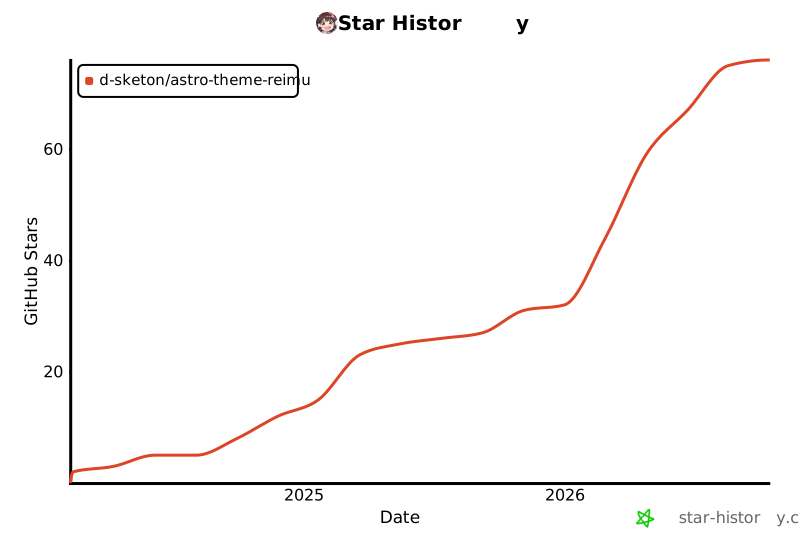
## Star History
[](https://www.star-history.com/#D-Sketon/astro-theme-reimu&type=date&legend=top-left)
## 许可
MIT
[](https://app.fossa.com/projects/git%2Bgithub.com%2FD-Sketon%2Fastro-theme-reimu?ref=badge_large)
Explore similar templates
Compare previews and descriptions within the same stack and category.

astrowind
AstroWind is a free, open-source Astro starter theme using Astro and Tailwind CSS, released under the MIT license.
Astro · Blog

astro-paper
AstroPaper is a minimal, responsive, accessible, and SEO-friendly Astro blog theme. Articles are stored as Markdown/MDX in src/content/posts/, with subdirectories affecting URLs.
Astro · Blog

fuwari
Fuwari is a static blog template built with Astro and Tailwind CSS for personal blogs. It manages posts as Markdown files in src/content/posts/, with frontmatter for title, date, description, cover, tags, categories, draft status, and language.
Astro · Blog

Firefly
Firefly is a clean personal blog theme forked from Astro and Fuwari, offering four background modes, single/double sidebar and list/grid layouts, Pagefind client-side full-text search, and a six-language UI.
Astro · Blog

astro-theme-cactus
Astro Cactus is an Astro-based blog and portfolio theme that uses Markdown/MDX content collections to manage posts, notes, and tags, with frontmatter type-checked by a schema.
Astro · Portfolio

astrofy
Astrofy is a free and open-source personal portfolio website template built with Astro and TailwindCSS, with built-in blog, CV timeline, project showcase, store, and RSS feed modules.
Astro · Portfolio