Built with Next.js App Router, TypeScript, and Tailwind CSS
Next.jsReactBlog
darshan-blog-temp — Next.js Blog Template
By darshanbajgain
A personal blog template based on Next.js, using Markdown to manage posts, with built-in categories, code highlighting, SEO metadata, and SendGrid and ConvertKit integrations.
Explore the design
Compare the page layouts and mobile experience. Open any screenshot for a closer look.
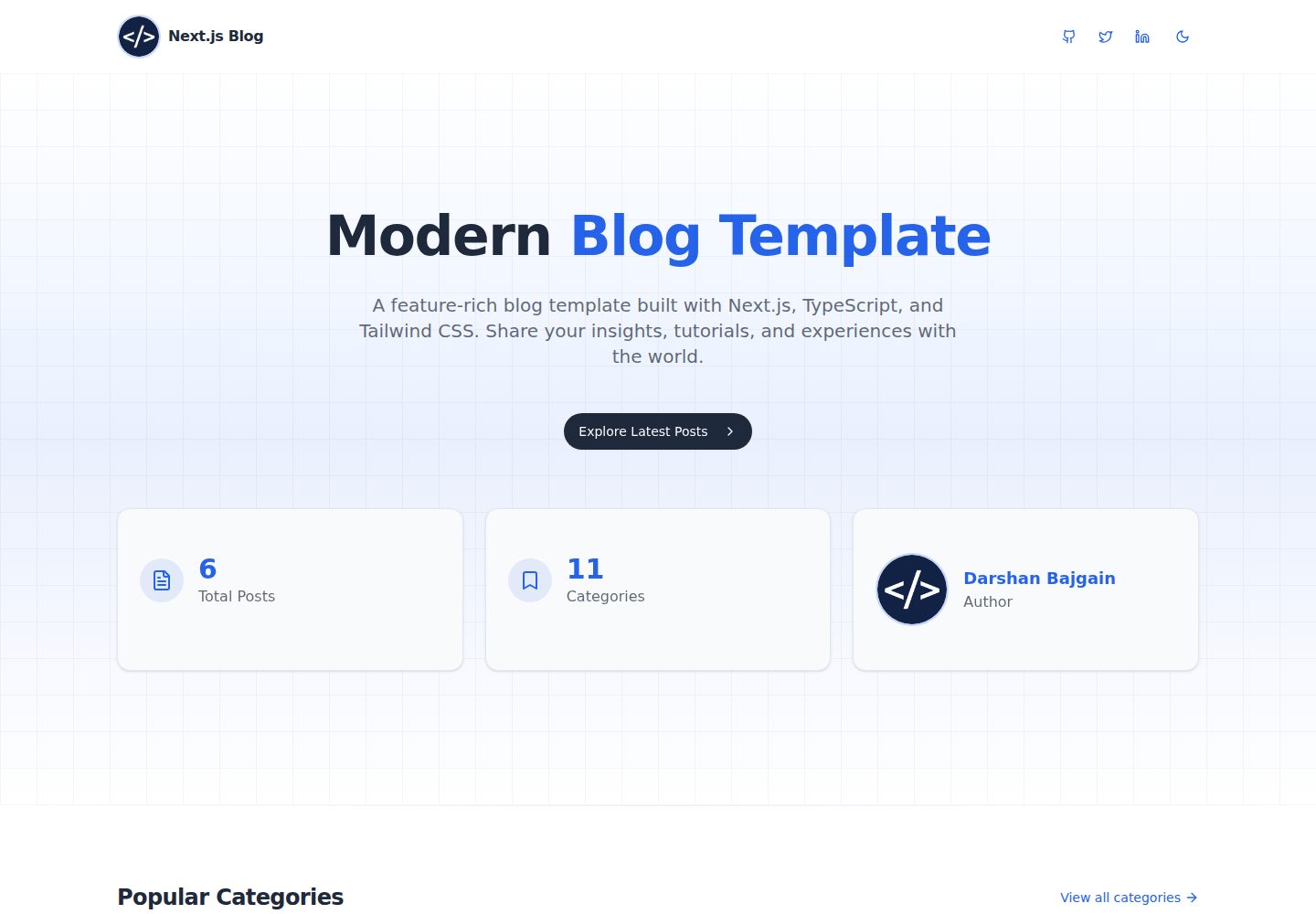
Desktop homepage1 / 3
Desktop captureTop of page
Actual screenshot captured by the server browser.
All pages & views 3
Screenshots show visual appearance; interactive behavior may differ.
Recorded 2026-10-14View source
What stands out
A quick read of the recorded project description.
Markdown posts are stored in src/posts, with frontmatter managing title, date, description, category, image, and author
Built-in categories, tags, reading time calculation, social sharing, and image optimization
Code blocks support syntax highlighting, language labels, and copy to clipboard
Contact form integrates SendGrid; subscription form integrates ConvertKit
Provides dark/light theme switching and responsive layout
Template Details
This template is a Next.js blog starting point for developers and content creators. The README states it is built with the Next.js App Router, TypeScript, and Tailwind CSS, and uses React Server Components. Posts are stored as Markdown files in the src/posts directory, with frontmatter providing metadata such as title, date, description, category, image, and author. They are parsed by gray-matter, converted to HTML via the remark ecosystem, and support GFM tables, code syntax highlighting, and a copy button. The template includes pages for home, all posts, categories, about, and contact, as well as API routes for the contact form and subscription form. The contact form relies on SendGrid, and the subscription feature relies on ConvertKit; the relevant keys are configured via .env.local. The README does not describe the deployment process, testing approach, or specific production behavior, nor does it provide hosting instructions other than a Vercel preview link.
Next.jsBlog
Is it right for your project?
Use Cases
- Developers building a personal tech blog and writing Markdown posts
- Content creators needing a blog site with categories, SEO metadata, and social sharing
- Receiving reader contact emails via SendGrid and collecting subscribers via ConvertKit
- Referencing Markdown rendering and code highlighting implementations in a Next.js App Router project
Suitable For
- Developers familiar with Next.js, TypeScript, and Markdown
- Personal bloggers who want to manage blog content as files rather than using a database
- Independent content creators who need contact forms and email subscription features
Getting started & customization
Use these recorded setup notes alongside the repository instructions for your chosen version.
- 1
Requires Node.js 18.x or higher, and npm or yarn
- 2
When installing dependencies, the README recommends using npm install --legacy-peer-deps to avoid react19 peer dependency issues
- 3
Create .env.local in the root directory and configure SENDGRID_API_KEY, SENDGRID_FROM_EMAIL, SENDGRID_TO_EMAIL, CONVERTKIT_FORM_ID, CONVERTKIT_API_KEY, CONVERTKIT_TAG_ID, and NEXT_PUBLIC_SITE_URL
- 4
The contact form requires a SendGrid account; the subscription feature requires a ConvertKit account (optional)
- 5
Run npm run dev or yarn dev to start the development server, accessible by default at http://localhost:3000
License & source material
Usage conditions & limitations
Free to use · keep license noticeThis entry covers the free version under the MIT license in the public repository; the free scope is the code of this version and does not imply that external services or third-party assets are free.
Must comply with when using
- Free use, modification, commercial use, and distribution of this version's code are permitted.
- When distributing copies or substantial portions of the code, retain the original author's copyright notice and the full MIT license notice.
- The code is provided as is; warranties and limitations of liability are governed by the original license and applicable law.
Additional costs & items to verify
- Demo images, fonts, icons, and other third-party assets must be checked against their respective licenses and cannot be judged solely by the code's MIT license.
- External services such as domains, hosting, databases, payments, or AI may incur additional charges.
- The contact form feature requires registering a SendGrid account and configuring an API key, which is an external service dependency.
- The subscription feature requires a ConvertKit account, marked as optional in the README; without configuration, this integration cannot be used.
- Before using the contact form, a SendGrid API key must be provided in .env.local.
- A sender email address verified with SendGrid must be provided.
- Enabling the subscription feature requires providing a ConvertKit form ID.
- Enabling the subscription feature requires providing a ConvertKit API key.
- Enabling the subscription feature requires providing a ConvertKit tag ID.
- The social sharing feature depends on correctly configuring the site URL environment variable.
- When installing dependencies, the --legacy-peer-deps flag must be used; otherwise, peer dependency issues may occur due to react19.
View Original Text Basis
Permission is hereby granted, free of charge
Original License Text
- A SendGrid account (for contact form)
Original README
- A ConvertKit account (for newsletter, optional)
Original README
SENDGRID_API_KEY=your_sendgrid_api_key
Original README
Original README
CONVERTKIT_FORM_ID=your_form_id
Original README
CONVERTKIT_API_KEY=your_api_key
Original README
CONVERTKIT_TAG_ID=your_tag_id
Original README
NEXT_PUBLIC_SITE_URL=https://yourdomain.com
Original README
https://github.com/darshanbajgain/darshan-blog-temp/blob/main/LICENSEhttps://github.com/darshanbajgain/darshan-blog-temp/blob/main/README.mdnpm install --legacy-peer-deps
Original README
Compiled by DeepSeek based on repository license and README ·2026-10-14. Results only cover the materials read; dependencies, images, fonts, and subsequent term changes are subject to their respective original texts.
Project checks & description sources
Template Information
- Source platforms
- GitHub
- Documentation and maintenance reference score
- More documented · 83 / 100
- Technologies
- Next.js · React
- Website type
- Blog
How this score is calculated
Our heuristic uses license records (up to 30), a demo link (12), a preview (10), stars (15), recorded maintenance (15), description completeness (8), feature records (5) and classification data (5). It is not a code, security or performance test, or a Google score. A link does not establish tested functionality.
What to verify for this project
- Repository update recorded
- 2026-04-05
- Screenshot last checked
- 2026-10-14
A demo link is listed. Check it with your own content and viewport sizes; its presence does not confirm that forms, authentication or payments work.
The catalog identifies Next.js as the primary stack. Check the actual dependency manifest and lockfile for versions and hosting requirements. These notes use recorded metadata, not a code audit or a deployment test.
Use a selection guide →How this description was prepared
AI-assisted description based on catalog records and repository material. Repository authors are not automatically the reviewers of this description.
Review declaration: codex-user-requested-batch-review-20261015 · 2026-10-15
Inspect the recorded source material
SHA-256: 2e2def04701d399124415981a0493ff76d2fb2a589daf138493ace272cc4dc12
2026-10-14T07:22:18.295Z
Source file / repository<div align="center">
# Next.js Personal Blog Template
### A modern, responsive, and SEO-optimized blog platform for developers and content creators
[](https://opensource.org/licenses/MIT)
[](https://nextjs.org/)
[](https://www.typescriptlang.org/)
[](https://tailwindcss.com/)
</div>
## 📋 Overview
This Next.js blog template provides a complete solution for developers and content creators who want to build a professional, SEO-optimized blog. It combines modern web technologies with a clean, responsive design to deliver an exceptional user experience across all devices.
## 🌟 Key Features
### 💻 Technical Features
- **Modern Tech Stack**: Built with Next.js 15+, TypeScript, and Tailwind CSS V4+
- **App Router**: Utilizes Next.js App Router for improved routing and layouts
- **Server Components**: Leverages React Server Components for optimal performance
- **TypeScript**: Full type safety throughout the codebase
- **Fast Performance**: Optimized for Core Web Vitals and page speed
- **SEO Optimized**: Meta tags, Open Graph, structured data, and semantic HTML
### 🎨 Design & UX Features
- **Responsive Design**: Perfectly adapts to all devices (mobile, tablet, desktop)
- **Dark/Light Mode**: Automatic theme detection with manual toggle option
- **Clean Typography**: Optimized reading experience with Geist font family
- **Animations**: Subtle animations for enhanced user experience
- **Accessible UI**: WCAG compliant components and keyboard navigation
### 📝 Content Features
- **Markdown Support**: Write blog posts in Markdown with frontmatter
- **Enhanced Code Blocks**: Beautiful syntax highlighting with copy-to-clipboard functionality
- **Custom Bullet Points**: Stylish bullet points with hover effects and special feature lists
- **Table Support**: Responsive tables that work on all screen sizes
- **Image Optimization**: Automatic image optimization with Next.js Image
- **Categories/Tags**: Organize content with a powerful categorization system
- **Reading Time**: Automatic calculation of post reading time
### 🔌 Integration Features
- **Contact Form**: SendGrid integration for reliable email delivery
- **Newsletter**: ConvertKit integration for building your audience
- **Social Sharing**: Easy sharing of blog posts to social media
- **Analytics Ready**: Prepared for Google Analytics or other tracking tools
- **Toast Notifications**: User-friendly feedback for form submissions
## 📋 Prerequisites
- Node.js 18.x or later
- npm or yarn
- A SendGrid account (for contact form)
- A ConvertKit account (for newsletter, optional)
## 🚀 Getting Started
### Installation
1. Clone this repository:
```bash
https://github.com/darshanbajgain/darshan-blog-temp.git
cd darshan-blog-temp
```
2. Install dependencies:
```bash
npm install --legacy-peer-deps
```
use `--legacy-peer-deps` to avoid peer dependency issues, as this uses react19
3. Create a `.env.local` file in the root directory with the following variables:
```
# SendGrid Configuration (for contact form)
SENDGRID_API_KEY=your_sendgrid_api_key
[email protected]
[email protected]
# ConvertKit Configuration (for newsletter, optional)
CONVERTKIT_FORM_ID=your_form_id
CONVERTKIT_API_KEY=your_api_key
CONVERTKIT_TAG_ID=your_tag_id
# Site URL (used for social sharing)
NEXT_PUBLIC_SITE_URL=https://yourdomain.com
```
4. Run the development server:
```bash
npm run dev
# or
yarn dev
```
5. Open [http://localhost:3000](http://localhost:3000) in your browser to see the result.
## 📝 Creating and Managing Blog Posts
### Blog Post Structure
Blog posts are written in Markdown and stored in the `src/posts` directory. Each post follows a specific structure for optimal SEO and rendering:
```markdown
---
title: "Your SEO-Optimized Post Title"
date: "2025-05-15"
description: "A comprehensive meta description (150-160 characters) that summarizes your post for better SEO"
categories: ["Next.js", "React", "Web Development"]
image: "/images/your-post-image.jpg"
author: "Your Name"
---
Your post content goes here with proper heading structure (H2, H3, etc.)
```
### Frontmatter Fields
| Field | Description | Required | SEO Impact |
|-------|-------------|----------|------------|
| `title` | The title of your blog post | Yes | High |
| `date` | Publication date (YYYY-MM-DD format) | Yes | Medium |
| `description` | A brief summary of your post | Yes | High |
| `categories` | Array of categories for classification | No | Medium |
| `image` | Featured image path (from public directory) | No | Medium |
| `author` | Post author name | No | Low |
### Content Best Practices
- Use proper heading hierarchy (H2 for sections, H3 for subsections)
- Include relevant keywords naturally throughout the content
- Keep paragraphs concise and focused on a single idea
- Use lists and tables to organize information when appropriate
- Include code examples with proper syntax highlighting
### Adding Images to Posts
1. Place your images in the `public/images` directory
2. Optimize images before adding them to the project
3. Reference them in your markdown using standard syntax:
```markdown

```
4. For responsive images, the template automatically handles proper sizing
### How Blog Posts are Processed
The blog post rendering pipeline works as follows:
1. **File Discovery**: The system scans the `src/posts` directory for `.md` files
2. **Frontmatter Parsing**: Using `gray-matter`, the frontmatter metadata is extracted
3. **Markdown Conversion**: The `remark` ecosystem converts Markdown content to HTML
4. **HTML Rendering**: The HTML is rendered with proper styling via Tailwind's Typography plugin
5. **SEO Optimization**: Metadata is used to generate SEO tags and structured data
## 🎨 Customization
### Changing Colors and Theme
The template uses Tailwind CSS for styling. You can customize the colors by editing the `tailwind.config.js` file.
### Updating Personal Information
1. Update the site metadata in `src/app/layout.tsx`
2. Modify the About page content in `src/app/about/page.tsx`
3. Update social links in `src/components/main/Footer.tsx`
### Customizing Components
All UI components are located in the `src/components` directory and can be modified to suit your needs.
## 📦 Project Structure
```text
├── public/ # Static assets
│ ├── images/ # Blog post images
│ └── ...
├── src/
│ ├── app/ # Next.js App Router
│ │ ├── about/ # About page
│ │ ├── api/ # API routes
│ │ │ ├── contact/ # Contact form API
│ │ │ └── subscribe/ # Newsletter API
│ │ ├── categories/ # Categories pages
│ │ ├── contact/ # Contact page
│ │ ├── posts/ # Blog post pages
│ │ │ └── [slug]/ # Dynamic post routes
│ │ ├── all-posts/ # All posts page
│ │ ├── globals.css # Global styles
│ │ └── layout.tsx # Root layout with metadata
│ ├── components/ # React components
│ │ ├── blog/ # Blog-specific components
│ │ │ ├── FeaturedPost.tsx # Featured post component
│ │ │ ├── LatestPost.tsx # Latest posts component
│ │ │ ├── PostGrid.tsx # Post grid display
│ │ │ └── SocialShare.tsx # Social sharing
│ │ ├── main/ # Main layout components
│ │ │ ├── Footer.tsx # Site footer
│ │ │ ├── Header.tsx # Site header
│ │ │ └── Newsletter.tsx # Newsletter form
│ │ └── ui/ # Reusable UI components
│ │ ├── button.tsx # Button component
│ │ ├── card.tsx # Card component
│ │ ├── table.tsx # Table component
│ │ └── ... # Other UI components
│ ├── lib/ # Utility functions
│ │ ├── post.ts # Blog post processing
│ │ ├── convertkit.ts # ConvertKit integration
│ │ └── utils.ts # General utilities
│ ├── posts/ # Markdown blog posts
│ │ ├── example-post-1.md # Example blog post
│ │ └── example-post-2.md # Example blog post
│ ├── store/ # State management
│ │ └── blog-store.ts # Blog state with Zustand
│ └── theme/ # Theme configuration
├── .env.local.example # Example environment variables
├── next.config.js # Next.js configuration
├── package.json # Project dependencies
├── tailwind.config.js # Tailwind CSS configuration
└── tsconfig.json # TypeScript configuration
```
### Key Files and Their Purposes
- **`src/lib/post.ts`**: Core file that handles blog post processing, including:
- Reading Markdown files from the `src/posts` directory
- Parsing frontmatter with `gray-matter`
- Converting Markdown to HTML with `remark` and `remark-html`
- Sorting posts by date
- Extracting metadata for SEO
- **`src/app/posts/[slug]/page.tsx`**: Dynamic route for individual blog posts that:
- Fetches post content based on the URL slug
- Generates metadata for SEO
- Calculates reading time
- Renders the post with proper styling
- Provides social sharing functionality
## 🔧 Key Implementation Details
### Blog Post Rendering System
The blog post rendering system is a core feature of this template, providing a seamless way to create, manage, and display content:
#### Processing Pipeline
1. **File Discovery**: The system scans the `src/posts` directory for Markdown (`.md`) files
2. **Metadata Extraction**: Using `gray-matter`, the frontmatter metadata is parsed from each file
3. **Markdown Processing**: The content is processed through a unified pipeline:
- `remarkParse`: Parses markdown content into an AST
- `remarkGfm`: Adds GitHub Flavored Markdown support (tables, autolinks, etc.)
- `remarkRehype`: Converts markdown AST to HTML AST
- `rehypeHighlight`: Applies syntax highlighting to code blocks
- `rehypeStringify`: Converts HTML AST to HTML string
4. **Client-Side Enhancement**: The `MarkdownContent` component enhances the rendered HTML:
- Adds language indicators to code blocks (positioned at top-left)
- Adds copy-to-clipboard buttons to code blocks (positioned at top-right)
- Applies special styling to feature lists that follow headings
5. **Reading Time Calculation**: Estimated reading time is calculated based on word count
#### Key Components
- **`src/lib/post.ts`**: Contains the core functions for processing blog posts:
```typescript
// Process markdown content through the unified pipeline
async function processMarkdown(content: string): Promise<string> { ... }
// Main functions for blog post handling (async)
export async function getAllPosts(): Promise<Post[]> { ... } // Gets all blog posts sorted by date
export async function getPostBySlug(slug: string): Promise<Post> { ... } // Gets a specific post by slug
```
- **`src/app/posts/[slug]/page.tsx`**: Server component that renders individual blog posts with:
- Async data fetching using `getPostBySlug`
- Dynamic routing based on post slug
- SEO metadata generation with Next.js Metadata API
- Reading time calculation
- Social sharing functionality
- Responsive layout
- **`src/components/blog/MarkdownContent.tsx`**: Client component that enhances rendered HTML:
- Uses React refs and useEffect to manipulate the DOM after rendering
- Adds copy buttons to code blocks with clipboard API integration
- Adds language indicators to code blocks
- Applies special styling to lists that follow headings
#### Styling and Typography
Blog posts are styled using a combination of:
1. **Tailwind's Typography Plugin**: Provides beautiful typography defaults for the main content
2. **Custom CSS Files**:
- `highlight.css`: Custom styling for code blocks, bullet points, and feature lists
- `hljs.css`: Imports and extends highlight.js theme for syntax highlighting
3. **Client-side DOM Manipulation**: The MarkdownContent component adds classes and attributes to enhance styling
These approaches work together to create a cohesive styling system that includes:
- **Enhanced Code Blocks**:
- Syntax highlighting with highlight.js through rehype-highlight
- Language indicator badges positioned at the top-left corner
- Copy-to-clipboard functionality with success feedback at the top-right corner
- Responsive design that adapts to all screen sizes
- GitHub-inspired dark theme for better readability
- **Beautiful Bullet Points**:
- Custom arrow-style bullets with hover effects
- Special feature lists with checkmark bullets
- Task lists with custom checkbox styling
- **Responsive Elements**:
- Tables that adapt to screen size
- Images with proper sizing and borders
- Blockquotes with distinctive styling
- Headings with proper hierarchy and spacing
### Contact Form with SendGrid
The contact form uses the SendGrid API to send emails. The implementation includes:
- A client-side form with validation in `src/app/contact/page.tsx`
- A server-side API route in `src/app/api/contact/route.ts`
- Toast notifications for user feedback
### Newsletter with ConvertKit
The newsletter subscription form integrates with ConvertKit:
- A client-side form component in `src/components/NewsletterForm.tsx`
- A server-side API route in `src/app/api/subscribe/route.ts`
### Dark Mode
The template uses a dark mode theme by default, implemented with:
- Theme provider in `src/theme/theme-provider.tsx`
- CSS variables for theme colors
- Tailwind CSS dark mode configuration
## 📱 Responsive Design
The template is fully responsive and looks great on all devices:
- Mobile-first approach with Tailwind CSS
- Responsive navigation with mobile menu
- Properly sized images and typography
- Optimized layouts for different screen sizes
## 🔍 SEO Optimization
This template is built with SEO as a priority, implementing numerous best practices to help your content rank well in search engines:
### Metadata and Tags
- **Dynamic Metadata Generation**: Each page and blog post automatically generates appropriate metadata
- **Open Graph Protocol**: Social sharing metadata for Facebook, Twitter, and other platforms
- **Canonical URLs**: Properly configured canonical URLs to prevent duplicate content issues
- **Structured Data**: JSON-LD structured data for rich search results
### Content Optimization
- **Semantic HTML**: Proper heading hierarchy and semantic elements for better accessibility and SEO
- **Optimized Images**: Images include alt text and are properly sized for fast loading
- **Responsive Design**: Mobile-friendly design that passes Google's mobile usability tests
- **URL Structure**: Clean, descriptive URLs for better user experience and SEO
### Performance Optimization
- **Fast Page Loading**: Optimized for Core Web Vitals metrics
- **Server-Side Rendering**: Critical content is rendered server-side for faster indexing
- **Static Generation**: Blog posts use static generation for optimal performance
- **Minimal JavaScript**: Reduced client-side JavaScript for faster loading and better SEO
### SEO Implementation Details
The SEO implementation is primarily handled in these files:
- **`src/app/layout.tsx`**: Contains the default metadata for the site
- **`src/app/posts/[slug]/page.tsx`**: Generates dynamic metadata for each blog post
- **`src/lib/post.ts`**: Extracts SEO-relevant information from blog post frontmatter
## 📈 Performance
The template is optimized for performance:
- Static generation for blog posts
- Optimized images with proper sizing
- Minimal JavaScript with efficient React components
- Fast page loads with Next.js optimizations
## 🤝 Contributing to This Open Source Project
Contributions are highly encouraged and appreciated! This project aims to provide a high-quality, feature-rich blog template for developers and content creators.
### Ways to Contribute
- **Bug Reports**: If you find a bug, please create an issue with detailed steps to reproduce
- **Feature Requests**: Have an idea for a new feature? Open an issue to discuss it
- **Code Contributions**: Submit pull requests for bug fixes or new features
- **Documentation**: Help improve the documentation or add more examples
- **Testing**: Test the template on different devices and browsers
### Contribution Guidelines
1. **Fork the repository** and create your branch from `main`
2. **Install dependencies** with `npm install --legacy-peer-deps`
3. **Make your changes** and ensure they follow the project's coding style
4. **Test your changes** thoroughly
5. **Update documentation** if necessary
6. **Submit a pull request** with a clear description of the changes
### Development Workflow
```bash
# Clone your fork
git clone https://github.com/your-username/nextjs-blog-template.git
cd nextjs-blog-template
# Install dependencies
npm install --legacy-peer-deps
# Start development server
npm run dev
# Build for production
npm run build
```
All contributions will be reviewed and merged if they align with the project's goals and quality standards.
## 📄 License
This project is licensed under the MIT License - see the [LICENSE](LICENSE) file for details.
```text
MIT License
Copyright (c) 2025 Darshan Bajgain
Permission is hereby granted, free of charge, to any person obtaining a copy
of this software and associated documentation files (the "Software"), to deal
in the Software without restriction, including without limitation the rights
to use, copy, modify, merge, publish, distribute, sublicense, and/or sell
copies of the Software, and to permit persons to whom the Software is
furnished to do so, subject to the following conditions:
The above copyright notice and this permission notice shall be included in all
copies or substantial portions of the Software.
THE SOFTWARE IS PROVIDED "AS IS", WITHOUT WARRANTY OF ANY KIND, EXPRESS OR
IMPLIED, INCLUDING BUT NOT LIMITED TO THE WARRANTIES OF MERCHANTABILITY,
FITNESS FOR A PARTICULAR PURPOSE AND NONINFRINGEMENT. IN NO EVENT SHALL THE
AUTHORS OR COPYRIGHT HOLDERS BE LIABLE FOR ANY CLAIM, DAMAGES OR OTHER
LIABILITY, WHETHER IN AN ACTION OF CONTRACT, TORT OR OTHERWISE, ARISING FROM,
OUT OF OR IN CONNECTION WITH THE SOFTWARE OR THE USE OR OTHER DEALINGS IN THE
SOFTWARE.
```
## 🙏 Acknowledgements
This project wouldn't be possible without these amazing open-source projects:
- [Next.js](https://nextjs.org/) - The React framework for production
- [Tailwind CSS](https://tailwindcss.com/) - A utility-first CSS framework
- [shadcn/ui](https://ui.shadcn.com/) - Beautifully designed components
- [Lucide Icons](https://lucide.dev/) - Beautiful & consistent icons
- [SendGrid](https://sendgrid.com/) - Email delivery service
- [ConvertKit](https://convertkit.com/) - Email marketing for creators
- [gray-matter](https://github.com/jonschlinkert/gray-matter) - Front matter parser
- [unified](https://unifiedjs.com/) - Interface for processing content with plugins
- [remark](https://remark.js.org/) - Markdown processor powered by plugins
- [remark-gfm](https://github.com/remarkjs/remark-gfm) - GitHub Flavored Markdown support
- [remark-rehype](https://github.com/remarkjs/remark-rehype) - Transform markdown to HTML
- [rehype-highlight](https://github.com/rehypejs/rehype-highlight) - Syntax highlighting with highlight.js
- [rehype-stringify](https://github.com/rehypejs/rehype/tree/main/packages/rehype-stringify) - Serialize HTML
- [highlight.js](https://highlightjs.org/) - Syntax highlighting for code blocks
---
<div align="center">
### Made by [Darshan Bajgain](https://github.com/darshanbajgain)
If you find this project helpful, please consider giving it a star ⭐
</div>
Explore similar templates
Compare previews and descriptions within the same stack and category.

tailwind-nextjs-starter-blog
A Next.js and Tailwind CSS blog starter template using Contentlayer for Markdown/MDX, with built-in SEO, code highlighting, and tags. It targets personal technical blogs and migration from Jekyll/Hugo to React, and supports one-click Vercel deployment.
Next.js · Blog

Nextjs-tailwindcss-blog-template
A Next.js blog styled with Tailwind CSS. The current branch processes Markdown with Velite; the earlier Contentlayer setup is retained in a separate historical branch.
Next.js · Blog

Next-js-Blog-Boilerplate
A blog starter built on Next.js 12 and Tailwind CSS 3, integrating TypeScript, ESLint, Prettier, and PostCSS.
Next.js · Blog

nextjs-blog-theme
A Next.js 15 and Tailwind CSS 4.x blog starter by Netlify, designed by Bejamas, with MDX support, dark/light theme switching, and environment-variable configuration. It includes a visual setup wizard for deploying to Netlify and manages content via local .mdx files.
Next.js · Blog

blog
A personal blog forked from Timlrx's tailwind-nextjs-starter-blog, built with Next.js, React, and Tailwind CSS. Content is stored as Markdown/MDX under data/, with site, author, navigation, and project data in separate files.
Next.js · Blog

tailnext
Tailnext is a free, open-source template built on the Next.js 14 App Router and Tailwind CSS, created by the onWidget team.
Next.js · Blog