Targets both portfolio and blog content types
HugoPortfolioBlog
aafu — Hugo Portfolio Template
By darshanbaral
aafu is a Hugo-based portfolio and blog theme built with Tailwind CSS, supporting an accordion-style section layout, light/dark theme switching, and Pagefind site search.
Explore the design
Compare the page layouts and mobile experience. Open any screenshot for a closer look.
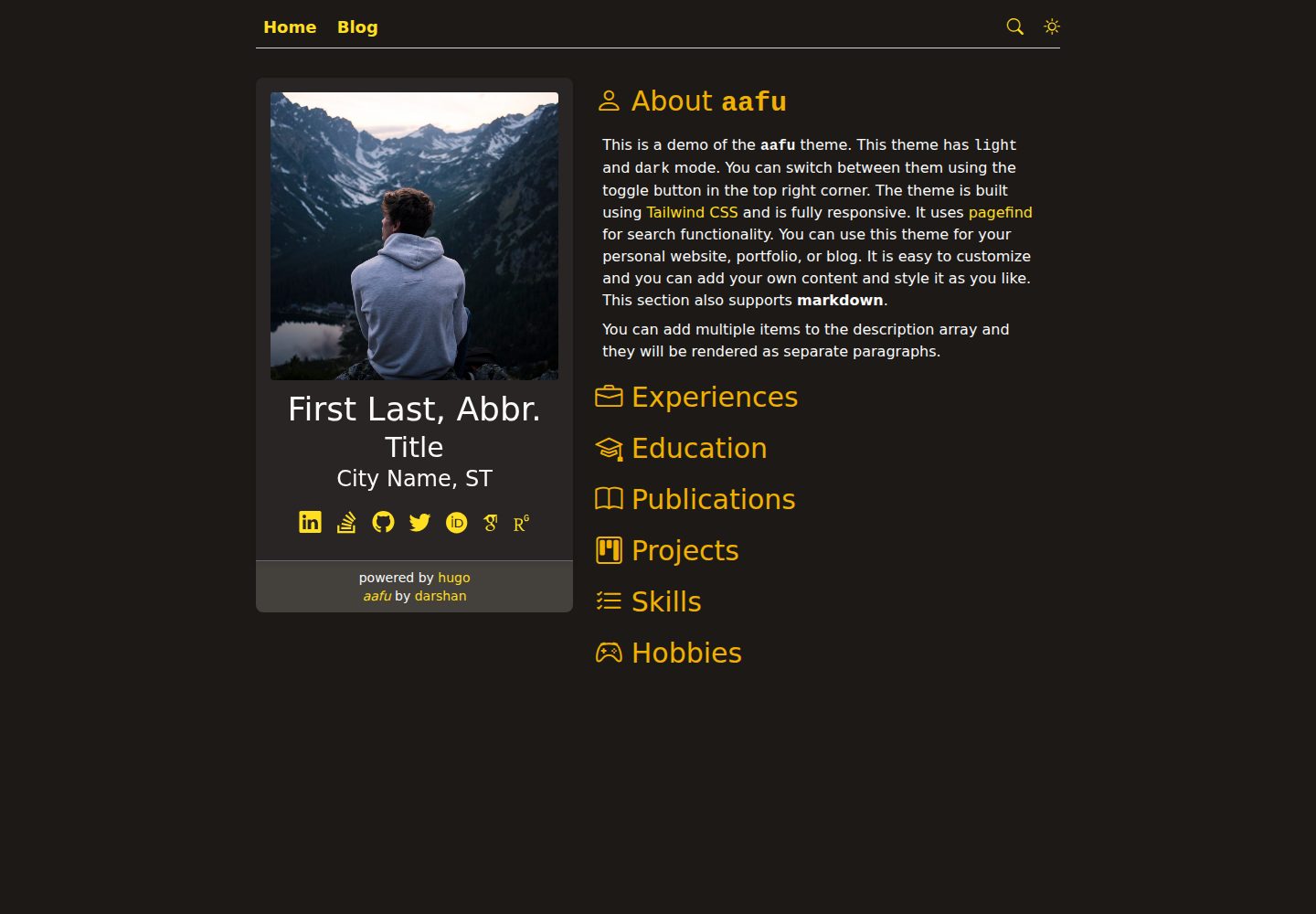
Desktop homepage1 / 3
Desktop captureTop of page
Actual screenshot captured by the server browser.
All pages & views 3
Screenshots show visual appearance; interactive behavior may differ.
Recorded 2026-09-30View source
What stands out
A quick read of the recorded project description.
Accordion-style section layout with configurable displayed sections, order, and default expanded item
Supports light, dark, and automatic theme modes that follow the device
Styles built with Tailwind CSS
Provides site search via Pagefind
The repository can run directly as a complete Hugo site or be integrated as a theme
Template Details
aafu is a portfolio and blog theme built with Hugo. The repository itself can run directly as a complete Hugo site, or it can be integrated as a theme into an existing Hugo project. The theme's page structure organizes content into accordion-style sections; you can define which sections to display in config.yaml, adjust section order, and specify which section is expanded by default.
For appearance, the theme offers light, dark, and automatic modes that follow the device setting, switched via params.theme.mainTheme in config.yaml; the profile avatar is changed by replacing profile.jpg under static/images. The theme includes a blog section and provides site search via Pagefind; before deployment, you need to build the site first and then index the public directory.
Regarding usage constraints, when integrating as a theme, you need to copy config.yaml, package.json, tailwind.config.js, and the assets/ and static/ directories from the repository to the project root, and set theme: aafu in config.yaml. The search feature depends on an additional Pagefind indexing step and is not available out of the box. Third-party assets such as images, fonts, and icons in the demo site must be checked separately under their respective licenses.
HugoPortfolioBlog
Is it right for your project?
Use Cases
- Building a personal portfolio website with a blog section
- Introducing a portfolio theme into an existing Hugo project
- Needing a static personal site that supports light/dark theme switching
- Adding local search based on Pagefind to a site
Suitable For
- Developers building sites with Hugo
- Individuals who need a combined portfolio and blog page
- Users who want to configure section order and default expanded state in Hugo
- Site maintainers who accept running an additional Pagefind indexing step before deployment
Getting started & customization
Use these recorded setup notes alongside the repository instructions for your chosen version.
- 1
Run the repository directly: after cloning, run npm install, then start the development server with hugo server
- 2
Use as a theme: add it as a git submodule under themes/aafu, and copy config.yaml, package.json, tailwind.config.js, and the assets/ and static/ directories to the project root
- 3
Set theme: aafu in config.yaml to enable the theme
- 4
Replace profile.jpg under static/images to change the avatar
- 5
Before deployment, run hugo -b https://your_base_url/ to build, then run npx -y pagefind --site public to build the search index
License & source material
Usage conditions & limitations
Free to use · keep license noticeThis entry covers the free version under the MIT license in the public repository; the free scope is the code of this version and does not mean external services or third-party assets are free.
Must comply with when using
- Free use, modification, commercial use, and distribution of this version's code are permitted.
- When distributing copies or substantial portions of the code, retain the original author's copyright notice and the full MIT license notice.
- The code is provided as is; warranties and limitations of liability are governed by the original license and applicable law.
Additional costs & items to verify
- Site search depends on the third-party tool Pagefind; an additional indexing step must be run before deployment (after hugo build, run npx -y pagefind --site public), so it is not available out of the box.
- When integrating as a theme into an existing Hugo project, you must manually copy config.yaml, package.json, tailwind.config.js, and the assets/ and static/ directories from the repository to the project root, and set theme: aafu.
- Demo images, fonts, icons, and other third-party assets must be checked under their respective licenses and cannot be judged solely by the code's MIT license.
- External services such as domains, hosting, databases, payments, or AI may incur separate charges.
View Original Text Basis
Permission is hereby granted, free of charge
Original License Text
This theme supports search functionality using [Pagefind](https://pagefind.app/). Before deploying, index your content using the following command:
Original README
https://github.com/darshanbaral/aafu/blob/main/LICENSEhttps://github.com/darshanbaral/aafu/blob/main/README.mdCopy the following files/folders from `aafu/` to your project root:
Original README
Compiled by DeepSeek based on repository license and README ·2026-10-02. Results only cover the materials read; dependencies, images, fonts, and subsequent term changes are subject to their respective original texts.
Project checks & description sources
Template Information
- Source platforms
- GitHub
- Documentation and maintenance reference score
- More documented · 84 / 100
- Technologies
- Hugo
- Website type
- Portfolio · Blog
How this score is calculated
Our heuristic uses license records (up to 30), a demo link (12), a preview (10), stars (15), recorded maintenance (15), description completeness (8), feature records (5) and classification data (5). It is not a code, security or performance test, or a Google score. A link does not establish tested functionality.
What to verify for this project
- Repository update recorded
- 2026-05-02
- Screenshot last checked
- 2026-10-02
A demo link is listed. Check it with your own content and viewport sizes; its presence does not confirm that forms, authentication or payments work.
The catalog identifies Hugo as the primary stack. Check the actual dependency manifest and lockfile for versions and hosting requirements. These notes use recorded metadata, not a code audit or a deployment test.
Use a selection guide →How this description was prepared
AI-assisted description based on catalog records and repository material. Repository authors are not automatically the reviewers of this description.
Automatically checked against source and license rules; no manual editorial review.
Inspect the recorded source material
SHA-256: a9a98edff7bba1f387c58c4583967f2b6aafdf6561347ed32fa019bd6178d133
2026-10-02T15:37:02.437Z
Source file / repository# aafu Theme
**aafu** is a modern, responsive portfolio and blog theme built with [Hugo](https://gohugo.io/) and powered by [Tailwind CSS 4.x](https://tailwindcss.com/).
## 🌍 Live Demo
Experience the theme in action: https://aafu.darshanbaral.com
## 🚀 Installation
### 🧪 Local Development
#### Option 1: Standalone Project
The repository functions as a complete Hugo site out of the box. To run it locally:
```sh
# Clone the repository
git clone https://github.com/darshanbaral/aafu.git
cd aafu
# Install dependencies
npm install
# Start the development server
hugo server
```
#### Option 2: Use as a Hugo Theme
To use `aafu` as a theme within your own Hugo project:
1. Add the theme:
```bash
git submodule add https://github.com/darshanbaral/aafu.git themes/aafu
```
2. Copy the following files/folders from `aafu/` to your project root:
- Files:
- `config.yaml`
- `package.json`
- `tailwind.config.js`
- Folders:
- `assets/`
- `static/`
The project structure should look something like:
```
your-hugo-project/
├── config.yaml
├── package.json
├── tailwind.config.js
├── assets/
├── content/
├── static/
├── themes/
│ └── aafu/
```
3. Enable the theme by setting the theme in `config.yaml`:
```yaml
theme: aafu
```
4. Install dependencies and start development server:
```bash
npm install
hugo server
```
### 🔧 Getting Started
#### Configuration (`config.yaml`)
Customize the theme by modifying the [`config.yaml`](https://github.com/darshanbaral/aafu/blob/master/config.yaml).
Key customization options:
- Define which sections appear in the accordion.
- Control the order of sections.
- Choose which section should be expanded by default.
#### Profile Image
Replace `profile.jpg` in `static/images` with your own profile picture.
#### Theme Modes
To configure the theme mode, modify the `params.theme.mainTheme` attribute in `config.yaml`.
- **Light Mode** (`light`)
- **Dark Mode** (`dark`)
- **Auto Mode** (`null` - adjusts based on user’s device settings)
### 📦 Deployment
This theme supports search functionality using [Pagefind](https://pagefind.app/). Before deploying, index your content using the following command:
```sh
hugo -b https://your_base_url/; npx -y pagefind --site public
```
## 🐞 Reporting Issues & Feature Requests
If you encounter any bugs or have feature suggestions, please [open an issue](https://github.com/darshanbaral/aafu/issues/new).
---
Enjoy using **aafu**! 🚀
Explore similar templates
Compare previews and descriptions within the same stack and category.

hugo-PaperMod
A fast, clean, responsive Hugo theme for blogs and lightweight portfolios, with three layout modes (Regular, Home-Info, Profile), automatic and manual light/dark themes, Fuse.js client-side search, multilingual support, and built-in Open Graph, Twitter Cards, and Schema.org data.
Hugo · Portfolio

LoveIt
LoveIt is a clean, elegant, and feature-rich Hugo blog theme derived from LeaveIt and KeepIt, MIT-licensed. It offers light/dark modes, responsive layout, multilingual support, and search via Lunr.js or Algolia.
Hugo · Blog

hugo-coder
hugo-coder is a minimalist Hugo blog theme maintained by luizdepra under the MIT license. It provides a clean, text-focused blog appearance, configuration documentation in the docs directory, and a complete exampleSite with hugo.toml.
Hugo · Blog

blowfish
Blowfish is a Hugo personal website and blog theme built with Tailwind CSS 4, focused on lightness, simplicity, and content-first presentation.
Hugo · Blog

hugo-paper
hugo-paper is a simple, clean, and customizable Hugo blog theme configured through config.toml or hugo.toml.
Hugo · Blog

hextra
Hextra is a Hugo theme for documentation and blog sites, built on Hugo and Tailwind CSS with design referencing Nextra.
Hugo · Documentation