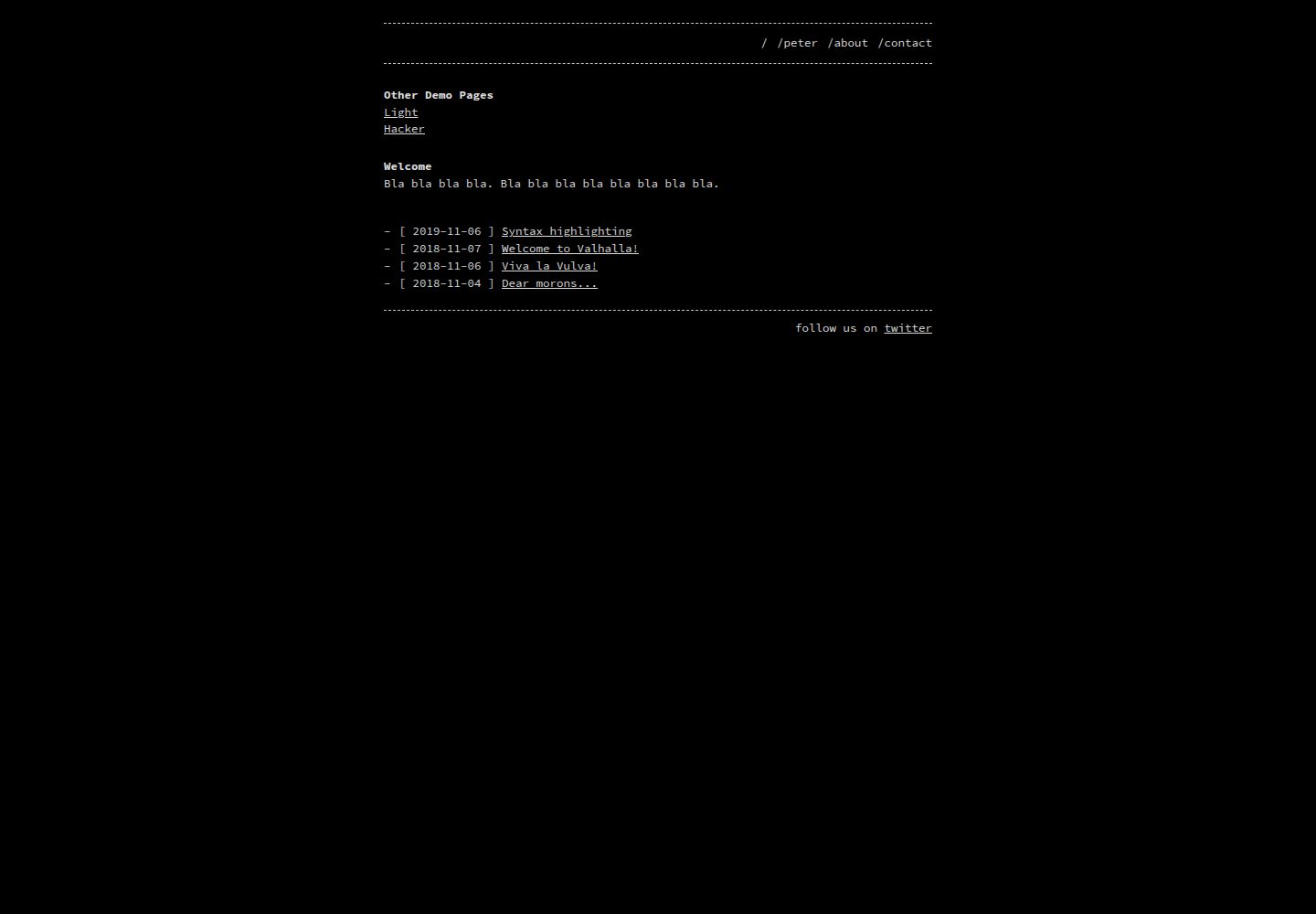
Terminal console visual style with three predefined color schemes: dark, light, and hacker
JekyllBlog
jekyll-theme-console — Jekyll Blog Template
By debifrank
A Jekyll blog theme modified from b2a3e8/jekyll-theme-console, featuring a terminal console style for personal blogs.
Explore the design
Compare the page layouts and mobile experience. Open any screenshot for a closer look.
Desktop homepage1 / 3
Desktop captureTop of page
Actual screenshot captured by the server browser.
All pages & views 3
Screenshots show visual appearance; interactive behavior may differ.
Recorded 2026-10-03View source
What stands out
A quick read of the recorded project description.
Supports two installation methods: remote_theme for GitHub Pages and gem installation
Navigation bar pages can be configured via header_pages, and footer content can be inserted via footer
Optional google_analytics tracking ID, loaded only when set and in a production environment
listen_for_clients_preferred_style can switch light/dark styles based on the client's color preference
MIT license, permitting use, modification, commercial use, and distribution
Template Details
This is a Jekyll blog theme; the repository describes it as a modified version of b2a3e8/jekyll-theme-console for personal blogs. The theme's visual inspiration comes from the Linux console and is aimed at hackers, developers, and scripting enthusiasts, offering three predefined color styles: dark, light, and hacker.
The theme supports two installation methods: for GitHub Pages, it can be referenced via remote_theme in _config.yml; for regular Jekyll projects, it can be installed as a gem and set as theme in _config.yml. Configuration options include header_pages (navigation bar pages), footer string, google_analytics tracking ID, listen_for_clients_preferred_style (switches light/dark based on the client's prefers-color-scheme preference), and style (selects a predefined style). Front matter supports variables such as title, lang, and robots.
Customization involves forking the repository and modifying the HTML in _layouts, as well as the styles in _sass and assets; general variables are located in _sass/base.scss, and style-specific definitions are in _sass/_dark.scss and _sass/_light.scss. This repository is a personal modification, has 0 stars, was last updated in 2021, and it is advisable to check for differences from the upstream theme before use.
JekyllBlog
Is it right for your project?
Use Cases
- Building a terminal console-style site for a personal blog
- Quickly applying the theme on GitHub Pages via remote_theme
- Introducing the theme as a gem in an existing Jekyll project and updating it with bundle update
- Deep customization by forking the repository and modifying _layouts, _sass, and assets
Suitable For
- Developers who build blogs with Jekyll
- Personal site authors who prefer terminal and command-line visual styles
- Users who need to host blogs on GitHub Pages
- Users willing to fork the repository and maintain the theme code themselves
Getting started & customization
Use these recorded setup notes alongside the repository instructions for your chosen version.
- 1
GitHub Pages method: set remote_theme: b2a3e8/jekyll-theme-console in _config.yml
- 2
Gem method: add gem "jekyll-theme-console" to the Gemfile, run bundle, and set theme in _config.yml
- 3
Configure header_pages, footer, google_analytics, style, and listen_for_clients_preferred_style as needed in _config.yml
- 4
For local development, run bundle install and bundle exec jekyll serve, then preview at http://localhost:4000
- 5
This repository is a personal modification; it is advisable to compare differences with the upstream b2a3e8/jekyll-theme-console before use
License & source material
Usage conditions & limitations
Free to use · keep license noticeThis entry covers the free version under the MIT license in a public repository; the free scope is the code of this version and does not imply that external services or third-party assets are free.
Must comply with when using
- The code of this version may be used, modified, used commercially, and distributed free of charge.
- When distributing copies or substantial portions of the code, retain the original author's copyright notice and the full MIT license notice.
- The code is provided as is; warranties and limitations of liability are governed by the original license and applicable law.
Additional costs & items to verify
- Demo images, fonts, icons, and other third-party assets must be checked against their respective licenses; they cannot be judged solely by the code's MIT license.
- External services such as domains, hosting, databases, payments, or AI may incur additional charges.
- google_analytics is optional: Google Analytics is enabled only when the tracking ID is set and in a production environment; when not set, no Google Analytics code is loaded.
- The remote_theme installation method applies only to sites hosted on GitHub Pages; other hosting environments require the gem installation method.
- When starting from scratch, a Jekyll environment must first be set up according to the official Jekyll Quickstart guide; the theme itself does not provide a standalone way to run without Jekyll.
- When publishing the theme, only files in the _layouts, _includes, _sass, and assets directories that are tracked by Git will be packaged; custom directories require modifying the regular expression in the gemspec to be included.
View Original Text Basis
Permission is hereby granted, free of charge
Original License Text
`google_analytics` tracking id (tracking will be enabled only in production environments and only if you set this option, no Google Analytics code will be loaded if you don't set this option)
Original README
Use this method for sites hosted with GitHub Pages only.
Original README
First, follow the steps in [this Quickstart Guide](https://jekyllrb.com/docs/) if you're starting with Jekyll from scratch.
Original README
https://github.com/debifrank/jekyll-theme-console/blob/master/LICENSE.txthttps://github.com/debifrank/jekyll-theme-console/blob/master/README.mdWhen your theme is released, only the files in `_layouts`, `_includes`, `_sass` and `assets` tracked with Git will be bundled.
Original README
Compiled by DeepSeek based on repository license and README ·2026-10-04. Results only cover the materials read; dependencies, images, fonts, and subsequent term changes are subject to their respective original texts.
Project checks & description sources
Template Information
- Source platforms
- GitHub
- Documentation and maintenance reference score
- Partly documented · 65 / 100
- Technologies
- Jekyll
- Website type
- Blog
How this score is calculated
Our heuristic uses license records (up to 30), a demo link (12), a preview (10), stars (15), recorded maintenance (15), description completeness (8), feature records (5) and classification data (5). It is not a code, security or performance test, or a Google score. A link does not establish tested functionality.
What to verify for this project
- Repository update recorded
- 2021-10-07
- Screenshot last checked
- 2026-10-04
A demo link is listed. Check it with your own content and viewport sizes; its presence does not confirm that forms, authentication or payments work.
The catalog identifies Jekyll as the primary stack. Check the actual dependency manifest and lockfile for versions and hosting requirements. These notes use recorded metadata, not a code audit or a deployment test.
Use a selection guide →How this description was prepared
AI-assisted description based on catalog records and repository material. Repository authors are not automatically the reviewers of this description.
Review declaration: [email protected] · 2026-10-04
Inspect the recorded source material
SHA-256: 8d0826384cebf78ef0aaa4d471d91a4d163f3a9ae38bb70e52dc6443af44d563
2026-10-04T14:30:23.703Z
Source file / repository# jekyll-theme-console A jekyll theme with inspiration from linux consoles for hackers, developers and script kiddies. <img src="https://raw.githubusercontent.com/b2a3e8/jekyll-theme-console/master/screenrec-dark.gif" width="550" title="Screenshot"> ## Demo [dark style](https://b2a3e8.github.io/jekyll-theme-console-demo-dark/) ([source code](https://github.com/b2a3e8/jekyll-theme-console-demo-dark)): [<img src="https://raw.githubusercontent.com/b2a3e8/jekyll-theme-console/master/screenshot-dark.png" width="350" title="Screenshot">](https://b2a3e8.github.io/jekyll-theme-console-demo-dark/) [light style](https://b2a3e8.github.io/jekyll-theme-console-demo-light/) ([source code](https://github.com/b2a3e8/jekyll-theme-console-demo-light)): [<img src="https://raw.githubusercontent.com/b2a3e8/jekyll-theme-console/master/screenshot-light.png" width="350" title="Screenshot">](https://b2a3e8.github.io/jekyll-theme-console-demo-light/) [hacker style](https://b2a3e8.github.io/jekyll-theme-console-demo-hacker/) ([source code](https://github.com/b2a3e8/jekyll-theme-console-demo-hacker)): [<img src="https://raw.githubusercontent.com/b2a3e8/jekyll-theme-console/master/screenshot-hacker.png" width="350" title="Screenshot">](https://b2a3e8.github.io/jekyll-theme-console-demo-hacker/) ## Installation First, follow the steps in [this Quickstart Guide](https://jekyllrb.com/docs/) if you're starting with Jekyll from scratch. Skip this if you already have an existing jekyll project. **_You can also use the [demo site's source code](https://b2a3e8.github.io/jekyll-theme-console-demo-dark/) as template for an easy start._** ### Remote theme method for GitHub Pages Use this method for sites hosted with GitHub Pages only. To install: 1. Set `remote_theme` in your project's Jekyll `_config.yml` file: ```yaml remote_theme: b2a3e8/jekyll-theme-console ``` ### Gem-based method With Gem-based themes, directories such as the `assets`, `_layouts`, `_includes`, and `_sass` are stored in the theme’s gem, hidden from your immediate view. Yet all of the necessary directories will be read and processed during Jekyll’s build process. This allows for easier installation and updating as you don't have to manage any of the theme files. To install: 1. Add this line to your Jekyll site's `Gemfile`: ```ruby gem "jekyll-theme-console" ``` 2. Fetch and update bundled gems by running the following [Bundler](http://bundler.io/) command: ```bash bundle ``` 3. Set `theme` in your project's Jekyll `_config.yml` file: ```yaml theme: jekyll-theme-console ``` To update the theme run `bundle update`. ## Usage ### _config.yaml In addition to jekyll's default configuration options, you can provide: - `header_pages` to specify which pages should be displayed in navbar - `footer` string, which will be inserted on the end of the page (doesn't support markup, but html) - `google_analytics` tracking id (tracking will be enabled only in production environments and only if you set this option, no Google Analytics code will be loaded if you don't set this option) - `listen_for_clients_preferred_style` boolean, used to allow users to choose light or dark style based on their preferences (mostly affected by OS dark or light theme, details see https://developer.mozilla.org/en-US/docs/Web/CSS/@media/prefers-color-scheme) - `style` to specify which predefined style (colors) should be used ```yaml header_pages: - index.md - about.md style: dark # dark (default), light or hacker listen_for_clients_preferred_style: true # false (default) or true footer: 'follow us on <a href="https://twitter.com/xxx">twitter</a>' google_analytics: UA-NNNNNNNN-N ``` ### front matter variables Besides the predefined [front matter](https://jekyllrb.com/docs/front-matter/) variables from jekyll this theme also supports following variables: - `title` to set a title for the page - `lang` to specify the language, defaults to 'en' - `robots` to control the robot meta tag ([details](http://longqian.me/2017/02/12/jekyll-robots-configuration/)) - this may be useful for example to set `NOINDEX` to tag pages ## Customization If you want to customize this theme, follow this steps: 1. Fork this repository (you can use the fork as your own theme or directly as your website) 2. Create or modify files in `_layouts` directory for html-based changes 3. Create or modify files in `_sass` and `assets` for css-based changes - You can change things which are used in light and dark theme (like font-size) in `_sass/base.scss`. You'll find style variables at the top. - Style-specific definitions are in `_sass/_dark.scss` respectively in `_sass/_light.scss`. You can change things like background-color there. ## Contributing Bug reports and pull requests are welcome on GitHub at https://github.com/b2a3e8/jekyll-theme-console. This project is intended to be a safe, welcoming space for collaboration, and contributors are expected to adhere to the [Contributor Covenant](http://contributor-covenant.org) code of conduct. ## Development To set up your environment to develop this theme, run `bundle install`. Your theme is setup just like a normal Jekyll site! To test your theme, run `bundle exec jekyll serve` and open your browser at `http://localhost:4000`. This starts a Jekyll server using your theme. Add pages, documents, data, etc. like normal to test your theme's contents. As you make modifications to your theme and to your content, your site will regenerate and you should see the changes in the browser after a refresh, just like normal. When your theme is released, only the files in `_layouts`, `_includes`, `_sass` and `assets` tracked with Git will be bundled. To add a custom directory to your theme-gem, please edit the regexp in `jekyll-theme-console.gemspec` accordingly. ## License The theme is available as open source under the terms of the [MIT License](https://opensource.org/licenses/MIT).
Explore similar templates
Compare previews and descriptions within the same stack and category.

al-folio
A Jekyll academic homepage theme for scholars and researchers, with a clean responsive design and out-of-the-box support for publication lists, project showcases, CVs, and blogs.
Jekyll · Portfolio

minimal-mistakes
Minimal Mistakes is a two-column Jekyll theme for personal sites, blogs, project documentation, or portfolios.
Jekyll · Portfolio

Beautiful Jekyll
Beautiful Jekyll is a mature, easy-to-use Jekyll blog theme maintained by Dean Attali since 2015, with over 50,000 users.
Jekyll · Blog

jekyll-TeXt-theme
A customizable Jekyll theme for personal sites, team sites, blogs, projects, and documentation.
Jekyll · Blog

startbootstrap-clean-blog-jekyll
The official Jekyll version of Start Bootstrap's Clean Blog theme, offering a blog home page, about page, contact page, and sample post pages, with a Formspree-powered contact form.
Jekyll · Blog

So Simple
A minimal reading-oriented Jekyll theme by Michael Rose for personal blogs, portfolios, and long-form reading. It offers multiple layouts, microformat markup, Disqus comments, Google Analytics, Jekyll SEO Tag, three skins, and aggregation by year, category, and tag with a grid view.
Jekyll · Blog