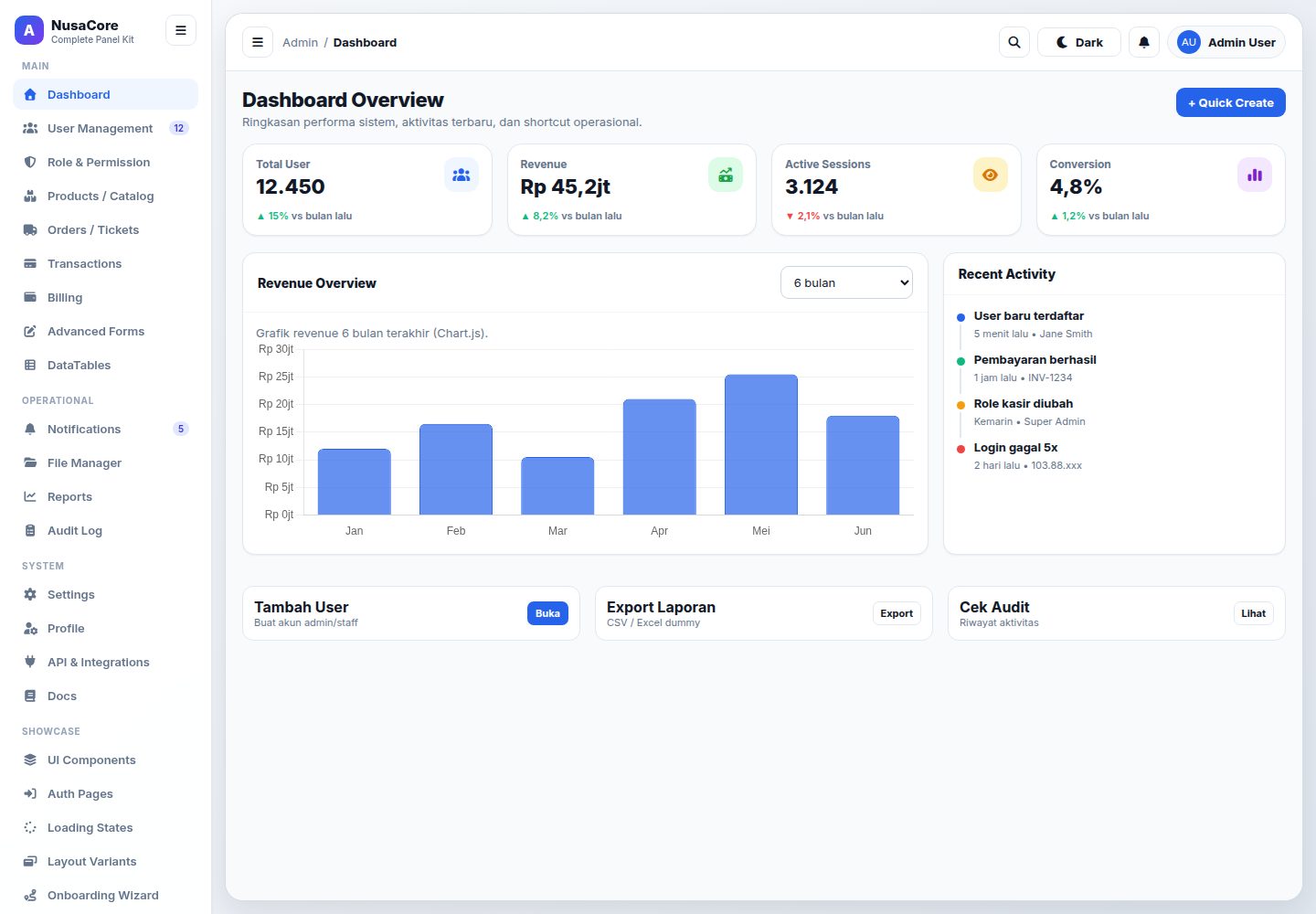
Multi-page static admin template covering dashboard, users and roles, products, orders, transactions, billing, audit, notifications, settings, authentication, onboarding, and error pages
HTMLAdmin dashboard
nusa-core — HTML Admin dashboard Template
By devabdulharis
NusaCore is a static admin panel template based on HTML, CSS, and vanilla JavaScript, including pages such as dashboard, user and role management, products, orders, transactions, billing, notifications, audit logs, settings, UI components, authentication pages, onboarding pages, and error pages.
Explore the design
Compare the page layouts and mobile experience. Open any screenshot for a closer look.
Desktop homepage1 / 3
Desktop captureTop of page
Actual screenshot captured by the server browser.
All pages & views 3
Screenshots show visual appearance; interactive behavior may differ.
Recorded 2026-10-15View source
What stands out
A quick read of the recorded project description.
Uses HTML5, CSS3, and vanilla JavaScript, with styles centralized in css/style.css and interactions centralized in js/app.js
References Google Fonts (Inter), Font Awesome, and Chart.js; documentation pages show DataTables, Dropzone, and Quill integrations or styles
Includes sidebar layout, dark mode, top navigation, collapsible sidebar, responsive layout, command palette, modals, and toast notifications
README states some data is dummy/mock, some features are UI simulations, and the template is not tied to a specific backend
Template Details
NusaCore is a static admin panel template built with HTML5, CSS3, and vanilla JavaScript, referencing Google Fonts (Inter), Font Awesome, and Chart.js; some documentation pages show DataTables, Dropzone, and Quill integrations or styles. The project is split into multiple independent HTML files by page (such as dashboard.html, users.html, roles.html, products.html, orders.html, transactions.html, billing.html, audit.html, notifications.html, settings.html, profile.html, components.html, layouts.html, docs.html, login.html, auth.html, onboarding.html, error-pages.html, etc.), with styles centralized in css/style.css and interaction logic centralized in js/app.js. The README states the template includes a sidebar layout, dark mode, top navigation and collapsible sidebar, responsive layout, command palette, modals and toast notifications, authentication flow previews, error and loading states, and components such as statistics, tables, cards, forms, badges, and tabs. The README also notes that some pages use dummy/mock data, some features are UI simulations, and the template itself is not tied to a backend and can serve as a frontend presentation layer connected to Laravel, CodeIgniter, Node.js/Express, Django, Rails, or an internal API. The README does not provide specific framework version numbers, build tools, backend integration code, or production deployment configuration.
HTMLBackend
Is it right for your project?
Use Cases
- Rapidly building prototypes of admin management interfaces
- Determining the admin information architecture and page structure before connecting a backend
- As a UI foundation for internal enterprise operational panels
- As a UI reference for modern dashboard interfaces
Suitable For
- Frontend developers who need a static admin template
- Teams that want to quickly create admin prototypes
- Projects using any backend technology stack that need an independent frontend presentation layer
- Developers who need reference admin UI components and layouts
Getting started & customization
Use these recorded setup notes alongside the repository instructions for your chosen version.
- 1
You can open pages such as index.html, dashboard.html, or login.html directly in a browser
- 2
It is recommended to run it with a local server, for example python3 -m http.server 8000 and then visit http://localhost:8000
- 3
VS Code users can install the Live Server extension, right-click index.html, and select Open with Live Server
- 4
Modifying the CSS variables under :root in css/style.css can adjust the primary color; modifying js/app.js can adjust some dummy data
- 5
The README does not provide build tools, dependency installation, or production deployment steps
License & source material
Usage conditions & limitations
Free to use · keep license noticeThis entry covers the free version under the MIT license in the public repository; the free scope is the code of this version and does not mean external services or third-party assets are free.
Must comply with when using
- Free use, modification, commercial use, and distribution of this version's code are permitted.
- When distributing copies or substantial portions of the code, retain the original author's copyright notice and the full MIT license notice.
- The code is provided as is; warranties and limitations of liability are governed by the original license and applicable law.
Additional costs & items to verify
- Demo images, fonts, icons, and other third-party assets must be checked against their respective licenses and cannot be judged solely by the code's MIT license.
- External services such as domains, hosting, databases, payments, or AI may incur additional charges.
View Original Text Basis
https://github.com/devabdulharis/nusa-core/blob/main/LICENSEhttps://github.com/devabdulharis/nusa-core/blob/main/README.mdPermission is hereby granted, free of charge
Original License Text
Compiled by DeepSeek based on repository license and README ·2026-10-15. Results only cover the materials read; dependencies, images, fonts, and subsequent term changes are subject to their respective original texts.
Project checks & description sources
Template Information
- Source platforms
- GitHub
- Documentation and maintenance reference score
- More documented · 80 / 100
- Technologies
- HTML
- Website type
- Admin dashboard
How this score is calculated
Our heuristic uses license records (up to 30), a demo link (12), a preview (10), stars (15), recorded maintenance (15), description completeness (8), feature records (5) and classification data (5). It is not a code, security or performance test, or a Google score. A link does not establish tested functionality.
What to verify for this project
- Repository update recorded
- 2026-05-25
- Screenshot last checked
- 2026-10-15
A demo link is listed. Check it with your own content and viewport sizes; its presence does not confirm that forms, authentication or payments work.
The catalog identifies HTML as the primary stack. Check the actual dependency manifest and lockfile for versions and hosting requirements. These notes use recorded metadata, not a code audit or a deployment test.
Use a selection guide →How this description was prepared
AI-assisted description based on catalog records and repository material. Repository authors are not automatically the reviewers of this description.
Review declaration: codex-user-requested-batch-review-20261017 · 2026-10-16
Inspect the recorded source material
SHA-256: b4e485718c99f0e97ac81f6361916c126cc18e85879b65b4df4464dc47ef454f
2026-10-15T09:30:11.529Z
Source file / repository# NusaCore Admin Panel Template NusaCore adalah template admin panel statis berbasis HTML, CSS, dan JavaScript yang dirancang untuk kebutuhan dashboard internal, backoffice, panel operasional, dan prototipe aplikasi web dengan tampilan modern. ## Gambaran Umum Project ini berisi kumpulan halaman siap pakai untuk kebutuhan admin panel, seperti: - Dashboard overview - Manajemen user dan role - Produk, order, transaksi, billing - Notifikasi dan audit log - Settings dan profile - UI components dan layout variants - Auth pages, onboarding, error pages - Dokumentasi komponen template Template ini cocok untuk: - Pembuatan prototype cepat - Landing struktur admin sebelum integrasi backend - Dasar pengembangan panel internal perusahaan - Referensi UI dashboard modern ## Struktur Project ```text . ├── advanced-forms.html ├── api-integrations.html ├── audit.html ├── auth.html ├── billing.html ├── components.html ├── dashboard.html ├── datatables.html ├── details.html ├── docs.html ├── error-pages.html ├── file-manager.html ├── index.html ├── layouts.html ├── login.html ├── modals.html ├── notifications.html ├── onboarding.html ├── orders.html ├── permission-preview.html ├── products.html ├── profile.html ├── reports.html ├── roles.html ├── settings.html ├── states.html ├── transactions.html ├── users.html ├── css/ │ └── style.css ├── js/ │ └── app.js └── README.md ``` ## Teknologi yang Digunakan Template ini menggunakan: - **HTML5** untuk struktur halaman - **CSS3** untuk styling utama - **JavaScript vanilla** untuk interaksi UI - **Google Fonts (Inter)** untuk tipografi - **Font Awesome** untuk ikon - **Chart.js** untuk visualisasi chart pada halaman tertentu Beberapa halaman dokumentasi juga menampilkan integrasi atau gaya untuk library tambahan seperti DataTables, Dropzone, dan Quill. ## Cara Penggunaan ### 1. Jalankan secara langsung Karena ini adalah template statis, Anda bisa langsung membuka file HTML di browser. Contoh: - `index.html` - `dashboard.html` - `login.html` Namun untuk pengalaman yang lebih stabil, disarankan menjalankan dengan local server. ### 2. Menjalankan dengan local server #### Opsi Python ```bash python3 -m http.server 8000 ``` Lalu buka: ```text http://localhost:8000 ``` #### Opsi VS Code Live Server Jika menggunakan VS Code: 1. Install extension **Live Server** 2. Klik kanan `index.html` 3. Pilih **Open with Live Server** ### 3. Halaman awal Gunakan salah satu halaman berikut sebagai entry point: - `index.html` — alias dashboard utama - `dashboard.html` — halaman dashboard eksplisit - `docs.html` — dokumentasi komponen template ## Cara Kustomisasi ### Ubah branding Brand utama saat ini menggunakan nama **NusaCore**. Anda bisa mengubah: - Judul halaman pada tag `<title>` - Nama brand di sidebar - Logo teks atau inisial ikon brand ### Ubah warna utama Buka file berikut: - `css/style.css` Lalu ubah variabel CSS di bagian `:root`, misalnya: ```css --primary:#2563eb; --primary-hover:#1d4ed8; --primary-light:#eff6ff; ``` ### Ubah data dummy Sebagian isi tabel, statistik, notifikasi, dan preview disimpan di: - `js/app.js` Contoh data yang bisa diubah: - daftar users - transaksi - audit log - permission - command palette - template error page - template auth preview ### Tambah halaman baru Untuk menambah halaman baru: 1. Duplikasi salah satu file HTML yang paling mirip 2. Ubah judul halaman 3. Sesuaikan menu sidebar/top navigation 4. Tambahkan section atau komponen yang dibutuhkan 5. Jika perlu interaksi baru, tambahkan fungsi di `js/app.js` ## Fitur Utama Template - Layout sidebar modern - Dukungan dark mode - Layout top navigation dan collapsed sidebar - Responsive untuk desktop dan mobile - Command palette sederhana - Modal dan toast notification - Preview auth flow - Error state dan loading state - Komponen statistik, tabel, card, form, badge, tabs, dan lainnya ## Filosofi Template ### 1. Cepat dipakai NusaCore dibuat agar developer dapat langsung memakai template tanpa setup build tools yang rumit. File dapat dibuka langsung, dipelajari cepat, lalu diintegrasikan bertahap. ### 2. Mudah dimodifikasi Struktur project sengaja dibuat sederhana: - HTML per halaman - satu file CSS utama - satu file JavaScript utama Pendekatan ini memudahkan tim kecil, freelancer, atau developer yang ingin bergerak cepat tanpa terikat framework tertentu. ### 3. Fokus pada kebutuhan admin nyata Komponen dan halaman di template ini tidak hanya dekoratif, tetapi diarahkan untuk kebutuhan umum panel admin, seperti: - monitoring data - pengelolaan user - transaksi dan billing - audit dan notifikasi - onboarding dan error handling ### 4. UI modern, namun tetap familiar Template ini mencoba menjaga keseimbangan antara: - tampilan modern - keterbacaan tinggi - navigasi yang jelas - interaksi yang familiar bagi user backoffice Tujuannya bukan sekadar “cantik”, tetapi membantu user bekerja lebih cepat. ### 5. Agnostic terhadap backend NusaCore tidak bergantung pada stack backend tertentu. Anda bisa menghubungkannya ke: - Laravel - CodeIgniter - Node.js / Express - Django - Rails - API internal perusahaan - atau sistem backend lain Dengan begitu, template ini bisa menjadi lapisan presentasi yang fleksibel. ## Rekomendasi Pengembangan Lanjutan Jika ingin mengembangkan template ini menjadi produk yang lebih siap produksi, Anda bisa menambahkan: - sistem templating/partials untuk sidebar dan topbar - integrasi API nyata - autentikasi dan otorisasi backend - asset bundler - komponen reusable - form validation yang lebih lengkap - state management bila diporting ke framework ## Catatan - Data pada beberapa halaman masih berupa **dummy/mock data** - Sebagian fitur adalah **UI simulation** untuk kebutuhan demo - Template ini ideal sebagai **fondasi UI**, lalu disambungkan ke logic aplikasi Anda ## Saran Alur Pakai 1. Mulai dari `index.html` atau `dashboard.html` 2. Sesuaikan branding menjadi identitas organisasi Anda 3. Rapikan menu sesuai modul yang benar-benar dipakai 4. Ganti data mock dengan data backend 5. Pecah komponen umum jika project makin besar Dibuat sebagai template admin panel modern yang ringan, fleksibel, dan mudah diadaptasi untuk banyak kebutuhan operasional digital.
Explore similar templates
Compare previews and descriptions within the same stack and category.

AdminLTE
An HTML admin dashboard built with Bootstrap 5 and vanilla JavaScript. Astro builds the documentation; React, Vue and Angular editions live in separate repositories.
HTML · Admin dashboard

gentelella
Gentelella v4 is a free, open-source admin dashboard template maintained by Colorlib, built with vanilla JavaScript, SCSS, and Vite 8 without Bootstrap or jQuery.
HTML · Admin dashboard

coreui-free-bootstrap-admin-template
A free Bootstrap admin template maintained by CoreUI, built on CoreUI's own UI component library. It provides compiled HTML pages and Pug template source code, covering dashboards, authentication, forms, components, icons, and error pages.
HTML · Admin dashboard

dashboards
A collection of responsive dashboard HTML templates open-sourced by Keen IO, built on CSS Grid, offering multiple prebuilt admin data interface layouts.
HTML · Admin dashboard

SB Admin 2
SB Admin 2 is a classic Bootstrap admin template from Start Bootstrap, offering dashboards, charts, tables, and common management pages.
HTML · Admin dashboard

Adminator-admin-dashboard
Adminator 4 is a vanilla HTML, CSS and JavaScript admin dashboard template with a CSS-variable token design system, built-in light and dark themes, no jQuery or Bootstrap dependency, and 18 pages covering dashboards, mail, calendar, charts, forms, tables and error pages.
HTML · Admin dashboard