Pure HTML static pages that can be edited and published without a build step
HTMLStarter
Discord-bot-website-template — HTML Starter Template
By DiscordWasMyIdea
An HTML-based open-source website template for Discord bots that can be forked, edited, and deployed to GitHub Pages.
Explore the design
Compare the page layouts and mobile experience. Open any screenshot for a closer look.
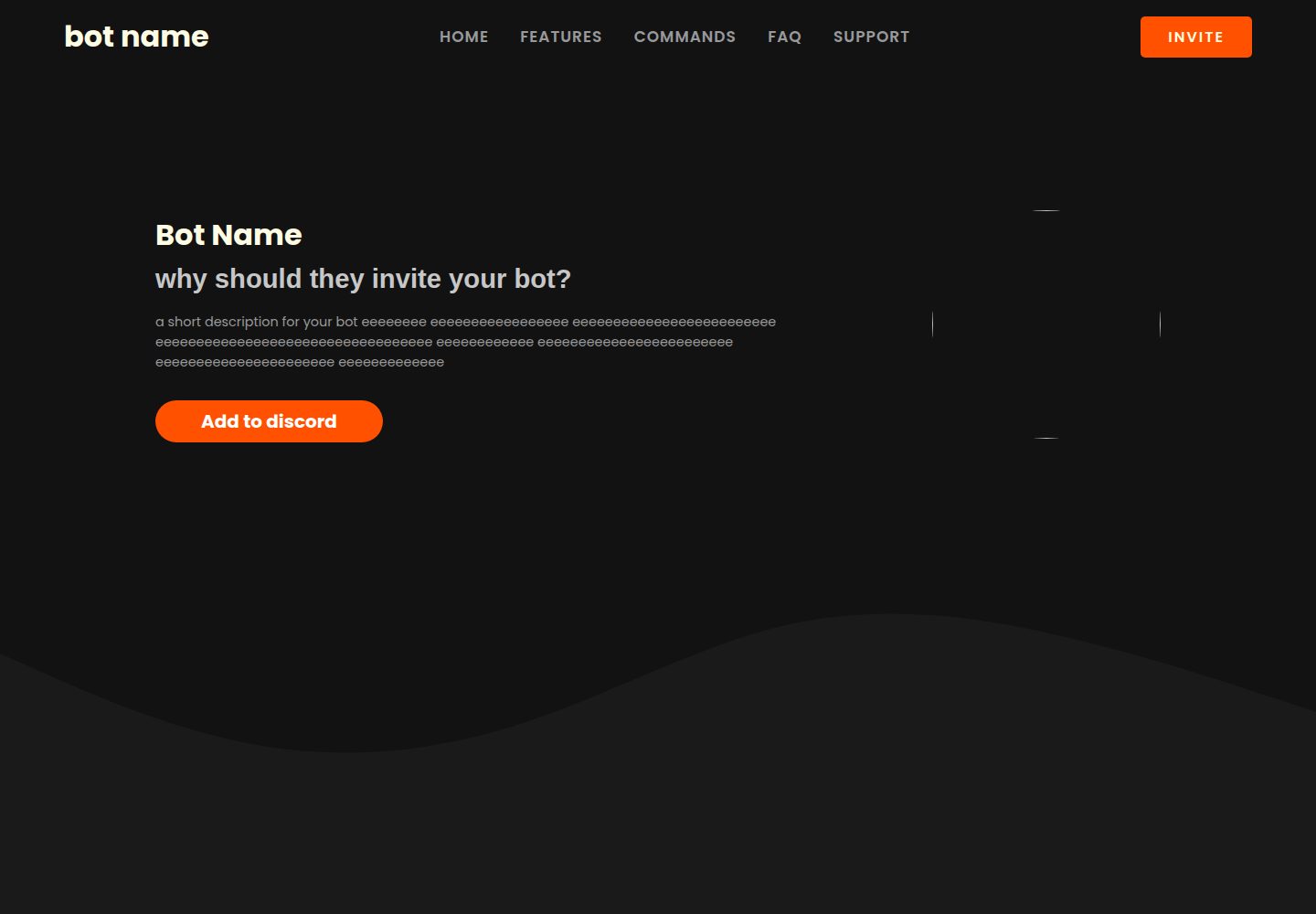
Desktop homepage1 / 2
Desktop captureTop of page
Actual screenshot captured by the server browser.
All pages & views 2
Screenshots show visual appearance; interactive behavior may differ.
Recorded 2026-10-02View source
What stands out
A quick read of the recorded project description.
The README provides the complete process for forking, editing, and enabling GitHub Pages
Uses the MIT license, allowing free use, modification, commercial use, and distribution
The repository provides an online demo page so you can see the actual effect before deciding whether to use it
Aimed at Discord bot projects, with the page structure organized around bot introduction
Template Details
This is a website template written in HTML for Discord bots, intended to give bot projects a more professional-looking presentation page. The repository itself does not include bot backend logic; it only provides frontend website files, and users need to replace the text, images, and links to match their own bot.
The usage instructions in the README are straightforward: fork the repository, edit the website content as needed, then enable site publishing in GitHub Pages to access it via the address provided by GitHub Pages. The template does not describe build tools, dependency installation, or backend interfaces, so it is suitable for use as a purely static page.
The project uses the MIT license, allowing free use, modification, commercial use, and distribution of this version of the code; when distributing copies or substantial portions of the code, the original author's copyright notice and the full MIT license notice must be retained. Third-party assets such as demo images, fonts, and icons appearing in the template need to be checked separately under their respective licenses, and external services such as domains and hosting may also incur additional costs.
HTMLLauncher
Is it right for your project?
Use Cases
- Build an introductory official website for a personal or team Discord bot
- Quickly publish a bot showcase page on GitHub Pages
- Use as a practice project for learning HTML page structure and GitHub Pages deployment
- Add an independent frontend showcase site alongside an existing bot project
Suitable For
- Developers who have a Discord bot and want to add an introduction page for it
- Users who are familiar with or willing to manually edit HTML files
- Personal projects that want to host static pages for free with GitHub Pages
- Developers who need a website template that can be freely modified under the MIT license
Getting started & customization
Use these recorded setup notes alongside the repository instructions for your chosen version.
- 1
Fork the repository to your own account on GitHub
- 2
Edit the text, images, and links in the HTML files as needed
- 3
Enable GitHub Pages in the repository settings and select the publishing branch
- 4
Access the website via the address generated by GitHub Pages
- 5
Before use, check the licenses of third-party assets such as images, fonts, and icons in the template
License & source material
Usage conditions & limitations
Free to use · keep license noticeThis entry covers the free version under the MIT license in the public repository; the free scope is the code of this version and does not mean that external services or third-party assets are free.
Must comply with when using
- Free use, modification, commercial use, and distribution of this version of the code are permitted.
- When distributing copies or substantial portions of the code, retain the original author's copyright notice and the full MIT license notice.
- The code is provided as is; warranties and limitations of liability are governed by the original license and applicable law.
Additional costs & items to verify
- Demo images, fonts, icons, and other third-party assets must be checked under their respective licenses and cannot be judged solely by the code's MIT license.
- External services such as domains, hosting, databases, payments, or AI may incur additional charges.
View Original Text Basis
Compiled by DeepSeek based on repository license and README ·2026-10-02. Results only cover the materials read; dependencies, images, fonts, and subsequent term changes are subject to their respective original texts.
Project checks & description sources
Template Information
- Source platforms
- GitHub
- Documentation and maintenance reference score
- Partly documented · 72 / 100
- Technologies
- HTML
- Website type
- Starter
How this score is calculated
Our heuristic uses license records (up to 30), a demo link (12), a preview (10), stars (15), recorded maintenance (15), description completeness (8), feature records (5) and classification data (5). It is not a code, security or performance test, or a Google score. A link does not establish tested functionality.
What to verify for this project
- Repository update recorded
- 2022-10-18
- Screenshot last checked
- 2026-10-02
A demo link is listed. Check it with your own content and viewport sizes; its presence does not confirm that forms, authentication or payments work.
The catalog identifies HTML as the primary stack. Check the actual dependency manifest and lockfile for versions and hosting requirements. These notes use recorded metadata, not a code audit or a deployment test.
Use a selection guide →How this description was prepared
AI-assisted description based on catalog records and repository material. Repository authors are not automatically the reviewers of this description.
Automatically checked against source and license rules; no manual editorial review.
Inspect the recorded source material
SHA-256: a4ee71df5de3e2a71139a20b8b111e2a8f08f9f68f557a1ab075dc56af3b5eb9
2026-10-02T19:55:42.245Z
Source file / repository<div id="top"></div>
<!--
*** I DID NOT CREATE THIS MD FILE, IT IS A TEMPLATE FROM [HERE](https://github.com/othneildrew/Best-README-Template)
*** Thanks for checking out the Best-README-Template. If you have a suggestion
*** that would make this better, please fork the repo and create a pull request
*** or simply open an issue with the tag "enhancement".
*** Don't forget to give the project a star!
*** Thanks again! Now go create something AMAZING! :D
-->
<!-- PROJECT LOGO -->
<br />
<div align="center">
<a href="https://discordapp.com/users/705698565279842376">
<img src="https://images-ext-2.discordapp.net/external/uKz20ev6Qn4O7ex9_pCH3QjZVCrb3Zw9VPPR-6E6jbs/%3Fsize%3D4096/https/cdn.discordapp.com/avatars/705698565279842376/ddeb00c70ffb1c40b0a02c512d7c49d7.png" alt="Logo" width="80" height="80" style="border-radius:50%">
</a>
<h3 align="center">Discord bot website</h3>
<p align="center">
An awesome website for your discord bots!
<br />
<a href="https://discordwasmyidea.github.io/Discord-bot-website-template/"><strong>View the website»</strong></a>
<br />
<br />
<a href="https://github.com/DiscordWasMyIdea/Discord-bot-website-template">The repo</a>
·
<a href="https://discordapp.com/users/705698565279842376">Contact me</a>
·
<a href="https://twitter.com/AdobeWasMyIdea">My Twitter</a>
·
</p>
</div>
<!-- TABLE OF CONTENTS -->
<details>
<summary>Table of Contents</summary>
<ol>
<li>
<a href="#about-the-project">About The Project</a>
</li>
<li>
<a href="#getting-started">Getting Started</a>
<ul>
<li><a href="#installation">Installation</a></li>
</ul>
</li>
<li><a href="#usage">Usage</a></li>
<li><a href="#license">License</a></li>
<li><a href="#contact">Contact</a></li>
<li><a href="#acknowledgments">Acknowledgments</a></li>
</ol>
</details>
<!-- ABOUT THE PROJECT -->
## About The Project
An opensource discord bot website template that you can use to make your bot seem more professional I plan to add more stuff and will update the repo regularly.
<p align="right">(<a href="#top">back to top</a>)</p>
<!-- GETTING STARTED -->
## Getting Started
Follow the steps given below or contact me if you have any issues.
### Installation
1. Fork the repo
2. Edit the website according to your needs.
3. Go to github pages, and start the website
4. Star this repo!
<p align="right">(<a href="#top">back to top</a>)</p>
<!-- CONTRIBUTING -->
## Contributing
Contributions are what make the open source community such an amazing place to learn, inspire, and create. Any contributions you make are **greatly appreciated**.
If you have a suggestion that would make this better, please fork the repo and create a pull request. You can also simply open an issue with the tag "enhancement".
Don't forget to give the project a star! Thanks again!
1. Fork the Project
2. Create your Feature Branch (`git checkout -b feature/AmazingFeature`)
3. Commit your Changes (`git commit -m 'Add some AmazingFeature'`)
4. Push to the Branch (`git push origin feature/AmazingFeature`)
5. Open a Pull Request
<p align="right">(<a href="#top">back to top</a>)</p>
<!-- LICENSE -->
## License
Distributed under the MIT License. See `LICENSE.txt` for more information.
<p align="right">(<a href="#top">back to top</a>)</p>
<!-- CONTACT -->
## Contact
Twitter - [@AdobeWasMyIdea](https://twitter.com/AdobeWasMyIdea)
Discord - [itsMcraft](https://discordapp.com/users/705698565279842376)
Project Link: [https://github.com/DiscordWasMyIdea/Discord-bot-website-template](https://github.com/DiscordWasMyIdea/Discord-bot-website-template)
<p align="right">(<a href="#top">back to top</a>)</p>
Explore similar templates
Compare previews and descriptions within the same stack and category.

startbootstrap-simple-sidebar
A Bootstrap off-canvas sidebar navigation HTML starter template from Start Bootstrap. It provides directly editable HTML and CSS in the dist directory, while the source uses Pug, SCSS, and JavaScript with npm build scripts for live preview and compilation.
HTML · Starter

adminkit
AdminKit is a free, MIT-licensed HTML admin and dashboard template built on Bootstrap 5. The free version includes 15 demo pages, 1 plugin, and 1 color scheme, with hundreds of UI components, forms, tables, charts, and icons.
HTML · Admin dashboard

Landing-Page
A general-purpose landing page HTML template maintained by Tailwind Toolbox, written in pure HTML and loading the complete Tailwind CSS via CDN.
HTML · Corporate Website

light-bootstrap-dashboard
Light Bootstrap Dashboard is a free, MIT-licensed admin dashboard template from Creative Tim, built on Bootstrap with a responsive static HTML structure.
HTML · Admin dashboard

sing-app
Sing App Lite is a free, open-source admin dashboard template from Flatlogic, built with Bootstrap 4.5 and SCSS. It provides a responsive layout, dashboard examples, typography, tables, notifications, basic charts, icons, maps, and a hover sidebar, along with styled Bootstrap components.
HTML · Admin dashboard

startbootstrap-modern-business
Modern Business is a multipurpose Bootstrap full-site HTML template from Start Bootstrap with 17 standalone pages covering home, about, services, portfolio, pricing, blog, FAQ, and contact.
HTML · Starter