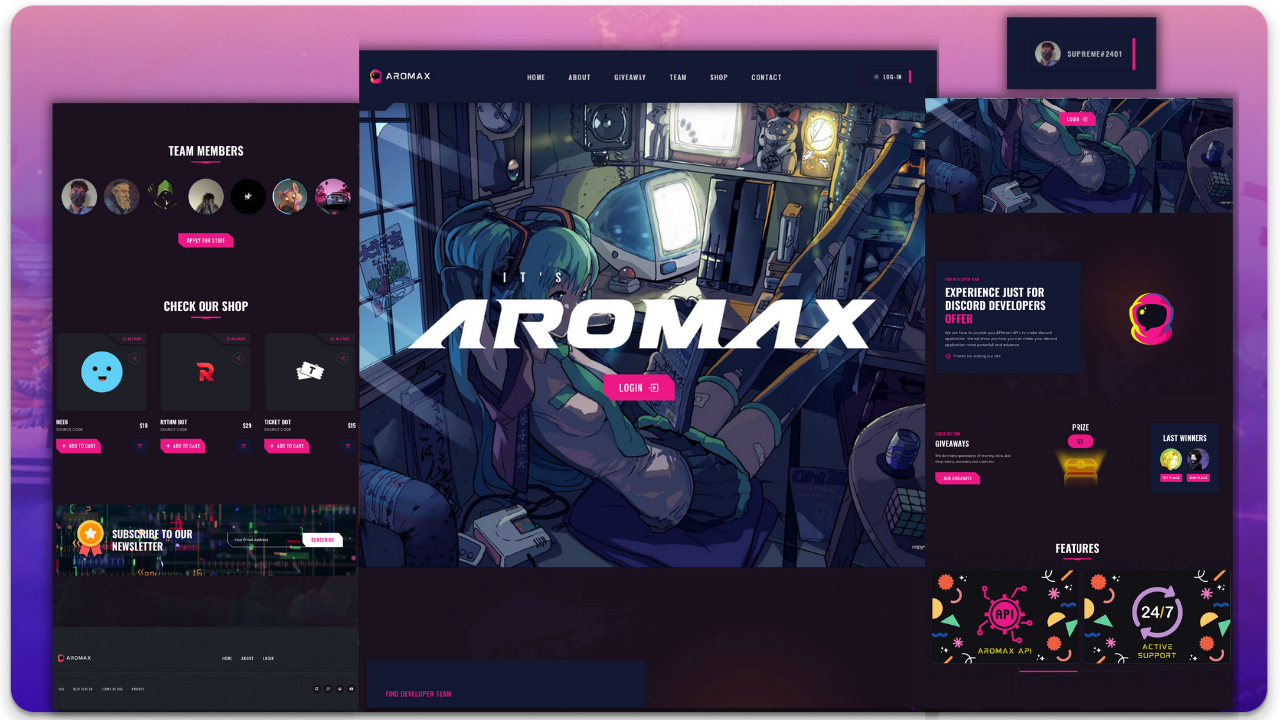
Discord server and bot management backend template
HTMLAdmin dashboard
Discord-Server-Dashboard — HTML Admin dashboard Template
By diwasatreya
A backend dashboard template for Discord server and bot management, featuring a login system, built with HTML and a responsive layout.
Explore the design
Compare the page layouts and mobile experience. Open any screenshot for a closer look.
Author preview
Author-provided preview
Preview provided in the project README.
One original preview is available. Open the full image to inspect the design.
Screenshots show visual appearance; interactive behavior may differ.
Recorded 2026-10-02View source
What stands out
A quick read of the recorded project description.
Built-in login system with OAuth2 login callback path configuration
Responsive layout adapting to different screen sizes
Provides .env and config.json configuration entries, requiring TOKEN and DB
API extensions centralized in routes/api.js
Apache-2.0 license, allowing modification, commercial use, and distribution
Template Details
This is a Discord server/bot dashboard template. The repository uses HTML as its primary technology stack and provides a backend management interface and login system. The README describes it as a "fully responsive Discord server/bot dashboard template" and explicitly includes a login system.
According to the installation instructions, the template requires a Node.js environment: after cloning the repository, run npm install, create a .env file and fill in the TOKEN and DB configuration items, and also fill in config.json. Before use, add the site domain and the /auth/login path to the OAuth2 redirect URL in the Discord Developer Portal. API-related code is located in routes/api.js and can be extended as needed.
The template is licensed under Apache-2.0, allowing free use, modification, commercial use, and distribution, provided the license is included and attribution notices are retained when distributing. Third-party assets such as demo images, fonts, and icons require separate license verification. External services such as domains, hosting, and databases may incur additional charges.
HTMLBackend
Is it right for your project?
Use Cases
- Building the frontend interface for a Discord server management panel
- Providing a login-protected backend control page for a Discord bot
- Using as a backend dashboard template for secondary development
- Quickly starting a Discord management interface prototype in a Node.js environment
Suitable For
- Developers who need a Discord server or bot management backend
- Teams looking to build upon an existing HTML backend template
- Users with Node.js and Discord application configuration experience
Getting started & customization
Use these recorded setup notes alongside the repository instructions for your chosen version.
- 1
After cloning the repository, run npm install to install dependencies
- 2
Create a .env file and fill in TOKEN and DB
- 3
Fill in the configuration items in config.json
- 4
Add the site domain and /auth/login to the OAuth2 redirect URL in the Discord Developer Portal
- 5
Add API code in routes/api.js as needed
License & source material
Usage conditions & limitations
Free to use · keep license noticeThis entry covers the free version of the public repository under the Apache-2.0 license; the free scope applies to that version's code and does not imply that external services or third-party assets are free.
Must comply with when using
- Free use, modification, commercial use, and distribution are permitted; the Apache-2.0 license must be included when distributing.
- Modified files must carry prominent notices of changes, and relevant copyright, patent, trademark, and attribution notices must be retained.
- If the original project includes a NOTICE file, applicable attribution notices must be retained when distributing derivative works.
- The license includes an applicable contributor patent grant; initiating patent litigation as described in the license terminates that patent grant, and no trademark rights are granted.
- The code is provided as-is; warranties and limitations of liability are governed by the original license and applicable law.
Additional costs & items to verify
- Before use, you must create a .env file and fill in both TOKEN and DB; missing either configuration will prevent normal operation.
- The site domain and /auth/login path must be registered in the OAuth2 redirect URL in the Discord Developer Portal, which depends on a Discord developer account and external services.
- Demo images, fonts, icons, and other third-party assets must be checked against their respective licenses; they cannot be assumed to be covered solely by the code's Apache-2.0 license.
- External services such as domains, hosting, databases, payments, or AI may incur additional charges.
View Original Text Basis
no-charge, royalty-free, irrevocable copyright license
Original License Text
Create `.env` file (Environment Secret in replit) ``` TOKEN=XXXXXXXXXX DB=XXXXXXXXXXXXX ```
Original README
https://github.com/diwasatreya/Discord-Server-Dashboard/blob/main/LICENSEhttps://github.com/diwasatreya/Discord-Server-Dashboard/blob/main/README.mdAdd `https://domain/` & `https://domain/auth/login` in application OAuth2 redirect url
Original README
Compiled by DeepSeek based on repository license and README ·2026-10-02. Results only cover the materials read; dependencies, images, fonts, and subsequent term changes are subject to their respective original texts.
Project checks & description sources
Template Information
- Source platforms
- GitHub
- Documentation and maintenance reference score
- Partly documented · 64 / 100
- Technologies
- HTML
- Website type
- Admin dashboard
How this score is calculated
Our heuristic uses license records (up to 30), a demo link (12), a preview (10), stars (15), recorded maintenance (15), description completeness (8), feature records (5) and classification data (5). It is not a code, security or performance test, or a Google score. A link does not establish tested functionality.
What to verify for this project
- Repository update recorded
- 2024-04-21
- Screenshot last checked
- 2026-10-02
No demo link is recorded. Use the repository instructions to evaluate the project locally; the screenshot alone cannot establish interactive behavior.
The catalog identifies HTML as the primary stack. Check the actual dependency manifest and lockfile for versions and hosting requirements. These notes use recorded metadata, not a code audit or a deployment test.
Use a selection guide →How this description was prepared
AI-assisted description based on catalog records and repository material. Repository authors are not automatically the reviewers of this description.
Automatically checked against source and license rules; no manual editorial review.
Inspect the recorded source material
SHA-256: 64800518e1e3b1ca99f0335c72f8f879e503fcce5ec5c51c9b895f4b62f1b3ca
2026-10-02T15:48:57.766Z
Source file / repository
<div align="center">


  <img src="serverdash.png" />

  <h2 align="center">Discord-Server-Dashboard</h2>

  It is a fully responsive discord server/bot dashboard template. Here you can see login system also.


</div>

<br>

## Installation

- Clone Repo
```
git clone https://github.com/diwasatreya/Discord-Server-Dashboard.git
```

- [Run in replit](https://repl.it/github/diwasatreya/Discord-Server-Dashboard)

- After cloning, type (Shell/Terminal)
```js
npm install
```

- Create `.env` file (Environment Secret in replit)
```
TOKEN=XXXXXXXXXX
DB=XXXXXXXXXXXXX
```

- Fill `config.json`


## Discord Developer Portal
Add `https://domain/` & `https://domain/auth/login` in application OAuth2 redirect url


## Adding API's
Goto `routes/api.js` then add your api code

<div align="center">
  <br>
  <h3> Star the Project </h3>
  <p> Follow me on github & twitter </p>
 <img src="https://user-images.githubusercontent.com/74746579/168328818-6995ed8d-915d-4083-9279-3d94e1d150c5.png" alt="help to star">
 </div>
Explore similar templates
Compare previews and descriptions within the same stack and category.

gentelella
Gentelella v4 is a free, open-source admin dashboard template maintained by Colorlib, built with vanilla JavaScript, SCSS, and Vite 8 without Bootstrap or jQuery.
HTML · Admin dashboard

coreui-free-bootstrap-admin-template
A free Bootstrap admin template maintained by CoreUI, built on CoreUI's own UI component library. It provides compiled HTML pages and Pug template source code, covering dashboards, authentication, forms, components, icons, and error pages.
HTML · Admin dashboard

dashboards
A collection of responsive dashboard HTML templates open-sourced by Keen IO, built on CSS Grid, offering multiple prebuilt admin data interface layouts.
HTML · Admin dashboard

SB Admin 2
SB Admin 2 is a classic Bootstrap admin template from Start Bootstrap, offering dashboards, charts, tables, and common management pages.
HTML · Admin dashboard

Adminator-admin-dashboard
Adminator 4 is a vanilla HTML, CSS and JavaScript admin dashboard template with a CSS-variable token design system, built-in light and dark themes, no jQuery or Bootstrap dependency, and 18 pages covering dashboards, mail, calendar, charts, forms, tables and error pages.
HTML · Admin dashboard

SB Admin
SB Admin is a lightweight, open-source Bootstrap admin template from Start Bootstrap. It offers a sidebar-and-top-bar layout with data tables, forms, and stat cards, plus responsive design.
HTML · Admin dashboard