Built with Next.js, styled with TailwindCSS and DaisyUI
Next.jsReactCorporate Website
nextjs-tailwindcss-landing-page-template — Next.js Business Template
By dvolkhonskiy
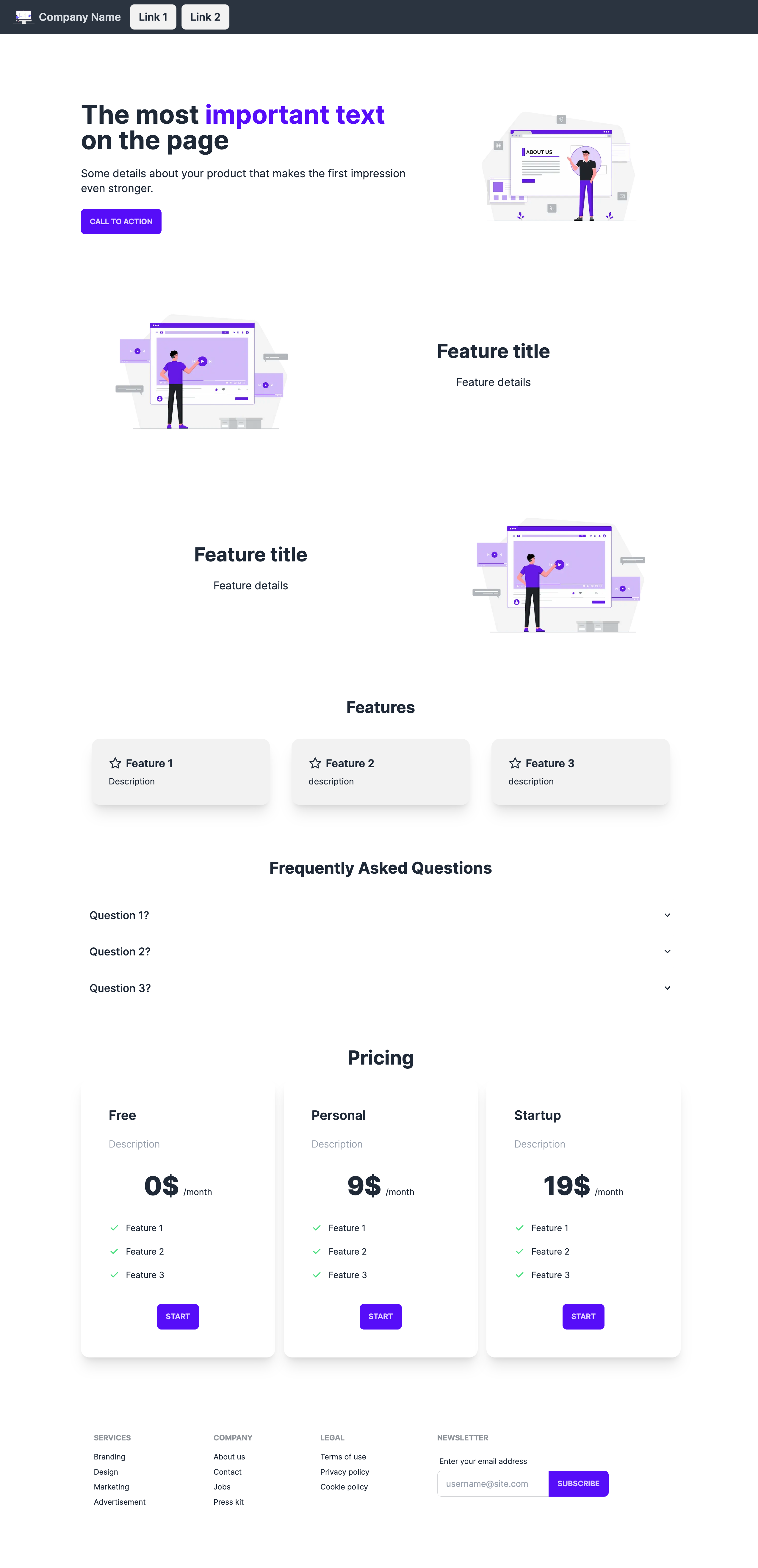
A landing page template built with Next.js, TailwindCSS, and DaisyUI, including sections for navigation, hero, features, pricing, and footer, with mobile and desktop responsiveness, theme switching, and SEO tag configuration.
Explore the design
Compare the page layouts and mobile experience. Open any screenshot for a closer look.
Author preview
Author-provided previewTop of page
Preview provided in the project README.
One original preview is available. Open the full image to inspect the design.
Screenshots show visual appearance; interactive behavior may differ.
Recorded 2026-10-02View source
What stands out
A quick read of the recorded project description.
Includes five page sections: Navbar, Hero, Features, Pricing, and Footer
Responsive for both mobile and desktop
Supports switching DaisyUI themes, with light and dark themes configurable in tailwind.config.js
Icons use lucide-react; SEO title and description are set in the metadata in layout.tsx
Template Details
This is a landing page template built with Next.js, using TailwindCSS and DaisyUI for styling. The README states that it is responsive for mobile and desktop and provides five sections: navigation bar, hero, feature showcase, pricing, and footer, making it suitable as a starting point for a corporate or product single-page website.
The template includes theme switching: in the daisyui configuration in tailwind.config.js, change themes from light to another DaisyUI theme (e.g., dark) to change the entire page's color scheme. Icons use lucide-react. SEO-related title and description are modified in the metadata variable in src/app/layout.tsx.
To run it, clone the repository, install Node.js, run npm install to install dependencies, then start the development server with npm run dev and visit http://localhost:3000 in a browser to view the result. The repository is under the MIT license, allowing free use, modification, commercial use, and distribution of this version of the code; however, third-party assets such as demo images, fonts, and icons must be checked separately under their respective licenses, and external services like domains and hosting may incur additional charges.
Next.jsCorporate website
Is it right for your project?
Use Cases
- Building a single-page landing page for a product or service introduction
- As an initial structure for a corporate website homepage
- Quickly validating a marketing page prototype with a pricing section
- Display pages that require light and dark theme switching
Suitable For
- Front-end developers familiar with Next.js and TailwindCSS
- Landing page projects that need a quick start
- Single-page sites where you want to replace copy and colors yourself
- Teams that accept the MIT license terms and will verify third-party asset licensing
Getting started & customization
Use these recorded setup notes alongside the repository instructions for your chosen version.
- 1
After cloning the repository, install Node.js and run npm install to install dependencies
- 2
Start the development server with npm run dev and visit http://localhost:3000 in a browser
- 3
To change themes, edit the themes configuration under daisyui in tailwind.config.js
- 4
To modify the SEO title and description, edit the metadata variable in src/app/layout.tsx
- 5
Third-party assets such as demo images, fonts, and icons must be checked separately under their respective licenses
License & source material
Usage conditions & limitations
Free to use · keep license noticeThis entry covers the free version under the MIT license in a public repository; the free scope is the code of this version and does not imply that external services or third-party assets are free.
Must comply with when using
- Free use, modification, commercial use, and distribution of this version of the code are permitted.
- When distributing copies or substantial portions of the code, retain the original author's copyright notice and the full MIT license notice.
- The code is provided as is; warranties and limitations of liability are governed by the original license and applicable law.
Additional costs & items to verify
- Demo images, fonts, icons, and other third-party assets must be checked under their respective licenses and cannot be judged solely by the code's MIT license.
- External services such as domains, hosting, databases, payments, or AI may incur additional charges.
View Original Text Basis
Compiled by DeepSeek based on repository license and README ·2026-10-02. Results only cover the materials read; dependencies, images, fonts, and subsequent term changes are subject to their respective original texts.
Project checks & description sources
Template Information
- Source platforms
- GitHub
- Documentation and maintenance reference score
- Partly documented · 56 / 100
- Technologies
- Next.js · React
- Website type
- Corporate Website
How this score is calculated
Our heuristic uses license records (up to 30), a demo link (12), a preview (10), stars (15), recorded maintenance (15), description completeness (8), feature records (5) and classification data (5). It is not a code, security or performance test, or a Google score. A link does not establish tested functionality.
What to verify for this project
- Repository update recorded
- 2023-09-18
- Screenshot last checked
- 2026-10-02
No demo link is recorded. Use the repository instructions to evaluate the project locally; the screenshot alone cannot establish interactive behavior.
The catalog identifies Next.js as the primary stack. Check the actual dependency manifest and lockfile for versions and hosting requirements. These notes use recorded metadata, not a code audit or a deployment test.
Use a selection guide →How this description was prepared
AI-assisted description based on catalog records and repository material. Repository authors are not automatically the reviewers of this description.
Automatically checked against source and license rules; no manual editorial review.
Inspect the recorded source material
SHA-256: c2b19bdb3230a45beb9b974607cf0daa3b91335e803efea592f2fc675b68cf3f
2026-10-02T14:32:05.440Z
Source file / repository
# Next.js TailwindCSS Landing Page Template
This is a Landing page template built with Next.js, TailwindCSS and DaisyUI. It is optimized for mobile and desktop devices.

## How to run this project
1. Clone this repository
2. Install Node.js
3. Install dependencies with `npm install`
4. Run the development server with `npm run dev`
5. Open [http://localhost:3000](http://localhost:3000) with your browser to see the result.
## Supported Sections and Features
Sections:
- Navbar
- Hero
- Features
- Pricing
- Footer
Features:
- Mobile and Desktop Optimized
- Dark mode and other themes
- SEO tags
In order to request new features, please open an issue.
## Landing Page Features
### Dark Mode and Other Themes
You can change the theme of the landing page. In the file `tailwind.config.js`, edit the following lines. Change
`light` the one of the
available [DaisyUI themes](https://daisyui.com/docs/themes/) (i.e. `dark` for dark theme).
```
daisyui: {
themes: ["light"],
}
```
### Icons
For the icons, we use [lucide-react](https://lucide.dev/icons/).
### SEO tags
In order to modify SEO tags like title and description, open `src/app/layout.tsx` and modify the `metadata` variable.Explore similar templates
Compare previews and descriptions within the same stack and category.

SaaS-Boilerplate
SaaS-Boilerplate is an open-source SaaS starter template built with Next.js App Router, React 19, TypeScript, Tailwind CSS, and Shadcn UI.
Next.js · SaaS

Next-JS-Landing-Page-Starter-Template
A free Next.js landing page starter template written in Tailwind CSS and TypeScript, featuring built-in navbar, hero, features, CTA banner, and footer sections.
Next.js · Corporate Website

next-saas-starter
A free Next.js SaaS marketing landing page template from Blazity, using static generation and styled-components with no extra UI library.
Next.js · SaaS

startup-nextjs
Startup is a free, MIT-licensed Next.js template from NextJSTemplates for SaaS startups and corporate landing pages.
Next.js · SaaS

shadcn-landing-page
A Next.js landing page template built with Shadcn, TypeScript, and Tailwind, converted from a Shadcn-Vue version. It includes sections such as Navbar, mobile Sidebar, Hero, Pricing, FAQ, and Footer, and highlights responsive design, navigation, and dark mode.
Next.js · Corporate Website

shadcn-dashboard-landing-template
An open-source admin dashboard and marketing landing page template built on shadcn/ui and Tailwind CSS, with both Vite + React and Next.js versions in one repository.
Next.js · Admin dashboard