Zero third-party requests: resources such as KaTeX, Fuse.js, and fonts are bundled in the repository, with CI checking for external subresources
HugoPortfolioBlog
devsheet — Hugo Portfolio Template
By fadli0029
devsheet is a minimal monospace Hugo theme for developer portfolios and technical blogs, with support for LaTeX formulas, syntax highlighting, and light/dark theme switching.
Explore the design
Compare the page layouts and mobile experience. Open any screenshot for a closer look.
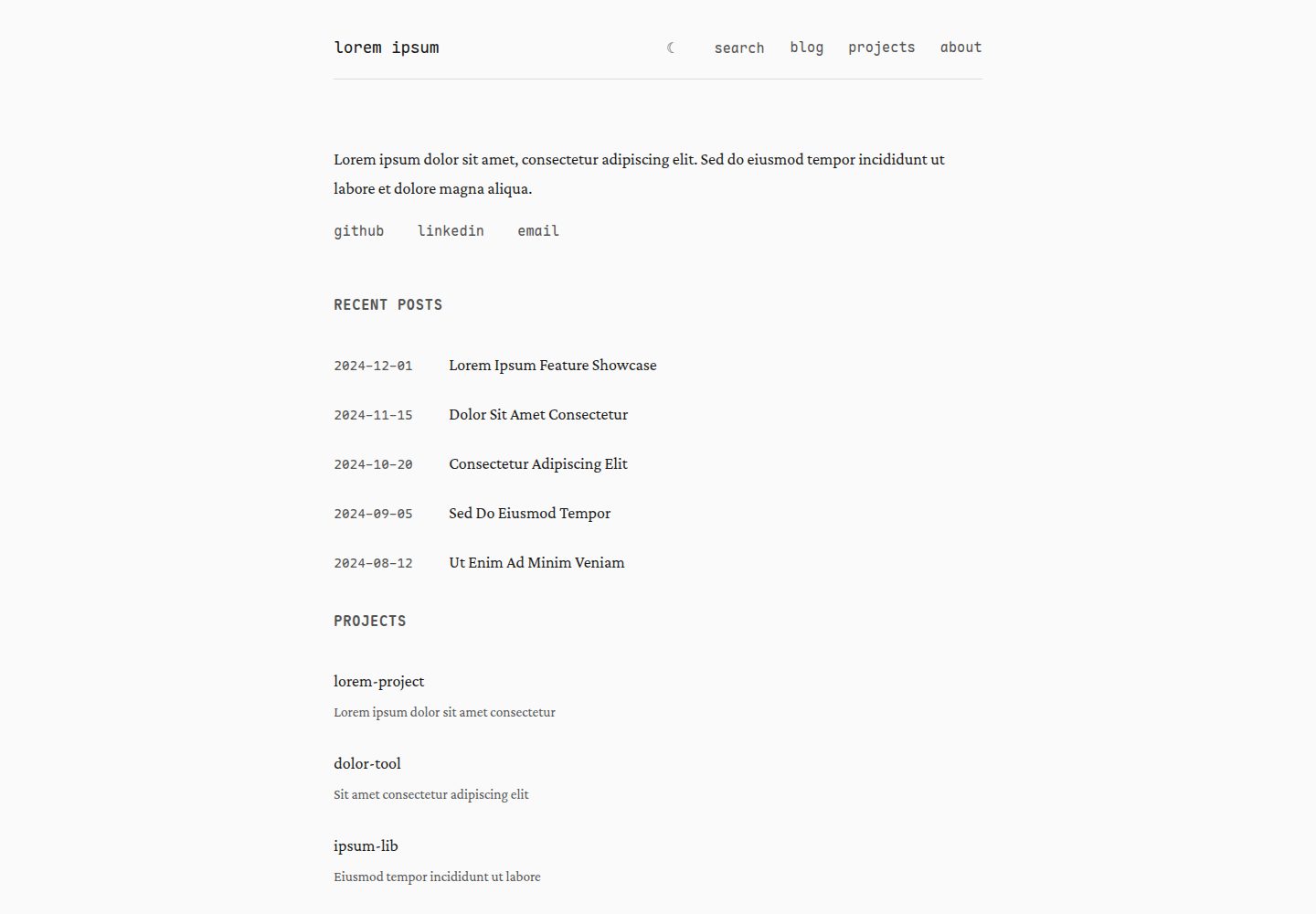
Desktop homepage1 / 3
Desktop captureTop of page
Actual screenshot captured by the server browser.
All pages & views 3
Screenshots show visual appearance; interactive behavior may differ.
Recorded 2026-09-30View source
What stands out
A quick read of the recorded project description.
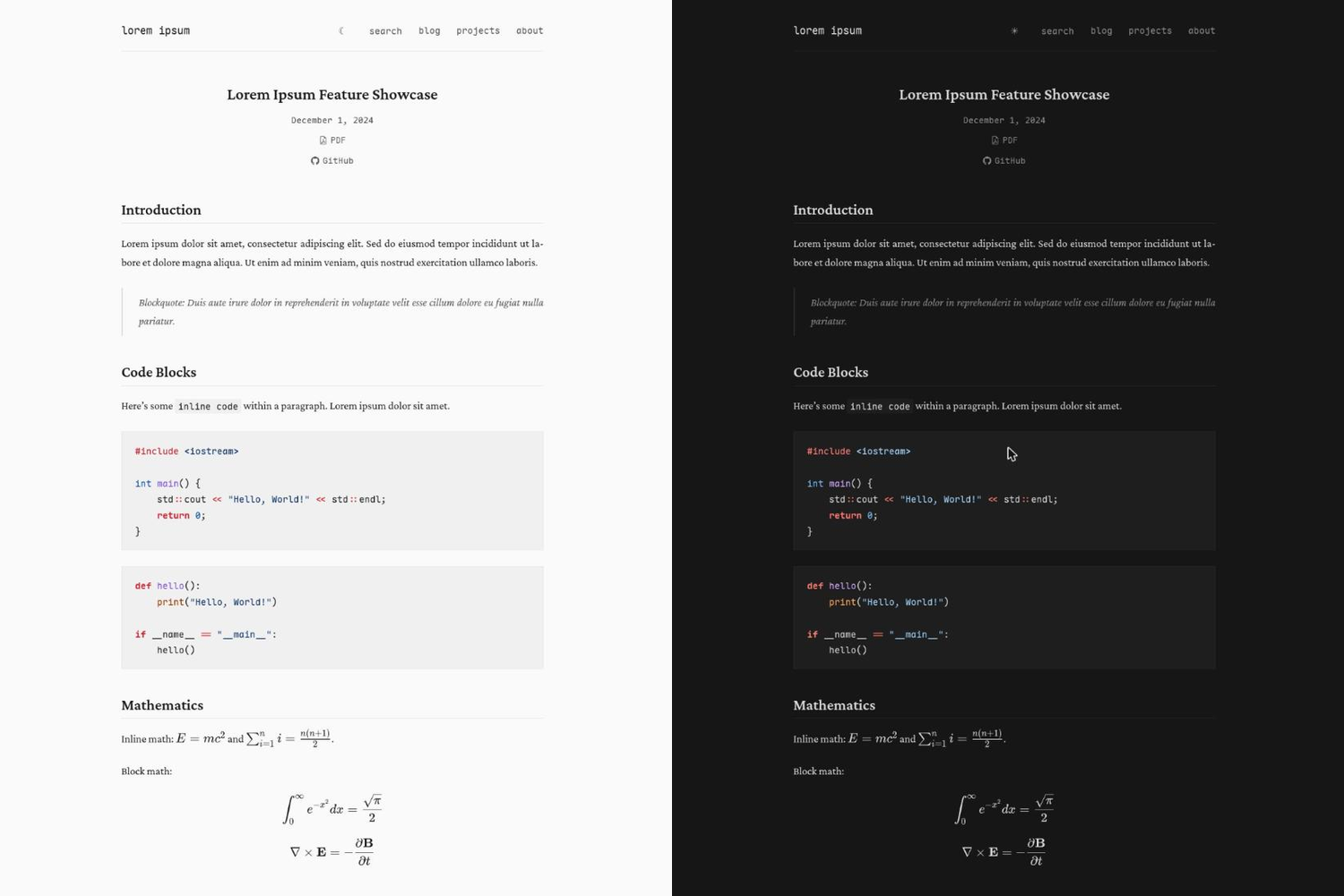
Light/dark theme switching, following system preference by default and applied before first paint to avoid flicker
Fuse.js-based search covering titles, tags, and the first 200 characters of body text, with Ctrl/Cmd+K and arrow key navigation
Support for KaTeX math formulas and Chroma syntax highlighting, with copy buttons on code blocks
JavaScript-free multi-state image tabs, plus optional table of contents and heading numbering
Keyboard accessibility: visible focus rings, skip links, respects prefers-reduced-motion, and both themes meet AA contrast
Template Details
devsheet is a minimal monospace Hugo theme aimed primarily at developer portfolios and technical blogs. The theme emphasizes zero third-party requests: resources such as KaTeX, Fuse.js, and the Crimson Pro and Maple Mono fonts are bundled in the repository, and CI checks and blocks external subresources from reappearing.
Functionally, it provides light/dark theme switching (following system preference by default and applied before first paint), Fuse.js-based search over titles, tags, and the first 200 characters of body text (Ctrl/Cmd+K shortcut), a collapsible mobile menu, code block copy buttons, KaTeX math formulas, Chroma syntax highlighting, optional table of contents and heading numbering, JavaScript-free multi-state image tabs, RSS auto-discovery, Open Graph and Twitter Card metadata, and a print stylesheet. The theme requires Hugo 0.122.0 or newer and does not need the extended build.
In terms of usage limitations, math formulas require the site to configure Goldmark's passthrough extension; search requires JSON in the home output; the RSS output key replaces Hugo's default, so RSS must be retained; and the theme does not provide Sass or image processing.
HugoPortfolioBlog
Is it right for your project?
Use Cases
- Developers building a personal portfolio site to showcase projects and articles
- Technical blogs writing posts that include LaTeX formulas and code examples
- Static sites that need strict control over third-party requests and want to avoid CDN dependencies
- Hugo sites deployed under a GitHub Pages project subdirectory
Suitable For
- Developer personal sites using Hugo
- Technical writers who prefer monospace fonts and minimal typography
- Technical blogs that need math formula rendering and syntax highlighting
- Site owners concerned about privacy who want to avoid external CDN requests
Getting started & customization
Use these recorded setup notes alongside the repository instructions for your chosen version.
- 1
Requires Hugo 0.122.0 or newer; does not need the extended build
- 2
Can be installed via git submodule or Hugo Module, or by copying exampleSite as a starting point
- 3
Math formulas require enabling Goldmark's passthrough extension in the site configuration and listing delimiters
- 4
The search feature requires "JSON" in [outputs] home; otherwise the theme omits the search button entirely
- 5
Custom CSS can be placed at assets/css/custom.css in the site root; it loads last and overrides theme styles
License & source material
Usage conditions & limitations
Free to use · keep license noticeThis entry covers the free version under the MIT license in the public repository; the free scope is the code of that version and does not mean external services or third-party assets are free.
Must comply with when using
- Free use, modification, commercial use, and distribution of this version's code are permitted.
- When distributing copies or substantial portions of the code, retain the original author's copyright notice and the full MIT license notice.
- The code is provided as is; warranties and limitations of liability are governed by the original license and applicable law.
Additional costs & items to verify
- Using this theme requires Hugo 0.122.0 or newer; the extended build is not required.
- The math formula feature requires enabling Goldmark's passthrough extension in the site configuration and listing delimiters; the theme cannot provide that configuration on your behalf.
- The search feature requires JSON in the home output; otherwise the theme omits the search button, dialog, and Fuse.js script entirely.
- Declaring a page type in [outputs] replaces Hugo's default, so you must retain outputs such as RSS yourself; otherwise the site feed will be silently removed.
- Inline dollar-sign math is off by default; it requires explicitly enabling mathInlineDollar and adding the corresponding passthrough delimiters, and it conflicts with dollar signs in ordinary text.
- Bundled resources such as KaTeX, Fuse.js, and the Crimson Pro and Maple Mono fonts retain their respective licenses; consult THIRD-PARTY.md before use.
- Demo images, fonts, icons, and other third-party assets must be checked against their respective licenses; the code's MIT license alone is not sufficient to judge them.
- External services such as domains, hosting, databases, payments, or AI may incur separate charges.
View Original Text Basis
Permission is hereby granted, free of charge
Original License Text
Requires Hugo 0.122.0 or newer.
Original README
Math needs the passthrough extension
Original README
It needs `"JSON"` in `[outputs] home`
Original README
Each key in `[outputs]` **replaces** Hugo's default for that page kind rather than extending it
Original README
`$…$` for **inline** math is off by default and gated behind `mathInlineDollar = true`.
Original README
https://github.com/fadli0029/devsheet/blob/main/LICENSEhttps://github.com/fadli0029/devsheet/blob/main/README.mdVendored assets keep their own licenses; see [THIRD-PARTY.md](THIRD-PARTY.md).
Original README
Compiled by DeepSeek based on repository license and README ·2026-10-01. Results only cover the materials read; dependencies, images, fonts, and subsequent term changes are subject to their respective original texts.
Project checks & description sources
Template Information
- Source platforms
- GitHub
- Documentation and maintenance reference score
- More documented · 88 / 100
- Technologies
- Hugo
- Website type
- Portfolio · Blog
How this score is calculated
Our heuristic uses license records (up to 30), a demo link (12), a preview (10), stars (15), recorded maintenance (15), description completeness (8), feature records (5) and classification data (5). It is not a code, security or performance test, or a Google score. A link does not establish tested functionality.
What to verify for this project
- Repository update recorded
- 2026-09-22
- Screenshot last checked
- 2026-10-01
A demo link is listed. Check it with your own content and viewport sizes; its presence does not confirm that forms, authentication or payments work.
The catalog identifies Hugo as the primary stack. Check the actual dependency manifest and lockfile for versions and hosting requirements. These notes use recorded metadata, not a code audit or a deployment test.
Use a selection guide →How this description was prepared
AI-assisted description based on catalog records and repository material. Repository authors are not automatically the reviewers of this description.
Automatically checked against source and license rules; no manual editorial review.
Inspect the recorded source material
SHA-256: 78fdc922b129988116406e29daa3d39a96edbc8f94ba03c1f67e5b366ad3611c
2026-10-01T14:13:57.048Z
Source file / repository# devsheet
Minimal monospace Hugo theme for developer portfolios and technical blogs.
**[Live demo](https://fadli0029.github.io/devsheet/)**
Requires Hugo 0.122.0 or newer. The extended build is **not** required: the theme uses no Sass, no image processing, and no other extended-only feature. CI builds against 0.122.0, 0.128.0 and
0.154.4, extended and non-extended, as blocking checks, plus a non-blocking canary on Hugo `latest`.
## Why
Most blog themes pull fonts from Google, scripts from a CDN, and analytics from
somewhere else. devsheet makes **zero third-party requests**. Everything it needs is
vendored, so your readers' browsers talk to your host and nothing else, no CDN outage
can break your site, and there is no third party to leak visitor IPs to. A CI job
fails the build if any external subresource reappears.
## Features
- Light/dark toggle, remembered across visits, defaulting to the system preference —
applied before first paint, so there is no flash of the wrong theme
- Search over titles, tags and the first 200 characters of each post (`Ctrl`/`Cmd`+`K`), with arrow-key
navigation, built on a native `<dialog>` for a real focus trap
- Collapsing mobile menu
- Copy button on every code block
- KaTeX math and Chroma syntax highlighting
- Per-page table of contents and numbered headings, opt-in from front matter
- Figures with several states behind tabs, without JavaScript
- RSS with autodiscovery, canonical URLs, Open Graph, and Twitter Card meta
- Keyboard accessible: visible focus rings, skip link, `prefers-reduced-motion`
honored, AA contrast in both themes
- Print stylesheet
- Correct under subdirectory deployments such as GitHub Pages project sites
## Install
### As a submodule
```bash
git submodule add https://github.com/fadli0029/devsheet themes/devsheet
```
Then in your `hugo.toml`:
```toml
theme = "devsheet"
```
### As a Hugo Module
```bash
hugo mod init github.com/you/your-site
hugo mod get github.com/fadli0029/devsheet
```
```toml
[module]
[[module.imports]]
path = "github.com/fadli0029/devsheet"
```
Go resolves the highest semver tag, so this needs a release tag whose module root
holds `layouts/` and `theme.toml`. Tags at or below `v1.0.2` predate the move to
the standard theme layout and will resolve to an empty site.
### Start from the demo site
If you would rather begin from a working site than a blank one, copy `exampleSite/`
and use it as your project:
```bash
git clone https://github.com/fadli0029/devsheet
cp -r devsheet/exampleSite my-site
cd my-site
git init
git submodule add https://github.com/fadli0029/devsheet themes/devsheet
hugo server
```
### Preview the demo in place
```bash
git clone https://github.com/fadli0029/devsheet
cd devsheet
hugo server --source exampleSite --themesDir ../..
```
The clone directory must be named `devsheet` for `--themesDir` to resolve it, since
that is the name in `theme = "devsheet"`.
## Configuration
```toml
baseURL = "https://example.com/" # change this before deploying
enableRobotsTXT = true # generates robots.txt with a sitemap pointer
[params]
mainSections = ["blog"] # sections listed on the home page and searched
author = "your name"
description = "Site tagline"
github = "https://github.com/you"
linkedin = "https://linkedin.com/in/you"
email = "[email protected]"
syntaxHighlighting = true
math = true # false drops ~294KB of KaTeX JS+CSS per page
mathInlineDollar = false # see Math below before turning this on
showProjects = true # show the Projects block on the home page
[outputs]
home = ["HTML", "RSS", "JSON"] # JSON builds the search index
section = ["HTML", "RSS"]
taxonomy = ["HTML"]
term = ["HTML"]
[markup]
[markup.goldmark.renderer]
unsafe = true # allows raw HTML in your markdown
[markup.highlight]
noClasses = false # REQUIRED: without it Chroma inlines its own
codeFences = true # colours and ignores the theme's stylesheet
style = "github"
tabWidth = 4
```
`noClasses = false` and `syntaxHighlighting = true` are two halves of one switch.
Set only the first and code blocks are unstyled; set only the second and Chroma
inlines monokai colours that ignore light mode entirely.
### mainSections
`mainSections` decides which sections appear under "Recent Posts", which sections
search covers, and which section lists render as dated posts rather than project
cards. Add every writing section you have:
```toml
[params]
mainSections = ["blog", "notes"]
```
When more than one section is listed, a `[section]` label appears next to each home
page entry so the sections stay distinguishable. Rename those labels without
forking the template:
```toml
[params.sectionLabels]
bits = "bit" # renders [bit] instead of [bits]
```
With only one main section no labels are rendered, so `sectionLabels` has no
effect there.
### Math
Write display math as `$$…$$`, inline math as `\(…\)`, and the `\begin{align}` /
`{equation}` / `{gather}` / `{CD}` environments as themselves.
Math needs the passthrough extension, which stops Goldmark mangling LaTeX before
KaTeX sees it (`\\` collapses to `\`, `\,` disappears, `a*b*c` becomes
`a<em>b</em>c`, and `>>` becomes `»`). It is why the minimum Hugo is 0.122.0.
Every delimiter you intend to use must be listed here, including the environments:
```toml
[markup.goldmark.extensions.passthrough]
enable = true
[markup.goldmark.extensions.passthrough.delimiters]
block = [['$$', '$$']]
inline = [['\(', '\)']]
```
Hugo's own math documentation lists `\[…\]` as the block delimiter. This theme
omits it on purpose. A passthrough delimiter wins over CommonMark's backslash
escapes, so listing `\[` stops `\[` meaning a literal `[`. Since `[` is
Markdown-significant, that escape gets used in practice, and
`[\[expr.context\]](url)` silently turns its own link text into display math.
`(` carries no meaning in ordinary Markdown text, so `\(` costs nothing to claim
and inline math keeps its LaTeX spelling. Add `['\[', '\]']` back to `block` if
you want the LaTeX display spelling and never escape a bracket; KaTeX is already
configured to render it.
Hugo will not let a theme supply this block for you: the `markup` key defaults to
a `none` merge strategy, so it has to live in each site's own configuration.
`$…$` for **inline** math is off by default and gated behind
`mathInlineDollar = true`. Turning it on also requires adding `['$', '$']` to the
passthrough `inline` list above, or Goldmark mangles it first. On a developer blog
it collides with ordinary prose:
"costs $5 today and $10 tomorrow" and "set $HOME and then $PATH" both become
mangled math. It also makes `\$` render a bare `$` that KaTeX then eats, so a
literal dollar needs `$`. Prefer `\(…\)` for inline.
### Search
Search is a Fuse.js index built from the home page's JSON output. It needs `"JSON"` in
`[outputs] home`; without it the theme omits the search button, the dialog, and the
Fuse.js script entirely rather than shipping a button that does nothing.
Open with the `search` button or `Ctrl`/`Cmd`+`K`. Arrow keys move through results,
Enter opens, Escape closes.
### RSS
Each key in `[outputs]` **replaces** Hugo's default for that page kind rather than
extending it, so declaring `home = ["HTML", "JSON"]` silently deletes your site feed.
Kinds you do not declare keep their defaults. Keep `"RSS"` in both `home` and `section`.
## Creating Content
### New blog post
```bash
hugo new content blog/YYYY-MM-DD-slug-title.md
```
`hugo new site` scaffolds its own `archetypes/default.md`, and a site archetype
always shadows the theme's. Delete yours to get devsheet's, which strips the date
prefix from the title and takes `date` from the filename:
```bash
rm archetypes/default.md
```
The generated file has `draft: true`; clear it (or build with `-D`) to publish.
```yaml
---
title: "Your Post Title"
date: 2024-12-08
description: "Short description for lists and social previews"
tags: ["systems", "c++"] # optional, indexed by search
pdf: /pdfs/your-post.pdf # optional, adds a PDF download link
github: "https://github.com/you/repo" # optional, adds a GitHub link
---
```
### Frontmatter reference
| Field | Required | Description |
|-------|----------|-------------|
| `title` | Yes | Page title |
| `date` | No | YYYY-MM-DD, determines sort order. Omit it and no date is shown. |
| `description` | No | Project cards, meta description, social previews. Not shown in dated post lists. |
| `tags` | No | Indexed by search, shown as chips in results |
| `pdf` | No | Path to a PDF; shows a download link in the article header |
| `github` | No | Shows a GitHub link in the article header |
| `toc` | No | `true` adds a table of contents of the page's h2 and h3 headings: under the title on narrow screens, a sticky column right of the article from 80em wide |
| `numberedHeadings` | No | `true` numbers h2 as 1, 2, ... and h3 as 1.1, 1.2, ...; the table of contents, if on, shows the same numbers |
### Images
Put them in `static/img/` and reference them as ``.
Root-relative paths are rewritten against `baseURL`, so they keep working when the
site is served from a subdirectory.
In the dark theme every article image sits on a light backing (`--img-plate`), so a
diagram drawn in dark ink on a transparent background, which is what TikZ and
Mermaid export, stays readable.
### Figures with several states
`figure-states` shows one image at a time with a row of tabs to switch between
them. Each `figure-state` names a tab, an image from the page bundle, its alt text,
and an optional caption written in Markdown. It needs no JavaScript: the tabs are
radio buttons.
```markdown
{{< figure-states label="Memory after each call" >}}
{{< figure-state label="by_value(b)" src="memory-1.svg" alt="Memory after by_value(b)" >}}
The copy constructor runs.
{{< /figure-state >}}
{{< figure-state label="by_lref(b)" src="memory-2.svg" alt="Memory after by_lref(b)" >}}
p becomes another name for b.
{{< /figure-state >}}
{{< /figure-states >}}
```
The build fails if `src` does not name a resource in the page bundle.
## Customizing
Add your own CSS without touching the theme: create `assets/css/custom.css` in your
site root. It loads last, so it overrides everything.
```
your-site/
└── assets/
└── css/
└── custom.css
```
Colors are CSS custom properties at the top of `assets/css/main.css`, grouped under
`[data-theme="light"]` and `[data-theme="dark"]`. Redefine them in `custom.css` to
restyle the theme without forking it. The full set is `--bg`, `--bg-secondary`,
`--text`, `--text-muted`, `--link`, `--code-bg`, `--code-border`, `--border`,
`--control-border` and `--img-plate`.
## Deploying
```bash
hugo --minify
```
Output goes to `public/`. Deploy that directory.
`.github/workflows/deploy.yml` publishes `exampleSite` to GitHub Pages and takes the
baseURL from the Pages API, so it is correct whether you are served from
`you.github.io` or `you.github.io/repo/` with no edit after forking. Bump
`HUGO_VERSION` in that file to upgrade Hugo.
## Third-party assets
KaTeX, Fuse.js, and the Crimson Pro and Maple Mono webfonts are vendored, with versions and licenses
recorded in [THIRD-PARTY.md](THIRD-PARTY.md). `scripts/check-no-external.py` runs in
CI and fails the build if any external subresource reappears.
## Repository layout
```
devsheet/
├── theme.toml # theme metadata
├── LICENSE
├── README.md
├── THIRD-PARTY.md # vendored asset versions and licenses
├── archetypes/ # `hugo new` scaffolding, reaches consumers
├── layouts/ # templates
├── assets/
│ ├── css/ # main.css, syntax.css
│ └── vendor/ # KaTeX, Fuse.js, and their licenses
├── static/
│ ├── fonts/ # Crimson Pro + Maple Mono (SIL OFL)
│ └── katex/ # KaTeX stylesheet and fonts
├── images/ # theme gallery screenshots
├── scripts/ # CI checks
├── .github/workflows/ # CI and Pages deploy
└── exampleSite/ # the demo site, also the live demo
```
## Contributing
CI must be green: the theme builds across the supported Hugo range with
`--panicOnWarning`, installs cleanly as a consumer would, and ships no external
subresources. Run the checks locally with:
```bash
hugo --source exampleSite --themesDir ../.. --minify --panicOnWarning --destination /tmp/out
python3 scripts/check-no-external.py /tmp/out https://example.com/
```
## License
MIT. See [LICENSE](LICENSE). Vendored assets keep their own licenses; see
[THIRD-PARTY.md](THIRD-PARTY.md).
Explore similar templates
Compare previews and descriptions within the same stack and category.

hugo-PaperMod
A fast, clean, responsive Hugo theme for blogs and lightweight portfolios, with three layout modes (Regular, Home-Info, Profile), automatic and manual light/dark themes, Fuse.js client-side search, multilingual support, and built-in Open Graph, Twitter Cards, and Schema.org data.
Hugo · Portfolio

LoveIt
LoveIt is a clean, elegant, and feature-rich Hugo blog theme derived from LeaveIt and KeepIt, MIT-licensed. It offers light/dark modes, responsive layout, multilingual support, and search via Lunr.js or Algolia.
Hugo · Blog

hugo-coder
hugo-coder is a minimalist Hugo blog theme maintained by luizdepra under the MIT license. It provides a clean, text-focused blog appearance, configuration documentation in the docs directory, and a complete exampleSite with hugo.toml.
Hugo · Blog

blowfish
Blowfish is a Hugo personal website and blog theme built with Tailwind CSS 4, focused on lightness, simplicity, and content-first presentation.
Hugo · Blog

hugo-paper
hugo-paper is a simple, clean, and customizable Hugo blog theme configured through config.toml or hugo.toml.
Hugo · Blog

hextra
Hextra is a Hugo theme for documentation and blog sites, built on Hugo and Tailwind CSS with design referencing Nextra.
Hugo · Documentation