Pure static HTML/CSS/JavaScript, no third-party runtime dependencies, can be opened offline
HTMLPortfolio
personal-homepage-template — HTML Portfolio Template
By firewildgod
A static Chinese personal homepage template for graduate school recommendation, entrance exam, and job applications, featuring fictional examples, a growth writing guide, research projects, and certificate previews, editable in the browser and exportable as HTML.
Explore the design
Compare the page layouts and mobile experience. Open any screenshot for a closer look.
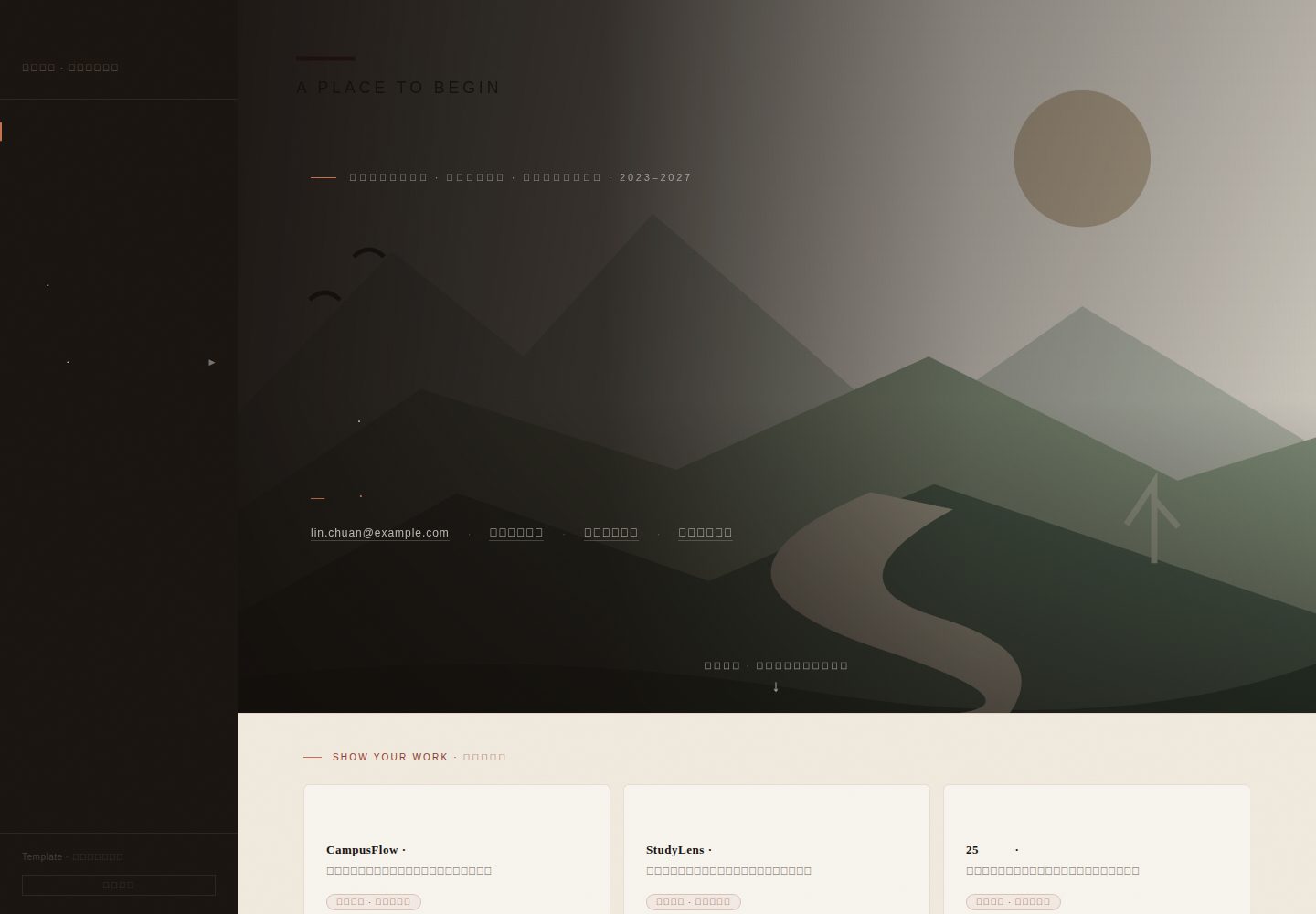
Desktop homepage1 / 2
Desktop captureTop of page
Actual screenshot captured by the server browser.
All pages & views 2
Screenshots show visual appearance; interactive behavior may differ.
Recorded 2026-10-10View source
What stands out
A quick read of the recorded project description.
Includes 25 growth writing examples, each with filling tips
Provides 8 original SVG illustrations and certificate placeholders, plus 4 fictional PDF sample materials
Supports in-page text editing, saving to the browser, and exporting HTML
Includes research abstract expansion, attachment previews, mobile menu, and keyboard operations
Offers content organization suggestions for graduate school recommendation, entrance exam/retest, and job hunting
Template Details
This is a pure static Chinese personal homepage template built with HTML, CSS, and JavaScript. It can be opened in a browser without installing dependencies or an internet connection. The page uses a paper texture and a chapter-based reading layout, with a sidebar containing sections for research, projects, resume, honors, growth, and a filling guide. The template includes fictional example content for a character named Lin Chuan, covering 25 growth writing examples, 8 original SVG illustrations and certificate placeholders, and 4 fictional PDF sample materials. It supports expanding research abstracts, attachment previews, a mobile menu, and keyboard operations.
Editing is done directly on the page: after clicking "Edit Example" at the bottom of the sidebar, text within dashed borders becomes editable; "Profile and Link Settings" allows unified changes to name, school/major/identity, email, and resume PDF path. Changes can be saved to the current browser or exported as an index.html containing the modifications. When sharing, the entire assets folder must be included; otherwise, styles, interactions, and attachments will be lost.
The template provides suggestions for priority content on the homepage and experience writing for three purposes: graduate school recommendation, entrance exam/retest, and job hunting, and notes that not all sections need to be filled. Replacing attachments requires updating the href, data-pdf-src, and openCert(...) paths in index.html accordingly. The code, original SVGs, and fictional PDF sample materials are provided under the MIT license; when redistributing, the license and copyright notice must be retained. Newly added personal photos, papers, and certificates require the user to confirm their public scope.
HTMLPortfolio
Is it right for your project?
Use Cases
- Showcasing research interests, course foundations, representative research, and verifiable achievements during graduate school recommendation applications
- Presenting foundational courses, graduation project, professional training, and future study plans during graduate entrance exam or retest
- Highlighting job direction, skills, internships/projects, and deliverables during job hunting
- Needing a Chinese personal homepage that can be edited offline and exported as HTML
Suitable For
- Chinese students preparing for graduate school recommendation, entrance exam, or job hunting
- Those who want to quickly build a personal homepage with static HTML and replace attachments themselves
- Applicants who need growth writing prompts and content organization references
- Users who can accept manually editing HTML and synchronizing attachment paths
Getting started & customization
Use these recorded setup notes alongside the repository instructions for your chosen version.
- 1
Double-click index.html to view the homepage in a browser; no dependencies or internet connection required
- 2
Click "Edit Example" at the bottom of the sidebar to modify text within dashed borders; click "Profile and Link Settings" to uniformly change name, school/major/identity, email, and resume PDF path
- 3
"Save to Browser" only saves in the current browser; "Export HTML" generates an index.html with modifications, which needs to replace the original file
- 4
When sharing, the entire assets folder must be included; sending only the HTML will lose styles, interactions, and attachments
- 5
When replacing attachments, keep the same filenames or update the href, data-pdf-src, and openCert(...) paths in index.html accordingly
License & source material
Usage conditions & limitations
Free to use · keep license noticeThis entry covers the free version under the MIT license in the public repository; the free scope is the code of this version and does not imply that external services or third-party materials are free.
Must comply with when using
- Free use, modification, commercial use, and distribution of this version's code are permitted.
- When distributing copies or substantial portions of the code, retain the original author's copyright notice and the full MIT license notice.
- The code is provided as-is; warranties and limitations of liability are governed by the original license and applicable law.
Additional costs & items to verify
- Demo images, fonts, icons, and other third-party materials must be checked against their respective licenses; they cannot be assumed free based solely on the code's MIT license.
- External services such as domains, hosting, databases, payments, or AI may incur additional charges.
- When distributing or deploying, the entire assets folder must be provided; sharing only index.html will cause styles, interactions, and attachments to fail.
- In-page edits are saved only locally in the current browser; changes will not sync across devices or browsers.
- The restore function can only clear locally saved changes in the browser; it cannot undo changes already exported and replaced into the HTML file.
- Before use, keep a backup of the original unfilled template for later restoration or refilling.
- The fictional example content in the template must not be used as real personal achievements.
- When redistributing the demo template, the "fictional example" label must be retained to distinguish samples from real achievements.
- Only this template folder or its ZIP may be shared; the original project's private materials and historical backups are not open source.
- Users must confirm the usage and public scope of any newly added photos, papers, and certificates.
- Before making real certificates public, cover ID numbers, student numbers, certificate numbers, QR codes, signatures, and unnecessary contact information.
- Paper content must accurately distinguish between planned, draft, submitted, accepted, and formally published, and provide corresponding evidence.
- Before use, replace the repository link with an actual accessible address.
- When contributing, do not submit personal IDs, real transcripts, keys, browser-saved data, or build artifacts.
View Original Text Basis
Permission is hereby granted, free of charge
Original License Text
分享时必须带上整个 `assets` 文件夹。单独发送 HTML 会丢失样式、交互和附件。
Original README
「保存到浏览器」只在当前浏览器保存,换电脑不会带走这些修改。
Original README
「恢复文件内容」清除当前浏览器保存的修改,重新载入当前 HTML 文件。它不会撤销已经导出并替换进文件的修改。
Original README
请保留一份未填写的模板。
Original README
不要将虚构示例当作个人成果使用。
Original README
分享这个演示模板时,请保留「虚构示例」标注,让使用者能够区分样稿与真实成果。
Original README
请只分享本模板文件夹或其 ZIP;原项目的私人材料与历史备份不属于开源内容。
Original README
个人填写后新增的照片、论文与证书,请自行确认其使用与公开范围。
Original README
真实证书公开前可遮盖身份证号、学号、证书编号、二维码、签名及不必要的联系方式
Original README
论文应准确区分计划、草稿、投稿、录用和正式发表,并提供相应证据。
Original README
仓库链接须换成实际可访问的地址。
Original README
https://github.com/firewildgod/personal-homepage-template/blob/main/LICENSEhttps://github.com/firewildgod/personal-homepage-template/blob/main/README.md不要提交个人证件、真实成绩单、密钥、浏览器保存数据或构建产物。
Original README
Compiled by DeepSeek based on repository license and README ·2026-10-10. Results only cover the materials read; dependencies, images, fonts, and subsequent term changes are subject to their respective original texts.
Project checks & description sources
Template Information
- Source platforms
- GitHub
- Documentation and maintenance reference score
- More documented · 80 / 100
- Technologies
- HTML
- Website type
- Portfolio
How this score is calculated
Our heuristic uses license records (up to 30), a demo link (12), a preview (10), stars (15), recorded maintenance (15), description completeness (8), feature records (5) and classification data (5). It is not a code, security or performance test, or a Google score. A link does not establish tested functionality.
What to verify for this project
- Repository update recorded
- 2026-10-10
- Screenshot last checked
- 2026-10-10
A demo link is listed. Check it with your own content and viewport sizes; its presence does not confirm that forms, authentication or payments work.
The catalog identifies HTML as the primary stack. Check the actual dependency manifest and lockfile for versions and hosting requirements. These notes use recorded metadata, not a code audit or a deployment test.
Use a selection guide →How this description was prepared
AI-assisted description based on catalog records and repository material. Repository authors are not automatically the reviewers of this description.
Review declaration: [email protected] · 2026-10-10
Inspect the recorded source material
SHA-256: 39b9de58def3c0721dac66962acdfb6fdbdaf924f5ab0d0c88d4d9ba778475c0
2026-10-10T08:59:18.808Z
Source file / repository# 个人主页模板 · Personal Homepage Template
面向保研、考研和求职的中文个人主页模板,采用纸张质感与章节阅读布局。下载即可打开,包含研究、项目、简历、荣誉和成长故事;可以在页面内编辑文字、保存修改并导出 HTML。
- 25 篇成长写作示例,从童年到大学,每篇附填写提示。
- 8 个原创 SVG 插图与证书占位、4 份实际 PDF 示例材料。
- 科研摘要展开、附件预览、移动端菜单和键盘操作。
- 纯静态 HTML/CSS/JavaScript,无第三方运行依赖,可离线使用。
- 使用 MIT 许可证,允许修改、复用和分发;保留许可证及版权声明。
## 获取模板
在线体验:[个人主页模板网站](https://firewildgod.github.io/personal-homepage-template/),无需登录即可查看完整页面与示例附件。
仓库:[firewildgod/personal-homepage-template](https://github.com/firewildgod/personal-homepage-template)。
可以点击 GitHub 的 **Use this template** 建立自己的仓库,也可以从 [Releases](https://github.com/firewildgod/personal-homepage-template/releases) 下载完整分享包,或点击 **Code → Download ZIP** 下载源码。Git 用户可运行:
```sh
git clone https://github.com/firewildgod/personal-homepage-template.git
```
这是一个可以直接在浏览器打开的静态个人主页。林川、星桥大学、成长故事、课程记录、奖项、论文和项目均为虚构,页面与附件中的数字也仅作排版示例。
## 打开与编辑
1. 双击 `index.html` 查看主页;侧栏包含科研、项目、简历、荣誉、成长章节和填写指南。
2. 点击侧栏底部的「编辑示例」。虚线范围内的文字可以直接修改;编辑时点击卡片内的文字不会跳转。
3. 点击底部「资料与链接设置」,统一修改姓名、学校/专业/身份、邮箱与简历 PDF 路径。姓名和首页身份会同步,正文中的经历、作者与奖项需逐项填写。
4. 「保存到浏览器」只在当前浏览器保存,换电脑不会带走这些修改。「导出 HTML」生成包含修改的 `index.html`;用它替换本文件夹中的同名文件。
5. 分享时必须带上整个 `assets` 文件夹。单独发送 HTML 会丢失样式、交互和附件。
「恢复文件内容」清除当前浏览器保存的修改,重新载入当前 HTML 文件。它不会撤销已经导出并替换进文件的修改。请保留一份未填写的模板。
## 按用途组织内容
| 用途 | 首页优先展示 | 每条经历如何写 |
| --- | --- | --- |
| 保研 | 研究兴趣、课程基础、代表研究、可核查成果 | 问题 → 文献/方法 → 自己的贡献 → 实验结果与局限 |
| 考研/复试 | 基础课程、毕业设计、专业训练、未来学习计划 | 专业基础 → 一次具体实践 → 对问题的理解 → 希望继续学习什么 |
| 求职 | 岗位方向、技能、实习/项目、交付成果 | 背景 → 负责范围 → 实现与协作 → 可验证的结果 |
不必填满全部栏目。没有论文时,可将「科研」改为课程研究、复现实验或毕业设计;没有奖项时,可以展示作品、课程成果与实践记录。不要将虚构示例当作个人成果使用。
成长章节采用「虚构故事+写作提示」。童年到大学不必逐年记录,选对当下方向有解释力的转折。写清场景、行动、变化,避免替别人下判断;公开版本可省略家庭隐私、具体住址和他人姓名。
## 替换附件
| 文件 | 用途 |
| --- | --- |
| `assets/template/resume-sample.pdf` | 虚构简历示例 |
| `assets/template/transcript-sample.pdf` | 虚构课程记录示例 |
| `assets/template/paper-one-sample.pdf` | CampusFlow 研究展示示例 |
| `assets/template/paper-two-sample.pdf` | StudyLens 研究展示示例 |
| `assets/template/award-modeling.svg` | 虚构建模奖项 |
| `assets/template/award-design.svg` | 虚构应用设计奖项 |
| `assets/template/scholarship.svg` | 虚构奖学金 |
| `assets/template/language-certificate.svg` | 虚构语言能力展示 |
| `assets/template/project-demo.svg` | 项目流程图示例 |
可以用自己的材料替换同名文件;更换文件名或格式时,请同步修改 `index.html` 的 `href`、`data-pdf-src` 与 `openCert(...)` 路径。PDF 使用 `openCert('pdf', '相对路径.pdf', '标题')`,图片使用 `openCert('img', '相对路径.svg', '标题')`。简历路径也可以在资料设置中修改。部分浏览器不能嵌入 PDF 时,使用下载/打开链接查看。
真实证书公开前可遮盖身份证号、学号、证书编号、二维码、签名及不必要的联系方式;论文应准确区分计划、草稿、投稿、录用和正式发表,并提供相应证据。仓库链接须换成实际可访问的地址。
## 文件结构与部署
```text
index.html 页面结构、内容与原有主体样式
assets/template/template.css 模板补充样式
assets/template/template.js 导航、预览、编辑、保存与导出
assets/template/*.svg 原创示例图和证书占位
assets/template/*.pdf 虚构示例材料
README.md 本说明
LICENSE MIT 许可证
build.mjs 可选静态打包脚本
package.json 可选构建命令,无第三方依赖
.openai/hosting.json 无 Site 身份的静态托管配置
```
打开模板无需安装依赖,也无需联网。若托管平台需要构建目录,在安装 Node.js 的环境运行 `node build.mjs`,将生成的 `dist` 目录作为静态站点根目录。
本仓库通过 GitHub Pages 发布,来源为 `main` 分支的根目录。使用 **Use this template** 建立自己的仓库后,可在 **Settings → Pages → Deploy from a branch** 中选择自己的默认分支和 **/ (root)**,发布自己的个人主页;`.nojekyll` 会让 GitHub 直接发布静态文件。向发布分支推送修改后,网站会自动更新。
分享这个演示模板时,请保留「虚构示例」标注,让使用者能够区分样稿与真实成果。制作自己的个人主页时,先逐页替换人物、作者、时间、指标和附件,再按需要删除已替换内容旁的示例标签与填写提示。请只分享本模板文件夹或其 ZIP;原项目的私人材料与历史备份不属于开源内容。
## 许可证与贡献
代码、原创 SVG 和虚构 PDF 示例材料按 [MIT License](LICENSE) 提供。再分发时保留许可证及版权声明。个人填写后新增的照片、论文与证书,请自行确认其使用与公开范围。
欢迎提交 Issue 或 Pull Request 改进布局、交互和写作提示。示例内容请继续使用虚构人物与成果,不要提交个人证件、真实成绩单、密钥、浏览器保存数据或构建产物。
Explore similar templates
Compare previews and descriptions within the same stack and category.

simplefolio
Simplefolio is a minimal single-page portfolio template for developers, built with HTML, Bootstrap, SCSS, and Parcel under the MIT license. It includes Hero, About, Projects, Contact, and Footer sections, with content edited in /src/index.html and theme colors controlled by two SCSS variables.
HTML · Portfolio

Freelancer
A bright, single-page Bootstrap portfolio template for freelancers, designers, and small studios. It includes a responsive portfolio grid with modal detail windows and an SB Forms contact form that requires an API token.
HTML · Portfolio

Resume
A single-page resume and CV template from Start Bootstrap, built on Bootstrap with a fixed sidebar and content sections.
HTML · Portfolio

Creative
A single-page marketing template by Start Bootstrap for creative agencies and product services, built on Bootstrap with SCSS, featuring a portfolio grid and call-to-action sections. It includes pre-set SB Forms markers for form integration and npm build scripts for source customization.
HTML · Corporate Website

Grayscale
A dark single-page Bootstrap template from Start Bootstrap for photography, events and brand storytelling, with a large hero and clearly separated sections.
HTML · Corporate Website

startbootstrap-stylish-portfolio
A one-page Bootstrap portfolio theme from Start Bootstrap with multiple content sections and an off-canvas navigation menu. Basic use means editing HTML/CSS under dist and opening index.html; advanced use relies on npm with Pug and SCSS build scripts.
HTML · Portfolio