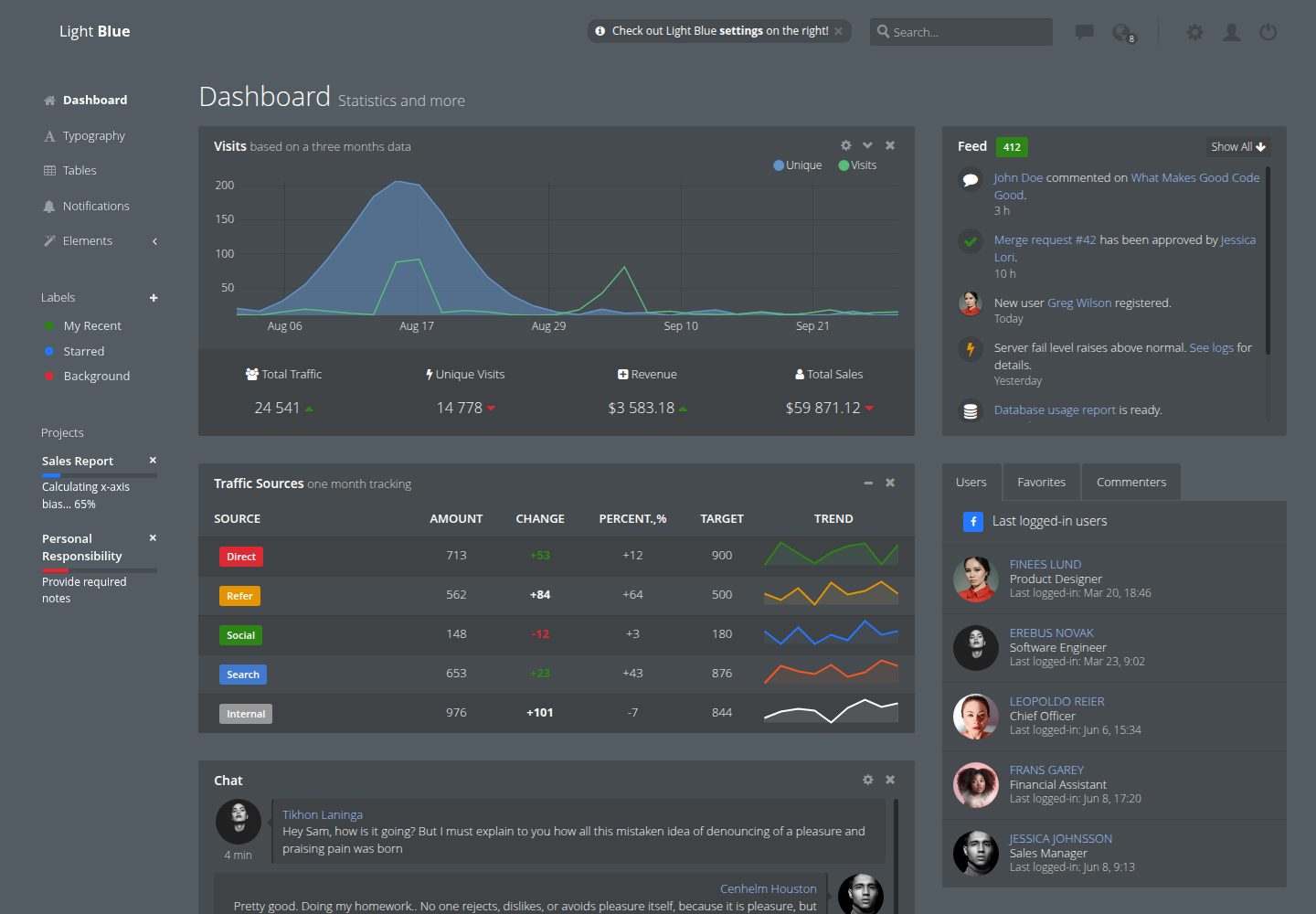
Built with Bootstrap and SCSS, with style customizations for components like buttons and modals
HTMLAdmin dashboardStarter
light-blue-dashboard — HTML Admin dashboard Template
By flatlogic
Light Blue Dashboard is a free and open-source admin dashboard template released by Flatlogic, built with Bootstrap and SCSS, featuring a transparent style and responsive layout; the repository provides a Lite version with limited functionality.
Explore the design
Compare the page layouts and mobile experience. Open any screenshot for a closer look.
Desktop homepage1 / 2
Desktop captureTop of page
Actual screenshot captured by the server browser.
All pages & views 2
Screenshots show visual appearance; interactive behavior may differ.
Recorded 2026-10-01View source
What stands out
A quick read of the recorded project description.
Transparent style design paired with responsive layout, offering desktop and mobile previews
The Lite version includes pages such as dashboard examples, typography, tables, notifications, basic charts, icons, and maps
Uses Grunt to compile /src source code to /dist, with grunt watch supporting real-time recompilation of Handlebars templates and SCSS
Code is MIT-licensed, allowing free use, modification, commercialization, and distribution
Template Details
Light Blue Dashboard is an admin dashboard template built with HTML, Bootstrap, and SCSS, maintained by Flatlogic and licensed under MIT. Its visual characteristics include a transparent style and responsive layout, with pages displaying correctly on both desktop and mobile devices.
The code in the repository is the Lite free version, containing pages and components such as dashboard examples, typography, tables, notifications, basic charts, icons, and maps, with style customizations applied to Bootstrap components like buttons and modals. Theme switching, login pages, and additional pages are only available in the full version offered on the Flatlogic website, which also includes React and Angular implementations.
The build process relies on yarn, bower, and a globally installed grunt: first install dependencies, then run grunt to compile source code from /src to /dist, and afterward access dist/index.html via a web server (such as Apache, nginx, or an IDE's built-in server); opening it directly as a file may cause some features to malfunction. During development, grunt watch can monitor changes in /src and recompile Handlebars templates and SCSS styles in real time.
Before use, note: the code itself is MIT-licensed and can be used, modified, commercialized, and distributed for free, but third-party assets such as demo images, fonts, and icons require separate verification under their respective licenses; external services like domains, hosting, and databases may incur additional charges.
HTMLAdminStarter
Is it right for your project?
Use Cases
- Quickly building static page prototypes for admin interfaces
- Customizing transparent-style data display interfaces on top of Bootstrap projects
- Serving as a sample project for learning the Grunt + SCSS + Handlebars build process
- Providing an interface starting point for subsequent integration with CRM, email management, marketing automation, and other systems
Suitable For
- Front-end developers needing a free and open-source admin template
- Static page projects using Bootstrap and SCSS as the tech stack
- Teams wanting to evaluate the Lite version before deciding whether to use the full version
Getting started & customization
Use these recorded setup notes alongside the repository instructions for your chosen version.
- 1
After cloning the repository, run yarn install and bower install in sequence to install dependencies
- 2
Install Grunt globally: yarn install -g grunt
- 3
Run grunt to compile /src to /dist, then access dist/index.html via a web server
- 4
During development, run grunt watch to monitor changes in /src and automatically recompile templates and styles
- 5
More features like theme switching and login pages require obtaining the full version from the Flatlogic website
License & source material
Usage conditions & limitations
Free to use · keep license noticeThis entry covers the free version under MIT license in the public repository; the free scope applies to that version's code and does not imply that external services or third-party assets are free.
Must comply with when using
- Permits free use, modification, commercialization, and distribution of this version's code.
- When distributing copies or substantial portions of the code, retain the original author's copyright notice and the full MIT license notice.
- The code is provided as-is; warranties and limitations of liability are governed by the original license and applicable law.
Additional costs & items to verify
- This repository only provides a Lite free version with limited functionality, not the complete product; theme switching, login pages, and additional pages are not included in the free version.
- Features such as theme switching, login pages, and additional pages are only available in the paid full version offered on the Flatlogic website; the free version does not include these features.
- Complete Bootstrap 4, React, and Angular versions must be obtained through the Flatlogic website; this repository does not include these implementations.
- Pages must be accessed via a web server (such as Apache, nginx, or an IDE's built-in server); opening directly as a file may cause some features to malfunction.
- Integration with accounting software, CRM, email management, marketing automation, website analytics, and other systems is a paid service provided by Flatlogic and requires separate purchase.
- Demo images, fonts, icons, and other third-party assets require verification under their respective licenses and cannot be judged solely based on the code's MIT license.
- External services such as domains, hosting, databases, payments, or AI may incur additional charges.
View Original Text Basis
Permission is hereby granted, free of charge
Original License Text
This repository offers a sneak peek through a limited free version of Light Blue
Original README
All other features like themining, login, additional pages, etc are available in [full version]
Original README
full bootstrap 4](https://flatlogic.com/admin-dashboards/light-blue-html5/demo), [React](https://flatlogic.com/admin-dashboards/light-blue-react/demo), and [Angular](https://flatlogic.com/admin-dashboards/light-blue-angular/demo) versions accessible via our website
Original README
The page must be served from a web server, e.g. apache, nginx, WebStorm built-in web server, etc., otherwise some features may not work properly.
Original README
https://github.com/flatlogic/light-blue-dashboard/blob/master/LICENSEhttps://github.com/flatlogic/light-blue-dashboard/blob/master/README.mdWe can integrate admin dashboards with such systems as your accounting software, customer relationship management (CRM) system, email management, marketing automation, website analytics program, etc.
Original README
Compiled by DeepSeek based on repository license and README ·2026-10-01. Results only cover the materials read; dependencies, images, fonts, and subsequent term changes are subject to their respective original texts.
Project checks & description sources
Template Information
- Source platforms
- GitHub
- Documentation and maintenance reference score
- More documented · 96 / 100
- Technologies
- HTML
- Website type
- Admin dashboard · Starter
How this score is calculated
Our heuristic uses license records (up to 30), a demo link (12), a preview (10), stars (15), recorded maintenance (15), description completeness (8), feature records (5) and classification data (5). It is not a code, security or performance test, or a Google score. A link does not establish tested functionality.
What to verify for this project
- Repository update recorded
- 2026-07-21
- Screenshot last checked
- 2026-10-01
A demo link is listed. Check it with your own content and viewport sizes; its presence does not confirm that forms, authentication or payments work.
The catalog identifies HTML as the primary stack. Check the actual dependency manifest and lockfile for versions and hosting requirements. These notes use recorded metadata, not a code audit or a deployment test.
Use a selection guide →How this description was prepared
AI-assisted description based on catalog records and repository material. Repository authors are not automatically the reviewers of this description.
Automatically checked against source and license rules; no manual editorial review.
Inspect the recorded source material
SHA-256: f8cc51967fd317f1fc200bdde7ffd3ee98dcf213f32850d55b34fef25170e365
2026-10-01T01:37:09.399Z
Source file / repository
# Light Blue Dashboard - free and open source admin dashboard template
The [Light Blue Dashboard](https://flatlogic.com/admin-dashboards/light-blue-html5/demo), a free and open-source admin dashboard template, features an awesome transparent design and responsive layout built with Bootstrap. This repository offers a sneak peek through a limited free version of Light Blue, with [full bootstrap 4](https://flatlogic.com/admin-dashboards/light-blue-html5/demo), [React](https://flatlogic.com/admin-dashboards/light-blue-react/demo), and [Angular](https://flatlogic.com/admin-dashboards/light-blue-angular/demo) versions accessible via our website, providing versatile development options for creating intuitive and visually appealing [business software](https://flatlogic.com/) interfaces.
[View Demo](https://flatlogic.github.io/light-blue-dashboard/) | [Download](https://github.com/flatlogic/light-blue-dashboard/archive/master.zip) | [Full version](https://flatlogic.com/admin-dashboards/light-blue-html5) | [More templates](https://flatlogic.com/admin-dashboards) | [Support forum](https://flatlogic.com/forum)
[](https://flatlogic.github.io/light-blue-dashboard/)
## Features
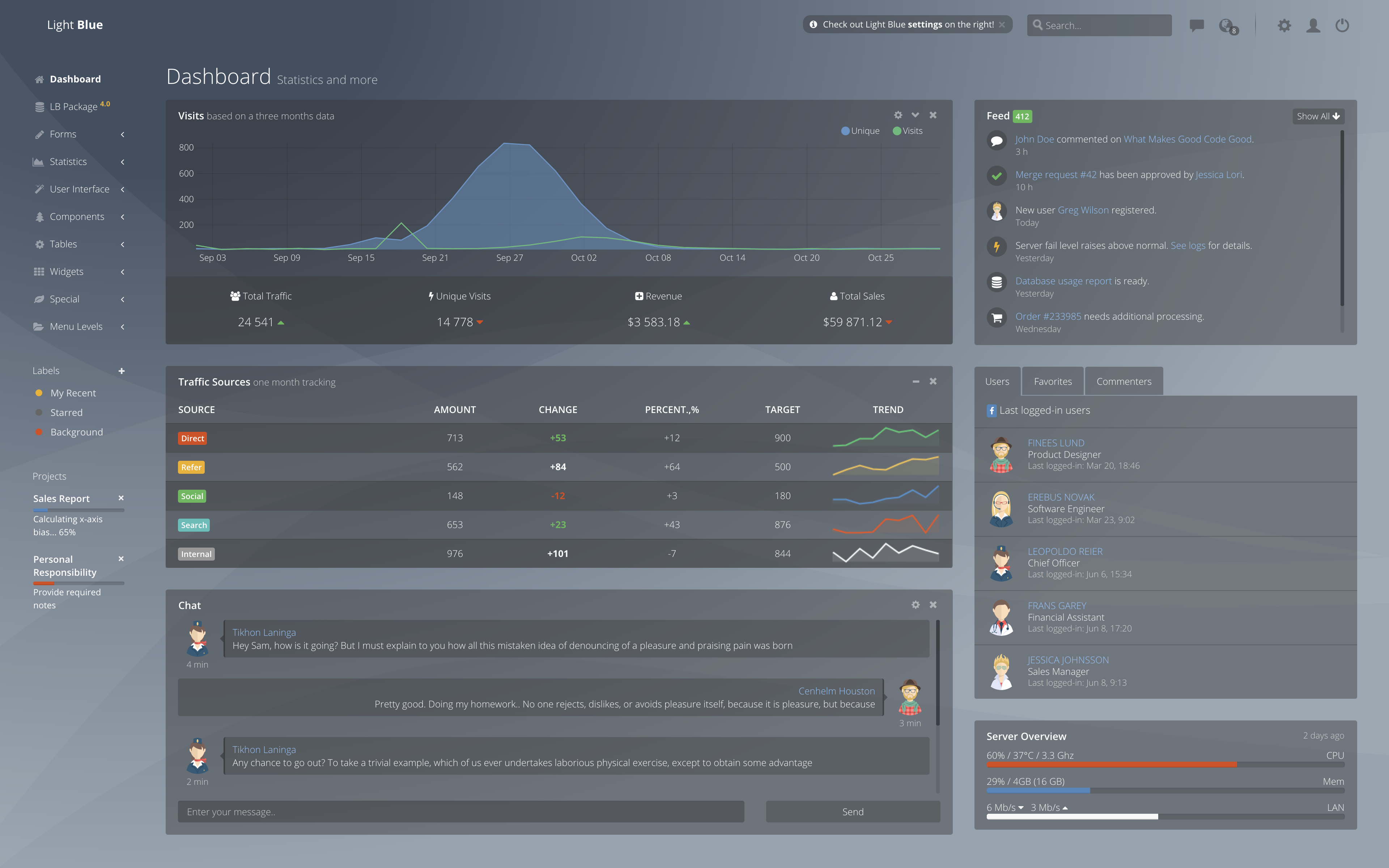
Using this template you will be able to leverage lots of built-in components and thus focus on building features that set you apart from competitors rather than bulding everything from scratch. Lite version of a Light Blue Dashboard includes following features and pages:
* Bootstrap & SCSS
* Unique transparent design
* Responsive layout
* Styled Bootstrap components like buttons, modals, etc
* Dashboard sample
* Typography
* Tables
* Notifications
* Base charts
* Icons
* Maps
All other features like themining, login, additional pages, etc are available in [full version](https://flatlogic.com/admin-dashboards/light-blue-html5/demo).
[](https://flatlogic.com/admin-dashboards/light-blue-html5/demo)
## Quick Start
#### 1. Get the latest version
You can start by cloning the latest version of Light Blue Dashboard on your local machine by running:
```shell
$ git clone -o light-blue-dashboard -b master --single-branch \
https://github.com/flatlogic/light-blue-dashboard.git MyApp
$ cd MyApp
```
#### 2. Run `yarn install && bower install`
This will install both run-time project dependencies and developer tools listed
in [package.json](../package.json) file. We are moving all dependencies to yarn, so there will be no bower dependencies soon.
#### 3. Run `yarn install -g grunt`
This commant will install grunt task runner globally.
#### 4. Run `grunt`
This command will build the app from the source files (`/src`) into the output
`/dist` folder. Then open `dist/index.html` in your browser.
Now you can open your web app in a browser, on mobile devices and start
hacking. The page must be served from a web server, e.g. apache, nginx, WebStorm built-in web server, etc., otherwise some features may not work properly.
#### 5. Run `grunt watch`
This command will watch for changes in `/src` and recompile handlebars' templates & scss styles on the fly into html & css accordingly.
## Integration & Customization
[](https://flatlogic.com/services/admin-template-integration)
Light Blue Dashboard is a part of [admin dashboard solution](https://flatlogic.com/services/admin-template-integration) provided by Flatlogic. We can integrate admin dashboards with such systems as your accounting software, customer relationship management (CRM) system, email management, marketing automation, website analytics program, etc. With this dashboard, the owner of the website (platform) can easily track orders and their success rate, track social metrics such as the most popular referring social media sites and their appropriate URLs, monitor sales states and periods of growth to better understand what makes users tick. [Contact us](https://flatlogic.com/contact) to learn more.
## Support
For any additional information please go to our [**support forum**](https://flatlogic.com/forum) and raise your questions or feedback provide there. We highly appreciate your participation!
## How can I support developers?
- Star our GitHub repo :star:
- [Tweet about it](https://twitter.com/intent/tweet?text=Amazing%20dashboard%20built%20with%20NodeJS,%20React%20and%20Bootstrap!&url=https://github.com/flatlogic/sing-app&via=flatlogic).
- Create pull requests, submit bugs, suggest new features or documentation updates :wrench:
- Follow [@flatlogic on Twitter](https://twitter.com/flatlogic).
- Subscribe to Flatlogic newsletter at [flatlogic.com](https://flatlogic.com/)
- Like our page on [Facebook](https://www.facebook.com/flatlogic/) :thumbsup:
## Premium themes
Looking for premium themes and templates? Check out our other template at [flatlogic.com](https://flatlogic.com/admin-dashboards).
## License
Light Blue Dashboard is [MIT](https://github.com/flatlogic/light-blue-dashboard/blob/master/LICENSE.txt)-licensed.
Explore similar templates
Compare previews and descriptions within the same stack and category.

gentelella
Gentelella v4 is a free, open-source admin dashboard template maintained by Colorlib, built with vanilla JavaScript, SCSS, and Vite 8 without Bootstrap or jQuery.
HTML · Admin dashboard

coreui-free-bootstrap-admin-template
A free Bootstrap admin template maintained by CoreUI, built on CoreUI's own UI component library. It provides compiled HTML pages and Pug template source code, covering dashboards, authentication, forms, components, icons, and error pages.
HTML · Admin dashboard

dashboards
A collection of responsive dashboard HTML templates open-sourced by Keen IO, built on CSS Grid, offering multiple prebuilt admin data interface layouts.
HTML · Admin dashboard

SB Admin 2
SB Admin 2 is a classic Bootstrap admin template from Start Bootstrap, offering dashboards, charts, tables, and common management pages.
HTML · Admin dashboard

Adminator-admin-dashboard
Adminator 4 is a vanilla HTML, CSS and JavaScript admin dashboard template with a CSS-variable token design system, built-in light and dark themes, no jQuery or Bootstrap dependency, and 18 pages covering dashboards, mail, calendar, charts, forms, tables and error pages.
HTML · Admin dashboard

SB Admin
SB Admin is a lightweight, open-source Bootstrap admin template from Start Bootstrap. It offers a sidebar-and-top-bar layout with data tables, forms, and stat cards, plus responsive design.
HTML · Admin dashboard