Single-page structure with all content in one index.html
HTMLStarter
aula-template — HTML Starter Template
By formgong
AULA is a one-page HTML website template for high-end interior design studios, with all page content in a single index.html and forms integrated with Formgong.
Explore the design
Compare the page layouts and mobile experience. Open any screenshot for a closer look.
Desktop homepage1 / 2
Desktop captureTop of page
Actual screenshot captured by the server browser.
All pages & views 2
Screenshots show visual appearance; interactive behavior may differ.
Recorded 2026-10-09View source
What stands out
A quick read of the recorded project description.
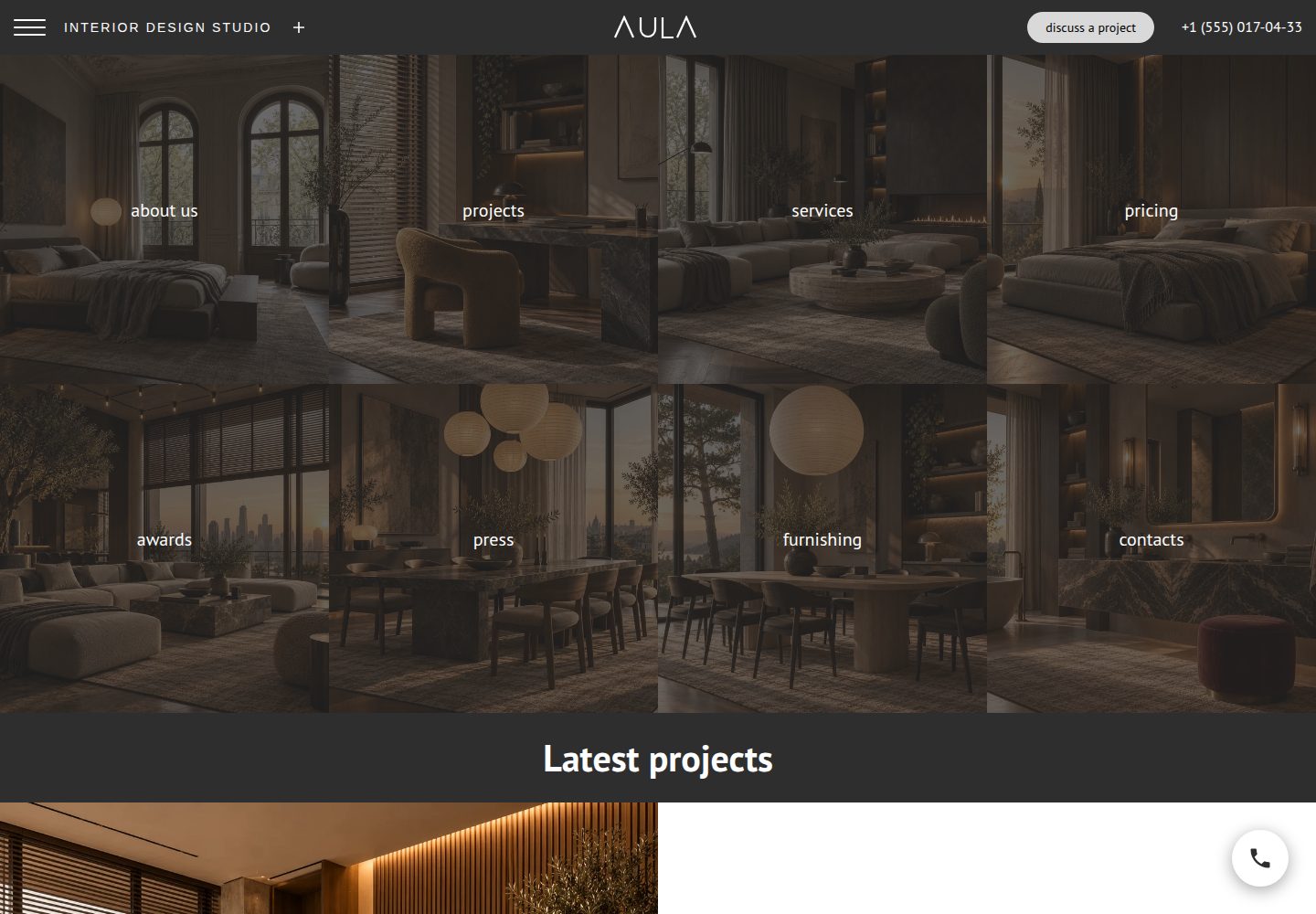
Fixed dark navigation bar with a left-sliding menu, about panel, centered wordmark, and phone
4 × 2 square photo tiles that zoom on hover and show short text; Services and furnishing can scroll to the form and check services
Five full-width project rows with photos and text alternating left and right, each project using --pc to define its own color
Footer request form with space type, area, and service chips plus name, phone, and email fields, and a circular phone button that opens a callback window
Forms integrated with Formgong; fk_your_access_key must be replaced, and the thank-you message appears only when success: true is returned
Template Details
AULA is a one-page website template for interior design studios. The entire site is contained in a single index.html file; the studio name AULA, address, and projects shown in the demo are fictional.
The page structure consists of several parts: a fixed dark navigation bar at the top, containing a menu button, a tagline, an about button that opens a studio introduction panel, a centered wordmark, a discuss a project button, and a phone number; the menu slides in from the left, and the Projects item expands into a sublist. Below the navigation is a 4 × 2 grid of eight square photo tiles, covered by a dark overlay, corresponding to about us, projects, services, pricing, awards, press, furnishing, and contacts; on hover, the photo zooms in, the overlay fades out, and a short line of text appears, with Services and furnishing scrolling to the request form and checking the corresponding service. Further down are five full-width project rows, with photos and text alternating left and right; each project defines its own color via the --pc variable, used for the label, details, title, and view link; view enlarges the photo. The footer is a dark request form, containing chips for space type, area (each single-select), and services (multi-select), plus name, phone, email, and a send request button. There is also a circular phone button that shakes on hover and, when clicked, opens a small window with the number and a callback form.
The forms require Formgong: create a form in the Formgong backend and copy the access key, then replace all fk_your_access_key in index.html (two forms in total: project request and callback). Each form sends a hidden request field, and multiple checked services are submitted as multiple services values. The form shows a thank-you message only when Formgong returns success: true; otherwise it shows an error and retains the entered content.
Editable items include the --dark (header and footer) and --pill (buttons) color variables at the top of the styles, and each project row sets its own --pc in its style attribute; the wordmark is an SVG symbol near the top of the body (id="wordmark"). If the site has more than one page, the tile and menu links need to point to your own pages. The thirteen photos in the template were generated by ChatGPT image generation (OpenAI) for this template and saved as WebP, totaling about 1.8 MB; they can be replaced with your own project images while keeping the file names unchanged.
Regarding licensing, the repository uses the MIT license, allowing free use, modification, commercial use, and distribution of this version of the code; when distributing copies or substantial portions of the code, the original author's copyright notice and the full MIT license notice must be retained; the code is provided as is. Third-party assets such as demo images, fonts, and icons need to be checked against their respective licenses, and external services such as domains and hosting may incur additional fees.
HTMLStarter
Is it right for your project?
Use Cases
- Building a one-page showcase website for an interior design studio
- As a starting point for a static site that needs forms to collect project inquiries and callback requests
- For demonstrating a page layout with dark navigation, square photo tiles, and alternating project rows
- Quickly integrating form submission when a Formgong account already exists
Suitable For
- Showcase websites for interior design or related design studios
- Projects that accept a single-page structure and do not need multi-page routing
- Developers or studios willing to use Formgong for form submission
- Static sites that need modifiable, commercially usable code under the MIT license
Getting started & customization
Use these recorded setup notes alongside the repository instructions for your chosen version.
- 1
Create a form in the Formgong backend and copy the access key, then replace all fk_your_access_key in index.html (two forms in total: project request and callback)
- 2
The form shows a thank-you only when Formgong returns success: true; otherwise it shows an error and retains the entered content
- 3
Color variables are at the top of the styles: --dark controls the header and footer, --pill controls buttons; each project row sets its own --pc in the style attribute
- 4
The wordmark is an SVG symbol near the top of the body (id="wordmark"); if the site has more than one page, the tile and menu links need to point to your own pages
- 5
The template photos were generated by ChatGPT image generation and saved as WebP (about 1.8 MB total); they can be replaced with your own project images while keeping the file names unchanged
License & source material
Usage conditions & limitations
Free to use · keep license noticeThis entry covers the free version under the MIT license in the public repository; the free scope is this version of the code and does not mean external services or third-party assets are free.
Must comply with when using
- Free use, modification, commercial use, and distribution of this version of the code are allowed.
- When distributing copies or substantial portions of the code, retain the original author's copyright notice and the full MIT license notice.
- The code is provided as is; warranties and limitations of liability are governed by the original license and applicable law.
Additional costs & items to verify
- Demo images, fonts, icons, and other third-party assets need to be checked against their respective licenses and cannot be judged solely by the code's MIT license.
- External services such as domains, hosting, databases, payments, or AI may incur additional fees.
- Using the form functionality requires registering with Formgong and obtaining an access key, then replacing all fk_your_access_key in index.html; form submission depends on the external Formgong service.
- The form shows a thank-you only when Formgong returns success: true; otherwise it shows an error and retains the entered content, so behavior depends on the external service response.
- The thirteen photos in the template were generated by ChatGPT image generation (OpenAI) and saved as WebP; they can be replaced with your own project images, but the file names must remain unchanged.
View Original Text Basis
Permission is hereby granted, free of charge
Original License Text
replace every `fk_your_access_key` in `index.html` of your copy with your Formgong access key (free at https://formgong.com/new) and commit
Original README
A form shows thanks only when Formgong answers `success: true`. If the answer is anything else, it shows the error and keeps what was typed.
Original README
https://github.com/formgong/aula-template/blob/main/LICENSEhttps://github.com/formgong/aula-template/blob/main/README.mdThe thirteen photos were generated for this template with ChatGPT image generation (OpenAI) and saved as WebP, about 1.8 MB in all. You may use them in your own site.
Original README
Compiled by DeepSeek based on repository license and README ·2026-10-09. Results only cover the materials read; dependencies, images, fonts, and subsequent term changes are subject to their respective original texts.
Project checks & description sources
Template Information
- Source platforms
- GitHub
- Documentation and maintenance reference score
- More documented · 80 / 100
- Technologies
- HTML
- Website type
- Starter
How this score is calculated
Our heuristic uses license records (up to 30), a demo link (12), a preview (10), stars (15), recorded maintenance (15), description completeness (8), feature records (5) and classification data (5). It is not a code, security or performance test, or a Google score. A link does not establish tested functionality.
What to verify for this project
- Repository update recorded
- 2026-10-09
- Screenshot last checked
- 2026-10-09
A demo link is listed. Check it with your own content and viewport sizes; its presence does not confirm that forms, authentication or payments work.
The catalog identifies HTML as the primary stack. Check the actual dependency manifest and lockfile for versions and hosting requirements. These notes use recorded metadata, not a code audit or a deployment test.
Use a selection guide →How this description was prepared
AI-assisted description based on catalog records and repository material. Repository authors are not automatically the reviewers of this description.
Review declaration: [email protected] · 2026-10-10
Inspect the recorded source material
SHA-256: 57410543f136cbe3c14e335494e0c78b6611c5402b0eb3b36c3a3f05fecbed10
2026-10-09T18:14:15.538Z
Source file / repository# AULA: a premium interior design studio site with Formgong forms **Live demo:** https://aula.formgong.com · Download: the [latest release](https://github.com/formgong/aula-template/releases/latest) zip. [](https://deploy.workers.cloudflare.com/?url=https://github.com/formgong/aula-template) [](https://vercel.com/new/clone?repository-url=https%3A%2F%2Fgithub.com%2Fformgong%2Faula-template&project-name=aula&repository-name=aula) Each button copies the site to your GitHub and publishes it. Then replace every `fk_your_access_key` in `index.html` of your copy with your Formgong access key (free at https://formgong.com/new) and commit: the host republishes on its own. Сайт преміальної студії дизайну інтер'єру з формами Формгонг A one-page template for an interior design studio, in a single `index.html`. The demo studio, AULA, its address and projects are fictional. - **Header.** A dark bar that stays on top. It has a menu button, the tagline, an "about" button that opens a panel with the studio text, a centred wordmark, a "discuss a project" pill and the phone number. The menu slides in from the left, and Projects opens a sub-list. - **Tiles.** Eight square photos in a 4 × 2 grid under a dark veil: about us, projects, services, pricing, awards, press, furnishing, contacts. On hover the photo zooms, the veil lifts and a short line of text opens. "Services" and "furnishing" scroll to the request form and tick that service. - **Latest projects.** Five full-width rows, photo and text side by side, swapping sides on every row. Each project has its own colour (`--pc`), used for the tag, the details, the title and the "view" link. "view" opens the photo large. - **Request form.** On the dark footer: chips for type of space and area (pick one each) and for services (pick several), name, phone and email, and a "send request" pill. - **Call button.** A round phone button that shakes on hover. It opens a small window with the number and a call-back form. ## English **Set up the forms** 1. Create a form in the Formgong dashboard and copy its access key. 2. In `index.html`, replace every `fk_your_access_key` with that key. There are two forms, project request and call back. 3. Each form sends a hidden `request` field. Several ticked services arrive as several `services` values. A form shows thanks only when Formgong answers `success: true`. If the answer is anything else, it shows the error and keeps what was typed. **Edit** - Colours are at the top of the styles: `--dark` for the header and footer, and `--pill` for the buttons. Each project row sets its own `--pc` in its `style` attribute. - The wordmark is one SVG `<symbol id="wordmark">` near the top of `<body>`. - Point the tiles and menu links at your own pages if your site has more than one page. **Images.** The thirteen photos were generated for this template with ChatGPT image generation (OpenAI) and saved as WebP, about 1.8 MB in all. You may use them in your own site. Replace them with your own projects, keeping the file names. ## Українська Односторінковий шаблон для студії дизайну інтер'єру. Студія AULA, адреса й проєкти вигадані. На сторінці: - темна шапка з бічним меню і панеллю «про нас»; - вісім квадратних плиток із фото: під курсором фото збільшується, темна вуаль зникає і з'являється короткий текст; - п'ять проєктів рядами, кожен зі своїм кольором, фото відкривається великим; - форма запиту з чипами (тип приміщення, площа, послуги); - кругла кнопка дзвінка з віконцем зворотного дзвінка. **Налаштування.** Створіть форму в кабінеті Formgong і замініть усі `fk_your_access_key` у `index.html` на свій ключ (форм дві). Подяка з'являється лише тоді, коли Formgong відповідає `success: true`. **Зображення:** тринадцять фото згенеровано для цього шаблону в ChatGPT (OpenAI) і збережено у WebP, разом близько 1,8 МБ. Їх можна використовувати на своєму сайті. MIT license.
Explore similar templates
Compare previews and descriptions within the same stack and category.

startbootstrap-simple-sidebar
A Bootstrap off-canvas sidebar navigation HTML starter template from Start Bootstrap. It provides directly editable HTML and CSS in the dist directory, while the source uses Pug, SCSS, and JavaScript with npm build scripts for live preview and compilation.
HTML · Starter

adminkit
AdminKit is a free, MIT-licensed HTML admin and dashboard template built on Bootstrap 5. The free version includes 15 demo pages, 1 plugin, and 1 color scheme, with hundreds of UI components, forms, tables, charts, and icons.
HTML · Admin dashboard

Landing-Page
A general-purpose landing page HTML template maintained by Tailwind Toolbox, written in pure HTML and loading the complete Tailwind CSS via CDN.
HTML · Corporate Website

light-bootstrap-dashboard
Light Bootstrap Dashboard is a free, MIT-licensed admin dashboard template from Creative Tim, built on Bootstrap with a responsive static HTML structure.
HTML · Admin dashboard

sing-app
Sing App Lite is a free, open-source admin dashboard template from Flatlogic, built with Bootstrap 4.5 and SCSS. It provides a responsive layout, dashboard examples, typography, tables, notifications, basic charts, icons, maps, and a hover sidebar, along with styled Bootstrap components.
HTML · Admin dashboard

startbootstrap-modern-business
Modern Business is a multipurpose Bootstrap full-site HTML template from Start Bootstrap with 17 standalone pages covering home, about, services, portfolio, pricing, blog, FAQ, and contact.
HTML · Starter