Single-page HTML template with all content in one index.html
HTMLStarter
ocra-template — HTML Starter Template
By formgong
Ocra is a single-page HTML website template for small handmade businesses that take orders by message rather than a shopping cart, with seven built-in Formgong forms.
Explore the design
Compare the page layouts and mobile experience. Open any screenshot for a closer look.
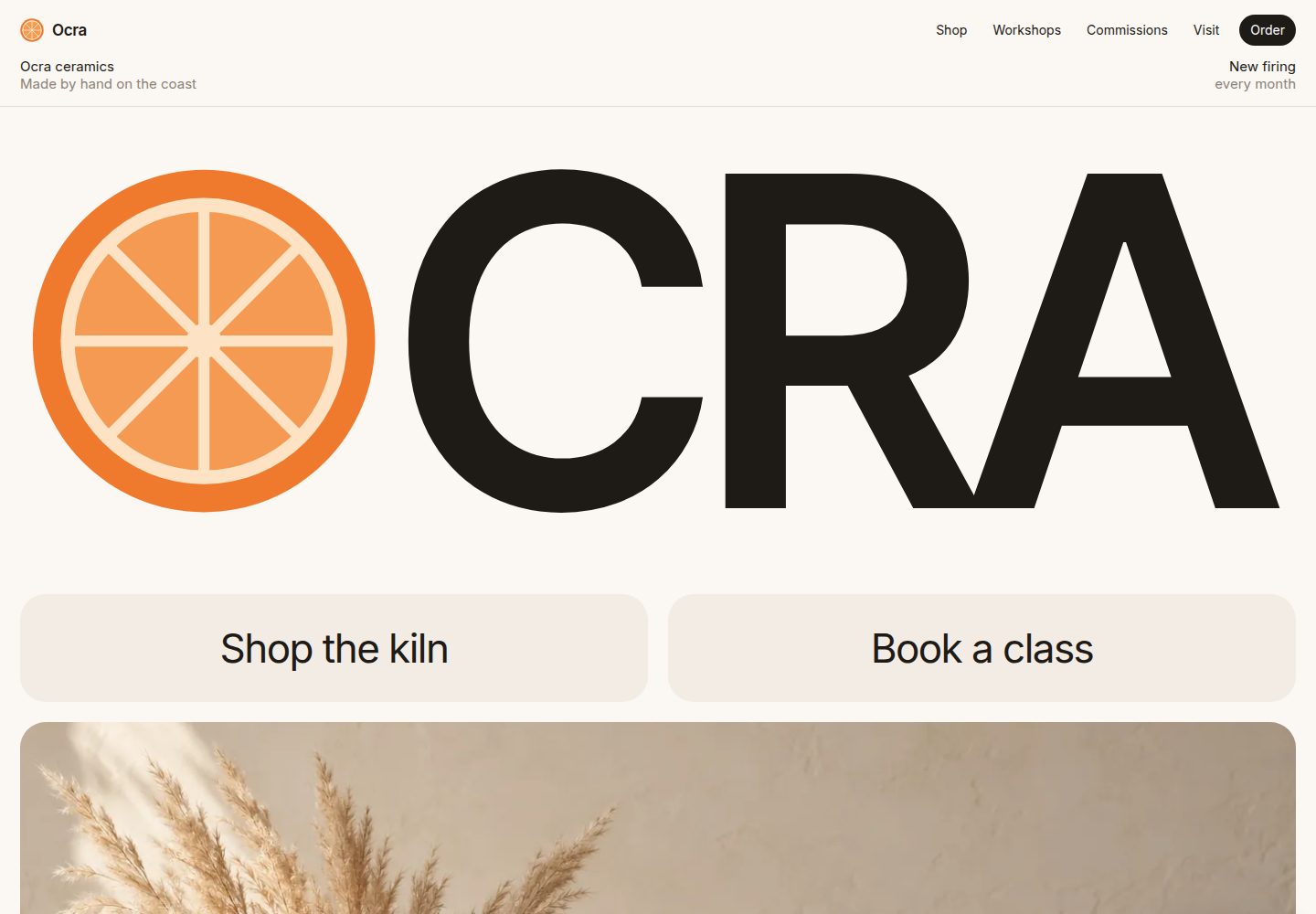
Desktop homepage1 / 2
Desktop captureTop of page
Actual screenshot captured by the server browser.
All pages & views 2
Screenshots show visual appearance; interactive behavior may differ.
Recorded 2026-10-09View source
What stands out
A quick read of the recorded project description.
7 built-in working Formgong forms covering ordering, workshop booking, commissions, wholesale, feedback, messages and newsletter signup
Three-step workshop booking form with a progress bar and per-step validation, supporting Enter to advance to the next step
Custom commission form supports up to 3 sketches or photos within 5 MB each
Forms show the thank-you state only when Formgong returns success: true; otherwise they show an error and retain input
Accent colors and the citrus slice graphic are controlled centrally via color variables and an SVG symbol
Template Details
Ocra is a single-page HTML template published by formgong, with a demo site for the fictional ceramics studio Ocra. The template puts the entire site in one index.html, suited to small makers such as ceramics, candles, bread and florals that take orders by message and do not use a shopping cart. From top to bottom, the page includes a header with a dark Order button, a full-width title Hero, an orange scrolling marquee, four product cards with price tags, a studio introduction, an Ask us form section, visit information, a subscription block and a footer, plus a floating Order button that appears after the Hero and hides when the order form is visible.
The Ask us section is the core of the template, with six rows each paired with a working Formgong form: ordering a single item (with quantity buttons and name, email, country), a three-step workshop booking (with a progress bar, per-step self-validation, and Enter to advance to the next step), a custom commission (a growing, counting textarea supporting up to 3 sketches or photos within 5 MB each), wholesale (shop/cafe/hotel selection cards, with the button moving through sending→sent→ready), feedback with five emoji, and a message form with floating labels. A form shows the thank-you state only when Formgong returns success: true; otherwise it shows an error and retains what was entered.
Before use, you must prepare your own Formgong access key: create the forms in the Formgong dashboard and replace all fk_your_access_key in index.html with the key, 7 places in total. Each form sends a hidden request field (Order, Workshop, Commission, Wholesale, Feedback, Message or Newsletter) to distinguish message types in the same inbox; if you want separate inboxes, create a separate Formgong form for each request type. The template is copied to your own GitHub and published via the Deploy to Cloudflare or Deploy with Vercel buttons.
Customization is concentrated in the color variables at the top of the styles (--orange and --orange-soft are accent colors, --paper and --sand are background and card colors); the citrus slice is an SVG symbol at the top of the body, used for the logo, two wordmarks, the orange panel and the favicon (the favicon has a separate copy). To add a product, copy article.item and add an option with the same name to the Piece list in the order form. Under prefers-reduced-motion: reduce, the slice stops rotating, the marquee stops scrolling, and each section shows its final state directly.
The seven photos were generated with ChatGPT image generation (OpenAI) for this template, saved as WebP, about 400 KB in total, and can be replaced with your own work photos while keeping the file names. The repository uses the MIT license, and the free scope is the code of this version; third-party assets such as demo images, fonts and icons, as well as external services such as domains and hosting, must be checked and paid for separately.
HTMLStarter
Is it right for your project?
Use Cases
- Building a site for small handmade businesses such as ceramics, candles, bread and florals that take orders by message and do not use a shopping cart
- Studios that need to offer ordering, booking, commissions, wholesale and other contact forms on one page
- Sites that want to collect and distinguish different types of customer messages through Formgong
- Custom commission business pages that need to support uploading sketches or photos
Suitable For
- Small makers and studios that take orders by message rather than a shopping cart
- Static sites using Formgong as the form backend
- Developers who want to quickly build and deploy a single HTML file to Cloudflare or Vercel
- Business pages that need multiple types of contact forms (ordering, booking, wholesale, feedback)
Getting started & customization
Use these recorded setup notes alongside the repository instructions for your chosen version.
- 1
Create the forms in the Formgong dashboard and copy the access key, then replace all fk_your_access_key in index.html with that key, 7 places in total
- 2
Each form sends a hidden request field to distinguish message types; if you need separate inboxes, create a separate Formgong form for each request type
- 3
You can copy the repository to your own GitHub and publish it via the Deploy to Cloudflare or Deploy with Vercel buttons
- 4
Adjust the color scheme by modifying the --orange, --orange-soft, --paper and --sand variables at the top of the styles; to add a product, copy article.item and add an option with the same name to the Piece list in the order form
- 5
Keep the original file names when replacing images; the demo images were generated with ChatGPT and can be replaced with your own work photos
License & source material
Usage conditions & limitations
Free to use · keep license noticeThis listing covers the free version under the MIT license in the public repository; the free scope is the code of this version and does not mean external services or third-party assets are free.
Must comply with when using
- You may use, modify, commercialize and distribute the code of this version for free.
- When distributing copies or substantial portions of the code, retain the original author's copyright notice and the full MIT license notice.
- The code is provided as is; warranties and limitations of liability are governed by the original license and applicable law.
Additional costs & items to verify
- Demo images, fonts, icons and other third-party assets must be checked against their own licenses and cannot be judged solely by the code's MIT license.
- External services such as domains, hosting, databases, payments or AI may incur separate charges.
- Before using the template, you must register with Formgong yourself and obtain an access key, then replace all fk_your_access_key in index.html with that key, otherwise the forms will not work.
- Form functionality depends on the external Formgong service: you must first create the forms in the Formgong dashboard and copy the access key.
- If you want different message types to go to different inboxes, you must create a separate Formgong form for each request type.
- Forms show the thank-you state only when Formgong returns success: true; otherwise they show an error and retain what was entered, so behavior depends on the external service response.
- The seven demo photos in the template were generated with ChatGPT (OpenAI); the README states they may be used on your own site, but the original file names must be kept when replacing them.
View Original Text Basis
Permission is hereby granted, free of charge
Original License Text
replace every `fk_your_access_key` in `index.html` of your copy with your Formgong access key (free at https://formgong.com/new) and commit
Original README
Create a form in the Formgong dashboard and copy its access key.
Original README
If you want them in separate inboxes, use one Formgong form per request type.
Original README
A form shows its thank-you state only when Formgong answers `success: true`.
Original README
https://github.com/formgong/ocra-template/blob/main/LICENSEhttps://github.com/formgong/ocra-template/blob/main/README.mdThe seven photos were generated for this template with ChatGPT image generation (OpenAI) and saved as WebP, about 400 KB in all. You may use them in your own site.
Original README
Compiled by DeepSeek based on repository license and README ·2026-10-09. Results only cover the materials read; dependencies, images, fonts, and subsequent term changes are subject to their respective original texts.
Project checks & description sources
Template Information
- Source platforms
- GitHub
- Documentation and maintenance reference score
- More documented · 80 / 100
- Technologies
- HTML
- Website type
- Starter
How this score is calculated
Our heuristic uses license records (up to 30), a demo link (12), a preview (10), stars (15), recorded maintenance (15), description completeness (8), feature records (5) and classification data (5). It is not a code, security or performance test, or a Google score. A link does not establish tested functionality.
What to verify for this project
- Repository update recorded
- 2026-10-09
- Screenshot last checked
- 2026-10-09
A demo link is listed. Check it with your own content and viewport sizes; its presence does not confirm that forms, authentication or payments work.
The catalog identifies HTML as the primary stack. Check the actual dependency manifest and lockfile for versions and hosting requirements. These notes use recorded metadata, not a code audit or a deployment test.
Use a selection guide →How this description was prepared
AI-assisted description based on catalog records and repository material. Repository authors are not automatically the reviewers of this description.
Review declaration: codex-user-requested-batch-review-20261017 · 2026-10-16
Inspect the recorded source material
SHA-256: e7d984bdceba77121241ecb742c216f41ca2fef94a0fcb0221881ee80fec812b
2026-10-09T11:11:23.696Z
Source file / repository# Ocra: a ceramics shop site with Formgong forms **Live demo:** https://ocra.formgong.com · Download: the [latest release](https://github.com/formgong/ocra-template/releases/latest) zip. [](https://deploy.workers.cloudflare.com/?url=https://github.com/formgong/ocra-template) [](https://vercel.com/new/clone?repository-url=https%3A%2F%2Fgithub.com%2Fformgong%2Focra-template&project-name=ocra&repository-name=ocra) Each button copies the site to your GitHub and publishes it. Then replace every `fk_your_access_key` in `index.html` of your copy with your Formgong access key (free at https://formgong.com/new) and commit: the host republishes on its own. Сайт керамічної майстерні з формами Формгонг A one-page template for a small maker who sells by message instead of a cart: ceramics, candles, bread, flowers. Everything is in a single `index.html`. The demo studio, Ocra, its pieces and its prices are fictional. - **Header.** The logo and links, with a dark Order button. A short line below gives the place and the next firing. - **Hero.** The name fills the width, and the O is a citrus slice that turns as you scroll. Below it are two large buttons (Shop the kiln, Book a class) and a photo that drifts slightly. - **Orange band.** A running line of short facts. - **The kiln.** Four product cards with orange price tags. "Order this" scrolls to the order form with that piece already selected. - **About.** A sentence about the studio and three numbers, beside an orange panel of drawn slices that turn as you scroll. - **Ask us.** Six rows, each with text on one side and a working form on the other: 1. **Order a piece:** piece, quantity buttons, name, email and country. It ends on a thank-you card with a drawn tick. 2. **Book a class:** three steps with a progress bar (time and date, experience and people, contact). Each step checks itself, and Enter moves to the next step. 3. **Commission:** a text area that grows and counts characters, plus a drop zone for up to 3 sketches or photos of 5 MB each. 4. **Wholesale:** choice cards (shop, café, hotel). The button goes sending → sent → ready, and the form stays on screen. 5. **Feedback:** five faces and an optional comment. 6. **Write to us:** floating labels on a dark card. - **Visit.** A studio photo, opening hours and the address. - **Newsletter.** An orange block with the email field and button in one pill and a required consent box. - **Footer.** The wordmark again and the "Forms powered by Formgong" credit. - **Order button.** A floating Order button appears after the hero and hides while the order form is on screen. ## English **Set up the forms** 1. Create a form in the Formgong dashboard and copy its access key. 2. In `index.html`, replace every `fk_your_access_key` with that key. There are 7 forms; use find and replace. 3. Each form sends a hidden `request` field (Order, Workshop, Commission, Wholesale, Feedback, Message or Newsletter), so you can tell the messages apart in one inbox. If you want them in separate inboxes, use one Formgong form per request type. A form shows its thank-you state only when Formgong answers `success: true`. If the answer is anything else, the form shows the error message and keeps what was typed. **Edit** - Colours are at the top of the styles. Change `--orange` and `--orange-soft` for the accent, and `--paper` and `--sand` for the background and cards. - The citrus slice is one SVG `<symbol id="slice">` near the top of `<body>`. It is used in the logo, both wordmarks, the orange panel and the favicon (the favicon has its own copy in the `<link rel="icon">`). - Products: copy an `<article class="item">` and add the same name as an `<option>` in the order form's Piece list. - With `prefers-reduced-motion: reduce`, the slices stop turning, the band stops, and every section shows in its final state. **Images.** The seven photos were generated for this template with ChatGPT image generation (OpenAI) and saved as WebP, about 400 KB in all. You may use them in your own site. Replace them with photos of your own work, keeping the file names. The citrus slices are drawn in SVG. ## Українська Односторінковий шаблон для майстерні, яка продає через повідомлення, а не через кошик: кераміка, свічки, хліб, квіти. Студія Ocra, її вироби й ціни вигадані. На сторінці по черзі: - велика назва, де «O» — це часточка апельсина, що обертається під час прокрутки; - дві великі кнопки й фото; - помаранчева стрічка з короткими фактами; - чотири вироби з цінами; - блок про студію з намальованими часточками. Далі блок «Ask us»: шість рядів, у кожному текст і робоча форма: 1. замовлення виробу; 2. запис на заняття в три кроки; 3. індивідуальне замовлення з ескізами (до 3 файлів по 5 МБ); 4. опт із кнопкою, що показує відправлення; 5. відгук через п'ять облич; 6. повідомлення з плаваючими підписами. Наприкінці фото студії з годинами роботи, підписка з обов'язковою згодою і футер з підписом «Forms powered by Formgong». **Налаштування.** Створіть форму в кабінеті Formgong і замініть усі `fk_your_access_key` у `index.html` на свій ключ (форм 7). Кожна форма надсилає приховане поле `request`, тож у спільній скриньці видно, що це: замовлення, заняття, опт тощо. Подяка з'являється лише тоді, коли Formgong відповідає `success: true`. **Зображення:** сім фото згенеровано для цього шаблону в ChatGPT (OpenAI) і збережено у WebP, разом близько 400 КБ. Їх можна використовувати на своєму сайті. Часточки апельсина намальовано в SVG. MIT license.
Explore similar templates
Compare previews and descriptions within the same stack and category.

startbootstrap-simple-sidebar
A Bootstrap off-canvas sidebar navigation HTML starter template from Start Bootstrap. It provides directly editable HTML and CSS in the dist directory, while the source uses Pug, SCSS, and JavaScript with npm build scripts for live preview and compilation.
HTML · Starter

adminkit
AdminKit is a free, MIT-licensed HTML admin and dashboard template built on Bootstrap 5. The free version includes 15 demo pages, 1 plugin, and 1 color scheme, with hundreds of UI components, forms, tables, charts, and icons.
HTML · Admin dashboard

Landing-Page
A general-purpose landing page HTML template maintained by Tailwind Toolbox, written in pure HTML and loading the complete Tailwind CSS via CDN.
HTML · Corporate Website

light-bootstrap-dashboard
Light Bootstrap Dashboard is a free, MIT-licensed admin dashboard template from Creative Tim, built on Bootstrap with a responsive static HTML structure.
HTML · Admin dashboard

sing-app
Sing App Lite is a free, open-source admin dashboard template from Flatlogic, built with Bootstrap 4.5 and SCSS. It provides a responsive layout, dashboard examples, typography, tables, notifications, basic charts, icons, maps, and a hover sidebar, along with styled Bootstrap components.
HTML · Admin dashboard

startbootstrap-modern-business
Modern Business is a multipurpose Bootstrap full-site HTML template from Start Bootstrap with 17 standalone pages covering home, about, services, portfolio, pricing, blog, FAQ, and contact.
HTML · Starter