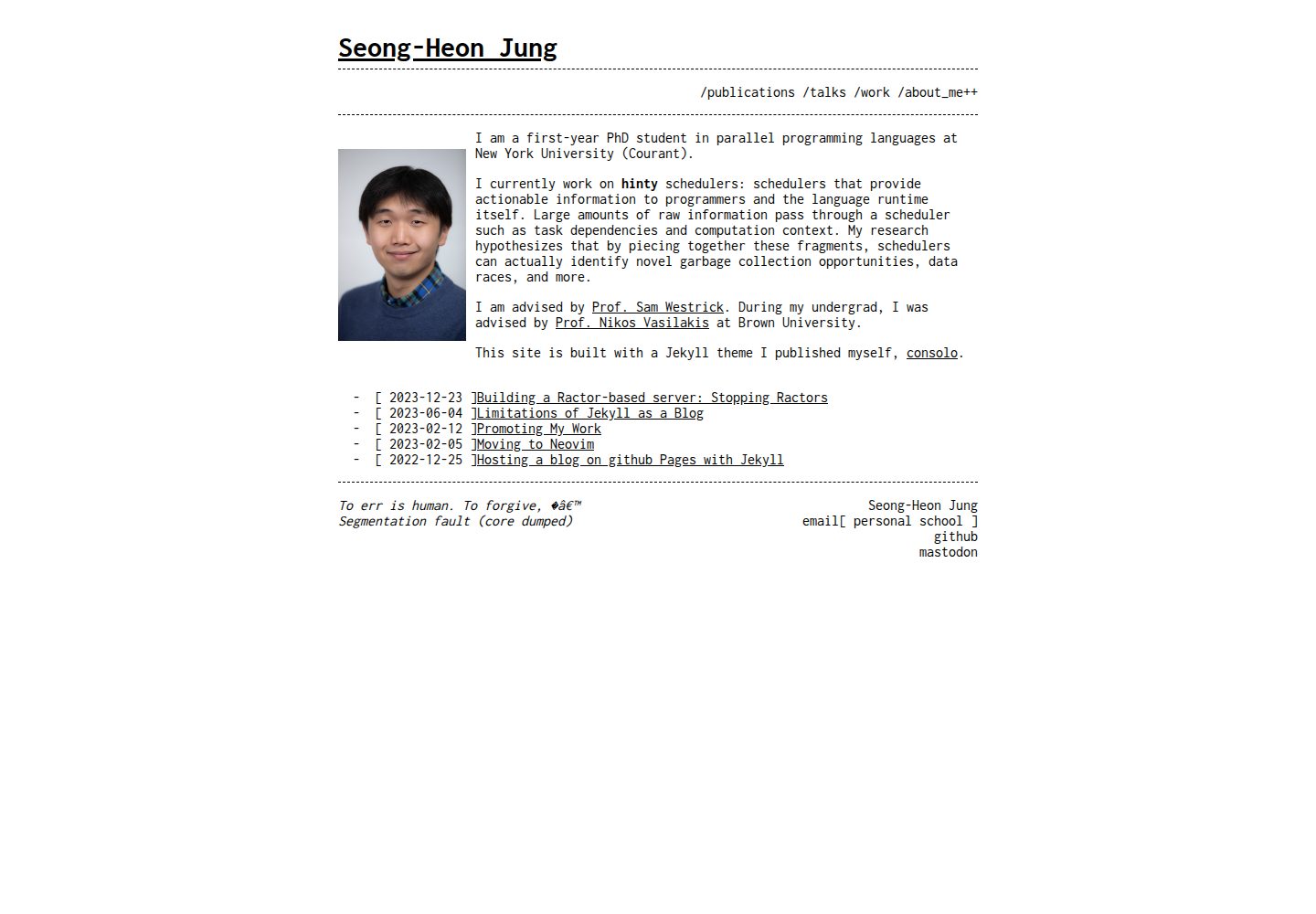
Terminal and console interface visual style while maintaining content readability
JekyllBlog
consolo — Jekyll Blog Template
By Forthoney
consolo is a Jekyll theme visually inspired by terminal and console interfaces, suitable for personal blogs and websites. It is an improved fork of jekyll-theme-console.
Explore the design
Compare the page layouts and mobile experience. Open any screenshot for a closer look.
Desktop homepage1 / 3
Desktop captureTop of page
Actual screenshot captured by the server browser.
All pages & views 3
Screenshots show visual appearance; interactive behavior may differ.
Recorded 2026-10-02View source
What stands out
A quick read of the recorded project description.
Forked from jekyll-theme-console, with adjusted appearance and unified content structure
Supports both remote theme and Gem installation methods
Customizable color schemes via SCSS files in _sass and assets
Provides new configuration options such as title, footer, home_source, and author
Open source under the MIT license; the repository accepts issue reports and pull requests
Template Details
consolo is a Jekyll theme that aims to reproduce the rough look of terminal and console interfaces while maintaining readability, for personal blogs and personal websites. It is forked from jekyll-theme-console; the author considers the original theme no longer maintained, so consolo adjusts the overall appearance, unifies the content structure, and enhances extensibility on top of the original theme.
The theme offers two installation methods: as a remote theme for GitHub Pages, set remote_theme: Forthoney/consolo in _config.yml; or as a Gem, add gem "consolo" to the Gemfile, set theme: consolo in _config.yml, then run bundle or gem install consolo.
For configuration, in addition to Jekyll defaults, consolo supports options from the original theme such as header_pages (list of pages in the navigation bar), google_analytics (analytics code is not loaded if unset), listen_for_clients_preferred_style (whether to choose light or dark style based on user preference), and style (preset color scheme). New options include title (site title), footer (footer message, no longer accepts raw HTML), home_source (source displayed on the home page, defaults to posts, can be set to pages), and author (with name, email, github_username; email can nest multiple addresses with titles).
Color schemes can be extended: create a new _<stylename>.scss in the _sass/ directory, modify it based on existing schemes, then create main-<stylename>.scss in the assets/ directory and import that style and base, and finally set style in _config.yml to the corresponding name. The theme is released under the MIT license, and the repository accepts issue reports and pull requests.
JekyllBlog
Is it right for your project?
Use Cases
- Building a personal blog with a terminal or console style
- Replacing or adding a console-style theme to an existing Jekyll site
- Quickly applying the theme as a remote theme via GitHub Pages
- Personal websites that need custom color schemes while retaining Jekyll content organization
Suitable For
- Developers building personal blogs with Jekyll
- Users who prefer terminal or console visual style and value readability
- Those who want to install the theme via GitHub Pages remote theme or Gem
- Users willing to adjust color schemes themselves through SCSS files
Getting started & customization
Use these recorded setup notes alongside the repository instructions for your chosen version.
- 1
Install as a remote theme: set remote_theme: Forthoney/consolo in _config.yml
- 2
Install as a Gem: add gem "consolo" to the Gemfile, set theme: consolo in _config.yml, then run bundle or gem install consolo
- 3
Starting from scratch requires initializing the project according to the Jekyll quick start guide
- 4
For local development, run bundle install and bundle exec jekyll serve, and preview at http://localhost:4000
- 5
To customize colors, create a new _<stylename>.scss in _sass/ and a new main-<stylename>.scss in assets/ that imports that style and base
License & source material
Usage conditions & limitations
Free to use · keep license noticeThis entry covers the free version in the public repository under the MIT license; the free scope is the code of that version and does not imply that external services or third-party assets are free.
Must comply with when using
- Free use, modification, commercial use, and distribution of this version's code are permitted.
- When distributing copies or substantial portions of the code, retain the original author's copyright notice and the full MIT license notice.
- The code is provided as is; warranties and limitations of liability are governed by the original license and applicable law.
Additional costs & items to verify
- google_analytics is optional: Google Analytics code is loaded only when a tracking ID is set in _config.yml; if not set, no analytics scripts are loaded, and no external account or API key is required.
- This theme is a fork of jekyll-theme-console, and part of the installation guide comes from the original theme; when using it, note the original theme's MIT license and attribution requirements.
- Part of the installation instructions is reused from the original theme jekyll-theme-console, which is third-party content; when redistributing, retain the corresponding attribution.
- Demo images, fonts, icons, and other third-party assets must be checked against their respective licenses and cannot be judged solely by the code's MIT license.
- External services such as domains, hosting, databases, payments, or AI may incur additional charges.
View Original Text Basis
Permission is hereby granted, free of charge
Original License Text
google_analytics`: tracking id (no Google Analytics code will be loaded if you don't set this option)
Original README
It is forked from [jekyll-theme-console](https://github.com/b2a3e8/jekyll-theme-console)
Original README
https://github.com/Forthoney/consolo/blob/main/LICENSE.txthttps://github.com/Forthoney/consolo/blob/main/README.mdParts of the installation guide also come from the original theme.
Original README
Compiled by DeepSeek based on repository license and README ·2026-10-02. Results only cover the materials read; dependencies, images, fonts, and subsequent term changes are subject to their respective original texts.
Project checks & description sources
Template Information
- Source platforms
- GitHub
- Documentation and maintenance reference score
- More documented · 83 / 100
- Technologies
- Jekyll
- Website type
- Blog
How this score is calculated
Our heuristic uses license records (up to 30), a demo link (12), a preview (10), stars (15), recorded maintenance (15), description completeness (8), feature records (5) and classification data (5). It is not a code, security or performance test, or a Google score. A link does not establish tested functionality.
What to verify for this project
- Repository update recorded
- 2026-05-15
- Screenshot last checked
- 2026-10-02
A demo link is listed. Check it with your own content and viewport sizes; its presence does not confirm that forms, authentication or payments work.
The catalog identifies Jekyll as the primary stack. Check the actual dependency manifest and lockfile for versions and hosting requirements. These notes use recorded metadata, not a code audit or a deployment test.
Use a selection guide →How this description was prepared
AI-assisted description based on catalog records and repository material. Repository authors are not automatically the reviewers of this description.
Automatically checked against source and license rules; no manual editorial review.
Inspect the recorded source material
SHA-256: f7b3f44c2d522932504c29589cbc337711a5d499138ef51ae174eba852329608
2026-10-02T17:39:43.266Z
Source file / repository# consolo
**consolo** aims the recreate the rugged look of a terminal/console interface while maintaining legibility.
It is forked from [jekyll-theme-console](https://github.com/b2a3e8/jekyll-theme-console) which, as far as I can tell, is no longer maintained.
**consolo** refines the general look of the original theme, standardizes content, and greatly improves on extensibility.
Parts of the installation guide also come from the original theme.
[Live Demo](https://forthoney.github.io/) (aka my own blog)
## Screenshots

## Installation
### Prerequisites
If you're starting with Jekyll from scratch, follow the steps in [the Quickstart Guide](https://jekyllrb.com/docs/). Skip this if you already have an existing jekyll project.
### Install as Remote theme for GitHub Pages
Set `remote_theme` in your project's Jekyll `_config.yml` file:
```yaml
remote_theme: Forthoney/consolo
```
### Install as Gem
Add this line to your Jekyll site's `Gemfile`:
```ruby
gem "consolo"
```
And add this line to your Jekyll site's `_config.yml`:
```yaml
theme: consolo
```
And then execute:
$ bundle
Or install it yourself as:
$ gem install consolo
## Usage
### _config.yml
In addition to the [jekyll default configurations](https://jekyllrb.com/docs/configuration/default/), consolo allows you to display additional information through options.
#### Options from jekyll-theme-console
- `header_pages`: list of pages to be displayed in navbar
- `google_analytics`: tracking id (no Google Analytics code will be loaded if you don't set this option)
- `listen_for_clients_preferred_style`: boolean on whether to allow users to choose light or dark style based on their preferences ([see also](https://developer.mozilla.org/en-US/docs/Web/CSS/@media/prefers-color-scheme))
- `style`: predefined color scheme to be used for the site. Color scheme options are discussed more later.
#### New from consolo
- `title`: the title of the website (yes, this was missing from the original)
- `footer`: message to display at footer. NO LONGER ACCEPTS RAW HTML
- `home_source`: array source to display on the homepage. Defaults to `posts`; set to `pages` to list site pages instead
- `author`: display various information about the author
- `name`: author's name
- `email`: author's email. Can nest multiple email with titles like
```YAML
email:
personal: [email protected]
school: [email protected]
```
- `github_username`: author's github username (not the full url). Automatically creates a link to the author's github profile
### Style/Color Scheme
You can now more easily create your own color scheme. Under the `_sass/` directory, create a new file with the name `_<stylename>.scss` (e.g. `_red.scss`).
I recommend using one of the existing color scheme's SCSS file as a starting point.
Once you have customized the color scheme, go to the `assets/` directory and create a new file named `main-<stylename>.scss` with the following contents:
```SCSS
@import "<stylename>";
@import "base";
```
You have successfully created a new style!
To change to a style, simply set the `style` in `_config.yml` to <stylename>.
## Contributing
Bug reports and pull requests are welcome on GitHub at https://github.com/Forthoney/consolo. This project is intended to be a safe, welcoming space for collaboration, and contributors are expected to adhere to the [Contributor Covenant](http://contributor-covenant.org) code of conduct.
## Development
To set up your environment to develop this theme, run `bundle install`.
Your theme is setup just like a normal Jekyll site! To test your theme, run `bundle exec jekyll serve` and open your browser at `http://localhost:4000`. This starts a Jekyll server using your theme. Add pages, documents, data, etc. like normal to test your theme's contents. As you make modifications to your theme and to your content, your site will regenerate and you should see the changes in the browser after a refresh, just like normal.
When your theme is released, only the files in `_layouts`, `_includes`, `_sass` and `assets` tracked with Git will be bundled.
To add a custom directory to your theme-gem, please edit the regexp in `consolo.gemspec` accordingly.
## License
The theme is available as open source under the terms of the [MIT License](https://opensource.org/licenses/MIT).
Explore similar templates
Compare previews and descriptions within the same stack and category.

al-folio
A Jekyll academic homepage theme for scholars and researchers, with a clean responsive design and out-of-the-box support for publication lists, project showcases, CVs, and blogs.
Jekyll · Portfolio

minimal-mistakes
Minimal Mistakes is a two-column Jekyll theme for personal sites, blogs, project documentation, or portfolios.
Jekyll · Portfolio

Beautiful Jekyll
Beautiful Jekyll is a mature, easy-to-use Jekyll blog theme maintained by Dean Attali since 2015, with over 50,000 users.
Jekyll · Blog

jekyll-TeXt-theme
A customizable Jekyll theme for personal sites, team sites, blogs, projects, and documentation.
Jekyll · Blog

startbootstrap-clean-blog-jekyll
The official Jekyll version of Start Bootstrap's Clean Blog theme, offering a blog home page, about page, contact page, and sample post pages, with a Formspree-powered contact form.
Jekyll · Blog

So Simple
A minimal reading-oriented Jekyll theme by Michael Rose for personal blogs, portfolios, and long-form reading. It offers multiple layouts, microformat markup, Disqus comments, Google Analytics, Jekyll SEO Tag, three skins, and aggregation by year, category, and tag with a grid view.
Jekyll · Blog