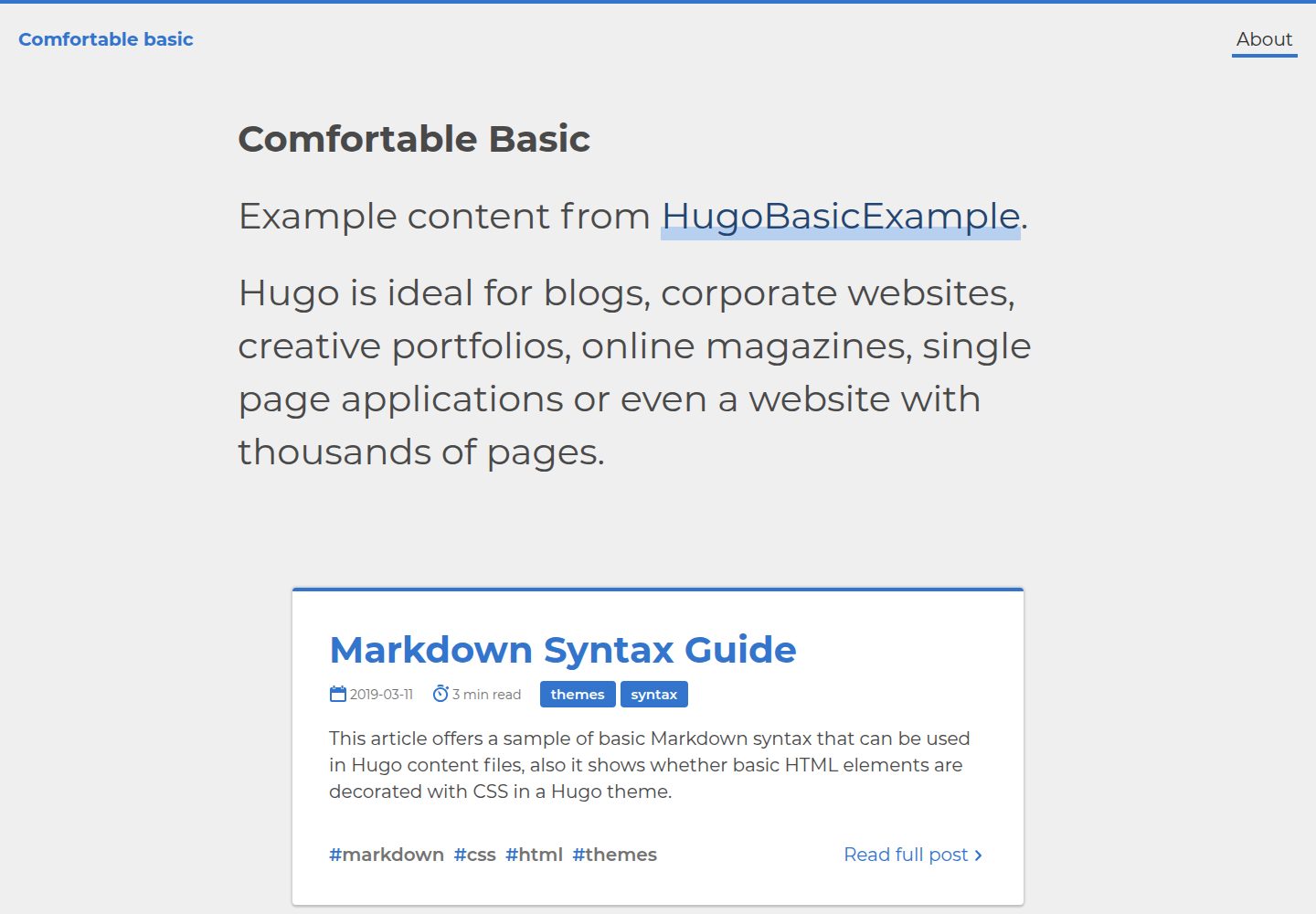
Minimal Hugo blog theme emphasizing content readability and mobile adaptation
HugoBlogTool Site
comfortable-basic — Hugo Blog Template
By freemagee
Comfortable Basic is a minimal Hugo blog theme released by freemagee under the MIT license, emphasizing mobile adaptation and reading experience, suitable for personal blogs with a simple structure.
Explore the design
Compare the page layouts and mobile experience. Open any screenshot for a closer look.
Desktop homepage1 / 3
Desktop captureTop of page
Actual screenshot captured by the server browser.
All pages & views 3
Screenshots show visual appearance; interactive behavior may differ.
Recorded 2026-10-02View source
What stands out
A quick read of the recorded project description.
Clear content structure conventions: homepage introduction, about page, and post article directory
Provides a complete Hugo site TOML configuration example, including params and taxonomy settings
Supports Hugo's built-in Chroma highlighting, and can switch to Highlight.js via useHighlightJS
Uses the MIT license, allowing free use, modification, commercial use, and distribution
Template Details
Comfortable Basic is a Hugo theme for blog sites. The repository describes it as a "Minimal Hugo blog theme," and the README states its goal is modern and concise, with an emphasis on readability and mobile friendliness. The recommended content structure is: the root _index.md serves as the site's top introduction, the about directory holds the about page, and the post directory holds all Markdown articles. Overall, it targets a simple blog format of "articles + about page."
The theme provides an example Hugo site configuration (TOML), including baseURL, languageCode, title, paginate, theme, and under params: description, metaDescription, author, authorWebsite, titleSeperator, useHighlightJS, and configures two taxonomies: category and tag. The README mentions that the theme includes Hugo's built-in Chroma syntax highlighting, with Highlight.js available as an alternative controlled by the useHighlightJS switch; enabling Highlight.js introduces additional JavaScript and fonts, increasing the theme size, while disabling it can reduce it by about 90KB. The README's TODO lists unimplemented features: optional logo support, image-type posts, and multi-page handling, indicating these capabilities are currently outside the theme's scope.
The repository uses the MIT license, allowing free use, modification, commercial use, and distribution of the code, provided the copyright notice and license notice are retained when distributing. The demo site uses hugoBasicExample content; third-party assets such as screenshots, fonts, and icons in the repository must be checked separately under their respective licenses.
HugoBlogUtility site
Is it right for your project?
Use Cases
- Building a personal blog centered on an article list and an about page
- Needing a simple, easy-to-modify Hugo theme starting point
- Sites that want to use Hugo's built-in syntax highlighting or switch to Highlight.js as needed
- Content sites written in Markdown with all articles organized in the post directory
Suitable For
- Personal blog authors using Hugo who want to get started quickly
- Sites that prefer minimal typography and are primarily text-based
- Users who can manually configure theme parameters and organize the content directory by convention
- Developers who need a blog theme that can be freely modified and distributed under the MIT license
Getting started & customization
Use these recorded setup notes alongside the repository instructions for your chosen version.
- 1
Install by running cd themes && git clone https://github.com/freemagee/comfortable-basic in the Hugo site root directory
- 2
Set theme = "comfortable-basic" in the site configuration, and fill in baseURL, title, paginate, etc. as shown in the README example
- 3
Organize the content directory by convention: root _index.md as the homepage introduction, about/_index.md as the about page, and the post directory for articles
- 4
To disable Highlight.js and use Hugo's built-in highlighting, set params.useHighlightJS to false
- 5
The logo support, image-type posts, and multi-page handling listed in the repository TODO are not yet implemented; evaluate before use
License & source material
Usage conditions & limitations
Free to use · keep license noticeThis entry covers the free version in the public repository under the MIT license; the free scope is the code of this version and does not imply that external services or third-party assets are free.
Must comply with when using
- Free use, modification, commercial use, and distribution of this version's code are permitted.
- When distributing copies or substantial portions of the code, retain the original author's copyright notice and the full MIT license notice.
- The code is provided as is; warranties and limitations of liability are governed by the original license and applicable law.
Additional costs & items to verify
- Enabling Highlight.js introduces additional JavaScript and fonts, increasing the theme size; it can be disabled with useHighlightJS = false to reduce size.
- Highlight.js is an optional feature that requires setting the useHighlightJS switch in the theme configuration; when disabled, Hugo's built-in Chroma highlighting is used instead.
- The README's TODO indicates that optional logo support, image-type posts, and multi-page handling are not yet implemented and are currently outside the theme's feature scope.
- Demo images, fonts, icons, and other third-party assets must be checked under their respective licenses and cannot be judged solely by the code's MIT license.
- External services such as domains, hosting, databases, payments, or AI may incur additional charges.
View Original Text Basis
Permission is hereby granted, free of charge
Original License Text
This unfortunately has bumped the theme file size up with the extra JavaScript, and some additional fonts.
Original README
A flag has been added to the theme config `useHighlightJS = true` that can be set to false to disable *Highlightjs* and just use Hugo's default syntax highlighting.
Original README
https://github.com/freemagee/comfortable-basic/blob/master/LICENSE.mdhttps://github.com/freemagee/comfortable-basic/blob/master/README.md- [ ] Optional logo support - [ ] Add image type posts - [ ] Handle multiple pages
Original README
Compiled by DeepSeek based on repository license and README ·2026-10-02. Results only cover the materials read; dependencies, images, fonts, and subsequent term changes are subject to their respective original texts.
Project checks & description sources
Template Information
- Source platforms
- GitHub
- Documentation and maintenance reference score
- Partly documented · 62 / 100
- Technologies
- Hugo
- Website type
- Blog · Tool Site
How this score is calculated
Our heuristic uses license records (up to 30), a demo link (12), a preview (10), stars (15), recorded maintenance (15), description completeness (8), feature records (5) and classification data (5). It is not a code, security or performance test, or a Google score. A link does not establish tested functionality.
What to verify for this project
- Repository update recorded
- 2023-01-04
- Screenshot last checked
- 2026-10-02
A demo link is listed. Check it with your own content and viewport sizes; its presence does not confirm that forms, authentication or payments work.
The catalog identifies Hugo as the primary stack. Check the actual dependency manifest and lockfile for versions and hosting requirements. These notes use recorded metadata, not a code audit or a deployment test.
Use a selection guide →How this description was prepared
AI-assisted description based on catalog records and repository material. Repository authors are not automatically the reviewers of this description.
Automatically checked against source and license rules; no manual editorial review.
Inspect the recorded source material
SHA-256: d6a56de9bcb4f3d5028f35cb2a8d6afa90d348511be25a6ca7ca2fea0791d7c6
2026-10-02T21:19:10.848Z
Source file / repository# Comfortable Basic
Comfortable Basic is a modern, simple Hugo theme. Intended for a blog like site.
View: [Demo using hugoBasicExample](https://freemagee.github.io/comfortable-basic/)

## Features
- Mobile friendly
- Emphasis on readability
- Lightweight(ish) see [notes](#notes)
## Installation
Inside the folder of your Hugo site run:
```bash
$ cd themes
$ git clone https://github.com/freemagee/comfortable-basic
```
*For more information read the official [setup guide](https://gohugo.io/overview/installing/) of Hugo.*
## Example HUGO site config toml
```toml
baseURL= "https://example.com"
languageCode= "en-gb"
title= "Example Site"
paginate = 3
theme = "comfortable-basic"
pluralizeListTitles = false
pygmentsUseClasses = true
[params]
description = "This is a website!"
metaDescription = "Used as 'description' meta tag for both home and index pages. If not set, 'description' will be used instead"
author = "SOMEGUY"
authorWebsite = "https://example.com"
titleSeperator = "/"
useHighlightJS = true
[taxonomies]
category = "categories"
tag = "tags"
```
### Content Architecture Example
This theme is meant for a simple blog with posts and a about page. To get the most from it is recommended to structure your **content** folder like this:
```
+---content
| _index.md # This is the intro, it will appear at the
| top of the site on the homepage only
|
+---about
| _index.md # This is the about page content
|
\---post
# all markdown posts
```
Simple as that.
## Notes
Recently added some better code syntax highlighting. Hugo has really good built-in highlighting using [Chroma](https://gohugo.io/content-management/syntax-highlighting/). Ran into some formatting issues with some code and extra white space being added. So have added [Highlightjs](https://highlightjs.org/) as an alternative. This unfortunately has bumped the theme file size up with the extra JavaScript, and some additional fonts. So that is why Comfortable Basic is lightweight(ish) at around > 300kb.
**Performance update**
A flag has been added to the theme config `useHighlightJS = true` that can be set to false to disable *Highlightjs* and just use Hugo's default syntax highlighting. This can save about 90Kb.
### TODO
- [ ] Optional logo support
- [ ] Add image type posts
- [ ] Handle multiple pages
Explore similar templates
Compare previews and descriptions within the same stack and category.

hugo-PaperMod
A fast, clean, responsive Hugo theme for blogs and lightweight portfolios, with three layout modes (Regular, Home-Info, Profile), automatic and manual light/dark themes, Fuse.js client-side search, multilingual support, and built-in Open Graph, Twitter Cards, and Schema.org data.
Hugo · Portfolio

LoveIt
LoveIt is a clean, elegant, and feature-rich Hugo blog theme derived from LeaveIt and KeepIt, MIT-licensed. It offers light/dark modes, responsive layout, multilingual support, and search via Lunr.js or Algolia.
Hugo · Blog

hugo-coder
hugo-coder is a minimalist Hugo blog theme maintained by luizdepra under the MIT license. It provides a clean, text-focused blog appearance, configuration documentation in the docs directory, and a complete exampleSite with hugo.toml.
Hugo · Blog

blowfish
Blowfish is a Hugo personal website and blog theme built with Tailwind CSS 4, focused on lightness, simplicity, and content-first presentation.
Hugo · Blog

hugo-paper
hugo-paper is a simple, clean, and customizable Hugo blog theme configured through config.toml or hugo.toml.
Hugo · Blog

hextra
Hextra is a Hugo theme for documentation and blog sites, built on Hugo and Tailwind CSS with design referencing Nextra.
Hugo · Documentation