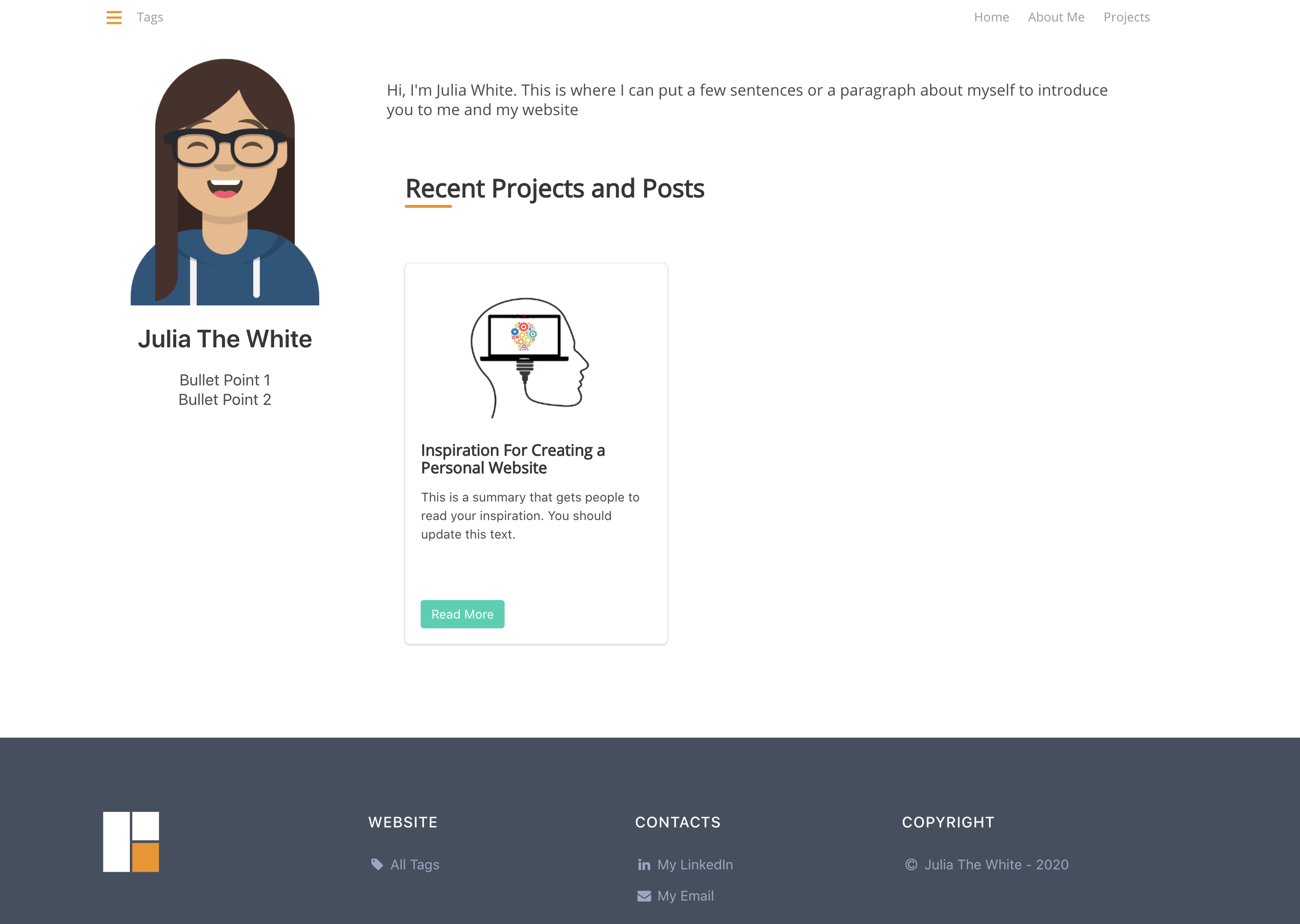
Based on the Hugo static site generator, with a theme structure that includes templateSite sample content and config.yaml configuration
HugoPortfolio
fullstack-portfolio-refresh — Hugo Portfolio Template
By FullstackProblemSolver
A Hugo-based Fullstack Portfolio theme for building personal portfolio and blog websites, derived from the ReFresh/Fresh theme with extended code-display shortcodes.
Explore the design
Compare the page layouts and mobile experience. Open any screenshot for a closer look.
Author preview
Author-provided previewTop of page
Preview provided in the project README.
One original preview is available. Open the full image to inspect the design.
Screenshots show visual appearance; interactive behavior may differ.
Recorded 2026-10-03View source
What stands out
A quick read of the recorded project description.
Derived from the ReFresh theme, which made substantial modifications based on the Fresh theme; the README lists changes relative to the originals
Provides code-display shortcodes such as code, codeWide, and codeInline, supporting line numbers and syntax-highlighting language parameters
Provides tabsCode and tabs shortcodes, supporting up to 6 tabs and loading file content from the content directory
Provides display shortcodes for portfolios and teaching content, such as figure, twoFigure, book, and exercise
Configuration options cover the navigation bar, sidebar, homepage, fonts, colors, statistics counter, and image directory
Template Details
This is a Hugo static site theme positioned as a personal portfolio and blog website. It is modified from the ReFresh theme, which in turn made substantial changes based on the Fresh theme; the README lists the changes relative to the original Fresh and ReFresh. The theme provides sample site content and configuration files. Following the README steps, you can clone the theme into the themes directory, copy the templateSite content, and preview locally.
The theme's configuration is centralized in config.yaml, covering options for the navigation bar, sidebar, homepage, fonts, colors, statistics counter, and images; images must be placed in the directory specified by assetDir. At the article level, it provides a large number of shortcodes, including multi-level headings and subtitles, code blocks (code, codeWide, codeInline), containers (container, containerWide), images (figure, twoFigure), book display (book), exercises (exercise), multi-tab code (tabsCode) and regular multi-tabs (tabs), as well as colored components such as messages, notifications, and site links.
There are several explicit limitations in use: the README states that the theme is intended for personal websites and blogs, and extending other features requires submitting a pull request; if running hugo server produces a TOCSS transformation failure for style.sass, the Hugo extended version must be installed; the statistics counter code must be manually written into layouts/partials/counter.html and will be generated after the <body> tag.
HugoPortfolio
Is it right for your project?
Use Cases
- Building a personal portfolio website to showcase projects, books, or exercise content
- Building a personal blog and using shortcodes to insert code blocks, notification messages, and multi-tab content in articles
- Writing technical tutorials or course notes, using shortcodes such as exercise and tabsCode to organize code examples
- Embedding statistics counter code such as Google and Yandex into pages
Suitable For
- Individual developers using Hugo who want to quickly obtain a basic portfolio and blog structure
- Technical writers who need to frequently display multilingual code examples in articles
- Users who accept modifying the theme as needed rather than using it directly in production
Getting started & customization
Use these recorded setup notes alongside the repository instructions for your chosen version.
- 1
The Hugo extended version must be installed; otherwise, running hugo server may report a TOCSS transformation failure for style.sass
- 2
Follow the README steps: create a site with hugo new site, add the theme to the themes directory as a git submodule, delete the default config.toml, and copy the templateSite content
- 3
Images must be placed in the directory specified by assetDir in config.yaml; for example, if assetDir is set to static, place them in the site's static folder
- 4
The statistics counter code must be manually written into layouts/partials/counter.html, and it is generated after the <body> tag
- 5
The theme is intended for personal websites and blogs; the README states that extending other features requires submitting a pull request
License & source material
Usage conditions & limitations
Free to use · keep license noticeThis entry covers the free version in the public repository under the MIT license; the free scope is the code of this version and does not mean that external services or third-party assets are free.
Must comply with when using
- Free use, modification, commercial use, and distribution of this version's code are permitted.
- When distributing copies or substantial portions of the code, retain the original author's copyright notice and the complete MIT license notice.
- The code is provided as is; warranties and limitations of liability are governed by the original license and applicable law.
Additional costs & items to verify
- The theme is intended only for personal websites and blogs; if other features need to be extended, the README requires participation by submitting a pull request rather than directly supporting arbitrary uses.
- If running hugo server produces a TOCSS transformation failure for style.sass, the Hugo extended version must be installed for the build to work properly.
- The statistics counter requires manually writing third-party statistics code such as Google and Yandex into layouts/partials/counter.html; these are external services, and you are responsible for the corresponding accounts and fees.
- Demo images, fonts, icons, and other third-party assets must be checked against their respective licenses; the code's MIT license alone is not sufficient to determine this.
- External services such as domains, hosting, databases, payments, or AI may incur additional charges.
View Original Text Basis
Permission is hereby granted, free of charge
Original License Text
This theme is intended for personal website and blog. If you'd like to extend the theme to include other functionalities submit a pull request.
Original README
make sure you have the extended version of Hugo installed
Original README
https://github.com/FullstackProblemSolver/fullstack-portfolio-refresh/blob/master/LICENSEhttps://github.com/FullstackProblemSolver/fullstack-portfolio-refresh/blob/master/README.mdYou can enter your Google / Yandex / etc statistic counter code into the `layouts/partials/counter.html`
Original README
Compiled by DeepSeek based on repository license and README ·2026-10-03. Results only cover the materials read; dependencies, images, fonts, and subsequent term changes are subject to their respective original texts.
Project checks & description sources
Template Information
- Source platforms
- GitHub
- Documentation and maintenance reference score
- Less documented · 53 / 100
- Technologies
- Hugo
- Website type
- Portfolio
How this score is calculated
Our heuristic uses license records (up to 30), a demo link (12), a preview (10), stars (15), recorded maintenance (15), description completeness (8), feature records (5) and classification data (5). It is not a code, security or performance test, or a Google score. A link does not establish tested functionality.
What to verify for this project
- Repository update recorded
- 2022-06-18
- Screenshot last checked
- 2026-10-03
No demo link is recorded. Use the repository instructions to evaluate the project locally; the screenshot alone cannot establish interactive behavior.
The catalog identifies Hugo as the primary stack. Check the actual dependency manifest and lockfile for versions and hosting requirements. These notes use recorded metadata, not a code audit or a deployment test.
Use a selection guide →How this description was prepared
AI-assisted description based on catalog records and repository material. Repository authors are not automatically the reviewers of this description.
Review declaration: [email protected] · 2026-10-04
Inspect the recorded source material
SHA-256: 79977f74009bf54ca0b4c7643706f44b78250580adb030f4ffff2153ca8a9ed2
2026-10-03T22:35:12.994Z
Source file / repository# Fullstack Portfolio theme for Hugo
**Fullstack Portfolio** is a theme for the [Hugo](https://gohugo.io) static site generator
**Credits/Origin**:
* it is a modified version of an awesome/accesible theme [ReFresh](https://github.com/PippoRJ/hugo-refresh) by Roberto Jordaney, which is based on:
* _highly_ modified from the awesome [Fresh](https://github.com/StefMa/hugo-fresh) theme
In a section below you can find the list of changes to the original Fresh & ReFresh theme.
You can find a live demo of the original Fresh theme [here](https://themes.gohugo.io/theme/hugo-fresh/) or a demo of the Hugo ReFresh theme [here](https://themes.gohugo.io/theme/hugo-refresh/).
You can find another example of ReFresh theme in [my personal website](https://rjordaney.is/).

> This theme is intended for personal website and blog. If you'd like to extend the theme to include other functionalities submit a pull request.
## Getting started
To create a new site using Hugo ReFresh:
```bash
# Create site and cd into it
hugo new site my-site && cd my-site
# Clone the ReFresh theme into the themes folder
git init
git submodule add https://github.com/FullstackProblemSolver/fullstack-portfolio-refresh.git themes/fullstack-portfolio-refresh
# Remove the default config
rm config.toml
# Copy the Example site content and configuration in my-site
cp -R themes/fullstack-portfolio-refresh/templateSite/* ./
# Open the site in your browser
hugo server -D
```
## Troubleshooting
If you see `error: failed to transform resource: TOCSS: failed to transform "style.sass"` when attempting to run your `hugo server`, make sure you have the extended version of Hugo installed:
```bash
# On Ubuntu:
snap refresh hugo --channel=extended
```
## Statistics counter
You can enter your Google / Yandex / etc statistic counter code into the `layouts/partials/counter.html`. Code will be generated right after open `<body>` tag.
## Customizing your page
There are different configuration options for Hugo ReFresh including options for: the navbar, the sidebar, the homepage, fonts, colours landing, stats counters and images.
Read the comments in the `config.yaml` file to know more.
The images specified in the `config.yaml` file need to be placed in the directory specified by the `assetDir` option in the config file.
E.g.: set `assetDir: "static"` to the set the default folder the `static` folder of your site.
## List of shortcodes you can use in your articles with description:
<details>
<summary> title1.html, title2.html, title3.html, title4.html, title5.html, title6.html </summary>
Usage example:
```
{{< title1 "My awesome title" "my-title-id">}}
```
The **first parameter** is the title of the shortcode (in this example is "My awesome title").<br>
The **second paramter** is the ID of the shortcode (in this example is "my-title-id").<br>
It can be used in links to the same page as:
```
[link to the title](#my-title-id)
```
</details>
<details>
<summary> subtitle1.html, subtitle2.html, subtitle3.html, subtitle4.html, subtitle5.html, subtitle6.html </summary>
Usage example:
```
{{< subtitle1 "My awesome subtitle" "my-subtitle-id">}}
```
The **first parameter** is the title of the shortcode (in this example is "My awesome subtitle").<br>
The **second paramter** is the ID of the shortcode (in this example is "my-subtitle-id").<br>
It can be used in links to the same page as:
```
[link to the subtitle](#my-subtitle-id)
```
</details>
<details>
<summary> code.html </summary>
This shortcode builds a centred page that is two-third of the full size of the page.
Usage example:
```
{{< code language="shell" >}}
$ sudo bash -c 'echo 0 > /proc/sys/kernel/randomize_va_space'
{{< /code >}}
```
This shortcode has 2 parameters:
* **line-numbers** to hide or show the line numbers. The default is true, for single line code the number is never shown.
* **language** is used to highlight the syntax of the code properly
</details>
<details>
<summary> codeWide.html </summary>
This shortcode builds a centred page that is as wide as the full size of the page.
Usage example:
```
{{< codeWide language="shell" >}}
$ dmesg | tail
......
[13401.299114] overflow64[16566]: segfault at 616161616161 ip 0000616161616161 sp 00007fffffffddb0 error 14 in libc-2.27.so[7ffff79e4000+1e7000]
{{< /codeWide >}}
```
This shortcode has 2 parameters:
* **line-numbers** to hide or show the line numbers. The default is true, for single line code the number is never shown.
* **language** is used to highlight the syntax of the code properly
</details>
<details>
<summary> container.html </summary>
This shortcode builds a centred page that is as wide as the two third of the size of the page. The content of the shortcode will pass through the markdown processor.
Usage example:
```
{{< container "container-id" >}}
{{< /container >}}
```
This shortcode has an optional parameter to give an ID to the html `div`.
</details>
<details>
<summary> containerWide.html </summary>
This shortcode builds a centred page that is as wide as the size of the page. The content of the shortcode will pass through the markdown processor.
Usage example:
```
{{< containerWide "container-wide-id" >}}
{{< /containerWide >}}
```
This shortcode has an optional parameter to give an ID to the html `div`.
</details>
<details>
<summary> figure.html </summary>
This shortcode resize an image that with the width and/or height that you specify
Usage example:
```
{{< figure src="images/the_stack.png" width="700" >}}
{{< figure src="images/the_stack.png" height="700" >}}
```
The parameter **src** is the location of the image relative to the location of the file where the shortcode has been used.<br>
The parameter **width** is the width of the image.<br>
The parameter **height** is the height of the image.<br>
The parameter **caption** is the caption of the image.<br>
The parameter **alt** is the alt property of the image.<br>
</details>
<details>
<summary> twoFigure.html </summary>
This shortcode shows 2 images one next to the other with the possibility to resize them.
Usage example:
```
{{< twoFigure src1="images/overflow_1.png" width1="700" src2="images/overflow_2.png" width2="700" >}}
```
The parameter **src1** is the location of the right image relative to the location of the file where the shortcode has been used.<br>
The parameter **width1** is the width of the right image.<br>
The parameter **height1** is the height of the right image.<br>
The parameter **caption1** is the caption of the right image.<br>
The parameter **alt1** is the alt property of the right image.<br>
The parameter **src2** is the location of the left image relative to the location of the file where the shortcode has been used.<br>
The parameter **width2** is the width of the left image.<br>
The parameter **height2** is the height of the left image.<br>
The parameter **caption2** is the caption of the left image.<br>
The parameter **alt2** is the alt property of the left image.<br>
With a small screen these images will be shown one on top of the other.
See example of use [here](https://rjordaney.is/lectures/basic_buffer_overflow/)
</details>
<details>
<summary> book.html </summary>
Usage example:
```
{{< book title="Title Awesome" authors="Awesome author" image="images/cover.jpg" size="300x">}}
```
The parameter **title** is the title of the book.<br>
The parameter **authors** contains the authors of the book.<br>
The parameter **image** is the cover of the book.<br>
The parameter **size** is used to specify the size of the book in pixel "width" x "height".<br>
E.g.: "300x" means 300px of width.<br>
E.g.: "x300" means 300px of height. <br>
See example of use [here](https://rjordaney.is/miscellaneous/ml_books/)
</details>
<details>
<summary> exercise.html </summary>
Usage example:
```
{{< exercise >}}
Text of the exercise.
{{< /exercise >}}
```
This shortcode has no parameters.
See example of use [here](https://rjordaney.is/code_exercises/staircase_n_steps/)
</details>
<details>
<summary> tabsCode.html </summary>
Usage example:
```
{{< tabsCode
file1="/content/code_exercises/staircase_n_steps/code/solution_python.md" language1="python" title1="Python" icon1="python"
file2="/content/code_exercises/staircase_n_steps/code/solution_c.md" language1="c" title2="C" icon2="c"
file3="/content/code_exercises/staircase_n_steps/code/solution_java.md" language1="java" title3="Java" icon3="java"
>}}
```
The parameter **file1** is the name of the code file to be displayed in the first tab.
The path needs to start from the `content` folder.<br>
The parameter **language1** is used to highlight the syntax of the code properly.
The parameter **title1** is the title of the first tab.<br>
The parameter **icon1** is the icon to be shown at the right of the title, it is an optional parameter. See the partial code `icon.html` for the available icons.
There are 6 tabs supported at this moment
* the files parameters are **file1**, **file2**, **file3**, **file4**, **file5**, **file6**
* the titles parameters are **title1**, **title2**, **title3**, **title4**, **title5**, **title6**
* the languages parameters are **language1**, **language2**, **language3**, **language4**, **language5**, **language6**
* the icons parameters are **icon1**, **icon2**, **icon3**, **icon4**, **icon5**, **icon6**
See example of use [here](https://rjordaney.is/code_exercises/staircase_n_steps/)
</details>
<details>
<summary> tabs.html </summary>
Usage example:
```
{{< tabs
file1="/content/exercises/article1/comments/my_comments.md" title1="My Ideas"
file2="/content/exercises/article1/comments/your_comments.md" title2="Your Ideas"
file3="/content/exercises/article1/comments/her_comments.md" title3="Her Ideas"
>}}
```
The content of the files (file1, file2 ...) are passed through the markdown processor, so you can use markdown in these files.
The parameter **file1** is the name of the code file to be displayed in the first tab.
The path needs to start from the `content` folder.<br>
The parameter **title1** is the title of the first tab.<br>
The parameter **icon1** is the icon to be shown at the right of the title, it is an optional parameter. See the partial code `icon.html` for the available icons.
There are 6 tabs supported at this moment
* the files parameters are **file1**, **file2**, **file3**, **file4**, **file5**, **file6**
* the titles parameters are **title1**, **title2**, **title3**, **title4**, **title5**, **title6**
* the icons parameters are **icon1**, **icon2**, **icon3**, **icon4**, **icon5**, **icon6**
</details>
<details>
<summary> codeInLine.html </summary>
Usage example:
```
{{< codeInline >}}sudo echo 0 > /proc/sys/kernel/randomize_va_space{{< /codeInline >}}
```
This shortcode has 2 parameters:
* **language** is used to highlight the syntax of the code properly
* **id** to set a id of the html `code` element
See an example of usage [here](https://rjordaney.is/lectures/basic_buffer_overflow/)
</details>
<details>
<summary> messageBlue.html, messageDark.html, messageGreen.html, messageRed.html, messageYellow.html </summary>
</details>
<details>
<summary> notificationBlue.html, notificationGreen.html, notificationRed.html, notificationYellow.html </summary>
</details>
<details>
<summary> siteBlue.html, siteGreen.html, siteLightgreen.html, siteRed.html, siteYellow.html </summary>
Usage example:
```
{{< siteLightgreen "Web" "https://www.example.com" >}}
<p>Description of the website.</p>
{{< /siteLightgreen >}}
```
The **first parameter** will appear in the right coloured part of the shortcode.<br>
The **second parameter** will appear in the middle part of the shortcode.<br>
See example of usage [here](https://rjordaney.is/miscellaneous/ctf_resources/)
</details>
## Customization options for a regular page
These are the options that you can define is the front matter of a regular page:
```
---
title: "My Awesome Title"
date: 2019-06-03T21:51:13+01:00
draft: false
hideLastModified: true
summaryImage: "images/system.jpg"
keepImageRatio: true
tags: ["Tag1", "tag2", "tag 3"]
summary: "This is a custom summary for my article"
showInMenu: true
---
```
* `summaryImage`: it is used to specify the image to be used in the summary
* `keepImageRatio`: it is used to force the aspect ratio of the image to be kept. The default value is **false**.
* `summary`: it is used to specify the summary of an article instead of taking it from the article itself.
* `hideLastModified`: it is used to hide the the timestamp added at the end of the article.
* `showInMenu`: it is used to show the article in the top right menu.
* `tags`: it is the list of tags for the article; they will be used to build the left sidebar.
To avoid path problems when specifying the `summaryImage`, it is recommended to define a regular page as a leaf bundle. The example above will result in:
```
* my_awesome_title (folder)
* index.md (file)
* images (folder)
* system.jpg (file)
```
## Multilanguage support
To chose the default language you need to set the `DefaultContentLanguage` setting in the `config.yaml` file.
(You can also have multiple languages at the same time, see `exampleSite/config.yaml` for an example.)
The language supported are:
* English
* Spanish
* French
* Italian
* Russian
* Chinese
If you want to add a missing language please submit a pull request.
## List of modifications from the original theme
* The ReFresh theme was transformed from _single page_ template to _multipage_.
* Added multilanguage support.
* The left side menu now contains page tags along with theirs post counter.
* The _list_ and _terms_ types of pages contain a list of the post summaries.
* The images used to build the summaries can be resized to allow better usage of the bandwidth.
* The js and css files can be minified (with a configurable option on the `config.yaml`).
* The menu is automatically built following the structure of the `content` folder. Two levels are allowed at the moment.
* The `navbar-burger` used in the original theme's menu is removed (it was displayed when the page was resized).
* The `.sass` files are now processed with `resources.ExecuteAsTemplate` so that it is possible to use variables from the `config.yaml`.
* Options in the `config.yaml` are added to configure the font-family for the navbar, sidebar and content of the a page.
* [Bulma](https://bulma.io/) (the css framework the theme is based on) is now updated to version 0.7.5 because in the new version the class _content_ has a separate style to allow modification that will impact only the contents of the posts.
* [highlight.js](https://highlightjs.org/) was added to better highlight the code sections of the posts. I chose the style **monokai-sublime**.
* [highlightjs-line-number.js](https://github.com/wcoder/highlightjs-line-numbers.js/) was added to have the line number at the beginning of each line of code in a code sections of a post.
* A minimal version of [MathJax](https://www.mathjax.org/) was added to allow LaTeX style mathematical expressions to be placed in the site.
* Several other options are added to personalise the content of a post.
* A shortcode is added to resize the images and save bandwidth in a post content.
* A shortcode is added to show multiple tabs.
* Four shortcodes are added to show code: inline, in page, in page wide, in tabs.
* The loaders images are now processed with `resources.ExecuteAsTemplate` so that they take the main colour of the theme (defined in `config.yaml`)
* The _favicon_ is processed with `resources.ExecuteAsTemplate` to follow the main colour of the page.
* Added Open Graph meta tags to each post for easy-sharing on social media sites.
* All the js and css files are loaded locally, i.e., not loaded from third party sites.
testExplore similar templates
Compare previews and descriptions within the same stack and category.

hugo-PaperMod
A fast, clean, responsive Hugo theme for blogs and lightweight portfolios, with three layout modes (Regular, Home-Info, Profile), automatic and manual light/dark themes, Fuse.js client-side search, multilingual support, and built-in Open Graph, Twitter Cards, and Schema.org data.
Hugo · Portfolio

Congo
Congo is a minimal Hugo content theme built on Tailwind CSS 3.0, designed for blogs, portfolios, and lightweight content sites. It offers multiple homepage layouts, customizable dark mode, multilingual support including RTL, and built-in client-side search, Mermaid, Chart.js, and KaTeX.
Hugo · Blog

toha
Toha is a Hugo theme for personal portfolios, featuring a minimalist, responsive design with configurable homepage sections such as about, experience timeline, and achievements gallery.
Hugo · Portfolio

hugo-profile
hugo-profile is a mobile-first Hugo theme for personal portfolios and blogs, with multilingual support, light/dark themes, categories and tags, Google Analytics, Disqus comments, and Formspree contact forms.
Hugo · Portfolio

hugo-theme-introduction
Introduction is a minimal Hugo theme that can be configured as a single-page site or a full site with multiple sections. Homepage sections are generated from Markdown files under content/home/, with weight sorting and optional images.
Hugo · Portfolio

hugo-theme-console
A minimalist, responsive Hugo theme inspired by the system terminal and built on Terminal CSS. It includes blog posts, photo galleries, and custom pages, with light/dark theming and style overrides via CSS variables.
Hugo · Portfolio