Responsive admin template based on Bootstrap 3 and jQuery 1.11+
HTMLAdmin dashboard
AdminLTE-2-dashboard-template — HTML Admin dashboard Template
By GeneralAXTED
AdminLTE 2 is an open-source admin dashboard HTML template based on Bootstrap 3, offering responsive layouts, multiple skins, and built-in plugins, suitable as a user interface for backend applications.
Explore the design
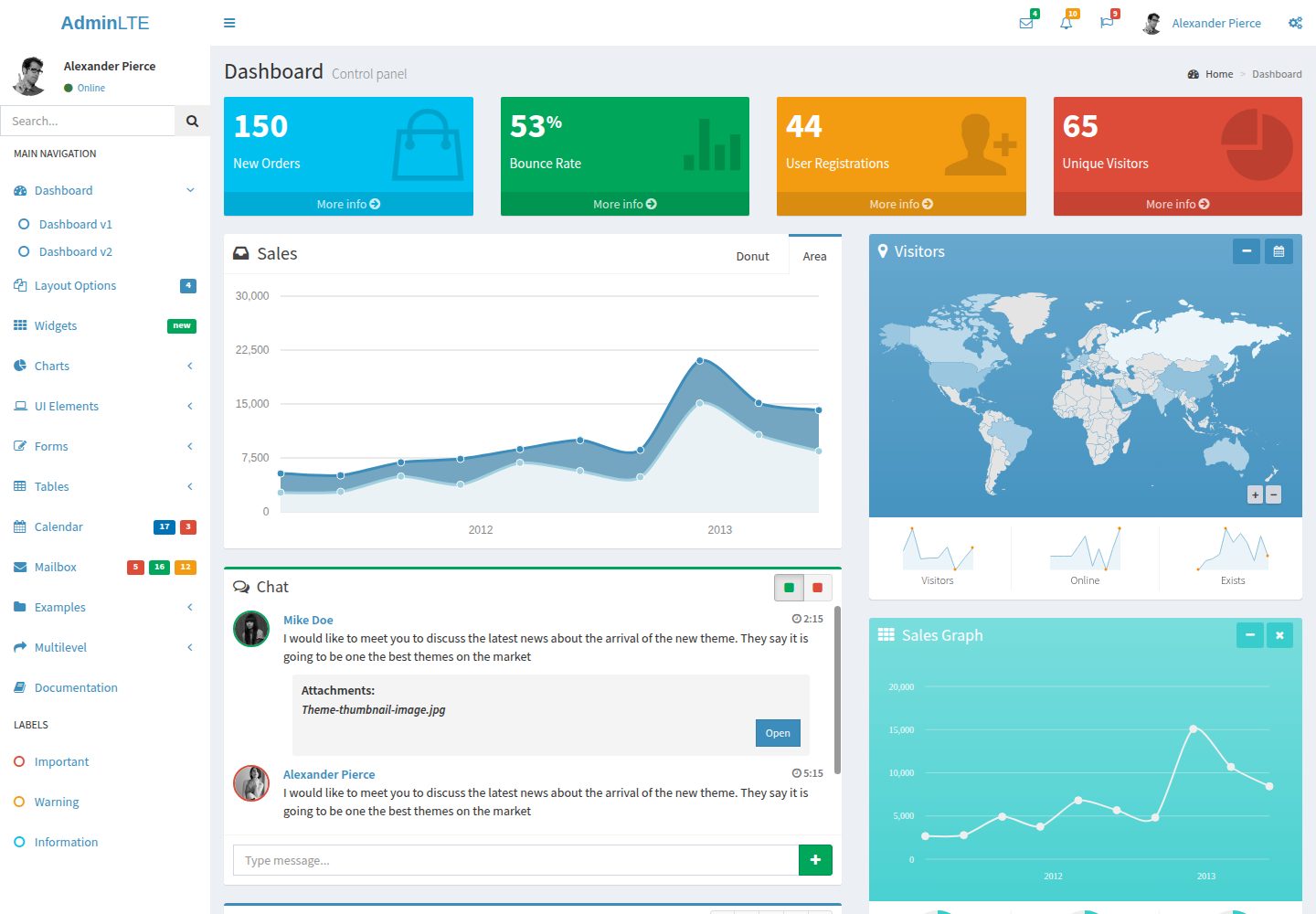
Compare the page layouts and mobile experience. Open any screenshot for a closer look.
Desktop homepage1 / 2
Desktop captureTop of page
Actual screenshot captured by the server browser.
All pages & views 2
Screenshots show visual appearance; interactive behavior may differ.
Recorded 2026-10-15View source
What stands out
A quick read of the recorded project description.
Offers four layout options: fixed, sidebar-collapse, layout-boxed, layout-top-nav
Includes six color skins (Blue, Yellow, Green, Purple, Red, Black) and light versions
Built-in UI elements such as main header, main sidebar, control sidebar, info boxes, box component, and direct chat
Bundles multiple third-party plugins like ChartJS, DataTables, Full Calendar, CK Editor
Supports IE9+ and major modern browsers (IE9 does not support transitions and animations)
Template Details
AdminLTE 2 is an open-source admin dashboard and control panel WebApp template built on Bootstrap 3 with a responsive HTML design. It uses all Bootstrap components and restyles many common plugins to form a consistent user interface, usable for backend applications. The template has a modular design for easy customization and extension.
The README provides two download versions: a compiled version (ready for production) and a source version (including compiled CSS and LESS files, requiring a LESS compiler for customization). The source directory structure includes dist (CSS, JS, img), build (less, Bootstrap-less), and plugins (CSS and JS for custom plugins). Core dependencies are Bootstrap 3 and jQuery 1.11+, both included in the download package.
The template layout consists of four parts: wrapper, main header, sidebar, and content wrapper. Layout options are applied by adding classes to the <body> tag: fixed (fixed header and sidebar), sidebar-collapse (collapsed sidebar on load), layout-boxed (boxed layout, max width 1250px), layout-top-nav (removes sidebar, links placed in top navbar). Skin files are located in dist/css/skins, offering six colors: Blue, Yellow, Green, Purple, Red, Black, each with normal and light versions, changing appearance by adding the corresponding class.
Built-in components include: main header (with messages, notifications, and tasks dropdown menus), main sidebar (left side, with user panel and multi-level tree menu), control sidebar (right side, slide-out or push-in, for additional settings), info boxes (two styles, with or without progress bars), box component (for displaying charts, text, or tables, supporting Solid, Collapsable, Removable, Loading states), and direct chat component (with message panel and optional contacts panel, offering multiple contextual colors).
Bundled third-party plugins cover: charts (ChartJS, Flot, Morris.js, Sparkline), form elements (Bootstrap Slider, Ion Slider, Date Picker, Date Range Picker, Color Picker, Time Picker, iCheck, Input Mask), editors (Bootstrap WYSIHTML5, CK Editor), and other tools (DataTables, Full Calendar, jQuery UI, jQuery Knob, jVector Map, Slim Scroll, Pace).
Browser support includes IE9+ (IE9 does not support transitions and animations), and the latest versions of Firefox, Safari, Chrome, Opera. Community-maintained third-party integrations include Persian RTL, Yii 2, Laravel, Symfony, Ruby on Rails, Vue.js (CoPilot), but these integrations are not officially supported. The README does not provide official integration guides with PHP frameworks (such as Yii or Symfony). The template is under the MIT license.
HTMLBackend
Is it right for your project?
Use Cases
- Building admin dashboards or control panel interfaces for backend applications
- Quickly setting up backend pages with multi-level menus, statistic info boxes, and chart displays
- Integrating form components like date pickers, color pickers, and rich text editors into projects
- Using as a reference template for learning Bootstrap 3 components and common backend plugin integration
Suitable For
- Frontend or full-stack developers needing a ready-made admin interface template
- Projects using the Bootstrap 3 stack and aiming to reduce UI development effort
- Development teams wanting to customize themes and styles based on LESS source
- Individuals or organizations needing a unified visual style for internal management systems
Getting started & customization
Use these recorded setup notes alongside the repository instructions for your chosen version.
- 1
Download the compiled version (ready for production) or source version (including LESS files, requires a LESS compiler) from the links provided in the README
- 2
Core dependencies Bootstrap 3 and jQuery 1.11+ are included in the download package
- 3
Apply layout options by adding classes to the <body> tag (e.g., fixed, layout-boxed)
- 4
Choose a skin file from dist/css/skins and add the corresponding class (e.g., skin-blue) to change appearance
- 5
The README does not provide official integration guides with WordPress or PHP frameworks; refer to community resources
License & source material
Usage conditions & limitations
Free to use · keep license noticeThis entry covers the free version under the MIT license in the public repository; the free scope applies to that version's code and does not imply that external services or third-party assets are free.
Must comply with when using
- Permits free use, modification, commercial use, and distribution of that version's code.
- When distributing copies or substantial portions of the code, retain the original author's copyright notice and the full MIT license notice.
- The code is provided as-is; warranties and limitations of liability are governed by the original license and applicable law.
Additional costs & items to verify
- Demo images, fonts, icons, and other third-party assets must be checked against their respective licenses; they cannot be judged solely by the code's MIT license.
- External services such as domains, hosting, databases, payments, or AI may incur additional charges.
- The source version includes LESS files; customizing the template requires installing a LESS compiler to compile them.
- Browser support is limited: IE9 and above are usable, and IE9 does not support transitions and animations.
- The listed third-party framework integrations (e.g., Yii 2, Laravel, Symfony) are community-maintained and not officially supported.
- The template is not designed for WordPress; using it in WordPress requires additional effort and corresponding scripting knowledge.
- No official integration guides are provided for PHP frameworks such as Yii or Symfony; only community branches and tutorials are available.
View Original Text Basis
Permission is hereby granted, free of charge
Original License Text
2. **Source Code**: Contains all files including the compiled CSS and LESS files [cite: 1]. Download this version if you plan on customizing the template [cite: 1]. *Requires a LESS compiler.* [cite: 1]
Original README
* IE9+ (*Note: IE9 does not support transitions or animations.*) [cite: 1]
Original README
Thanks to our amazing community, AdminLTE has been integrated into several back-end frameworks [cite: 1]. *(Note: These are community-maintained and not officially supported by Almsaeed Studio)* [cite: 1].
Original README
AdminLTE is an HTML template that can be used for any purpose [cite: 1]. However, it is not made to be easily installed on Wordpress [cite: 1]. It will require some effort and enough knowledge of the Wordpress script to do so [cite: 1].
Original README
https://github.com/GeneralAXTED/AdminLTE-2-dashboard-template/blob/main/LICENSEhttps://github.com/GeneralAXTED/AdminLTE-2-dashboard-template/blob/main/README.mdShort answer, no [cite: 1]. However, there are forks and tutorials around the web that provide info on how to integrate with many different frameworks [cite: 1].
Original README
Compiled by DeepSeek based on repository license and README ·2026-10-15. Results only cover the materials read; dependencies, images, fonts, and subsequent term changes are subject to their respective original texts.
Project checks & description sources
Template Information
- Source platforms
- GitHub
- Documentation and maintenance reference score
- More documented · 80 / 100
- Technologies
- HTML
- Website type
- Admin dashboard
How this score is calculated
Our heuristic uses license records (up to 30), a demo link (12), a preview (10), stars (15), recorded maintenance (15), description completeness (8), feature records (5) and classification data (5). It is not a code, security or performance test, or a Google score. A link does not establish tested functionality.
What to verify for this project
- Repository update recorded
- 2026-08-08
- Screenshot last checked
- 2026-10-15
A demo link is listed. Check it with your own content and viewport sizes; its presence does not confirm that forms, authentication or payments work.
The catalog identifies HTML as the primary stack. Check the actual dependency manifest and lockfile for versions and hosting requirements. These notes use recorded metadata, not a code audit or a deployment test.
Use a selection guide →How this description was prepared
AI-assisted description based on catalog records and repository material. Repository authors are not automatically the reviewers of this description.
Review declaration: codex-user-requested-batch-review-20261017 · 2026-10-16
Inspect the recorded source material
SHA-256: ad1fe1520d32d896126e11407d53d8a95e3fc6a077858dde6404d5171b109819
2026-10-15T10:20:03.162Z
Source file / repository[Live demo](https://generalaxted.github.io/AdminLTE-2-dashboard-template/)
<h1 align="center">AdminLTE 2</h1>
<p align="center">
<b>A popular open-source WebApp template for admin dashboards and control panels.</b>
</p>
<p align="center">
<img src="https://img.shields.io/badge/version-2.3.12-blue.svg" alt="Version">
<img src="https://img.shields.io/badge/bootstrap-v3.3.6-brightgreen.svg" alt="Bootstrap">
<img src="https://img.shields.io/badge/license-MIT-blue.svg" alt="License">
</p>
## Table of Contents
- [Introduction](#introduction)
- [Download and Installation](#download-and-installation)
- [Dependencies](#dependencies)
- [Layout Options & Skins](#layout-options--skins)
- [Included Components](#included-components)
- [Included Plugins](#included-plugins)
- [Browser Support](#browser-support)
- [Third-Party Implementations](#third-party-implementations)
- [FAQ](#faq)
- [License](#license)
---
## Introduction
**AdminLTE** is a popular open-source WebApp template for admin dashboards and control panels [cite: 1]. It is a highly responsive HTML template based on the CSS framework **Bootstrap 3** [cite: 1].
It utilizes all of the Bootstrap components in its design and re-styles many commonly used plugins to create a consistent design that can be used as a user interface for backend applications [cite: 1]. AdminLTE is based on a modular design, which allows it to be easily customized and built upon [cite: 1].
## Download and Installation
AdminLTE can be downloaded in two different versions, each appealing to different skill levels and use cases [cite: 1]:
1. **Ready to Use (Compiled)**: Compiled and ready to use in production [cite: 1]. Download this version if you don't want to customize AdminLTE's LESS files [cite: 1].
2. **Source Code**: Contains all files including the compiled CSS and LESS files [cite: 1]. Download this version if you plan on customizing the template [cite: 1]. *Requires a LESS compiler.* [cite: 1]
**Source Code Hierarchy:**
```bash
AdminLTE/
├── dist/
│ ├── CSS/
│ ├── JS/
│ ├── img/
├── build/
│ ├── less/
│ │ ├── AdminLTE's Less files
│ └── Bootstrap-less/
└── plugins/
├── All customized plugins CSS and JS files
```
## Dependencies
AdminLTE relies on the following core frameworks (both are included in the downloadable package) [cite: 1]:
* [Bootstrap 3](http://getbootstrap.com) [cite: 1]
* [jQuery 1.11+](http://jquery.com/) [cite: 1]
## Layout Options & Skins
The layout consists of four major parts: the wrapper, main header, sidebar, and content wrapper [cite: 1].
### Layout Options
AdminLTE provides a set of options to apply to your main layout by adding specific classes to the `<body>` tag [cite: 1]:
* `fixed`: Fixed header and sidebar [cite: 1].
* `sidebar-collapse`: Collapsed sidebar upon loading [cite: 1].
* `layout-boxed`: Boxed layout that stretches only to 1250px [cite: 1].
* `layout-top-nav`: Removes the sidebar and places your links at the top navbar [cite: 1].
### Skins
Choose the skin file that you want from `dist/css/skins` and add the appropriate class to the body tag to change the template's appearance [cite: 1]:
* **Blue**: `skin-blue`, `skin-blue-light` [cite: 1]
* **Yellow**: `skin-yellow`, `skin-yellow-light` [cite: 1]
* **Green**: `skin-green`, `skin-green-light` [cite: 1]
* **Purple**: `skin-purple`, `skin-purple-light` [cite: 1]
* **Red**: `skin-red`, `skin-red-light` [cite: 1]
* **Black**: `skin-black`, `skin-black-light` [cite: 1]
## Included Components
AdminLTE uses all Bootstrap 3 components and expands upon them with its own custom UI elements [cite: 1]:
* **Main Header**: Top navigation with message, notification, and task dropdowns [cite: 1].
* **Sidebars**:
* Main Sidebar (Left): Contains the user panel and multi-level treeview menus [cite: 1].
* Control Sidebar (Right): Slide-over or push-content sidebar for extra settings [cite: 1].
* **Info Boxes**: Two different styles of statistical snippet boxes (with and without progress bars) [cite: 1].
* **Box Widget**: Standard panels for displaying charts, text, or tables [cite: 1]. Supports states like **Solid**, **Collapsable**, **Removable**, and **Loading State** [cite: 1].
* **Direct Chat**: A beautiful chat interface widget with message pane and an optional contacts pane [cite: 1]. Available in multiple contextual colors (primary, success, warning, danger) [cite: 1].
## Included Plugins
AdminLTE is bundled with numerous third-party plugins styled to match the theme natively [cite: 1]:
* **Charts**: ChartJS, Flot, Morris.js, Sparkline [cite: 1]
* **Form Elements**: Bootstrap Slider, Ion Slider, Date Picker, Date Range Picker, Color Picker, Time Picker, iCheck, Input Mask [cite: 1]
* **Editors**: Bootstrap WYSIHTML5, CK Editor [cite: 1]
* **Other Tools**: DataTables, Full Calendar, jQuery UI, jQuery Knob, jVector Map, Slim Scroll, Pace [cite: 1]
## Browser Support
AdminLTE supports the following browsers [cite: 1]:
* IE9+ (*Note: IE9 does not support transitions or animations.*) [cite: 1]
* Firefox (latest) [cite: 1]
* Safari (latest) [cite: 1]
* Chrome (latest) [cite: 1]
* Opera (latest) [cite: 1]
## Third-Party Implementations
Thanks to our amazing community, AdminLTE has been integrated into several back-end frameworks [cite: 1]. *(Note: These are community-maintained and not officially supported by Almsaeed Studio)* [cite: 1].
* **Persian RTL** by Mohammad Sharifi [cite: 1]
* **Yii 2** by Tobias Munk [cite: 1]
* **Laravel** by Arjay Angeles, Sergi Tur Badenas, Jeroen Noten [cite: 1]
* **Symfony** by Marc Bach [cite: 1]
* **Ruby on Rails** by Nicolas Besnard and RacketLogger [cite: 1]
* **Vue.js (CoPilot)** by Gil Ferreira [cite: 1]
## FAQ
* **Can AdminLTE be used with WordPress?**
AdminLTE is an HTML template that can be used for any purpose [cite: 1]. However, it is not made to be easily installed on Wordpress [cite: 1]. It will require some effort and enough knowledge of the Wordpress script to do so [cite: 1].
* **Is there an integration guide for PHP frameworks such as Yii or Symfony?**
Short answer, no [cite: 1]. However, there are forks and tutorials around the web that provide info on how to integrate with many different frameworks [cite: 1].
## License
AdminLTE is an open source project that is licensed under the [MIT license](http://opensource.org/licenses/MIT) [cite: 1]. This allows you to do pretty much anything you want as long as you include the copyright in "all copies or substantial portions of the Software." [cite: 1] Attribution is not required (though very much appreciated) [cite: 1].
---
*Copyright © 2014-2016 Almsaeed Studio. All rights reserved.* [cite: 1]
Explore similar templates
Compare previews and descriptions within the same stack and category.

AdminLTE
An HTML admin dashboard built with Bootstrap 5 and vanilla JavaScript. Astro builds the documentation; React, Vue and Angular editions live in separate repositories.
HTML · Admin dashboard

gentelella
Gentelella v4 is a free, open-source admin dashboard template maintained by Colorlib, built with vanilla JavaScript, SCSS, and Vite 8 without Bootstrap or jQuery.
HTML · Admin dashboard

coreui-free-bootstrap-admin-template
A free Bootstrap admin template maintained by CoreUI, built on CoreUI's own UI component library. It provides compiled HTML pages and Pug template source code, covering dashboards, authentication, forms, components, icons, and error pages.
HTML · Admin dashboard

dashboards
A collection of responsive dashboard HTML templates open-sourced by Keen IO, built on CSS Grid, offering multiple prebuilt admin data interface layouts.
HTML · Admin dashboard

SB Admin 2
SB Admin 2 is a classic Bootstrap admin template from Start Bootstrap, offering dashboards, charts, tables, and common management pages.
HTML · Admin dashboard

Adminator-admin-dashboard
Adminator 4 is a vanilla HTML, CSS and JavaScript admin dashboard template with a CSS-variable token design system, built-in light and dark themes, no jQuery or Bootstrap dependency, and 18 pages covering dashboards, mail, calendar, charts, forms, tables and error pages.
HTML · Admin dashboard