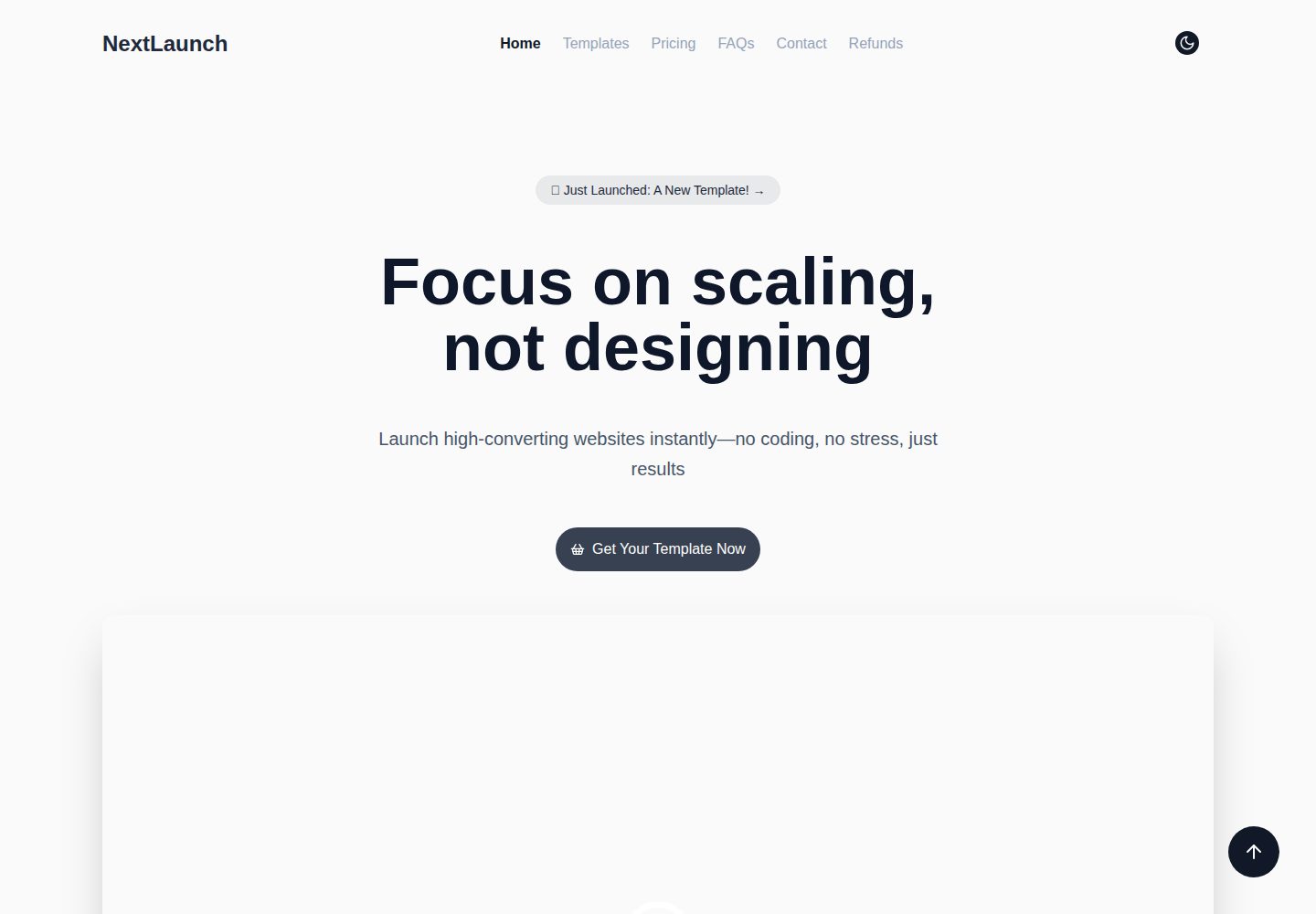
The template storefront includes category filtering, featured sections, user reviews, FAQ, and pricing comparison
Next.jsReactAdmin dashboardCorporate Website
next-launch — Next.js Admin dashboard Template
By Gitnaseem745
NextLaunch is a template marketplace project based on the Next.js App Router, including modules for template display, Razorpay payments, Clerk login, Firebase storage, and email notifications.
Explore the design
Compare the page layouts and mobile experience. Open any screenshot for a closer look.
Desktop homepage1 / 2
Desktop captureTop of page
Actual screenshot captured by the server browser.
All pages & views 2
Screenshots show visual appearance; interactive behavior may differ.
Recorded 2026-10-14View source
What stands out
A quick read of the recorded project description.
The buyer dashboard allows viewing purchase history and re-downloading purchased resources
The Razorpay checkout flow includes HMAC signature verification and download permission control
Clerk authentication is used to protect the dashboard and purchase-related APIs
Firebase Firestore and Storage store template metadata, purchase credentials, and downloadable resources
Nodemailer + Gmail SMTP sends purchase confirmation and contact form reply emails
Template Details
NextLaunch is a Next.js template marketplace project for selling and delivering landing-page/UI kits. The project includes a template storefront (category filtering, featured sections, user reviews, FAQ, pricing comparison, and conversion-oriented CTAs), a dashboard for logged-in buyers (viewing purchase history and re-downloading resources), and a set of server-side API routes for template retrieval, purchase verification, secure download links, email sending, and payment notifications. Site branding, navigation, hero copy, and theme settings are configured centrally in config/siteConfig.ts.
On the technical stack side, the README lists Next.js App Router, React, TypeScript, Tailwind CSS, Zustand (with persist middleware), Clerk, Razorpay, Firebase Firestore + Storage, Nodemailer + Gmail SMTP, as well as Lucide icons, Radix primitives, Framer Motion, and Lenis. The project structure is organized into directories such as app/(pages), app/api, components, sections, store, db, config, lib, animations, and types.
The README provides steps for local running, environment variable configuration, production build, code linting, and deployment to Vercel, and notes that the payment flow can be replaced with other gateways. The README does not describe the project's actual performance, production environment verification status, or specific implementation details for payment gateways other than Razorpay.
Next.jsReactAdmin panelCorporate website
Is it right for your project?
Use Cases
- Build a digital goods marketplace selling landing page templates or UI kits
- Provide buyers with a dashboard to view purchase history and re-download after logging in
- Use Razorpay as the default payment method to complete template purchase and verification
- Store template metadata and downloadable files via Firebase
- Use Nodemailer to send purchase confirmation and contact form reply emails
Suitable For
- Developers who need Next.js App Router template marketplace base code
- Digital goods sales projects planning to use Clerk authentication and Razorpay payments
- Teams that want to use Firebase as the data and file storage backend
- Template projects that need centralized configuration of site copy, navigation, and theme
Getting started & customization
Use these recorded setup notes alongside the repository instructions for your chosen version.
- 1
Requires Node.js 20+ and npm 10+ (or pnpm/yarn)
- 2
Need to prepare a Firebase project, Clerk application, Razorpay account, and Gmail SMTP app password
- 3
Create .env.local in the project root and fill in the Firebase, Clerk, Razorpay, and Gmail environment variables listed in the README
- 4
Run npm run dev to start the development server, visit http://localhost:3000, and log in via Clerk
- 5
When deploying to Vercel, copy all environment variables to the project settings and configure the redirects or webhooks required by Razorpay and Clerk
License & source material
Usage conditions & limitations
Free to use · keep license noticeThis entry covers the free version under the MIT license in the public repository; the free scope is the code of this version and does not mean external services or third-party assets are free.
Must comply with when using
- Free use, modification, commercial use, and distribution of this version's code are allowed.
- When distributing copies or substantial portions of the code, retain the original author's copyright notice and the complete MIT license notice.
- The code is provided as is; warranties and limitations of liability are governed by the original license and applicable law.
Additional costs & items to verify
- The README mentions Firebase integration; before enabling related dynamic features, you need to configure it yourself and check Firebase quotas and charges.
- Demo images, fonts, icons, and other third-party assets need to be checked against their respective licenses; they cannot be judged solely by the code's MIT license.
- External services such as domains, hosting, databases, payments, or AI may incur additional charges.
- Running the project requires preparing your own Firebase project, Clerk application, Razorpay account, and Gmail SMTP app password; these are all external service accounts.
- You must create .env.local in the project root and configure all environment variables listed in the README; otherwise, related features cannot start properly.
- It is recommended to use test Razorpay keys and a test Gmail mailbox as development defaults; production keys should be stored in Vercel project settings.
- Razorpay is the default payment implementation; if switching to other gateways such as Stripe, PayPal, or Lemon Squeezy, you need to replace the payment-related API routes and checkout components yourself.
- After deploying to Vercel, you need to configure the redirects or webhooks required by Razorpay and Clerk to point to your domain.
- The code uses the MIT license, but the purchased template resources themselves may carry additional license terms, and the agreement with buyers must be followed.
View Original Text Basis
Permission is hereby granted, free of charge
Original License Text
- Firebase project, Clerk application, Razorpay account, Gmail SMTP app password
Original README
Create a `.env.local` file in the project root using the variables below. Never commit production secrets—`.gitignore` already excludes `.env*`.
Original README
> Tip: Provide dev-safe defaults (e.g., test Razorpay keys, test Gmail inbox) and keep production secrets in Vercel project settings.
Original README
> **Payment gateway swap:** Razorpay is the default implementation, but the flow is modular. Replace the `/app/api/payments/*` routes plus `components/pages/razorpay-checkout.tsx` with calls to your preferred provider (Stripe, PayPal, Lemon Squeezy, etc.), keeping the purchase documents and download flow unchanged.
Original README
4. Add required third-party webhooks/redirects (Razorpay, Clerk) pointing to your Vercel domain.
Original README
https://github.com/Gitnaseem745/next-launch/blob/main/LICENSEhttps://github.com/Gitnaseem745/next-launch/blob/main/README.mdDistributed under the [MIT License](./LICENSE). You are free to use the code in commercial and personal projects, but purchased template assets themselves may include additional licensing terms—respect your buyers.
Original README
Compiled by DeepSeek based on repository license and README ·2026-10-14. Results only cover the materials read; dependencies, images, fonts, and subsequent term changes are subject to their respective original texts.
Project checks & description sources
Template Information
- Source platforms
- GitHub
- Documentation and maintenance reference score
- More documented · 85 / 100
- Technologies
- Next.js · React
- Website type
- Admin dashboard · Corporate Website
How this score is calculated
Our heuristic uses license records (up to 30), a demo link (12), a preview (10), stars (15), recorded maintenance (15), description completeness (8), feature records (5) and classification data (5). It is not a code, security or performance test, or a Google score. A link does not establish tested functionality.
What to verify for this project
- Repository update recorded
- 2025-12-12
- Screenshot last checked
- 2026-10-14
A demo link is listed. Check it with your own content and viewport sizes; its presence does not confirm that forms, authentication or payments work.
The catalog identifies Next.js as the primary stack. Check the actual dependency manifest and lockfile for versions and hosting requirements. These notes use recorded metadata, not a code audit or a deployment test.
Use a selection guide →How this description was prepared
AI-assisted description based on catalog records and repository material. Repository authors are not automatically the reviewers of this description.
Review declaration: codex-user-requested-batch-review-20261015 · 2026-10-15
Inspect the recorded source material
SHA-256: af40cf9724b6d125ebbd5ebaabcdd11964e71816313ace11b38350883a491ee1
2026-10-14T13:33:03.006Z
Source file / repository# NextLaunch > Launch high-converting websites instantly—no coding, no stress, just results.      NextLaunch is a production-ready Next.js template marketplace. It bundles premium landing-page/ui kits, a purchase flow with Razorpay, authenticated dashboards powered by Clerk, template delivery backed by Firebase, and delightful UI micro-interactions via Framer Motion. Use it as the foundation for marketplaces, theme stores, or any digital product catalog. ## Table of contents 1. [Overview](#overview) 2. [Highlights](#highlights) 3. [Architecture](#architecture) 4. [Tech stack](#tech-stack) 5. [Project structure](#project-structure) 6. [Getting started](#getting-started) 7. [Environment variables](#environment-variables) 8. [Core workflows](#core-workflows) 9. [Quality checks](#quality-checks) 10. [Deployment](#deployment) 11. [Contributing](#contributing) 12. [Security](#security) 13. [License](#license) 14. [Maintainer](#maintainer) ## Overview - **Templates storefront** with category filters, curated sections, testimonials, FAQs, pricing comparison, and conversion-focused CTAs. - **Authenticated dashboard** for buyers to review purchases and re-download assets. - **Serverless API routes** for template fetching, purchase verification, secure download URLs, emails, and payment notifications. - **Single-point customization** via `config/siteConfig.ts` so branding, navigation, hero copy, and theme settings stay centralized. ## Highlights - 🎨 **Multi-theme UI system** powered by `next-themes`, Tailwind presets, and reusable section components. - ⚡ **Smooth motion + scroll experiences** using Framer Motion, custom animation presets, and Lenis integration. - 💳 **Razorpay checkout** flow with HMAC verification, download access gating, and frontend Razorpay widget support. - 🔐 **Clerk authentication** keeps dashboards and purchase APIs secure with JWT verification helpers. - ☁️ **Firebase (Firestore + Storage)** hosts template metadata, purchase receipts, and downloadable assets. - 📬 **Transactional email automation** through Nodemailer + Gmail SMTP for purchase confirmations and contact replies. - 📦 **Persistent template store** using Zustand with caching, offline fallbacks, and filter helpers. ## Architecture ``` ┌────────────┐ ┌───────────────┐ ┌──────────────┐ │ Next.js │ │ API Routes │ │ Integrations │ │ App Dir │ -> │ (app/api/*) │ -> │ Razorpay │ │ (UI + UX) │ │ auth, CRUD │ │ Firebase │ └────────────┘ └───────────────┘ │ Clerk │ ↑ ↓ │ Nodemailer │ │ Zustand Store └──────────────┘ └────────── Client <-> Server ─────────────────────────┘ ``` Key principles: 1. **App Router + RSC** for streaming, metadata, and route groups (marketing pages live under `app/(pages)` while transactional routes live under `app/api`). 2. **Composable sections** in `sections/` feed page-level layouts, making it easy to plug templates into other projects. 3. **Data-first configuration** via `db/templates.ts` (seed data) and `config/siteConfig.ts` (content + theming) to keep UI code lean. ## Tech stack | Layer | Tools | | --- | --- | | Framework | Next.js 15 (App Router) + React 19 | | Language | TypeScript | | Styling | Tailwind CSS, tailwind-merge, custom animation presets | | State | Zustand with `persist` middleware | | Auth | Clerk (publishable + secret keys) | | Payments | Razorpay Checkout, HMAC verification | | Data | Firebase Firestore + Storage, server-side Admin SDK | | Email | Nodemailer + Gmail SMTP | | UI | Lucide icons, Radix primitives, Framer Motion, Lenis | ## Project structure ```bash next-launch/ ├── app/ │ ├── (pages)/... # Marketing pages, auth routes, dashboard routes │ ├── api/ # Purchase, template, payment, and email endpoints │ ├── globals.css │ └── layout.tsx ├── components/ # UI primitives, navbar/footer, Razorpay checkout, mockups ├── sections/ # Reusable page sections (hero, pricing, testimonials, etc.) ├── store/templateStore.ts # Zustand store for templates & purchases ├── db/templates.ts # Seed/template metadata and helper exports ├── config/siteConfig.ts # Centralized site copy, links, feature lists, etc. ├── lib/ # Auth helpers, Firebase Admin SDK, utilities ├── public/ # Logos, mock images, favicons, testimonial assets ├── animations/ # Shared animation variants and easing curves ├── types/ # Shared TypeScript interfaces ├── tailwind.config.ts / postcss.config.mjs └── package.json / tsconfig.json / eslint.config.mjs ``` ## Getting started ### 1. Prerequisites - Node.js 20+ - npm 10+ (or pnpm/yarn, adjust commands accordingly) - Firebase project, Clerk application, Razorpay account, Gmail SMTP app password ### 2. Install dependencies ```bash npm install ``` ### 3. Configure environment Create a `.env.local` file in the project root using the variables below. Never commit production secrets—`.gitignore` already excludes `.env*`. ### 4. Run the development server ```bash npm run dev ``` Visit `http://localhost:3000` and sign in via Clerk to access authenticated flows. ### 5. Production build & lint ```bash npm run build npm run start # serve the production build npm run lint # ESLint (Next.js rules) ``` ## Environment variables | Variable | Description | | --- | --- | | `NEXT_PUBLIC_DB_API_KEY` | Firebase web API key for client-side SDK | | `NEXT_PUBLIC_DB_AUTH_DOMAIN` | Firebase auth domain | | `NEXT_PUBLIC_DB_PROJECT_ID` | Firebase project ID (client) | | `NEXT_PUBLIC_DB_STORAGE_BUCKET` | Firebase storage bucket | | `NEXT_PUBLIC_DB_MESSAGING_SENDER_ID` | Sender ID for Firebase | | `NEXT_PUBLIC_DB_APP_ID` | Firebase app ID | | `NEXT_PUBLIC_DB_MEASUREMENT_ID` | Analytics measurement ID | | `NEXT_PUBLIC_FIREBASE_PROJECT_ID` | Used for helpful Firestore index hints | | `NEXT_PUBLIC_CLERK_PUBLISHABLE_KEY` | Clerk frontend key for providers | | `NEXT_PUBLIC_RAZORPAY_KEY_ID` | Public Razorpay key for checkout widget | | `CLERK_SECRET_KEY` | Server-side Clerk key for token verification | | `FIREBASE_PROJECT_ID` | Service account project ID | | `FIREBASE_CLIENT_EMAIL` | Service account email | | `FIREBASE_PRIVATE_KEY` | Service account private key (`\n` escaped) | | `RAZORPAY_KEY_ID` | Server Razorpay key (order creation) | | `RAZORPAY_KEY_SECRET` | Razorpay HMAC secret | | `GMAIL_USER` | Gmail address used for SMTP notification emails | | `GMAIL_PASS` | Gmail app password for SMTP | > Tip: Provide dev-safe defaults (e.g., test Razorpay keys, test Gmail inbox) and keep production secrets in Vercel project settings. ## Core workflows ### Template catalog 1. `db/templates.ts` exposes seed data and metadata for SEO. 2. `sections/templates-showcase-section.tsx` + `components/sections/*` render cards, pricing, testimonials. 3. The Zustand store (`store/templateStore.ts`) handles caching, filtering, and local persistence. ### Purchase flow 1. Frontend calls `/api/payments/create-order` to create a Razorpay order with the secret key. 2. `components/pages/razorpay-checkout.tsx` opens the Razorpay widget with the publishable key. 3. On success, `/api/payments/verify` validates the signature and records the purchase in Firestore. 4. `/api/purchases/get|check-updates|download-url` hydrate dashboards and gated downloads. > **Payment gateway swap:** Razorpay is the default implementation, but the flow is modular. Replace the `/app/api/payments/*` routes plus `components/pages/razorpay-checkout.tsx` with calls to your preferred provider (Stripe, PayPal, Lemon Squeezy, etc.), keeping the purchase documents and download flow unchanged. ### Notifications & support - `/api/purchase-notify` sends transactional emails to the buyer with template/payment details. - `/api/send-mail` powers the contact form, including validation and basic rate limiting. ### Admin controls - Update `db/templates.ts` to add new templates or metadata. - Curate homepage/marketing content via `config/siteConfig.ts` without touching component code. ## Quality checks - `npm run lint` – ESLint/Next.js ruleset (recommended before commits). - `npm run build` – ensures App Router routes, API handlers, and type checks are healthy. - Consider adding CI (GitHub Actions) to run these commands automatically on PRs. ## Deployment 1. Push the repository to GitHub (public). 2. Create a new Vercel project → Import this repo. 3. Copy **all environment variables** from `.env.local` into Vercel → Settings → Environment Variables. 4. Add required third-party webhooks/redirects (Razorpay, Clerk) pointing to your Vercel domain. 5. Trigger a production deploy; Vercel will handle Next.js build + serverless routing. ## Contributing 1. Fork the repository & create a feature branch. 2. Run `npm run lint` locally before opening a PR. 3. Describe the motivation, screenshots (if UI), and testing steps. 4. For larger features, open an issue first so we can discuss requirements. ## Security Please avoid opening public issues for vulnerabilities. Instead, email **[email protected]** with a detailed report. You’ll receive an acknowledgement within 48 hours and coordinated disclosure will be arranged if needed. ## License Distributed under the [MIT License](./LICENSE). You are free to use the code in commercial and personal projects, but purchased template assets themselves may include additional licensing terms—respect your buyers. ## Maintainer Built and maintained by [Naseem Ansari](https://github.com/gitnaseem745). Feel free to reach out on [LinkedIn](https://www.linkedin.com/in/naseem-ansari-25474b269/) or [Twitter](https://x.com/dev_Naseem) for support, collaborations, or template ideas.
Explore similar templates
Compare previews and descriptions within the same stack and category.

SaaS-Boilerplate
SaaS-Boilerplate is an open-source SaaS starter template built with Next.js App Router, React 19, TypeScript, Tailwind CSS, and Shadcn UI.
Next.js · SaaS

next-shadcn-dashboard-starter
An MIT-licensed admin dashboard starter built with Next.js 16, shadcn/ui, Tailwind CSS v4, and TypeScript.
Next.js · Admin dashboard

Studio Admin · Radix UI
Studio Admin is an admin dashboard template built with Next.js 16, TypeScript, Tailwind CSS v4, and Shadcn UI.
Next.js · Admin dashboard

free-nextjs-admin-dashboard
A free, open-source admin dashboard template built on Next.js 16, React 19, TypeScript, and Tailwind CSS v4. It provides a collapsible sidebar, charts, tables, authentication forms, modals, dropdowns, and dark mode, with internationalization and RTL support since version 2.4.0.
Next.js · Admin dashboard

Next-JS-Landing-Page-Starter-Template
A free Next.js landing page starter template written in Tailwind CSS and TypeScript, featuring built-in navbar, hero, features, CTA banner, and footer sections.
Next.js · Corporate Website

materio-mui-nextjs-admin-template-free
Materio Free is a Next.js admin dashboard template based on App Router and MUI, integrating Tailwind CSS and available in TypeScript and JavaScript versions.
Next.js · Admin dashboard