Built with Astro, Tailwind CSS, and TypeScript, open-source under the MIT license
AstroBlog
ev0-astro-theme — Astro Blog Template
By gndx
EV0 Astro Theme is an open-source blog template based on Astro, Tailwind CSS, and TypeScript, released under the MIT license, suitable for building personal blogs or portfolio sites.
Explore the design
Compare the page layouts and mobile experience. Open any screenshot for a closer look.
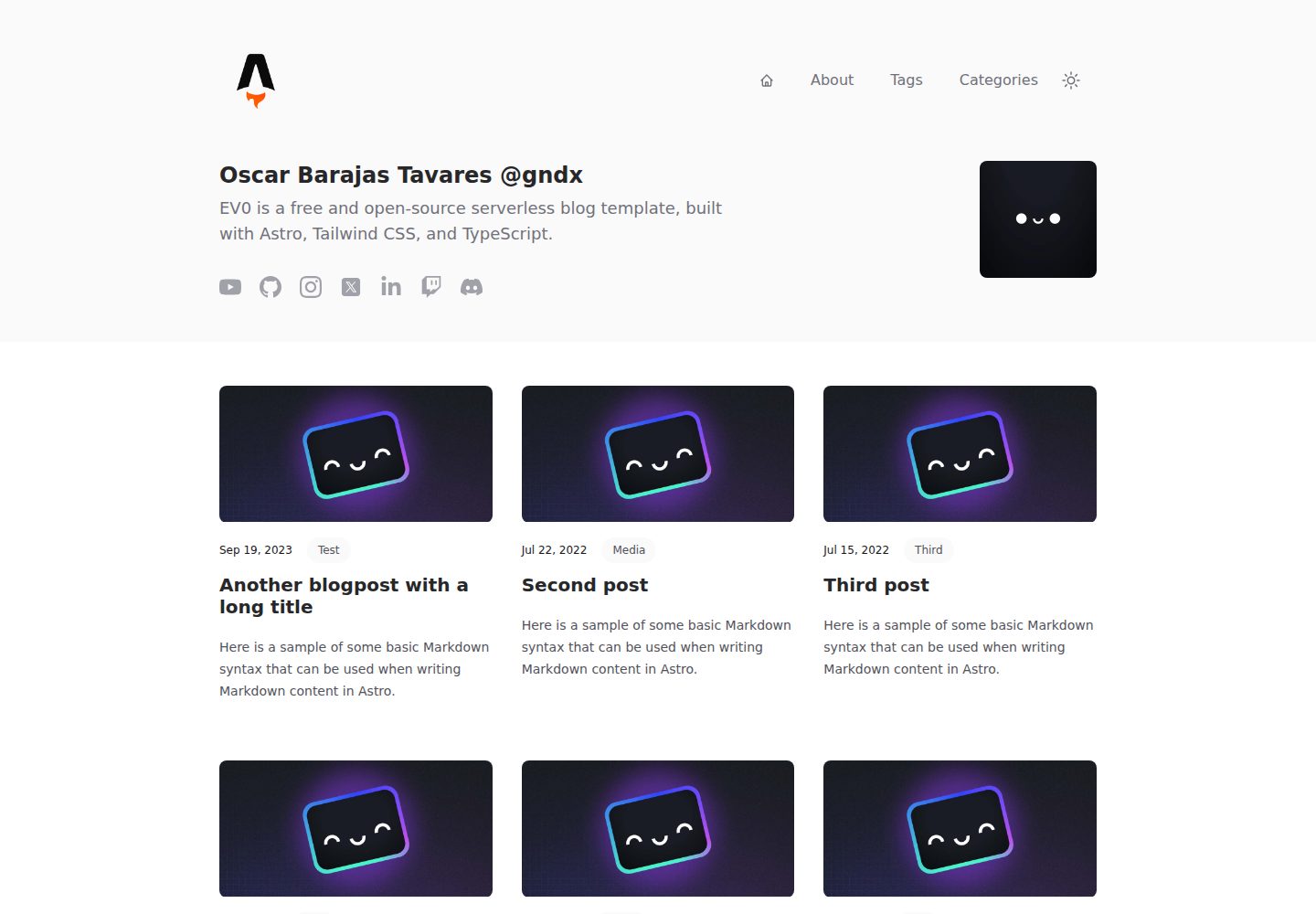
Desktop homepage1 / 3
Desktop captureTop of page
Actual screenshot captured by the server browser.
All pages & views 3
Screenshots show visual appearance; interactive behavior may differ.
Recorded 2026-09-30View source
What stands out
A quick read of the recorded project description.
Supports Markdown and MDX content, syntax highlighting, RSS, and sitemap
Includes dark mode, responsive layout, View Transitions, and PWA-related configuration
Centralized configuration of site, menu, and social links via JSON files in src/config
Provides npm run newpost command to generate new post Markdown files
Optional YouTube integration to fetch the latest channel videos via script, which can be disabled
Template Details
EV0 Astro Theme is a free and open-source serverless blog template built with Astro, Tailwind CSS, and TypeScript, created by gndx. It is positioned as a starting point for personal portfolio websites or project showcases. The code is released under the MIT license, allowing free use, modification, and distribution, including commercial use.
The template provides essential blogging capabilities: Markdown and MDX content support, syntax highlighting, dark mode, responsive layout, sitemap, RSS feed, canonical URLs and OpenGraph metadata, robots.txt and humans.txt, as well as View Transitions and PWA-related configuration. It also includes built-in YouTube integration that can fetch the latest videos from a channel via a script and can be disabled through configuration.
Site configuration is centralized in the src/config directory: config.json manages site title, URL, language, description, pagination size, and feature toggles; menu.json manages navigation menus; social.json manages social links. New posts can be generated as Markdown files using the npm run newpost command, then edited under src/content/blog.
Regarding usage limitations, the YouTube integration requires obtaining a YouTube API V3 key and writing it to .env, and this API is not used in production. Third-party assets such as demo images, fonts, and icons require separate license verification and cannot be judged solely by the code's MIT license. External services like domain and hosting may incur costs. The Lighthouse scores and VIP paid support mentioned in the README are the author's own statements and are not endorsed by this introduction.
AstroBlog
Is it right for your project?
Use Cases
- Building a personal blog and publishing Markdown or MDX posts
- Creating a personal portfolio or project showcase page
- Static sites requiring RSS, sitemap, and OpenGraph metadata
- Blogs that want to display the latest YouTube channel videos on the site
Suitable For
- Developers familiar with Astro or willing to configure according to the README
- Individual bloggers needing a free open-source blog template
- Content creators writing in Markdown/MDX and seeking static output
- Showcase sites requiring dark mode and responsive layout
Getting started & customization
Use these recorded setup notes alongside the repository instructions for your chosen version.
- 1
Clone the repository with git clone and run npm install to install dependencies
- 2
Run npm run dev to start the local development server; npm run build generates the production site to ./dist/
- 3
Site information is configured in src/config/config.json; menus and social links are configured in menu.json and social.json respectively
- 4
To enable YouTube integration, create a .env file in the root directory with CHANNEL_ID and API_KEY, then run npm run youtube
- 5
Run npm run newpost to add a new post; the generated file is located in the src/content/blog directory
License & source material
Usage conditions & limitations
Free to use · keep license noticeThis entry covers the free version under the MIT license in the public repository; the free scope applies to this version's code and does not imply that external services or third-party assets are free.
Must comply with when using
- Free use, modification, commercial use, and distribution of this version's code are permitted.
- When distributing copies or substantial portions of the code, retain the original author's copyright notice and the full MIT license notice.
- The code is provided as-is; warranties and liability limitations are governed by the original license and applicable law.
Additional costs & items to verify
- Enabling YouTube integration requires applying for a YouTube API V3 key in Google Console and writing CHANNEL_ID and API_KEY to the root .env file; without a key, this feature cannot be used, but it can be disabled in config.json.
- The README states that the YouTube API is not used in production, meaning the integration is only for locally fetching video data, and the production site does not depend on this API.
- VIP support is an optional paid service (25 USD) including message/email assistance, up to 1 feature customization, and hosting deployment assistance; not purchasing it does not affect the free use of the template itself.
- Demo images, fonts, icons, and other third-party assets must be checked against their respective licenses and cannot be judged solely by the code's MIT license.
- External services such as domain, hosting, database, payment, or AI may incur additional charges.
View Original Text Basis
Permission is hereby granted, free of charge
Original License Text
Requires an API KEY for YouTube API V3 - [Google Console](https://console.cloud.google.com/)
Original README
Your YouTube API is not used in production.
Original README
https://github.com/gndx/ev0-astro-theme/blob/main/LICENSEhttps://github.com/gndx/ev0-astro-theme/blob/main/README.md## 👨🏻💻 VIP Support (optional) $25
Original README
Compiled by DeepSeek based on repository license and README ·2026-10-01. Results only cover the materials read; dependencies, images, fonts, and subsequent term changes are subject to their respective original texts.
Project checks & description sources
Template Information
- Source platforms
- GitHub
- Documentation and maintenance reference score
- More documented · 91 / 100
- Technologies
- Astro
- Website type
- Blog
How this score is calculated
Our heuristic uses license records (up to 30), a demo link (12), a preview (10), stars (15), recorded maintenance (15), description completeness (8), feature records (5) and classification data (5). It is not a code, security or performance test, or a Google score. A link does not establish tested functionality.
What to verify for this project
- Repository update recorded
- 2026-02-05
- Screenshot last checked
- 2026-10-01
A demo link is listed. Check it with your own content and viewport sizes; its presence does not confirm that forms, authentication or payments work.
The catalog identifies Astro as the primary stack. Check the actual dependency manifest and lockfile for versions and hosting requirements. These notes use recorded metadata, not a code audit or a deployment test.
Use a selection guide →How this description was prepared
AI-assisted description based on catalog records and repository material. Repository authors are not automatically the reviewers of this description.
Automatically checked against source and license rules; no manual editorial review.
Inspect the recorded source material
SHA-256: b4f63c4ac236231305d51ec79086467305b4570b719b8c597dc3dde54f3c5a44
2026-10-01T14:04:44.277Z
Source file / repository# 🚀 EV0 Astro Theme - Blog Template
EV0 Astro Theme is a free and open-source serverless blog template, built with Astro, Tailwind CSS, and TypeScript. It serves as a starting point for creating your personal portfolio website or showcasing your projects online. The template is open-source and released under the MIT license, meaning you are free to use, modify, and distribute it for personal or commercial purposes.
<p align="center">
<img align="center" alt="EV0 Astro Theme" src="https://s3.amazonaws.com/gndx.dev/ev0-astro-theme.png"/>
</p>
<a href="https://astro.build"><img src="https://astro.badg.es/v2/built-with-astro/tiny.svg" alt="Built with Astro" width="120" height="20"></a>
## 🔥 DEMOS
- [EV0 Astro Theme - DEMO](https://ev0.gndx.dev/)
- [GNDX - My Personal Blog (ES)](https://gndx.dev)
[](https://app.netlify.com/start/deploy?repository=https://github.com/gndx/ev0-astro-theme#NODE_VERSION=18)
## 🔥 Features
- ✅ Minimal styling (Tailwind CSS)
- ✅ 100/100 Lighthouse performance
- ✅ SEO-friendly with canonical URLs and OpenGraph data
- ✅ Dark Mode
- ✅ Sitemap support
- ✅ RSS Feed support
- ✅ Markdown & MDX support
- ✅ View Transitions
- ✅ PWA-ready
- ✅ Fully responsive
- ✅ Robots.txt & Humans.txt
- ✅ TypeScript support
- ✅ Syntax highlighting
- ✅ YouTube Integration
- ✅ CLI for adding new posts
## ⚓ Lighthouse Score - PWA Ready
<p align="center">
<img align="center" alt="Lighthouse Score" src="https://s3.amazonaws.com/gndx.dev/EV0-astro-theme-lighthouse.png"/>
</p>
## 👨🏻💻 VIP Support (optional) $25
Includes personalized assistance via messages/emails, customization of up to 1 feature, assistance for implementation in your hosting and deployment, and advice for future changes. [Buy VIP Support](https://gndx.gumroad.com/l/zwaeqz).
## 🚀 Getting Started
Clone this repository to your local machine using Git.
```scheme
git clone https://github.com/gndx/ev0-astro-theme.git your-project-name
```
| Command | Action |
| :---------------- | :------------------------------------------- |
| `npm install` | Installs dependencies |
| `npm run dev` | Starts local dev server at `localhost:4321` |
| `npm run build` | Build your production site to `./dist/` |
| `npm run preview` | Preview your build locally, before deploying |
| `npm run youtube` | Fetches the Latest YouTube Channel Videos |
| `npm run newpost` | Generate a New Blogpost Markdown Entry |
Edit the HTML files in the `src/pages` directory to add your projects, experiences, and personal information.
## 📝 Configuration Blog
To configure your blog, edit the `src/config/config.json` file. This file contains the following options:
```scheme
{
"site": {
"title": "EV0 Astro Theme",
"base_url": "https://ev0.gndx.dev/",
"base_path": "/",
"favicon": "/favicon.png",
"logo": "https://s3.amazonaws.com/gndx.dev/ev0-astro-logo.png",
"lang": "en",
"description": "EV0 is a free and open-source serverless blog template, built with Astro, Tailwind CSS, and TypeScript.",
"pageSize": 6
},
"features": {
"youtube": true
},
"metadata": {
"meta_author": "Oscar Barajas @gndx",
"meta_description": "EV0 is a free and open-source serverless blog template, built with Astro, Tailwind CSS, and TypeScript."
},
"author": {
"name": "Oscar Barajas Tavares @gndx",
"avatar": "https://s3.amazonaws.com/gndx.dev/gndx-astro-avatar.png",
"bio": "EV0 is a free and open-source serverless blog template, built with Astro, Tailwind CSS, and TypeScript."
}
}
```
The menu is configured in the `src/config/menu.json` file. This file contains the following options:
```scheme
[
{
"name": "Home",
"url": "/"
},
{
"name": "Blog",
"url": "/blog"
},
]
```
Social networks are configured in the `src/config/social.json` file. This file contains the following options:
```scheme
{
"name": "Instagram",
"url": "https://instagram.com/gndx"
"svg": "...."
}
```
## 🎥 YouTube Integration
To integrate your YouTube channel, you need to create a new file called `.env` in the root directory of your project. Then add the `CHANNEL_ID` and `API_KEY` to get the latest videos from your YouTube channel in `src/config/youtube.json`.
```scheme
npm run youtube
```
Your YouTube API is not used in production.
Requires an API KEY for YouTube API V3 - [Google Console](https://console.cloud.google.com/)
You can disable the youtube integration by modifying the `src/config/config.json`.
```json
"features": {
"youtube": false
},
```
## 📝 Adding New Posts
To add a new post, run the following command:
```scheme
npm run newpost
```
Follow the instructions and this will generate a new markdown file in the `src/content/blog` directory. Edit the file to add your post content.
## 📂 Project Structure
```
/
├── public/
│ └── favicons/
│ └── fonts/
│ └── blog-placeholder.jpg
│ └── favicon.png
│ └── humans.txt
├── scripts/
│ └── youtube.cjs
├── src/
│ ├── components/
│ ├── config/
│ ├── content/
│ ├── layouts/
│ └── pages/
│ └── styles/
│ └── env.d.ts
└── package.json
└── astro.config.mjs
└── tailwind.config.js
└── tsconfig.json
└── .gitignore
```
## 💻 Contributing
Contributions to this project are welcome. If you find a bug or have a suggestion for improvement, please open an issue or submit a pull request.
<!-- ALL-CONTRIBUTORS-LIST:START - Do not remove or modify this section -->
<!-- prettier-ignore-start -->
<!-- markdownlint-disable -->
<table>
<tbody>
<tr>
<td align="center" valign="top" width="14.28%"><a href="https://gndx.io"><img src="https://avatars.githubusercontent.com/u/10554486?v=4?s=100" width="100px;" alt="Oscar Barajas Tavares"/><br /><sub><b>Oscar Barajas Tavares</b></sub></a><br /><a href="#doc-gndx" title="Documentation">📖</a></td>
<td align="center" valign="top" width="14.28%"><a href="https://jhonachata.dev/"><img src="https://avatars.githubusercontent.com/u/7337141?v=4?s=100" width="100px;" alt="Jhon Achata Limachi"/><br /><sub><b>Jhon Achata Limachi</b></sub></a><br /><a href="#bug-dcyar" title="Bug reports">🐛</a> <a href="#ideas-dcyar" title="Ideas, Planning, & Feedback">🤔</a></td>
<td align="center" valign="top" width="14.28%"><a href="https://erasmoh.dev"><img src="https://avatars.githubusercontent.com/u/12125288?v=4?s=100" width="100px;" alt="Erasmo Hernández"/><br /><sub><b>Erasmo Hernández</b></sub></a><br /><a href="#bug-erasmoh" title="Bug reports">🐛</a></td>
<td align="center" valign="top" width="14.28%"><a href="http://francisco-araujo.com"><img src="https://avatars.githubusercontent.com/u/49659840?v=4?s=100" width="100px;" alt="Francisco Araujo"/><br /><sub><b>Francisco Araujo</b></sub></a><br /><a href="#design-franciscoagx" title="Design">🎨</a> <a href="#bug-franciscoagx" title="Bug reports">🐛</a></td>
<td align="center" valign="top" width="14.28%"><a href="http://www.linkedin.com/in/jhoandris-baron"><img src="https://avatars.githubusercontent.com/u/46359791?v=4?s=100" width="100px;" alt="Jhoandris Barón"/><br /><sub><b>Jhoandris Barón</b></sub></a><br /><a href="#bug-andybaronp" title="Bug reports">🐛</a></td>
</tr>
</tbody>
</table>
<!-- markdownlint-restore -->
<!-- prettier-ignore-end -->
<!-- ALL-CONTRIBUTORS-LIST:END -->
## 📃 License
This project is licensed under the MIT License. See the `LICENSE` file for details.
## ☕ Support
If this project helped you learn something new, or if you're feeling particularly generous, you can buy me a coffee. It's greatly appreciated! 😊 [GitHub Sponsors](https://github.com/sponsors/gndx)
Explore similar templates
Compare previews and descriptions within the same stack and category.

astrowind
AstroWind is a free, open-source Astro starter theme using Astro and Tailwind CSS, released under the MIT license.
Astro · Blog

astro-paper
AstroPaper is a minimal, responsive, accessible, and SEO-friendly Astro blog theme. Articles are stored as Markdown/MDX in src/content/posts/, with subdirectories affecting URLs.
Astro · Blog

fuwari
Fuwari is a static blog template built with Astro and Tailwind CSS for personal blogs. It manages posts as Markdown files in src/content/posts/, with frontmatter for title, date, description, cover, tags, categories, draft status, and language.
Astro · Blog

Firefly
Firefly is a clean personal blog theme forked from Astro and Fuwari, offering four background modes, single/double sidebar and list/grid layouts, Pagefind client-side full-text search, and a six-language UI.
Astro · Blog

astro-theme-cactus
Astro Cactus is an Astro-based blog and portfolio theme that uses Markdown/MDX content collections to manage posts, notes, and tags, with frontmatter type-checked by a schema.
Astro · Portfolio

astrofy
Astrofy is a free and open-source personal portfolio website template built with Astro and TailwindCSS, with built-in blog, CV timeline, project showcase, store, and RSS feed modules.
Astro · Portfolio