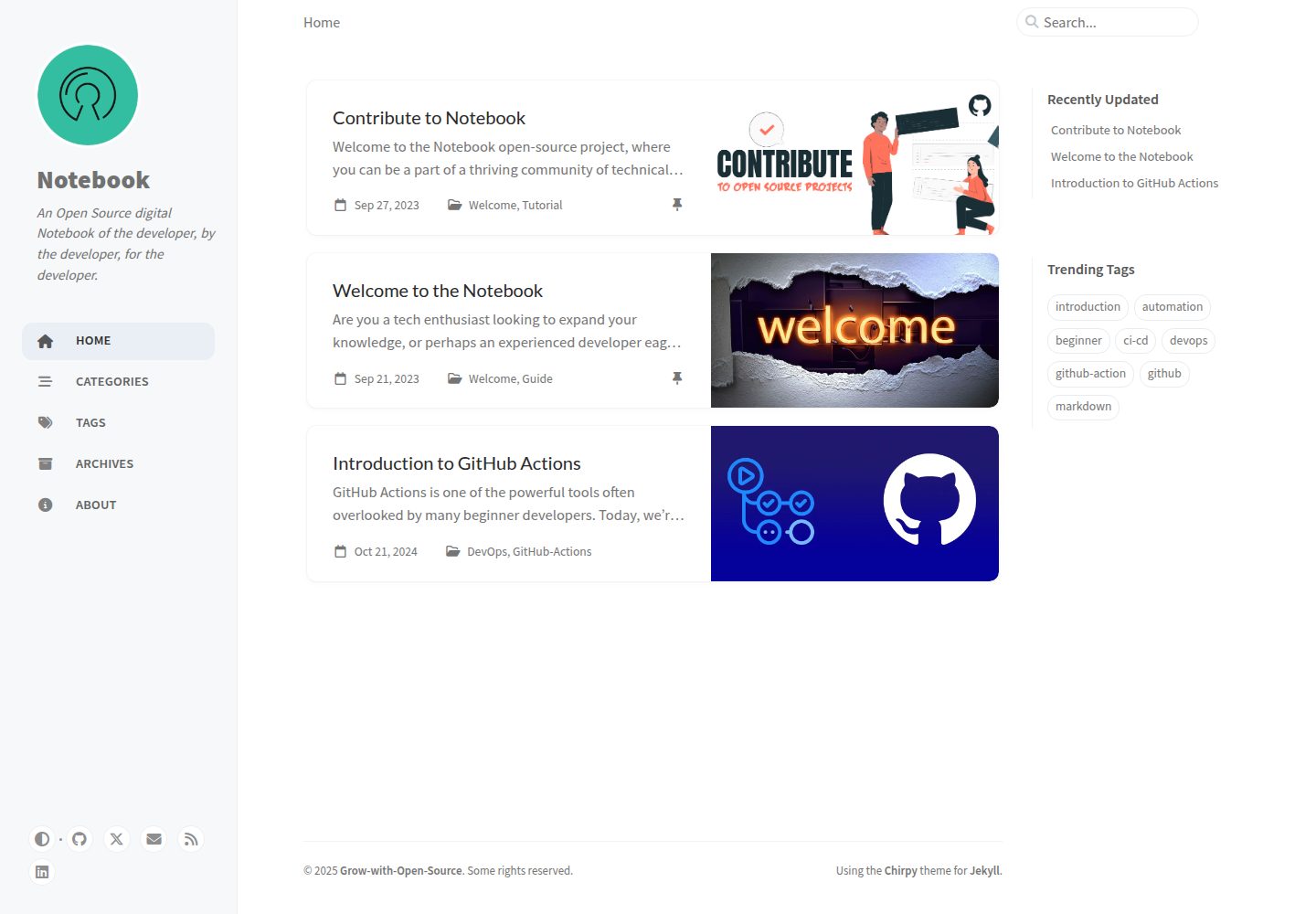
Based on the Jekyll static site framework, using the Chirpy theme
JekyllHTMLBlogDocumentationStarter
Notebook — Jekyll Blog Template
By Grow-with-Open-Source
An open-source writing blog template based on Jekyll and the Chirpy theme, aimed at technical content contributions and documentation publishing.
Explore the design
Compare the page layouts and mobile experience. Open any screenshot for a closer look.
Desktop homepage1 / 3
Desktop captureTop of page
Actual screenshot captured by the server browser.
All pages & views 3
Screenshots show visual appearance; interactive behavior may differ.
Recorded 2026-10-02View source
What stands out
A quick read of the recorded project description.
Supports Markdown writing, with articles stored in the _posts directory
Configure title, date, categories, tags, and author via Front Matter
Provides authors.yml for managing multiple author information
Built-in RSS subscription and GitHub Pages deployment support
Comes with complete contribution guide documentation
Template Details
Notebook is an open-source project maintained by the Grow-with-Open-Source organization, positioned as a technical writing and contribution platform for beginners. It is built with the Jekyll static site framework and uses the Chirpy theme to present a blog-style interface, supporting Markdown writing, category and tag organization, author information configuration, and RSS subscription. The repository provides complete contribution process documentation, including environment setup, branch creation, article Front Matter format, image asset directory conventions, and Pull Request submission steps. The template is suitable for personal or community technical blogs, documentation sites, and as a starter for learning open-source collaboration workflows. Note that the project materials do not specify production deployment, performance, or long-term maintenance status; users should verify dependencies and third-party asset licenses before use.
JekyllHTMLBlogDocumentationStarter
Is it right for your project?
Use Cases
- Personal technical blog setup
- Community open-source writing platform
- Technical documentation and tutorial publishing
- Learning Jekyll and open-source collaboration workflows
Suitable For
- Developers who want to write technical blogs using Markdown
- Content projects requiring multi-author collaboration
- Beginners who want to practice open-source contribution workflows
Getting started & customization
Use these recorded setup notes alongside the repository instructions for your chosen version.
- 1
Requires Ruby and Bundler environment
- 2
After cloning the repository, run bundle to install dependencies
- 3
Start locally with bundler exec jekyll s, default access at localhost:4000/Notebook
- 4
Articles must be placed in the _posts directory in the format YYYY-MM-DD-name.md
- 5
Images are recommended to use CDN links or be placed in the corresponding directory under assets/img
License & source material
Usage conditions & limitations
Free to use · keep license noticeThis entry covers the free version under the MIT license in the public repository; the free scope is the code of this version and does not imply that external services or third-party assets are free.
Must comply with when using
- Permits free use, modification, commercial use, and distribution of this version's code.
- When distributing copies or substantial portions of the code, retain the original author's copyright notice and the full MIT license notice.
- The code is provided as-is; warranties and limitations of liability are governed by the original license and applicable law.
Additional costs & items to verify
- The README recommends using CDN external links for article images first; if CDN cannot be used, place images in the corresponding directory under assets/img and configure media_subpath.
- Contributions require forking the repository, writing articles in a local branch, then submitting a Pull Request to the original repository, which is considered complete only after review and merge by maintainers.
- This template is positioned as a community collaborative writing platform, with content contributions mainly technical articles, tips, and documentation, and must follow the repository's contribution process and Front Matter format conventions.
- Demo images, fonts, icons, and other third-party assets must be checked against their respective licenses and cannot be judged solely based on the code's MIT license.
- External services such as domain, hosting, database, payment, or AI may incur additional charges.
View Original Text Basis
Permission is hereby granted, free of charge
Original License Text
It's highly suggested to use CDN links for images.
Original README
create a pull request to the [original repo](https://github.com/Grow-with-Open-Source/Notebook)
Original README
https://github.com/Grow-with-Open-Source/Notebook/blob/main/LICENSEhttps://github.com/Grow-with-Open-Source/Notebook/blob/main/README.mdyou're always welcome to make your techinal writing contribution by writing you own blog
Original README
Compiled by DeepSeek based on repository license and README ·2026-10-02. Results only cover the materials read; dependencies, images, fonts, and subsequent term changes are subject to their respective original texts.
Project checks & description sources
Template Information
- Source platforms
- GitHub
- Documentation and maintenance reference score
- More documented · 82 / 100
- Technologies
- Jekyll · HTML
- Website type
- Blog · Documentation · Starter
How this score is calculated
Our heuristic uses license records (up to 30), a demo link (12), a preview (10), stars (15), recorded maintenance (15), description completeness (8), feature records (5) and classification data (5). It is not a code, security or performance test, or a Google score. A link does not establish tested functionality.
What to verify for this project
- Repository update recorded
- 2025-03-08
- Screenshot last checked
- 2026-10-02
A demo link is listed. Check it with your own content and viewport sizes; its presence does not confirm that forms, authentication or payments work.
The catalog identifies Jekyll as the primary stack. Check the actual dependency manifest and lockfile for versions and hosting requirements. These notes use recorded metadata, not a code audit or a deployment test.
Use a selection guide →How this description was prepared
AI-assisted description based on catalog records and repository material. Repository authors are not automatically the reviewers of this description.
Automatically checked against source and license rules; no manual editorial review.
Inspect the recorded source material
SHA-256: d8a36703e65197bea34894a9dd2d9cb4ed24005182065a6cee7e6ce01c63a7f7
2026-10-02T17:42:13.287Z
Source file / repository# NoteBook
<div align="center">





<br>
[](https://github.com/Grow-with-Open-Source)




</div>
Welcome to **Notebook**, an open-source project designed with beginners in mind! Notebook is all about creating a friendly and supportive environment for developers of all levels. Whether you're just starting your coding journey or you're an experienced pro, there's a place for you here.
With Notebook, you can easily contribute to technical content and gain valuable experience in the world of open source. Our blog-like platform, built on GitHub's [Jekyll](https://jekyllrb.com/ "visit offical jekyll website") framework and adorned with the user-friendly [Chirpy](https://github.com/cotes2020/jekyll-theme-chirpy "goto chripy offical repo") theme, makes it a breeze to share your knowledge and learn from others. **It's a win-win situation:** beginners learn from the insightful posts by contributors, while contributors get the satisfaction of helping others on their coding journey. Join us at Notebook and let's learn and grow together!
<div align="center">

</div>
## Contribution
Hey there, fellow developer !!!... I'm happy to see you intrested in contributing to this open source project. Since, this project is an open notebook for everyone, you're always welcome to make your techinal writing contribution by writing you own blog, tip & trick, documentation and much more. All you have to do is write down your content in `markdown` *(just like how wrote this README.md file)* and place those file within `_posts` directory.
> First time ???... Then I highly recommend you to check out [CONTRIBUTING.md](docs/CONTRIBUTING.md "goto CONTRIBUTING.md").
- **Step 1:** Setting up development environment. Refer to [CONTRIBUTING.md](docs/CONTRIBUTING.md "goto CONTRIBUTING.md") that guide you to setup the required evironment for the project.
- **Step 2:** After setting up environment, [fork](https://github.com/Grow-with-Open-Source/Notebook/fork "Let's fork this repo") this repository and clone it in your local system, using the following command:
```bash
git clone https://github.com/<your-github-profile>/Notebook.git
```
- **Step 3:** Build and run the project within your local machine.
```bash
# installing required dependencies for the project to run
bundle
# host the build within your local machine
bundler exec jekyll s
```
> [!NOTE]
> If project build is successful, then you can view the project build that is hosted through your [localhost:4000/Notebook](http://127.0.0.1:4000/Notebook/). Well done, you have successfully setted up the project within your local system.
- **Step 4:** After you have setted up the project and done analyzing it, Create a new branch to work on. Make sure your branch name is small and simple.
```bash
# create and checkout to your new branch
git checkout -b <your-post-name>
# checking which branch you currently in
git branch
```
- **Step 5:** Now, go ahead and enter your author details within the [`authors.yml`](_data/authors.yml) even before you started working on your technical writing. Just make sure you're entering the details in the following format:
```yml
# Make sure the key value does not match other authors
unique_key_value:
name: <author_name>
twitter: <twitter_id>
url: <personal (or) contact url>
```
<details>
<summary>Looking for an example ?</summary>
<div>
```yml
shamith_watchdogs:
name: Shamith Nakka
twitter: shamith_nakka
url: https://github.com/iamwatchdogs/
```
<div>
</details>
- **Step 6:** Now to the actual task, Create a new markdown file with `YYYY-MM_DD-your-post-name.md` *(make sure your post name is in small letters and separated by single dash)* within the [`_post`](/tree/main/_posts/) directory.
- **Step 7:** Each and every markdown file that you have created for content writing should contain the following meta data called `Front Matter
`:
```md
---
title: <title>
date: YYYY-MM-DD HH:MM:SS +/-TTTT
categories: [<main_categories>, <sub_categories_1>, ..., <sub_categories_n>]
tags: [<tag_1>, ..., <tag_n>]
author: <respective_author_key_value>
media_subpath: "/assets/img/<your_img_directory_name>/"
image:
path: <name_of_the_img_for_page_cover>
alt: <alternative_text>
---
# Your content writing begins here
```
<details>
<summary>Looking for an example ?</summary>
<div>
```md
---
title: Welcome to the Notebook
date: 2023-09-21 20:34:00 +0530
categories: [Welcome, Guide]
tags: [introduction]
author: shamith_watchdogs
media_subpath: "/assets/img/welcome-page"
image:
path: "welcome-img.jpg"
alt: "Welcome Page"
---
# remaining content down below
```
<div>
</details>
> [!NOTE]
> - Note that the `+/-TTTT` in the `date` section refers the **UTC offset**. You can find your **UTC offset** value by searching for your country in the [list of UTC](https://en.wikipedia.org/wiki/List_of_UTC_offsets "Goto List of UTC offsets"). And if you're from India, you can use the above UTC offset from the example.
> - Also not that `media_subpath` and `image` *(including its sub attributes)* are optional and only need when you're going to add images to your post.
> - If there are more than one person working on a single post use `authors` attribute instead of `author`. And the input for the `authors` attribute will be a list of key of authors specified within the [`authors.yml`](_data/authors.yml) file.
- **Step 8:** Now, you can proceed to write your technical content. And if you have any images that are part of your technical writing, then create a new directory using your post's name within `assets/img` directory as `assets/img/<your-post-name>`. Now add your images to your folder. After adding images to your folder, don't forget to add location to `media_subpath` attribute as `media_subpath: ../../assets/img/<your-post-name>`. Now, you can directly access your images with specifying full relative path.
> [!NOTE]
> It's highly suggested to use CDN links for images. But if you could not for any reason, then you can proceed with above process.
- **Step 9:** After you done with your changes, commit them and push them back to your forked repo.
```bash
# tracing new files and stagging new changes
git add .
# commiting your changes
git commit -m "Added <your-post-name>"
# check your branch name
git branch
# push your commits to your origin repo
git push origin <your-branch-name>
```
- **Step 10:** Now, create a pull request to the [original repo](https://github.com/Grow-with-Open-Source/Notebook). [Learn about Pull requests](https://docs.github.com/articles/using-pull-requests "offical GitHub documentaiton")
And that it, you have done it !!!... Now, it's time for the maintainer to review you work and merge you pull request. If there's any issue with your pull request, then the maintainer will contact you and asks for a few changes. And he merges your Pull request, you have successfully did your first open source contribution that actual help others.
Everybody can see you work and make use of it. Good job, mate !!...
# Contributors
Thank you for your valuable contribution to this repo. You work will not be forgotten..
<div align="center">
<a href = "https://github.com/Grow-with-Open-Source/Notebook/graphs/contributors">
<img src = "https://contrib.rocks/image?repo=Grow-with-Open-Source/Notebook"/>
</a>
</div>Explore similar templates
Compare previews and descriptions within the same stack and category.

al-folio
A Jekyll academic homepage theme for scholars and researchers, with a clean responsive design and out-of-the-box support for publication lists, project showcases, CVs, and blogs.
Jekyll · Portfolio

minimal-mistakes
Minimal Mistakes is a two-column Jekyll theme for personal sites, blogs, project documentation, or portfolios.
Jekyll · Portfolio

Beautiful Jekyll
Beautiful Jekyll is a mature, easy-to-use Jekyll blog theme maintained by Dean Attali since 2015, with over 50,000 users.
Jekyll · Blog

jekyll-TeXt-theme
A customizable Jekyll theme for personal sites, team sites, blogs, projects, and documentation.
Jekyll · Blog

startbootstrap-clean-blog-jekyll
The official Jekyll version of Start Bootstrap's Clean Blog theme, offering a blog home page, about page, contact page, and sample post pages, with a Formspree-powered contact form.
Jekyll · Blog

So Simple
A minimal reading-oriented Jekyll theme by Michael Rose for personal blogs, portfolios, and long-form reading. It offers multiple layouts, microformat markup, Disqus comments, Google Analytics, Jekyll SEO Tag, three skins, and aggregation by year, category, and tag with a grid view.
Jekyll · Blog