Based on the AstroPaper theme, built with Astro and TypeScript
AstroBlog
gustavosalvini-astro-blog — Astro Blog Template
By guspatagonico
A personal blog built on the AstroPaper theme, used for digital exploration notes and professional showcases, under the MIT license.
Explore the design
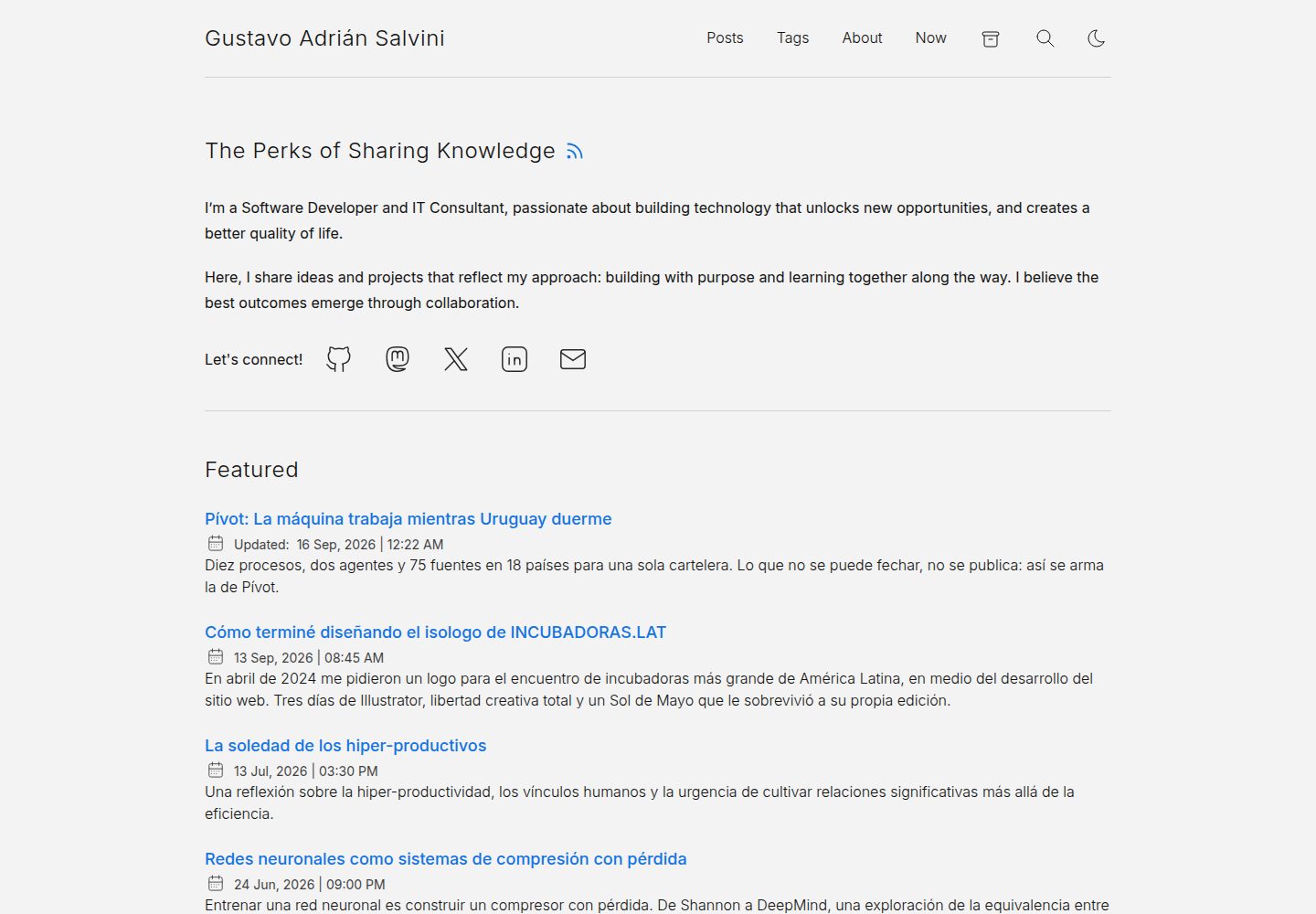
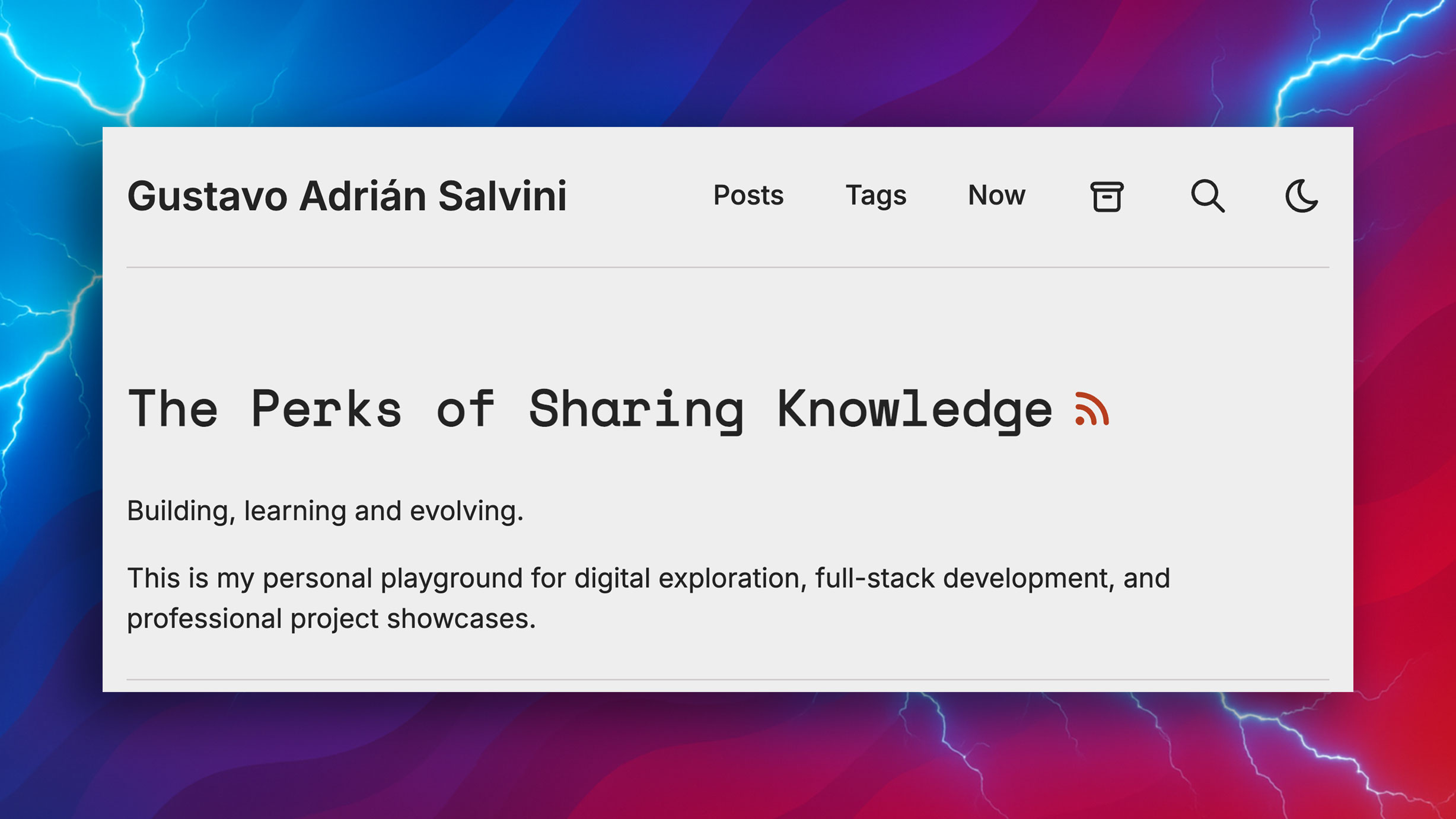
Compare the page layouts and mobile experience. Open any screenshot for a closer look.
Desktop homepage1 / 3
Desktop captureTop of page
Actual screenshot captured by the server browser.
All pages & views 3
Screenshots show visual appearance; interactive behavior may differ.
Recorded 2026-10-02View source
What stands out
A quick read of the recorded project description.
Blog posts are stored as Markdown in the src/data/blog directory
The theme provides light and dark modes, fuzzy search, drafts, and pagination
Includes built-in sitemap and RSS feed, and supports dynamic OG image generation
The repository is under the MIT license, allowing use, modification, commercial use, and distribution
Template Details
This is the source code for guspatagonico's personal blog. The repository description explicitly states it is built on the AstroPaper theme and positioned as a personal digital exploration and professional showcase. The README retains AstroPaper's original documentation, and the author notes it will be updated later, so the current repository documentation mainly reflects the features and structure of the upstream theme rather than the blog's own customizations.
Looking at the directory structure, blog posts are stored in src/data/blog, pages and layouts are in src/pages and src/layouts, and static assets are in public. The theme itself provides Markdown type checking, light and dark modes, fuzzy search, drafts and pagination, sitemap and RSS, dynamic OG image generation, and includes documentation on configuration, adding posts, and customizing colors.
Regarding usage limitations: the repository README has not yet been replaced with the author's own documentation, so configuration details should refer to the upstream AstroPaper docs; third-party assets such as demo images, fonts, and icons require separate license verification, and the code's MIT license does not cover these; external services such as domains and hosting may incur additional costs.
AstroBlog
Is it right for your project?
Use Cases
- Building a personal blog to record digital exploration articles
- Serving as a showcase page for personal professional work and resume
- Using AstroPaper as a starting point to customize your own blog theme
- Learning how to organize an Astro blog project by referencing its directory structure
Suitable For
- Developers who need a ready-made Astro blog theme and are willing to customize it
- Individual writers who want to manage post content with Markdown
- Sites that need basic blog features such as light and dark modes, search, and RSS
Getting started & customization
Use these recorded setup notes alongside the repository instructions for your chosen version.
- 1
The README is still the original AstroPaper documentation; the author says it will be updated later, so refer to the upstream docs for configuration
- 2
To run locally, install dependencies first, then start the development server; the default port is 4321
- 3
Blog posts go in src/data/blog, and static assets go in the public directory
- 4
Optionally configure the Google site verification environment variable; if not configured, the corresponding meta tag will not be output
- 5
Third-party assets such as demo images, fonts, and icons require separate license verification
License & source material
Usage conditions & limitations
Free to use · keep license noticeThis entry covers the free version under the MIT license in a public repository; the free scope is the code of this version and does not mean external services or third-party assets are free.
Must comply with when using
- You are allowed to use, modify, commercially use, and distribute the code of this version for free.
- When distributing copies or substantial portions of the code, retain the original author's copyright notice and the full MIT license notice.
- The code is provided as is; warranties and limitations of liability are governed by the original license and applicable law.
Additional costs & items to verify
- This repository is a personal blog based on the AstroPaper theme; the README still retains the upstream theme's original documentation, and the author says it will be updated later. Actual configuration and feature details should refer to the upstream AstroPaper docs, not this repository's own documentation.
- The Google site verification environment variable is optional; if not configured, the corresponding meta tag will not be output in the HTML head, as it is an optional external service integration.
- Using Docker-related commands requires Docker to be installed on the machine first, which is an external dependency requirement for local running.
- Demo images, fonts, icons, and other third-party assets must be checked against their respective licenses; they cannot be judged solely by the code's MIT license.
- External services such as domains, hosting, databases, payments, or AI may incur additional charges.
View Original Text Basis
Permission is hereby granted, free of charge
Original License Text
This is a minimal, responsive, accessible and SEO-friendly Astro blog theme.
Original README
You can easily add your [Google Site Verification HTML tag]
Original README
https://github.com/guspatagonico/gustavosalvini-astro-blog/blob/main/LICENSEhttps://github.com/guspatagonico/gustavosalvini-astro-blog/blob/main/README.mdFor `Docker` commands we must have it [installed]
Original README
Compiled by DeepSeek based on repository license and README ·2026-10-02. Results only cover the materials read; dependencies, images, fonts, and subsequent term changes are subject to their respective original texts.
Project checks & description sources
Template Information
- Source platforms
- GitHub
- Documentation and maintenance reference score
- More documented · 83 / 100
- Technologies
- Astro
- Website type
- Blog
How this score is calculated
Our heuristic uses license records (up to 30), a demo link (12), a preview (10), stars (15), recorded maintenance (15), description completeness (8), feature records (5) and classification data (5). It is not a code, security or performance test, or a Google score. A link does not establish tested functionality.
What to verify for this project
- Repository update recorded
- 2026-09-16
- Screenshot last checked
- 2026-10-02
A demo link is listed. Check it with your own content and viewport sizes; its presence does not confirm that forms, authentication or payments work.
The catalog identifies Astro as the primary stack. Check the actual dependency manifest and lockfile for versions and hosting requirements. These notes use recorded metadata, not a code audit or a deployment test.
Use a selection guide →How this description was prepared
AI-assisted description based on catalog records and repository material. Repository authors are not automatically the reviewers of this description.
Automatically checked against source and license rules; no manual editorial review.
Inspect the recorded source material
SHA-256: 72dd7429e81dbef350e4eccf0edab3f151a7394af8741ef989570c686c7beabe
2026-10-02T20:58:37.473Z
Source file / repository# Gustavo Adrián Salvini blog based on AstroPaper
Here it comes the original AstroPaper README. I'll be soon updating it.
Gustavo.
---


[](https://conventionalcommits.org)
[](http://commitizen.github.io/cz-cli/)
This is a minimal, responsive, accessible and SEO-friendly Astro blog theme. This theme is designed and crafted based on [AstroPaper] [my personal blog](https://satnaing.dev/blog).
Read [the blog posts](https://astro-paper.pages.dev/posts/) or check [the README Documentation Section](#-documentation) for more info.
## 🔥 Features
- [x] type-safe markdown
- [x] super fast performance
- [x] accessible (Keyboard/VoiceOver)
- [x] responsive (mobile ~ desktops)
- [x] SEO-friendly
- [x] light & dark mode
- [x] fuzzy search
- [x] draft posts & pagination
- [x] sitemap & rss feed
- [x] followed best practices
- [x] highly customizable
- [x] dynamic OG image generation for blog posts [#15](https://github.com/satnaing/astro-paper/pull/15) ([Blog Post](https://astro-paper.pages.dev/posts/dynamic-og-image-generation-in-astropaper-blog-posts/))
## ✅ Lighthouse Score
<p align="center">
<a href="https://pagespeed.web.dev/report?url=https%3A%2F%2Fastro-paper.pages.dev%2F&form_factor=desktop">
<img width="710" alt="AstroPaper Lighthouse Score" src="AstroPaper-lighthouse-score.svg">
<a>
</p>
## 🚀 Project Structure
Inside of AstroPaper, you'll see the following folders and files:
```bash
/
├── public/
│ ├── assets/
| ├── pagefind/ # auto-generated when build
│ └── favicon.svg
│ └── astropaper-og.jpg
│ └── favicon.svg
│ └── toggle-theme.js
├── src/
│ ├── assets/
│ │ └── icons/
│ │ └── images/
│ ├── components/
│ ├── data/
│ │ └── blog/
│ │ └── some-blog-posts.md
│ ├── layouts/
│ └── pages/
│ └── styles/
│ └── utils/
│ └── config.ts
│ └── constants.ts
│ └── content.config.ts
└── astro.config.ts
```
Astro looks for `.astro` or `.md` files in the `src/pages/` directory. Each page is exposed as a route based on its file name.
Any static assets, like images, can be placed in the `public/` directory.
All blog posts are stored in `src/data/blog` directory.
## 📖 Documentation
Documentation can be read in two formats\_ _markdown_ & _blog post_.
- Configuration - [markdown](src/data/blog/how-to-configure-astropaper-theme.md) | [blog post](https://astro-paper.pages.dev/posts/how-to-configure-astropaper-theme/)
- Add Posts - [markdown](src/data/blog/adding-new-post.md) | [blog post](https://astro-paper.pages.dev/posts/adding-new-posts-in-astropaper-theme/)
- Customize Color Schemes - [markdown](src/data/blog/customizing-astropaper-theme-color-schemes.md) | [blog post](https://astro-paper.pages.dev/posts/customizing-astropaper-theme-color-schemes/)
- Predefined Color Schemes - [markdown](src/data/blog/predefined-color-schemes.md) | [blog post](https://astro-paper.pages.dev/posts/predefined-color-schemes/)
## 💻 Tech Stack
**Main Framework** - [Astro](https://astro.build/)
**Type Checking** - [TypeScript](https://www.typescriptlang.org/)
**Styling** - [TailwindCSS](https://tailwindcss.com/)
**UI/UX** - [Figma Design File](https://www.figma.com/community/file/1356898632249991861)
**Static Search** - [FuseJS](https://pagefind.app/)
**Icons** - [Tablers](https://tabler-icons.io/)
**Code Formatting** - [Prettier](https://prettier.io/)
**Deployment** - [Github Pages](https://pages.github.com/)
**Linting** - [ESLint](https://eslint.org)
## 👨🏻💻 Running Locally
You can start using this project locally by running the following command in your desired directory:
```bash
# pnpm
pnpm create astro@latest --template satnaing/astro-paper
# npm
npm create astro@latest -- --template satnaing/astro-paper
# yarn
yarn create astro --template satnaing/astro-paper
```
Then start the project by running the following commands:
```bash
# install dependencies if you haven't done so in the previous step.
pnpm install
# start running the project
pnpm run dev
```
## Google Site Verification (optional)
You can easily add your [Google Site Verification HTML tag](https://support.google.com/webmasters/answer/9008080#meta_tag_verification&zippy=%2Chtml-tag) in AstroPaper using an environment variable. This step is optional. If you don't add the following environment variable, the google-site-verification tag won't appear in the HTML `<head>` section.
```bash
# in your environment variable file (.env)
PUBLIC_GOOGLE_SITE_VERIFICATION=your-google-site-verification-value
```
> See [this discussion](https://github.com/satnaing/astro-paper/discussions/334#discussioncomment-10139247) for adding AstroPaper to the Google Search Console.
## 🧞 Commands
All commands are run from the root of the project, from a terminal:
> **_Note!_** For `Docker` commands we must have it [installed](https://docs.docker.com/engine/install/) in your machine.
| Command | Action |
| :----------------------------------- | :------------------------------------------------------------------------------------------------------------------------------- |
| `pnpm install` | Installs dependencies |
| `pnpm run dev` | Starts local dev server at `localhost:4321` |
| `pnpm run build` | Build your production site to `./dist/` |
| `pnpm run preview` | Preview your build locally, before deploying |
| `pnpm run format:check` | Check code format with Prettier |
| `pnpm run format` | Format codes with Prettier |
| `pnpm run sync` | Generates TypeScript types for all Astro modules. [Learn more](https://docs.astro.build/en/reference/cli-reference/#astro-sync). |
| `pnpm run lint` | Lint with ESLint |
| `docker compose up -d` | Run AstroPaper on docker, You can access with the same hostname and port informed on `dev` command. |
| `docker compose run app npm install` | You can run any command above into the docker container. |
| `docker build -t astropaper .` | Build Docker image for AstroPaper. |
| `docker run -p 4321:80 astropaper` | Run AstroPaper on Docker. The website will be accessible at `http://localhost:4321`. |
> **_Warning!_** Windows PowerShell users may need to install the [concurrently package](https://www.npmjs.com/package/concurrently) if they want to [run diagnostics](https://docs.astro.build/en/reference/cli-reference/#astro-check) during development (`astro check --watch & astro dev`). For more info, see [this issue](https://github.com/satnaing/astro-paper/issues/113).
## ✨ Feedback & Suggestions
If you have any suggestions/feedback, you can contact me via [my email](mailto:[email protected]). Alternatively, feel free to open an issue if you find bugs or want to request new features.
## 📜 License
Licensed under the MIT License, Copyright © 2025
---
Made with 🤍 by [Sat Naing](https://satnaing.dev) 👨🏻💻 and [contributors](https://github.com/satnaing/astro-paper/graphs/contributors).
Explore similar templates
Compare previews and descriptions within the same stack and category.

astrowind
AstroWind is a free, open-source Astro starter theme using Astro and Tailwind CSS, released under the MIT license.
Astro · Blog

astro-paper
AstroPaper is a minimal, responsive, accessible, and SEO-friendly Astro blog theme. Articles are stored as Markdown/MDX in src/content/posts/, with subdirectories affecting URLs.
Astro · Blog

fuwari
Fuwari is a static blog template built with Astro and Tailwind CSS for personal blogs. It manages posts as Markdown files in src/content/posts/, with frontmatter for title, date, description, cover, tags, categories, draft status, and language.
Astro · Blog

Firefly
Firefly is a clean personal blog theme forked from Astro and Fuwari, offering four background modes, single/double sidebar and list/grid layouts, Pagefind client-side full-text search, and a six-language UI.
Astro · Blog

astro-theme-cactus
Astro Cactus is an Astro-based blog and portfolio theme that uses Markdown/MDX content collections to manage posts, notes, and tags, with frontmatter type-checked by a schema.
Astro · Portfolio

astrofy
Astrofy is a free and open-source personal portfolio website template built with Astro and TailwindCSS, with built-in blog, CV timeline, project showcase, store, and RSS feed modules.
Astro · Portfolio